
Key Updates in Claude Code v2.1.330 - Addition of the Built-in mod "easel" for Drawing Charts and Behavior Change to deniedMcpServers

This page has been translated by machine translation. View original
I'm Ishikawa from the Cloud Business Division. Claude Code v2.1.330 (released 2026-11-20) has been released. Because there are many changes, this article focuses on notable changes and changes that may require reviewing settings or operations. Today, the built-in mod "easel", which draws charts
The previous update article is here.
Update Summary
v2.1.330 includes 142 changes. By the author's classification, fixes make up the majority at 98, followed by 16 new features, 11 improvements, and 6 breaking changes. Of these, 28 are changes to the VS Code extension and 22 relate to self-hosted runners.
Notable Updates
[New Feature] Built-in mod "easel" that draws charts
A built-in mod "easel" has been added. It draws charts when you ask for them, and also draws them below MCP metrics results. It is available for Pro and Max, and for Team and Enterprise where offered, and works on macOS and Linux. Automatic charts can be turned off in /config.
The official documentation says it appears as cc-plugin-easel under Built-in in the Installed tab of /plugin, and that it automatically draws charts for time-series MCP results such as Prometheus range query results. The requirements include signing in with a claude.ai subscription and using macOS or a Linux that is not WSL.
If you handle metrics such as Prometheus via MCP, the chart attached below the results makes it easier to follow how the numbers change over time.
[New Feature] Sign in to organizations managed by the Enterprise Admin Console
You can now sign in to organizations managed by Anthropic's Enterprise Admin Console. After claude auth login, the organization's settings are applied and the organization's cloud provider or gateway is used.
The documentation describes the procedure: run claude auth login in an organization where an Owner has enabled this sign-in, then choose the organization in the browser. If Signed in to the organization appears in the terminal, you are signed in.
If your organization uses a cloud provider such as Amazon Bedrock or a gateway, I see this as a change that reduces the effort of distributing connection settings to each developer.
[Bug Fix] Freezes right after compaction and in WebFetch, and mistaken worktree deletion
Bugs that stopped work and bugs that deleted worktrees in use have been fixed.
- Claude Code freezing for up to several minutes right after compacting a very long conversation
- WebFetch freezing the session for several minutes on some pages and returning empty results on other pages
ExitWorktreeand the worktree exit dialog deleting a worktree that another running Claude Code session was working in
For those who keep long conversations going or use worktrees across multiple sessions, this fix reduces problems where work stops or disappears.
[Security] Behavior change for name entries in deniedMcpServers
Name entries in deniedMcpServers now hide only the specified claude.ai connector, rather than other connectors with the same URL. To block all connectors with the same URL, deny that exact URL. A configuration example is shown in "Breaking Changes" below.
Administrators who thought they were blocking claude.ai connectors as a group with a name entry will now see other connectors with the same URL displayed, so they need to review their settings and specify the URL instead.
[Security] Expanded approval for rm commands
The scope of rm commands that require approval has expanded to those targeting the root, the home folder, top-level folders, and the working folder. In environments where no one can respond to approvals, these commands are denied.
If you leave it to Claude to delete the entire working folder in headless runs such as CI, note that it will be denied because no one is available to approve.
[Improvement] Scheduled tasks and /loop extended to up to 30 days
Recurring scheduled tasks and /loop now run for up to 30 days instead of 7 days while the session keeps running, and when they will end is also displayed. Tasks created before this release still end after 7 days as before. Note that at the time of writing (2026-11-21), the official documentation (Run prompts on a schedule) still states that recurring tasks expire after 7 days.
This is welcome for those who want to keep monitoring with /loop for more than a week, but since existing tasks remain at 7 days, I think they need to be recreated if you want 30 days.
Trying out easel
I checked the procedure for having Claude draw charts with easel in an interactive session. The test environment was Claude Code v2.1.330, macOS, and iTerm2 (120 columns × 40 rows).
Prerequisites
- Claude Code v2.1.330
- Sign-in with a claude.ai subscription (according to the CHANGELOG, Pro and Max, and Team and Enterprise where offered)
- macOS, or Linux that is not WSL (requirements in the official documentation)
1. Start Claude Code
Purpose: Start an interactive session in which to use easel.
% claude
2. Check that easel is enabled
Purpose: Confirm that the built-in mod (cc-plugin-easel) that provides the chart tool has not been disabled. easel can be disabled from /plugin, and the chart tool cannot be used while it is disabled.
- Type
/plugin - Switch to the Installed tab with the → key
- Press
/and typeeasel
If ✔ cc-plugin-easel Plugin builtin is displayed, it is enabled. Press Esc to close /plugin and proceed to step 3. When there is text in the search field, the first Esc clears the search.
If ◯ cc-plugin-easel Plugin off · builtin is displayed, it is disabled. Enable it with the following steps.
- Press Enter twice. The first moves from the search field to the list, and the second opens the detail screen
- Confirm that
Status: offis shown on the detail screen and the cursor is on Enable plugin, then press Enter - The Configure cc-plugin-easel screen (settings such as Auto charts) opens; if you are not changing settings, close it with Esc
- Press Esc several times to close
/plugin, exit Claude Code with/exit, and then startclaudeagain
When easel is enabled, the first item on the detail screen is Disable plugin. Pressing Enter here will disable easel, so if you only want to check the status, either don't open the detail screen, or go back with Esc if you do.
3. Ask for a chart
Purpose: Have the chart tool draw a bar chart.
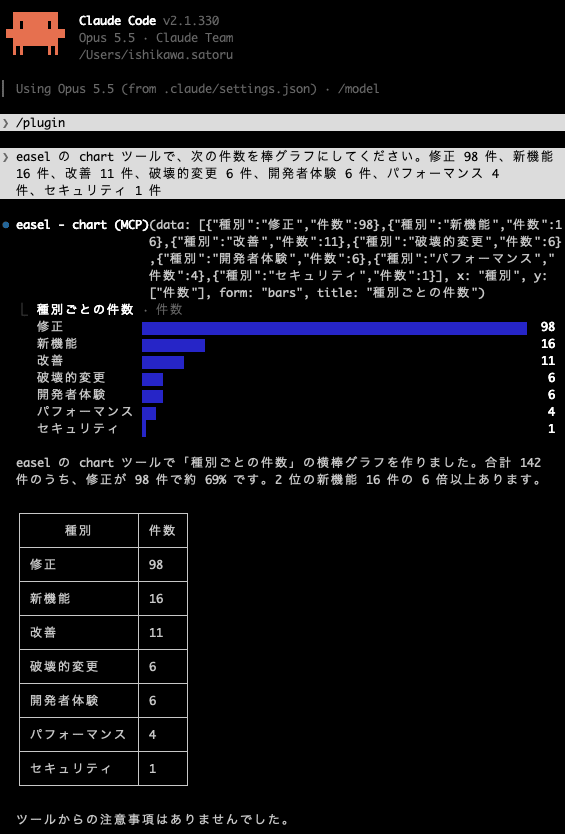
Ask it to draw with easel's chart tool as follows. The counts are the author's tally of the 142 changes in v2.1.330 by main category.
easel の chart ツールで、次の件数を棒グラフにしてください。修正 98 件、新機能 16 件、改善 11 件、破壊的変更 6 件、開発者体験 6 件、パフォーマンス 4 件、セキュリティ 1 件
A bar chart is drawn following a call line like easel - chart (MCP)(...).
Next, let's try a pie chart.
円グラフでも表示して
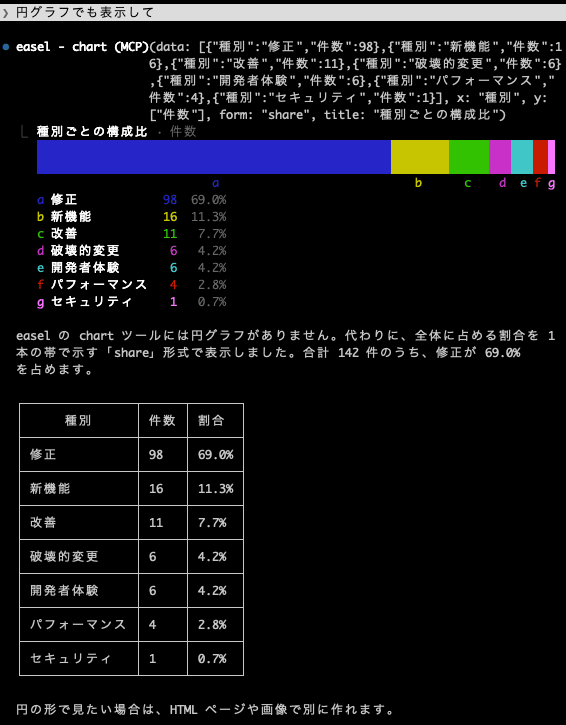
Since a pie chart could not be displayed, I had it create a pie chart in HTML instead.
HTMLで円グラフを作って
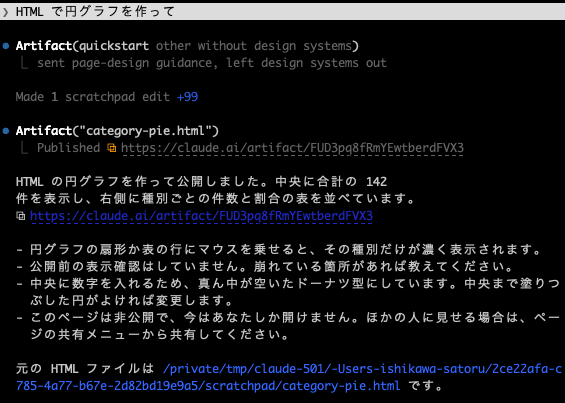
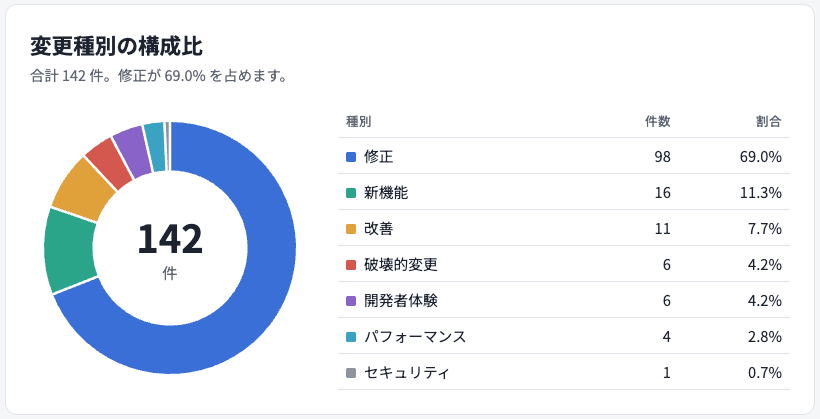
The HTML was created, and the browser launched automatically and displayed it.
If Claude replies that it cannot find the chart tool, exit Claude Code with /exit, start claude again, and then repeat your request.
Update Details
New Features
- Support for signing in to organizations managed by Anthropic's Enterprise Admin Console (described above)
- Added the built-in mod "easel" (described above)
- Added the environment variable
CLAUDE_CODE_FULL_SIGN_IN_LINK=1. It displays the full link when the short sign-in link causes errors or when a script reads values from the link - Added
commandPrinted(true if the plugin install command printed to stderr) andcommandFailed(if it exited with an error, was killed, or timed out) to theclaude plugin install --jsonresult - Self-hosted runners
- Added
--start-dir/SELF_HOSTED_RUNNER_START_DIR. Work can be started from a folder inside the repository (settings and hooks are loaded just as when it is not specified) - Added
claude_code_self_hosted_runner_order_to_registered_seconds(for runners started by the orchestrator, the seconds from issuing a work order to registration being accepted) andclaude_code_self_hosted_runner_order_to_first_session_seconds(for runners started for a session, the seconds from the work order to the first session handoff) to/metrics - Shows a notification when the plugin marketplace repository is not included in the session's repositories and cannot be fetched (including cloud sessions), and when Anthropic-managed git rejects the plugin's own repository
- Added
- VS Code extension
- Added
/fork, which forks the conversation after the last response - Added
/workflows, which opens the agent map including running workflows - Added the settings
claudeCode.escapeStopsClaude(when off, Escape does not stop Claude),claudeCode.pinPrompt(lets your own message scroll instead of being pinned), andclaudeCode.contextUsageThreshold(when to show the context indicator) - Added a
promptargument to the "Open in Side Bar" command for keybindings and extensions. Added Move up / Move down to the session group menu
- Added
Security
- Expanded the scope of approval for
rmcommands targeting the root, the home folder, top-level folders, and the working folder (described above)
Improvements
- Extended recurring scheduled tasks and
/loopto up to 30 days while the session keeps running (described above) - Greatly shortened the claude.ai sign-in links shown by /login,
claude auth login, andclaude setup-token - On Windows, a console host is no longer launched for each built-in ripgrep search on local paths, making Grep and Glob faster
- Improved file diff speed
- In
/configsearch, setting names that start with the typed characters now generally appear first, and improved so that "effort" finds Model and "dark" or "light" finds Theme - In
/resume, sessions that you left after merely opening a screen such as/modelare no longer listed - On Team / Enterprise plans, the
/ultrareviewcost confirmation now shows the remaining amount when the remaining monthly usage limit is less than the normal cost of a review - For skills that Claude runs with a
modelsetting (excludingcontext: forkskills), changed subagents, forks, compaction, and/recapto stay on the session's model - Changed to inherit the subagent's model fallback. Agents with no model specified and forks launched from them run on the fallback model, and agents they launch use that Bedrock region
- Changed the
modelfield of prompt hooks to accept model aliases such ashaikuandsonnet - In terminal sessions signed in to a Claude app gateway, changed subagent progress summaries to be created from short notes instead of the whole conversation, greatly reducing token usage
- In addition, Code Mode (telling Claude how to view images and PDFs, showing "Interrupted" after Esc, reducing the freeze time after a large number of tool calls), Reconnect in
/mcpand/plugin, error display for the macOS sandbox deny list, Windows drive validation errors, the Storybook fallback build for/design-sync, and self-hosted runners (exit status 108 for checkout hooks, display of the default model switch on Amazon Bedrock / Google Cloud's Agent Platform) have been improved
Fixes
- Fixed the freeze right after compaction: Claude Code froze for up to several minutes right after compacting a very long conversation.
- Fixed WebFetch freezes and empty results: The session froze for several minutes on some pages, and empty results were returned on other pages.
- Fixed ExitWorktree deleting other sessions' worktrees:
ExitWorktreeand the worktree exit dialog deleted a worktree that another running Claude Code session was working in. - Fixed loss of changes when saving user settings concurrently: When multiple Claude Code processes saved at the same time, changes to user settings were lost.
- Fixed empty sessions with --continue / --resume: When the timestamp of the last saved message was missing or invalid, an empty session opened or the command failed.
- Fixed the wait for the first prompt after sleep: On Linux and WSL, the first prompt after sleeping for 2 minutes or more waited 3 minutes on a disconnected connection.
- Fixed turn failures caused by MCP tool input schemas: When there were many MCP tools with input schemas the API does not accept, turns failed with "JSON schema is invalid" and session files grew by several MB.
- Fixed MCP servers being stopped when a subagent ends: MCP servers declared by a subagent were stopped when one subagent ended, even if other subagents or sessions were using them.
- Fixed pinned model being ignored on Amazon Bedrock (Mantle): Terminal sessions started without a selected model ignored the pinned Opus model and kept calling an unavailable default model even after notifying of a fallback.
- Fixed the exit code of claude -p when the disk is full: Even when the disk holding the output file was full, it exited with exit code 0 without any message. It now shows an error and exits with exit code 1 (a full NFS export may not be detected).
- Fixed fastMode being ignored on Google Cloud's Agent Platform: With
claude -p, when the model was specified viaANTHROPIC_MODELor the settings file,--settings '{"fastMode":true}'was ignored. Affected runs are now billed at fast mode rates. - Reverted the removal of automatic retry when max_tokens is exceeded: The removal, made in 2.1.329, of the automatic retry when
max_tokensexceeds the model or gateway limit has been reverted. - [VS Code] Fixed restoring and deleting without confirmation: Holding Enter in
/rewindrestored files, and double-clicking Remove / Delete deleted memory, MCP servers, and plugin marketplaces without confirmation. - A quietly welcome fix: Fixed
/statsaggregating new activity by UTC day instead of the local time zone. With UTC days, the date boundary falls at 9 a.m. in Japan time, so this is a quietly welcome fix for those using it from Japan. - In addition, many other minor bugs in Code Mode, self-hosted runners, Remote Control, LSP, the VS Code extension, and more have been fixed.
Breaking Changes
This article treats the following 6 items, which may affect existing settings and operations, as breaking changes. They are not explicitly labeled "breaking changes" in the CHANGELOG; this is the author's classification.
| Target | Before (up to v2.1.329) | After (v2.1.330 onward) | Action |
|---|---|---|---|
Name entries in deniedMcpServers |
Other connectors with the same URL are also hidden | Only the specified claude.ai connector is hidden | To block all of them, deny the exact URL |
claude --teleport |
Runs the git command to switch branches | In some configurations, only displays the git command. With -p, exits with code 1 until you switch |
Switch branches with the displayed git command |
| Unrecognized model names containing "sonnet" or "haiku" | Full system prompt | Same short system prompt as other unrecognized names | To use the full one, set CLAUDE_CODE_SIMPLE_SYSTEM_PROMPT=0 |
Self-hosted runner spawn-runner hook |
Does not check for the next spawn request until all started hooks finish (as described in the official documentation at the time of writing) | Starts up to --hook-concurrency (default 4) per orchestrator even while earlier hooks are running |
For hooks that cannot run concurrently, set --hook-concurrency to 1 |
| Self-hosted runner Bash file diffs | Records file diffs for Bash commands | Skips them when diffs are not needed (the transcript may not include diffs) | To get all diffs, set bashEditDiffEnabled to true in managed settings |
| Self-hosted runner 403 logs | Logs 403s caused by IP allowlists and the like as an invalid secret or token | Many of the relevant lines start with the server's reason | Update log alerts that match the old wording |
Name entries in deniedMcpServers
Below is a configuration example. The serverName / serverUrl keys follow the official documentation. The connector name and URL values are examples.
Before (up to v2.1.329), a name entry also hid other connectors with the same URL.
{
  "deniedMcpServers": [
    { "serverName": "claude.ai Example" }
  ]
}
After (v2.1.330 onward), a name entry hides only the specified connector. To block all connectors with the same URL, specify the exact URL.
{
  "deniedMcpServers": [
    { "serverUrl": "https://mcp.example.com/mcp" }
  ]
}
The official documentation also explains that serverName entries are not a security control, and advises adding serverCommand or serverUrl entries to control the servers that actually run.
Unrecognized model names containing "sonnet" or "haiku"
Below is an example. It compares the case where you use a model name such as my-sonnet-gateway that contains "sonnet" but is not recognized by Claude Code.
Before (up to v2.1.329):
export ANTHROPIC_MODEL=my-sonnet-gateway # Full system prompt
After (v2.1.330 onward):
export ANTHROPIC_MODEL=my-sonnet-gateway   # Short system prompt
export CLAUDE_CODE_SIMPLE_SYSTEM_PROMPT=0  # Use the full system prompt for all models
Self-hosted runner Bash file diffs
To keep all diffs in the transcript after the change (v2.1.330 onward), add the following key to managed settings. Below is a configuration example.
{
  "bashEditDiffEnabled": true
}
Conclusion
v2.1.330 is a release with many changes at 142, but most are fixes, and bugs that stopped or erased work, such as freezes and mistaken worktree deletion, have been fixed together. In addition to visible new features like easel, it also includes management and safety changes such as deniedMcpServers and rm approval, so if you use it in an organization, it's best to start by reviewing your settings.
If you manage Claude Code in an organization, why not check the "Breaking Changes" section, then update and try it out?
References