
Key Updates in Claude Code v2.1.331 - Code Mode Support for Amazon Bedrock and Claude Platform on AWS

This page has been translated by machine translation. View original
I'm Ishikawa from the Cloud Business Division. Claude Code v2.1.331 (published 2026-11-23) has been released. This version includes changes that people using Claude Code on AWS shouldn't miss. Today, I tried out the newly supported Code Mode on Amazon Bedrock and Claude Platform on AWS.
The previous update article is here.
Update Summary
v2.1.331 includes 135 changes. By component, 57 are for the CLI and 78 are for the VS Code extension, and by type, fixes make up the majority at 93. In addition to 13 new features and 11 performance improvements, there are 3 items combining breaking changes and notices of future changes.
Notable Updates
New feature: Code Mode support for Amazon Bedrock, Claude Platform on AWS, and more
Code Mode is now available in terminal sessions on Amazon Bedrock, Google Cloud's Agent Platform, Microsoft Foundry, and Claude Platform on AWS. Code Mode is an experimental feature in which, instead of calling tools one at a time, Claude writes JavaScript that makes multiple tool calls, and Claude Code runs that code within the session. It is off by default.
Note that as of this writing (2026-11-24), the requirements section of the official Code Mode documentation page and the feature availability page state that it is not yet available on Amazon Bedrock, Claude Platform on AWS, and others. This description does not match the CHANGELOG.
For organizations running Claude Code on Amazon Bedrock or Claude Platform on AWS, I feel they can now evaluate Code Mode within their AWS contracts.
New feature: API connectivity section in claude doctor
An API connectivity section has been added to claude doctor. This section shows whether the API can be reached, along with the HTTP status or error, and gives the reason if it was not tested. claude doctor is a read-only command that outputs diagnostics of the installation and settings without starting a session.
When someone says "I can't connect" in an environment going through a proxy or VPN, I feel it becomes easier to isolate the problem by first asking them to share the result of claude doctor.
New feature: optionalDependencies in the plugin manifest
optionalDependencies has been added to the plugin manifest. Plugins listed there are installed together with the plugin that lists them, and can be disabled or uninstalled individually. In addition, in plugin auto-update notifications, plugins newly installed as dependencies are now shown separately from the plugins that were updated.
I expect that plugin authors who want to distribute multiple related plugins together, and those who operate internal marketplaces, will be able to distribute plugins together that can still be individually disabled or uninstalled.
Bug fix: MCP tool call hangs
Fixed an issue where an MCP tool call would hang for up to 30 minutes when a local or WebSocket MCP server returned certain malformed responses.
For those who build their own local or WebSocket MCP servers, I expect fewer cases where a session stalls for a long time when the server returns a malformed response.
Bug fix: File deletion by rewind after a failed restore
Fixed an issue where rewind would delete files after a restore failed.
For those who use rewind heavily, I feel it is significant that files are no longer deleted when a restore fails.
Bug fix: Unable to start on Windows with managed settings containing Japanese
Fixed an issue on Windows where Claude Code would not start if the managed settings in the registry contained non-ASCII characters such as Japanese (anthropics/claude-code#93280).
For organizations in Japan that distribute values containing Japanese as registry managed settings, this may be a fix they have been waiting for.
Security: Permission mode when reopening in the VS Code extension
Fixed an issue in the VS Code extension where, when bypass permissions mode is disabled by settings, a chat that had remained in bypass permissions mode was reopened in Auto mode rather than in the initial permission mode.
For organizations that prohibit bypass permissions in their settings, I feel this is a fix that can't be overlooked, since unintended resumption in Auto mode no longer occurs.
Update Details
New features
- Code Mode is now available in terminal sessions on Amazon Bedrock, Google Cloud's Agent Platform, Microsoft Foundry, and Claude Platform on AWS
- Added
oidc.groups_jsonpathto the Claude apps gateway. Using a subset of JSONPath (RFC 9535) syntax, groups can be read from the entries in a list of objects that match a condition - Added an API connectivity section to
claude doctor - Tap-mode voice input now shows a notification when it stops automatically, either after 15 seconds with no recognized speech or upon reaching the 2-minute limit
- Added
CLAUDE_CODE_DISABLE_RESPONSE_COMPRESSION. In environments with proxies that cut off compressed responses midway, you can request uncompressed model responses. Use with self-hosted runners and Remote Control is not yet recommended - Added
CLAUDE_GATEWAY_IDP_CONNECT_BY_HOSTNAME=1for the Claude apps gateway. Whenoidc.use_proxy: true, thehttpsIdP hostname is passed to the proxy in sign-in requests even ifNO_PROXYis set - Added
gen_ai.usage.*,gen_ai.response.model, andgen_ai.operation.nameto theclaude_code.llm_requesttrace span.gen_ai.usage.input_tokensincludes prompt cache tokens - Added
optionalDependenciesto the plugin manifest - VS Code extension: Now shows a notification before sending a very large selection or attached text file, and shows advice under "Prompt is too long" indicating the large portion and the next steps
- VS Code extension: Added "Add Cell to Chat" to the notebook cell menu, allowing cells to be attached along with their output or errors
- VS Code extension: Added "Fix with Claude Code" to quick fixes for errors and warnings, and to failed tests in the Test Peek and Test Results views. The problem details are entered into the chat box
- VS Code extension: Added "Add to Chat" to the right-click menu of changed files in the Source Control view
- VS Code extension: Added "Resolve Merge Conflicts" to the editor title of files with merge conflicts and to the Merge Changes group in Source Control
Improvements
- Code Mode tool search now shows more of the MCP tool descriptions (limits, formats, default values, etc.)
- Plugin auto-update notifications now show plugins newly installed as dependencies separately from the plugins that were updated
- The Console sign-in links shown by /login and
claude auth login --consoleare now significantly shorter - Web pages are now distinguished in the list of artifacts Claude refers to, reducing cases where Claude tries to open web pages with the Claude Docs connector
- Improved the folder trust prompt on short terminals. The full-screen
/cdand/add-dirshow options in fewer lines, and the startup prompt keeps showing the folder path even when there are many warnings - Changed the confirmation for stopping
/ideauto-connect, and the confirmation when running/clear,/compact, or/rewindwhile a subagent is displayed, to show Yes first. The initial selection remains No, so you choose No with ↓ → Enter - VS Code extension: When the sign-in screen opens because a request was denied, this is now indicated
- VS Code extension: The @ file menu now shows files from open editor tabs first (the more recently used, the higher)
- VS Code extension: Saving and approving a proposed diff is now possible only after clicking or typing on the proposed side (right side). A notification is shown when saving is rejected or when closing with Save doesn't apply anything
- VS Code extension: Diffs from terminal sessions now open next to files with unsaved changes without moving keyboard focus. You answer by clicking Accept or in the terminal
- VS Code extension: When the Find box in the Claude tab has lost keyboard focus, Enter is now ignored and a notification is shown
Performance
- Improved startup time. If another session was started just before, it no longer waits for the model list, and sessions outside a git repository without
.claude/settings.local.jsonno longer wait for git - Improved input speed in screen reader mode (especially in long sessions)
- Windows: Improved the speed of the first Bash command in a session on machines without a custom shell startup file
- VS Code extension: Improved the speed of opening, restoring, and switching back to long conversations (especially with many file edits or slow git)
- VS Code extension: Improved responsiveness in long chats. Typing and writing large files are smoother even while a response is streaming, permission prompts are faster, and freezes on send with accessibility support enabled are greatly reduced
- VS Code extension: Improved startup and memory usage. The panel and new chat tabs open faster, responses to the first message in a new tab are quicker, and on Pro/Max plans the folder trust dialog appears sooner
- VS Code extension: In remote windows (SSH, WSL, containers), panel startup, response display, and session reopening are faster
- VS Code extension: Improved the time to first response in new folders that contain no Python when the Python extension is installed
- VS Code extension: On machines with little memory, improved the response time to the first message after a chat has been idle for several minutes
- VS Code extension: On slow disks or disks scanned by antivirus, starting chats, opening from history, and restoring after a restart are faster
- VS Code extension: Improved the speed until diffs appear in reopened conversations, and removed diff menu items that did not work
Security
- Changed what
retry: truein thePermissionDeniedhook tells Claude. It now tells Claude to re-run a denied call only if the user had asked for that call - VS Code extension: When the revocation request for the claude.ai login could not be confirmed at logout, a warning and a link to the revocation page are now shown
- VS Code extension: Fixed an issue where, when bypass permissions mode is disabled by settings, a chat that had remained in bypass permissions mode was reopened in Auto mode rather than in the initial permission mode
- VS Code extension: When
allowManagedPermissionRulesOnlyis set and a card presents an allow rule, the permission card now shows only Yes and No. On these cards, key 2 answers No
Fixes
CLI
- Fixed MCP tool call hangs: When a local or WebSocket MCP server returned certain malformed responses, calls would hang for up to 30 minutes
- Fixed turn and subagent failures when the response stalls: If the response stalled while Claude was thinking, turns or subagents would fail in cloud sessions, and long responses would time out in other environments. Claude Code now retries the request
- Fixed file deletion by rewind: Rewind would delete files after a restore failed
- Fixed startup failure on Windows caused by non-ASCII characters in managed settings: Claude Code would not start if the managed settings in the registry contained non-ASCII characters such as Japanese (anthropics/claude-code#93280)
- Fixed missing summary content in /compact: When a summary quoted certain XML tags, part of the conversation summary could be lost in /compact and auto-compact
- Fixed Stop hook misses in Claude Desktop: A Stop hook that reads the transcript would miss the last response. The SubagentStop hook now also waits for the last response
- Fixed delays in Esc and stop when file reading stalls: When fetching the contents of a cloud or network file that Claude was reading stalled, Esc and stop would take over a minute
- Fixed loss of thinking and prompt cache when resuming Code Mode: These were lost when using
--resume/--continuewith a different permission mode. A session started in a mode that asks for confirmation retains that mode's restrictions on scripts - Fixed consecutive Code Mode requests: Typing a
!command or slash command while a script was running would send a request about every second - Fixed missing long script output in Code Mode: The middle portion was lost. Claude now receives the path to the full, untruncated text (anthropics/claude-code#111373)
- Fixed missing information in Code Mode with
--bare: Claude was not told what could be called from scripts - Fixed incomplete folders on plugin update failure: If an update was interrupted or failed, an incomplete plugin folder was left behind and later loaded with components such as skills missing (anthropics/claude-code#102186)
- Fixed /loop being unstoppable in auto mode: Claude's call to stop /loop could be denied, causing the next wake-up to run
- Fixed lingering processes after a Workflow agent finishes: Background shells and MCP servers could keep running even after the report was returned
- Fixed hangs in plugin-related commands:
claude plugin install,marketplace add, and others would hang with no output when approval that could not be confirmed was required by managed settings - Fixed crash caused by tool calls without a tool name: Claude Code would crash when a custom API endpoint returned a tool call without a tool name. That call now fails as an error and the session continues
- Fixed CLI freezes and missing quoted text: In some responses the CLI would freeze, and quoted text could be missing or shown twice
- Fixed whole-file attachment with
@file#10-12: The whole file was attached instead of the specified lines
VS Code extension
-
Fixed forked conversations overwriting plan files: They would overwrite the plan file of the original conversation. A warning is shown for forks and rewinds where the plan cannot be copied
-
Fixed Claude continuing to edit after a rewind: After rewinding code while Claude was working, Claude kept editing files
-
Fixed edits being overwritten in folders accessed via symbolic links: Unsaved changes were overlooked, and Claude's edits were overwritten on the next save
-
Fixed incorrect @mention attachments after
cd: After Claude moved folders withcd, nothing was attached, or a different file with the same name was attached -
Fixed shortcuts answering dialogs: Ctrl+1, Alt+1, Ctrl+Space, and others would answer an open dialog, and could restore files or switch git branches in the rewind confirmation
-
Fixed new sessions starting in Edit: After switching to Plan mode via Edit with Shift+Tab, new sessions would automatically start in Edit
-
Fixed loss of line breaks in commands edited in permission prompts: They were executed without the line breaks that were typed or pasted
-
Fixed whole-file sending with Alt+K line ranges: With a line range such as
@app.ts#5-10, the whole file or its first 2,000 lines was sent instead of the selected lines -
Fixed diff issues when multiple subagents await approval: Diff tabs opened out of order, and later edits to the same file undid earlier edits
-
Fixed partial edit rejections not being conveyed to Claude: Rejecting part of a proposed edit, or modifying it in the diff view before approval, was not communicated
-
Fixed Escape in permission prompts sending instructions: Instructions being typed were sent to Claude instead of being cancelled
-
Fixed memory growth on every fork and rewind: In long conversations, memory kept growing until the window was reloaded
-
Fixed Manage Plugins not opening when startup is delayed or fails: Plugins that block startup can now be disabled
-
Fixed garbled text with non-UTF-8
files.encoding: Non-ASCII text in proposed diffs was displayed and saved garbled -
Fixed the session list opening every transcript: Editor extensions would stall, and in projects with many sessions, sessions were missing from the list
-
In addition, many other minor bugs have been fixed, including terminal UI display glitches, voice input, Remote Control, Windows-specific issues, and operations in VS Code extension input fields and dialogs.
Breaking changes and notices
Windows: Change in startup behavior when registry managed settings exist
On Windows, the startup behavior when managed settings exist in the registry has changed. HKLM policies take precedence over managed-settings.json, and a broken value may stop startup, so you are advised to check the registry settings before upgrading.
According to the official documentation, HKLM managed settings are stored as JSON in a value named Settings (REG_SZ or REG_EXPAND_SZ) under HKLM\SOFTWARE\Policies\ClaudeCode, and Claude Code refuses to start if this value is not a string, is empty, or cannot be read as a JSON object. The behavior before the change is not described in the CHANGELOG, so here we contrast a broken value with a correct one. The following are example values.
Example of a broken value (one closing brace is missing):
Settings(REG_SZ)= {"permissions": {"deny": ["Bash(curl *)"]}
Example of a correct value:
Settings(REG_SZ)= {"permissions": {"deny": ["Bash(curl *)"]}}
To check before upgrading, you can display the value with, for example, the following command.
reg query "HKLM\SOFTWARE\Policies\ClaudeCode" /v Settings
VS Code extension: ELECTRON_RUN_AS_NODE=1 must be set when running VS Code as Node
Fixed an issue in the VS Code extension where Electron apps and extension tests could not be launched from Claude, hooks, or MCP servers. In addition, wrappers, hooks, and servers that run VS Code as Node must now set ELECTRON_RUN_AS_NODE=1 themselves. The following is an MCP server configuration example.
Before the change (up to v2.1.330):
{
  "mcpServers": {
    "my-node-tool": {
      "command": "<VS Code の実行ファイルのパス>",
      "args": ["server.js"]
    }
  }
}
After the change (v2.1.331 onward):
{
  "mcpServers": {
    "my-node-tool": {
      "command": "<VS Code の実行ファイルのパス>",
      "args": ["server.js"],
      "env": {
        "ELECTRON_RUN_AS_NODE": "1"
      }
    }
  }
}
Notice: extraKnownMarketplaces in managed settings will auto-update by default
In a future release on or after November 30, 2026, plugin marketplaces listed in extraKnownMarketplaces in managed settings will be auto-updated by default. The CHANGELOG describes this as a change in a future release, not a change in v2.1.331. According to the official documentation, currently, if autoUpdate is omitted, third-party marketplaces default to false (no auto-update). To exclude a marketplace from auto-updates, set "autoUpdate": false on its entry. The following are managed settings examples.
Current configuration example (as of v2.1.331):
{
  "extraKnownMarketplaces": {
    "acme-tools": {
      "source": {
        "source": "github",
        "repo": "acme-corp/claude-plugins"
      }
    }
  }
}
Configuration example for excluding from auto-update:
{
  "extraKnownMarketplaces": {
    "acme-tools": {
      "source": {
        "source": "github",
        "repo": "acme-corp/claude-plugins"
      },
      "autoUpdate": false
    }
  }
}
Trying Code Mode on Claude Platform on AWS
With Code Mode enabled while connected to Amazon Bedrock in the Tokyo Region (ap-northeast-1), I'll confirm that tools are called from code written by Claude. An overview of Code Mode itself is covered in the v2.1.322–v2.1.323 article.
I only tried Amazon Bedrock this time, not Claude Platform on AWS.
Test environment
- Claude Code v2.1.331
- AWS CLI v2.42.1
- Region: ap-northeast-1
- Model: Claude Opus 5.5 (inference profile
jp.anthropic.claude-opus-5-5) - AWS credentials were already set via environment variables
% claude --version
2.1.331 (Claude Code)
% aws --version
aws-cli/2.42.1 Python/3.14.10 Darwin/25.6.0 exe/arm64
When I opened the inference profile jp.anthropic.claude-opus-5-5 in the management console, the status was Active, and there were two destination Regions: Osaka (ap-northeast-3) and Tokyo (ap-northeast-1).
The test setup is as follows.
Creating a sample project
For testing, I prepare a sample project consisting of three Markdown files.
% mkdir -p codemode-demo/docs/guide
cd codemode-demo
cat > README.md <<'EOF'
# Sample Project
- [Getting started](docs/getting-started.md)
- [Install guide](docs/guide/install.md)
- [Changelog](CHANGELOG.md)
EOF
cat > docs/getting-started.md <<'EOF'
# Getting started
See [install](guide/install.md) and [configuration](guide/configuration.md).
Back to [README](../README.md).
EOF
cat > docs/guide/install.md <<'EOF'
# Install
Run the installer. For troubleshooting, see [FAQ](../faq.md).
Images: 
EOF
% tree
.
├── docs
│   ├── getting-started.md
│   └── guide
│       └── install.md
└── README.md

3 directories, 3 files
Starting with Code Mode enabled
Start Claude Code with the following environment variables.
CLAUDE_CODE_USE_BEDROCK=1: Connects via Amazon BedrockAWS_REGION=ap-northeast-1: The Region to connect toANTHROPIC_BEDROCK_REGION_PREFIX=jp: Prefersjpas the inference profile prefixCLAUDE_CODE_EXPERIMENTAL_CODE_MODE=1: Enables Code Mode
% CLAUDE_CODE_USE_BEDROCK=1 AWS_REGION=ap-northeast-1 ANTHROPIC_BEDROCK_REGION_PREFIX=jp CLAUDE_CODE_EXPERIMENTAL_CODE_MODE=1 claude --model opus
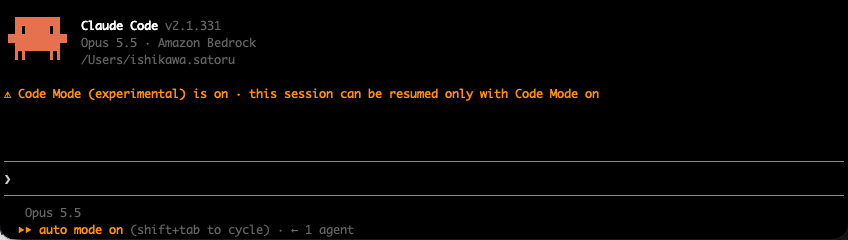
Immediately after startup, the same Code Mode (experimental) is on line described in the official documentation's procedure was displayed. The documentation says an enablement confirmation appears before the first launch, but in this environment it was not shown and Code Mode was simply enabled. The permission mode is auto mode, which is the default in my user settings.
I check the connection target with /status (only the relevant lines are excerpted).
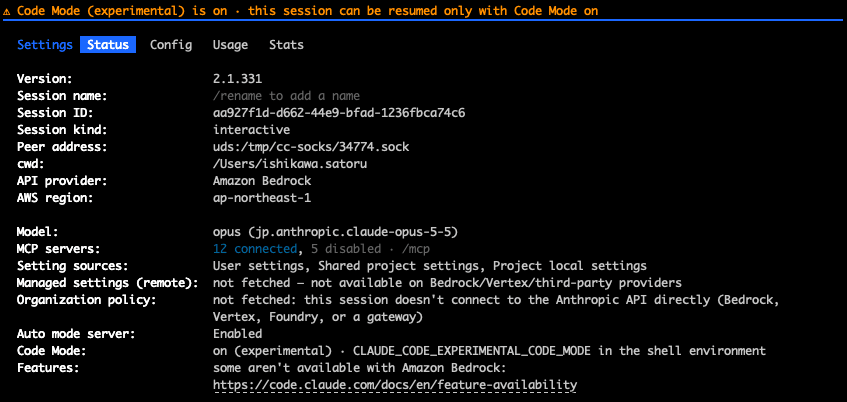
API provider is Amazon Bedrock, Model is opus (jp.anthropic.claude-opus-5-5), and Code Mode is on (experimental).
Asking it to detect broken links
Read all Markdown files in this project and list the links that point to local files that do not exist.
For testing, I prepared a sample project consisting of three Markdown files. It includes four links whose targets do not exist. I send the same prompt as the example in the official documentation.
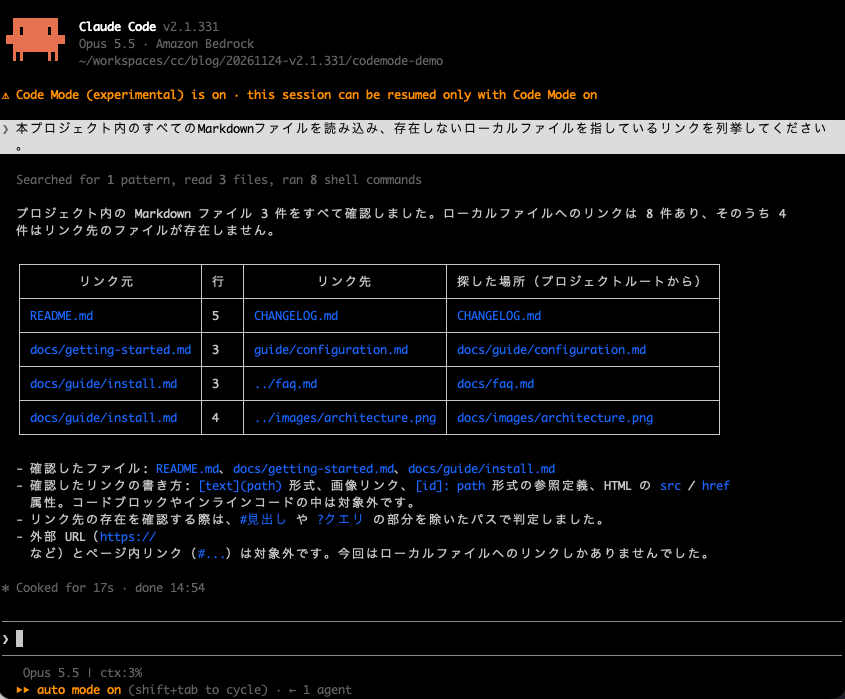
All four of the broken links I planted were detected.
Checking the code Claude wrote
When I open the transcript viewer with Ctrl+O, the code is shown collapsed as a Code(...) line. The code Claude wrote was the following 21 lines (excerpted from the session transcript).
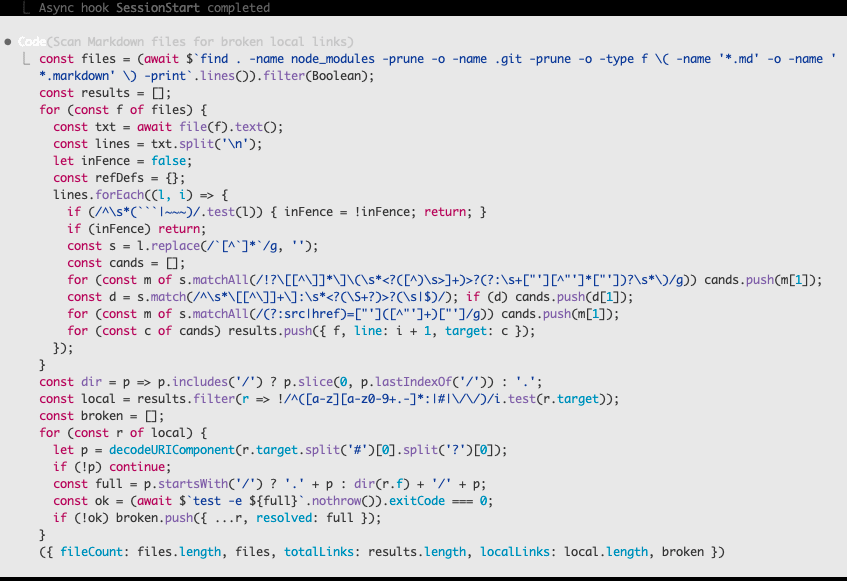
Template literals starting with $ in the code were executed as Bash, and file(f).text() as a Read tool call, and they were shown in the transcript viewer under their normal tool names. In the following log, three Read lines are omitted because their paths are long.
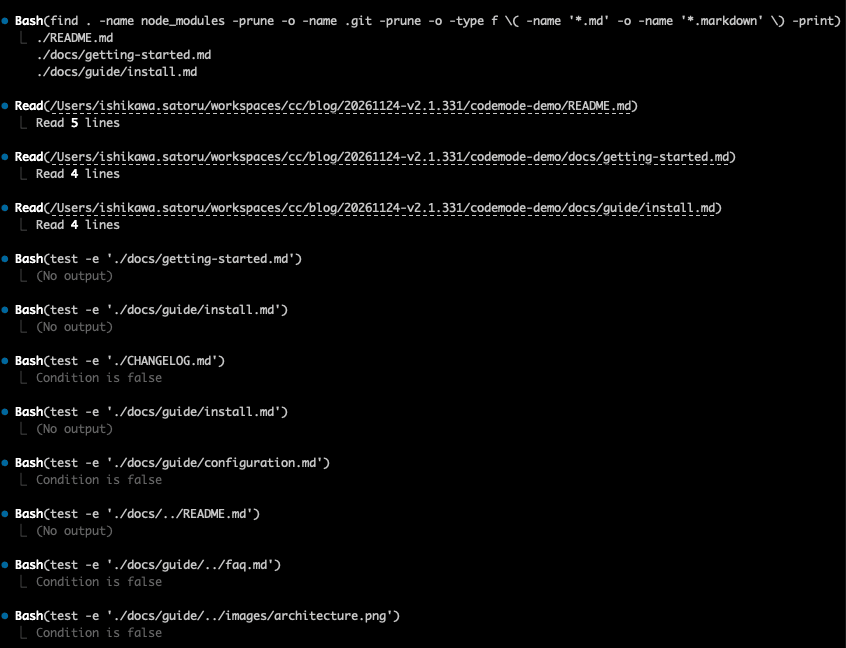
This code runs test -e in parallel with Promise.all and returns only the nonexistent links to Claude on the last line.
When I ended the session, the command for resuming it was also displayed with CLAUDE_CODE_EXPERIMENTAL_CODE_MODE=1 attached.
Resume this session with:
CLAUDE_CODE_EXPERIMENTAL_CODE_MODE=1 claude --model opus --resume 9e9456a9-cd13-4cc0-a4c4-7f15958f3456
Checking invocations on the Bedrock side
I check the number of invocations during the test period using CloudWatch metrics.
% aws cloudwatch get-metric-statistics --namespace AWS/Bedrock --metric-name Invocations --dimensions Name=ModelId,Value=jp.anthropic.claude-opus-5-5 --start-time 2026-11-23T23:10:00Z --end-time 2026-11-23T23:35:00Z --period 300 --statistics Sum --region ap-northeast-1 --query "sort_by(Datapoints,&Timestamp)[].[Timestamp,Sum]" --output table
--------------------------------------
|         GetMetricStatistics        |
+-----------------------------+------+
|  2026-11-24T08:15:00+09:00  |  3.0 |
|  2026-11-24T08:20:00+09:00  |  1.0 |
+-----------------------------+------+
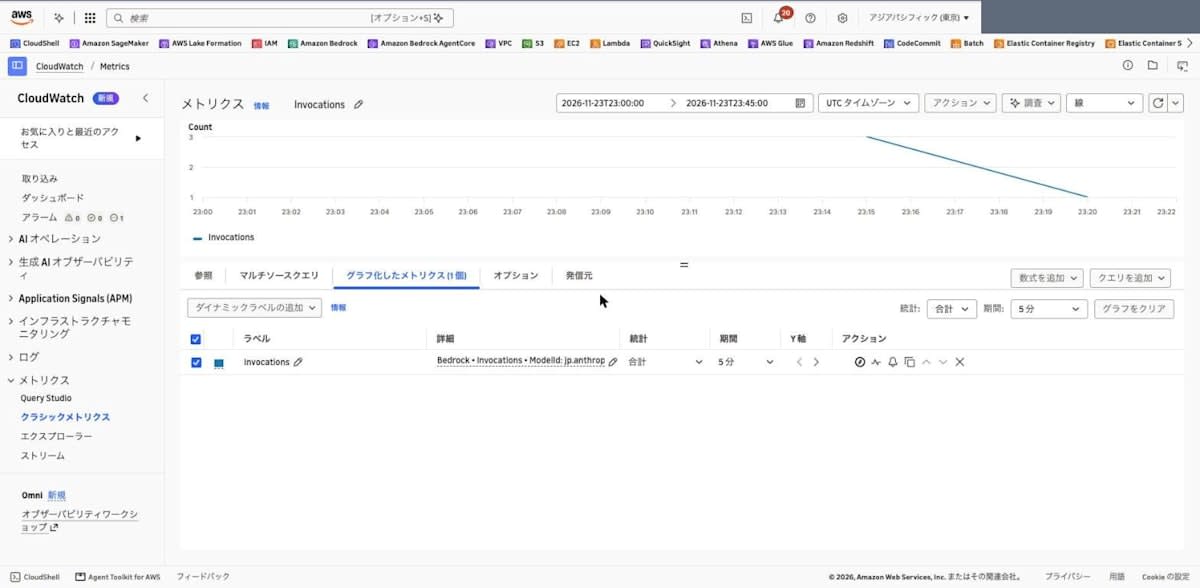
CloudWatch in ap-northeast-1 recorded a total of 4 Invocations for jp.anthropic.claude-opus-5-5. The same values can also be confirmed in the CloudWatch graph in the management console.
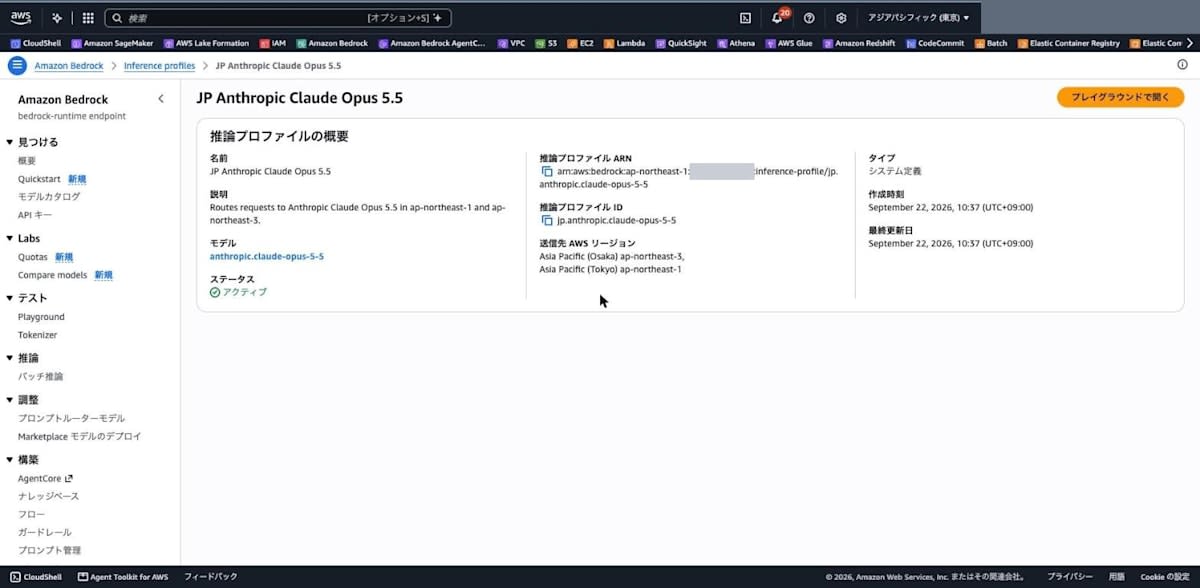
In this Bedrock environment, Code Mode was enabled simply by adding the same CLAUDE_CODE_EXPERIMENTAL_CODE_MODE=1 used with the Anthropic API. By specifying the jp. inference profile, you can try it while keeping the inference destination limited to the Tokyo and Osaka Regions, so I feel it has become easier to start evaluating in an AWS environment.
Conclusion
I feel the biggest change in v2.1.331 is that Code Mode can now be used in terminal sessions on Amazon Bedrock and Claude Platform on AWS as well. There are 93 fixes, centered on the VS Code extension, and I think the resolution of the startup failure on Windows when registry managed settings contain Japanese and similar characters is also significant for organizations in Japan.
If you use Claude Code on Amazon Bedrock or Claude Platform on AWS, why not update and give it a try?
References
