
Understanding Amazon Bedrock AgentCore Through Illustrations

This page has been translated by machine translation. View original
Introduction
Hello, I'm Yonamine from the Osaka office.
When you're told you want to build an AI Agent on AWS, which service comes to mind first? For me, Amazon Bedrock AgentCore comes to mind first.
AgentCore — have you ever tried it?
I'm sure many of you are interested but haven't had a chance to try it yet.
One of the reasons for that might be that many people don't really know what AgentCore specifically is or what it can do.
I was the same way when I first started using AgentCore — I had a vague image of AgentCore as just "AWS's AI Agent service" and had no idea what it could actually do. So in this article, I'd like to share what I didn't understand and what I needed to understand to be able to use it, with illustrations along the way.
Having basic knowledge of EC2 and Lambda as a prerequisite will help you understand this more easily.
Let's get started!
What Did I Not Understand?
At first, I thought AgentCore was an AI Agent — some kind of "thing" that would easily let you create a chat application similar to AI Agents like Claude Code or OpenAI Codex.
However, when I opened the AgentCore console screen, there was no such chat interface anywhere. Why? I was confused. (There is now a feature called AgentCore Harness that allows chatting from the console, but I won't cover that here.)
When I actually looked into it properly, I found that AgentCore was not a chat app, but rather an infrastructure platform for running applications that behave like AI Agents.
Looking back now, I think one of the reasons I couldn't understand AgentCore was that I was conflating the application with the infrastructure.
At this point, you might be thinking, "What? An infrastructure platform mechanism for AI Agents? What does that mean?" — but don't worry. Let's work through this together from here.
What Is an AI Agent?
Before getting into AgentCore, let's get a rough understanding of AI Agents.
So what is an AI Agent?
In my view, an AI Agent is a program that can plan, make decisions, and take action on its own.
I can already hear "I know that!" — but this is important for understanding AgentCore.

What does it specifically mean to make decisions and take action on your own?
For example, let's say you're a salesperson at an electronics retailer (try your best to imagine yourself as a salesperson).
If a customer came to you and said "Summer is coming soon, could you recommend an energy-efficient air conditioner that suits my room?" what would you do?
First, you'd confirm the requirements such as the room size and budget,
then compare products from each manufacturer on the floor,
compare performance and prices,
check inventory,
and select products you could recommend,
and guide the customer through that process, right?
This is you (the salesperson) making a plan, making judgments, and taking action toward the goal of having the customer purchase a product.
An AI Agent does this in your place — making decisions, planning, and taking action on its own.

When you hear "AI Agent," some of you might wonder how it's different from a general AI chat.
If you ask an AI chat "recommend an air conditioner," it might tell you products that seem to match the conditions or how to choose one.
But it's difficult with just a regular AI chat to carry out a series of tasks toward a goal — like "confirm the room size," "compare candidates," "check inventory," and "make a recommendation based on the results" — the way a salesperson would.
In this way, an AI Agent is a program that thinks about the necessary steps to fulfill a user's request and takes action while using the tools available to it.
A Closer Look at AI Agents
I think you now have a rough image of AI Agents, so let's dig a little deeper into how an AI Agent operates by replacing the salesperson example from earlier with an AI Agent.
A customer (user) came to me, the salesperson, with this request:
"I'd like to know about energy-efficient air conditioners suitable for a 6-tatami room."
At this point, I wouldn't immediately pick a single product.
First, in my head, I'd think:
"For a 6-tatami room, this coverage capacity should be about right."
"If they prioritize energy efficiency, I should look at the annual electricity cost and performance."
"But I can't decide without also confirming the budget and installation conditions."
and so on.

In other words, having understood the customer's request,
I'm organizing the necessary conditions and thinking about what to confirm next.
Once I have a rough direction in mind, I'd actually start looking for products.
Not just looking at the products on the floor, but also checking performance in catalogs and looking up inventory in the inventory system.
Even after finding candidates, it doesn't always end there.
The performance might be good but exceed the budget, the price might be just right but the item is out of stock, or the item might be available but the installation date doesn't work.
In that case, I'd look for other products or adjust the conditions a little to find the right product for the customer.
Finally, I'd suggest a few recommended products to the customer.
The customer would then consider the suggestions, hear my reasons for recommending them, compare them, and ultimately decide on a product.

An AI Agent works the same way.
When it receives a user's request, it first interprets the objective,
then thinks about the information and steps needed to achieve that objective.

In this way,
"What should I confirm?"
"What information should I use?"
"What order should I proceed in?"
— thinking through these questions is what constitutes planning in an AI Agent.
From the available tools, it selects the ones that seem useful for achieving the goal, executes them, looks at the results, and decides the next action.
If necessary, it changes the conditions and executes again, or uses a different tool, gradually getting closer to achieving the goal.
The key point is that it doesn't just use a tool once and stop — it decides the next action based on the execution results.
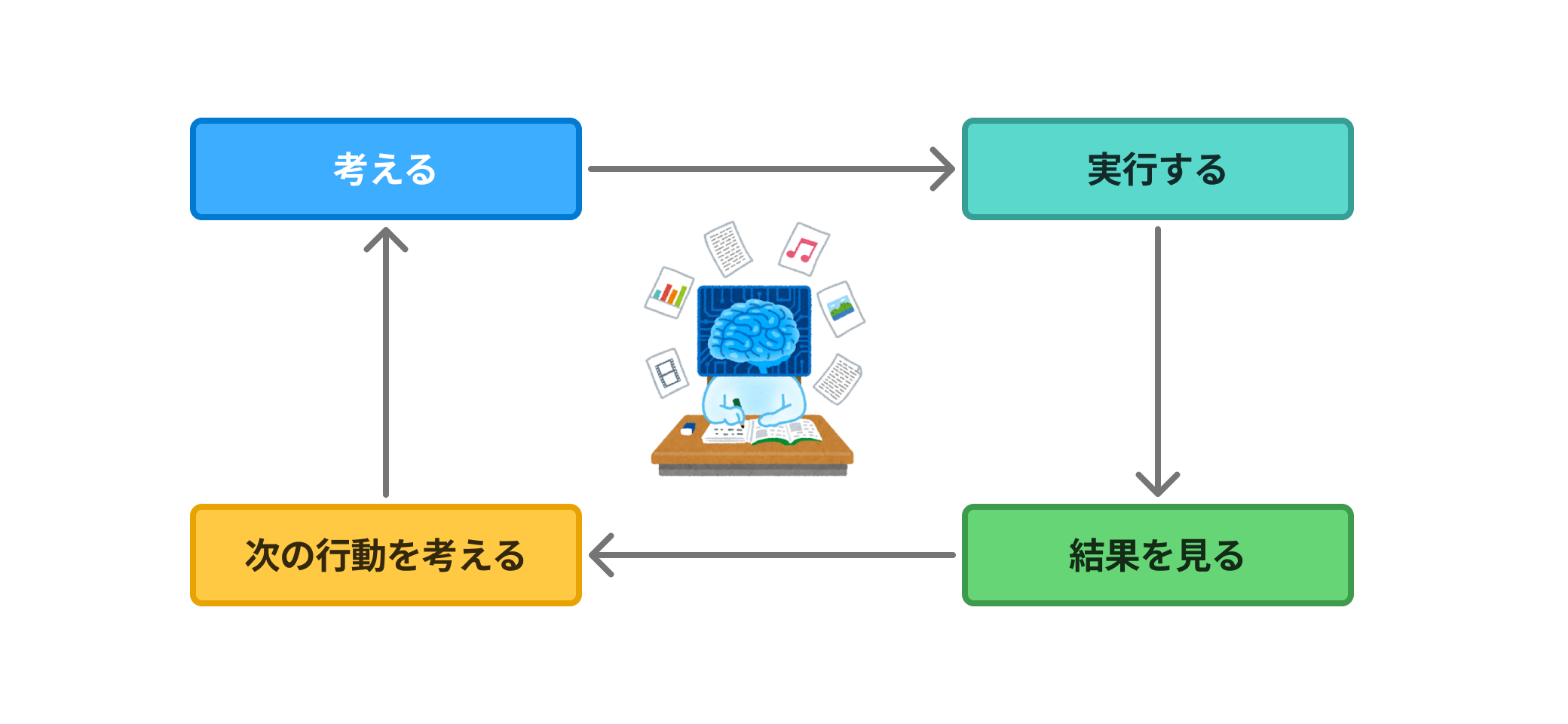
Just like a human, an AI Agent checks the results of its research itself, and considers the result that the user most likely needs.
In this way, an AI Agent — just like a human working through a task — thinks, executes, checks the results, and arrives at a final answer.
Who Implements the AI Agent?
Now, I think you have a good understanding of how an AI Agent operates from the explanation so far.
We've been talking about AI Agents up until now, but this has only been about how AI Agents behave.
I used to think that using AgentCore would magically implement this AI Agent-like behavior on its own.
This was a big mistake — AgentCore does not automatically implement AI Agent-like behavior for you.
If you think about it a little, it makes sense that you need to control the AI Agent's behavior: what tools it can use, what models it can use, how many times it reconsiders, how deeply it thinks, and so on.
So who implements this AI Agent behavior? The developer does.
The developer writes code to implement the behavior of the AI Agent.
The developer implements in code the processes they want the AI to follow — such as the tools they want it to use and the reconsideration logic.
This is an application-level implementation, not an infrastructure concern.
This is just my mental image, but think of it as the developer's written code being the body (control logic), which is given tools and a brain (LLM) to operate as an AI Agent.
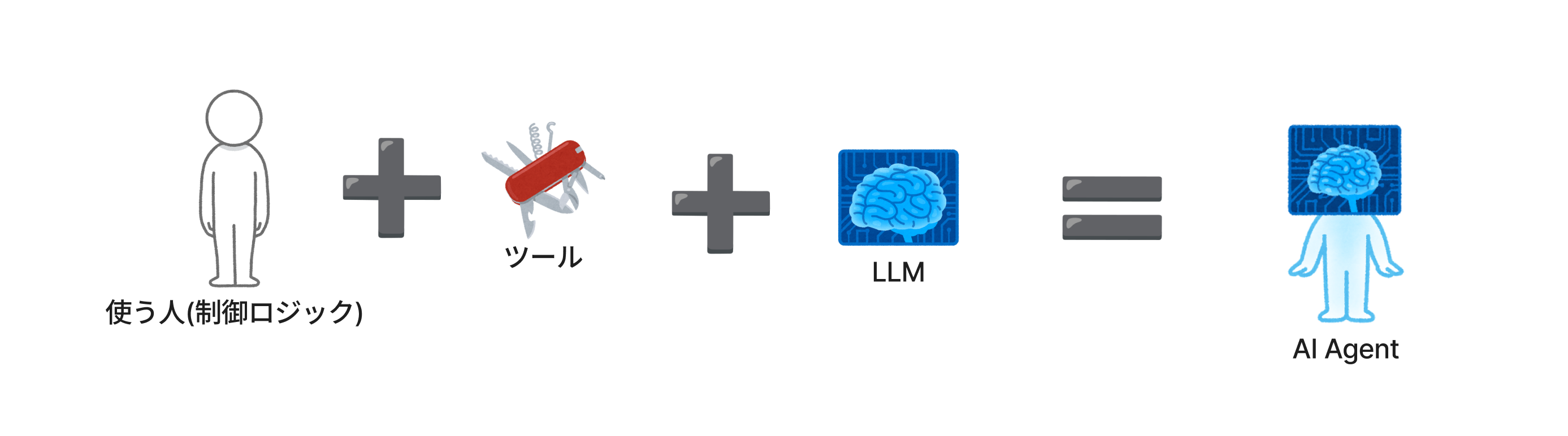
Each element in the figure above represents something like this:
Control logic → A program that connects the LLM and tools and manages the overall execution of the Agent
Tools → Tools for searching the product inventory list (MCP, self-defined inventory lookup programs, etc.)
LLM → A model (well-known ones include Claude, GPT, etc.)
As a side note, there are also convenient frameworks out there that make it easier to implement the control logic part of an AI Agent.
For example, there are frameworks such as Strands Agents, LangGraph, CrewAI, and LlamaIndex.
At this point, you might be thinking — wait, then what is AgentCore?
We've been talking about applications this whole time.
AgentCore
That was quite a long preamble, but this is where the AgentCore discussion begins.
AgentCore provides the infrastructure needed for applications that operate like the AI Agents we've been looking at.
We've been talking about AI Agents, but where does that AI Agent (application) run?
It needs to run on a server, just like any other application.
The first things that come to mind are on-premises servers or virtual servers in the cloud.
AgentCore is about the server side of things.
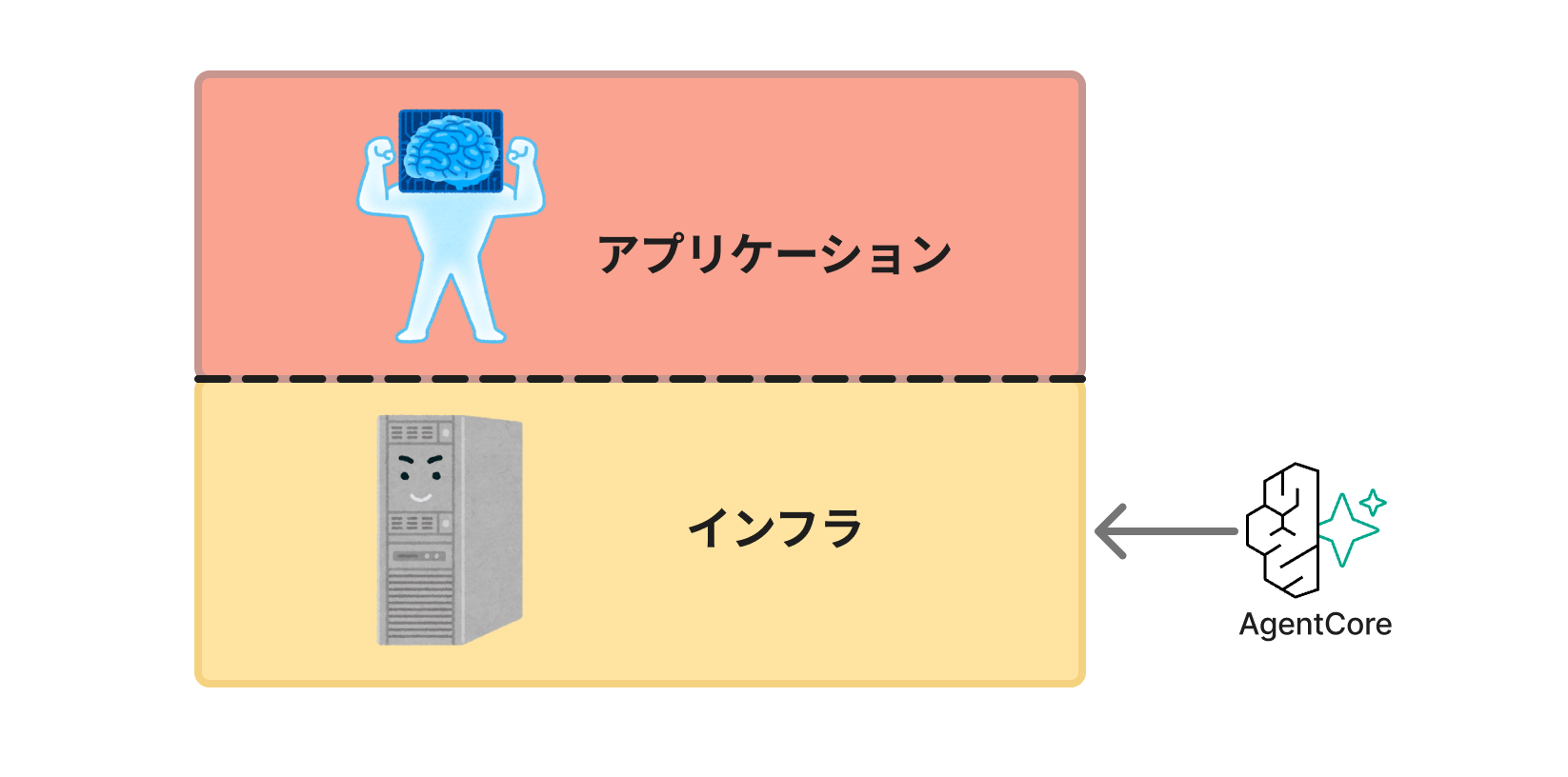
You might be wondering, "So how do you run an application (AI Agent) on AgentCore?" — and the main resource in AgentCore is AgentCore Runtime.
This AgentCore Runtime is exactly the infrastructure part where the application runs.
When creating a Runtime, there is a place where you select your own source code.
By selecting your source code (or where it's stored) here, the Runtime automatically sets up the infrastructure needed to run that code.
This infrastructure works by launching a microVM for each session.
Think of it as a microVM spinning up as a Runtime when a user opens a chat (starts a session).
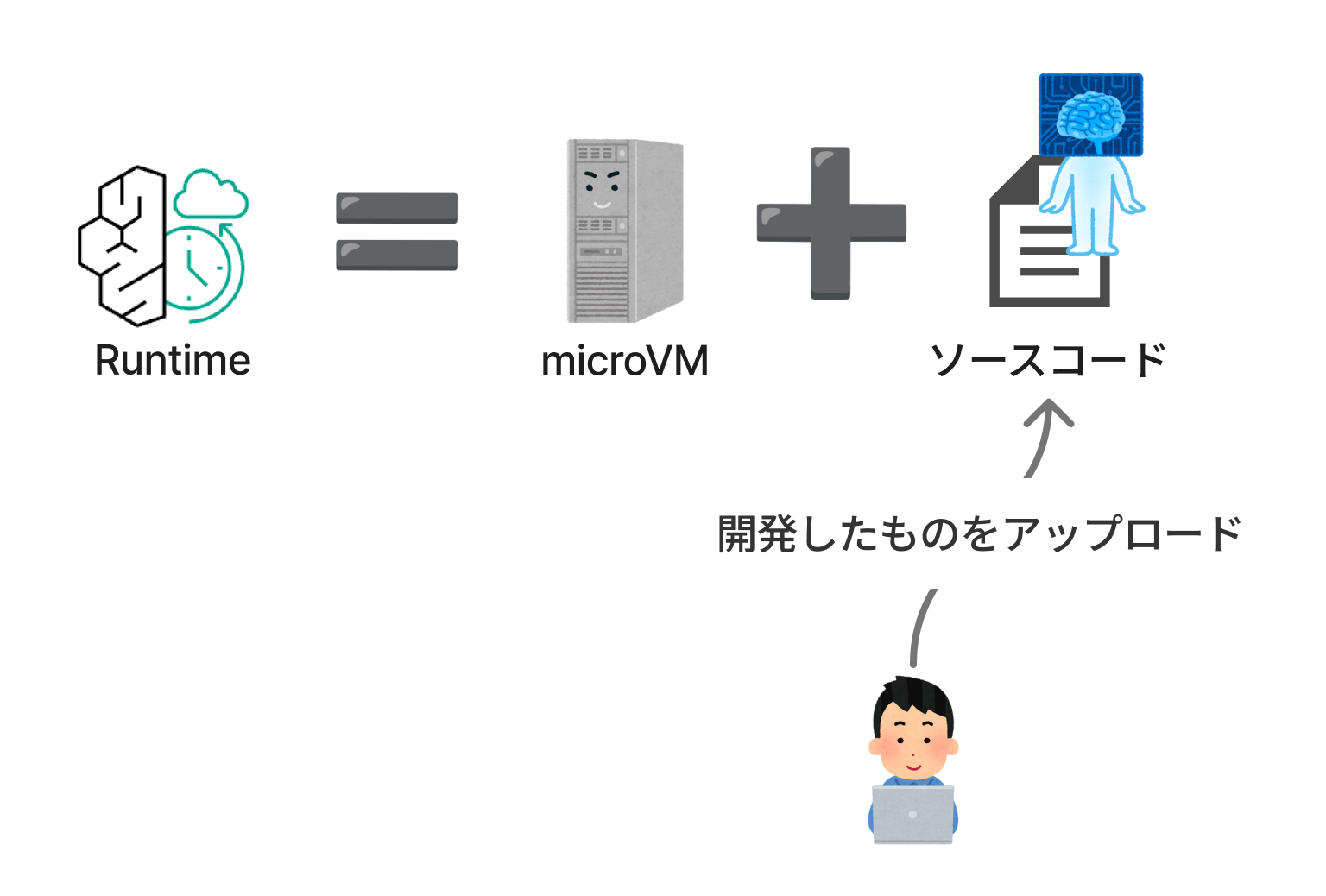
For those familiar with AWS, Lambda is a helpful analogy.
Think of it as infrastructure that only spins up to run code when it's needed.
This means developers don't have to worry much about the infrastructure.
What Kind of Infrastructure Would Be Nice to Have for an AI Agent?
Now, thinking about what infrastructure is needed for an application that behaves like an AI Agent — what would be nice to have when running an AI Agent — will help you appreciate the value of AgentCore.
From here, I'll introduce some representative features of AgentCore.
First, as a premise, AgentCore is not a single service but rather a collective name for a group of services called "AgentCore [something]."
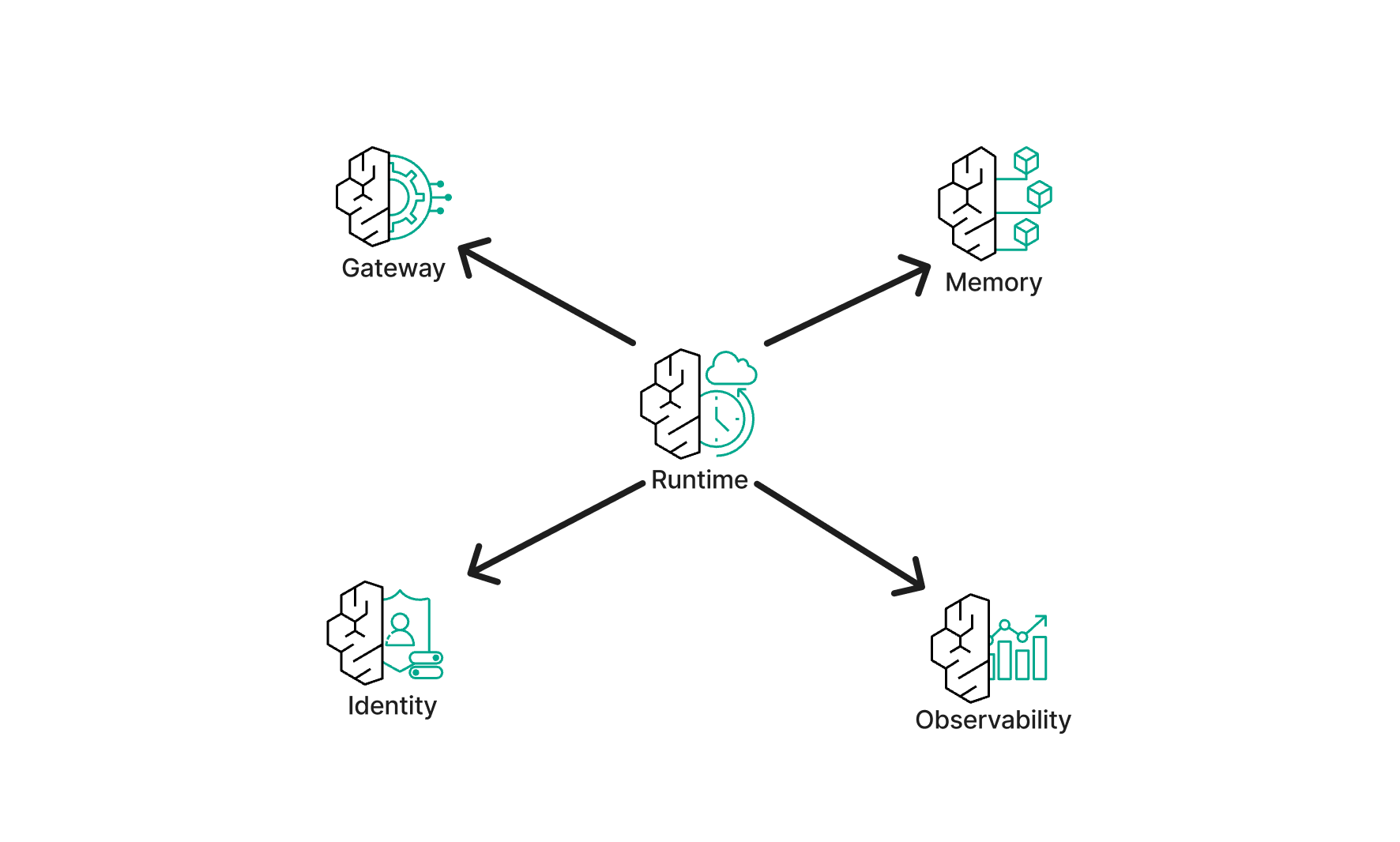
Let me first introduce some features of AgentCore Runtime, which is the core functionality of AgentCore.
AgentCore Runtime
Scaling
Let's say there's an AI Agent chat app for an electronics retailer.
Imagine a chat app running on a virtual server like EC2.
In the early days when the chat app just launched, there are few users and it runs without any issues.

But then the electronics retailer becomes popular and the number of chat app users grows.
What happens then?
The processing might stop because it can't handle the large volume of requests.

For example, using EC2 Auto Scaling might handle things to some extent, but dealing with spike-like increases in requests would be difficult.
Also, when the number of servers increases, session management and conversation history management require additional thought and effort.
With AgentCore, you don't need to worry about this kind of scaling.
Since AgentCore Runtime launches a microVM per session, developers don't need to think about the infrastructure.

Of course, more usage means more cost, so keep that in mind.
Environment Isolation
If you run a chat app on a single server, multiple users' requests are processed by that one server.
In this case, you need to manage the separation of conversation history, temporary files, and resource usage per user at the application, file system, and database level.

If an implementation mistake causes one user's information to be mixed with another's, that would be a serious problem.

As mentioned earlier, AgentCore Runtime launches a microVM per session.
This microVM is a dedicated virtual environment with completely isolated CPU, memory, and file system.
This reduces the burden on developers to implement boundary separation themselves.

Execution Time
In the first half, I talked about how an AI Agent thinks and acts on its own.
This is a benefit of AI Agents, but from a different angle, you could also see it as: you never know when the processing will finish.
In other words, even with a mechanism where a server starts up temporarily, the AI Agent's processing time is unpredictable, so a certain amount of buffer in the execution time is necessary.
This is not a problem for regular servers that are always running.
However, for execution environments like Lambda that only start up when needed, the execution time limit becomes a problem.

Lambda has a maximum execution time limit of 15 minutes.
In cases where the AI Agent might process for more than 15 minutes, it's difficult to choose Lambda as the infrastructure.
But you still want it to only start up when needed...
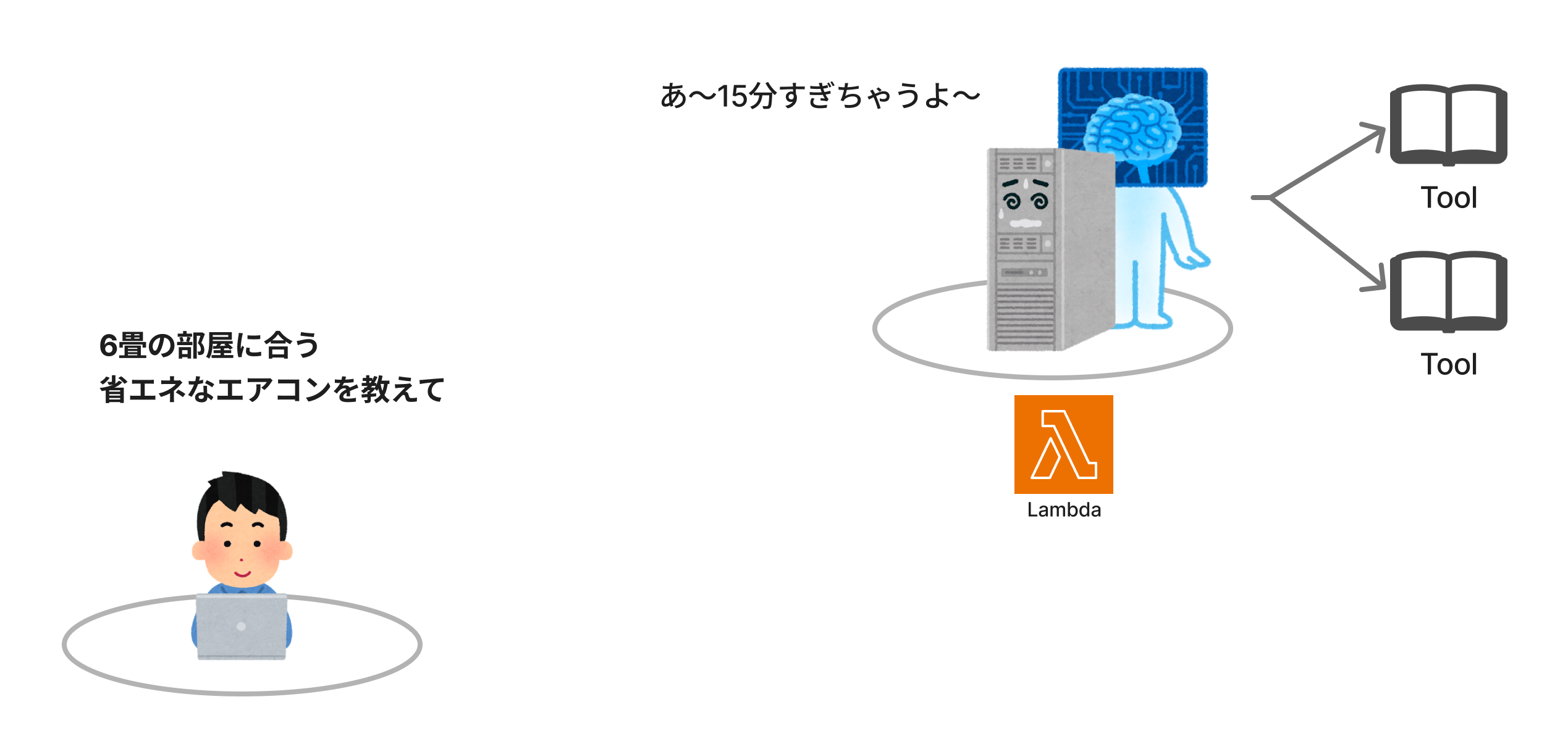
AgentCore Runtime can handle such variability in execution time.
AgentCore Runtime can execute for up to 8 hours, so you don't need to worry about the AI Agent's processing time.
Also, conveniently, if the CPU is not in use while waiting for a response from the LLM, no CPU charges are incurred. It's easy on your wallet too.
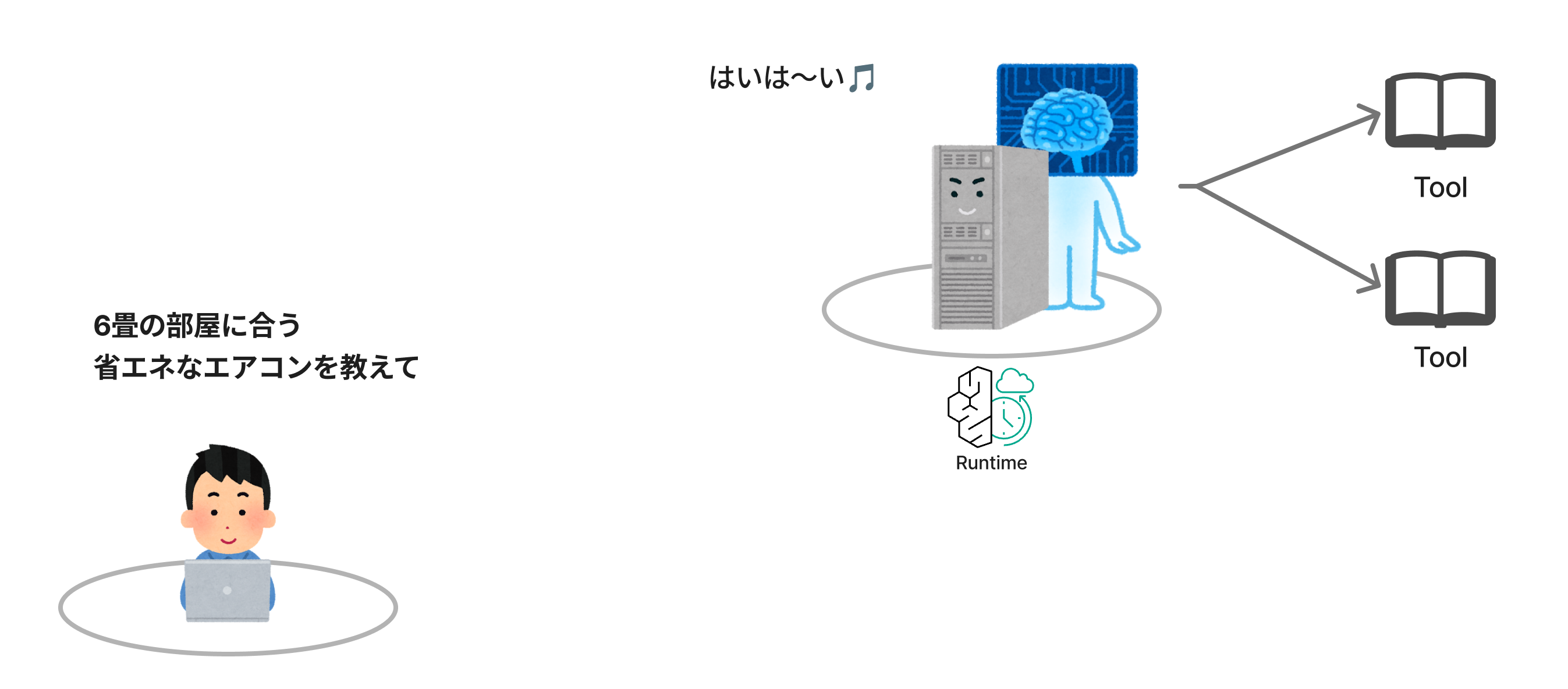
Beyond these features, there are also capabilities specifically tailored for AI Agent execution environments, such as support for a wide variety of frameworks and models for implementing AI Agents, as well as streaming support.
AgentCore Memory
Next is AgentCore Memory.
As the name suggests, this is a feature related to memory.
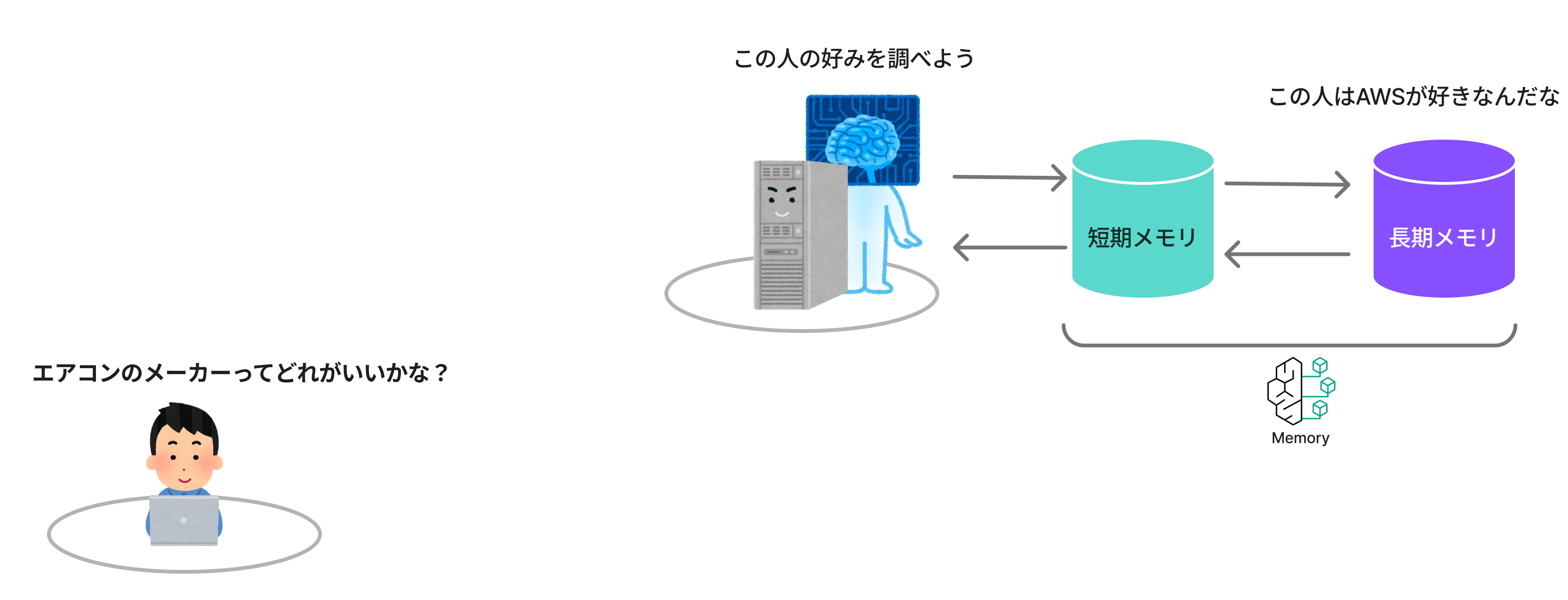
Memory has two functions: short-term memory and long-term memory.
This feature is easy to understand if you think of the AI Agents you use in your daily life.
Short-term Memory
First, short-term memory.
For example, while chatting with a chat app about air conditioner comparisons, you might ask, "Among the air conditioners you described earlier, which one is the cheapest?"
In response, the chat app would probably say something like, "Among the products I described earlier, the cheapest is Company A. Following that, Company C is..."
This happens all the time, right?
It answers as if it remembers what was said just a moment ago. That is short-term memory.

Let me explain this a little more.
What does "earlier" mean?
For a human, it's easy enough to understand. Like, "oh, that thing we just talked about."
But for a program, a "place to store the memory" is needed in order to remember something.

This "place to store the memory" is AgentCore Memory's short-term memory.
Short-term memory stores the currently ongoing conversation.
Since it's only for the currently ongoing conversation (session), when you open a new session, everything recorded in short-term memory is completely forgotten.

Long-term Memory
Next is long-term memory.
Have the AI Agents you use gradually started to remember the topics you frequently bring up?
I often look things up related to AWS, and sometimes when I ask a completely unrelated question, the response will be something like "To use your favorite AWS as an analogy..."
This means the AI Agent has remembered my preferences.
That is long-term memory.

Long-term memory is retained across sessions.
The mechanism works by asynchronously extracting conversation summaries and user preferences from data stored in short-term memory and saving them to long-term memory.
These Memory features can also be implemented similarly without AgentCore.
For example, with Lambda, you could write conversation information to DynamoDB.
However, there is a lot you'd need to implement yourself, such as managing data per session and user, as well as implementing the infrastructure and read/write operations.
Using AgentCore Memory reduces the implementation burden on developers, so it's a feature you'd want to actively use unless you have special requirements.
In particular, short-term memory is almost an essential feature when implementing chat-based AI Agents, so it's great that AgentCore provides this kind of functionality as part of its feature set.
AgentCore Identity
Next is AgentCore Identity.
Identity is AgentCore's feature related to authentication and authorization.
Identity also comes in two types: Inbound Auth and Outbound Auth.
Inbound Auth is a feature for verifying when AgentCore Runtime is called from outside (outside → inside).
Outbound Auth is a feature for verifying when AgentCore Runtime accesses external services (inside → outside).
Inbound Auth
Inbound Auth verifies whether a user (the caller) is allowed to call the Agent running on the Runtime.
If the user has valid authentication credentials, Identity allows the Runtime to be called.
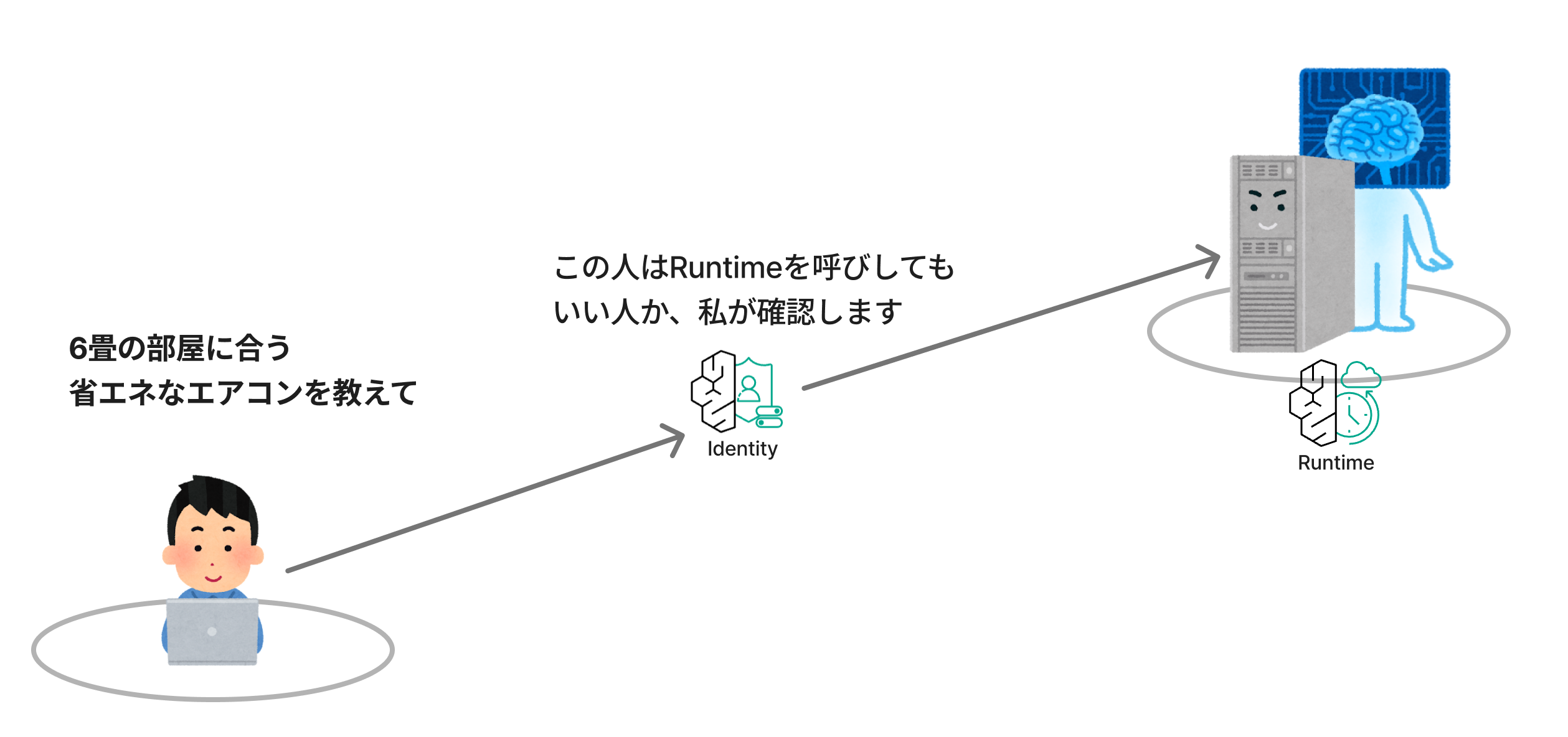
Inbound Auth supports IAM authentication, Cognito, and JWT authentication from external IdPs.
Outbound Auth
Outbound Auth is a mechanism for safely obtaining and using the authentication credentials needed when the AI Agent running on the Runtime uses external services.
For example, let's say there's an API for looking up a list of air conditioners. An API key is required to call this API.
In this case, embedding the API key directly in the Runtime is risky, so you'd want to store it somewhere safe.
AgentCore Identity has a storage location called Token Vault, where API keys and OAuth 2.0 tokens can be stored.
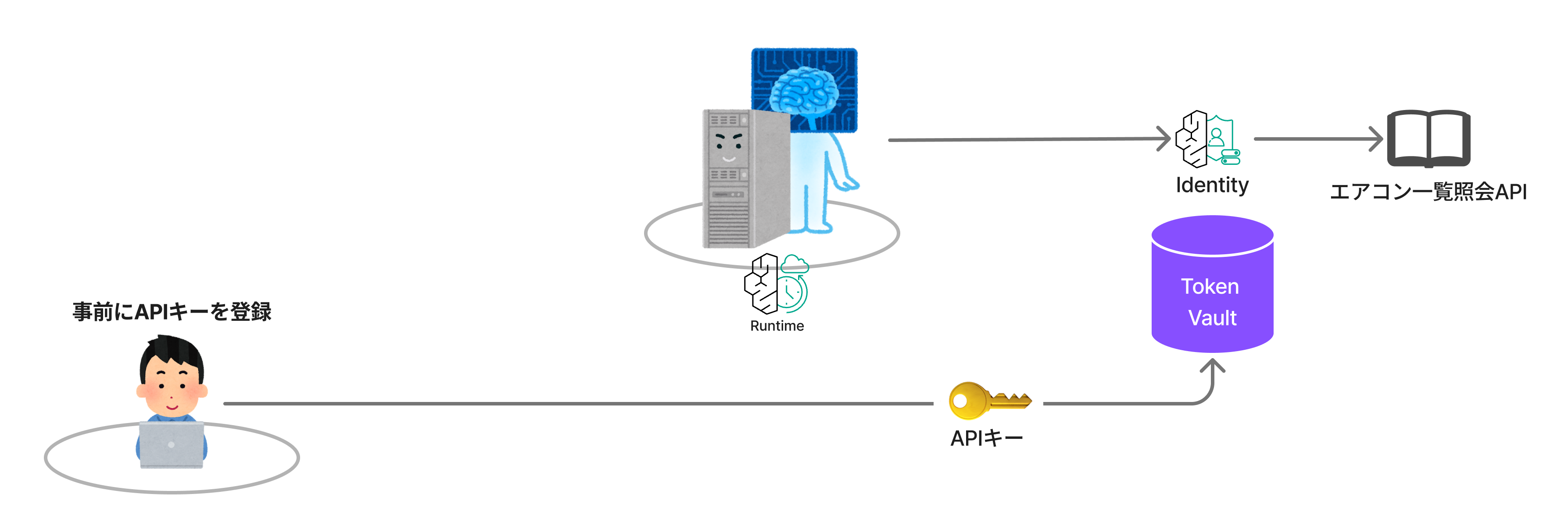
Outbound Auth retrieves the API key from that storage and enables access to external services.
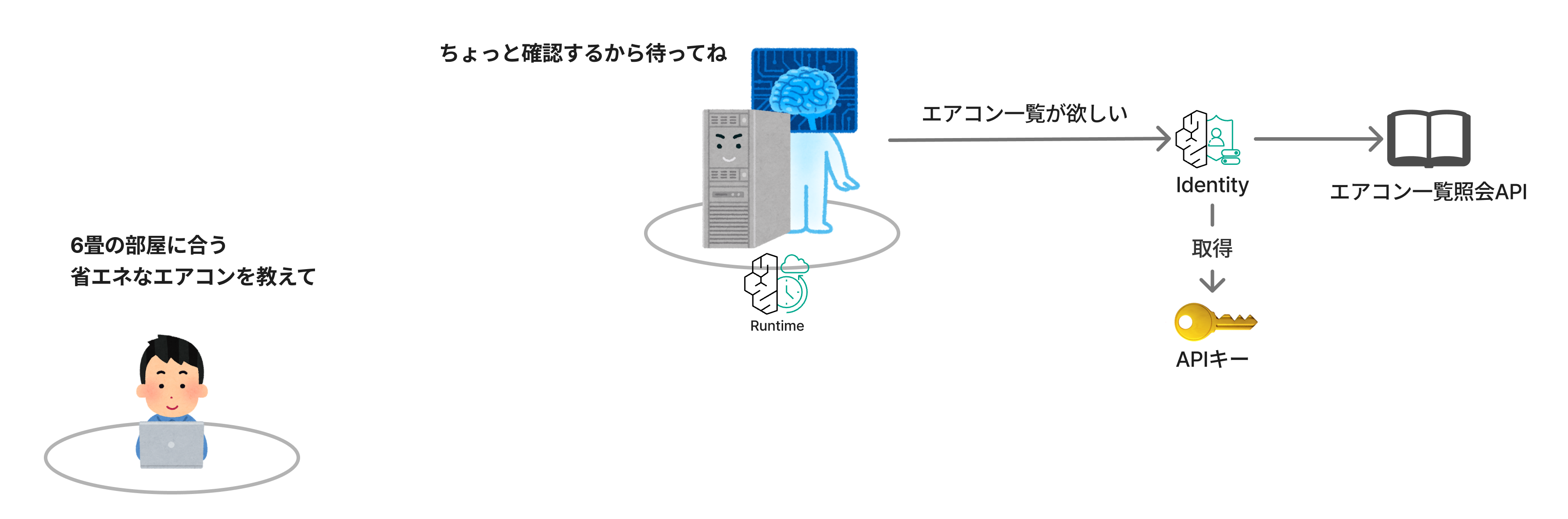
I used an API key example here, but you can also store OAuth 2.0 tokens to access Google-related services and GitHub.
Identity could also be implemented yourself, but when you consider things like secure storage of API keys and per-user permission separation, the ongoing operational cost — not just the implementation — can't be ignored.
AgentCore Identity verifies "who can use the Agent" and manages the authentication credentials for the Agent to safely use external services such as Google, GitHub, and internal APIs.
AgentCore Gateway
Next is AgentCore Gateway.
As the name suggests, it's a feature that serves as an entry point to various tools.
What does it connect? It connects "AI Agents" and "tools."
"Tools" can mean many things.
There are MCP servers, programs you've created yourself, other Agents, external services like GitHub, LLM providers, and more.
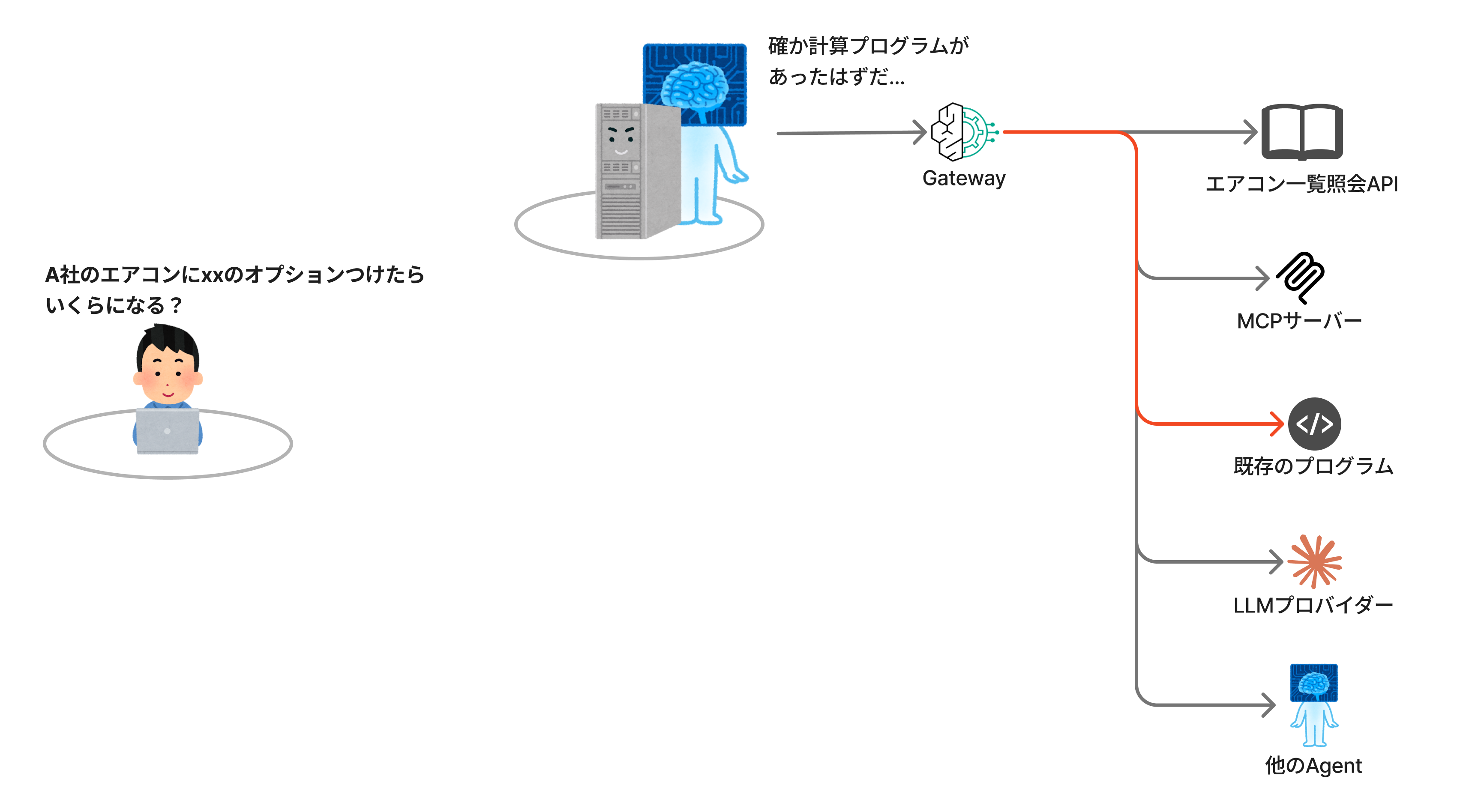
Gateway also has a rate limiting feature that can restrict per-user request limits and LLM calls.
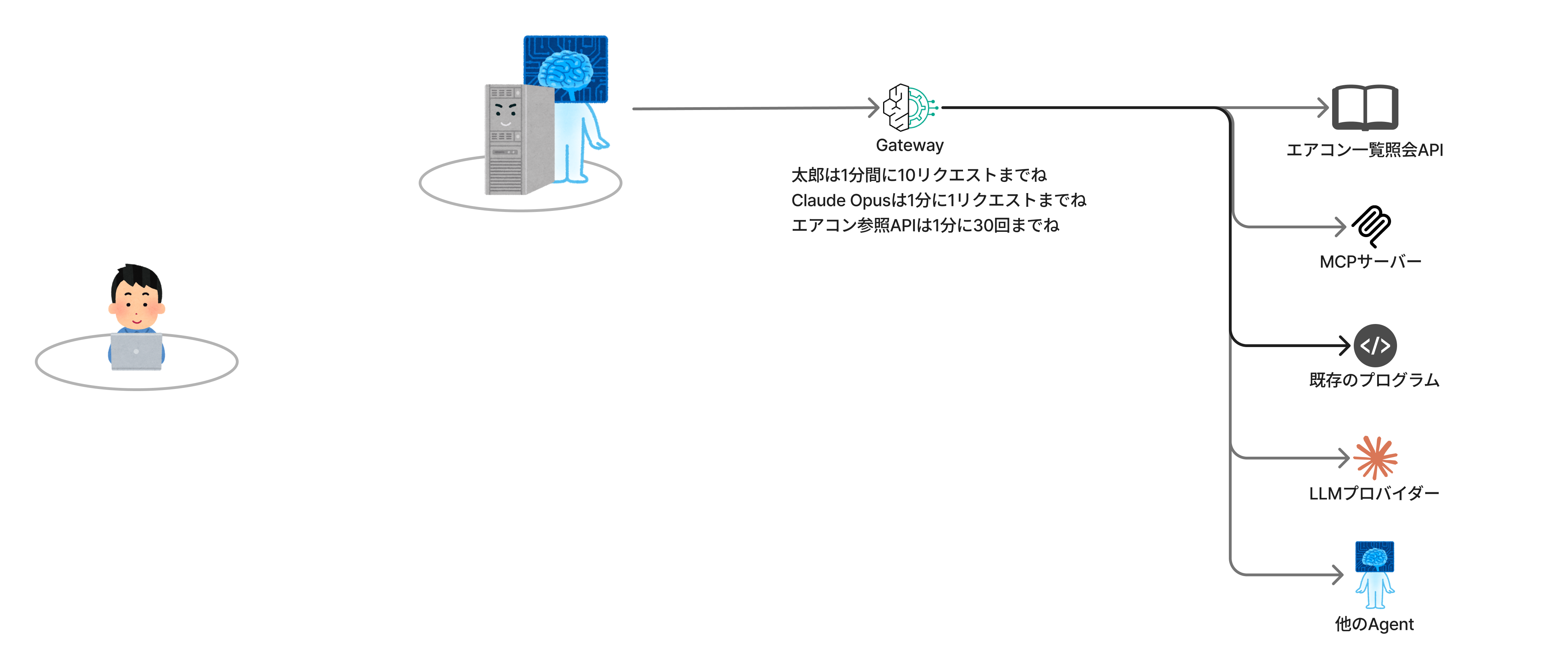
Beyond what's written here, you can also integrate Gateway with Policy to control which tools users can call and with what permissions through the Gateway, and you can also call Memory from the Gateway.
Honestly, I sometimes wonder what it's for, but I think the purpose is something like: by funneling everything through Gateway as a single entry point, it becomes easier to centrally manage access permissions and routing.
Summary
In this article, I introduced an overview of AgentCore with illustrations.
I covered Memory, Identity, and Gateway, but there are many more — Policy, Observability, Evaluations, Browser, Code Interpreter, Optimization, and so on... there are many "AgentCore [something]" services.
Through this article, I want you to understand the relationship between AI Agents and AgentCore — that AgentCore is simply the platform for running AI Agents.
Since AgentCore is only the platform, it is possible, for example, to replace the platform with EC2 or Lambda. If the program running on top of it behaves like an AI Agent, then it is an AI Agent.
However, AgentCore provides many features that become necessary when running AI Agents in production environments.
Memory, Identity, and Gateway introduced in this article are each one of those features.
I hope reading this article leads you to an opportunity to actually try AgentCore.
In Closing
Everyone who has read this far should now be eager to try AgentCore.
For those saying "This is too high-level! I want more detail!" — I recommend this resource that my colleague who tells me the latest AgentCore news every day worked hard to put together at the end of last year.
It is a wonderful resource written comprehensively about AgentCore, including implementation details.