![[Update] AgentCore CLI v1.0.0 has been released!](https://devio2024-media.developers.io/image/upload/f_auto,q_auto,w_3840/f_auto,q_auto/v1790875048/eyecatch/edq4dfptctqlcwjhffhs.png)
[Update] AgentCore CLI v1.0.0 has been released!

This page has been translated by machine translation. View original
Introduction
Hello, I'm Jinno from the Consulting Division.
AgentCore CLI v1.0.0 has finally been released!!! It's quite a momentous occasion...
In this article, I'll summarize the main changes and try out a few of them! For information about the AgentCore CLI up until now, I've introduced it in the blog post below, so it might be interesting to look back and see how things used to be!
Prerequisites
The environment used this time is as follows.
| Item | Version |
|---|---|
| AgentCore CLI | 1.0.0 (also used 0.31.1 as migration source) |
| Node.js | 26.7.0 |
| Region | us-east-1 |
Install AgentCore CLI globally with pnpm.
pnpm add -g @aws/agentcore@1.0.0
Main Changes
The release notes contain a very large number of changes, so I've extracted the ones related to usage...!
Resources can now be managed from outside the project
The biggest change is the command structure.
In the 0.x series, commands like status and invoke were meant to be executed inside a project (a directory with agentcore.json), and running them outside would result in No agentcore project found. making them impossible to call.
In v1.0.0, in addition to commands that operate on projects (create, deploy, etc.), new commands have been added to directly handle deployed resources (harness, runtime, memory, gateway, etc.)!
Since resource commands work by specifying IDs, you can list resources in your account, invoke them, and execute commands in the runtime environment from outside the project.
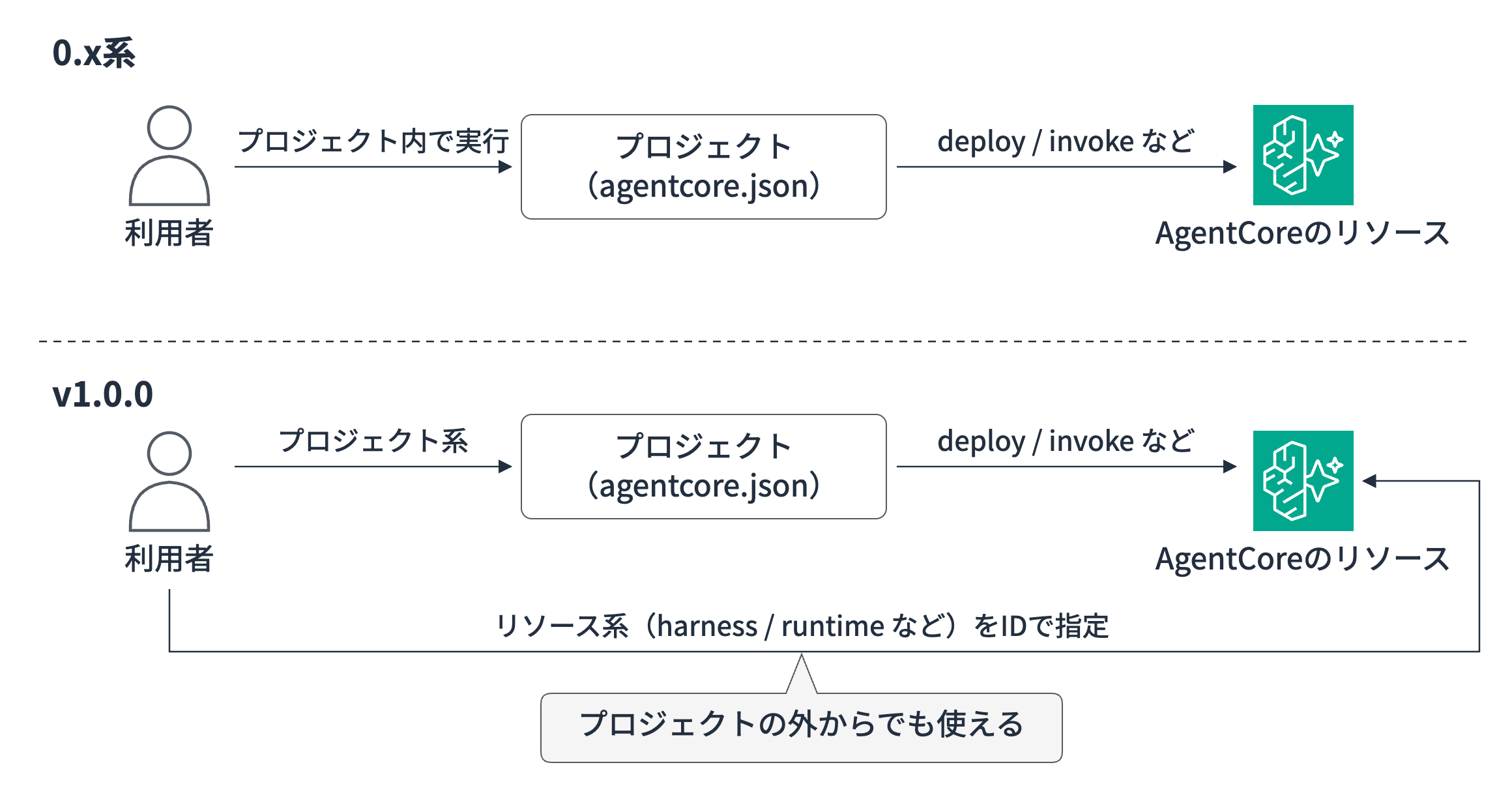
It's great that you don't have to navigate to the console just to quickly check an agent deployed by CLI or another tool!!!
I had quietly been hoping for this feature.
Harness configuration file is now YAML
The Harness configuration file has changed from harness.json to harness.yaml!
The 0.x series used its own unique syntax, but v1.0.0 uses the same structure as the Harness API.
Comparing the same configuration (Bedrock model, no memory) looks like this.
{
  "name": "legacy",
  "model": {
    "provider": "bedrock",
    "modelId": "global.anthropic.claude-sonnet-4-6"
  },
  "tools": [],
  "skills": [],
  "memory": {
    "mode": "disabled"
  }
}
name: legacy
model:
  bedrockModelConfig:
    modelId: global.anthropic.claude-sonnet-4-6
tools: []
skills: []
memory:
  disabled: {}
Since the field names are now the same as the API reference, it's become easier to add settings while reading the documentation.
Projects are created by selecting a template
The form has changed from specifying language and framework individually with agentcore create to selecting a single template name.
agentcore create --project-name MyProject --name agent \
  --framework Strands --language Python --model-provider Bedrock --memory none
agentcore create --name MyProject --template agent-python-strands
The templates you can list with agentcore create --help include, for example:
- Strands agents (Python and TypeScript, Python also has a container version)
- LangChain agents
- Vercel AI SDK agents (TypeScript)
- Strands agents communicating via A2A or AG-UI
- MCP servers built with FastMCP
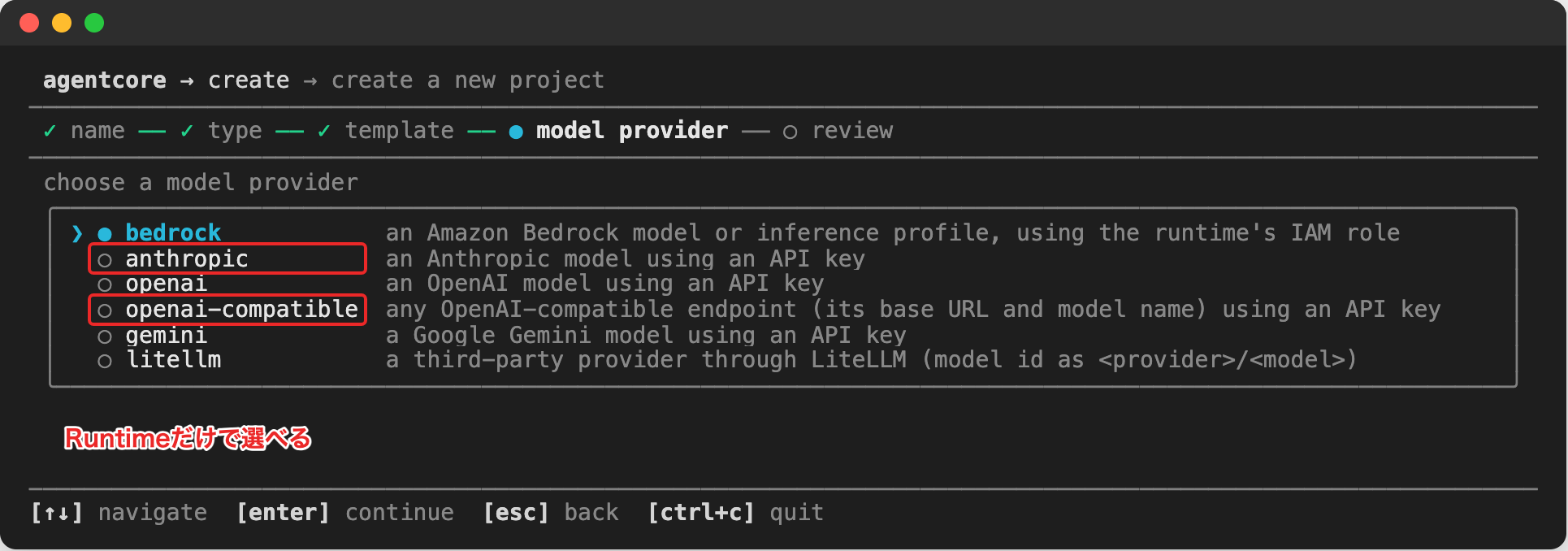
If you're using a model other than Bedrock, run agentcore create without options and select through the wizard. You can choose from Anthropic, OpenAI, Gemini, OpenAI-compatible endpoints, and LiteLLM (Python only).
Harness can now be evaluated directly by ID
Evaluation (eval) was possible in the 0.x series as well, but only Runtime could be specified as the evaluation target (agentcore run eval --runtime ...).
To evaluate a Harness, you had to look up the ARN of the Runtime created behind the Harness and pass it to --runtime-arn (when I tested this with 0.31.1, this method worked for evaluation).
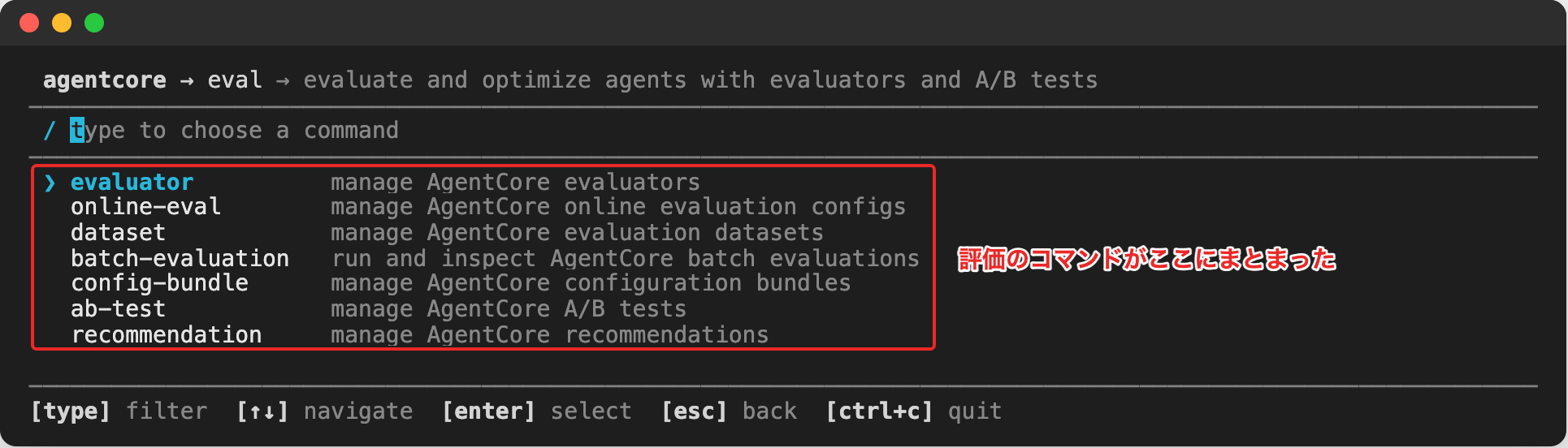
In v1.0.0, evaluation commands are consolidated under agentcore eval, and you can pass the Harness ID directly to the --agent evaluation target. Of course, Runtime IDs can be passed as well.
agentcore run eval --runtime MyAgent --evaluator Builtin.Helpfulness
agentcore eval ondemand evaluate --agent <Harness or Runtime ID> \
  --session-ids <session ID to evaluate> --evaluators Builtin.Helpfulness
For online evaluation (eval online-eval create) and batch evaluation (eval batch-evaluation evaluate), you can similarly specify Harness or Runtime with --agent.
Evaluators can now also be created directly with eval evaluator without a project, rather than just being added to a project.
0.x series projects can be migrated
agentcore migrate can convert projects created with the 0.x series to v1.0.0 format. The migration preserves the names of deployed resources, so you don't need to recreate them. I'll introduce the results of actually trying this in the second half.
Other changes
agentcore export harnesscan now be executed from outside the project- Project credentials stored locally are now encrypted
Points where usage changes from the 0.x series
agentcore createoptions are now just--name,--template,--skip-install, and--skip-git- Google ADK and OpenAI Agents that were available in 0.31.1 were not in the v1.0.0 template list
- Evaluation commands like
run evalandrun batch-evaluationhave moved underagentcore eval - Batch Insights, Online Insights commands, and locally stored evaluation result history (
evals history) have been removed
If you're using the CLI from scripts or CI, be sure to check the release notes!
Trying It Out
Running agentcore without arguments opens the TUI.
It looks quite sleek.
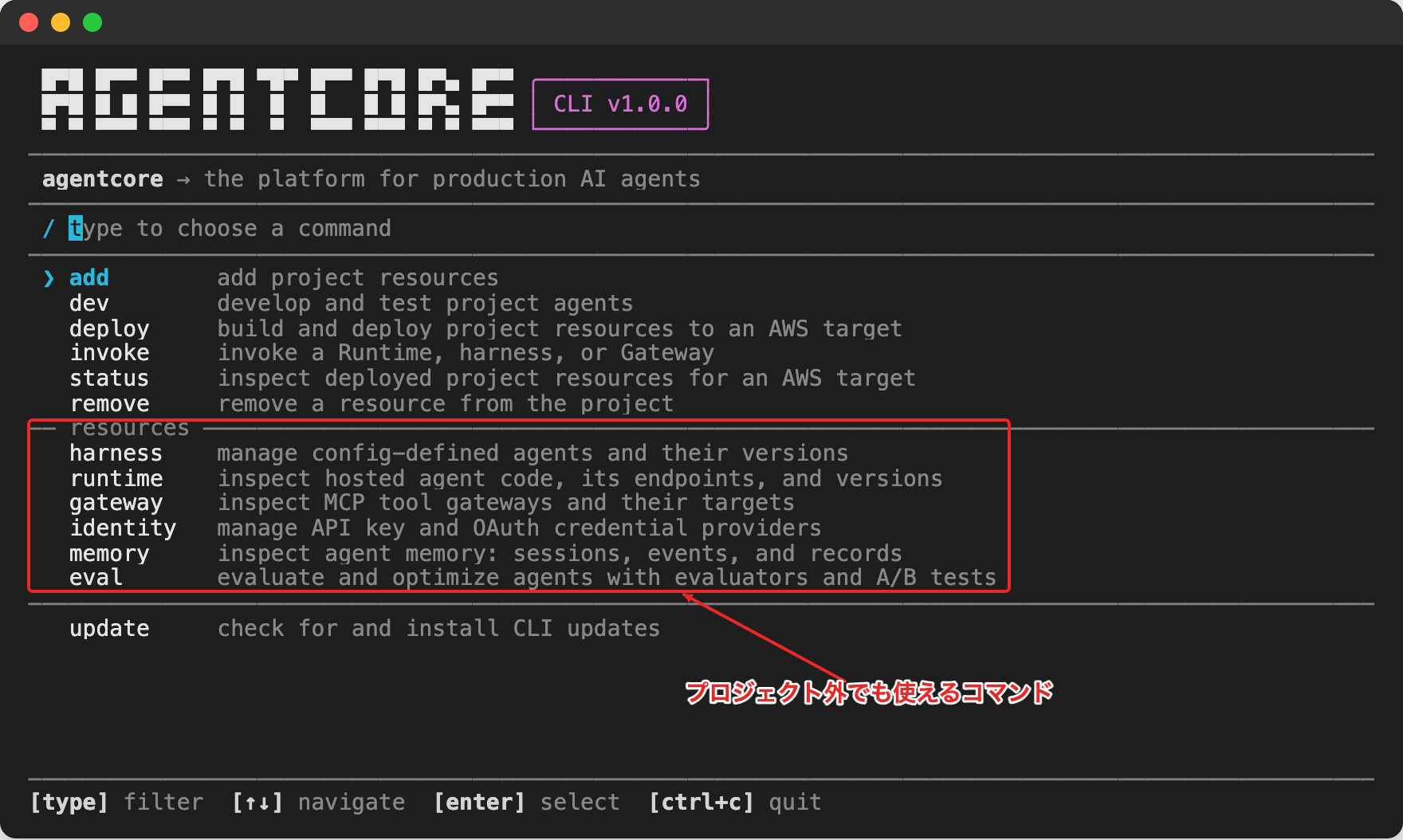
The top half shows project commands, and the resource commands are listed under resources.
From here, I'll try deploying Harness and Runtime, listing and invoking them, checking sessions, and migrating in that order!
Deploying Harness and Runtime
First, let's create a project, add a Harness, and deploy it.
agentcore create --name CliV1Blog
cd CliV1Blog
agentcore add harness --name assistant --system-prompt "You are an assistant that answers concisely in Japanese."
agentcore deploy
The created app/assistant/harness.yaml contains examples for MCP tools, Skills, VPC, and JWT authentication as comments with documentation links, which is somewhat helpful.
The deployment target aws-targets.json was also automatically created from the authenticated account and region during the first deployment.
created default deployment target: account 123456789012, region us-east-1 (agentcore/aws-targets.json)
verifying AWS account 123456789012
synthesizing CloudFormation templates
enabling CloudWatch Transaction Search
deploying AgentCore-CliV1Blog-default (usually takes a few minutes)
deployed project 'CliV1Blog' to target 'default'
Let's try invoking it right away!
agentcore invoke --harness assistant --prompt "What is AgentCore CLI? Answer in one sentence"

AgentCore CLI is a command-line tool for Amazon Bedrock AgentCore. With commands like `agentcore configure`, `launch`, and `invoke`, you can configure AI agents, deploy them to AgentCore Runtime, and invoke them.
A response came back, but configure and launch are commands from the Starter Toolkit era. Since the model is answering based on its own knowledge, that's understandable!
For the Runtime, I created a project using the Strands template and deployed it.
cd ..
agentcore create --name V1Strands --template agent-python-strands
cd V1Strands
agentcore deploy
The template includes a Strands agent with an addition tool (add_numbers) and AgentCore Memory configuration. I'll try invoking the Runtime from outside the project in the next section.
Listing and invoking from outside the project
First, let's list the Runtimes in the account from outside the project.
cd /tmp
agentcore runtime list --json
{
  "agentRuntimes": [
    {
      "agentRuntimeId": "sample_resource_memory-UeIgHSCSNd",
      "agentRuntimeName": "sample_resource_memory",
      "status": "READY"
    }
  ]
}
A Runtime that I deployed separately in a previous test also appeared in the list.
You can not only list but also invoke by specifying an ID. Let's try invoking both Harness and Runtime from outside the project. The ID can be confirmed at the end of the ARN displayed with agentcore status, or in listings like agentcore runtime list.
agentcore harness invoke --id <Harness ID> \
  --prompt "Hello. Introduce yourself in one sentence" --json
Hello! I'm a Japanese-language assistant that can also execute shell commands and edit files, and I answer concisely.
RSID=blog-v1-runtime-$(uuidgen | tr A-Z a-z)
agentcore runtime invoke --id <Runtime ID> \
  --session-id $RSID --payload '{"prompt":"Calculate 123 + 456"}' --json
data: {"event": {"contentBlockStart": {"start": {"toolUse": {"toolUseId": "tooluse_sUdyeN1yTvVVn9EEUD7Fgq", "name": "add_numbers", "type": "tool_use"}}, "contentBlockIndex": 0}}}
data: {"event": {"contentBlockDelta": {"delta": {"text": "123 + 456 = **"}, "contentBlockIndex": 0}}}
data: {"event": {"contentBlockDelta": {"delta": {"text": "579**"}, "contentBlockIndex": 0}}}
Both were successfully invoked from outside the project!
The Runtime used the add_numbers tool to answer 579. The Runtime response contains the streaming events returned by the agent directly. The top-level agentcore invoke also worked outside the project when passing an ID to --runtime.
You can also check the details screen in the TUI by selecting a Harness from agentcore harness list.
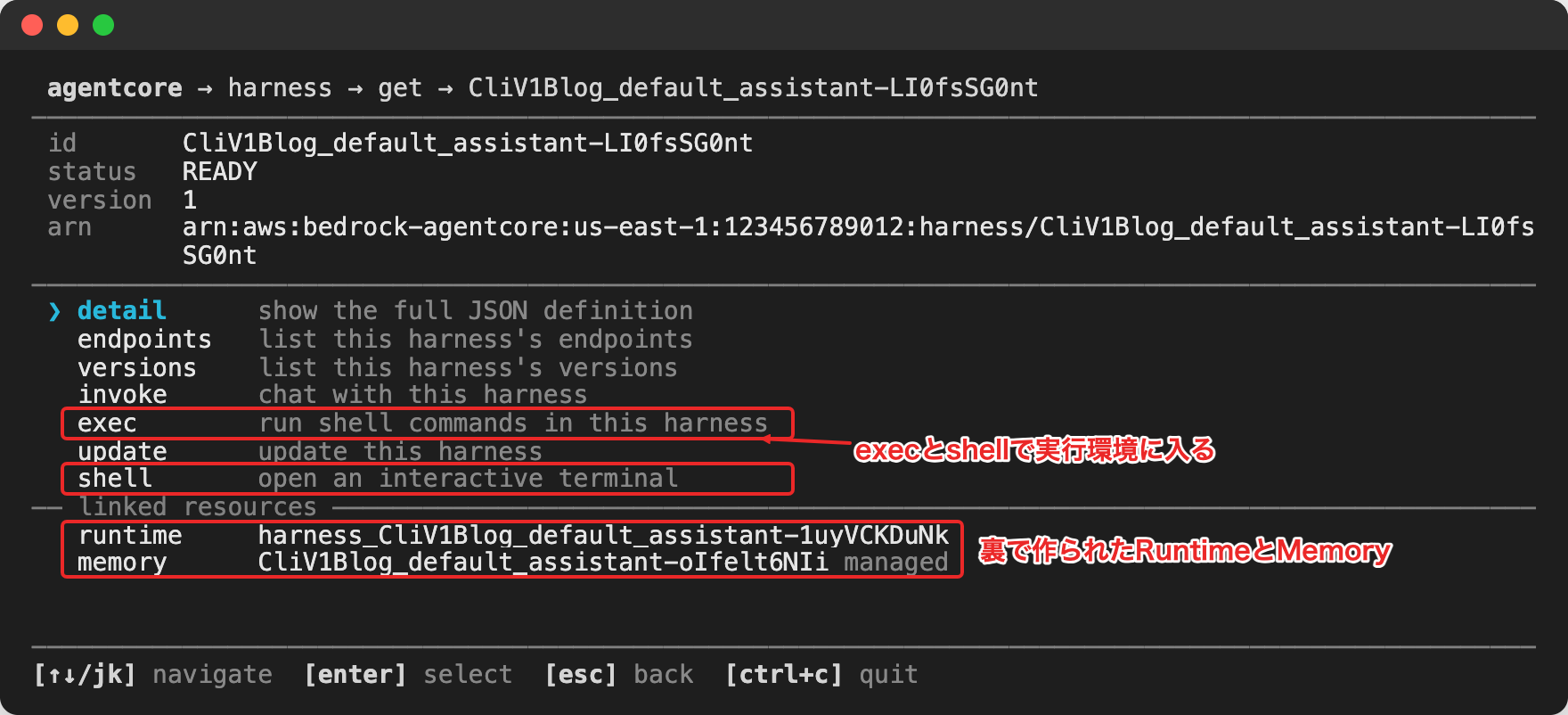
In linked resources, the Runtime and Memory created behind the Harness are displayed. It's convenient to be able to see where the actual entity of a configuration-only Harness lives without opening the console.
Peeking inside a session
You can also enter the runtime environment of a Harness or Runtime session to check its contents. This feature itself existed in 0.31.1 as agentcore exec (with --it for a shell). However, since I personally hadn't used it much before, I'll introduce it again now that it's been split into per-resource commands like harness exec and runtime shell in v1.0.0!
First, let's have the agent create a file in a Harness session by specifying a session ID.
cd <working directory>/CliV1Blog
SID=blog-v1-session-$(uuidgen | tr A-Z a-z)
agentcore invoke --harness assistant --session-id $SID \
  --prompt "Calculate the square of the numbers 1 through 10 in a Python script, save it as squares.py in the working directory, and also tell me the execution result"
Run harness exec with the same session ID and check the working directory.
agentcore harness exec --id <Harness ID> \
  --session-id $SID --command "pwd && ls -la && cat squares.py"
/home
total 12
drwxr-xr-x 1 root root 4096 Oct 22 23:45 .
drwxr-xr-x 1 root root 4096 Oct 22 23:43 ..
-rw-r--r-- 1 root root   59 Oct 22 23:45 squares.py
for n in range(1, 11):
    print(f"{n}'s square = {n ** 2}")
The squares.py created by the agent is still there! When I ran ls -la with a different session ID, /home was empty, so the working directories are separate per session.
With harness shell, you can operate interactively like this:
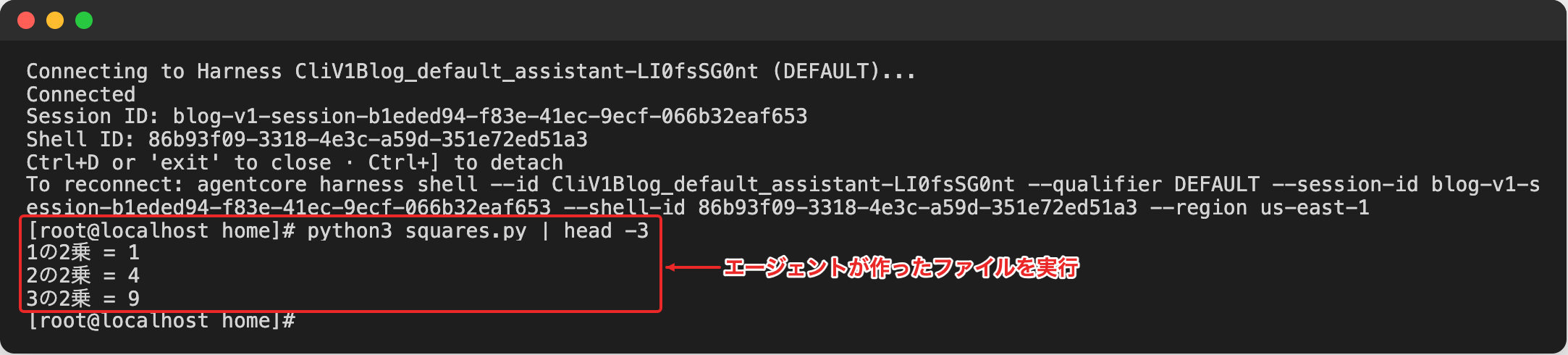
Being able to verify whether the agent actually created a file by checking the runtime environment contents seems useful for debugging!
Let's also run runtime exec on the Runtime with the session invoked earlier. Passing commands chained with && directly didn't give the expected results, so I'm wrapping them with sh -c.
agentcore runtime exec --id <Runtime ID> \
  --session-id $RSID --command "sh -c 'pwd && ls -la && python3 --version'"
/
total 40
drwxr-xr-x   1 root root 4096 Aug 24 21:48 .
drwxr-xr-x   1 root root 4096 Aug 24 21:48 ..
lrwxrwxrwx   1 root root    7 Jan 30  2023 bin -> usr/bin
...
Python 3.14.2
I also entered with runtime shell and checked the agent's process.
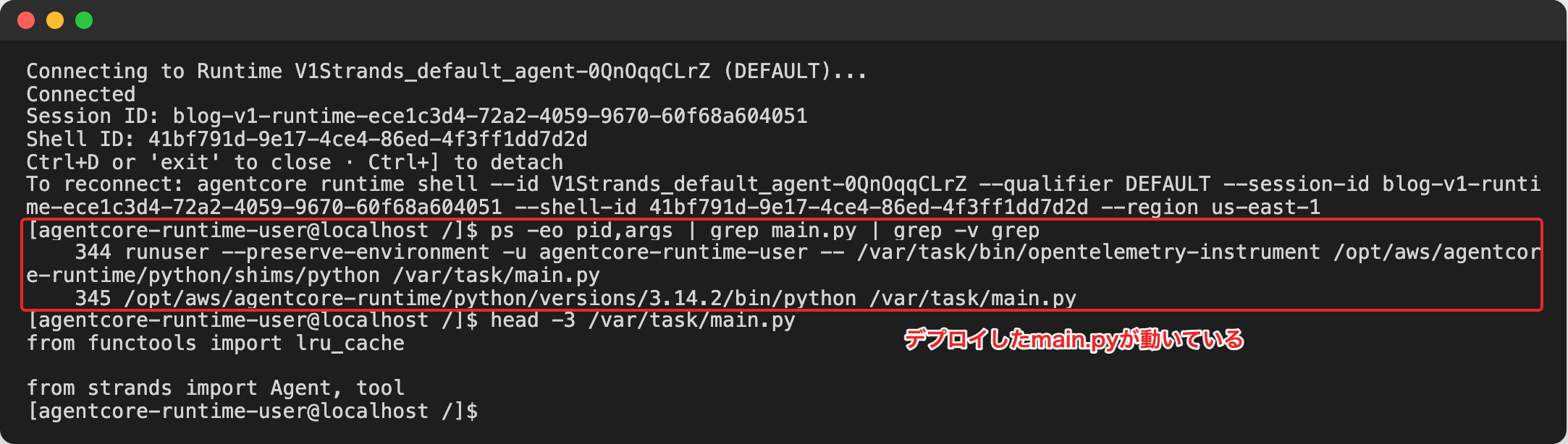
You can see the deployed /var/task/main.py running on Python 3.14! The Harness ran as root, but the Runtime was running as a user called agentcore-runtime-user.
Migrating a 0.x series project
I'll also try the migration for both Harness and Runtime projects. First, let's try with a Harness project (V0Legacy) created and deployed with 0.31.1.
When I tried running add as-is in v1.0.0, it guided me to migrate first.
Error: This project uses the v0 format (agentcore.json version 1). The v1 CLI cannot add or remove resources in it. Use 'agentcore migrate' to migrate the project fully before adding or removing resources.
migrate needs to be run with a clean Git working tree, so commit first before running it.
cd <working directory>/V0Legacy
git add -A && git commit -m "v0 deployed"
agentcore migrate --yes
Migration plan: V0Legacy → v1 (target default, 123456789012/us-east-1)
  Keeps the names of 2 deployed resources (harness legacy, harness-role legacy)
  Moves 0 resources in AgentCore-V0Legacy-default to new logical IDs (stack refactor)
  First v1 deploy: replaces nothing
  Changes 13 files (agentcore/agentcore.json, agentcore/cdk/…, app/legacy/harness.json, app/legacy/harness.yaml)

Migrated. Review the changes with `git diff`, then run `agentcore deploy`.
Before rewriting files, the plan displays that it will preserve the names of the Harness and IAM role, and that the first deployment won't replace any resources. The harness.json was also converted to harness.yaml.
Redeploy with agentcore deploy and check the Harness ARN with agentcore status.
arn:aws:bedrock-agentcore:us-east-1:123456789012:harness/V0Legacy_legacy-UEjzc5CQi6
It's the same ID as when deployed with 0.31.1! It was carried over without being recreated, and add also worked without issues after migration.
I also created a Strands agent Runtime project with 0.31.1, deployed it, and migrated it using the same steps.
Migration plan: V0Strands → v1 (target default, 123456789012/us-east-1)
  Keeps the names of 1 deployed resource (runtime agent)
  Moves 3 resources in AgentCore-V0Strands-default to new logical IDs (stack refactor)
  First v1 deploy: replaces nothing; updates 1 resource in place

✔ AgentCore-V0Strands-default: refactored, every physical ID unchanged
Migrated. Review the changes with `git diff`, then run `agentcore deploy`.
For the Runtime, it displayed that it reassigned logical IDs for 3 resources via CloudFormation stack refactoring, while migrating without changing the actual IDs (physical IDs).
The Runtime ID after deployment was also the same as in 0.31.1 (V0Strands_agent-trUPjZEz5C), and it could be invoked as-is after migration.
Cleanup
Removing all resources from the project and deploying will delete the stack. I deleted the Runtime and migrated projects using the same procedure.
# Run in the directory of the project to delete
agentcore remove all --yes
agentcore deploy --yes
Conclusion
With changes spanning from the command structure to the configuration files, it really feels like we've finally reached v1.0.0!
It's great that both Harness and Runtime can now be invoked from outside the project and even the inside of sessions can be checked! I'd like to explore more details and write about them in future blog posts!
I hope this article is helpful in some way. Thank you for reading to the end!
Supplementary Notes
The create wizard has become shorter
Running agentcore create without options lets you create a project through a wizard.
In 0.31.1, selecting Harness involved 7 steps: "Name → Model → API format → Runtime → Memory → Advanced settings → Confirm."
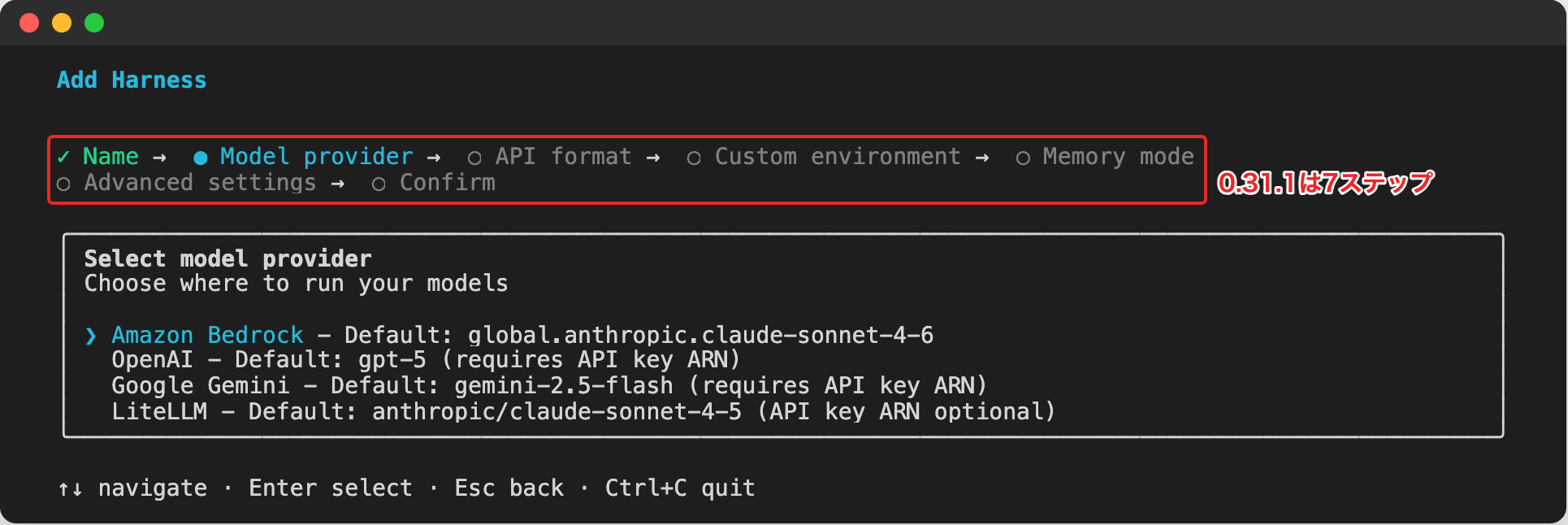
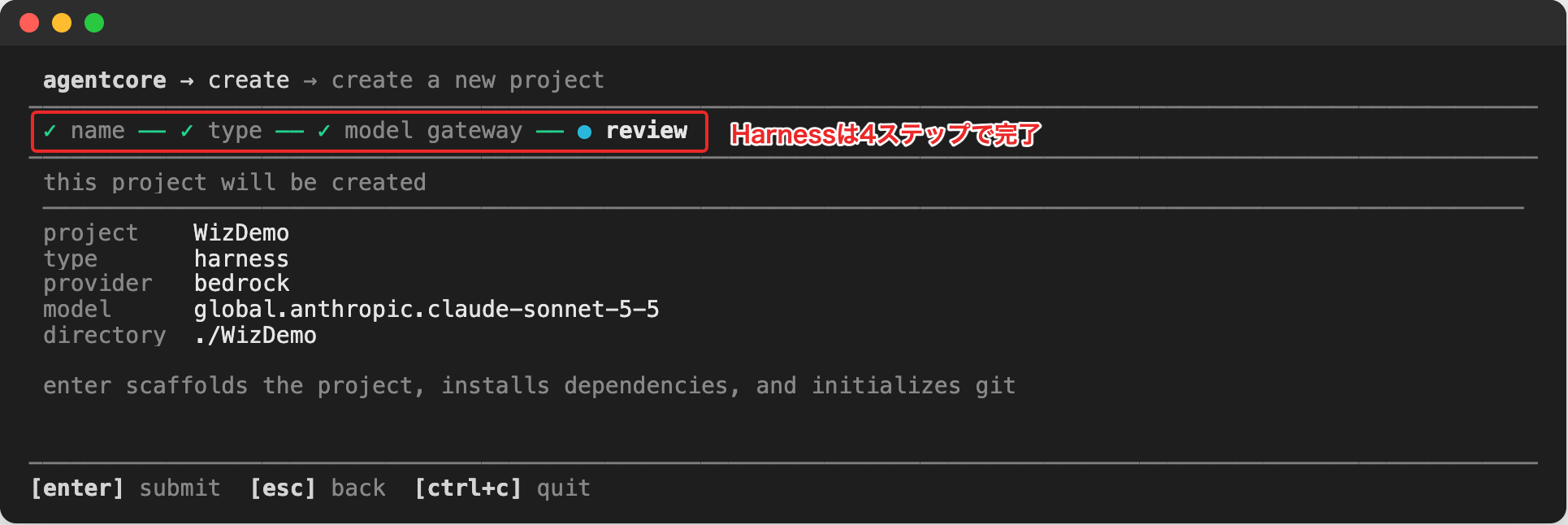
In v1.0.0, it's been reduced to 4 steps: "Name → Type → Model → Confirm," with detailed settings added later in harness.yaml.
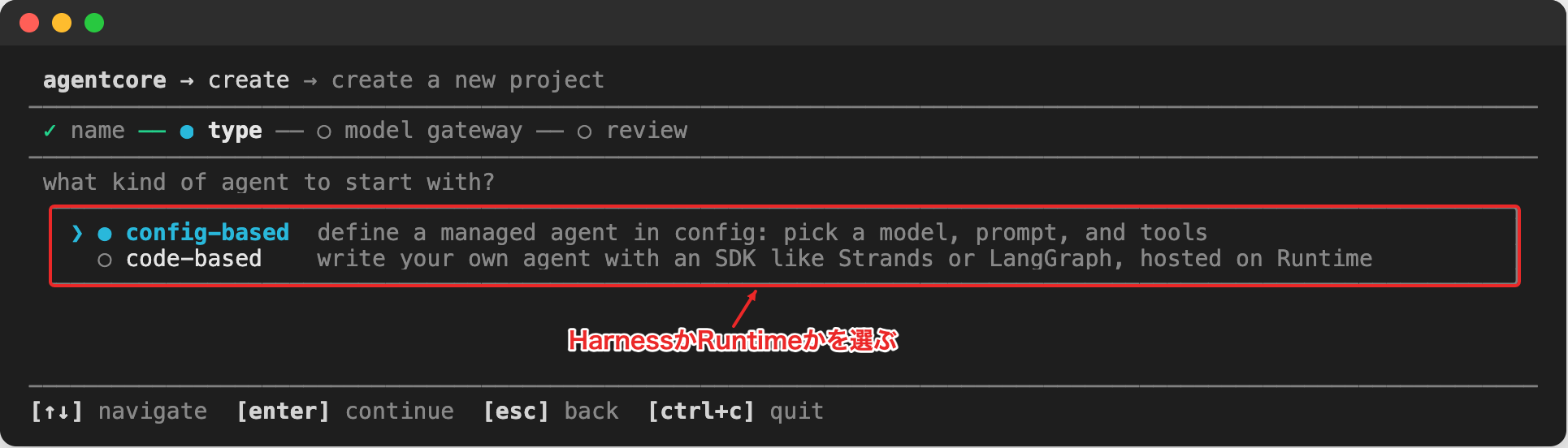
After entering the name, you first choose between config-based (Harness) or code-based (Runtime).
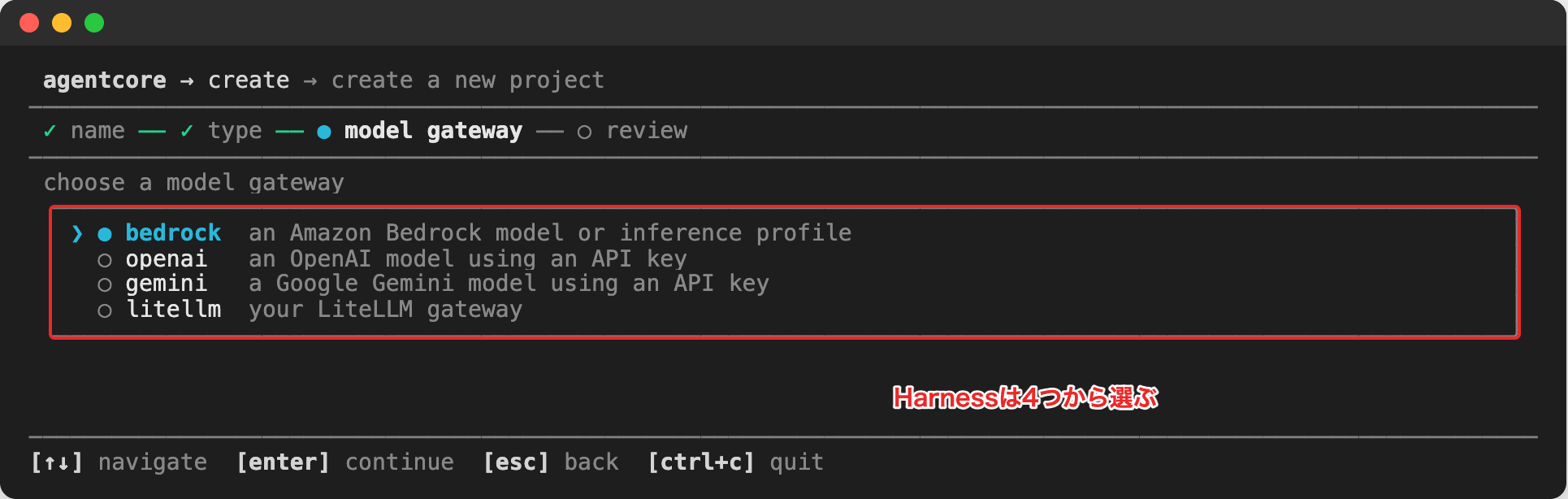
If you select config-based, you choose the model. The available options are Bedrock, OpenAI, Gemini, and LiteLLM.
Selecting a model takes you directly to the confirmation screen. Memory is created with managed Memory enabled.
If you select code-based, you choose a template and model provider. The templates are the same list as what can be specified with --template.
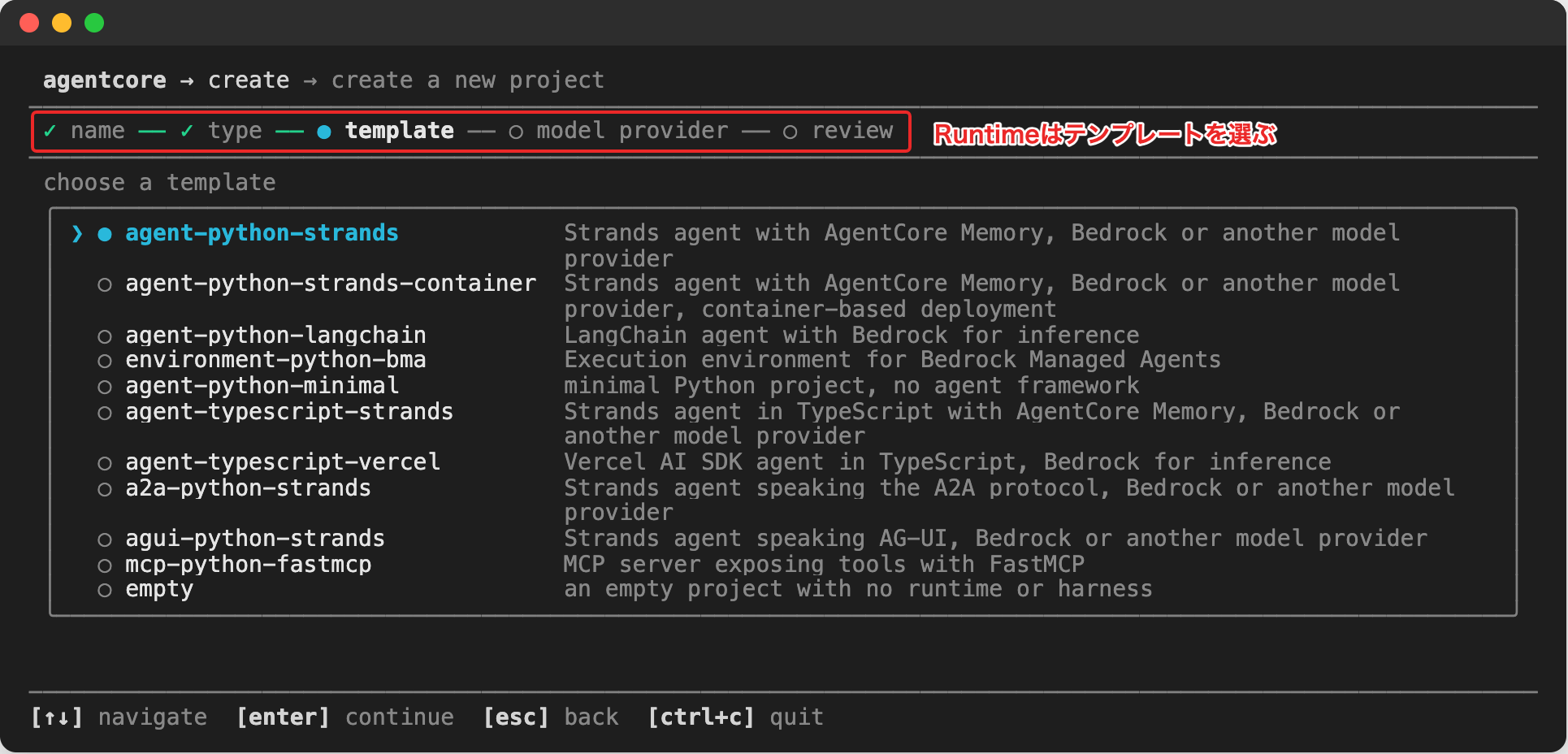
After selecting a template, you choose the model provider. In addition to the 4 options for Harness, Anthropic and OpenAI-compatible endpoints were also available.