
I built a Code Interpreter environment using AgentCore Runtime that can be used just by connecting MCP

This page has been translated by machine translation. View original
Introduction
Hello, I'm Masaoka from the AI Business Division, Generative AI Integration Department, West Japan Development Team.
In a chat environment like LibreChat that can switch between multiple LLM provider models, I wanted to also perform tasks like "passing a CSV for aggregation" or "creating graphs and documents." A code execution environment is necessary for that.
LibreChat itself has a Code Interpreter feature, but the hosted API has stopped accepting new registrations, and to use it for free, self-hosting the execution infrastructure is required.
Also, the Azure AI Foundry Code Interpreter that I was originally using is simply not supported by LibreChat. Even if it were supported, it can only be called from the Foundry agent side, so using it with Bedrock's Claude would require yet another separate mechanism. I'd prefer to avoid rebuilding the code execution environment every time the model or provider changes.
So I tried fixing the execution environment to a single one that can be called from any model with the same interface. By extracting Amazon Bedrock AgentCore's Code Interpreter as an MCP server, any MCP-connectable client can use code execution and file I/O.
What We're Building
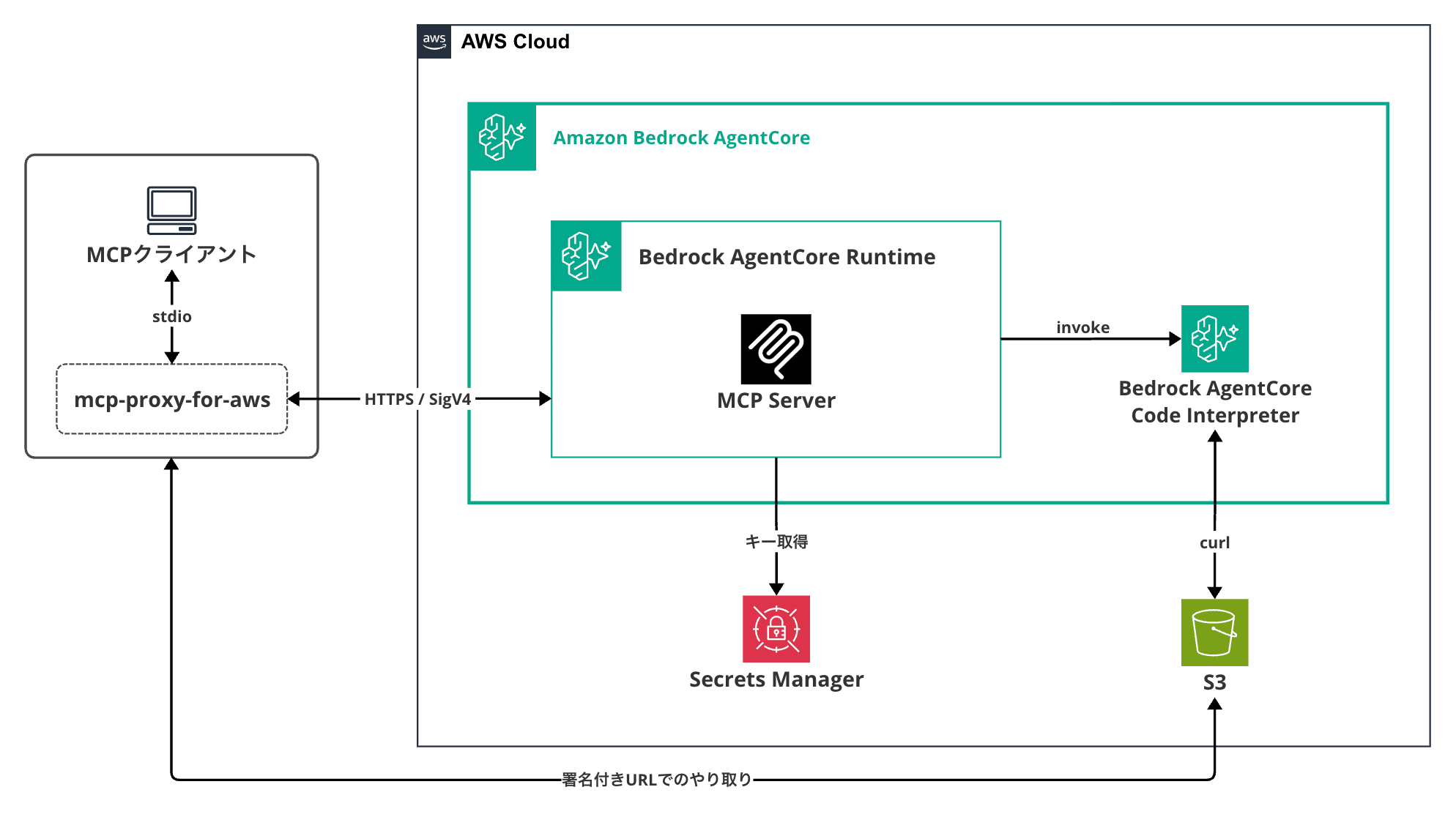
The MCP client connects to the MCP server on AgentCore Runtime via AWS's official stdio proxy mcp-proxy-for-aws, which signs requests with SigV4.
The MCP server internally holds one Code Interpreter session and exposes code execution and file operations as tools.
Provided Tools
Eight tools are provided.
| Tool | Role |
|---|---|
execute_python |
Execute Python code in a sandbox |
execute_js |
Execute JavaScript code in a sandbox |
execute_ts |
Execute TypeScript code in a sandbox |
execute_command |
Execute shell commands |
write_file |
Write text directly to the sandbox (for small files) |
get_upload_url |
Issue a pre-signed URL for uploading |
load_file |
Load a file from S3 into the sandbox |
save_file |
Extract a file from the sandbox (images are returned as-is, others as a download URL) |
File Transfer
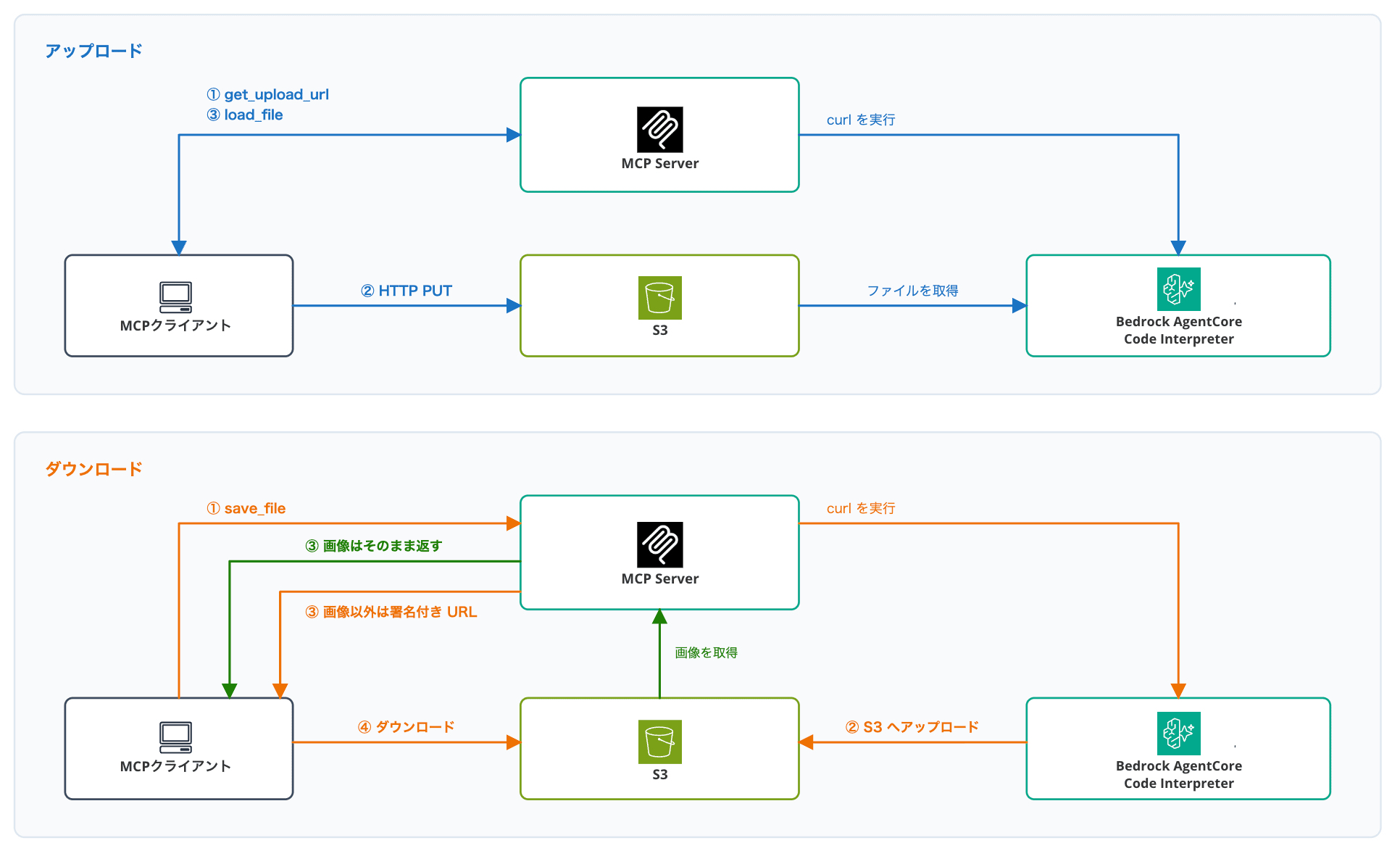
The upload flow is as follows:
- Issue a pre-signed URL with
get_upload_url - The client performs an HTTP PUT to that URL
- Load the file from S3 into the sandbox with
load_file
The download is the reverse: save_file writes from the sandbox to S3 and returns a pre-signed download URL.
However, images (png / jpg / gif / webp) are an exception — instead of a URL, the image itself is returned as MCP image content. If the client supports it, results are displayed directly in the chat, so you can see the graph without clicking a link.
About the Technologies Used
MCP Server Hosting on AgentCore Runtime
AgentCore Runtime natively supports the MCP protocol.
If the container accepts streamable-HTTP at 0.0.0.0:8000/mcp, the Runtime handles session management (automatic assignment when Mcp-Session-Id is absent) and scaling.
The server is implemented in stateless mode (stateless_http=True). This is the mode recommended by the official documentation for basic MCP servers; stateful mode is only needed when using MCP's bidirectional features such as elicitation or sampling. Even in stateless mode, state doesn't disappear with each exchange. Requests with the same Mcp-Session-Id are delivered to the same instance, so state maintenance can be delegated to the Runtime's session management.
For inbound authentication, the choice is either IAM (SigV4) or OAuth 2.0 (JWT); we'll use SigV4 this time.
AgentCore Code Interpreter
This is a managed sandbox for safely executing code. It has the following characteristics:
- State is maintained per session. The default timeout is 15 minutes (maximum 8 hours), and files inside the sandbox are deleted when the session ends
- Tool operations such as
executeCode(Python / JavaScript / TypeScript),executeCommand, andwriteFilescan be invoked - We'll use the AWS-managed default environment (identifier
aws.codeinterpreter.v1). It's a closed network configuration (networkMode: SANDBOX) with no outbound internet access; access to AWS services like S3 works, but DNS resolution fails for PyPI and npm registries, sopip installandnpm installare not available
If pip install is absolutely necessary, you can create a custom Code Interpreter with the create-code-interpreter API and specify networkMode: PUBLIC to enable outbound internet access.
mcp-proxy-for-aws
With SigV4 authentication, you need to compute a signature from the request body and timestamp for each request and include it in the header. However, in MCP client configurations like Claude Code or LibreChat, only fixed-value headers like Authorization: Bearer xxx can be added to remote MCP servers. Since there's no mechanism to compute a signature per request, a direct connection is not possible.
That's where AWS's official mcp-proxy-for-aws comes in. It runs locally on the client as a stdio MCP server, signs received requests with AWS credentials using SigV4, and forwards them to the Runtime.
Let's Try It
Prerequisites
These are the versions used during verification.
| Item | Version |
|---|---|
| Region | ap-northeast-1 |
| Python | 3.14 |
| uv | 0.9.7 |
| AgentCore CLI(@aws/agentcore) | 0.24.0 |
| mcp | 2.0.0 |
| bedrock-agentcore | 1.21.0 |
| boto3 | 1.43.67 |
| mcp-proxy-for-aws | 1.6.4 |
| LibreChat | 0.8.7 |
Create the Project
Create a project with the AgentCore CLI.
pnpm add -g @aws/agentcore
agentcore create --project-name cimcpserver --name code_interpreter_mcp \
  --protocol MCP --language Python --build CodeZip
--build CodeZip is a deployment method that bundles code and dependency packages into a zip, eliminating the need for Docker.
Running this generates a CDK-based project. We'll write the MCP server itself in app/code_interpreter_mcp/main.py, so let's add the dependencies first.
cd cimcpserver/app/code_interpreter_mcp
uv add "mcp>=2.0.0,<3" "bedrock-agentcore>=1.21.0,<2" boto3
The reason for adding upper bounds to versions is that CodeZip build resolves dependencies fresh without referencing uv.lock.
Without upper bounds, the latest major version would be installed with each deployment.
Implement the MCP Server
We'll implement following the MCP server example in the official documentation. The only Runtime-specific points are stateless_http=True and host="0.0.0.0".
The official documentation code is written with FastMCP from MCP Python SDK v1, but here we'll write with v2. In v2, released on July 28, 2026, FastMCP was renamed to MCPServer, and the import path changed from mcp.server.fastmcp to mcp.server.mcpserver. The v1 series has entered maintenance mode.
Create the Skeleton
First, write up to loading configuration values and initializing clients.
The helper functions and tools that follow will be added between the code_interpreter definition and if __name__ == "__main__":.
Note that the S3 bucket pointed to by environment variable FILE_BUCKET and the secret pointed to by SIGNING_SECRET_ID will be created in subsequent steps, with values passed through deployment configuration.
import json
import os
from pathlib import Path

import boto3
from bedrock_agentcore.tools.code_interpreter_client import CodeInterpreter
from botocore.config import Config
from mcp.server.mcpserver import Image, MCPServer

REGION = os.environ.get("AWS_REGION", "ap-northeast-1")
FILE_BUCKET = os.environ["FILE_BUCKET"]  # S3 bucket name for file transfer
SIGNING_SECRET_ID = os.environ.get("SIGNING_SECRET_ID")  # Secret ID for signing-only access key
URL_EXPIRES_SECONDS = 900  # Expiration time for pre-signed URLs
SESSION_TIMEOUT_SECONDS = 1800  # Code Interpreter session idle timeout

mcp = MCPServer("code-interpreter")

S3_CONFIG = Config(signature_version="s3v4", s3={"addressing_style": "virtual"})

s3 = boto3.client("s3", region_name=REGION, config=S3_CONFIG)

code_interpreter = CodeInterpreter(REGION)

if __name__ == "__main__":
    mcp.run(transport="streamable-http", host="0.0.0.0", port=8000, stateless_http=True)
Issue Pre-signed URLs with SigV4
The reason for explicitly specifying Config(signature_version="s3v4") when creating the s3 client is that without it, PUT requests to the issued pre-signed URL fail with 307 Temporary Redirect or 403 SignatureDoesNotMatch.
Without explicit specification, the failure occurs in the following sequence:
- boto3 may generate pre-signed URLs using the old SigV2 scheme
- Since SigV2 doesn't include region information in the signature, the URL becomes in global endpoint (
s3.amazonaws.com) format - The actual global endpoint is in US East, so a PUT to a Tokyo bucket returns a 307 redirect saying "go to the regional endpoint," where it fails
By explicitly specifying s3v4, the issued URL uses the Tokyo region hostname <bucket-name>.s3.ap-northeast-1.amazonaws.com, and both PUT and GET go through without redirects.
Implement Helper Functions
Three helpers are prepared.
def get_session_id() -> str:
    """Returns the Code Interpreter session ID. Starts a new session if not yet started."""
    if not code_interpreter.session_id:
        code_interpreter.start(session_timeout_seconds=SESSION_TIMEOUT_SECONDS)
    return code_interpreter.session_id

def call_code_interpreter(tool_name: str, arguments: dict) -> str:
    """Calls a Code Interpreter tool once and returns the result text."""
    get_session_id()
    response = code_interpreter.invoke(tool_name, arguments)
    for event in response["stream"]:
        result = event["result"]
        texts = [c["text"] for c in result.get("content", []) if c.get("type") == "text"]
        output = "\n".join(texts)
        if result.get("isError"):
            raise RuntimeError(f"An error occurred in Code Interpreter: {output}")
        return output
    return ""

def build_s3_key(filename: str) -> str:
    """Assembles an S3 key with the session ID as a prefix.

    By separating prefixes per session, files from different sessions don't get mixed.
    """
    return f"{get_session_id()}/{filename}"
Implement Code Execution Tools
Now for the tool implementations themselves. First, the four code execution tools.
@mcp.tool()
def execute_python(code: str) -> str:
    """Executes Python code in a sandbox and returns the execution result.

    pandas, matplotlib, python-pptx, and others are pre-installed.
    Within the same session, variables and files are retained across executions.
    """
    return call_code_interpreter("executeCode", {"language": "python", "code": code})
@mcp.tool()
def execute_js(code: str) -> str:
    """Executes JavaScript code in a sandbox and returns the execution result.

    Only ESM syntax is supported (require is not available). Built-in modules are loaded
    with the node: prefix like `import fs from "node:fs"`.
    npm packages cannot be retrieved because outbound network access is not available.
    Since it shares the same sandbox as Python, files can be read and written across languages.
    """
    return call_code_interpreter("executeCode", {"language": "javascript", "code": code})
@mcp.tool()
def execute_ts(code: str) -> str:
    """Executes TypeScript code in a sandbox and returns the execution result.

    Code with type annotations can be executed directly without transpilation.
    Module restrictions are the same as execute_js (ESM only, no npm package retrieval).
    """
    return call_code_interpreter("executeCode", {"language": "typescript", "code": code})
@mcp.tool()
def execute_command(command: str) -> str:
    """Executes a shell command in the sandbox and returns the execution result.

    Outbound network access is not available (pip install / npm install not possible).
    """
    return call_code_interpreter("executeCommand", {"command": command})
The MCP Python SDK registers the function name as the tool name and the docstring as the tool's description.
The AI looks at this description to select tools.
In fact, I initially wrote "npm install is available" in the execute_js description, causing the AI to diligently attempt npm install and time out.
Implement Pre-signed URL Helpers
Pre-signed URL generation is consolidated into three helpers.
_signer = None  # Cache for the signing-only S3 client

def get_signer():
    """Returns an S3 client used only for generating pre-signed URLs."""
    global _signer
    if _signer is None:
        if SIGNING_SECRET_ID:
            secrets = boto3.client("secretsmanager", region_name=REGION)
            creds = json.loads(secrets.get_secret_value(SecretId=SIGNING_SECRET_ID)["SecretString"])
            _signer = boto3.client(
                "s3",
                region_name=REGION,
                aws_access_key_id=creds["AccessKeyId"],
                aws_secret_access_key=creds["SecretAccessKey"],
                config=S3_CONFIG,
            )
        else:
            _signer = s3
    return _signer

def presign_upload(filename: str) -> str:
    """Issues a pre-signed URL for uploading (HTTP PUT) to S3."""
    return get_signer().generate_presigned_url(
        "put_object",
        Params={"Bucket": FILE_BUCKET, "Key": build_s3_key(filename)},
        ExpiresIn=URL_EXPIRES_SECONDS,
    )

def presign_download(filename: str) -> str:
    """Issues a pre-signed URL for downloading (HTTP GET) from S3."""
    return get_signer().generate_presigned_url(
        "get_object",
        Params={"Bucket": FILE_BUCKET, "Key": build_s3_key(filename)},
        ExpiresIn=URL_EXPIRES_SECONDS,
    )
get_signer creates an S3 client using a static access key stored in Secrets Manager, used only for issuing pre-signed URLs.
This is because signing with the execution role's temporary credentials appends an approximately 900-character X-Amz-Security-Token to the URL, causing the model to drop characters when transcribing the URL.
Pre-signed URLs signed with a static key are not invalidated by credential expiration, so the expiration (URL_EXPIRES_SECONDS) is set to 15 minutes to limit the impact if a URL is leaked.
Implement File Operation Tools
There are four file-related tools.
@mcp.tool()
def get_upload_url(filename: str) -> str:
    """Issues an upload URL for passing a file to the sandbox.

    After uploading the file via HTTP PUT to the returned URL,
    call load_file to load it into the sandbox.
    """
    return presign_upload(filename)
@mcp.tool()
def load_file(filename: str) -> str:
    """Loads an uploaded file into the sandbox's working directory."""
    url = presign_download(filename)
    call_code_interpreter("executeCommand", {"command": f'curl -sSf -o "{filename}" "{url}"'})
    return f"{filename} has been placed in the sandbox"
The internals of load_file simply run curl inside the sandbox to fetch from S3. Since the MCP server process doesn't relay the file, files up to the 5GB limit supported by Code Interpreter can be handled directly.
INLINE_IMAGE_FORMATS = {
    ".png": "png",
    ".jpg": "jpeg",
    ".jpeg": "jpeg",
    ".gif": "gif",
    ".webp": "webp",
}
MAX_INLINE_IMAGE_BYTES = 5 * 1024 * 1024

@mcp.tool()
def save_file(filename: str):
    """Extracts a file from the sandbox.

    Images (png/jpg/gif/webp) are returned as the image itself, so they display
    directly in the chat on supported clients. Other files return a download URL.
    Never rewrite the URL; present it exactly as the received string.
    """
    upload_url = presign_upload(filename)
    call_code_interpreter("executeCommand", {"command": f'curl -sSf -X PUT -T "{filename}" "{upload_url}"'})

    image_format = INLINE_IMAGE_FORMATS.get(Path(filename).suffix.lower())
    if image_format:
        body = s3.get_object(Bucket=FILE_BUCKET, Key=build_s3_key(filename))["Body"].read()
        if len(body) <= MAX_INLINE_IMAGE_BYTES:
            return Image(data=body, format=image_format)

    return presign_download(filename)
Image is a class from the MCP Python SDK; returning it passes the image directly to the client.
Since the image data is loaded into the LLM's context as base64, only images 5MB or smaller take this path; others return a download URL.
Also, annotating the return type as -> str | Image causes the MCP Python SDK to fail to build the schema and crash at import time, so type annotations are omitted only for save_file.
@mcp.tool()
def write_file(filename: str, content: str) -> str:
    """Writes text content directly to the sandbox as a file.

    Since it doesn't go through S3 (completed only via MCP communication),
    it's suitable for passing small text. Use get_upload_url / load_file for
    large files or binary data.
    """
    call_code_interpreter("writeFiles", {"content": [{"path": filename, "text": content}]})
    return f"{filename} has been written to the sandbox"
Both write_file and load_file are tools for "placing a file in the sandbox," but they use different paths.
write_file |
get_upload_url + load_file |
|
|---|---|---|
| Path the file travels | MCP tool arguments (passes through LLM context) | S3 (direct via HTTP) |
| Size | Tens of KB of text is the practical limit | Up to 5GB |
| Binary | Not supported | Supported |
| Client requirements | Only needs MCP connectivity | Requires HTTPS access to S3 endpoint |
The normal usage is load_file, while write_file is used when placing a single configuration file or small script.
Here is the complete code combining all the separately presented snippets above.
main.py complete
import json
import os
from pathlib import Path

import boto3
from bedrock_agentcore.tools.code_interpreter_client import CodeInterpreter
from botocore.config import Config
from mcp.server.mcpserver import Image, MCPServer

REGION = os.environ.get("AWS_REGION", "ap-northeast-1")
FILE_BUCKET = os.environ["FILE_BUCKET"]  # S3 bucket name for file transfer
SIGNING_SECRET_ID = os.environ.get("SIGNING_SECRET_ID")  # Secret ID for signing-only access key
URL_EXPIRES_SECONDS = 900  # Expiration time for pre-signed URLs
SESSION_TIMEOUT_SECONDS = 1800  # Code Interpreter session idle timeout

mcp = MCPServer("code-interpreter")

S3_CONFIG = Config(signature_version="s3v4", s3={"addressing_style": "virtual"})

s3 = boto3.client("s3", region_name=REGION, config=S3_CONFIG)

code_interpreter = CodeInterpreter(REGION)

def get_session_id() -> str:
    """Returns the Code Interpreter session ID. Starts a new session if not yet started."""
    if not code_interpreter.session_id:
        code_interpreter.start(session_timeout_seconds=SESSION_TIMEOUT_SECONDS)
    return code_interpreter.session_id

def call_code_interpreter(tool_name: str, arguments: dict) -> str:
    """Calls a Code Interpreter tool once and returns the result text."""
    get_session_id()
    response = code_interpreter.invoke(tool_name, arguments)
    for event in response["stream"]:
        result = event["result"]
        texts = [c["text"] for c in result.get("content", []) if c.get("type") == "text"]
        output = "\n".join(texts)
        if result.get("isError"):
            raise RuntimeError(f"An error occurred in Code Interpreter: {output}")
        return output
    return ""

def build_s3_key(filename: str) -> str:
    """Assembles an S3 key with the session ID as a prefix.

    By separating prefixes per session, files from different sessions don't get mixed.
    """
    return f"{get_session_id()}/{filename}"

@mcp.tool()
def execute_python(code: str) -> str:
    """Executes Python code in a sandbox and returns the execution result.

    pandas, matplotlib, python-pptx, and others are pre-installed.
    Within the same session, variables and files are retained across executions.
    """
    return call_code_interpreter("executeCode", {"language": "python", "code": code})

@mcp.tool()
def execute_js(code: str) -> str:
    """Executes JavaScript code in a sandbox and returns the execution result.

    Only ESM syntax is supported (require is not available). Built-in modules are loaded
    with the node: prefix like `import fs from "node:fs"`.
    npm packages cannot be retrieved because outbound network access is not available.
    Since it shares the same sandbox as Python, files can be read and written across languages.
    """
    return call_code_interpreter("executeCode", {"language": "javascript", "code": code})

@mcp.tool()
def execute_ts(code: str) -> str:
    """Executes TypeScript code in a sandbox and returns the execution result.

    Code with type annotations can be executed directly without transpilation.
    Module restrictions are the same as execute_js (ESM only, no npm package retrieval).
    """
    return call_code_interpreter("executeCode", {"language": "typescript", "code": code})

@mcp.tool()
def execute_command(command: str) -> str:
    """Executes a shell command in the sandbox and returns the execution result.

    Outbound network access is not available (pip install / npm install not possible).
    """
    return call_code_interpreter("executeCommand", {"command": command})

_signer = None  # Cache for the signing-only S3 client

def get_signer():
    """Returns an S3 client used only for generating pre-signed URLs."""
    global _signer
    if _signer is None:
        if SIGNING_SECRET_ID:
            secrets = boto3.client("secretsmanager", region_name=REGION)
            creds = json.loads(secrets.get_secret_value(SecretId=SIGNING_SECRET_ID)["SecretString"])
            _signer = boto3.client(
                "s3",
                region_name=REGION,
                aws_access_key_id=creds["AccessKeyId"],
                aws_secret_access_key=creds["SecretAccessKey"],
                config=S3_CONFIG,
            )
        else:
            _signer = s3
    return _signer

def presign_upload(filename: str) -> str:
    """Issues a pre-signed URL for uploading (HTTP PUT) to S3."""
    return get_signer().generate_presigned_url(
        "put_object",
        Params={"Bucket": FILE_BUCKET, "Key": build_s3_key(filename)},
        ExpiresIn=URL_EXPIRES_SECONDS,
    )

def presign_download(filename: str) -> str:
    """Issues a pre-signed URL for downloading (HTTP GET) from S3."""
    return get_signer().generate_presigned_url(
        "get_object",
        Params={"Bucket": FILE_BUCKET, "Key": build_s3_key(filename)},
        ExpiresIn=URL_EXPIRES_SECONDS,
    )

@mcp.tool()
def get_upload_url(filename: str) -> str:
    """Issues an upload URL for passing a file to the sandbox.

    After uploading the file via HTTP PUT to the returned URL,
    call load_file to load it into the sandbox.
    """
    return presign_upload(filename)

@mcp.tool()
def load_file(filename: str) -> str:
    """Loads an uploaded file into the sandbox's working directory."""
    url = presign_download(filename)
    call_code_interpreter("executeCommand", {"command": f'curl -sSf -o "{filename}" "{url}"'})
    return f"{filename} has been placed in the sandbox"

INLINE_IMAGE_FORMATS = {
    ".png": "png",
    ".jpg": "jpeg",
    ".jpeg": "jpeg",
    ".gif": "gif",
    ".webp": "webp",
}
MAX_INLINE_IMAGE_BYTES = 5 * 1024 * 1024

@mcp.tool()
def save_file(filename: str):
    """Extracts a file from the sandbox.

    Images (png/jpg/gif/webp) are returned as the image itself, so they display
    directly in the chat on supported clients. Other files return a download URL.
    Never rewrite the URL; present it exactly as the received string.
    """
    upload_url = presign_upload(filename)
    call_code_interpreter("executeCommand", {"command": f'curl -sSf -X PUT -T "{filename}" "{upload_url}"'})

    image_format = INLINE_IMAGE_FORMATS.get(Path(filename).suffix.lower())
    if image_format:
        body = s3.get_object(Bucket=FILE_BUCKET, Key=build_s3_key(filename))["Body"].read()
        if len(body) <= MAX_INLINE_IMAGE_BYTES:
            return Image(data=body, format=image_format)

    return presign_download(filename)

@mcp.tool()
def write_file(filename: str, content: str) -> str:
    """Writes text content directly to the sandbox as a file.

    Since it doesn't go through S3 (completed only via MCP communication),
    it's suitable for passing small text. Use get_upload_url / load_file for
    large files or binary data.
    """
    call_code_interpreter("writeFiles", {"content": [{"path": filename, "text": content}]})
    return f"{filename} has been written to the sandbox"

if __name__ == "__main__":
    mcp.run(transport="streamable-http", host="0.0.0.0", port=8000, stateless_http=True)
Create the S3 Bucket for File Transfer
Create an S3 bucket for file transfer. Block all public access and add a lifecycle rule to delete files after 1 day.
aws s3api create-bucket \
  --bucket code-interpreter-mcp-files-123456789012 \
  --region ap-northeast-1 \
  --create-bucket-configuration LocationConstraint=ap-northeast-1

aws s3api put-public-access-block \
  --bucket code-interpreter-mcp-files-123456789012 \
  --public-access-block-configuration BlockPublicAcls=true,IgnorePublicAcls=true,BlockPublicPolicy=true,RestrictPublicBuckets=true

aws s3api put-bucket-lifecycle-configuration \
  --bucket code-interpreter-mcp-files-123456789012 \
  --lifecycle-configuration '{
    "Rules": [{
      "ID": "expire-transfer-files",
      "Status": "Enabled",
      "Filter": {},
      "Expiration": {"Days": 1},
      "AbortIncompleteMultipartUpload": {"DaysAfterInitiation": 1}
    }]
  }'
Create an IAM User for Signing
Prepare a static access key for use by get_signer. This key can only read and write objects in the created bucket. The issued key is not displayed on screen, but kept in a variable and passed directly to Secrets Manager.
aws iam create-user --user-name code-interpreter-mcp-signer

aws iam put-user-policy --user-name code-interpreter-mcp-signer \
  --policy-name s3-presign-objects \
  --policy-document '{
    "Version": "2012-10-17",
    "Statement": [{
      "Effect": "Allow",
      "Action": ["s3:GetObject", "s3:PutObject"],
      "Resource": "arn:aws:s3:::code-interpreter-mcp-files-123456789012/*"
    }]
  }'

KEY_JSON=$(aws iam create-access-key --user-name code-interpreter-mcp-signer \
  --query 'AccessKey.{AccessKeyId:AccessKeyId,SecretAccessKey:SecretAccessKey}' \
  --output json)

aws secretsmanager create-secret \
  --name code-interpreter-mcp/signing-key \
  --secret-string "$KEY_JSON"
The ARN of the created secret will look like ...:secret:code-interpreter-mcp/signing-key-XXXXXX, with 6 characters appended to the end of the specified name. This suffix is automatically added by Secrets Manager, so in the IAM policy below it will be written using a wildcard.
Deploy to AgentCore Runtime
Add two items to the runtime definition in agentcore/agentcore.json. Pass the bucket name and secret ID via envVars, and have IAM permissions for Code Interpreter automatically generated via connections.
{
  "runtimes": [
    {
      "name": "code_interpreter_mcp",
      "build": "CodeZip",
      "entrypoint": "main.py",
      "codeLocation": "app/code_interpreter_mcp/",
      "runtimeVersion": "PYTHON_3_14",
      "networkMode": "PUBLIC",
      "protocol": "MCP",
      "envVars": [
        { "name": "FILE_BUCKET", "value": "code-interpreter-mcp-files-123456789012" },
        { "name": "SIGNING_SECRET_ID", "value": "code-interpreter-mcp/signing-key" }
      ],
      "connections": [
        { "to": { "type": "codeInterpreter" }, "description": "Use AWS Managed Code Interpreter" }
      ]
    }
  ]
}
networkMode remains as it was at project generation. This is the network configuration for the Runtime container side, and is a separate resource setting from Code Interpreter's networkMode (SANDBOX). Even if this is set to PUBLIC, the sandbox remains closed.
Since there are no fields in the schema for S3 and Secrets Manager permissions, add them to the generated CDK stack (agentcore/cdk/lib/cdk-stack.ts). Place them inside the constructor, immediately after this.application = new AgentCoreApplication(...).
for (const env of this.application.environments.values()) {
  // Access to the S3 bucket for file transfer
  env.runtime.role.addToPrincipalPolicy(
    new iam.PolicyStatement({
      actions: ['s3:GetObject', 's3:PutObject'],
      resources: ['arn:aws:s3:::code-interpreter-mcp-files-123456789012/*'],
    })
  );

  // Retrieve the signing-only access key (-* at the end is the suffix added by Secrets Manager)
  env.runtime.role.addToPrincipalPolicy(
    new iam.PolicyStatement({
      actions: ['secretsmanager:GetSecretValue'],
      resources: [
        'arn:aws:secretsmanager:ap-northeast-1:123456789012:secret:code-interpreter-mcp/signing-key-*',
      ],
    })
  );
}
Deploy.
agentcore deploy --yes
It completes in a few minutes, and you can retrieve the endpoint URL with agentcore status.
Agents
  code_interpreter_mcp: Deployed - Runtime: READY (arn:aws:bedrock-agentcore:ap-northeast-1:123456789012:runtime/cimcpserver_code_interpreter_mcp-xxxxxxxxxx)
  URL: https://bedrock-agentcore.ap-northeast-1.amazonaws.com/runtimes/arn%3Aaws%3A...%2Fcimcpserver_code_interpreter_mcp-xxxxxxxxxx/invocations
Connect from an MCP client by appending ?qualifier=DEFAULT to this URL.
Verification
Issue an IAM User for Connection
The only permission the client needs is bedrock-agentcore:InvokeAgentRuntime for this Runtime. Issue a dedicated IAM user.
aws iam create-user --user-name code-interpreter-mcp-client

aws iam put-user-policy --user-name code-interpreter-mcp-client \
  --policy-name invoke-ci-mcp-runtime \
  --policy-document '{
    "Version": "2012-10-17",
    "Statement": [{
      "Effect": "Allow",
      "Action": "bedrock-agentcore:InvokeAgentRuntime",
      "Resource": [
        "arn:aws:bedrock-agentcore:ap-northeast-1:123456789012:runtime/cimcpserver_code_interpreter_mcp-xxxxxxxxxx",
        "arn:aws:bedrock-agentcore:ap-northeast-1:123456789012:runtime/cimcpserver_code_interpreter_mcp-xxxxxxxxxx/*"
      ]
    }]
  }'

aws iam create-access-key --user-name code-interpreter-mcp-client
Use the AccessKeyId and SecretAccessKey output by the final create-access-key in the LibreChat configuration below.
Using from LibreChat
Connect to the created MCP server from LibreChat, which has multiple providers configured. According to the official documentation, LibreChat's MCP connections are established independently per user (User-Specific Connections), so even when deployed company-wide, sandboxes are not shared with other users.
First, append the issued access key to LibreChat's .env. It uses a dedicated variable name to avoid mixing with LibreChat's own AWS configuration.
CI_MCP_AWS_ACCESS_KEY_ID=AKIAXXXXXXXXXXXXXXXX
CI_MCP_AWS_SECRET_ACCESS_KEY=xxxxxxxxxxxxxxxxxxxxxxxxxxxxxxxxxxxxxxxx
Next, add three sections to librechat.yaml.
interface:
  agents:
    use: true

endpoints:
  agents:
    capabilities:
      - 'tools'

mcpServers:
  code-interpreter:
    type: stdio
    command: uvx
    args:
      - 'mcp-proxy-for-aws@latest'
      - '<endpoint URL>?qualifier=DEFAULT'
      - '--region'
      - 'ap-northeast-1'
    env:
      AWS_ACCESS_KEY_ID: '${CI_MCP_AWS_ACCESS_KEY_ID}'
      AWS_SECRET_ACCESS_KEY: '${CI_MCP_AWS_SECRET_ACCESS_KEY}'
      AWS_REGION: 'ap-northeast-1'
      UV_CACHE_DIR: '/tmp/uv-cache'
    initTimeout: 120000
The env: under mcpServers contains environment variables passed to the proxy launched as a child process.
Writing ${CI_MCP_AWS_ACCESS_KEY_ID} expands the value previously added to .env.
UV_CACHE_DIR is a workaround for uvx being unable to create its default cache location in the Docker version.
initTimeout is extended because the first-time package download by uvx took 19 seconds.
interface and endpoints are also required.
In particular, if tools is missing from capabilities, tools will appear in the UI but none will be passed to the model, and no warning will be shown.
Testing the Full Flow with Azure OpenAI GPT-5.4
Select Azure OpenAI's GPT-5.4 as the model, and issue instructions sequentially in a single thread from data input to pptx creation.
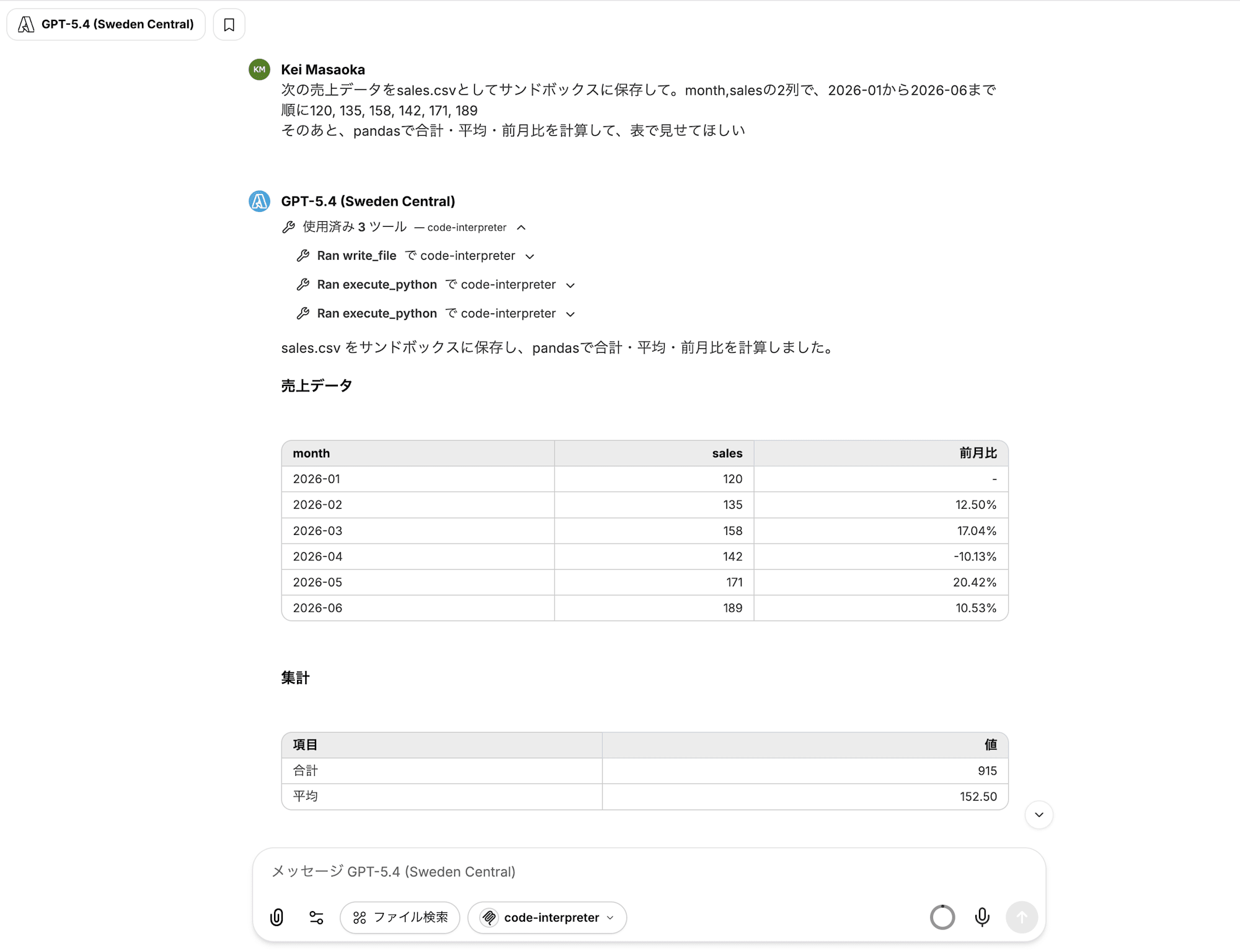
First, place a CSV in the sandbox and have it aggregated.
Save the following sales data to the sandbox as sales.csv. It has 2 columns, month and sales, from 2026-01 to 2026-06 in order: 120, 135, 158, 142, 171, 189
Then use pandas to calculate the total, average, and month-over-month change, and show me the results in a table
The first instruction calls write_file, writing the CSV to the sandbox. For text of this size, it can be passed with a single tool call without going through S3.
The second uses execute_python, returning a table aggregated by the pre-installed pandas.
Next, have it create a graph.
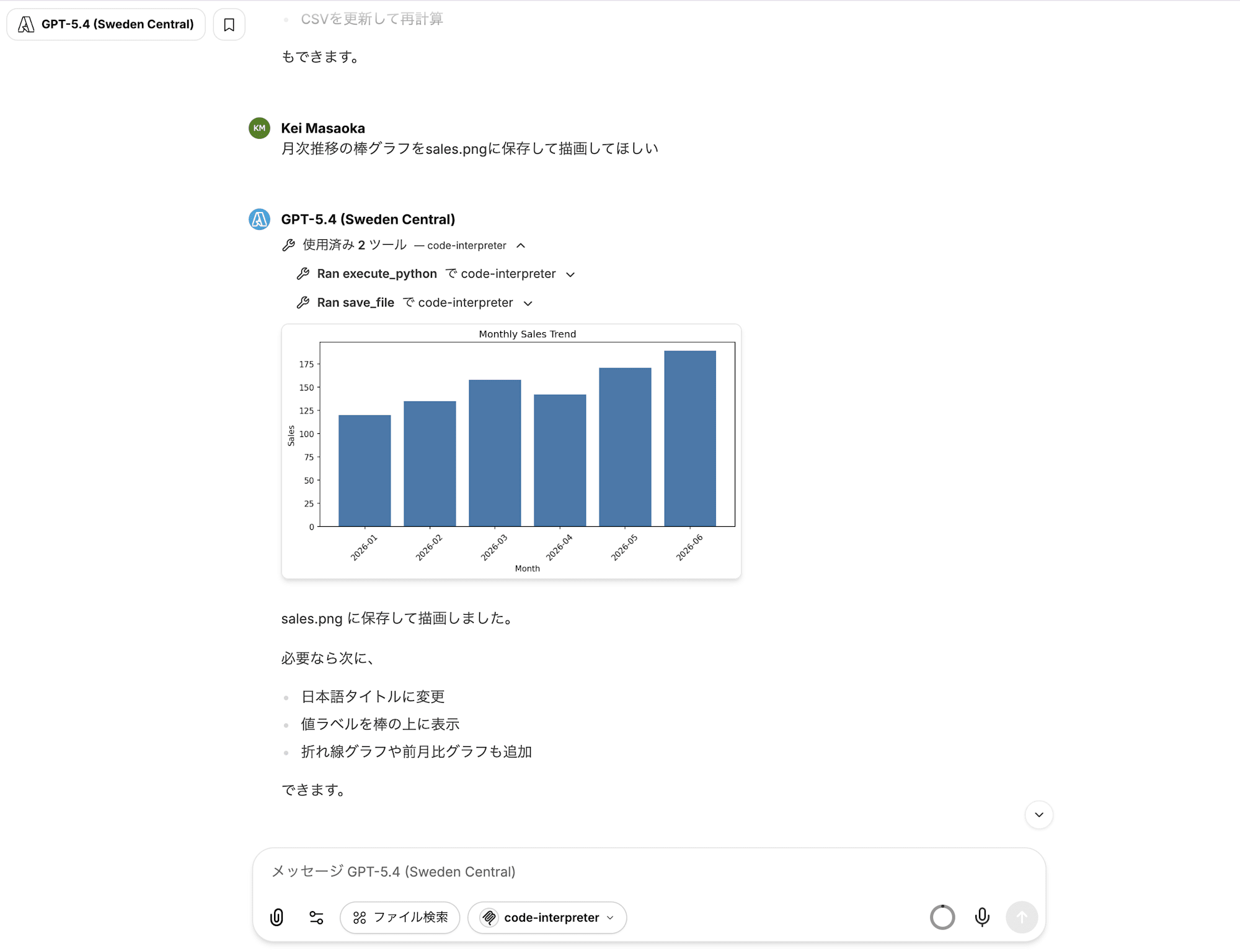
Please draw a bar chart of monthly trends and save it to sales.png
After rendering with execute_python (matplotlib), save_file is called, and since it's a png, the image itself is displayed in the chat rather than a download URL.
Then, have it create a presentation as well.
Please create a single slide with that graph embedded and save it as sales.pptx
Since python-pptx is also pre-installed, the pptx can be created with just execute_python. This time, since it's not an image, save_file returns a signed URL for download. Opening the URL downloads the pptx locally.
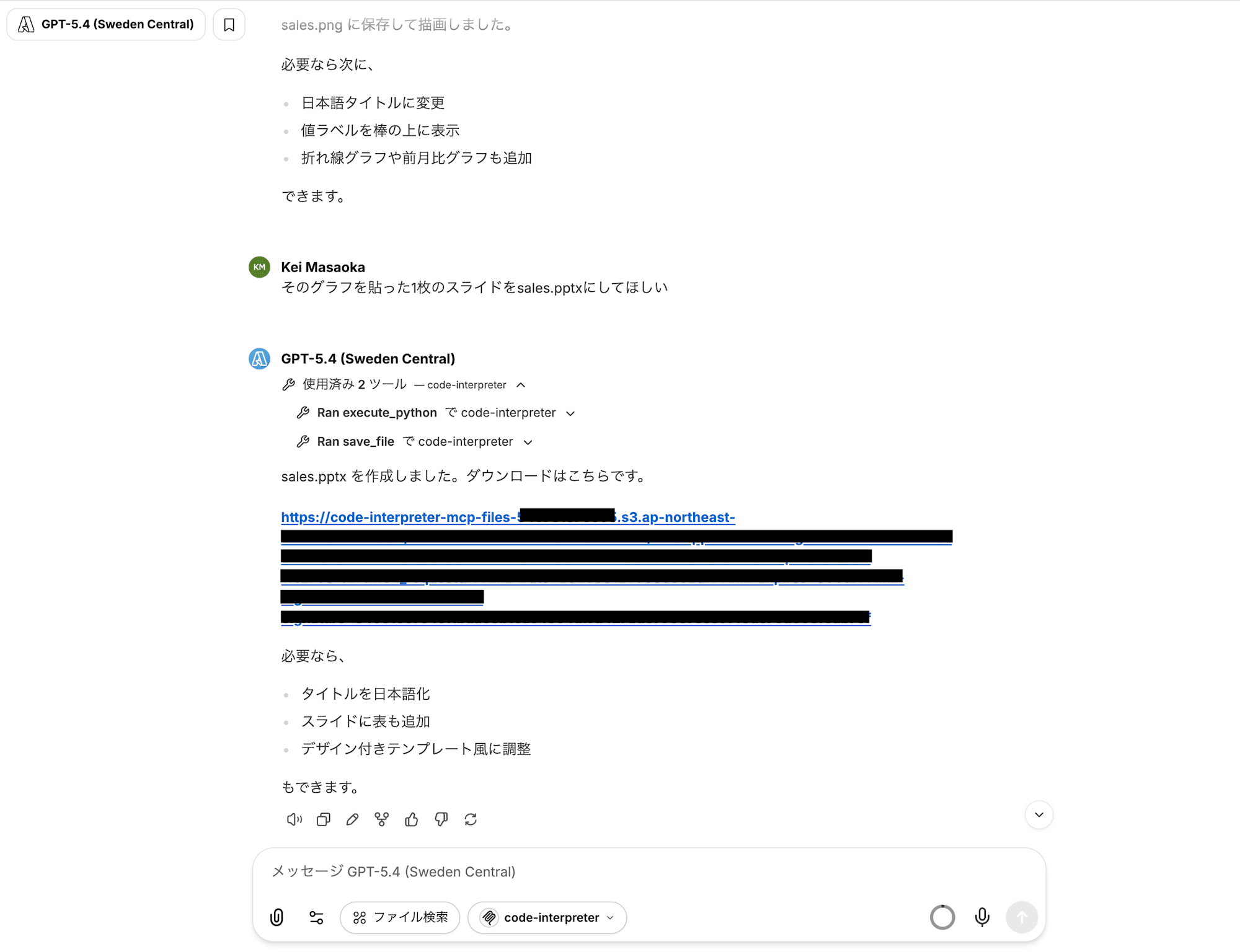
The created PowerPoint looked like this.

Finally, continue asking in the same thread.
Are the files I created earlier still there? Please check.
execute_command(pwd && ls -l sales.csv sales.png sales.pptx) is called, and the response confirms that sales.csv, sales.png, and sales.pptx are still present. Files and variables are retained throughout the same MCP session.
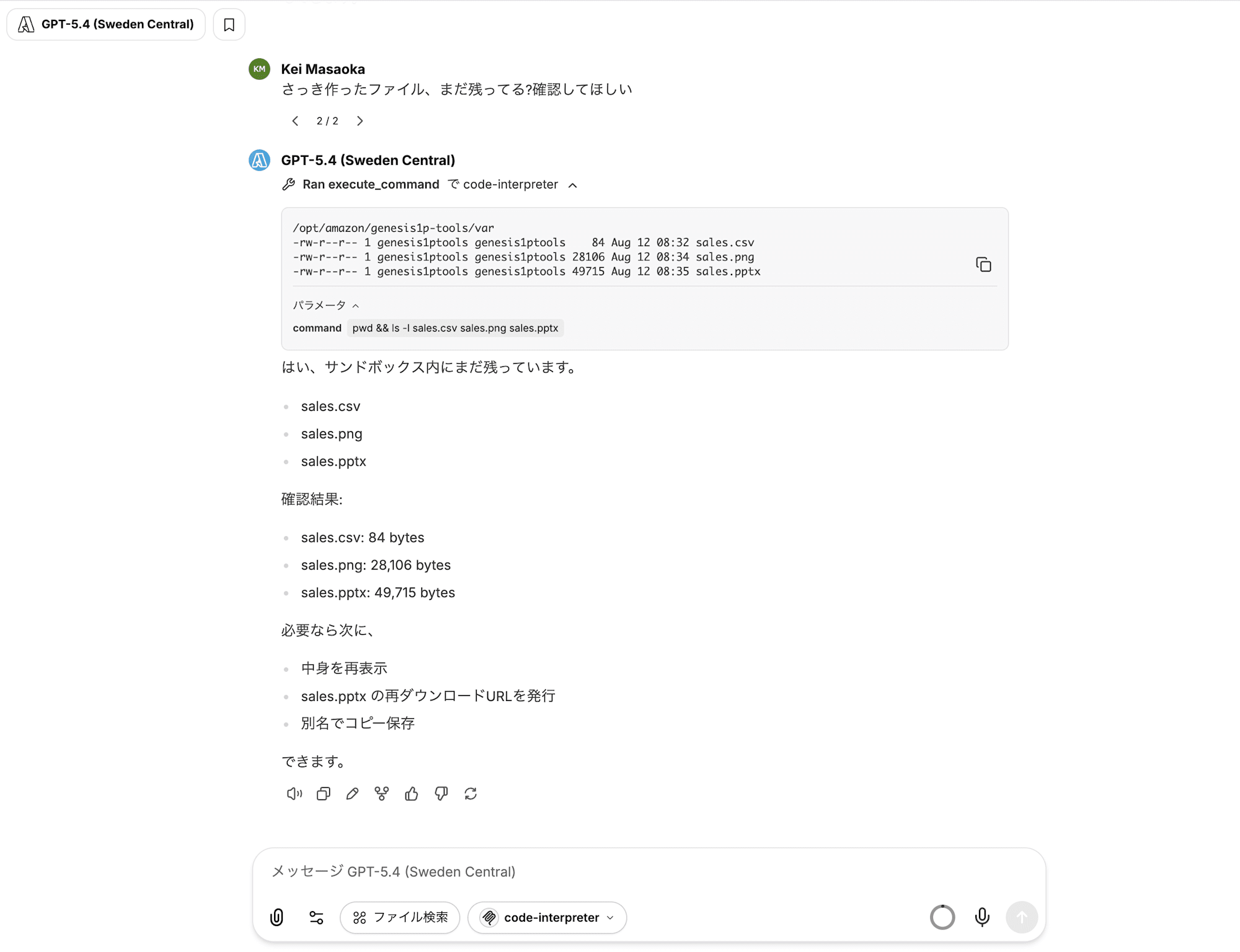
Calling from Amazon Bedrock Claude Sonnet 4.6
Switch the model to Bedrock's Claude Sonnet 4.6.
Since MCP connections are per-user, switching models means the same sandbox is still visible, and the files created with GPT-5.4 remain intact.
Let's summarize the work done so far in a new thread.
Using sales.csv and sales.png in the sandbox, please create a single slide summarizing the aggregated results and graph, and save it as summary.pptx
Here too, execute_python and save_file were called, and the pptx download completed successfully.
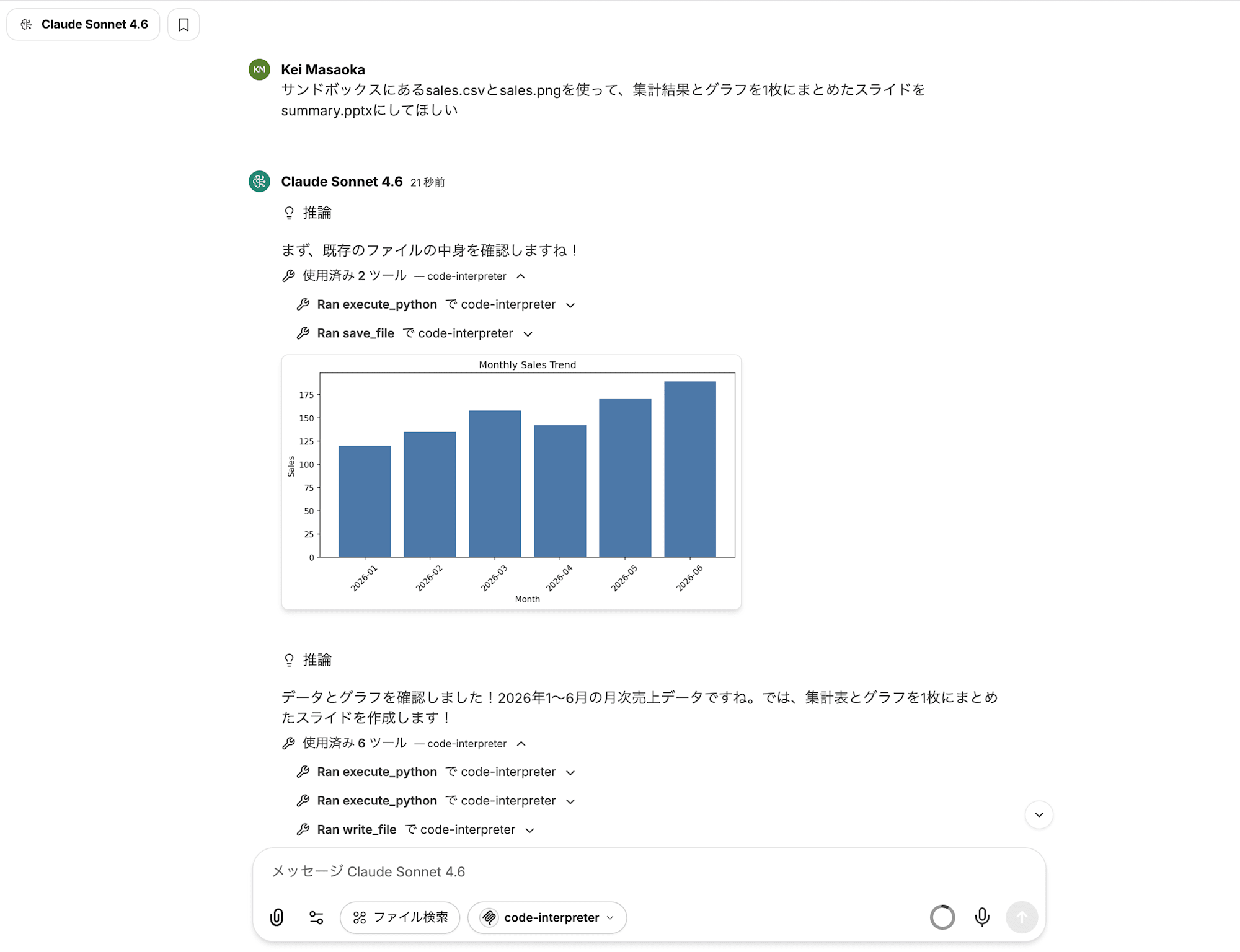
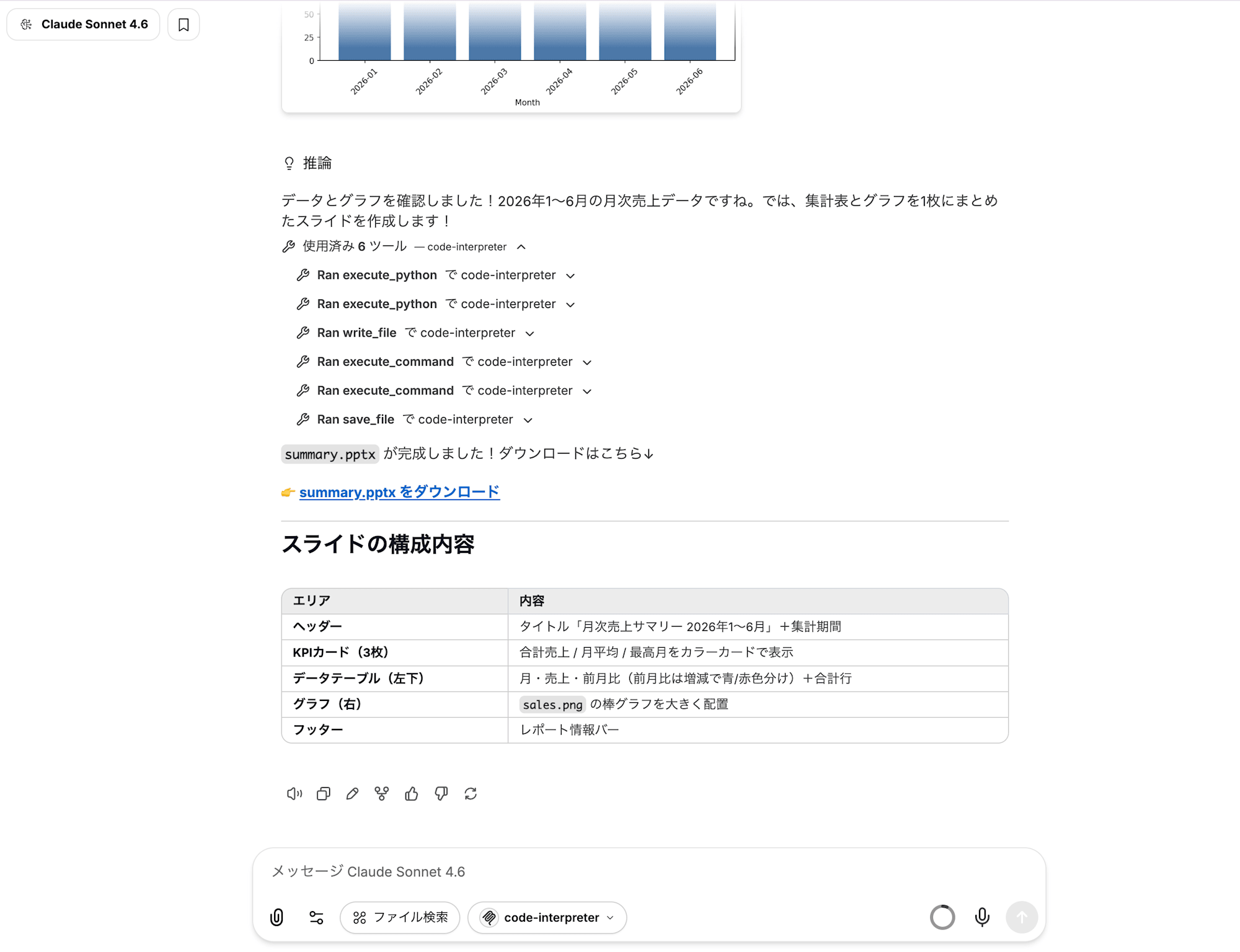
The quality of the created summary.pptx is not great. (The card overlaps with the image.)
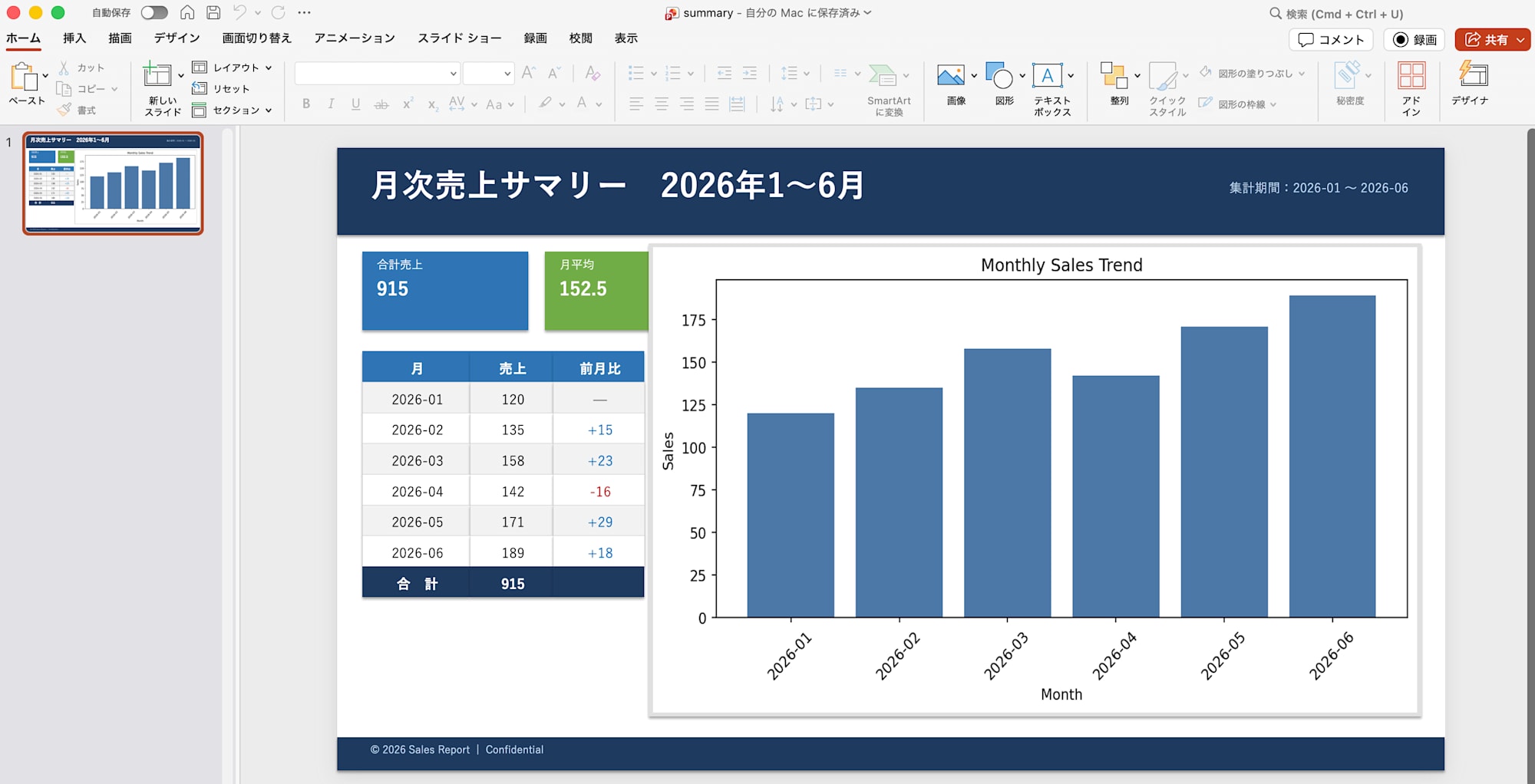
This confirmed that "any client connected via MCP can use Code Interpreter, regardless of the LLM provider."
Cleanup
# Runtime (delete along with CloudFormation stack)
aws cloudformation delete-stack --stack-name AgentCore-cimcpserver-default

# S3 bucket
aws s3 rm s3://code-interpreter-mcp-files-123456789012 --recursive
aws s3api delete-bucket --bucket code-interpreter-mcp-files-123456789012

# Secret for signing-only access key
aws secretsmanager delete-secret --secret-id code-interpreter-mcp/signing-key \
  --force-delete-without-recovery

# IAM user for connection
aws iam delete-user-policy --user-name code-interpreter-mcp-client --policy-name invoke-ci-mcp-runtime
aws iam list-access-keys --user-name code-interpreter-mcp-client
aws iam delete-access-key --user-name code-interpreter-mcp-client --access-key-id AKIAXXXXXXXXXXXXXXXX
aws iam delete-user --user-name code-interpreter-mcp-client

# IAM user for signing
aws iam delete-user-policy --user-name code-interpreter-mcp-signer --policy-name s3-presign-objects
aws iam list-access-keys --user-name code-interpreter-mcp-signer
aws iam delete-access-key --user-name code-interpreter-mcp-signer --access-key-id AKIAXXXXXXXXXXXXXXXX
aws iam delete-user --user-name code-interpreter-mcp-signer

# AgentCore CLI installed globally
pnpm remove -g @aws/agentcore
Summary
In this post, we deployed an MCP server with a built-in Code Interpreter to AgentCore Runtime, and verified that it can be connected from LibreChat using both Azure OpenAI's GPT-5.4 and Bedrock's Claude Sonnet 4.6. The entire flow—from CSV input, pandas aggregation, graph image display in chat, to pptx download—was completed with chat instructions alone.
When embedded in Strands Agents, Code Interpreter was "a component of that agent," but by making it an MCP server, it becomes shared infrastructure that any client can connect to.
Rather than building sandbox integration into each agent individually, having a single instance set up this way makes it more reusable.