I tried adding Cognito JWT authentication to AgentCore Gateway and calling it from AI Starter

This page has been translated by machine translation. View original
Introduction
In the previous article, I introduced a configuration that registers AgentCore Gateway as an MCP server and calls VPC Lambda sub-agents without authentication (None).
After confirming the configuration worked, a new question arose.
"Authentication is essential for production use. But which authentication method should I choose?"
AgentCore Gateway offers three authentication methods: IAM, JWT, and None. I thought "We already have an existing Cognito User Pool. Can't we add JWT authentication using that?" and decided to try it out.
To cut to the chase, I managed to get it working after stumbling through 3 pitfalls. I hope this debugging record serves as a reference for others trying the same configuration.
What is Amazon Cognito
Amazon Cognito is AWS's user authentication and authorization service. It primarily consists of two components.
User Pool: A directory that manages user sign-up and sign-in. It provides email/password authentication, MFA, social login integration, and more. Upon successful login, it issues ID tokens, access tokens, and refresh tokens (all in JWT format).
Identity Pool: Converts JWT tokens into AWS temporary credentials (IAM roles). Used when you want to directly access S3 or DynamoDB. Not used in this article.
Cognito's Role in This Article
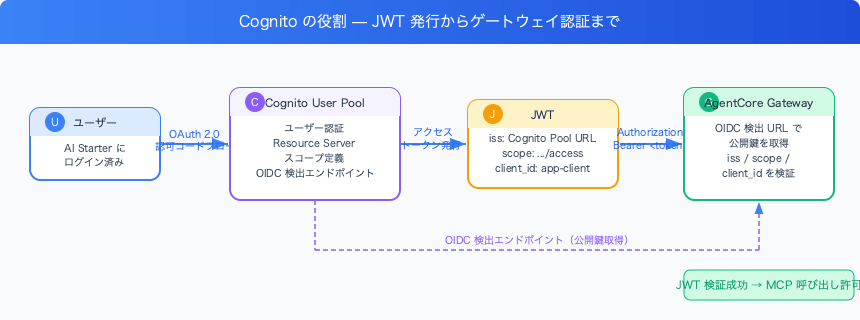
Cognito functions as the Token Issuer. Specifically:
- Login foundation for AI Starter: AI Starter originally authenticates users with Cognito User Pool
- Scope definition with Resource Server: Add a custom scope (
https://mcp.internal/access) dedicated to MCP Gateway to the User Pool - Token issuance via OAuth 2.0 flow: When a user clicks "Connect", Cognito executes the authorization code flow (PKCE) and issues an access token with the custom scope
- Providing OIDC discovery endpoint: AgentCore Gateway references
/.well-known/openid-configurationto retrieve Cognito's public keys and verify the received JWT
In other words, Cognito not only proves "who the user is", but also plays the role of embedding authorization information in the token stating "this user is allowed to access the MCP Gateway."
Why I Chose JWT Authentication Over IAM Authentication
First, let me organize the options.
AgentCore Gateway authentication methods:
| Method | Mechanism | Suitable Use Case |
|---|---|---|
| None | No authentication | Verification/prototyping |
| IAM | SigV4 signed requests | AWS service-to-service communication |
| JWT | Bearer token | User-authenticated apps |
Why I didn't choose IAM authentication: The MCP client in AI Starter communicates using the Authorization: Bearer <token> header. IAM authentication requires SigV4 signing, which is fundamentally incompatible with client implementations that send Bearer tokens.
Differences Between SigV4 and Bearer Tokens
The two methods differ fundamentally in "what the client sends."
SigV4 is a method that signs the entire request. For each transmission, the client calculates a signature using HMAC-SHA256 by combining the request method, URL, headers, body hash, and timestamp, then embeds it in the Authorization header.
Authorization: AWS4-HMAC-SHA256
  Credential=AKID.../aws4_request,
  SignedHeaders=host;x-amz-date,
  Signature=abc123...(differs per request)
Since the signature includes timestamps and body hashes, it has high resistance to token theft and tampering, but the client needs to perform HMAC calculations every time a request is sent.
Bearer token (JWT) is a method that simply sends a pre-issued token as-is.
Authorization: Bearer eyJhbGci...(fixed token string)
The server only needs to verify the token's signature and claims such as iss and scope. The client simply passes the token without any calculation each time.
AI Starter's MCP SDK stores the access token obtained through the OAuth flow in DynamoDB and sends it directly as a Bearer during API calls. It doesn't include an implementation that "calculates HMAC and assembles headers right before sending" like SigV4, making it fundamentally incompatible with IAM authentication.
Why I chose JWT: AI Starter has a mechanism where users log in with Cognito. By adding a Resource Server (custom scope) to the same Cognito User Pool, users can use the token obtained through the OAuth 2.0 flow directly for the Gateway's JWT authentication.
Configuring Cognito JWT Authentication
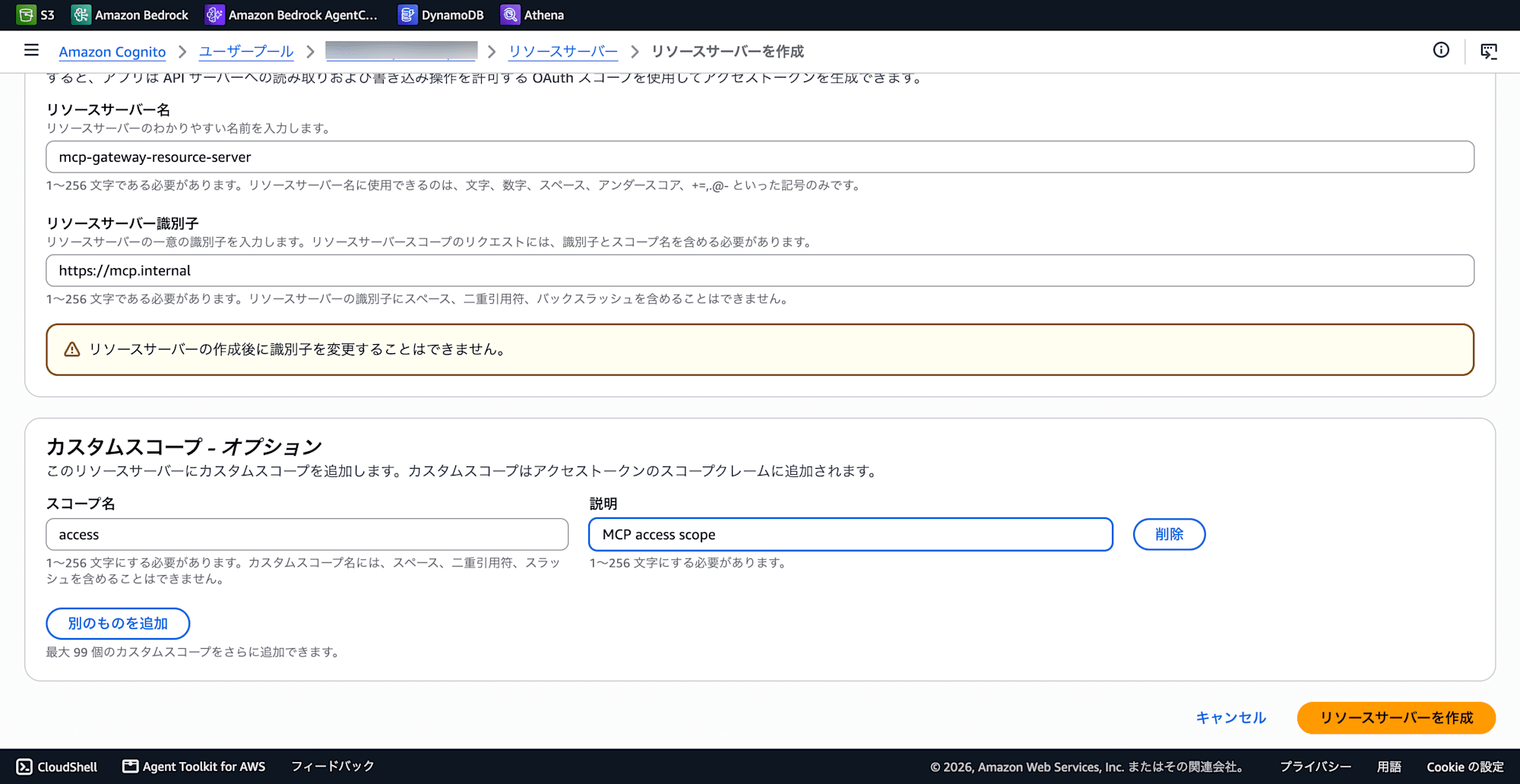
Creating a Resource Server
Add a Resource Server to the Cognito User Pool. A Resource Server defines "the target (API) that this token is allowed to access."
Cognito Console → User Pool → App Integration → Resource Servers
| Setting | Value |
|---|---|
| Resource Server Name | Arbitrary (e.g., MCP Gateway) |
| Identifier | https://mcp.internal (any URI format) |
| Scope Name | access |
Creating an App Client
Create an app client for the OAuth flow.
- Client Type: Traditional web application
- Allowed OAuth Flows: Authorization code
- Require PKCE: Enable (AI Starter's MCP SDK uses PKCE)
- Allowed Scopes:
https://mcp.internal/access - Callback URL:
https://YOUR_APP_URL/auth/integrate/{AuthProviderId}/callback
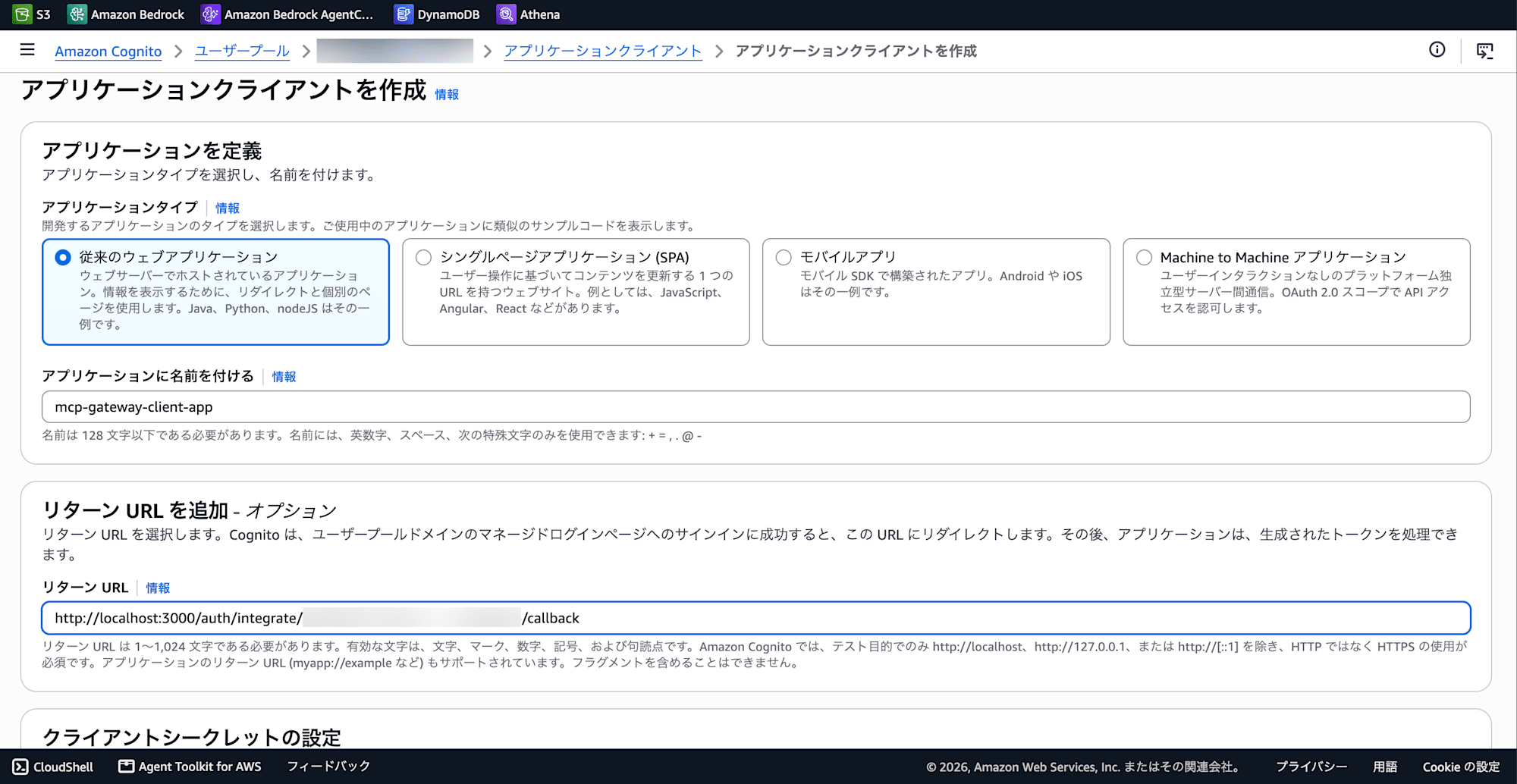
If you're developing locally with AI Starter, register http://localhost:{PORT}/auth/integrate/{AuthProviderId}/callback.
Gateway JWT Configuration
Bedrock Console → AgentCore → Gateway → Edit
| Setting | Value |
|---|---|
| Discovery URL | https://cognito-idp.{region}.amazonaws.com/{USER_POOL_ID}/.well-known/openid-configuration |
| Allowed Clients | Cognito App Client ID |
| Allowed Scopes | https://mcp.internal/access (full scope string) |
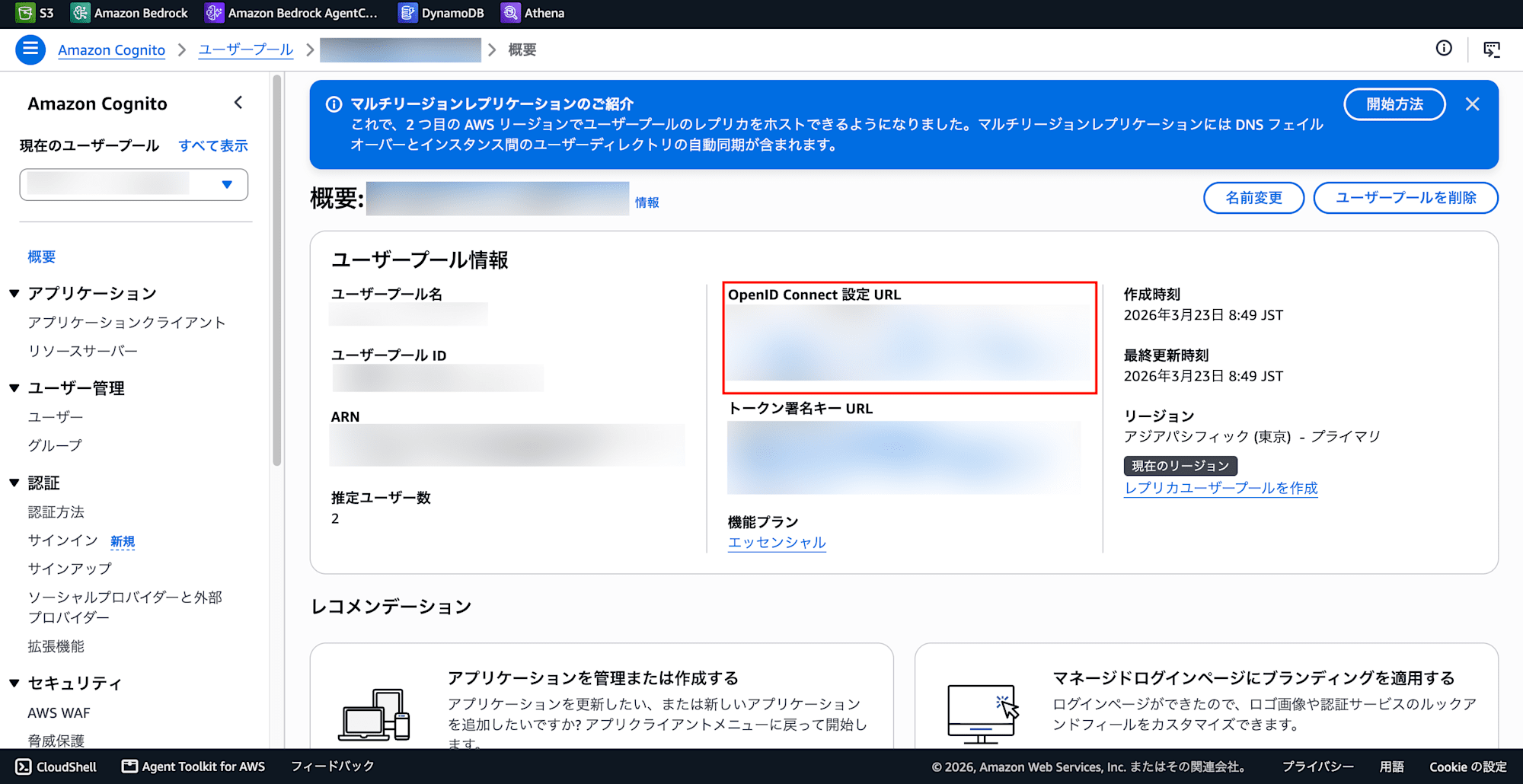
The Discovery URL can be copied from the Cognito User Pool screen.
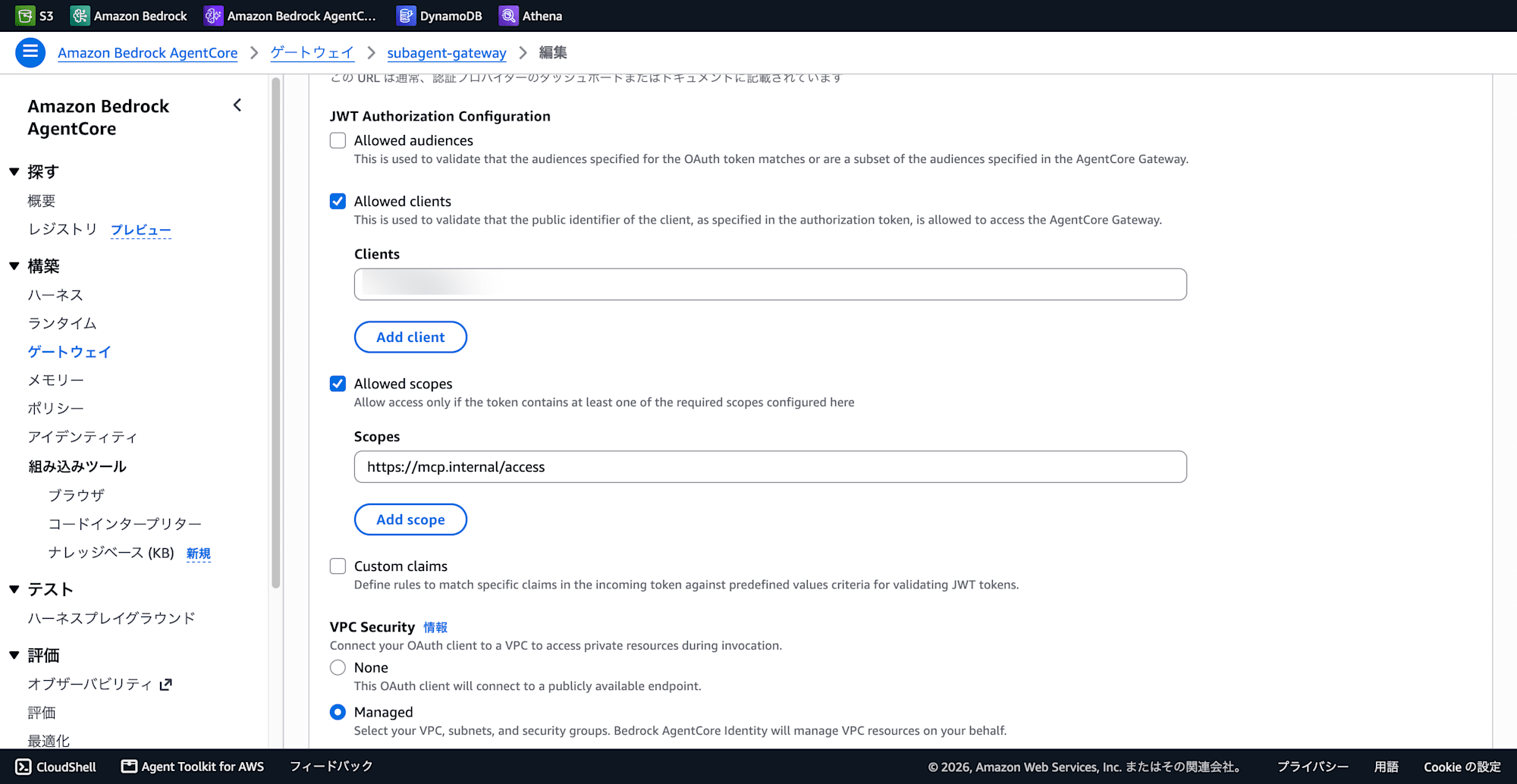
AI Starter Configuration
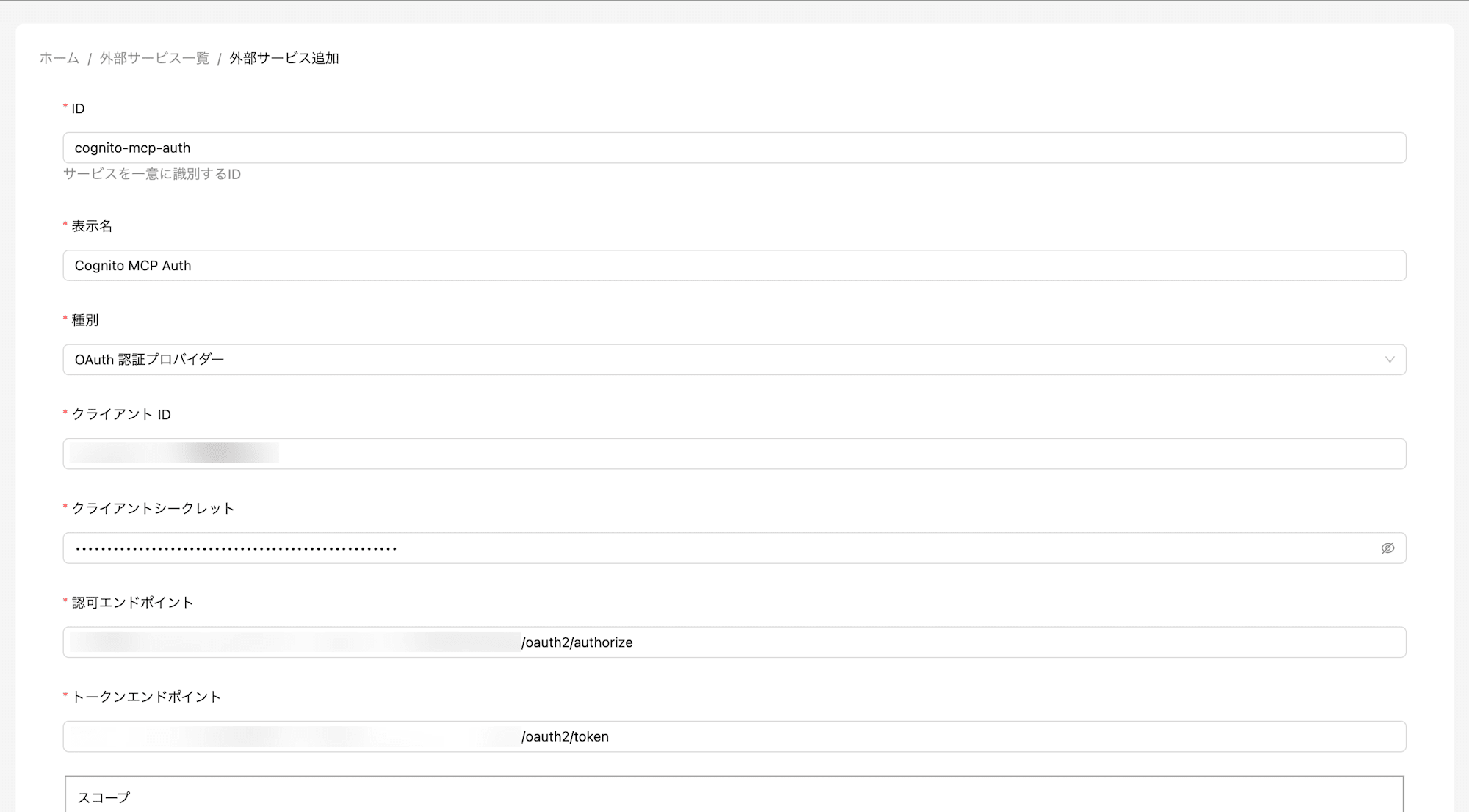
Register the external service in the AI Starter admin console.
Registering AuthProvider
Admin Console → External Services → Add New (Type: AuthProvider)
| Field | Value |
|---|---|
| ID | The AuthProviderId configured for the Cognito app client |
| Display Name | Cognito MCP Auth (arbitrary) |
| Type | OAuth Authentication Provider |
| Client ID | Cognito App Client ID |
| Client Secret | Cognito App Client Secret |
| Authorization Endpoint | https://{COGNITO_DOMAIN}/oauth2/authorize |
| Token Endpoint | https://{COGNITO_DOMAIN}/oauth2/token |
| Scope | https://mcp.internal/access |
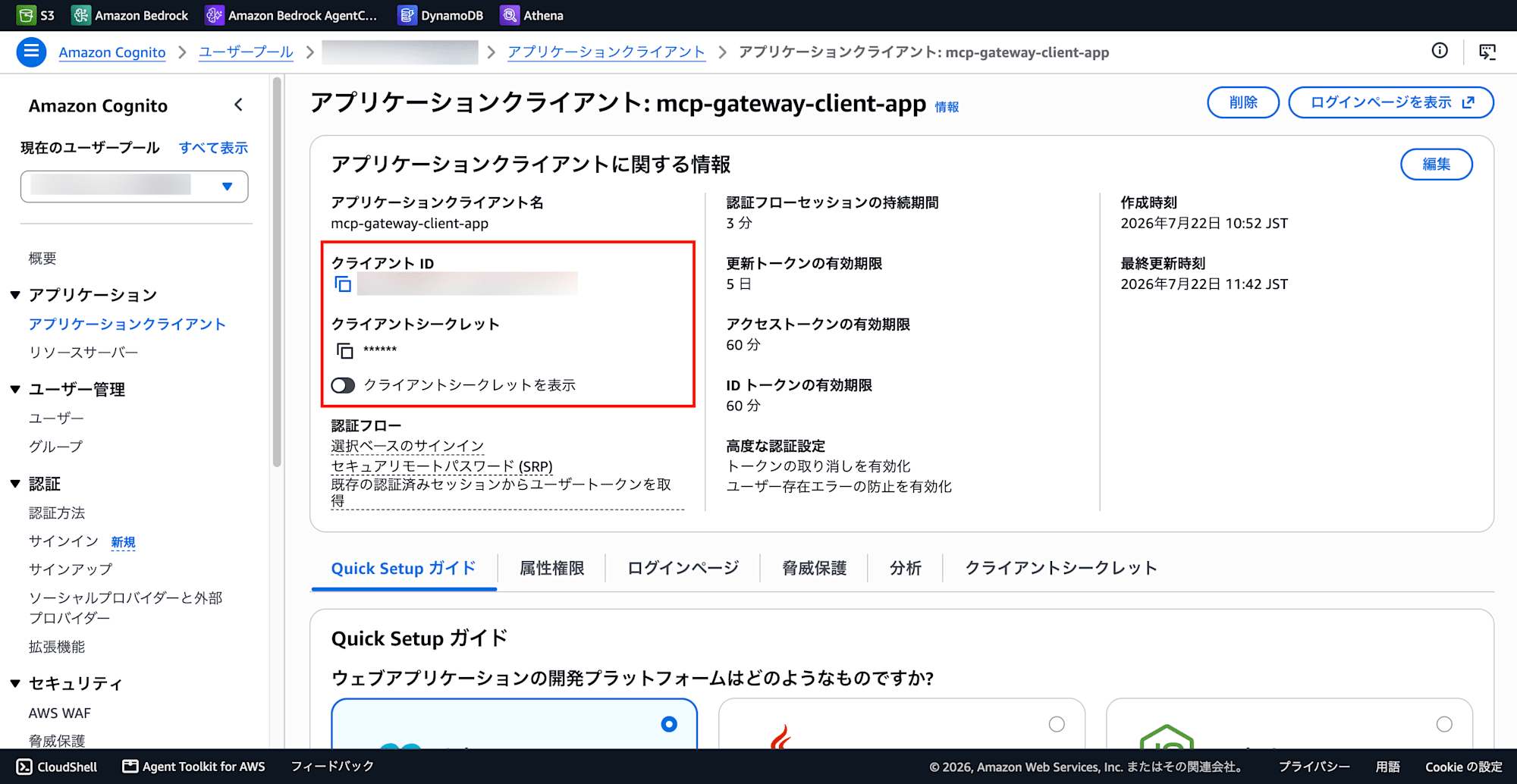
Client ID and Client Secret can be copied from Cognito → User Pool → Domain.
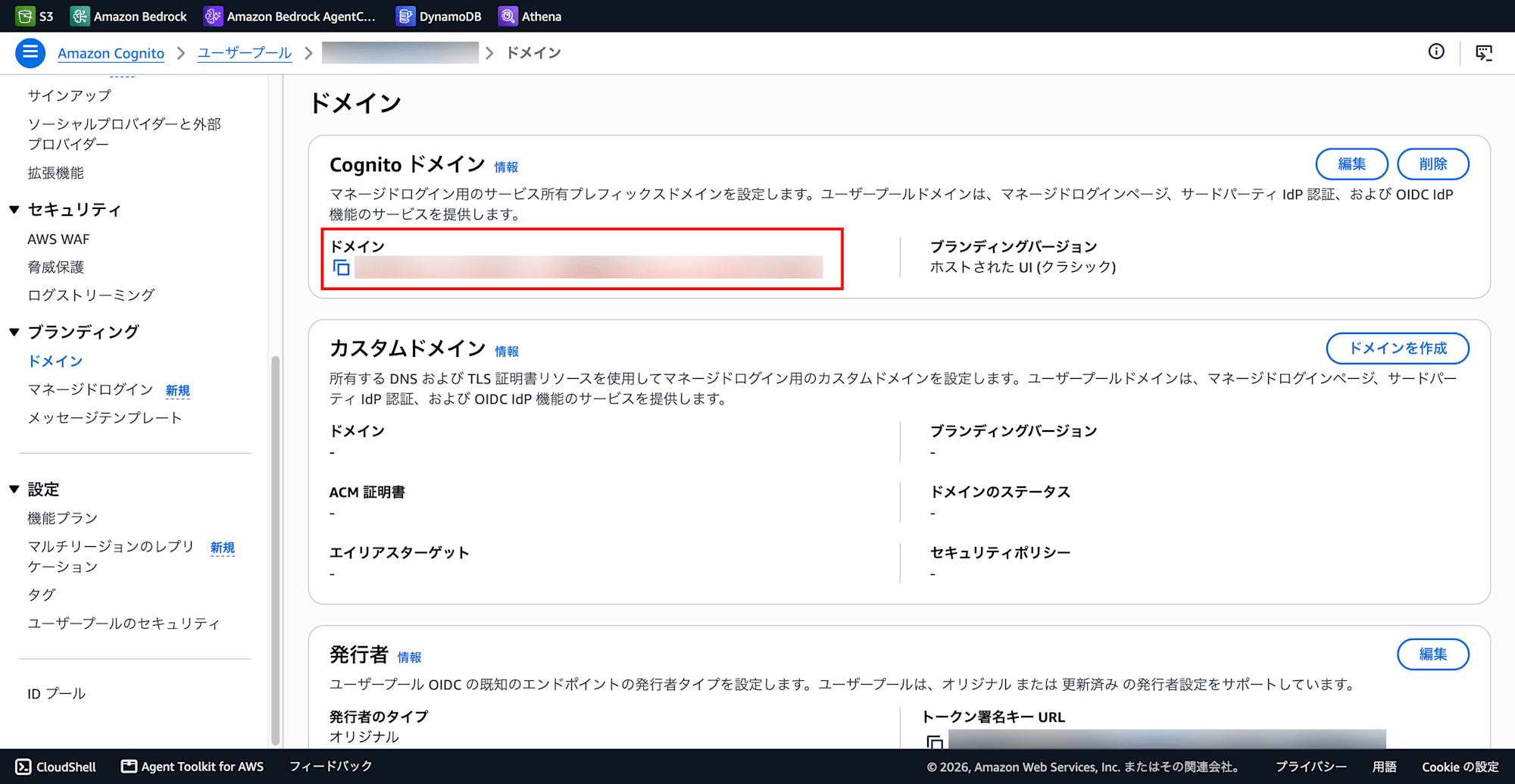
COGNITO_DOMAIN can be copied from Cognito → User Pool → Domain.
Registering McpServer
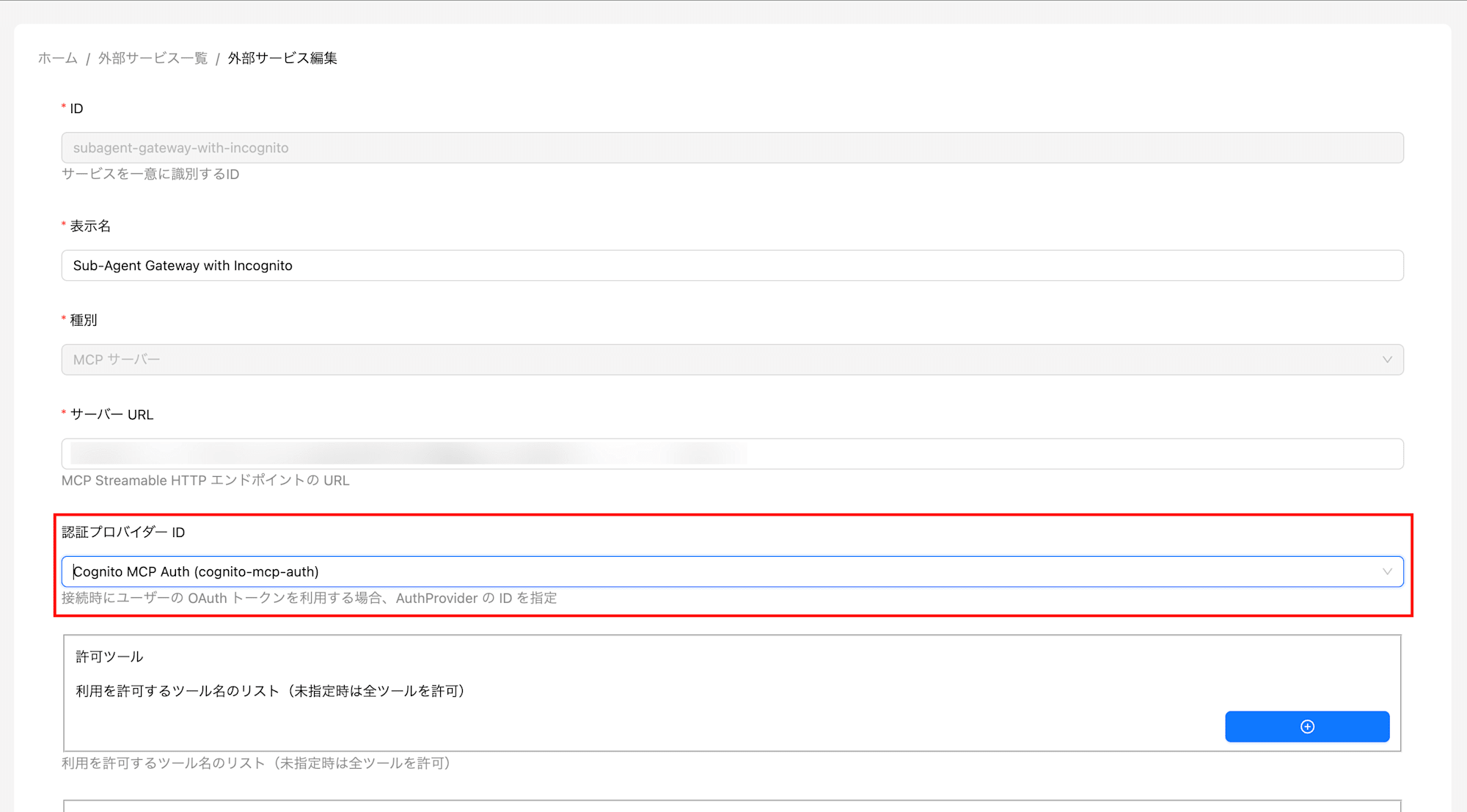
Admin Console → External Services → Add New (Type: McpServer)
| Field | Value |
|---|---|
| Display Name | (arbitrary) |
| Type | MCP Server |
| Server URL | AgentCore Gateway MCP endpoint |
| Auth Provider ID | The ID of the AuthProvider created above |
OAuth Integration (User Operation)
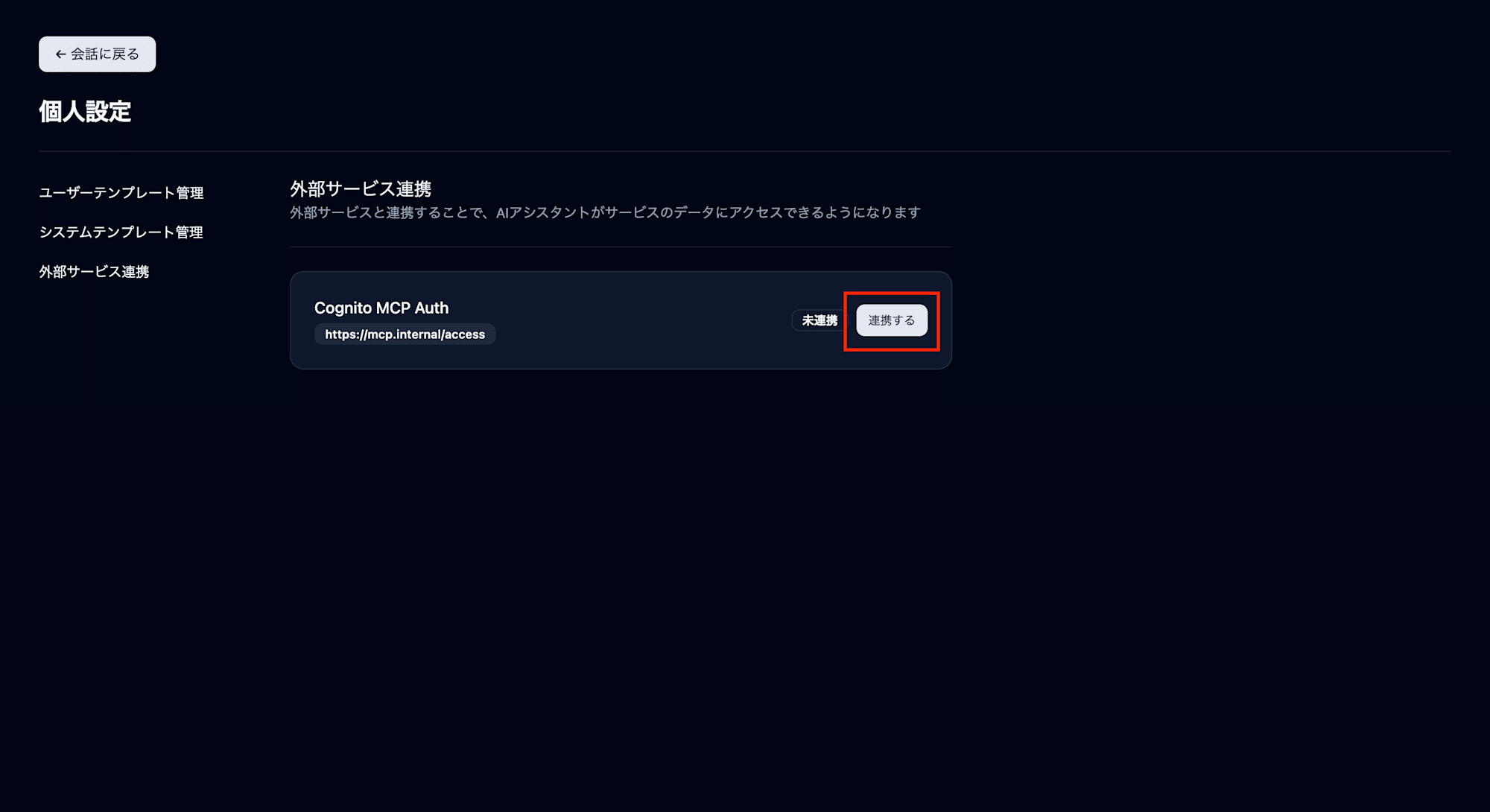
This is done from the AI Starter user screen, not the admin console.
-
Open Settings → Connected Services
-
The registered AuthProvider will be displayed — click "Connect"
-
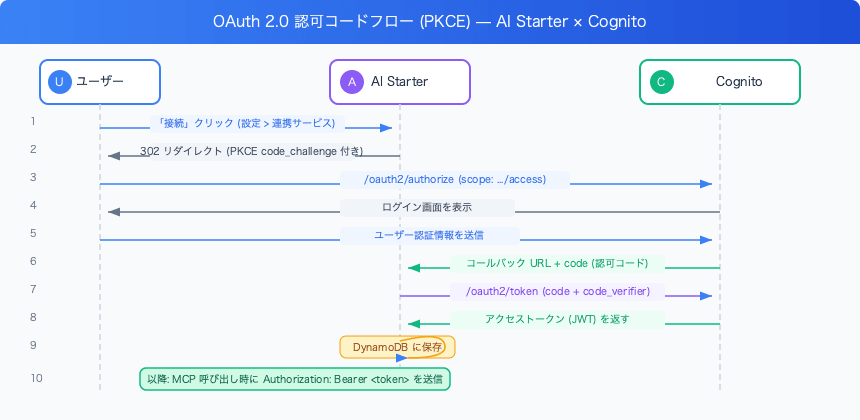
You will be redirected to the Cognito login screen
-
Login → Authorize → Return to callback URL where the token is saved
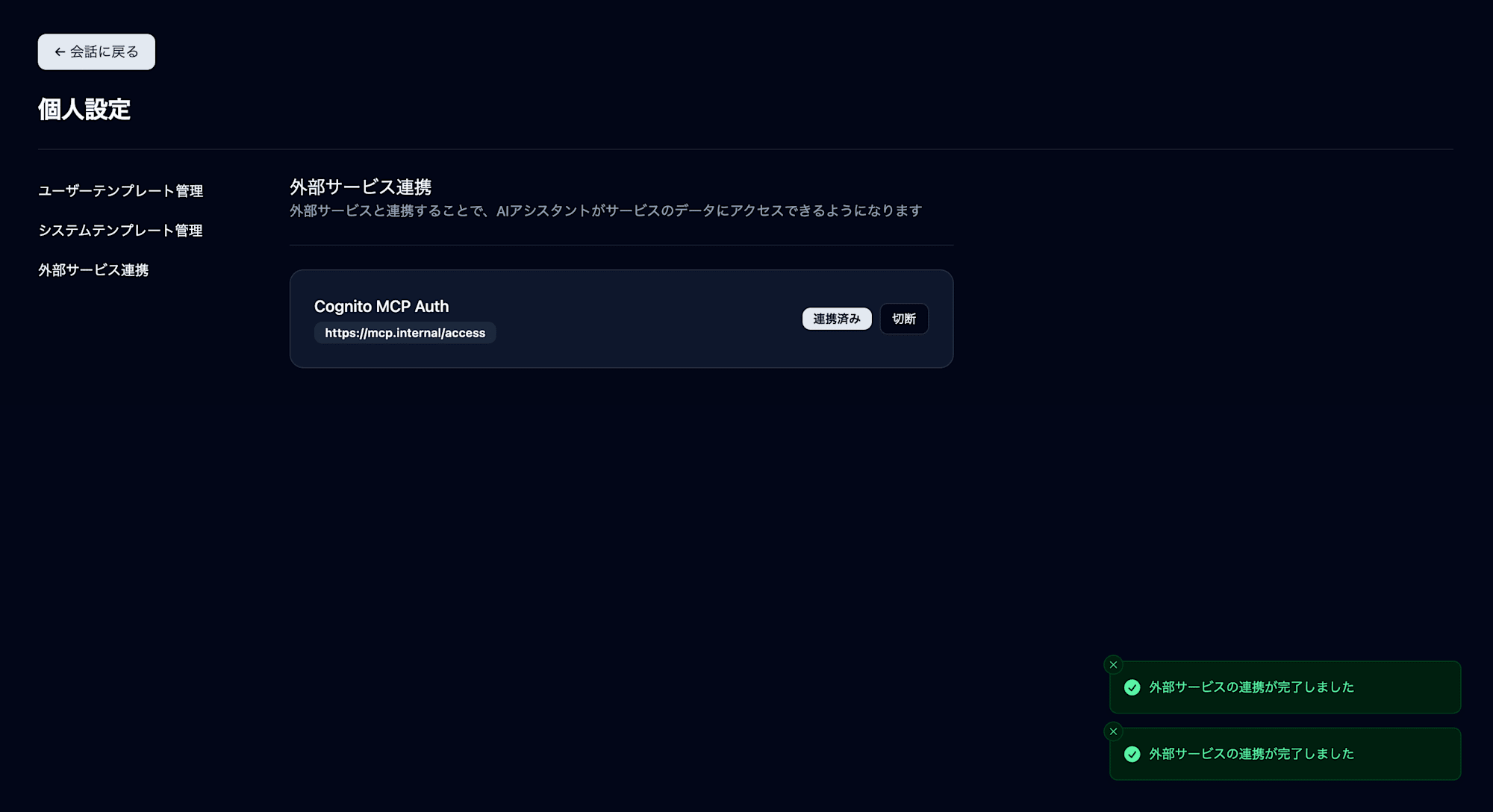
This saves the Cognito access token to the UserIntegration table in DynamoDB.
403 Debug Log
Even after a successful OAuth integration, the MCP server kept being skipped when calling the assistant.
WARN: Failed to resolve MCP server, skipping
  mcpServerId: "YOUR_MCP_SERVER_ID"
  error: { "code": 403 }
There were 3 pitfalls.
Pitfall 1: Wrong Pool ID in Gateway Discovery URL
When editing the JWT settings of the Gateway, I had entered a different User Pool ID in the OIDC discovery URL.
Looking at the AI Starter server logs, the Issuer is displayed at startup:
INFO: Discovered issuer
  issuer: "https://cognito-idp.ap-northeast-1.amazonaws.com/ap-northeast-1_XXXXXXXX"
Verify that this pool ID matches the pool ID in the Gateway's discovery URL.
Fix: Reconfigure the Gateway's discovery URL with the correct User Pool ID.
Pitfall 2: Gateway Scope Was Not in Full Format
I had set only access in the Gateway's Allowed scopes, but the scope claim in tokens issued by Cognito contains the full format https://mcp.internal/access.
Since JWT verification performs an exact match check on the scope, access ≠ https://mcp.internal/access results in a 403.
Fix: Change the Gateway's Allowed scopes from access to https://mcp.internal/access (full scope string).
Pitfall 3: Cognito Access Token Has No aud Claim
Still getting 403 even after fixing the above two issues. I retrieved the actual token from DynamoDB and decoded it with Base64 to check.
# Retrieve token from DynamoDB and decode
TOKEN=$(aws dynamodb get-item \
  --table-name YOUR_TABLE-user-integration \
  --key '{"userId":{"S":"USER_ID"},"serviceId":{"S":"AUTH_PROVIDER_ID"}}' \
  --query 'Item.accessToken.S' --output text)

echo $TOKEN | cut -d'.' -f2 | python3 -c "
import sys,base64,json
p=sys.stdin.read().strip()
p+='='*(4-len(p)%4)
print(json.dumps(json.loads(base64.b64decode(p)),indent=2))
"
Decoded result:
{
  "sub": "...",
  "iss": "https://cognito-idp.ap-northeast-1.amazonaws.com/ap-northeast-1_XXXXXXXX",
  "client_id": "YOUR_CLIENT_ID",
  "scope": "https://mcp.internal/access",
  "token_use": "access",
  ...
}
The aud claim does not exist. Cognito access tokens do not include aud; instead, the client_id claim is used. The Gateway's "Allowed audiences" check attempts to validate the aud claim, but since the claim is absent, validation was failing.
Fix: Uncheck Allowed audiences in the Gateway's JWT settings. Validation using just the three — iss, client_id, and scope — is sufficient.
Verification After Fixing All Three Issues
You'll know it's working when the following appears in the server logs:
DEBUG: Assitant message completed  # ※As output in server log (typo of "Assistant")
  message: {
    "content": [
      {
        "type": "tool",
        "toolName": "YOUR_TARGET___YOUR_TOOL",
        "state": "completed",
        "result": "..."
      }
    ]
  }
You can confirm that the MCP tool was called and the Lambda sub-agent was executed.
Summary
I was able to add Cognito JWT authentication to AgentCore Gateway and call sub-agents using tokens obtained through the OAuth 2.0 flow from AI Starter.
Key configuration points:
- When the MCP client uses
Authorization: Bearer, IAM authentication (SigV4) cannot be used → JWT is the only option - The Gateway scope setting must be specified with the full scope string (
https://mcp.internal/access) - Cognito access tokens have no
audclaim → Disable Allowed audiences in the Gateway - Note that the callback URL's host and port may change depending on environment variables
Cognito access token JWT claim structure (summary):
| Claim | Value | How It's Used in Gateway |
|---|---|---|
iss |
Cognito User Pool URL | Automatically verified via discovery URL |
client_id |
App client ID | Verified via Allowed clients |
scope |
Full scope string | Verified via Allowed scopes |
aud |
Does not exist | Disable Allowed audiences |
By using JWT, it becomes possible to call the Gateway using individual access tokens for each AI Starter user. This is an effective configuration when you want to finely control permissions for each user in a multi-tenant setup.