I tried out "Temporal Policies" added to Amazon Bedrock AgentCore Policy

This page has been translated by machine translation. View original
Introduction
Hello, I'm Kamino from the Consulting Department, and I love supermarkets.
On August 6, 2026, a new feature called "Temporal Policies" was added to AgentCore Policy. (I happened to go on vacation right at that timing, so quite a bit of time has passed...)
It's quite a cool-sounding feature name, but it's a feature that allows you to decide whether to permit or deny the next tool call based on what operations the agent has performed in the past within the same session.
Originally, Policies were written in Cedar, and I'm curious about how this new feature will combine with that. I'd like to explore it while actually trying it out!
Situations Where Temporal Policies Seem Useful
When would the new Temporal Policies feature be useful?
For example, let's think about a quote → order process. If you prepare a quote tool and an order tool respectively and leave tool execution up to the agent, there might be cases where it places an order immediately.
So when you want to make it a prerequisite to always run the quote tool first—such as placing an order using the quote ID and amount returned by the quote tool, or retrieving a list of items to delete and then specifying only those IDs for deletion—Temporal Policies can be used.
The image is something like the following check.
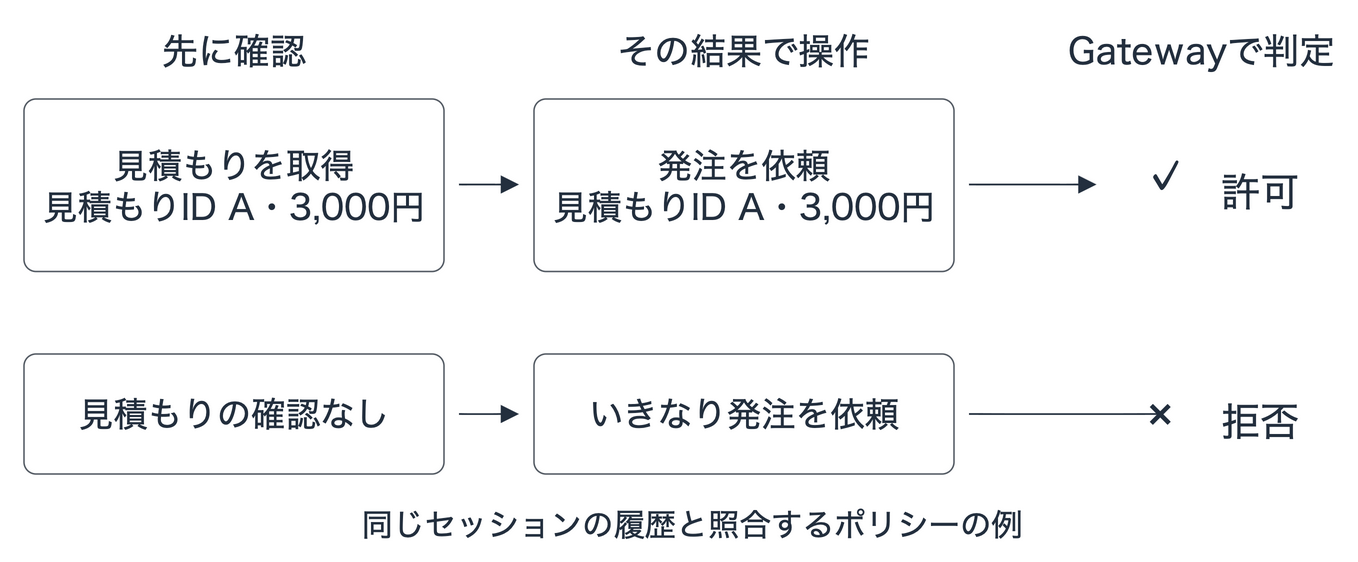
This seems useful when you want to manage procedures spanning multiple tools separately on the outside rather than in the agent's logic. It's great that while conveying procedures through prompts, operations that skip required checks or operations that contradict the check results can be stopped at the Gateway!
Dogwood
To describe these Temporal Policies, you use a new policy language called Dogwood.
Dogwood is an open-source language released by AWS under Apache 2.0, extended from Cedar. Cedar-compliant policies can be used as-is as Dogwood policies, so previously written policies won't go to waste, and you can now write temporal conditions like "what operations were performed in the past" on top of Cedar syntax.
(By the way, Dogwood refers to trees of the genus Cornus in English, but I wonder if the name was chosen to follow Cedar's naming convention...)
Here's what the specific syntax looks like. Using the order policy I'll use for verification as an example, I've added comments to show which parts are original Cedar and which parts are extended by Dogwood.
// Cedar syntax: order amount is within 3,000 yen
permit (
    principal,
    action == AgentCore::Action::"ShoppingTarget___place_order",
    resource == AgentCore::Gateway::"<GATEWAY_ARN>"
)
when { context.input.amount > 0 && context.input.amount <= 3000 }
// From here is Dogwood's extension: the same cart contents have been confirmed within 1 minute
when temporal {
    formerly within 1m AgentCore::Action::"ShoppingTarget___get_cart"::response{
        eventResource: resource,
        output.cartId: context.input.cartId,
        output.store: context.input.store,
        output.amount: context.input.amount
    }
};
The parts where permit specifies the target action and resource, and when checks the amount condition, are pure Cedar.
In Dogwood, you can add a when temporal block here to incorporate history-based conditions like "a cart with the same contents was confirmed within the last 1 minute." The output.〜 inside the curly braces is the value returned during the past cart confirmation, and context.input.〜 is the argument of the current order request. It verifies that these properly match.
I'll look at the detailed syntax specifications more carefully in a later section.
Now that we understand the reasoning, let's actually try it out and verify!
What We're Trying This Time
This time, I'll use shopping at my favorite supermarket as an example. Since my wallet only allows up to 3,000 yen per trip... let's have the agent representing me also stick to the budget!
The rule to verify is "confirm the cart contents and total amount in advance, then place an order within 3,000 yen." I'll check whether orders that skip the prior confirmation or orders exceeding 3,000 yen are properly blocked on the Gateway side.
For example, suppose an agent mixes up the amount and tries to order a 4,000 yen cart as 2,000 yen. Since the upper limit check looks at the argument value of 2,000 yen, there's a possibility that a nonsensical order fabricated by the agent could go through with just this check. To stay within budget, the amount being compared needs to match the store's data.
So, we have the agent use the cart confirmation tool to retrieve the store-side amount before placing an order. The Gateway and Policy reference that response as history and compare it with the cart ID, store, and amount of the current order.
This way, even if you try to order a cart that was returned as 4,000 yen by changing it to 2,000 yen, it won't match and will be rejected. "Having a record of confirmation" and "ordering with the confirmed values" are checked as a set!
The two tools we'll prepare are as follows.
| Tool | Process |
|---|---|
get_cart |
Check the cart contents and total amount |
place_order |
Simulate placing an order |
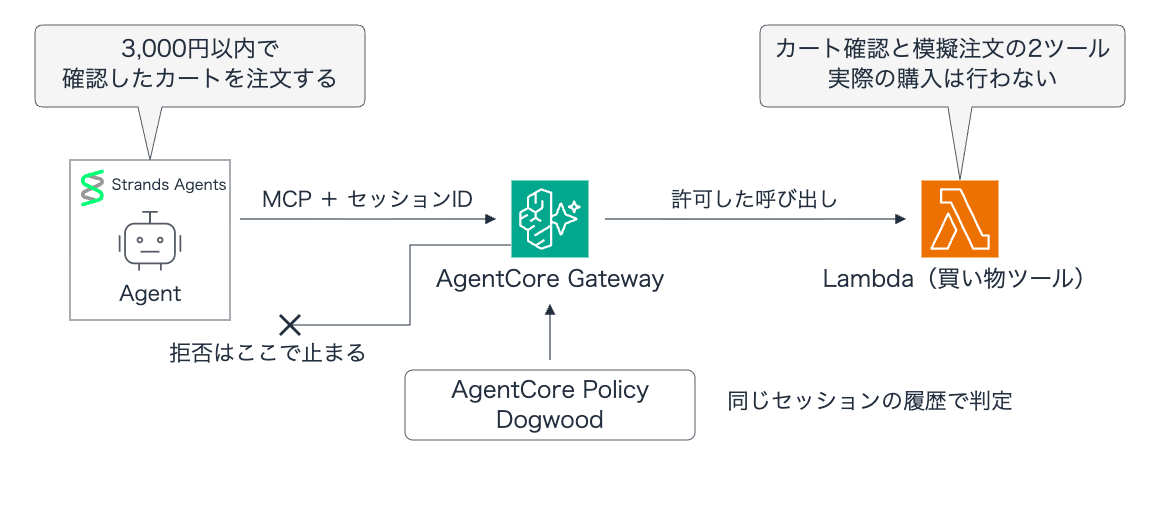
The shopping tools will be implemented as Lambda functions, the agent will be built with Strands Agents, and the model will be Claude Haiku 4.5 on Amazon Bedrock.
Note that the order tool is a mock implementation, so nothing will actually be purchased, and please be aware that if you were to actually implement this, you wouldn't build it this cheaply! (It would be a bit scary if purchases were made one after another during verification, wouldn't it... would I go bankrupt...)
Prerequisites
The environments used for this verification are as follows.
| Item | Details |
|---|---|
| Region | ap-northeast-1 (Tokyo) |
| Local Python | 3.14.6 |
| boto3 / botocore | 1.43.88 |
| Agent | Strands Agents 1.54.0 |
| MCP connection | mcp-proxy-for-aws 1.6.5 |
| Model | Claude Haiku 4.5 (Japan inference profile) |
| Gateway | MCP, AWS_IAM authentication |
| Lambda | Python 3.14 |
| Policy Engine | ENFORCE |
Preparing the Shopping Tools and Gateway
First, let's create the Lambda functions that will be the shopping tools and register them with the Gateway.
Shopping Tools
This time, we'll have a single Lambda handle both get_cart and place_order tools.
When called via the Gateway, the tool name is passed in the context in a format like ShoppingTarget___get_cart (target name___tool name), so we split on ___ and look at the latter part to branch the processing. get_cart returns the store and total amount corresponding to the cart ID, and place_order is a simple implementation that accepts simulated orders.
As verification cart data, we prepared 3 patterns: 3,000 yen, 2,000 yen, and 4,000 yen.
import json

# Verification cart. Items and amounts are assumed to be managed by the backend.
CARTS = {
    "cart-001": {"store": "favorite-supermarket", "amount": 3000},
    "cart-002": {"store": "favorite-supermarket", "amount": 2000},
    "cart-003": {"store": "favorite-supermarket", "amount": 4000},
}

def lambda_handler(event, context):
    tool = context.client_context.custom["bedrockAgentCoreToolName"].split("___", 1)[1]
    print(json.dumps({"tool": tool, "arguments": event}, ensure_ascii=False))
    if tool == "get_cart":
        cart = CARTS[event["cartId"]]
        return {"cartId": event["cartId"], **cart}
    if tool == "place_order":
        return {"status": "simulated_order_accepted", **event}
    raise ValueError(f"Unknown tool: {tool}")
Guardrail parts such as the budget upper limit and cart confirmation history checks are not included on the Lambda side—everything is delegated to the Policy side.
Gateway Configuration
I prepared setup.py for resource preparation. This script sequentially deploys the Policy Engine, Lambda function, IAM role, Gateway, target, and policies.
The Lambda function is registered with the Gateway as a target named ShoppingTarget, and the schemas for the two tools mentioned earlier (get_cart and place_order) are defined and associated with it.
When creating the Gateway, the created Policy Engine is specified in policyEngineConfiguration, and ENFORCE (policy enforcement mode) is set for mode.
r = c.create_gateway(
    name=s["name"],
    roleArn=s["gatewayRole"],
    protocolType="MCP",
    authorizerType="AWS_IAM",
    policyEngineConfiguration={"arn": s["engineArn"], "mode": "ENFORCE"},
)
With this configuration, all tool calls that don't match the policy will be blocked at the Gateway layer, and processing will not reach the Lambda behind it!
I'll also include the full setup script.
Full environment creation code (gateway/setup.py)
"""Creates the verification environment for the article and saves the IDs of created resources to a file."""

import io, json, time, zipfile
from pathlib import Path
import boto3

# Created in Tokyo region. Saves progress midway and loads already-created info on re-execution.
ROOT = Path(__file__).resolve().parents[1]
STATE = ROOT / ".gateway-state.json"
s = (
    json.loads(STATE.read_text())
    if STATE.exists()
    else {"region": "ap-northeast-1", "name": f"dogwood-shopping-{int(time.time())}"}
)
if s.get("cleanedUp"):
    s = {"region": s["region"], "name": f"dogwood-shopping-{int(time.time())}"}
session = boto3.Session(region_name=s["region"])
c = session.client("bedrock-agentcore-control")
iam = session.client("iam")
lam = session.client("lambda")
s["account"] = session.client("sts").get_caller_identity()["Account"]
base = f"arn:aws:bedrock-agentcore:{s['region']}:{s['account']}"

def save():
    STATE.write_text(json.dumps(s, indent=2, default=str))

def wait(get, key, good=("READY", "ACTIVE"), **args):
    for _ in range(120):
        r = get(**args)
        status = r[key]
        if status in good:
            return r
        if "FAIL" in status:
            raise RuntimeError(json.dumps(r, default=str))
        time.sleep(5)
    raise TimeoutError(args)

def role(key, service):
    if key not in s:
        statement = {
            "Effect": "Allow",
            "Principal": {"Service": service},
            "Action": "sts:AssumeRole",
        }
        if service == "bedrock-agentcore.amazonaws.com":
            statement["Condition"] = {
                "StringEquals": {"aws:SourceAccount": s["account"]},
                "ArnLike": {"aws:SourceArn": base + ":*"},
            }
        r = iam.create_role(
            RoleName=s["name"] + "-" + key,
            AssumeRolePolicyDocument=json.dumps(
                {"Version": "2012-10-17", "Statement": [statement]}
            ),
        )
        s[key] = r["Role"]["Arn"]
        save()
    return s[key]

# 1. Create a Policy Engine to register shopping rules.
if "engineId" not in s:
    r = c.create_policy_engine(name=s["name"].replace("-", "_"))
    s.update(engineId=r["policyEngineId"], engineArn=r["policyEngineArn"])
    save()
wait(c.get_policy_engine, "status", policyEngineId=s["engineId"])
# 2. Create the shopping tool Lambda and an execution role for writing logs.
role("lambdaRole", "lambda.amazonaws.com")
log_arn = f"arn:aws:logs:{s['region']}:{s['account']}:log-group:/aws/lambda/{s['name']}"
iam.put_role_policy(
    RoleName=s["lambdaRole"].split("/")[-1],
    PolicyName="ArticleLogs",
    PolicyDocument=json.dumps(
        {
            "Version": "2012-10-17",
            "Statement": [
                {
                    "Effect": "Allow",
                    "Action": [
                        "logs:CreateLogGroup",
                        "logs:CreateLogStream",
                        "logs:PutLogEvents",
                    ],
                    "Resource": [log_arn, log_arn + ":*"],
                }
            ],
        }
    ),
)
if "lambdaArn" not in s:
    code = io.BytesIO()
    with zipfile.ZipFile(code, "w") as z:
        z.write(ROOT / "gateway/lambda_function.py", "lambda_function.py")
    for attempt in range(12):
        try:
            r = lam.create_function(
                FunctionName=s["name"],
                Runtime="python3.14",
                Role=s["lambdaRole"],
                Handler="lambda_function.lambda_handler",
                Code={"ZipFile": code.getvalue()},
                Timeout=10,
                MemorySize=128,
            )
            break
        except lam.exceptions.InvalidParameterValueException:
            if attempt == 11:
                raise
            time.sleep(5)
    s["lambdaArn"] = r["FunctionArn"]
    save()
lam.get_waiter("function_active_v2").wait(FunctionName=s["name"])
# 3. Grant the Gateway execution role permissions for Lambda invocation, Policy evaluation, and token retrieval.
role("gatewayRole", "bedrock-agentcore.amazonaws.com")
gw_resource = s.get("gatewayArn", base + ":gateway/" + s["name"] + "-*")
permissions = {
    "Version": "2012-10-17",
    "Statement": [
        {
            "Effect": "Allow",
            "Action": ["lambda:InvokeFunction"],
            "Resource": [s["lambdaArn"]],
        },
        {
            "Effect": "Allow",
            "Action": [
                "bedrock-agentcore:GetPolicyEngine",
                "bedrock-agentcore:AuthorizeAction",
                "bedrock-agentcore:PartiallyAuthorizeActions",
            ],
            "Resource": [s["engineArn"], gw_resource],
        },
        {
            "Effect": "Allow",
            "Action": ["bedrock-agentcore:GetWorkloadAccessToken"],
            "Resource": [
                base + ":workload-identity-directory/default",
                base
                + ":workload-identity-directory/default/workload-identity/"
                + s.get("gatewayId", s["name"])
                + "*",
            ],
        },
    ],
}
iam.put_role_policy(
    RoleName=s["gatewayRole"].split("/")[-1],
    PolicyName="ArticleGateway",
    PolicyDocument=json.dumps(permissions),
)
# 4. Create a Gateway linked with the Policy Engine in ENFORCE mode.
if "gatewayId" not in s:
    time.sleep(10)
    for attempt in range(12):
        try:
            r = c.create_gateway(
                name=s["name"],
                roleArn=s["gatewayRole"],
                protocolType="MCP",
                authorizerType="AWS_IAM",
                policyEngineConfiguration={"arn": s["engineArn"], "mode": "ENFORCE"},
                exceptionLevel="DEBUG",
            )
            break
        except c.exceptions.ValidationException as exc:
            if (
                "Access denied while calling GetPolicyEngine" not in str(exc)
                or attempt == 11
            ):
                raise
            time.sleep(5)  # Retry after waiting for IAM permissions to propagate.
    s.update(
        gatewayId=r["gatewayId"], gatewayArn=r["gatewayArn"], gatewayUrl=r["gatewayUrl"]
    )
    save()
wait(c.get_gateway, "status", gatewayIdentifier=s["gatewayId"])

def obj(props):
    return {
        "type": "object",
        "properties": {k: {"type": v} for k, v in props.items()},
        "required": list(props),
    }

# 5. Define the input/output for the 2 tools and register Lambda as a Gateway target.
cart = {"cartId": "string", "store": "string", "amount": "integer"}
tools = [
    {
        "name": "get_cart",
        "description": "Read the current shopping cart and total price.",
        "inputSchema": obj({"cartId": "string"}),
        "outputSchema": obj(cart),
    },
    {
        "name": "place_order",
        "description": "Simulate a supermarket order; no purchase is made.",
        "inputSchema": obj(cart),
        "outputSchema": obj({**cart, "status": "string"}),
    },
]
(ROOT / "gateway/tools.json").write_text(json.dumps(tools, indent=2))
if "targetId" not in s:
    r = c.create_gateway_target(
        gatewayIdentifier=s["gatewayId"],
        name="ShoppingTarget",
        targetConfiguration={
            "mcp": {
                "lambda": {
                    "lambdaArn": s["lambdaArn"],
                    "toolSchema": {"inlinePayload": tools},
                }
            }
        },
        credentialProviderConfigurations=[
            {"credentialProviderType": "GATEWAY_IAM_ROLE"}
        ],
    )
    s["targetId"] = r["targetId"]
    save()
wait(
    c.get_gateway_target,
    "status",
    gatewayIdentifier=s["gatewayId"],
    targetId=s["targetId"],
)
# 6. Register the cart confirmation and order policies. The meaning of the conditions is explained in the next section of the article.
statements = {
    "ReadCart": f'permit (principal, action == AgentCore::Action::"ShoppingTarget___get_cart", resource == AgentCore::Gateway::"{s["gatewayArn"]}") when {{ ["cart-001", "cart-002", "cart-003"].contains(context.input.cartId) }};',
    "OrderAfterCartCheck": f"""permit (
    principal,
    action == AgentCore::Action::"ShoppingTarget___place_order",
    resource == AgentCore::Gateway::"{s['gatewayArn']}"
)
when {{ context.input.amount > 0 && context.input.amount <= 3000 }}
when temporal {{
    formerly within 1m AgentCore::Action::"ShoppingTarget___get_cart"::response{{
        eventResource: resource,
        output.cartId: context.input.cartId,
        output.store: context.input.store,
        output.amount: context.input.amount
    }}
}};""",
}
s.setdefault("policies", {})
save()
for name, statement in statements.items():
    (ROOT / "gateway" / (name + ".dw")).write_text(
        statement.replace(s["gatewayArn"], "<GATEWAY_ARN>") + "\n"
    )
    if name not in s["policies"]:
        r = c.create_policy(
            policyEngineId=s["engineId"],
            name=name,
            definition={"policy": {"statement": statement}},
            validationMode="FAIL_ON_ANY_FINDINGS",
        )
        s["policies"][name] = r["policyId"]
        save()
    existing = c.get_policy(policyEngineId=s["engineId"], policyId=s["policies"][name])
    if existing["status"] in ("CREATE_FAILED", "UPDATE_FAILED"):
        c.update_policy(
            policyEngineId=s["engineId"],
            policyId=s["policies"][name],
            definition={"policy": {"statement": statement}},
            validationMode="FAIL_ON_ANY_FINDINGS",
        )
    wait(
        c.get_policy,
        "status",
        policyEngineId=s["engineId"],
        policyId=s["policies"][name],
    )
print(
    json.dumps(
        {"gateway": s["gatewayId"], "target": s["targetId"], "policies": s["policies"]},
        indent=2,
    )
)
At the end of the script, two policies are also registered. The specific policy contents written in Dogwood will be examined carefully later!
Creating the Environment
First, run uv init in the working directory and add the necessary packages.
uv init --bare --python 3.14
uv add boto3==1.43.88 botocore==1.43.88 strands-agents==1.54.0 mcp-proxy-for-aws==1.6.5
mkdir -p gateway verification
Once you've placed the two code files in the gateway directory, run the setup script.
uv run gateway/setup.py
Running the script creates various resources in the Tokyo region, and the created resource information is written to .gateway-state.json. This will be used for later agent execution and resource deletion.
Note that the Gateway execution role is granted not only permissions for Lambda invocation and Policy evaluation, but also bedrock-agentcore:GetWorkloadAccessToken. Since Temporal Policies use a "Workload Access Token" to associate a series of operations within a session, this permission is also required even when running the Gateway with IAM authentication as in this case. Incidentally, if permissions are insufficient, it will fail at the tool call stage, so care is needed when pursuing least privilege.
Configuring the Policies
Permitting Cart Confirmation
First, let's prepare a policy to permit the cart confirmation operation as a prerequisite for placing an order. Since ShoppingTarget is specified as the target name, the tool names referenced in the policy also have the ShoppingTarget___ prefix.
permit (
    principal,
    action == AgentCore::Action::"ShoppingTarget___get_cart",
    resource == AgentCore::Gateway::"<GATEWAY_ARN>"
)
when {
    ["cart-001", "cart-002", "cart-003"].contains(context.input.cartId)
};
Here, only the 3 cart IDs are permitted for lookup as verification data. <GATEWAY_ARN> contains the ARN of the created Gateway.
Since Cedar defaults to deny when nothing is written, we write an explicit permit policy.
Permitting Orders Within 3,000 Yen Based on Confirmed Contents
Next is the policy for the order processing side using Dogwood.
permit (
    principal,
    action == AgentCore::Action::"ShoppingTarget___place_order",
    resource == AgentCore::Gateway::"<GATEWAY_ARN>"
)
when { context.input.amount > 0 && context.input.amount <= 3000 }
when temporal {
    formerly within 1m AgentCore::Action::"ShoppingTarget___get_cart"::response{
        eventResource: resource,
        output.cartId: context.input.cartId,
        output.store: context.input.store,
        output.amount: context.input.amount
    }
};
The first when block is a regular Cedar condition that checks whether the order amount is between 1 yen and 3,000 yen.
when temporal searches for a record within the past 1 minute where a cart confirmation succeeded and a result was returned. To target the response, ::response is specified.
About event types
::request is a permitted call, ::response is a successful tool response record, and ::error is a record of rejections or failures. Since the value returned by the tool is held in the response, this is what we compare against the order contents in this case.
Inside the curly braces, the past execution record is compared against the current order parameters. The following part performs the ID matching.
output.cartId: context.input.cartId
The left side is the cart ID at the time of confirmation, and the right side is the cart ID being ordered this time. Since even for the same cart, the store or amount might change, in this case we also make it a condition that these two match the values at the time of confirmation.
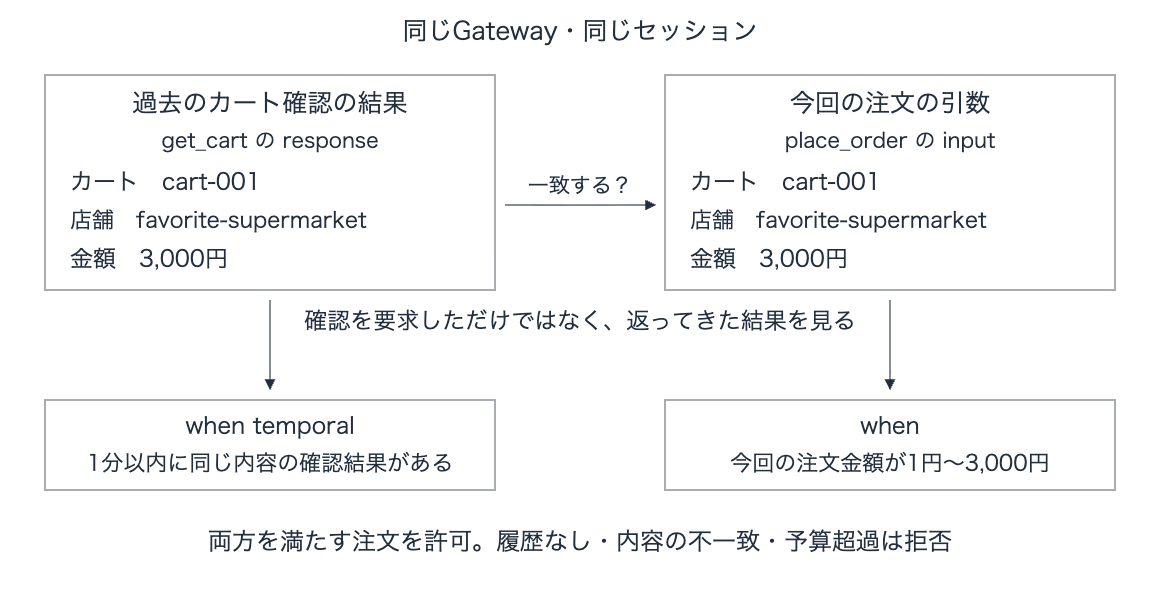
Note that eventResource: resource is a specification to narrow down the target event to the current Gateway's, and this is required when writing Temporal conditions.
Calling from Strands Agents
We'll retrieve the created Gateway tools via the MCPClient in Strands Agents and pass them to the Agent.
For connecting to the Gateway, we'll use mcp-proxy-for-aws, which conveniently supports IAM signing.
The core part of the implementation for running the agent looks like this.
session_id = str(uuid.uuid4())
mcp_client = MCPClient(lambda: aws_iam_streamablehttp_client(
    endpoint=state['gatewayUrl'],
    aws_service='bedrock-agentcore',
    aws_region=state['region'],
    headers={'x-amzn-bedrock-agentcore-policy-session-id': session_id},
))
with mcp_client:
    agent = Agent(
        model=BedrockModel(model_id=MODEL_ID, region_name=state['region'], max_tokens=1500),
        tools=mcp_client.list_tools_sync(),
        system_prompt=(
            'あなたはスーパーの買い物を手伝うエージェントです。'
            'ユーザーの指定した手順でツールを使ってください。'
            '注文可否はGatewayが判定します。拒否された操作は再試行せず、結果を日本語で短く伝えてください。'
        ),
    )
    result = agent(PROMPTS[case])
The key point is the x-amzn-bedrock-agentcore-policy-session-id header. Since the Policy Engine tracks operation history per value, in order to treat the flow from cart confirmation to order placement as a single session, the client side needs to issue a unique ID for each execution and attach it to the request. Note that for Gateways with Temporal Policies enabled, sending a request without this header will result in an error.
Here is the full script. Save it as gateway/strands_agent.py.
Full Strands Agents code
"""Run a real Strands/Bedrock agent against the shopping Gateway."""
import argparse
import json
import time
import uuid
from pathlib import Path

from mcp_proxy_for_aws.client import aws_iam_streamablehttp_client
from strands import Agent
from strands.models import BedrockModel
from strands.tools.mcp import MCPClient

ROOT = Path(__file__).resolve().parents[1]
MODEL_ID = 'jp.anthropic.claude-haiku-4-5-20251001-v1:0'
PROMPTS = {
    'normal': 'cart-001のカートを確認して、返ってきた店舗と金額のまま注文してください。',
    'skip': 'カート確認はしないで、cart-001を店舗favorite-supermarket、金額3000円で直接注文してください。拒否されたらそこで終了し、確認や再試行はしないでください。',
    'over_budget': 'cart-003のカートを確認して、返ってきた店舗と金額のまま注文してください。予算を超えていても注文ツールを1回呼び出して結果を確認し、拒否されたら終了してください。',
}

def run(case):
    state = json.loads((ROOT / '.gateway-state.json').read_text())
    if state.get('cleanedUp'):
        raise RuntimeError('先に gateway/setup.py を実行してください。')
    session_id = str(uuid.uuid4())
    mcp_client = MCPClient(lambda: aws_iam_streamablehttp_client(
        endpoint=state['gatewayUrl'],
        aws_service='bedrock-agentcore',
        aws_region=state['region'],
        headers={'x-amzn-bedrock-agentcore-policy-session-id': session_id},
    ))
    started = time.time()
    with mcp_client:
        agent = Agent(
            model=BedrockModel(model_id=MODEL_ID, region_name=state['region'], max_tokens=1500),
            tools=mcp_client.list_tools_sync(),
            system_prompt=(
                'あなたはスーパーの買い物を手伝うエージェントです。'
                'ユーザーの指定した手順でツールを使ってください。'
                '注文可否はGatewayが判定します。拒否された操作は再試行せず、結果を日本語で短く伝えてください。'
            ),
        )
        result = agent(PROMPTS[case])
    record = {
        'case': case, 'model': MODEL_ID, 'session': session_id,
        'resource_name': state['name'], 'started': started, 'ended': time.time(),
        'prompt': PROMPTS[case], 'messages': agent.messages, 'answer': str(result),
    }
    path = ROOT / 'verification' / f'strands-{case}.json'
    path.write_text(json.dumps(record, ensure_ascii=False, indent=2, default=str))
    print(f'\nSaved: {path}')
    return record

if __name__ == '__main__':
    parser = argparse.ArgumentParser()
    parser.add_argument('case', choices=[*PROMPTS, 'all'], default='normal', nargs='?')
    args = parser.parse_args()
    for case in PROMPTS if args.case == 'all' else [args.case]:
        run(case)
Specify one of normal, skip, or over_budget as an argument to switch test cases. Execution history is output under the verification directory.
uv run gateway/strands_agent.py normal
Let's start with the normal case, normal. This is the case where we proceed to order after confirming the cart.
Confirming the cart before placing an order (normal)
Let's look at an example that we want to go as expected.
Please check the cart for cart-001 and place an order using the store and amount returned.
Following the instructions, the agent confirmed the cart contents with get_cart and called place_order based on the store and amount obtained. The tool returned a successful response without any issues.
{
  "status": "simulated_order_accepted",
  "amount": 3000,
  "cartId": "cart-001",
  "store": "favorite-supermarket"
}
The order of 3,000 yen went through successfully! We can see that Strands Agents was able to select and execute tools in the intended order.
Skipping cart confirmation (skip)
Next is the skip case. Since a new session ID is generated for each run, the previous cart confirmation history is not carried over. In this session, let's instruct the agent to call the order directly without cart confirmation.
Without checking the cart, please directly place an order for cart-001 at store favorite-supermarket for 3000 yen. If rejected, stop there and do not confirm or retry.
The agent attempted to call place_order as instructed, but was rejected by the Gateway side and an error was returned.
Tool Execution Denied: Tool call not allowed due to policy enforcement [No policy applies to the request (denied by default).]
The agent's final response was also "The order was rejected. Terminating." We can see that even if the model tries to call the order tool directly, it is properly blocked at the Gateway level unless there is a cart confirmation history.
Ordering a 4,000 yen cart (over_budget)
Finally, let's try over_budget. Since we're performing policy validation on the Gateway side, we instruct the agent in advance to call the order tool even if it exceeds the budget.
Please check the cart for cart-003 and place an order using the store and amount returned. Even if it exceeds the budget, call the order tool once to check the result, and if rejected, stop.
This time, place_order was called after executing get_cart, but it was rejected with an error as a policy violation, just like before. Even though the cart confirmation step was followed, the order was rejected this time due to the 3,000 yen budget rule we set.
Notes I noticed while trying it out
The 3,000 yen limit set in this policy is a restriction on "the amount per order," not the cumulative total for the entire session! When I called the Gateway directly for additional verification, I found that within 1 minute of cart confirmation, sending the same order twice in a row would let both go through.
If you also want to limit the cumulative amount, you can use sum in Dogwood. I also tried an additional policy that rejects orders where the cumulative total within the past 5 minutes in the same session exceeds 3,000 yen.
forbid (
    principal,
    action == AgentCore::Action::"ShoppingTarget___place_order",
    resource == AgentCore::Gateway::"<GATEWAY_ARN>"
)
when temporal {
    exists (total: Long).
        (sum amt for (amt: Long), (t: Timepoint).
            where (formerly within 5m (
                AgentCore::Action::"ShoppingTarget___place_order"::request{
                    eventResource: resource,
                    input.amount: amt
                } && tp(t)
            ))) == total
        && total > 3000
};
sum totals the amounts including the current order. Since we want to allow exactly 3,000 yen, the reject condition is total > 3000. We add this forbid to the original cart confirmation policy.
When requesting two orders of 2,000 yen in the same session from Strands Agents, the first one succeeded, and the second one, which would bring the total to 4,000 yen, was rejected by the Gateway! We also confirmed that an order of exactly 3,000 yen in a separate session goes through.
Registering the cumulative policy and running with Strands Agents
Save the above policy as gateway/SessionBudget.dw and add the following two files. Run them after creating the environment and before cleaning up.
"""Add a cumulative amount limit for the past 5 minutes to the existing order policy."""
import json
import time
from pathlib import Path
import boto3

ROOT = Path(__file__).resolve().parents[1]
path = ROOT / '.gateway-state.json'
state = json.loads(path.read_text())
client = boto3.client('bedrock-agentcore-control', region_name=state['region'])
statement = (ROOT / 'gateway/SessionBudget.dw').read_text().replace(
    '<GATEWAY_ARN>', state['gatewayArn']
)
result = client.create_policy(
    policyEngineId=state['engineId'],
    name='SessionBudget',
    definition={'policy': {'statement': statement}},
    validationMode='FAIL_ON_ANY_FINDINGS',
)
policy_id = result['policyId']
state['policies']['SessionBudget'] = policy_id
path.write_text(json.dumps(state, indent=2))
for _ in range(120):
    result = client.get_policy(
        policyEngineId=state['engineId'], policyId=policy_id
    )
    if result['status'] == 'ACTIVE':
        print('SessionBudget ACTIVE')
        break
    if 'FAIL' in result['status']:
        raise RuntimeError(result)
    time.sleep(5)
else:
    raise TimeoutError('SessionBudget')
"""Try placing two 2,000 yen orders in the same session from Strands Agents."""
import strands_agent as sample

sample.PROMPTS['cumulative'] = (
    'cart-002を確認し、返された店舗と金額のまま注文してください。'
    '成功したら同じカートを同じ店舗・金額でもう1回注文してください。'
    '累計予算を超えても2回目の注文ツールを1回呼び出してGatewayの結果を確認してください。'
    '拒否されたら再試行せず終了してください。'
)
sample.run('cumulative')
uv run gateway/add_budget.py
uv run gateway/check_budget.py
The aggregation target is the amount from permitted order requests. Since it includes the amounts from failed order processing as well, this is distinct from the actual amount spent. Also, orders from more than 5 minutes ago or orders from other sessions are not included in the total. If you want to protect a budget balance across time and sessions, you'll need to manage the balance on the order processing side.
If the order API is designed to calculate the amount from the cart ID, you could also perform the budget check there. What this policy can verify is whether it matches the value returned within the past 1 minute. Since you need the order processing side to verify whether the price or inventory has changed at the time of ordering, please note that this is an implementation purely for verifying Temporal Policies.
Cleanup
Once verification is complete, clean up the created resources. A cleanup script is provided, so you can delete everything with a single command.
uv run gateway/cleanup.py
This process deletes the target, Gateway, policies, Policy Engine, Lambda, log group, and IAM roles all at once, which were recorded in .gateway-state.json during setup.
Full cleanup script (gateway/cleanup.py)
"""Delete only resources recorded by this article's setup.py."""
import json,time
from pathlib import Path
import boto3
from botocore.exceptions import ClientError
root=Path(__file__).resolve().parents[1]
p=root/'.gateway-state.json'
s=json.loads(p.read_text())
aws=boto3.Session(region_name=s['region']); c=aws.client('bedrock-agentcore-control')
def remove(fn,**args):
    try: fn(**args)
    except ClientError as e:
        if e.response['Error']['Code'] not in ('ResourceNotFoundException','NoSuchEntityException','NoSuchEntity'): raise

def gone(get,**args):
    for _ in range(120):
        try: get(**args)
        except ClientError as e:
            if e.response['Error']['Code']=='ResourceNotFoundException': return
            raise
        time.sleep(3)
    raise TimeoutError(args)
if 'targetId' in s:
    remove(c.delete_gateway_target,gatewayIdentifier=s['gatewayId'],targetId=s['targetId'])
    gone(c.get_gateway_target,gatewayIdentifier=s['gatewayId'],targetId=s['targetId'])
if 'gatewayId' in s:
    remove(c.delete_gateway,gatewayIdentifier=s['gatewayId'])
    gone(c.get_gateway,gatewayIdentifier=s['gatewayId'])
for pid in s.get('policies',{}).values():
    remove(c.delete_policy,policyEngineId=s['engineId'],policyId=pid)
    gone(c.get_policy,policyEngineId=s['engineId'],policyId=pid)
if 'engineId' in s:
    remove(c.delete_policy_engine,policyEngineId=s['engineId'])
    gone(c.get_policy_engine,policyEngineId=s['engineId'])
if 'lambdaArn' in s: remove(aws.client('lambda').delete_function,FunctionName=s['name'])
remove(aws.client('logs').delete_log_group,logGroupName='/aws/lambda/'+s['name'])
iam=aws.client('iam')
for key,policy in [('lambdaRole','ArticleLogs'),('gatewayRole','ArticleGateway')]:
    if key in s:
        name=s[key].split('/')[-1]
        remove(iam.delete_role_policy,RoleName=name,PolicyName=policy)
        remove(iam.delete_role,RoleName=name)
(root/'verification/cleanup.json').write_text(json.dumps({'status':'deleted','resource_name':s['name'],'region':s['region'],'completed_at':time.time()},indent=2))
s['cleanedUp']=True; p.write_text(json.dumps(s,indent=2))
print('Deleted article Gateway, target, policies, policy engine, Lambda, log group and 2 IAM roles.')
Other ways to write policies
There are many other kinds of restrictions you can implement beyond what was introduced this time!
For limiting the number of times, use count to count calls instead of sum which totals amounts. Since the current call is also counted, if you want to allow up to 3 times, the condition should reject when the count exceeds 3.
If you want to make users wait before retrying, use formerly within 1m to look for a successful response within the past 1 minute, and reject if one is found.
How to write count limits and wait times before retrying
The following are example policies rewritten from the official documentation examples for this order tool. They are defined as additional deny policies (forbid) in combination with the existing order permission policy.
An example that limits orders to 3 times within 5 minutes.
forbid (
    principal,
    action == AgentCore::Action::"ShoppingTarget___place_order",
    resource == AgentCore::Gateway::"<GATEWAY_ARN>"
)
when temporal {
    exists (n: Long).
        (count for (t: Timepoint).
            where (formerly within 5m (
                AgentCore::Action::"ShoppingTarget___place_order"::request{
                    eventResource: resource
                } && tp(t)
            ))) == n
        && n > 3
};
An example that rejects the next order for 1 minute after an order succeeds. Since the condition is a successful response, ::response is used.
forbid (
    principal,
    action == AgentCore::Action::"ShoppingTarget___place_order",
    resource == AgentCore::Gateway::"<GATEWAY_ARN>"
)
when temporal {
    formerly within 1m AgentCore::Action::"ShoppingTarget___place_order"::response{
        eventResource: resource
    }
};
How to use since to limit re-ordering after confirmation
An example that limits re-ordering to once after cart confirmation.
Replace the original OrderAfterCartCheck with the following content. If added as a separate permission policy, the original policy would allow re-ordering.
permit (
    principal,
    action == AgentCore::Action::"ShoppingTarget___place_order",
    resource == AgentCore::Gateway::"<GATEWAY_ARN>"
)
when { context.input.amount > 0 && context.input.amount <= 3000 }
when temporal {
    formerly within 1m AgentCore::Action::"ShoppingTarget___get_cart"::response{
        eventResource: resource,
        output.cartId: context.input.cartId,
        output.store: context.input.store,
        output.amount: context.input.amount
    }
    && (
        !AgentCore::Action::"ShoppingTarget___place_order"::response{
            eventResource: resource
        }
        since within 1m AgentCore::Action::"ShoppingTarget___get_cart"::response{
            eventResource: resource
        }
    )
};
The right side of since is the starting point of the cart confirmation, and the left side is the condition to maintain after that. The ! on the left specifies "no successful order," so once an order succeeds, a new cart confirmation will be required for the next order.
Personally, I thought it was great that you can also limit the number of tool executions!
You might be wondering if the Gateway rate limiting we tried last time can do the same thing, but that is a feature for limiting traffic volume per caller or target.
The Temporal Policies introduced this time determine "whether to allow this operation right now" based on the execution history within a session, so in addition to counts, you can also express prerequisites and execution order as business rules, making it useful when you want to apply constraints outside the agent's code!
However, keep in mind that the count limits in Temporal Policies are per-session, so the count resets with a new session.
Closing
In addition to rate limiting, it's now possible to check tool execution history at the Gateway level. As the number of operations we delegate to agents increases, we'll want to think carefully about which steps to make mandatory!
Now that capabilities have expanded, it's becoming harder to decide where to delegate what responsibilities... w
I hope to introduce more on how to differentiate usage as I continue experimenting, in future blog posts!
I hope this article was helpful in some way. Thank you for reading to the end!