[Update] Amazon Bedrock AgentCore Gateway Now Supports MCP Tasks

This page has been translated by machine translation. View original
Introduction
Hello, this is Kanno from the Consulting Department, who loves the supermarket La Moo.
I was surprised by the convenient update that my beloved La Moo will start accepting credit card payments from 11/30 (Mon).
I'm so happy.
On a different note, while looking at the Amazon Bedrock AgentCore Gateway documentation, I found that the October 2026 update added support for the MCP Tasks extension! (I hadn't noticed...)
Synchronous invocations on Gateway are limited to 15 minutes, but with tasks you can now handle even longer processing!
The flow of using tasks with Gateway
The MCP Tasks extension is a mechanism where, for a time-consuming tool call, the server immediately returns a task ID, and the client later fetches the status and result. The specification is defined in the 2026-07-28 protocol, so if you're interested, please refer to the documentation.
Here is how it differs from a synchronous call.
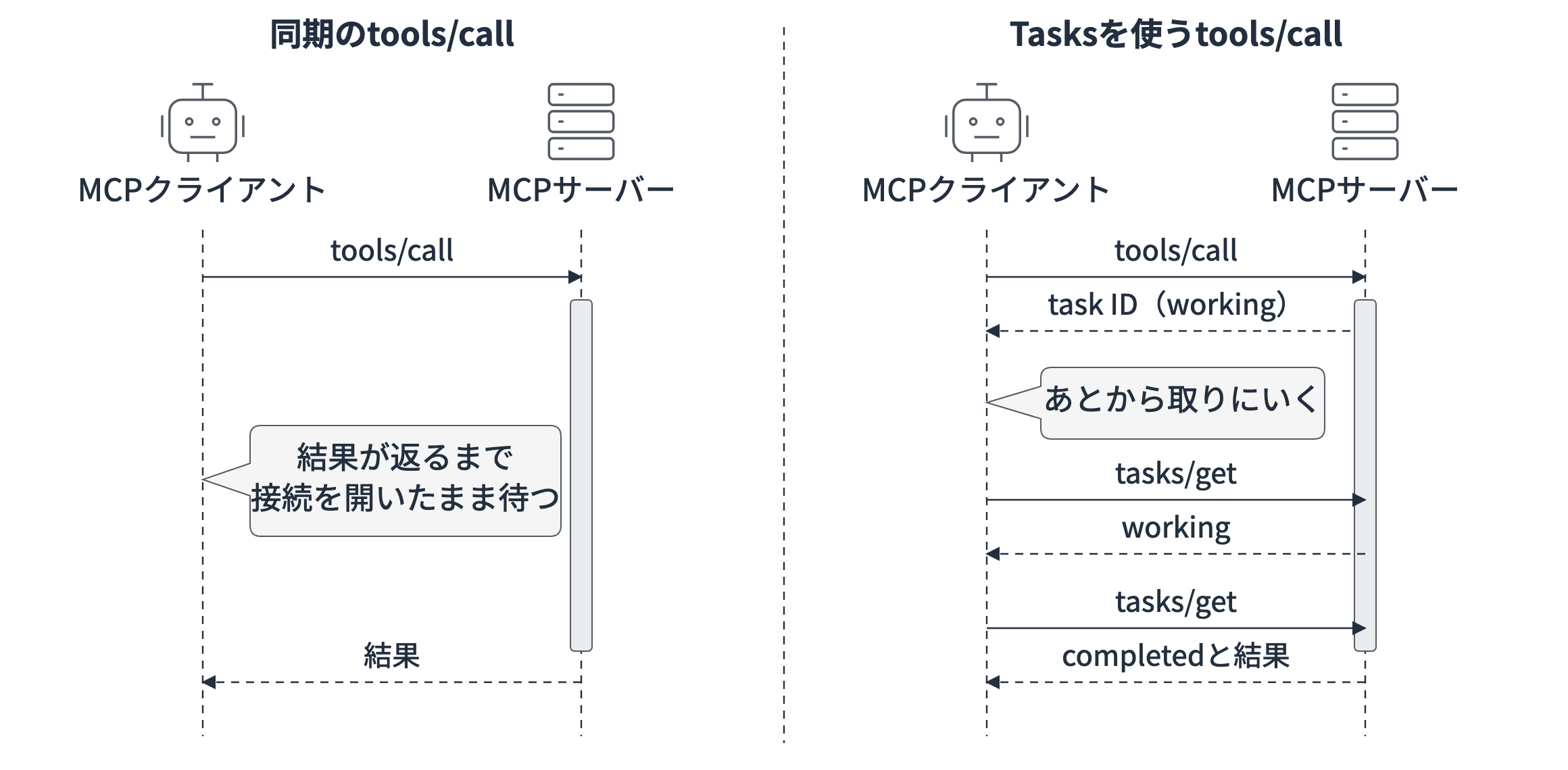
It's similar to common asynchronous processing!
There are three conditions for using Tasks with Gateway, and no session or streaming settings are required.
- Include 2026-07-28 in Gateway's MCP protocol versions
- Use an MCP server target
- Declare the Tasks extension (io.modelcontextprotocol/tasks) in params._meta every time for tool calls and subsequent operations that handle tasks
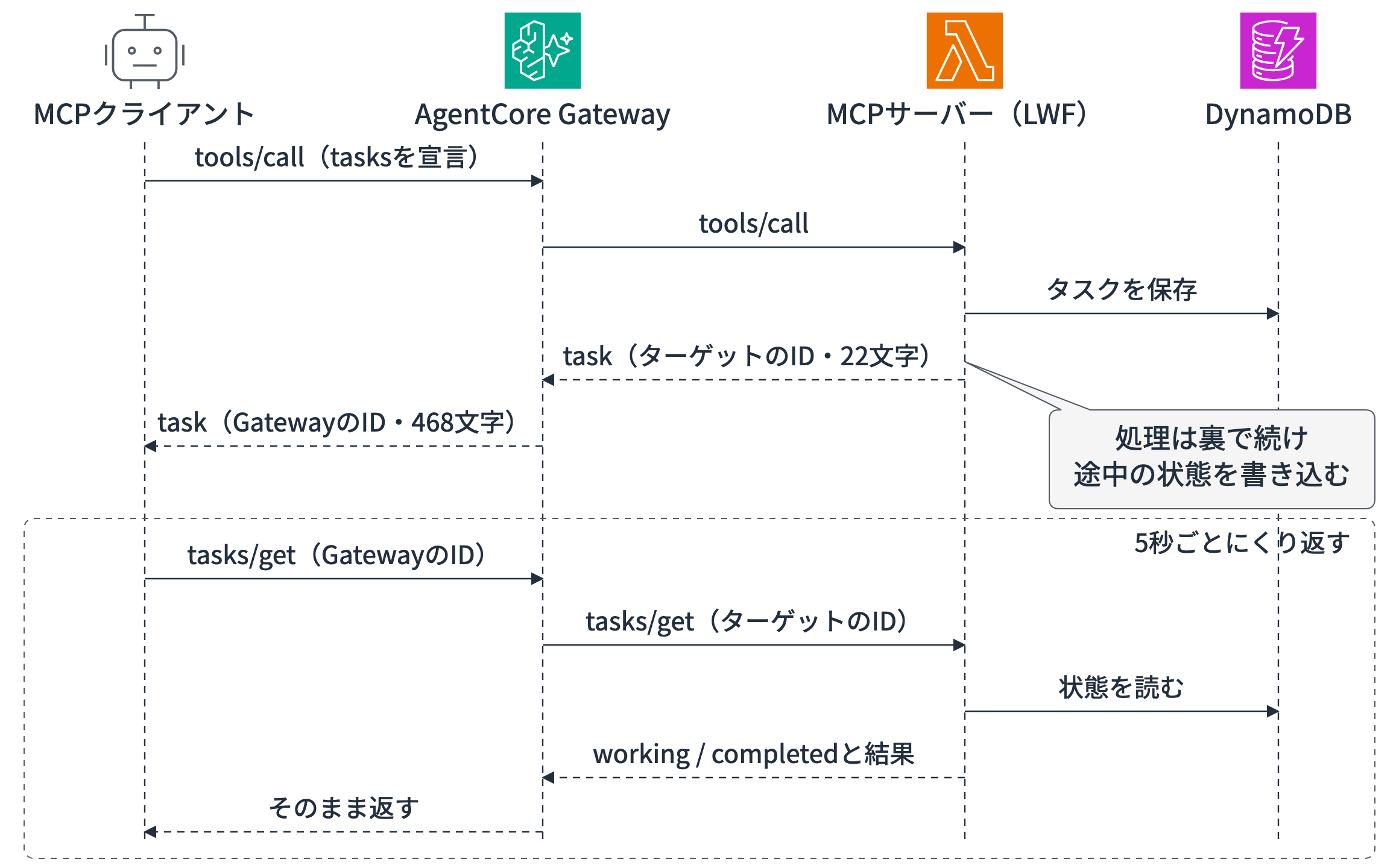
When the target returns a task, Gateway issues its own task ID and returns it to the client.
When you call status retrieval (tasks/get), intermediate input (tasks/update), or cancellation (tasks/cancel) with that ID, Gateway converts it back to the original ID and relays the request.
In addition to the status and result, the retention period (ttlMs) and polling interval (pollIntervalMs) are also passed through as-is from the target's response. How many milliseconds a task is retained (ttlMs) is decided by the target, and expired tasks are also cleaned up by the target.
Let's try it out to deepen our understanding!
Trying it out
Architecture for this time
I deployed the MCP server on Lambda Web Functions and connected it to Gateway with IAM authentication.
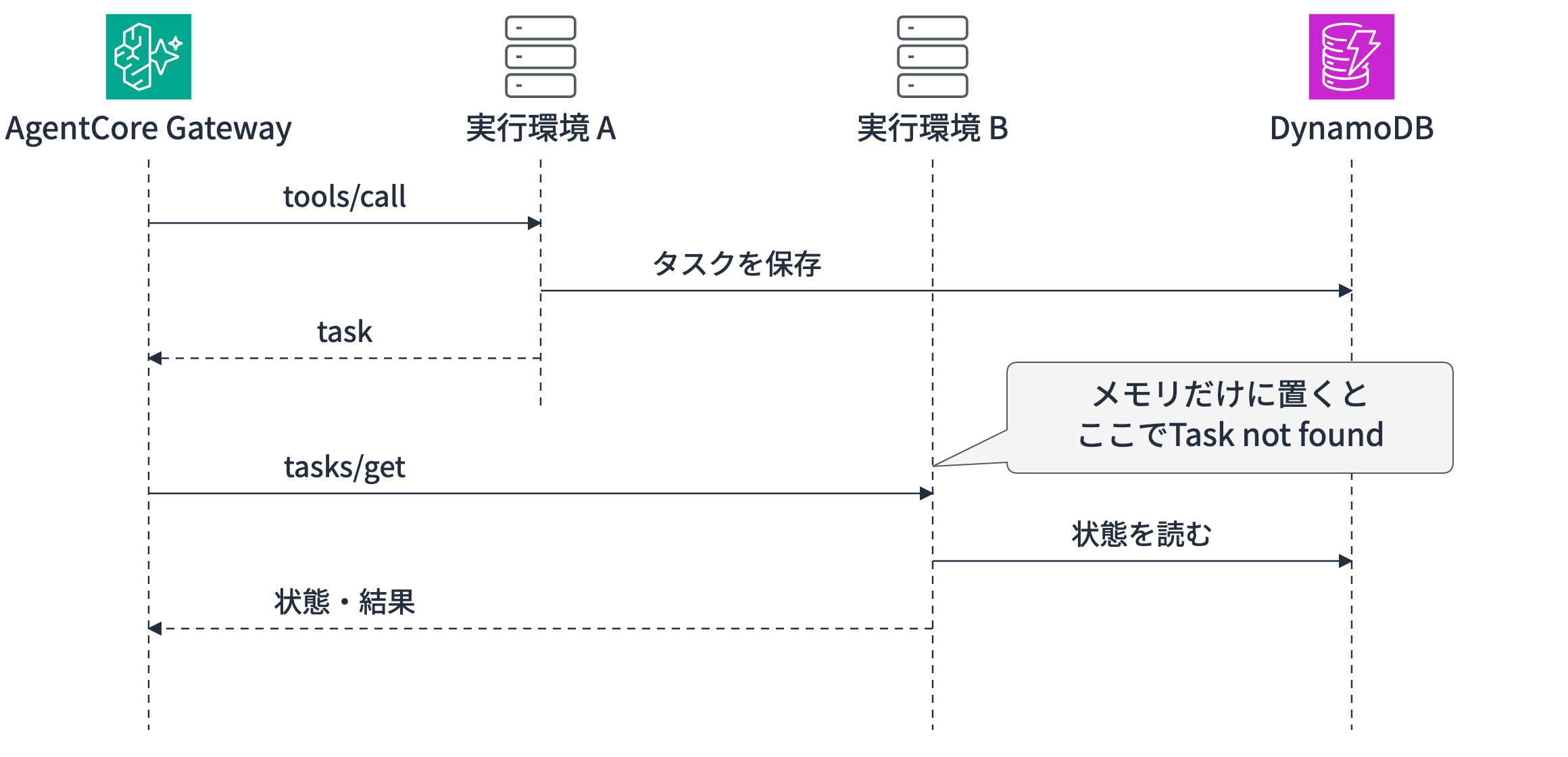
Lambda Web Functions can continue processing in the background even after returning a response, but if the execution environment that received tools/call disappears, the processing stops. For that reason, I set up the configuration to store task state in DynamoDB.
Here's the overall flow!
| Item | Version / Value |
|---|---|
| Region | N. Virginia (us-east-1) |
| aws-cdk-lib / aws-cdk | 2.278.0 / 2.1149.0 |
| Lambda Web Functions runtime | nodejs24.x |
| @modelcontextprotocol/server | 2.4.0 |
| Python / boto3 (client) | 3.15.2 / 1.44.12 |
The full code is on GitHub, and DynamoDB, the Lambda Web Function, IAM, and Gateway are created with CDK (TypeScript).
Please refer to the repository for details!
Set the AWS CLI region to us-east-1, and for an account and region combination where you're using CDK for the first time, run pnpm cdk bootstrap after pnpm install in the cdk directory before deploying.
You can try everything from deployment to tool execution with the following commands!
git clone https://github.com/yuu551/agentcore-gateway-mcp-tasks.git
cd agentcore-gateway-mcp-tasks/server && pnpm install
cd ../cdk && pnpm install && pnpm cdk deploy

cd ../client && uv sync
export GATEWAY_URL=$(aws cloudformation describe-stacks --stack-name McpTasksDemo \
  --query "Stacks[0].Outputs[?OutputKey=='GatewayUrl'].OutputValue" --output text)
uv run client.py report 60
Let's also check the implementation to see how it's processed!
The client declares the Tasks extension in params._meta for every call that handles tasks. For subsequent status retrieval, intermediate input, and cancellation, it puts the task ID received from Gateway into both params.taskId and the Mcp-Name header.
rpc() in the code is a function that calls Gateway with a SigV4 signature.
META = {
    "io.modelcontextprotocol/protocolVersion": "2026-07-28",
    "io.modelcontextprotocol/clientCapabilities": {
        "extensions": {"io.modelcontextprotocol/tasks": {}},  # Declare the Tasks extension every time
        "elicitation": {"form": {}},  # Can answer mid-process questions (forms)
    },
}
# (中略)

def poll(task_id, stop=("completed", "failed", "cancelled")):
    while True:
        task = rpc("tasks/get", {"taskId": task_id}, task_id)
        if task.get("status") in stop:
            return task
        time.sleep(task.get("pollIntervalMs", 5000) / 1000)
task = rpc("tools/call", {"name": "report-server___build_report",
                          "arguments": {"seconds": seconds}}, "report-server___build_report")
# (中略)
poll(task["taskId"])
When the server side receives a tool call, it saves the task in DynamoDB, returns a response immediately, and continues processing in the background. Status checks and the like are served by reading from DynamoDB.
  if (msg.method === 'tools/call') {
    // (中略:Tasks の宣言がなければ build_report は同期で動かし approve_and_deploy はエラーを返す)
    const now = new Date().toISOString();
    const task = {
      taskId: randomBytes(16).toString('base64url'), tool: p.name, args: p.arguments ?? {},
      status: 'working', createdAt: now, lastUpdatedAt: now,
      expiresAt: Math.floor((Date.now() + TTL_MS) / 1000), // DynamoDB の TTL で消す
    };
    await ddb.send(new PutCommand({ TableName: TABLE, Item: task })); // 返す前に保存しておく
    console.log('task created', task.taskId, p.name, 'env', ENV_ID);
    void runJob(task.taskId, p.name, task.args); // 応答のあともバックグラウンドで動かす
    return { resultType: 'task', ...taskView(task, false) };
  }
  // (中略)
  const t = p.taskId && (await getTask(p.taskId));
  if (!t) throw new RpcError(-32602, `Task ${p.taskId} not found`);
  // (中略)
  if (msg.method === 'tasks/get') return { resultType: 'complete', ...taskView(t, true) };
Calling the tool and waiting for the result
For the 60-second report creation, the first call returned a task in about 1 second.
When I fetched the status every 5 seconds, it changed from working to completed, and I was able to get the result!
In the status retrieval response, resultType is always complete, so completion is determined by status.
   1.0s tools/call   {"resultType": "task", "taskId": "AQICAHifui3Nd7d+…(468文字)", "status": "working"}
   2.0s tasks/get    {"resultType": "complete", "taskId": "AQICAHifui3Nd7d+…(468文字)", "status": "working", "statusMessage": "集計中 1/6"}
(中略)
  61.0s tasks/get    {"resultType": "complete", "taskId": "AQICAHifui3Nd7d+…(468文字)", "status": "working", "statusMessage": "集計中 6/6"}
  67.0s tasks/get    {"resultType": "complete", "taskId": "AQICAHifui3Nd7d+…(468文字)", "status": "completed", "result": {"content": [{"text": "レポートができました(60秒かかりました)", "type": "text"}], "isError": false}}
The task ID returned by Gateway was 468 characters long, which is different from the 22-character ID issued by the MCP server. Even so, the subsequent status retrieval returned the result, so you can see that the ID is swapped on the Gateway side, just as the documentation says.
I was also curious about an 18-minute process that exceeds the 15-minute synchronous limit, so I tried it, and I was able to receive the result in about 1,085 seconds!
By the way, when I called status retrieval with the same task ID from a different IAM role, -32602 (Task not found) was returned. When using IAM roles, Gateway identifies the caller by the role ARN, so the same role can reference it even if the session changes.
Cancellation and mid-process approval
There are many situations where you'd want to stop a long process midway, so I also tried cancellation (tasks/cancel). When you run uv run client.py cancel 90, it starts a 90-second report creation and sends a cancel after 30 seconds. After waiting for a processing breakpoint, the status changed to cancelled after about 10 seconds.
Also, with MCP Tasks you can insert a confirmation from the user in the middle of processing. For example, it's a mechanism you can use for operations where you want to get approval once before execution, such as production deployments or data deletion.
The sample MCP server this time also has a tool that asks for approval before deploying (approve_and_deploy), which you can try with uv run client.py approve. On the client side, it waits until the status becomes input_required, returns the approval result with tasks/update, and then continues polling until completion.
task = rpc("tools/call", {"name": "report-server___approve_and_deploy",
                          "arguments": {"service": "billing-api"}}, "report-server___approve_and_deploy")
poll(task["taskId"], stop=("input_required",))
rpc("tasks/update", {"taskId": task["taskId"],
                     "inputResponses": {"approval": {"action": "accept", "content": {"approve": True}}}},
    task["taskId"])
poll(task["taskId"])
When executed, the status becomes input_required midway, and an elicitation (a mechanism for requesting input midway) question is returned.
   1.8s tools/call    {"resultType": "task", "status": "working", …}
   8.9s tasks/get     {"status": "input_required", "statusMessage": "承認待ち", "inputRequests": {"approval": {"method": "elicitation/create", "params": {"message": "billing-api を本番にデプロイしてよいですか?", …}}}}
   9.8s tasks/update  {"resultType": "complete"}
  10.9s tasks/get     {"status": "working", "statusMessage": "デプロイ中", …}
  22.4s tasks/get     {"status": "completed", "result": {"content": [{"text": "billing-api をデプロイしました", "type": "text"}], …}}
When the approval was sent from tasks/update here, the process resumed to "deploying" and proceeded through to completion. It's nice that operations where you want a human confirmation can be built right into the protocol!
Managing task state externally
When you adopt serverless like Lambda Web Functions or AgentCore Runtime, the initial call and subsequent status retrievals may reach different execution environments. For that reason, keep in mind that task state needs to be placed outside, such as in DynamoDB, rather than in memory!
Here's the flow when execution environments are split!
Cleanup
After verification, delete the CDK stack.
cd ../cdk && pnpm cdk destroy
Some log groups remain because of logs written after deletion, so delete them as well using the commands in the README of the GitHub repository.
Conclusion
Since this feature lets you run long-running processing as a tool, I'd like to consider using it when the need arises!
This time I introduced the update quickly, so next I'd like to try incorporating it into Strands Agents and use it for background execution and mid-process approval!!
I hope this article was of some help. Thank you for reading to the end!
