I tried out the On-Behalf-Of (OBO) token exchange feature of Amazon Bedrock AgentCore Identity to deepen my understanding

This page has been translated by machine translation. View original
Hello, I'm Kamino from the consulting department who loves Amazon Bedrock AgentCore.
I'm embarrassed to admit that while I was curious about AgentCore Identity's On-Behalf-Of (OBO) token exchange, I never quite understood "why do we actually need it?"...
But the day finally came when I had to consider whether to actually use it, and I decided to write a blog post to clarify what it is!
Why OBO Is Needed
Why is this feature necessary? Let's start by organizing its significance!
Entra ID Tokens Have a Destination
Let me review Entra ID tokens. When a user signs in with Entra ID, an access token is issued. The application receives this token and checks who made the request.
The token contains who (name), which app it's intended for (aud), and what actions are permitted (scp).
Since Entra ID issues tokens for each destination app, if it's being used for agent authentication, the token's destination will be the agent's app.

The receiving application should verify that the destination is itself before using the token, and Microsoft's documentation also states that Web APIs should only accept tokens where the aud is their own. Not just any token will do.
Now let's consider a case where an AI agent authenticated with Entra ID wants to use Microsoft Graph.
The Received Token Is Addressed to the Agent
In an agent for internal use, users attach a token addressed to this agent when making requests, but when this agent tries to call Microsoft Graph, passing the same token as-is will be rejected.

When trying to call Graph's /me with the agent-addressed token, an error like this occurs.
{"error":{"code":"InvalidAuthenticationToken","message":"Access token validation failure. Invalid audience.", ...}}
HTTP 401
It's being rejected with "this token is not addressed to me."
Indeed, if tokens were accepted without checking the destination, tokens issued for other services could be reused, so it makes sense to reject them.
So what's the right approach?
Problems with Other Approaches
Let me list the approaches I can think of for how an agent could call the Graph API.

When calling with the agent's own permissions (application permissions), the operator seen by Graph is the agent.
Since Graph doesn't know whose request it is, the agent would need to implement logic to filter the data shown per user, and since permissions are attached to the application, depending on which permissions are granted, the agent could read everyone's data — so this is something to avoid if you want per-user control.
If you have users log in and consent per service (3LO), you can call with their own permissions. However, it feels a bit off to re-consent when they've already authenticated with the same Entra ID...
That's where OBO comes in — it's a feature that passes the sign-in token to Entra ID and asks "I want to call Graph on behalf of this person," exchanging it for a Graph-addressed token. AgentCore Identity plays a key role in that exchange.
Microsoft's OBO flow documentation also describes it as a mechanism for carrying the user's identity and permissions forward through a chain of calls.
Why Not Just Pass a Graph-Addressed Token from the Start?
Here I naively thought, "Can't we skip OBO by having the user obtain a Graph-addressed token upfront and pass it to the agent?"
However, I think this would conflict with the mechanism that checks tokens at the agent's entry point (inbound authentication). AgentCore Runtime's inbound authentication matches the issuer and destination of the received token against the Runtime's configuration, and anything that doesn't match is rejected before reaching the agent's code. In this case, the Runtime is configured to only accept tokens addressed to the agent's app ID, so Graph-addressed tokens are not expected.

Indeed, when I tried calling the Runtime with a Graph-addressed token, it was rejected with a 401.
{"jsonrpc":"2.0","error":{"code":-32001,"message":"Claim 'iss' value mismatch with configuration."}}
HTTP 401
Then the question becomes whether we could configure the Runtime side to also accept Graph-addressed tokens, but looking at Microsoft's documentation, that doesn't seem advisable. Graph-addressed tokens use a proprietary format, so you can't validate them in your own app. It also states that accepting tokens addressed to another resource is an example of the "confused deputy" problem. The OBO documentation also states that Graph-addressed tokens cannot be used for OBO, so they should not be accepted.
The right approach seems to be: the agent only accepts tokens addressed to itself, and when calling Graph, it exchanges via OBO.
MCP Servers Don't Pass Tokens As-Is
The same thinking applies when providing tools as an MCP server. The MCP authorization specification (version 2025-11-25) states that MCP servers accept tokens issued to themselves, and when calling upstream APIs, they should not pass the received token directly. For upstream APIs, a separately issued token for that API should be used.
The security best practices list this forwarding as "Token passthrough," identifying it as a pattern to avoid. Risks mentioned include bypassing access controls and losing the ability to trace who performed an action.
A token exchanged via OBO is a separate token issued for the upstream API (Graph in this case), so it aligns with this thinking as well.
Now that I understand the mechanism, let me check how AgentCore Identity makes this easier!
What AgentCore Identity Can Handle
The OBO exchange itself can be done by asking Entra ID's token endpoint, but writing it yourself would look something like this. The parameters follow Microsoft's OBO flow documentation. It looks a bit involved.
res = httpx.post(
    f"https://login.microsoftonline.com/{TENANT_ID}/oauth2/v2.0/token",
    data={
        "grant_type": "urn:ietf:params:oauth:grant-type:jwt-bearer",
        "client_id": CLIENT_ID,
        "client_secret": CLIENT_SECRET,  # Manage and load the secret from somewhere
        "assertion": user_token,          # Pass the received user token directly
        "scope": "https://graph.microsoft.com/User.Read",
        "requested_token_use": "on_behalf_of",
    },
)
graph_token = res.json()["access_token"]
With AgentCore Identity, the agent's code just needs to say "give me an OBO token for this provider." Just add a decorator!
@requires_access_token(
    provider_name="entra-obo-provider",
    auth_flow="ON_BEHALF_OF_TOKEN_EXCHANGE",
    scopes=["https://graph.microsoft.com/User.Read"],
)
async def call_graph_me(*, access_token: str) -> dict:
    ...  # access_token has already been exchanged for Graph
The secret stays in the Token Vault, and there's no code to pass the user's token around. Microsoft-specific parameters like requested_token_use are handled by the Microsoft provider, making implementation easy.
With AgentCore Gateway, you don't even need to write code. For the target's outbound authentication (authentication when calling the target), just set grantType to TOKEN_EXCHANGE.
"oauthCredentialProvider": {
  "providerArn": "arn:aws:bedrock-agentcore:...:oauth2credentialprovider/entra-obo-provider",
  "scopes": ["https://graph.microsoft.com/User.Read"],
  "grantType": "TOKEN_EXCHANGE"
}
Architecture for This Walkthrough
I'll try OBO with both Runtime and Gateway!
Here's a quick image of what we'll be doing.
Runtime Pattern
The user signs in with the az CLI, attaches the obtained token, and calls the agent on AgentCore Runtime. The agent exchanges it for a Graph token using AgentCore Identity and calls /me with that token.

Gateway Pattern
The MCP client attaches the user's token and calls an AgentCore Gateway tool. The Gateway verifies the token via inbound authentication, then exchanges it for a Graph token using AgentCore Identity before calling the target.

Let's get started!
Let's Try It
Prerequisites
You need an account that can register apps in Entra ID and grant admin consent for Graph permissions.
| Item | Version |
|---|---|
| Azure CLI | 2.85.0 |
| AWS CLI | 2.37.13 |
| AgentCore CLI | 0.30.0 |
| Node.js | 26.7.0 |
| uv | 0.9.26 |
| Python (Runtime) | 3.14 |
| bedrock-agentcore / strands-agents / httpx | 1.24.1 / 1.59.0 / 0.28.1 |
Create an App for the Agent in Entra ID
Let's set things up from the "App registrations" section in the Azure portal. There are five things to configure.
- Register the app
- Expose the
access_as_userscope (the permission for users to use the agent) - Authorize the Azure CLI as an approved client (to obtain tokens without a consent screen)
- Grant admin consent for Microsoft Graph's
User.Read(delegated) (the permission being exchanged for via OBO) - Set the access token version to 2 and create a client secret
Register the App
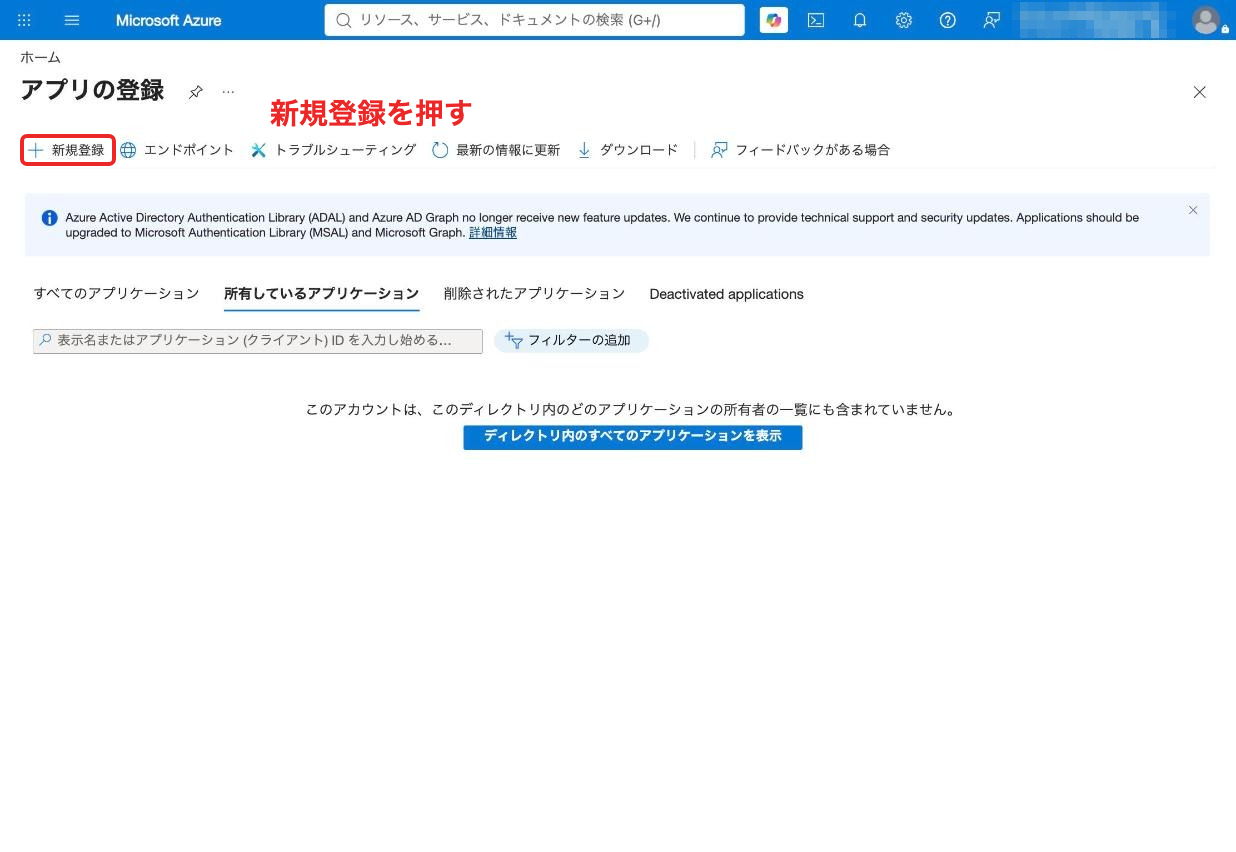
Click "New registration" under "App registrations."
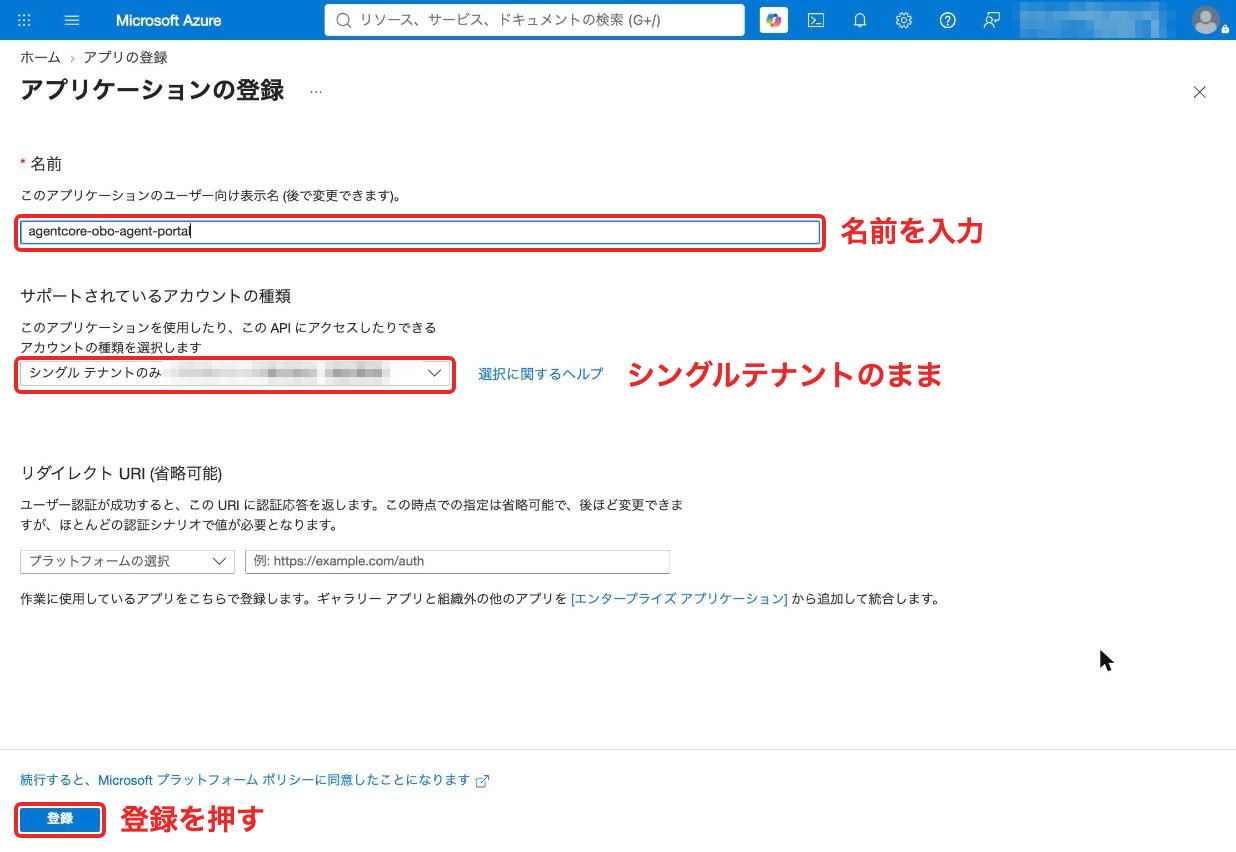
Enter a name, leave the account type as "Single tenant only," and register. I used agentcore-obo-agent-portal for this walkthrough.
Once created, note the client ID and tenant ID from the overview screen. You'll use them in subsequent commands.
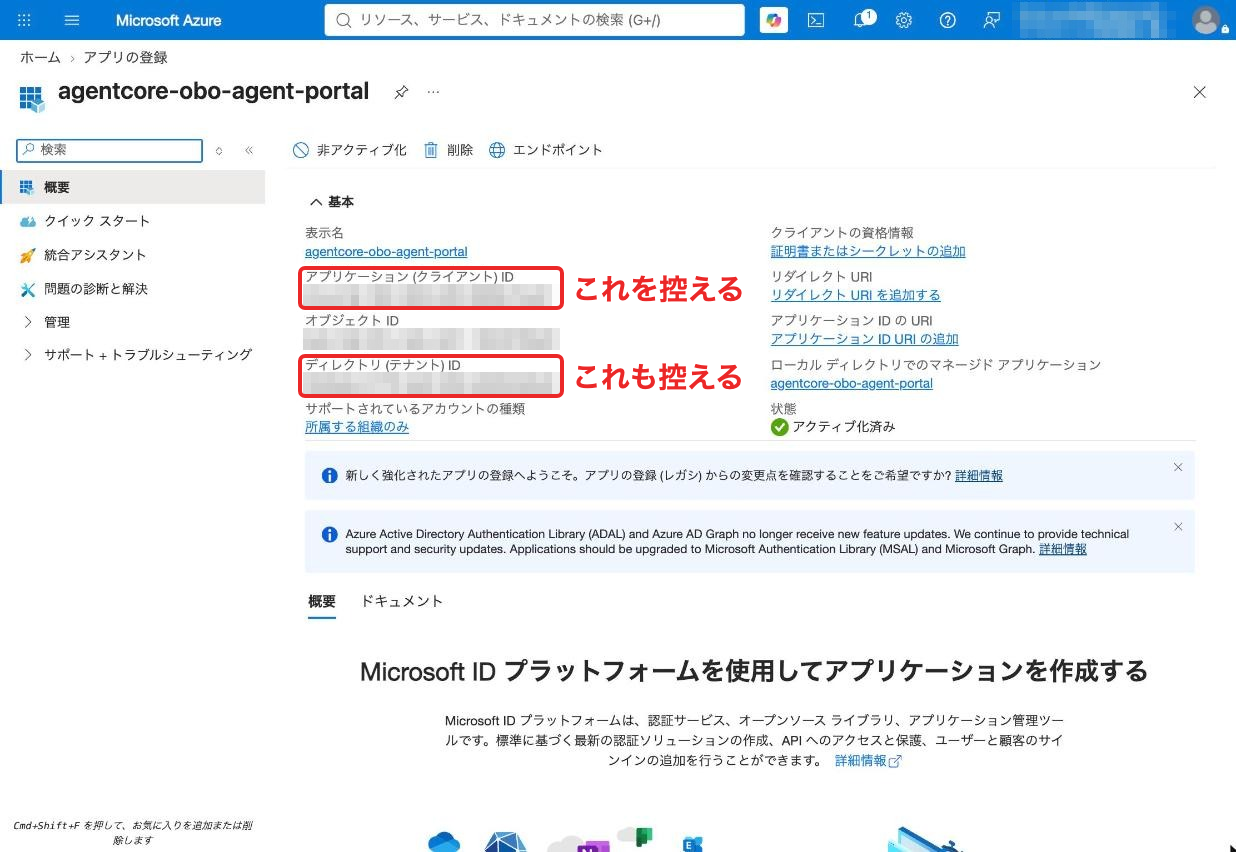
APP_ID=<client ID>
TENANT_ID=<tenant ID>
Expose a Scope
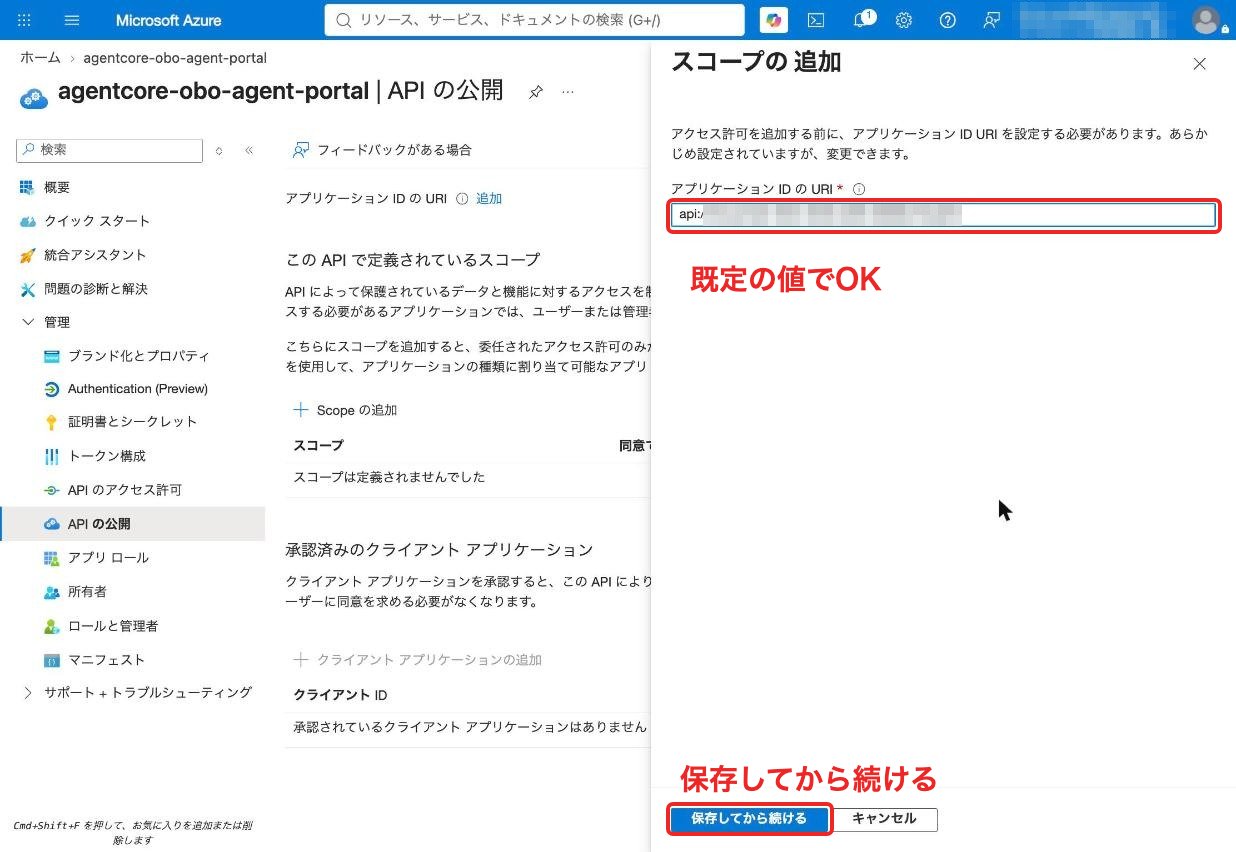
When you click "Add a Scope" under "Expose an API," you'll be prompted to set the Application ID URI first. Save it with the default value api://<client ID>.
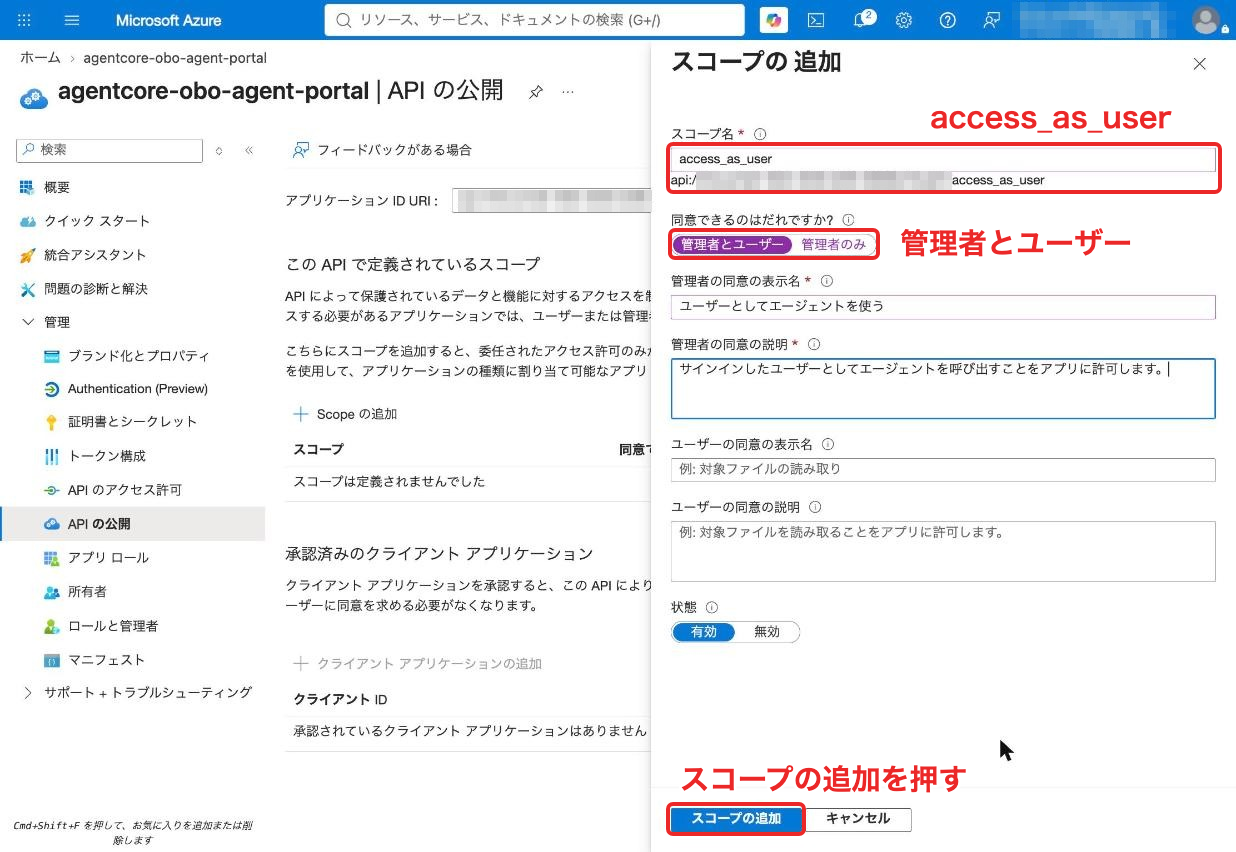
Enter access_as_user as the scope name, select "Admins and users" for "Who can consent?", and add a descriptive display name and description.
Authorize the Azure CLI
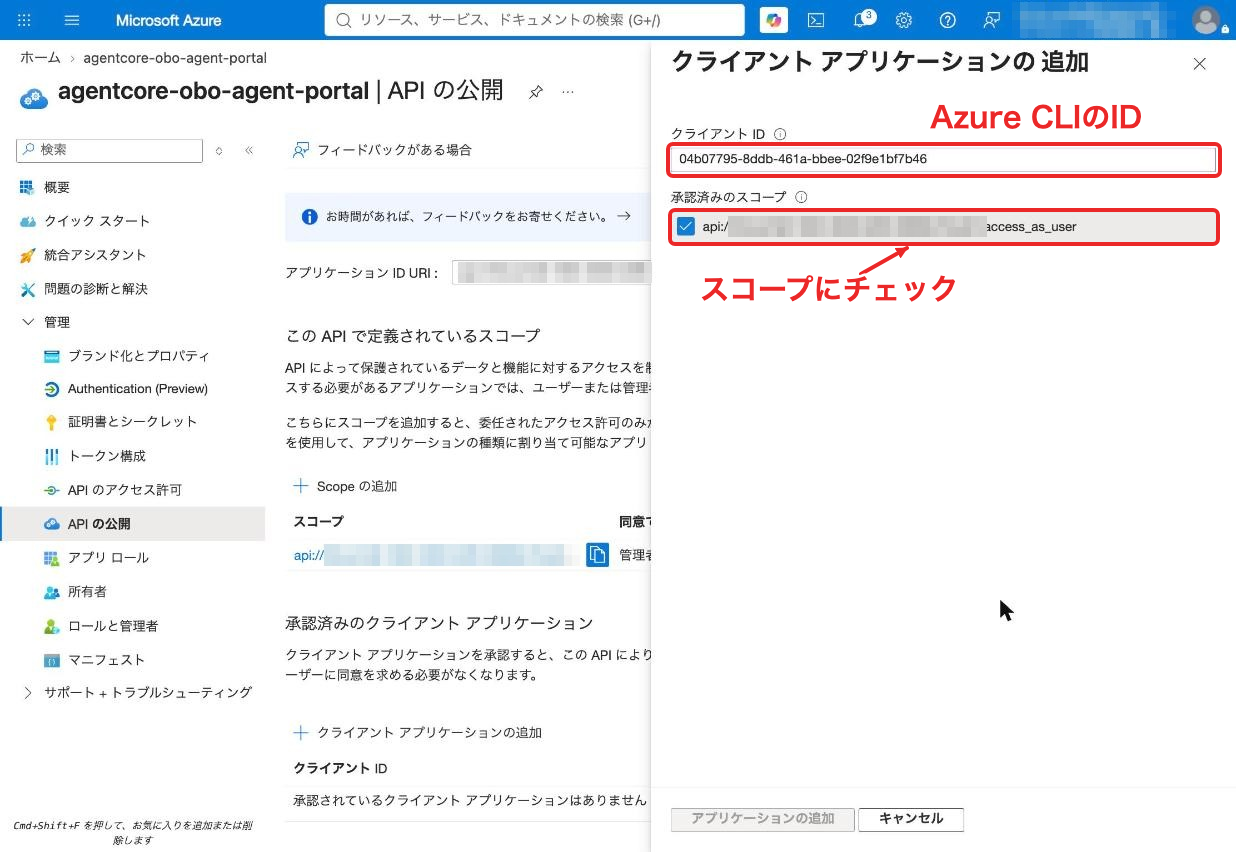
Under "Add a client application" on the same "Expose an API" screen, enter the Azure CLI's client ID 04b07795-8ddb-461a-bbee-02f9e1bf7b46, check the scope, and add it. This allows the az CLI to obtain tokens for this app without a consent screen.
In this walkthrough I used the az CLI as the client for simplicity, but in a real application a frontend like a web app or chat UI would be the client. In that case, you'd register a separate app for the frontend and sign in using MSAL specifying api://<agent client ID>/access_as_user. If you don't want a consent screen, just authorize the frontend's client ID here instead of the Azure CLI.
The frontend only passes the token to the agent; the exchange to Graph is done on the agent side (OBO). Microsoft's OBO documentation also describes SPAs as passing tokens to a middle-tier API to perform OBO.
The scope exposure and authorized client configuration are covered in Microsoft's quickstart.
Grant Consent for Graph Permissions
When you open "API permissions," you'll find that the newly registered app already has Microsoft Graph's User.Read (delegated) included. Click "Grant admin consent" and it's done once the status shows as granted. This permission is used when obtaining the Graph-addressed token via OBO.
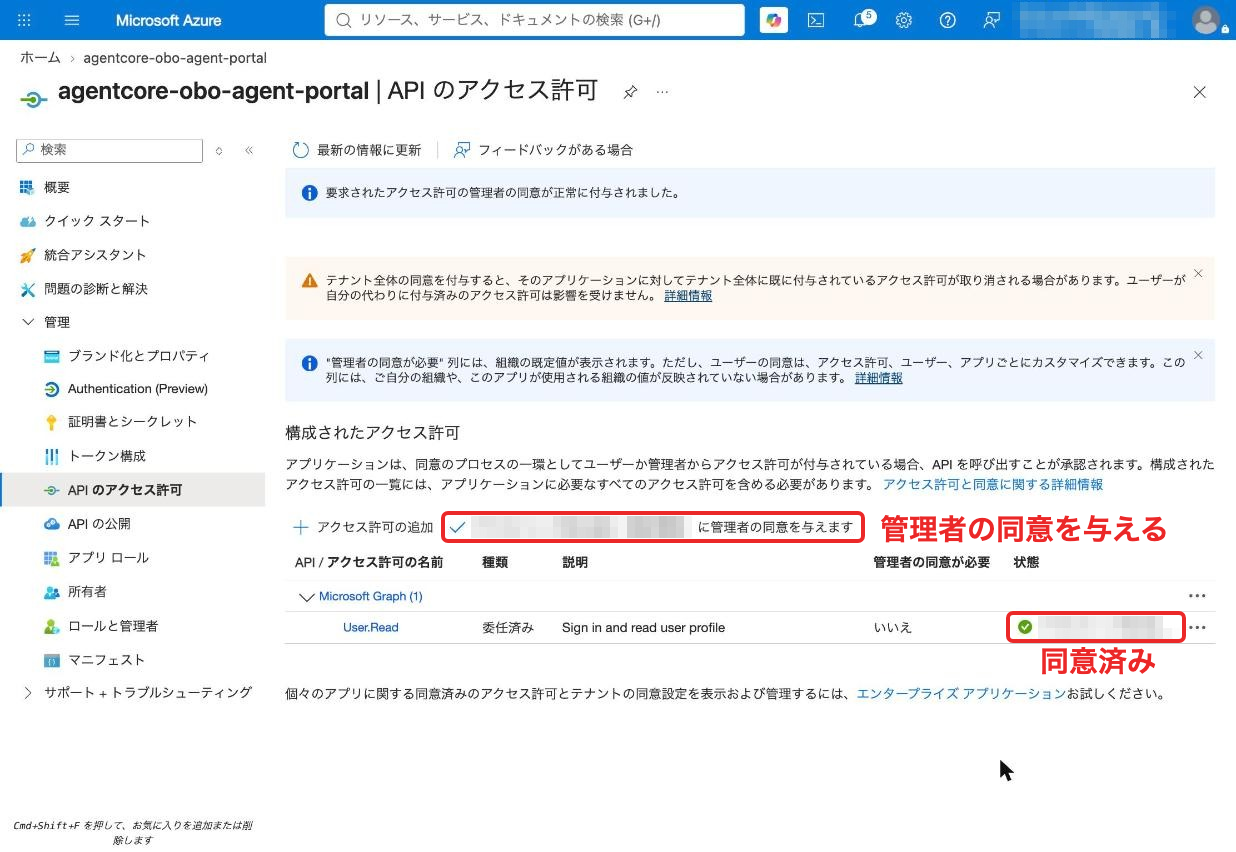
Consenting in advance is necessary because the OBO exchange takes place between the agent and Entra ID, and there's no way to show the user a consent screen at that moment.
You might feel a little uneasy about "granting consent on behalf of the entire organization," but what you're authorizing here is the delegated permission "this app may use User.Read (reading the signed-in user's profile) on behalf of the signed-in user." The app can only act on behalf of what the user themselves can do, and it doesn't gain access to other users' data.
Set the Token Version to 2
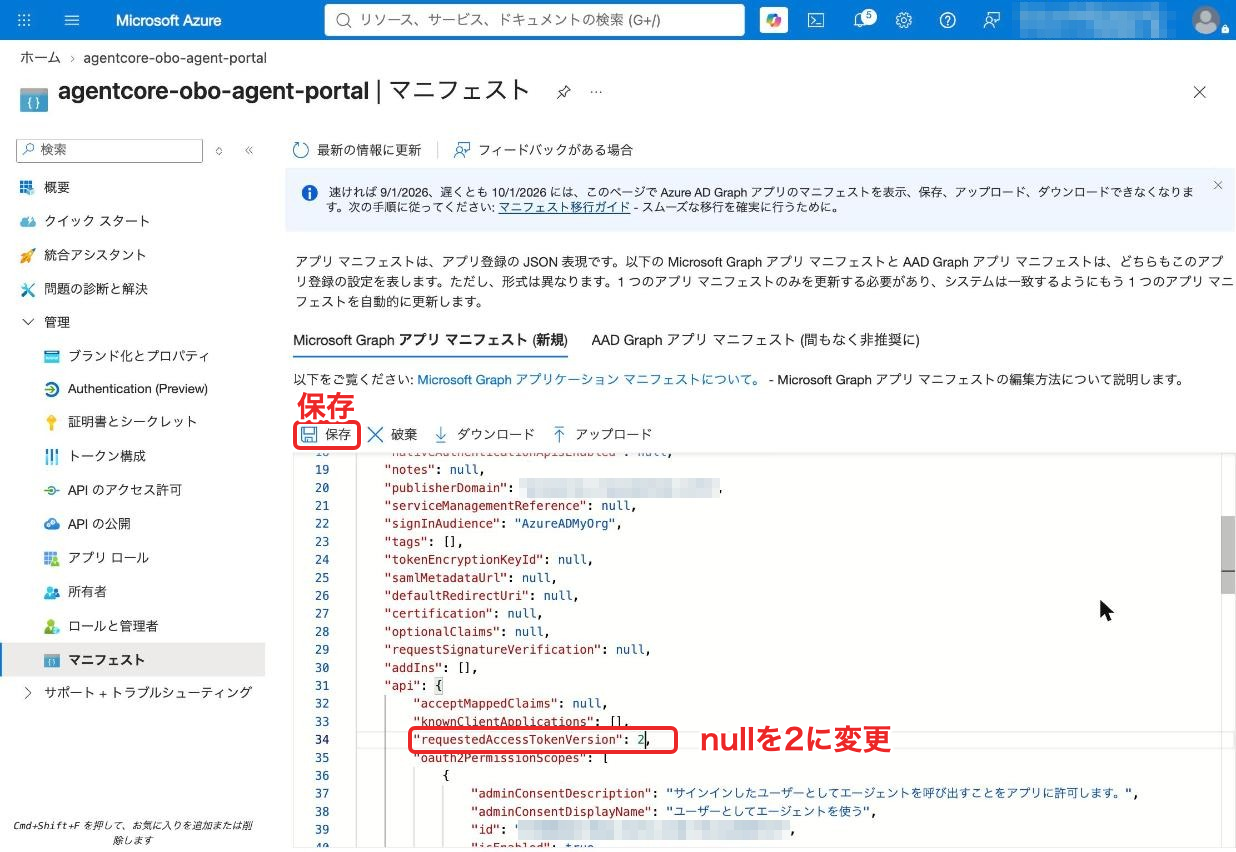
In "Manifest," change requestedAccessTokenVersion to 2 and save. This follows the setup instructions for Entra ID in the AgentCore documentation.
Create a Client Secret
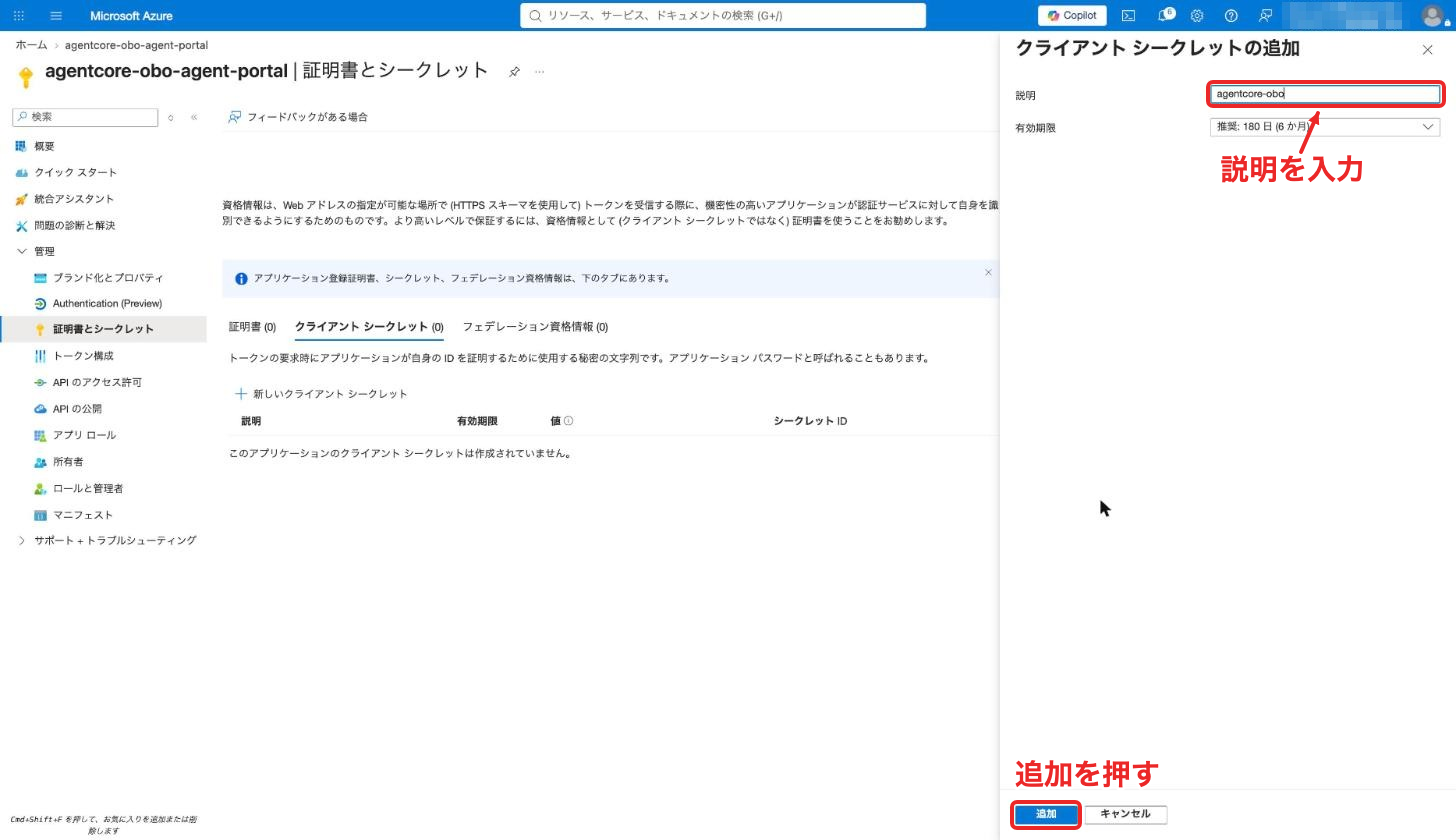
Click "New client secret" under "Certificates & secrets," enter a description, and add it. The value is shown only once when added, so make sure to note it. AgentCore Identity uses this for OBO exchanges.
That's all for the portal work. The same configuration can also be done with the Azure CLI.
When creating with the Azure CLI (setup_entra.sh)
set -e
TENANT_ID=$(az account show --query tenantId -o tsv)
APP_ID=$(az ad app create --display-name agentcore-obo-agent \
  --sign-in-audience AzureADMyOrg --query appId -o tsv)
OBJ_ID=$(az ad app show --id "${APP_ID}" --query id -o tsv)
SCOPE_ID=$(uuidgen | tr A-Z a-z)

# Expose the access_as_user scope and set the access token version to 2
az ad app update --id "${APP_ID}" --identifier-uris "api://${APP_ID}"
az rest --method PATCH \
  --url "https://graph.microsoft.com/v1.0/applications/${OBJ_ID}" \
  --headers Content-Type=application/json --body "{
  \"api\": {
    \"requestedAccessTokenVersion\": 2,
    \"oauth2PermissionScopes\": [{
      \"id\": \"${SCOPE_ID}\", \"value\": \"access_as_user\", \"type\": \"User\", \"isEnabled\": true,
      \"adminConsentDisplayName\": \"Access agent as user\",
      \"adminConsentDescription\": \"Access agent as user\"
    }]
  }
}"

# Pre-authorize the Azure CLI (04b07795-...)
az rest --method PATCH \
  --url "https://graph.microsoft.com/v1.0/applications/${OBJ_ID}" \
  --headers Content-Type=application/json --body "{
  \"api\": { \"preAuthorizedApplications\": [{
    \"appId\": \"04b07795-8ddb-461a-bbee-02f9e1bf7b46\",
    \"delegatedPermissionIds\": [\"${SCOPE_ID}\"]
  }] }
}"

# Add Microsoft Graph's User.Read (delegated) and grant tenant-wide consent
az ad app permission add --id "${APP_ID}" \
  --api 00000003-0000-0000-c000-000000000000 \
  --api-permissions e1fe6dd8-ba31-4d61-89e7-88639da4683d=Scope
az ad sp create --id "${APP_ID}"
az ad app permission grant --id "${APP_ID}" \
  --api 00000003-0000-0000-c000-000000000000 --scope User.Read

echo "TENANT_ID=${TENANT_ID}" > .env.ids
echo "APP_ID=${APP_ID}" >> .env.ids
bash setup_entra.sh
source .env.ids
The client secret can be issued with az ad app credential reset when creating the provider in the next section.
Try Getting the User's Token
Obtain a token addressed to the agent app using the az CLI.
USER_TOKEN=$(az account get-access-token \
  --scope "api://${APP_ID}/access_as_user" --query accessToken -o tsv)
Decoding the contents (payload) shows that the destination is the agent's app ID.
decode.py (displays the JWT payload)
import sys, base64, json
keys = sys.argv[1:]
p = sys.stdin.read().strip().split(".")[1]
p += "=" * (-len(p) % 4)
c = json.loads(base64.urlsafe_b64decode(p))
print(json.dumps({k: c.get(k) for k in keys} if keys else c, ensure_ascii=False, indent=1))
echo "${USER_TOKEN}" | uv run decode.py aud iss scp azp name
{
 "aud": "xxxxxxxx-xxxx-xxxx-xxxx-xxxxxxxxxxxx",
 "iss": "https://login.microsoftonline.com/yyyyyyyy-yyyy-yyyy-yyyy-yyyyyyyyyyyy/v2.0",
 "scp": "access_as_user",
 "azp": "04b07795-8ddb-461a-bbee-02f9e1bf7b46",
 "name": "Kamino Yudai"
}
The 401 at the beginning was the result of sending this token directly to Graph.
curl -s -w "\nHTTP %{http_code}\n" https://graph.microsoft.com/v1.0/me \
  -H "Authorization: Bearer ${USER_TOKEN}"
Let's move on to configuring AgentCore Identity!
Register a Microsoft Provider with AgentCore Identity
Register the noted client secret with an OAuth provider in AgentCore Identity.
read -s SECRET   # Paste the secret value noted from the portal

aws bedrock-agentcore-control create-oauth2-credential-provider \
  --name entra-obo-provider \
  --credential-provider-vendor MicrosoftOauth2 \
  --oauth2-provider-config-input "{\"microsoftOauth2ProviderConfig\":{
    \"clientId\":\"${APP_ID}\",\"clientSecret\":\"${SECRET}\",\"tenantId\":\"${TENANT_ID}\"}}"
unset SECRET
When issuing a secret with the Azure CLI
SECRET=$(az ad app credential reset --id "${APP_ID}" \
  --display-name agentcore-obo --years 1 --query password -o tsv)
After this, run the create-oauth2-credential-provider command above.
The OBO configuration field (onBehalfOfTokenExchangeConfig) is for custom providers; the Microsoft provider doesn't have this field, so you specify the client ID, secret, and tenant ID.
From here, I'll try both the Runtime pattern and the Gateway pattern!
Try the Runtime Pattern
Create the Agent
Create a project with the AgentCore CLI and add an agent that accepts Entra ID tokens. The inbound authentication conditions are the discovery URL and the destination (the agent's app ID).
agentcore create --project-name OboDemo --no-agent --skip-git
cd OboDemo
agentcore add agent --name obo_agent --type create --language Python \
  --framework Strands --model-provider Bedrock --memory none \
  --authorizer-type CUSTOM_JWT \
  --discovery-url "https://login.microsoftonline.com/${TENANT_ID}/v2.0/.well-known/openid-configuration" \
  --allowed-audience "${APP_ID}"
Rewrite the generated app/obo_agent/main.py to have a tool that calls Graph. For the OBO configuration, specify ON_BEHALF_OF_TOKEN_EXCHANGE with requires_access_token.
@requires_access_token(
    provider_name="entra-obo-provider",
    auth_flow="ON_BEHALF_OF_TOKEN_EXCHANGE",
    scopes=["https://graph.microsoft.com/User.Read"],
)
async def call_graph_me(*, access_token: str) -> dict:
    ...  # access_token has already been exchanged for Graph
As mentioned earlier, there's no code to pass the user's token to the function!
After verifying the JWT, the Runtime passes a workload token containing user information to the agent, and the SDK uses it to request the exchange.
app/obo_agent/main.py (full)
import httpx
from strands import Agent, tool
from bedrock_agentcore.runtime import BedrockAgentCoreApp
from bedrock_agentcore.identity.auth import requires_access_token

app = BedrockAgentCoreApp()

# Exchange the user's token for a Graph token (OBO) before calling
@requires_access_token(
    provider_name="entra-obo-provider",
    auth_flow="ON_BEHALF_OF_TOKEN_EXCHANGE",
    scopes=["https://graph.microsoft.com/User.Read"],
)
async def call_graph_me(*, access_token: str) -> dict:
    async with httpx.AsyncClient() as client:
        res = await client.get(
            "https://graph.microsoft.com/v1.0/me",
            params={"$select": "displayName,userPrincipalName"},
            headers={"Authorization": f"Bearer {access_token}"},
        )
        return {"status": res.status_code, "body": res.json()}

@tool
async def get_my_profile() -> dict:
    """Retrieve the signed-in user's own profile from Microsoft Graph"""
    return await call_graph_me()

@app.entrypoint
async def invoke(payload, context):
    # Create an Agent per request to prevent conversation history from mixing between users
    agent = Agent(
        model="us.anthropic.claude-sonnet-4-5-20250929-v1:0",
        system_prompt="You are an internal assistant. Use the tool to check information about the user themselves.",
        tools=[get_my_profile],
    )
    result = await agent.invoke_async(payload.get("prompt", ""))
    return {"result": str(result)}

if __name__ == "__main__":
    app.run()
The MCP client and other items in the generated template are not needed, so I deleted mcp_client/, skills/, and model/. The dependencies in pyproject.toml were also cleaned up accordingly.
app/obo_agent/pyproject.toml
[build-system]
requires = ["hatchling"]
build-backend = "hatchling.build"

[project]
name = "obo_agent"
version = "0.1.0"
requires-python = ">=3.10"
dependencies = [
    "aws-opentelemetry-distro ~= 0.18.0",
    "bedrock-agentcore >= 1.24.1",
    "strands-agents >= 1.59.0",
    "httpx >= 0.28.0",
]

[tool.hatch.build.targets.wheel]
packages = ["."]
cd app/obo_agent && uv lock && cd ../..
Deploy and Add Permissions
Write the destination account and region, then deploy.
ACCOUNT_ID=$(aws sts get-caller-identity --query Account --output text)
echo "[{\"name\":\"default\",\"account\":\"${ACCOUNT_ID}\",\"region\":\"us-east-1\"}]" \
  > agentcore/aws-targets.json
agentcore deploy -y
The Runtime execution role created by the CLI did not include permission to use the provider we created outside the CLI. Allow token retrieval and reading the provider's secret.
ROLE_NAME=$(aws cloudformation describe-stacks --stack-name AgentCore-OboDemo-default \
  --query "Stacks[0].Outputs[?contains(OutputKey,'RoleArn')].OutputValue" --output text | cut -d/ -f2)
SECRET_ARN=$(aws bedrock-agentcore-control get-oauth2-credential-provider \
  --name entra-obo-provider --query clientSecretArn.secretArn --output text)
BASE="arn:aws:bedrock-agentcore:us-east-1:${ACCOUNT_ID}"

aws iam put-role-policy --role-name "${ROLE_NAME}" --policy-name entra-obo --policy-document "{
  \"Version\": \"2012-10-17\",
  \"Statement\": [
    {\"Effect\": \"Allow\", \"Action\": \"bedrock-agentcore:GetResourceOauth2Token\",
     \"Resource\": [
       \"${BASE}:token-vault/default\",
       \"${BASE}:token-vault/default/oauth2credentialprovider/entra-obo-provider\",
       \"${BASE}:workload-identity-directory/default\",
       \"${BASE}:workload-identity-directory/default/workload-identity/*\"]},
    {\"Effect\": \"Allow\", \"Action\": \"secretsmanager:GetSecretValue\", \"Resource\": \"${SECRET_ARN}\"}
  ]
}"
Let's Try Calling It
We'll call the Runtime with a user token obtained via az CLI. The question is "Who am I?"
RUNTIME_ARN=$(aws cloudformation describe-stacks --stack-name AgentCore-OboDemo-default \
  --query "Stacks[0].Outputs[?contains(OutputKey,'RuntimeArn')].OutputValue" --output text)
ENCODED=$(uv run python -c "import urllib.parse,sys;print(urllib.parse.quote(sys.argv[1],safe=''))" "${RUNTIME_ARN}")
USER_TOKEN=$(az account get-access-token \
  --scope "api://${APP_ID}/access_as_user" --query accessToken -o tsv)

curl -s -X POST \
  "https://bedrock-agentcore.us-east-1.amazonaws.com/runtimes/${ENCODED}/invocations?qualifier=DEFAULT" \
  -H "Authorization: Bearer ${USER_TOKEN}" \
  -H "Content-Type: application/json" \
  -H "X-Amzn-Bedrock-AgentCore-Runtime-Session-Id: $(uuidgen)-$(uuidgen)" \
  -d '{"prompt": "私は誰ですか?"}'
{"result": "You are **Yudai Kamino**.\n\nYour email address is registered as `user@example.onmicrosoft.com`.\n\nIs there anything I can help you with?\n"}
The person's name came back from Graph! From the same user's token that returned 401 at the beginning, the agent was able to call Graph as that person.
I also tested "what happens if you pass a token intended for Graph" from the previous section here. I obtained a token for Graph via az CLI and called it the same way.
GRAPH_TOKEN=$(az account get-access-token --resource-type ms-graph --query accessToken -o tsv)

curl -s -w "\nHTTP %{http_code}\n" -X POST \
  "https://bedrock-agentcore.us-east-1.amazonaws.com/runtimes/${ENCODED}/invocations?qualifier=DEFAULT" \
  -H "Authorization: Bearer ${GRAPH_TOKEN}" \
  -H "Content-Type: application/json" \
  -H "X-Amzn-Bedrock-AgentCore-Runtime-Session-Id: $(uuidgen)-$(uuidgen)" \
  -d '{"prompt": "私は誰ですか?"}'
{"jsonrpc":"2.0","error":{"code":-32001,"message":"Claim 'iss' value mismatch with configuration."}}
HTTP 401
As expected, this results in an error!
Comparing Tokens Before and After Exchange
Let's also look at what changed in the token after the exchange. I ran the same operations via CLI that the SDK does inside the Runtime. I create a workload token from the user's token, then exchange it via OBO.
aws bedrock-agentcore-control create-workload-identity --name obo-local-test

WAT=$(aws bedrock-agentcore get-workload-access-token-for-jwt \
  --workload-name obo-local-test --user-token "${USER_TOKEN}" \
  --query workloadAccessToken --output text)

OBO_TOKEN=$(aws bedrock-agentcore get-resource-oauth2-token \
  --resource-credential-provider-name entra-obo-provider \
  --oauth2-flow ON_BEHALF_OF_TOKEN_EXCHANGE \
  --scopes "https://graph.microsoft.com/User.Read" \
  --workload-identity-token "${WAT}" --query accessToken --output text)

echo "${OBO_TOKEN}" | uv run decode.py aud scp appid app_displayname name
{
 "aud": "https://graph.microsoft.com",
 "scp": "User.Read profile openid email",
 "appid": "xxxxxxxx-xxxx-xxxx-xxxx-xxxxxxxxxxxx",
 "app_displayname": "agentcore-obo-agent-portal",
 "name": "Yudai Kamino"
}
When placed side by side, it looks like this.

The destination (aud) changed to Graph, and the permission (scp) became Graph's User.Read. Meanwhile, the name (name) remains the person themselves, and which app is calling on their behalf (appid) is also included. From Graph's perspective, it can tell that "agentcore-obo-agent-portal is calling on behalf of Kamino."
Trying the Gateway Pattern
Next is the pattern where we delegate the exchange to a Gateway. We register the Graph API as an OpenAPI tool in the Gateway, and set the target's outbound authentication to OBO.
Creating the Gateway Role
We create a service role for the Gateway to perform token exchange and read secrets.
Create the Gateway service role
ACCOUNT_ID=$(aws sts get-caller-identity --query Account --output text)
BASE="arn:aws:bedrock-agentcore:us-east-1:${ACCOUNT_ID}"
SECRET_ARN=$(aws bedrock-agentcore-control get-oauth2-credential-provider \
  --name entra-obo-provider --query clientSecretArn.secretArn --output text)

aws iam create-role --role-name obo-gateway-role --assume-role-policy-document "{
  \"Version\": \"2012-10-17\",
  \"Statement\": [{\"Effect\": \"Allow\",
    \"Principal\": {\"Service\": \"bedrock-agentcore.amazonaws.com\"},
    \"Action\": \"sts:AssumeRole\",
    \"Condition\": {\"StringEquals\": {\"aws:SourceAccount\": \"${ACCOUNT_ID}\"}}}]
}"

aws iam put-role-policy --role-name obo-gateway-role --policy-name obo-gateway --policy-document "{
  \"Version\": \"2012-10-17\",
  \"Statement\": [
    {\"Effect\": \"Allow\",
     \"Action\": [\"bedrock-agentcore:GetWorkloadAccessToken\", \"bedrock-agentcore:GetWorkloadAccessTokenForJWT\"],
     \"Resource\": [\"${BASE}:workload-identity-directory/default\",
                    \"${BASE}:workload-identity-directory/default/workload-identity/obo-gateway-*\"]},
    {\"Effect\": \"Allow\", \"Action\": \"bedrock-agentcore:GetResourceOauth2Token\",
     \"Resource\": [\"${BASE}:token-vault/default\",
                    \"${BASE}:token-vault/default/oauth2credentialprovider/entra-obo-provider\",
                    \"${BASE}:workload-identity-directory/default\",
                    \"${BASE}:workload-identity-directory/default/workload-identity/obo-gateway-*\"]},
    {\"Effect\": \"Allow\", \"Action\": \"secretsmanager:GetSecretValue\", \"Resource\": \"${SECRET_ARN}\"}
  ]
}"
Creating the Gateway and Target
For inbound authentication, we use the same Entra ID discovery URL and destination (agent's app ID) as the Runtime.
GATEWAY_ID=$(aws bedrock-agentcore-control create-gateway --name obo-gateway \
  --role-arn "arn:aws:iam::${ACCOUNT_ID}:role/obo-gateway-role" \
  --protocol-type MCP --authorizer-type CUSTOM_JWT \
  --authorizer-configuration "{\"customJWTAuthorizer\":{
    \"discoveryUrl\":\"https://login.microsoftonline.com/${TENANT_ID}/v2.0/.well-known/openid-configuration\",
    \"allowedAudience\":[\"${APP_ID}\"]}}" \
  --query gatewayId --output text)
The target is an OpenAPI schema that defines Graph's /me.
graph-me.json
{
  "openapi": "3.0.1",
  "info": {"title": "Microsoft Graph (me)", "version": "1.0"},
  "servers": [{"url": "https://graph.microsoft.com/v1.0"}],
  "paths": {
    "/me": {
      "get": {
        "operationId": "getMyProfile",
        "description": "Retrieve the profile of the currently signed-in user",
        "parameters": [{"name": "$select", "in": "query", "required": false, "schema": {"type": "string"}}],
        "responses": {"200": {"description": "User profile",
          "content": {"application/json": {"schema": {"type": "object"}}}}}
      }
    }
  }
}
In the target's outbound authentication, specifying the provider and grantType: TOKEN_EXCHANGE is the OBO configuration.
PROVIDER_ARN=$(aws bedrock-agentcore-control get-oauth2-credential-provider \
  --name entra-obo-provider --query credentialProviderArn --output text)
SCHEMA=$(uv run python -c "import json;print(json.dumps(open('graph-me.json').read()))")

aws bedrock-agentcore-control create-gateway-target --gateway-identifier "${GATEWAY_ID}" --name graph \
  --target-configuration "{\"mcp\":{\"openApiSchema\":{\"inlinePayload\":${SCHEMA}}}}" \
  --credential-provider-configurations "[{
    \"credentialProviderType\": \"OAUTH\",
    \"credentialProvider\": {\"oauthCredentialProvider\": {
      \"providerArn\": \"${PROVIDER_ARN}\",
      \"scopes\": [\"https://graph.microsoft.com/User.Read\"],
      \"grantType\": \"TOKEN_EXCHANGE\"}}}]"
Let's Try Calling the Gateway
Now that it's created, let's use curl in place of an MCP client to call tools/list and tools/call with the user's token.
GATEWAY_URL=$(aws bedrock-agentcore-control get-gateway --gateway-identifier "${GATEWAY_ID}" \
  --query gatewayUrl --output text)

curl -s -X POST "${GATEWAY_URL}" -H "Authorization: Bearer ${USER_TOKEN}" \
  -H "Content-Type: application/json" \
  -d '{"jsonrpc":"2.0","id":1,"method":"tools/list"}'

curl -s -X POST "${GATEWAY_URL}" -H "Authorization: Bearer ${USER_TOKEN}" \
  -H "Content-Type: application/json" \
  -d '{"jsonrpc":"2.0","id":2,"method":"tools/call","params":{"name":"graph___getMyProfile","arguments":{"$select":"displayName,userPrincipalName"}}}'
{"jsonrpc":"2.0","id":2,"result":{"isError":false,"content":[{"type":"text","text":"{...\"displayName\":\"Yudai Kamino\",\"userPrincipalName\":\"user@example.onmicrosoft.com\"}"}]}}
The tool name is graph___getMyProfile, and the person's name came back from Graph! No token exchange code was written!
The Gateway verifies the user's token and exchanges it for a Graph-destined token before calling the target.
Of course, calling the Gateway with a Graph-destined token was also rejected at the entry point.
{"jsonrpc":"2.0","id":0,"error":{"code":-32002,"message":"insufficient_scope - The request requires higher privileges than provided by the access token."}}
HTTP 403
Cleanup
We delete the Gateway, Runtime, provider, and the Entra ID app. The inline policy manually added to the Runtime's execution role should be removed before deleting the stack.
TARGET_ID=$(aws bedrock-agentcore-control list-gateway-targets --gateway-identifier "${GATEWAY_ID}" \
  --query "items[0].targetId" --output text)
aws bedrock-agentcore-control delete-gateway-target --gateway-identifier "${GATEWAY_ID}" --target-id "${TARGET_ID}"
aws bedrock-agentcore-control delete-gateway --gateway-identifier "${GATEWAY_ID}"
aws iam delete-role-policy --role-name obo-gateway-role --policy-name obo-gateway
aws iam delete-role --role-name obo-gateway-role
aws iam delete-role-policy --role-name "${ROLE_NAME}" --policy-name entra-obo
aws cloudformation delete-stack --stack-name AgentCore-OboDemo-default
aws bedrock-agentcore-control delete-oauth2-credential-provider --name entra-obo-provider
aws bedrock-agentcore-control delete-workload-identity --name obo-local-test
az ad app delete --id "${APP_ID}"
Closing
By actually trying it hands-on, I hope you've gained a bit of a grasp on the significance of OBO! It seems particularly useful when using Entra for inbound authentication and also wanting to use that token for outbound calls.
The tokens that can be submitted to OBO are tokens issued by Entra ID destined for the agent. If sign-in is handled by a different IdP such as Cognito, a candidate approach would be to use 3LO to obtain the user's consent for Microsoft.
I hope this article has been helpful in some way. Thank you for reading to the end!
