I tried configuring Inbound Authentication (JWT Authentication) for Amazon Bedrock AgentCore Runtime with Keycloak in a private subnet

This page has been translated by machine translation. View original
Introduction
Hello, I'm Jinno from the Consulting Department, currently practicing driving.
Having a car is convenient because I can go to my favorite supermarket.
But setting that aside, are you implementing AI agents using JWT-based inbound authentication with AgentCore Runtime?
The Runtime provides a mechanism for inbound authentication using JWTs issued by an IdP. Publicly reachable IdPs like Cognito or Auth0 work smoothly, but in enterprise environments, there are cases where you want to perform JWT authentication with a private IdP that's only reachable from the internal network...
Since inbound JWT verification is performed on the AgentCore Identity service side, the discovery URL previously needed to be publicly reachable. However, a feature is now available that allows AgentCore Identity to connect to a private IdP hosted within a VPC (private identity provider connection).
So this time, I actually built and verified AgentCore Runtime's Inbound Auth using Keycloak placed in a private subnet (not reachable from the internet).
Conclusion First
By using the privateEndpoint configuration, you can achieve managed JWT verification while keeping Keycloak private.
AgentCore Identity reaches Keycloak inside the VPC via VPC Lattice and retrieves the discovery URL to verify the token.
However, be aware of the following two constraints:
- The discovery URL must be HTTPS (HTTP is not supported)
- The IdP's certificate must be a publicly trusted certificate. For private CA certificates, a workaround is needed by placing an internal ALB with a public ACM certificate in front
Starting from the next section, I'll dive deeper into the mechanism and setup steps.
Research on the Approach
Where is Inbound JWT Verification Performed?
Looking at the official documentation, there is the following description about inbound JWT authentication:
When AgentCore Runtime or AgentCore Gateway receives an inbound request, the authorizer will use the configured discovery URL to fetch the public keys and authorization server endpoint to perform the JWT validation.
https://docs.aws.amazon.com/bedrock-agentcore/latest/devguide/inbound-jwt-authorizer.html
JWT verification is performed on the AgentCore Identity service side, not the Runtime container. Therefore, the discovery URL (OIDC's /.well-known/openid-configuration) needs to be accessible from the AWS service side.
You might think connecting the Runtime to a VPC would solve this, but the Runtime's VPC connection controls outbound communication from the Runtime container and does not serve as the route for AgentCore Identity to retrieve the private IdP's discovery URL or JWKS.
VPC connectivity impacts only outbound network traffic from the runtime or tool. Inbound requests to the runtime (such as invocations) are not routed through the VPC and are unaffected by this configuration.
Hmm, so private IdPs are impossible then... but actually there was dedicated documentation. To make the IdP verification route private, use the privateEndpoint configuration introduced next.
Private Identity Provider Connection
The official documentation has a page specifically about private IdP connections, using self-hosted Keycloak as an example.
Amazon Bedrock AgentCore Identity supports connecting to OAuth 2.0 identity providers (IdPs) hosted inside your AWS VPC, such as self-hosted Keycloak, PingFederate, or other OIDC-compliant authorization servers, without exposing them to the public internet.
The mechanism uses Amazon VPC Lattice's resource gateway and resource configuration to establish a closed route from AgentCore Identity to the IdP endpoint within the VPC. Two connection modes are available.
| Mode | Overview | Suitable Cases |
|---|---|---|
| managed Lattice | Just specify the VPC, subnet, and security group; AgentCore handles Lattice resource creation and management | When you want simple use within the same account |
| self-managed Lattice | Create and manage Lattice resource gateways and resource configurations yourself | For cross-account connections or when governance visibility of connection targets is needed |
With managed Lattice, users don't need to explicitly create or manage VPC Lattice resources; the resource gateway ENI is created in the specified subnet. We'll use this approach today.
And as written in the conclusion at the beginning, there are two constraints.
Discovery URL must be HTTPS: The IdP's OIDC discovery URL must use HTTPS. HTTP endpoints are not supported.
Private certificates: Your IdP must use a publicly trusted TLS certificate, or you must place an ALB with a public ACM certificate in front of it.
HTTPS is required and a publicly trusted certificate is needed. Since HTTP cannot be used as-is, we'll use a configuration that places an internal ALB with a public ACM certificate in front of Keycloak. Note that issuing an ACM certificate requires one domain for DNS validation (this time I used a domain obtained from Onamae.com with nameservers delegated to Route 53).
The configuration diagram looks like the image below.
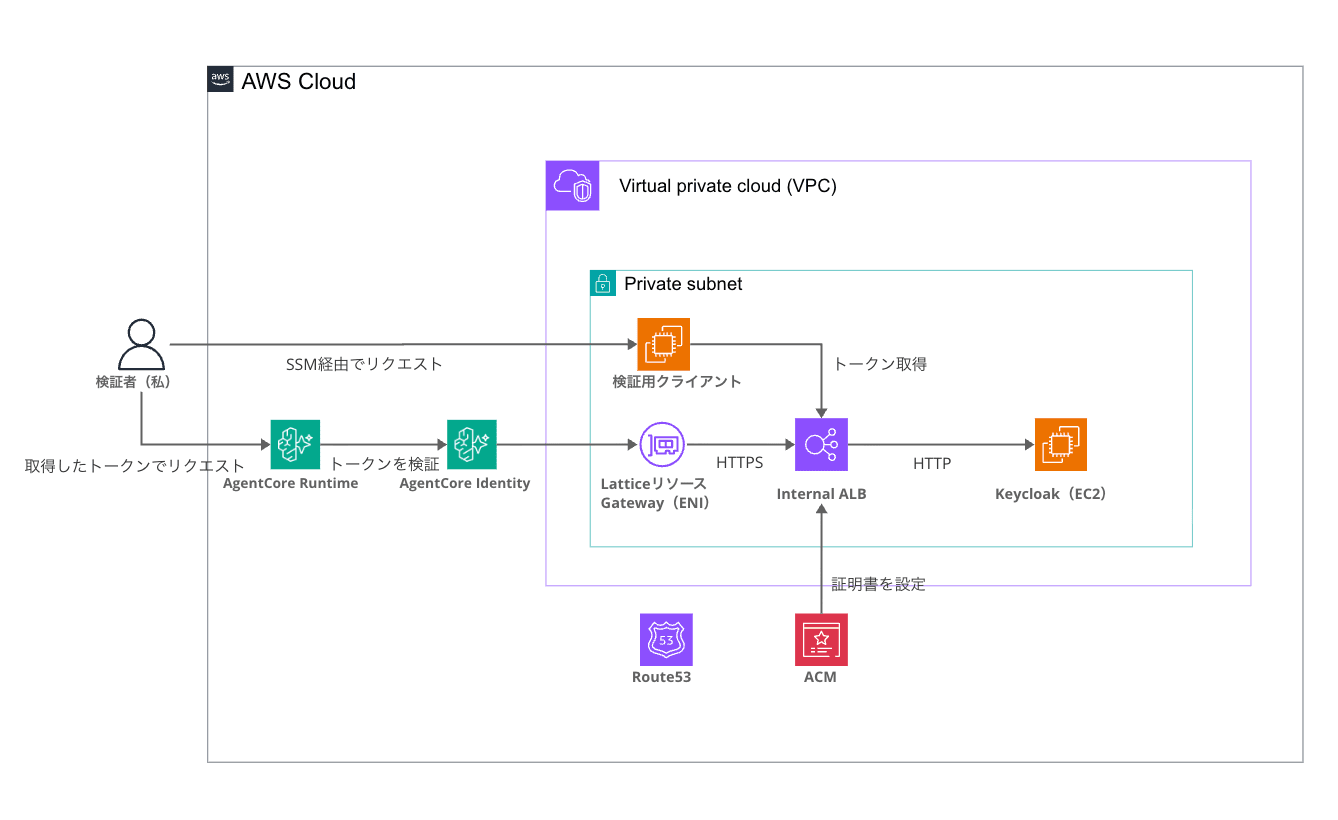
The authentication flow in chronological order is as follows:
Prerequisites
The environment during verification is as follows:
| Item | Details |
|---|---|
| Region | us-east-1 |
| Keycloak | 26.3 (Docker on EC2, start-dev mode) |
| Connection Mode | managed Lattice (managedVpcResource) |
| IaC | AWS CDK (TypeScript) |
| Runtime SDK | bedrock-agentcore (Python 3.12) |
| Agent Framework | Strands Agents |
| Model | Claude Haiku 4.5 |
| Domain | Custom domain with Route 53 delegation (used for ACM certificate DNS validation) |
The complete code for this time is in the repository below. This article only excerpts the key points, so please check here for the full picture.
Setup
The CDK app is divided into two stacks. This is to ensure the order of deploying Runtime after Keycloak is ready to respond, since AgentCore Identity actually accesses the discovery URL during Runtime creation to verify it.
- KeycloakIdpStack — VPC, private Keycloak, internal ALB for TLS termination
- AgentCoreRuntimeStack — Agent image, execution role, AgentCore Runtime
Building VPC and Private Keycloak + Internal ALB (KeycloakIdpStack)
First is the IdP side stack. The EC2 running Keycloak has no public IP, and management is done via SSM Session Manager. The main resources created by the stack are as follows:
- VPC (public + private subnets × 2 AZs, NAT Gateway)
- Keycloak EC2 (private subnet, auto-imports demo realm with UserData)
- ACM public certificate (DNS validation with Route 53 hosted zone)
- Internal ALB (TLS termination on HTTPS:443 → forwards to Keycloak:8080)
- Route 53 alias record (keycloak subdomain → internal ALB)
- Security group for Lattice resource gateway (used in the privateEndpoint configuration described later)
- Verification client EC2 (t4g.nano, private subnet. Used for operation verification as the closed-network client)
I'll explain the design points while excerpting the code.
The first point is TLS termination. It's performed at the internal ALB, and the certificate uses an ACM public certificate (DNS validation).
const certificate = new acm.Certificate(this, 'Certificate', {
  domainName: props.domainName,
  validation: acm.CertificateValidation.fromDns(hostedZone),
});

const alb = new elbv2.ApplicationLoadBalancer(this, 'LoadBalancer', {
  vpc: this.vpc,
  internetFacing: false, // internal scheme
  vpcSubnets: { subnetType: ec2.SubnetType.PRIVATE_WITH_EGRESS },
  securityGroup: albSecurityGroup,
});
The ALB uses an internal scheme so it's not reachable from the internet, but the certificate itself is publicly trusted, which satisfies AgentCore Identity's certificate requirements. By the way, the DNS record (keycloak subdomain → alias for internal ALB) is created in a public hosted zone. Anyone can resolve the name, but what's returned is a private IP so it can't be reached.
The second point is Keycloak's hostname configuration. When starting the Keycloak container with EC2 UserData, the following environment variables are passed:
`-e KC_HOSTNAME=https://${props.domainName}`,
'-e KC_HTTP_ENABLED=true',
'-e KC_PROXY_HEADERS=xforwarded',
By setting KC_HOSTNAME to a fixed HTTPS domain URL, the issuer is consistently https://keycloak.<domain>/realms/demo. Since TLS is terminated at the ALB, Keycloak itself remains on HTTP, configured to trust X-Forwarded headers with KC_PROXY_HEADERS=xforwarded.
The third point is the security group for the Lattice resource gateway. Since it's assigned to the ENI created by AgentCore, we create it in this stack in advance and specify it later in the privateEndpoint configuration when creating the Runtime.
// SG assigned to the Lattice resource gateway ENI created by AgentCore
this.latticeSecurityGroup = new ec2.SecurityGroup(this, 'LatticeSecurityGroup', {
  vpc: this.vpc,
  description: 'Security group for AgentCore managed Lattice resource gateway ENIs',
});

albSecurityGroup.addIngressRule(
  ec2.Peer.ipv4(this.vpc.vpcCidrBlock),
  ec2.Port.tcp(443),
  'HTTPS from within VPC (Lattice gateway ENIs / clients)',
);
The ALB's security group only allows port 443 from within the VPC and is not reachable from the internet (since other resources within the VPC can reach it with this setting, if you need to restrict more strictly, limit inbound to only from LatticeSecurityGroup).
One more point: care is needed regarding VPC AZs. AgentCore's VPC connection has available AZs specified (use1-az1 / use1-az2 / use1-az4 in us-east-1), so the supported AZs are explicitly specified.
this.vpc = new ec2.Vpc(this, 'Vpc', {
  ipAddresses: ec2.IpAddresses.cidr('10.0.0.0/16'),
  availabilityZones: ['us-east-1a', 'us-east-1b'], // Explicitly specify AgentCore-supported AZs
  natGateways: 1,
  ...
});
Note that the correspondence between AZ IDs like use1-az1 and AZ names like us-east-1a differs per AWS account. The AZ names above are examples from my account, so please verify the correspondence for your own account using commands like the following before specifying them.
aws ec2 describe-availability-zones --region us-east-1 \
  --query 'AvailabilityZones[].{Name:ZoneName,Id:ZoneId}' --output table
The realm and client (confidential client for the client_credentials flow) are automatically created at startup using the realm import feature. An audience-mapper adds agentcore-runtime to the aud claim of the access token, which corresponds to the allowedAudience in the authorizer configuration later.
Domains and secrets are specified in cdk.json context and then deployed.
| Context Item | Description |
|---|---|
| domainName | Domain to assign to Keycloak (e.g., keycloak.example.com) |
| hostedZoneId / hostedZoneName | Route 53 public hosted zone used for DNS validation and record creation |
| keycloakClientSecret | Secret for the demo client (for verification) |
cd cdk
pnpm install
pnpm exec cdk deploy KeycloakIdpStack
After deployment is complete, let's verify the private nature by hitting the discovery URL from both inside the VPC and locally (internet side).
For execution from inside the VPC, we use the verification client EC2 set up as the closed-network client. Since there's no public IP and no SSH key, we log in via SSM Session Manager and run curl from within (the same applies for subsequent "commands executed inside SSM session").
INSTANCE_ID=$(aws ec2 describe-instances \
  --filters "Name=tag:Name,Values=keycloak-test-client" \
            "Name=instance-state-name,Values=running" \
  --query 'Reservations[0].Instances[0].InstanceId' --output text)

aws ssm start-session --target ${INSTANCE_ID}
After logging in, let's hit Keycloak's discovery URL with curl.
curl -s https://keycloak.<domain>/realms/demo/.well-known/openid-configuration
{"issuer":"https://keycloak.<domain>/realms/demo",
 "token_endpoint":"https://keycloak.<domain>/realms/demo/protocol/openid-connect/token", ...
Running the same command from my local machine (internet side) with a timeout shows no response.
curl -s --max-time 8 -o /dev/null -w "local_access: %{http_code} %{errormsg}\n" \
  https://keycloak.<domain>/realms/demo/.well-known/openid-configuration
local_access: 000 Connection timed out after 8002 milliseconds
It responds via HTTPS with a valid certificate from inside the VPC, and times out from the internet! It's properly a private IdP.
Implementing the Agent
The agent side doesn't need to write JWT verification. Since AgentCore Identity handles the verification, the agent only receives authenticated requests. Also, if you allow the Authorization header in the Runtime creation settings (requestHeaderAllowlist in requestHeaderConfiguration, which appears in the AgentCoreRuntimeStack section next), the verified token is forwarded as-is to the agent, so I included the contents of the claims in the response for verification.
import base64
import json

from bedrock_agentcore import BedrockAgentCoreApp, RequestContext

app = BedrockAgentCoreApp()

def decode_claims(token: str) -> dict:
    """Decode JWT payload for display (verification is already completed on AgentCore Identity side)"""
    payload = token.split(".")[1]
    payload += "=" * (-len(payload) % 4)
    return json.loads(base64.urlsafe_b64decode(payload))

@app.entrypoint
def invoke(payload, context: RequestContext):
    headers = {k.lower(): v for k, v in (context.request_headers or {}).items()}
    auth_header = headers.get("authorization", "")
    claims = decode_claims(auth_header.removeprefix("Bearer ")) if auth_header else {}

    app.logger.info("Invoked. client=%s", claims.get("azp"))

    prompt = payload.get("prompt", "Hello")
    try:
        from strands import Agent

        agent = Agent(model="us.anthropic.claude-haiku-4-5-20251001-v1:0")
        response = str(agent(prompt))
    except Exception as e:
        response = f"(Model call unavailable: {e})"

    return {
        "authenticated_client": claims.get("azp"),
        "issuer": claims.get("iss"),
        "audience": claims.get("aud"),
        "response": response,
    }

app.run()
The forwarded Authorization header is extracted from RequestContext's request_headers. The decoding is for display purposes; signature verification is completed on the AWS side before reaching this code.
AgentCore Runtime requires a linux/arm64 container image, but this is handled by CDK's DockerImageAsset.
const image = new ecrAssets.DockerImageAsset(this, 'AgentImage', {
  directory: '../agent',
  platform: ecrAssets.Platform.LINUX_ARM64,
});
When the next stack is deployed, everything from arm64 build to ECR push is done automatically, so no manual docker build or ECR operations are needed.
Setting Up AgentCore Runtime with privateEndpoint-Enabled Authorizer (AgentCoreRuntimeStack)
Create the Runtime with a customJWTAuthorizer that includes privateEndpoint. The configuration is assembled within the stack as follows:
requestHeaderConfiguration: {
  requestHeaderAllowlist: ['Authorization'],
},
authorizerConfiguration: {
  customJWTAuthorizer: {
    discoveryUrl: props.discoveryUrl,
    allowedAudience: ['agentcore-runtime'],
    privateEndpoint: {
      managedVpcResource: {
        vpcIdentifier: props.vpc.vpcId,
        subnetIds: props.vpc.privateSubnets.map((s) => s.subnetId),
        endpointIpAddressType: 'IPV4',
        securityGroupIds: [props.latticeSecurityGroup.securityGroupId],
      },
    },
  },
},
| Configuration Item | Value | Description |
|---|---|---|
| discoveryUrl | Keycloak's private OIDC discovery URL | HTTPS required |
| allowedAudience | agentcore-runtime | Matched against the JWT's aud claim |
| privateEndpoint | managedVpcResource | AgentCore Identity reaches the discovery URL via VPC Lattice |
| securityGroupIds | Lattice SG | Assigned to the resource gateway ENI |
| networkMode | PUBLIC | Since inbound verification goes through privateEndpoint, VPC connection for the Runtime itself is not needed |
| requestHeaderAllowlist | Authorization | Forwards the verified JWT to agent code |
Runtime's networkMode can remain PUBLIC. What needs to be in a closed network is the AgentCore Identity → Keycloak verification route, and privateEndpoint handles that. If the agent itself needs to access resources within the VPC, set VPC mode separately.
Deploy it.
pnpm exec cdk deploy AgentCoreRuntimeStack
Upon creation, AgentCore creates the service-linked role AWSServiceRoleForBedrockAgentCoreIdentity and creates Lattice resource gateway ENIs in the specified subnets. Checking the ENIs, they were created as follows:
interface   Resource Gateway Interface rgw-0fed0e24083ed2423   in-use   10.0.10.205
interface   Resource Gateway Interface rgw-0fed0e24083ed2423   in-use   10.0.11.105
Operation Verification
Now that the environment is ready, let's actually try it out!
Token Retrieval
Since the client is expected to reach Keycloak from within the closed network, for verification we log into the verification client EC2 via the SSM Session Manager mentioned earlier and retrieve a token using the client_credentials flow. We'll store it in a shell variable since it's used in subsequent calls.
The client secret is the value specified in cdk.json context (keycloakClientSecret).
ACCESS_TOKEN=$(curl -s -X POST https://keycloak.<domain>/realms/demo/protocol/openid-connect/token \
  -d grant_type=client_credentials \
  -d client_id=agentcore-client \
  -d client_secret=<client secret> \
  | python3 -c "import sys, json; print(json.load(sys.stdin)['access_token'])")

echo ${ACCESS_TOKEN}
The access token retrieved is a JWT-format string like eyJhbGciOiJSUzI1NiIs..., with header, payload, and signature connected by dots. You can check the contents of the claims by Base64-decoding the payload part.
python3 -c "import base64, json, sys; p = sys.argv[1].split('.')[1]; \
print(json.dumps(json.loads(base64.urlsafe_b64decode(p + '=' * (-len(p) % 4))), indent=2))" "${ACCESS_TOKEN}"
Below is an excerpt of the decode result showing only the claims relevant to this authentication (other claims like exp and scope are omitted).
{
  "iss": "https://keycloak.<domain>/realms/demo",
  "aud": ["agentcore-runtime", "account"],
  "azp": "agentcore-client"
}
The issuer is the private Keycloak URL, the aud contains agentcore-runtime added by the audience-mapper, and the token was issued as configured!
Calling the Agent
You can call it by attaching the Bearer token in the Authorization header. Since the data plane endpoint is public, it can be called with curl.
ARN_ENC=$(python3 -c "import urllib.parse; print(urllib.parse.quote('YOUR_RUNTIME_ARN', safe=''))")

curl -s -X POST \
  "https://bedrock-agentcore.us-east-1.amazonaws.com/runtimes/${ARN_ENC}/invocations?qualifier=DEFAULT" \
  -H "Authorization: Bearer ${ACCESS_TOKEN}" \
  -H "Content-Type: application/json" \
  -H "X-Amzn-Bedrock-AgentCore-Runtime-Session-Id: <session ID of 33+ characters>" \
  -d '{"prompt": "Tell me about AgentCore Identity in one sentence"}'
{
  "authenticated_client": "agentcore-client",
  "issuer": "https://keycloak.<domain>/realms/demo",
  "audience": ["agentcore-runtime", "account"],
  "response": "# About AgentCore Identity\n\n..."
}
Authentication passed and the agent's response came back! AgentCore Identity is verifying the JWT issued by the Keycloak that can't be reached from the internet by retrieving JWKS via VPC Lattice. Managed JWT authentication with private Keycloak was successfully achieved! Great!!
Checking Error Cases
Let me also quickly verify that invalid requests are properly rejected to confirm it's functioning as authentication. First, a token with a tampered signature.
{"jsonrpc":"2.0","error":{"code":-32001,"message":"Invalid Signature for bearerToken"}}
HTTP_STATUS: 401
Next, the case with no token.
{"jsonrpc":"2.0","error":{"code":-32001,"message":"Missing Authentication Token"}}
HTTP_STATUS: 401
Both are rejected with 401!
Conclusion
This time it was M2M authentication using the client_credentials flow, but of course it's also possible to verify using user access tokens!
I'd like to take advantage of the privateEndpoint feature when using a private IdP.
I hope this article is helpful in some way. Thank you for reading to the end!
Supplementary Notes
Cost of managed Lattice
In managed Lattice mode, VPC Lattice charges based on the amount of data processed through the resource gateway. Since JWKS retrieval also uses caching, the expected cost for verification purposes is very small, but please check the official VPC Lattice pricing page for details on the pricing structure.