
[Update] Amazon Bedrock AgentCore Memory Can Now Create Summaries of Entire Sessions!

This page has been translated by machine translation. View original
Introduction
Hello, I'm Kanno from the Consulting Department, and I love ramen.
This update came out a little while ago, but Amazon Bedrock AgentCore Memory's summary strategy now supports full session summaries (Full session summary)!
It has been producing summaries until now, so what's different?
Let's dig in!
Main changes
The conventional summary strategy summarizes conversations and keeps them in long-term memory, and until now it created summary fragments for each conversation break. From now on, a full summary that condenses the entire session into a single record is also created alongside them!
Fragments are not updated afterward, so for example if you change the schedule midway, fragments for both the old and new schedules are created, which becomes a source of confusion...
With a full summary, the updated content is consolidated into a single record, so you can reference the correct information! It's nice that you no longer have to write the processing to stitch the fragments together yourself.
The official documentation organizes how to use the two as follows.
| Output | Content | Suited use |
|---|---|---|
| Summary fragments | A part of the conversation. The count grows as the conversation progresses | Extracting only the parts relevant to a question |
| Full summary | The entire session. A single record that keeps being updated | Passing the big picture of the session to the agent as one record |
Knowing which to use is important too! My impression is that the summaries until now were for narrowing down to the necessary points, and this update seems handy when you want to grasp the big picture.
Prerequisites
The prerequisites for this post are as follows.
| Item | Version / Value |
|---|---|
| Region | N. Virginia (us-east-1) |
| Python / uv | 3.14.10 / 0.13.6 |
| boto3 | 1.44.8 |
| Model used to resume the conversation | Claude Sonnet 5.5 (us.anthropic.claude-sonnet-5-5) |
uv init agentcore-full-session-summary --python 3.14
cd agentcore-full-session-summary
uv add boto3
Trying it out
Let's try it right away!
Create a Memory with only the summary strategy
First, create a Memory that has just one summary strategy.
import time

import boto3

control = boto3.client("bedrock-agentcore-control", region_name="us-east-1")

res = control.create_memory(
    name="FullSessionSummaryBlog",
    eventExpiryDuration=30,
    memoryStrategies=[
        {"summaryMemoryStrategy": {
            "name": "SessionSummary",
            "namespaceTemplates": ["/strategy/{memoryStrategyId}/actor/{actorId}/session/{sessionId}/"],
        }},
    ],
)
memory_id = res["memory"]["id"]

# Wait until it becomes ACTIVE
while True:
    memory = control.get_memory(memoryId=memory_id)["memory"]
    if memory["status"] == "ACTIVE":
        break
    time.sleep(10)

print("MEMORY_ID=" + memory_id)
print("STRATEGY_ID=" + memory["strategies"][0]["strategyId"])
If you create a Memory with the summary strategy attached as usual, the full summary is also created, so no special settings are needed.
uv run create_memory.py
MEMORY_ID=FullSessionSummaryBlog-XXXXXXXXXX
STRATEGY_ID=SessionSummary-XXXXXXXXXX
We'll use the two output values in later scripts, so put them in environment variables.
export MEMORY_ID=FullSessionSummaryBlog-XXXXXXXXXX
export STRATEGY_ID=SessionSummary-XXXXXXXXXX
Send the conversation in three batches
Assuming a travel consultation, we'll send events in three batches of two exchanges each!
In the third batch we change the schedule and budget, and see whether the fragments and the full summary differ.
# Conversation for each session. One tuple is one exchange (the user's utterance and the agent's reply)
ROUNDS = {
    "trip-kyoto": {
        1: [  # Schedule and lodging
            ("12月に京都へ旅行したいです。2泊3日で考えています。",
             "いいですね。宿の希望はありますか?"),
            ("和室で大浴場がある宿がいいです。予算は1泊2万円くらいです。",
             "祇園や嵐山の周辺で条件に合う旅館を探してみます。"),
        ],
        2: [  # Meals and transportation
            ("現地では湯豆腐と和菓子を食べたいです。",
             "南禅寺の周辺は湯豆腐のお店が多いので、観光と合わせて回れます。"),
            ("移動はバスより電車を中心にしたいです。",
             "地下鉄と京阪を組み合わせるルートで考えます。"),
        ],
        3: [  # Back to the schedule and lodging
            ("やっぱり3泊4日に延ばして、1日は奈良に行きたいです。",
             "奈良は京都から日帰りで行けます。宿は京都で連泊にしますか?"),
            ("はい、京都で3連泊にします。予算は1泊2万5千円まで上げます。",
             "承知しました。京都3連泊・和室・大浴場・1泊2万5千円までの条件で探し直します。"),
        ],
    },
    "pc-purchase": {
        1: [
            ("動画編集用のノートPCを探しています。予算は25万円です。",
             "動画編集ならメモリは32GB以上をおすすめします。"),
            ("持ち運ぶので重さは1.5kg以下がいいです。",
             "条件に合う14インチのモデルを候補にしましょう。"),
        ],
    },
}
We use CreateEvent to send events, registering one exchange (the user's utterance and the reply) as one event.
for user_text, assistant_text in ROUNDS[session_id][round_no]:
    client.create_event(
        memoryId=MEMORY_ID,
        actorId=ACTOR_ID,
        sessionId=session_id,
        eventTimestamp=datetime.now(timezone.utc),
        payload=[
            {"conversational": {"role": "USER", "content": {"text": user_text}}},
            {"conversational": {"role": "ASSISTANT", "content": {"text": assistant_text}}},
        ],
    )
common.py, send_events.py, show_records.py
import os

import boto3

MEMORY_ID = os.environ["MEMORY_ID"]
STRATEGY_ID = os.environ["STRATEGY_ID"]
ACTOR_ID = "user-001"
ACTOR_PATH = f"/strategy/{STRATEGY_ID}/actor/{ACTOR_ID}/"

client = boto3.client("bedrock-agentcore", region_name="us-east-1")

# Narrow to only full summaries using the metadata the system attaches
FULL_SESSION_ONLY = [{
    "left": {"metadataKey": "x-amz-agentcore-memory-recordType"},
    "operator": "EQUALS_TO",
    "right": {"metadataValue": {"stringValue": "FULL_SESSION"}},
}]
import sys
from datetime import datetime, timezone

from common import ACTOR_ID, MEMORY_ID, client
from conversation import ROUNDS

session_id, round_no = sys.argv[1], int(sys.argv[2])

for user_text, assistant_text in ROUNDS[session_id][round_no]:
    client.create_event(
        memoryId=MEMORY_ID,
        actorId=ACTOR_ID,
        sessionId=session_id,
        eventTimestamp=datetime.now(timezone.utc),
        payload=[
            {"conversational": {"role": "USER", "content": {"text": user_text}}},
            {"conversational": {"role": "ASSISTANT", "content": {"text": assistant_text}}},
        ],
    )
print(f"{session_id} round {round_no}: sent")
import sys

from common import ACTOR_PATH, MEMORY_ID, client

session_id = sys.argv[1]

# Display the records in the session's namespace in creation order
res = client.list_memory_records(
    memoryId=MEMORY_ID,
    namespace=f"{ACTOR_PATH}session/{session_id}/",
)
for r in sorted(res["memoryRecordSummaries"], key=lambda r: r["createdAt"]):
    meta = r["metadata"]
    print("---", meta["x-amz-agentcore-memory-recordType"]["stringValue"], r["memoryRecordId"],
          "updatedAt:", meta["x-amz-agentcore-memory-updatedAt"]["dateTimeValue"])
    print(r["content"]["text"])
First, send the first batch and check the records.
uv run send_events.py trip-kyoto 1
# Wait about a minute, then
uv run show_records.py trip-kyoto
--- BASE mem-8013b9e9… updatedAt: 2026-11-24 07:43:28.897000+09:00
        <topic name="京都旅行の計画">
- 時期: 12月(タイムスタンプ1795473742629ms、UTCで約2026年11月23日、この会話の時点)
- 期間: 2泊3日
- 目的地: 京都
</topic>
<topic name="宿の希望条件">
- 客室: 和室
- 設備: 大浴場あり
- 予算: 1泊あたり約2万円
- 希望エリア: 祇園または嵐山周辺
</topic>
<topic name="アシスタントの対応">
- 祇園・嵐山周辺で条件に合う旅館を探すと回答(検索結果はこの範囲には含まれない)
</topic>
--- FULL_SESSION mem-b91ac423… updatedAt: 2026-11-24 07:43:32.212000+09:00
## 京都旅行の計画

- **時期:** 12月(タイムスタンプ1795473742629ms、UTCで約2026年11月)[1]
- **期間:** 2泊3日 [1]
- **目的地:** 京都 [1]

## 宿の希望条件

- **客室:** 和室 [2]
- **設備:** 大浴場あり [2]
- **予算:** 1泊あたり約2万円 [2]
- **希望エリア:** 祇園または嵐山周辺 [2]

## アシスタントの対応

- 祇園・嵐山周辺で、上記条件に合う旅館を探すと回答した。検索結果はこの範囲には含まれていない [3]

---
**Sources:**
[1] 京都旅行の計画
[2] 宿の希望条件
[3] アシスタントの対応
About a minute after sending, two records were created! BASE is the fragment and FULL_SESSION is the full summary.
The fragment is written in XML <topic> tags, while the full summary is written with Markdown headings and bullet points (with bold), so the formats differ. If you display it on a screen, rendering it as Markdown would probably be easier to read.
Also, at the end of the full summary there is a list of the source topics as "Sources", and markers like [1] at the end of each item point to them. It's interesting that citations are included too.
Next, we send the second and third batches of events. After the second batch, I confirmed that one more fragment had been added before sending the third.
uv run send_events.py trip-kyoto 2
# Confirm with show_records.py that one more fragment was added, then
uv run send_events.py trip-kyoto 3
# Wait about a minute, then
uv run show_records.py trip-kyoto
--- BASE mem-8013b9e9… updatedAt: 2026-11-24 07:43:28.897000+09:00
        <topic name="京都旅行の計画">
- 時期: 12月(タイムスタンプ1795473742629ms、UTCで約2026年11月23日、この会話の時点)
- 期間: 2泊3日
- 目的地: 京都
</topic>
(略)
--- FULL_SESSION mem-b91ac423… updatedAt: 2026-11-24 07:46:35.006000+09:00
## 京都旅行の計画

- **時期:** 12月(タイムスタンプ1795473742629ms、UTCで約2026年11月)[1]
- **期間:** 当初2泊3日だったが、「やっぱり」と変更され**3泊4日**に(タイムスタンプ1795473924752ms、前回発話から約76秒後)[6]
- **目的地:** 京都。京都での**3連泊**に変更 [6]
- **追加目的地:** 奈良(1日を日帰りで訪問したい)[6]

## 宿の希望条件

- **客室:** 和室 [2][6]
- **設備:** 大浴場あり [2][6]
- **予算:** 当初は1泊あたり約2万円だったが、**2万5千円まで**に変更 [6]
- **希望エリア:** 祇園または嵐山周辺 [2][6]

(略)

---
**Sources:**
[1] 京都旅行の計画
(略)
[6] 更新された旅行計画・宿の条件(タイムスタンプ1795473924752ms)
[7] 更新されたアシスタントの対応
--- BASE mem-215d56d1… updatedAt: 2026-11-24 07:46:30.114000+09:00
                <topic name="京都旅行の計画(更新)">
        - 期間: 2泊3日から3泊4日に変更(ユーザーが「やっぱり」と変更、タイムスタンプ1795473924752ms、前回発話から約76秒後)
- 宿泊: 京都で3連泊にする
- 追加目的地: 奈良(1日を日帰りで訪問したい)
        </topic>
(略)
Execution result (after the third batch, full text)
--- BASE mem-8013b9e9… updatedAt: 2026-11-24 07:43:28.897000+09:00
        <topic name="京都旅行の計画">
- 時期: 12月(タイムスタンプ1795473742629ms、UTCで約2026年11月23日、この会話の時点)
- 期間: 2泊3日
- 目的地: 京都
</topic>
<topic name="宿の希望条件">
- 客室: 和室
- 設備: 大浴場あり
- 予算: 1泊あたり約2万円
- 希望エリア: 祇園または嵐山周辺
</topic>
<topic name="アシスタントの対応">
- 祇園・嵐山周辺で条件に合う旅館を探すと回答(検索結果はこの範囲には含まれない)
</topic>
--- FULL_SESSION mem-b91ac423… updatedAt: 2026-11-24 07:46:35.006000+09:00
## 京都旅行の計画

- **時期:** 12月(タイムスタンプ1795473742629ms、UTCで約2026年11月)[1]
- **期間:** 当初2泊3日だったが、「やっぱり」と変更され**3泊4日**に(タイムスタンプ1795473924752ms、前回発話から約76秒後)[6]
- **目的地:** 京都。京都での**3連泊**に変更 [6]
- **追加目的地:** 奈良(1日を日帰りで訪問したい)[6]

## 宿の希望条件

- **客室:** 和室 [2][6]
- **設備:** 大浴場あり [2][6]
- **予算:** 当初は1泊あたり約2万円だったが、**2万5千円まで**に変更 [6]
- **希望エリア:** 祇園または嵐山周辺 [2][6]

## アシスタントの対応

- **宿泊:** 祇園・嵐山周辺で条件に合う旅館を探すと回答。今回は、京都3連泊・和室・大浴場・1泊2万5千円までの条件で探し直すと回答 [3][7]
- **奈良:** 京都から日帰りで行けると回答し、京都での連泊を継続するか確認する質問をした [7]

## 食の希望

- **希望:** 現地で湯豆腐と和菓子を食べたい(タイムスタンプ1795473848650ms、前回の発話から約106秒後)[4]
- **アシスタントの回答:** 南禅寺周辺は湯豆腐のお店が多く、観光と合わせて回れると回答 [4]

## 移動手段

- **希望:** バスより電車を中心に移動したい [5]
- **アシスタントの回答:** 地下鉄と京阪を組み合わせるルートで検討すると回答 [5]

---
**Sources:**
[1] 京都旅行の計画
[2] 宿の希望条件
[3] アシスタントの対応(宿泊)
[4] 食の希望
[5] 移動手段
[6] 更新された旅行計画・宿の条件(タイムスタンプ1795473924752ms)
[7] 更新されたアシスタントの対応
--- BASE mem-ed355dc1… updatedAt: 2026-11-24 07:45:13.163000+09:00
                <topic name="食の希望">
        - 希望: 現地で湯豆腐と和菓子を食べたい(タイムスタンプ1795473848650ms、前回の発話から約106秒後)
- アシスタント: 南禅寺周辺は湯豆腐のお店が多く、観光と合わせて回れると回答
        </topic>
        <topic name="移動手段">
        - 希望: バスより電車を中心に移動したい
- アシスタント: 地下鉄と京阪を組み合わせるルートで検討すると回答
        </topic>
--- BASE mem-215d56d1… updatedAt: 2026-11-24 07:46:30.114000+09:00
                <topic name="京都旅行の計画(更新)">
        - 期間: 2泊3日から3泊4日に変更(ユーザーが「やっぱり」と変更、タイムスタンプ1795473924752ms、前回発話から約76秒後)
- 宿泊: 京都で3連泊にする
- 追加目的地: 奈良(1日を日帰りで訪問したい)
        </topic>
        <topic name="宿の希望条件(更新)">
        - 予算: 1泊あたり約2万円から2万5千円までに変更
- 客室(和室)・大浴場あり・祇園または嵐山周辺は変更なし
        </topic>
        <topic name="アシスタントの対応(更新)">
        - 京都3連泊・和室・大浴場・1泊2万5千円までの条件で宿を探し直すと回答
- 奈良は京都から日帰りで行けると回答し、京都での連泊継続を確認する質問をした
        </topic>
Here is how things changed across the three batches.
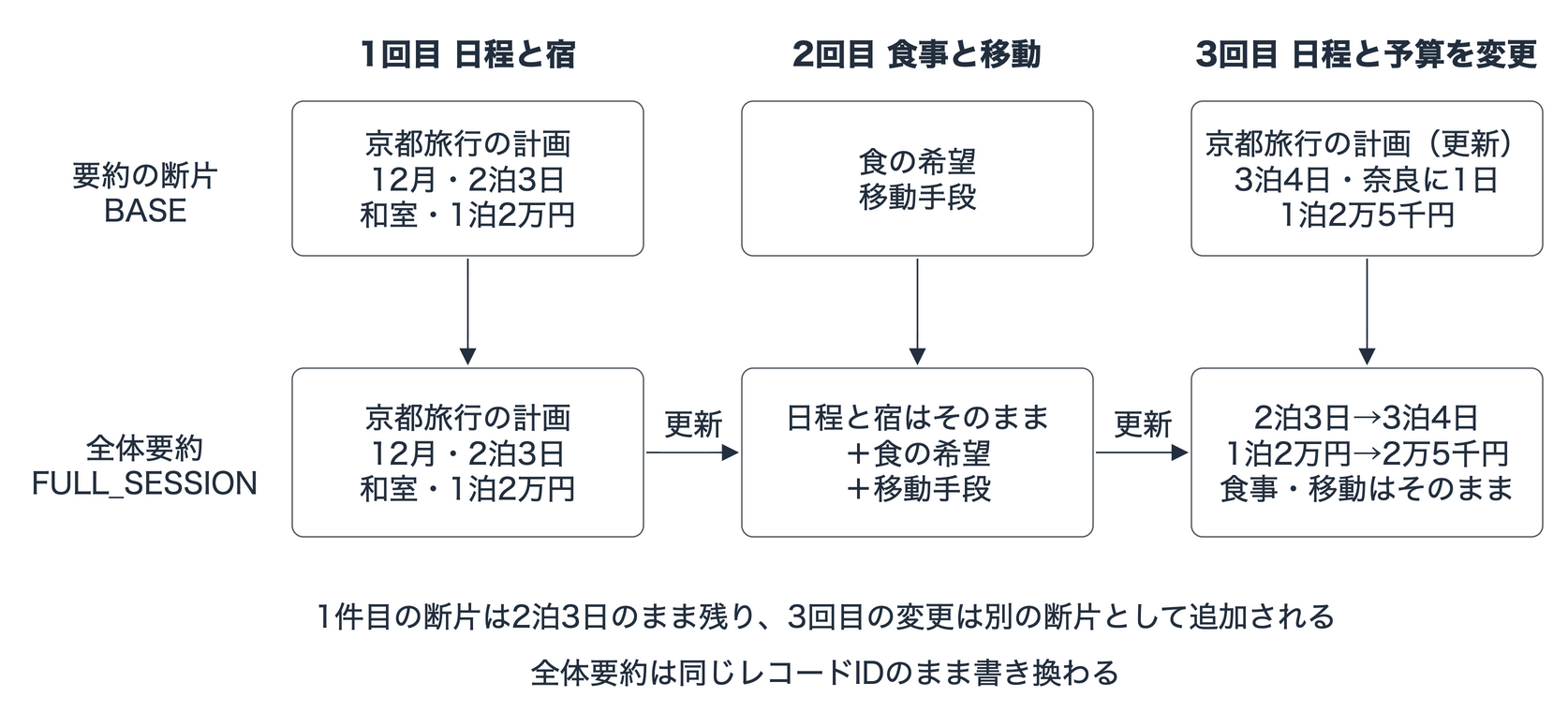
The first fragment remains "2 nights 3 days, 20,000 yen per night", and the third batch's changes were added as a separate fragment called "Kyoto Trip Plan (Updated)". As stated in the documentation, earlier fragments are not modified.
On the other hand, the full summary was corrected to 3 nights 4 days while preserving the history with "originally 2 nights 3 days, but..."!
The record ID (mem-b91a…) is unchanged from the first batch, and only the content and updatedAt are newer. So the same record keeps being rewritten.
If you pass only the fragments, both 2 nights 3 days and 3 nights 4 days appear, so you'd have to make the model decide which is newer, but with the full summary the state after the changes is already organized, which is a relief.
Extract only the full summary
The full summary is stored as a long-term memory record in the same namespace as the fragments (the path that separates where memories are stored). The metadata x-amz-agentcore-memory-recordType that the system attaches is set to FULL_SESSION, so you can filter by it.
When you want only the full summary, narrow down the record type with metadataFilters in ListMemoryRecords. This is the filter we put in common.py earlier.
# Narrow to only full summaries using the metadata the system attaches
FULL_SESSION_ONLY = [{
    "left": {"metadataKey": "x-amz-agentcore-memory-recordType"},
    "operator": "EQUALS_TO",
    "right": {"metadataValue": {"stringValue": "FULL_SESSION"}},
}]
We'll also send a laptop consultation as a second session, and extract a list of full summaries from all of the user's sessions. If you specify namespacePath instead of namespace, you can target all the namespaces beneath it at once.
from common import ACTOR_PATH, FULL_SESSION_ONLY, MEMORY_ID, client

# Extract only the full summaries from all sessions under the user
res = client.list_memory_records(
    memoryId=MEMORY_ID,
    namespacePath=ACTOR_PATH,
    metadataFilters=FULL_SESSION_ONLY,
)
for r in res["memoryRecordSummaries"]:
    session_id = r["namespaces"][0].rstrip("/").split("/")[-1]
    title = r["content"]["text"].splitlines()[0].lstrip("# ")
    print(f"{session_id}: {title}")
uv run send_events.py pc-purchase 1
# Wait about a minute, then
uv run list_recaps.py
trip-kyoto: 京都旅行の計画
pc-purchase: 会話の概要
One record was returned per session. The first line is a heading in both, but the laptop consultation's was "Conversation Overview". It's a bit underwhelming to use as a title as is.
With RetrieveMemoryRecords too, if you put the same filter in searchCriteria, you can run a semantic search targeting only full summaries.
import sys

from common import ACTOR_PATH, FULL_SESSION_ONLY, MEMORY_ID, client

# Semantic search narrowed to full summaries
res = client.retrieve_memory_records(
    memoryId=MEMORY_ID,
    namespacePath=ACTOR_PATH,
    searchCriteria={
        "searchQuery": sys.argv[1],
        "topK": 1,
        "metadataFilters": FULL_SESSION_ONLY,
    },
)
for r in res["memoryRecordSummaries"]:
    print(r["namespaces"][0], f"score={r['score']:.3f}")
    print(r["content"]["text"])
uv run search_recaps.py "奈良にも寄る旅行の宿"
uv run search_recaps.py "持ち運べるパソコン"
/strategy/SessionSummary-XXXXXXXXXX/actor/user-001/session/trip-kyoto/ score=0.394
## 京都旅行の計画
(略)
/strategy/SessionSummary-XXXXXXXXXX/actor/user-001/session/pc-purchase/ score=0.411
## 会話の概要
(略)
In both cases, the full summary of the relevant session was returned. Being able to search for "that consultation I had before" by session is handy.
Resume the conversation from where it left off
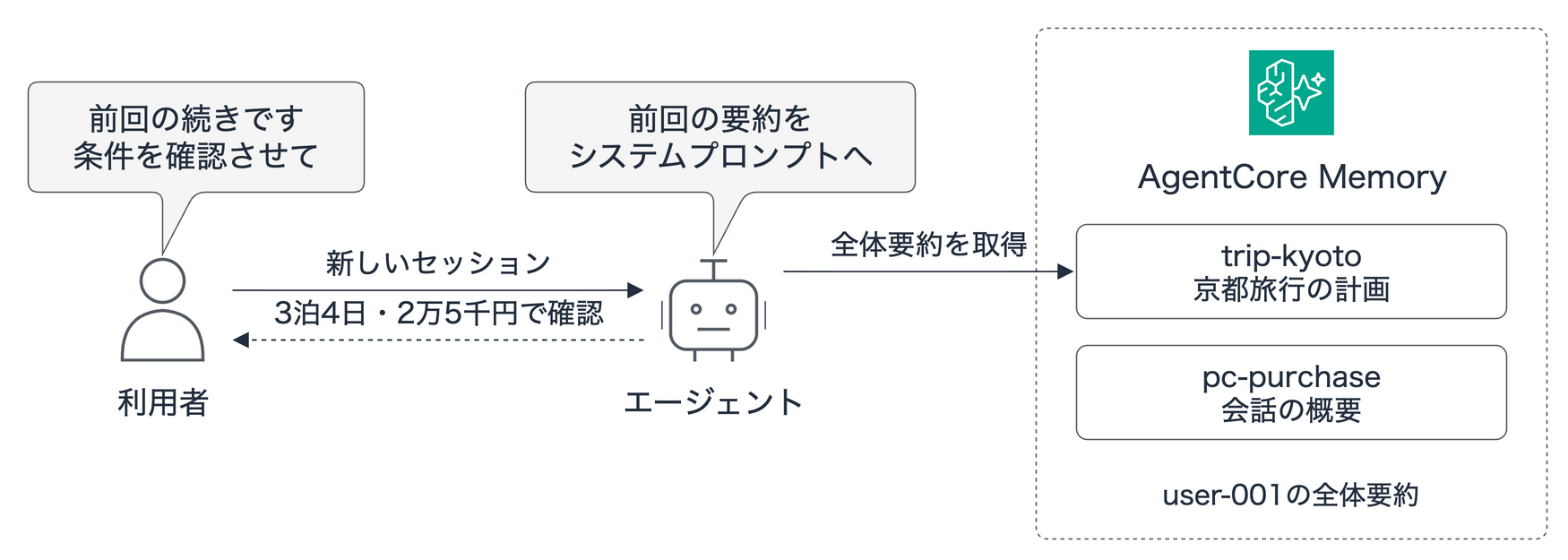
The most obvious use case is resuming a conversation. At the start of a new conversation, we'll fetch the single full summary of the Kyoto trip and put it in the system prompt.
import boto3

from common import ACTOR_PATH, FULL_SESSION_ONLY, MEMORY_ID, client

bedrock = boto3.client("bedrock-runtime", region_name="us-east-1")

# Fetch just one full summary of the previous session
res = client.list_memory_records(
    memoryId=MEMORY_ID,
    namespace=f"{ACTOR_PATH}session/trip-kyoto/",
    metadataFilters=FULL_SESSION_ONLY,
)
recap = res["memoryRecordSummaries"][0]["content"]["text"]

answer = bedrock.converse(
    modelId="us.anthropic.claude-sonnet-5-5",
    system=[{"text": "あなたは旅行の相談に乗るアシスタントです。以下は前回の会話の要約です。\n\n" + recap}],
    messages=[{"role": "user", "content": [{"text": "前回の続きです。宿を予約する前に、決まっている条件を短く確認させてください。"}]}],
)
print("".join(b["text"] for b in answer["output"]["message"]["content"] if "text" in b))
uv run resume.py
## 現在の条件(最新版)

- **時期:** 12月(具体的な日付は未確認)
- **期間:** 3泊4日(京都3連泊)
- **エリア:** 祇園または嵐山周辺
- **客室:** 和室
- **設備:** 大浴場あり
- **予算:** 1泊2万5千円まで
- **観光:** 奈良へ1日日帰り
- **食事:** 湯豆腐と和菓子(南禅寺周辺が候補)
- **移動:** バスより電車中心(地下鉄と京阪を軸に検討)

## 予約前に確認したい点

1. **宿泊日:** 12月の具体的なチェックイン日とチェックアウト日
2. **人数:** 何名で泊まるか
3. **連泊の継続:** 奈良の日帰りも含め、京都の同じ宿に3連泊でよいか。前回この点を確認しましたが、お返事は記録に残っていません。
4. **予算の基準:** 1泊2万5千円は、1名あたりか1室あたりか

この内容でよければ、日付と人数を教えてください。それに合わせて宿を探します。
It answered that the current conditions are 3 nights 4 days, 3 consecutive nights in Kyoto, and 25,000 yen per night!
The processing of lining up fragments to build the prompt is gone, and being able to pick up from last time with a single fetch is nice!
Checking existing sessions too
The documentation says sessions summarized before this feature are also covered, so for reference I counted in some old existing Memories.
| Region | Session period | Number of sessions | Sessions with a full summary |
|---|---|---|---|
| N. Virginia (us-east-1) | March – early November 2026 | 79 | 79 |
| Oregon (us-west-2) | August – September 2025 | 40 | 0 |
The 2026 sessions had full summaries without adding any conversation, but the 2025 sessions did not. When I added a conversation to them, a full summary was created, but its content was only the added conversation and did not include the contents of the old fragments.
I haven't been able to separate whether the difference is due to the region or the age, so if you use this with existing sessions, it's safer to check the contents once first... (This is only the state of my own environment, so please take it as a reference only...)
Cleanup
Delete the Memory we created.
aws bedrock-agentcore-control delete-memory --memory-id $MEMORY_ID --region us-east-1
Conclusion
You can now get a session's current state as a single record! If you're using the summary strategy, it comes along without any configuration, so it looks easy to use for resuming conversations and searching sessions.
Thank you for reading to the end!