AgentCore Runtime Instances have been released!

This page has been translated by machine translation. View original
Introduction
Hello, I'm Kamino from the Consulting Department, currently practicing driving.
On August 7, 2026, Instances, a new compute type for Amazon Bedrock AgentCore Runtime, became generally available!
This is a compute type that runs agents on EC2 instances within your own AWS account, with provisioning and patch management handled by the AgentCore side.
It feels similar to Lambda's Managed Instance feature.
The first thing I thought when reading the announcement was: when exactly would you use this?
AgentCore Runtime originally runs agents in serverless microVMs, and for agents that are called via API and complete processing within a few minutes, that should be sufficient. Persistent storage and shared file systems can also be used with microVMs. With Managed session storage (Preview), you can retain files across stop/resume cycles, and by mounting EFS or S3 Files, multiple agents can share the same data.
So, summarizing what is unique to Instances from the documentation:
- Multiple Runtimes can be placed on the same EC2 instance
- File sharing itself is also possible with microVM + EFS etc. Only Instances allows co-location while directly sharing the same machine's local disk
- Session compute can run continuously for up to 14 days (microVM is 8 hours)
- 14 days is amazing...!!!! Use it for processes you want to run for a long time...??
- GPU instances can be used. Drivers are automatically configured by AgentCore
- Since EC2 and EBS launch within your own AWS account, RIs/SPs can be applied
This time, I'll actually run and verify three things: co-location on the same instance, interruption and resumption via in-account EBS, and direct communication (A2A) between co-located agents. Since these are all items where one might think "can't you do something similar with microVMs?", I'll verify them while being mindful of what the differences are.
Prerequisites
The verification environment is as follows.
| Item | Details |
|---|---|
| Region | us-east-1 (N. Virginia) |
| Python | 3.13 |
| boto3 / botocore | 1.43.66 or later |
| Deployment method | S3 source (zip package) |
| Instance type | m7g.large (ARM64) |
Supported regions are US East (N. Virginia, Ohio), US West (Oregon), Asia Pacific (Mumbai, Singapore, Sydney, Tokyo), and Europe (Frankfurt, Ireland). The Tokyo region is also supported from the start.
Pricing follows a model where EC2 instances and EBS are billed directly to your account, plus AgentCore management fees. Savings Plans, RIs, and ODCRs apply only to the EC2 portion, and management fees are calculated based on published on-demand pricing. Also note that EBS charges continue even while a session is stopped.
How Instances Works
The concepts are a bit complex, so I've created a diagram of the overall architecture of the verification environment we'll be building.
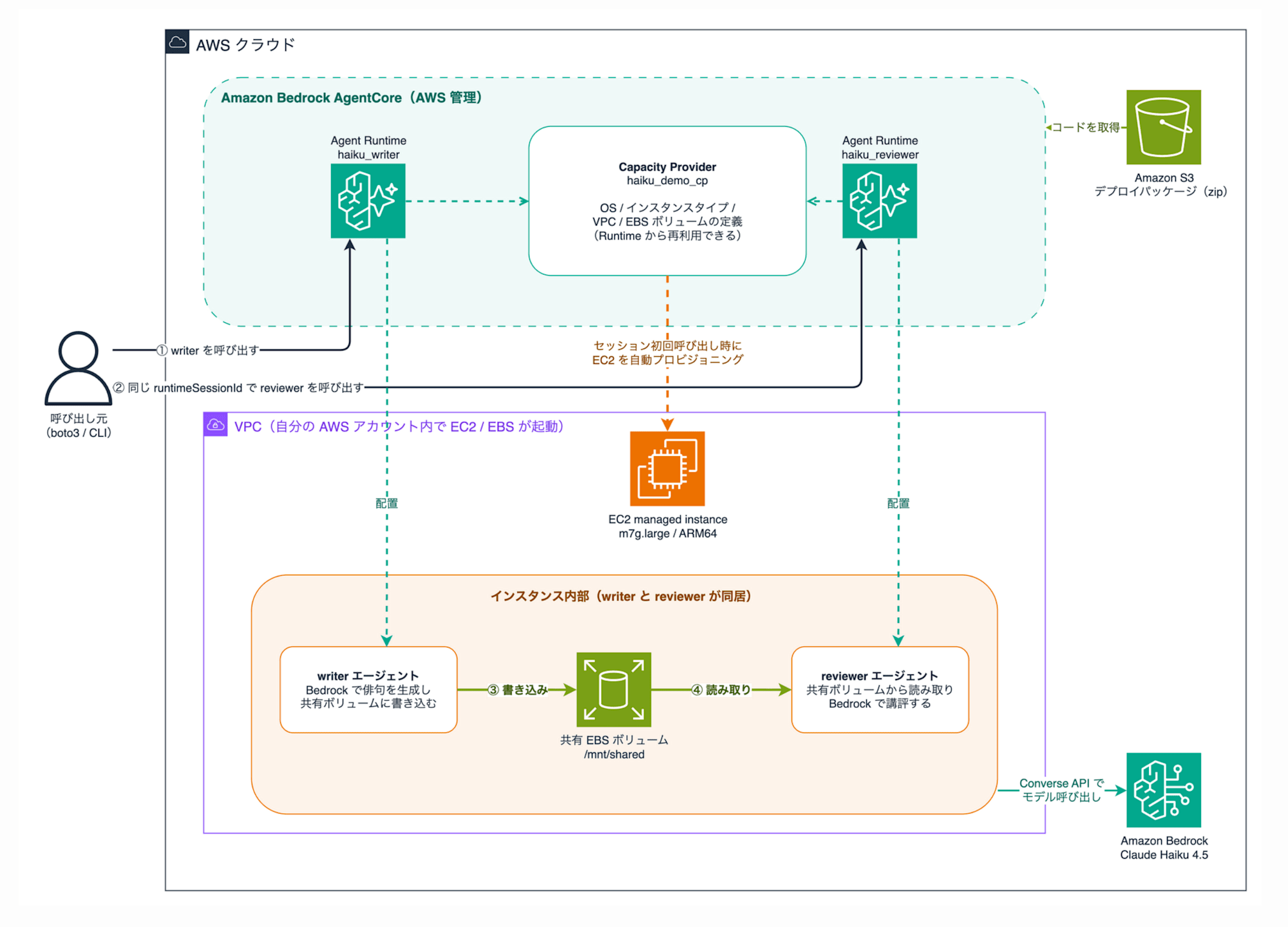
A Capacity Provider is a reusable template that holds EC2 infrastructure definitions (OS, instance type, VPC, EBS volumes). This is what sits in the center of the diagram, and it can be referenced by multiple Agent Runtimes.
An Agent Runtime is the definition of the agent itself to be run. When you attach a Capacity Provider during creation, the compute type becomes Instances. In the diagram, I've created two: writer and reviewer.
A Session is a unit per runtimeSessionId specified at invocation time, and on the first invocation, one EC2 instance per session is provisioned within your account. When you invoke two Runtimes with the same session ID as in ① and ② in the diagram, both agents are co-located on the same instance, and as in ③ and ④, files can also be passed between them via a shared EBS volume.
Compared to microVMs, the differences are as follows.
| Item | microVM | Instances |
|---|---|---|
| Max session duration | 8 hours | 14 days |
| Architecture | arm64 only | x86_64 / arm64 |
| GPU | Not supported | Supported (automatic driver configuration) |
| Number of agents | 1 agent per runtime | Multiple agents per session |
| Network | PUBLIC or VPC | VPC |
| Billing | AgentCore pay-as-you-go | EC2 billed to own account (Savings Plans also applicable to EC2 portion) |
It's interesting that x86_64 is also available. It may not be a case of "because x86_64 is available...!", but I thought it makes sense since it's EC2. The results from actually running it are included in the appendix.
Building
Let's build the configuration in the diagram. The agents are two: a writer that uses Bedrock to compose a haiku and writes it to a shared volume, and a reviewer that reads it and provides a critique. Think of it as the minimum configuration of a pipeline that passes artifact files, like code generation and code review.
Creating IAM Roles
With Instances, in addition to the regular execution role, two additional roles are required.
| Role | Purpose |
|---|---|
| Infrastructure role (Operator role) | Role assumed by AgentCore to launch and manage EC2 instances |
| Instance profile | Role attached to the EC2 instance, used for system log collection |
| Execution role | Permissions for the agent code itself (such as calling Bedrock) |
When creating from the console, default roles are automatically created, but since we're proceeding with CLI, I created them manually. I got stuck here once. When I created the Capacity Provider with only EC2 permissions and PassRole on the infrastructure role, it resulted in CREATE_FAILED with the following error.
EventBridge managed rule creation failed. User: arn:aws:sts::123456789012:assumed-role/agentcore-cp-operator-role/AgentCore is not authorized to perform: events:PutRule on resource: arn:aws:events:us-east-1:123456789012:rule/agentcore-lifecycle-events-123456789012
AgentCore creates EventBridge managed rules to monitor instance lifecycle events, so EventBridge permissions are also required on the infrastructure role. The final role definitions are in the collapsible section below.
IAM role creation commands and complete policies
The trust policies for the infrastructure role and execution role are the same, trusting bedrock-agentcore.amazonaws.com.
{
  "Version": "2012-10-17",
  "Statement": [{
    "Effect": "Allow",
    "Principal": {"Service": "bedrock-agentcore.amazonaws.com"},
    "Action": "sts:AssumeRole",
    "Condition": {
      "StringEquals": {"aws:SourceAccount": "123456789012"},
      "ArnLike": {"aws:SourceArn": "arn:aws:bedrock-agentcore:us-east-1:123456789012:*"}
    }
  }]
}
The infrastructure role is granted EC2 management permissions, as well as PassRole and EventBridge permissions.
aws iam create-role --role-name agentcore-cp-operator-role \
  --assume-role-policy-document file://trust-agentcore.json
aws iam attach-role-policy --role-name agentcore-cp-operator-role \
  --policy-arn arn:aws:iam::aws:policy/AmazonEC2FullAccess
aws iam put-role-policy --role-name agentcore-cp-operator-role \
  --policy-name operator-extra --policy-document file://operator-extra.json
{
  "Version": "2012-10-17",
  "Statement": [
    {
      "Effect": "Allow",
      "Action": ["iam:PassRole", "iam:GetInstanceProfile", "iam:CreateServiceLinkedRole"],
      "Resource": "*"
    },
    {
      "Effect": "Allow",
      "Action": [
        "events:PutRule", "events:PutTargets", "events:RemoveTargets",
        "events:DeleteRule", "events:DescribeRule", "events:TagResource",
        "events:ListTargetsByRule"
      ],
      "Resource": "arn:aws:events:us-east-1:123456789012:rule/agentcore-*"
    }
  ]
}
The instance profile trusts EC2, and after creating the role, it needs to be registered in the instance profile.
{
  "Version": "2012-10-17",
  "Statement": [{
    "Effect": "Allow",
    "Principal": {"Service": "ec2.amazonaws.com"},
    "Action": "sts:AssumeRole"
  }]
}
aws iam create-role --role-name agentcore-cp-instance-role \
  --assume-role-policy-document file://trust-ec2.json
aws iam attach-role-policy --role-name agentcore-cp-instance-role \
  --policy-arn arn:aws:iam::aws:policy/CloudWatchAgentServerPolicy
aws iam attach-role-policy --role-name agentcore-cp-instance-role \
  --policy-arn arn:aws:iam::aws:policy/AmazonSSMManagedInstanceCore
aws iam create-instance-profile --instance-profile-name agentcore-cp-instance-profile
aws iam add-role-to-instance-profile \
  --instance-profile-name agentcore-cp-instance-profile \
  --role-name agentcore-cp-instance-role
The execution role is created with the same trust policy as the infrastructure role (trust-agentcore.json). Permissions are the same as a regular AgentCore Runtime execution role, granting CloudWatch Logs / X-Ray / Bedrock model invocation and similar.
Agent Implementation and Deployment
The way to write agents is the same as regular AgentCore Runtime — you prepare a handler with @app.entrypoint.
@app.entrypoint
def handler(event, context):
    haiku = compose_haiku(event.get("theme", "cloud"))  # Generate haiku with Bedrock

    # Write to shared volume (read by reviewer in the same session)
    session_dir = SHARED_DIR / context.session_id  # SHARED_DIR = /mnt/shared
    session_dir.mkdir(parents=True, exist_ok=True)
    (session_dir / "haiku.txt").write_text(haiku, encoding="utf-8")

    return {
        "agent": "writer",
        "haiku": haiku,
        "hostname": socket.gethostname(),   # For verifying same instance
        "arch": platform.machine(),          # For verifying CPU architecture
    }
/mnt/shared is the mount path for the persistent EBS volume defined in the Capacity Provider. The reviewer simply reads this file and returns a critique — no inter-agent communication processing is written. For verification purposes, hostname showing which host it ran on and arch for CPU architecture are also returned.
Complete code for writer / reviewer
"""Writer agent: Generate artifacts and write to shared volume"""
import platform
import socket
from pathlib import Path

import boto3
from bedrock_agentcore.runtime import BedrockAgentCoreApp

app = BedrockAgentCoreApp()

SHARED_DIR = Path("/mnt/shared")
MODEL_ID = "us.anthropic.claude-haiku-4-5-20251001-v1:0"

bedrock = boto3.client("bedrock-runtime", region_name="us-east-1")

@app.entrypoint
def handler(event, context):
    theme = event.get("theme", "cloud")
    session_id = context.session_id

    # Generate artifact (haiku) with Bedrock
    response = bedrock.converse(
        modelId=MODEL_ID,
        messages=[
            {
                "role": "user",
                "content": [
                    {"text": f"Please compose one haiku on the theme of \"{theme}\". Output only the haiku."}
                ],
            }
        ],
    )
    haiku = response["output"]["message"]["content"][0]["text"]

    # Write to shared volume (read by reviewer in the same session)
    session_dir = SHARED_DIR / session_id
    session_dir.mkdir(parents=True, exist_ok=True)
    (session_dir / "haiku.txt").write_text(haiku, encoding="utf-8")

    return {
        "agent": "writer",
        "haiku": haiku,
        "hostname": socket.gethostname(),
        "arch": platform.machine(),
        "wrote_to": str(session_dir / "haiku.txt"),
    }

if __name__ == "__main__":
    app.run()
"""Reviewer agent: Read artifacts from shared volume and review them"""
import platform
import socket
from pathlib import Path

import boto3
from bedrock_agentcore.runtime import BedrockAgentCoreApp

app = BedrockAgentCoreApp()

SHARED_DIR = Path("/mnt/shared")
MODEL_ID = "us.anthropic.claude-haiku-4-5-20251001-v1:0"

bedrock = boto3.client("bedrock-runtime", region_name="us-east-1")

@app.entrypoint
def handler(event, context):
    session_id = context.session_id
    haiku_path = SHARED_DIR / session_id / "haiku.txt"

    if not haiku_path.exists():
        return {
            "agent": "reviewer",
            "error": f"{haiku_path} not found. Please call writer first.",
            "hostname": socket.gethostname(),
        }

    # Read the artifact written by writer from the shared volume
    haiku = haiku_path.read_text(encoding="utf-8")

    response = bedrock.converse(
        modelId=MODEL_ID,
        messages=[
            {
                "role": "user",
                "content": [
                    {"text": f"Please critique the following haiku from the perspective of a haiku poet. Within 3 sentences.\n\n{haiku}"}
                ],
            }
        ],
    )
    review = response["output"]["message"]["content"][0]["text"]

    return {
        "agent": "reviewer",
        "haiku_read_from_shared_volume": haiku,
        "review": review,
        "hostname": socket.gethostname(),
        "arch": platform.machine(),
    }

if __name__ == "__main__":
    app.run()
The project is set up with uv. There are only two dependency packages: bedrock-agentcore and boto3.
uv init agentcore-instances-demo --python 3.13
cd agentcore-instances-demo
uv add bedrock-agentcore boto3
I used S3 source (zip) for deployment. Since it's an ARM64 instance, I used uv to collect aarch64 dependencies, packaged them, and uploaded to S3.
uv pip install \
  --python-platform aarch64-manylinux2014 \
  --python-version 3.13 \
  --target build/deps \
  --only-binary=:all: \
  bedrock-agentcore boto3

cd build/deps && zip -qr ../writer.zip . && cd ../..
cd agents/writer && zip -q ../../build/writer.zip main.py && cd ../..

aws s3 cp build/writer.zip s3://bedrock-agentcore-code-123456789012-us-east-1/writer/deployment_package.zip
Creating the Capacity Provider and Agent Runtimes
Let's create the Capacity Provider.
response = client.create_capacity_provider(
    name="haiku_demo_cp",
    permissionsConfiguration={"capacityProviderOperatorRoleArn": OPERATOR_ROLE_ARN},
    computeConfiguration={
        "ec2Configuration": {
            "launchTemplateSource": {
                "launchParameters": {
                    "operatingSystem": "LINUX_ARM64",
                    "instanceRequirements": {"allowedInstanceTypes": ["m7g.large"]},
                    "instanceProfileArn": INSTANCE_PROFILE_ARN,
                }
            },
            "vpcConfiguration": {"subnets": [SUBNET_ID], "securityGroups": [SG_ID]},
            "volumes": [{"ebsConfiguration": {"name": "shared", "sizeGiB": 10, "volumeType": "gp3"}}],
        }
    },
)
The parameters are configured as follows.
| Configuration item | Value | Description |
|---|---|---|
| operatingSystem | LINUX_ARM64 | LINUX_X86_64 is also available |
| allowedInstanceTypes | m7g.large | Up to 30 types can be specified. GPU types (g5, g6, etc.) can also be specified here |
| vpcConfiguration | Subnet / SG | With Instances, the network is always VPC |
| volumes | shared / 10GiB / gp3 | Named persistent volumes. Up to 5 can be defined |
After about 1-2 minutes it reaches READY, so we'll link this to create 2 Runtimes.
for name in ["writer", "reviewer"]:
    client.create_agent_runtime(
        agentRuntimeName=f"haiku_{name}",
        roleArn=EXEC_ROLE_ARN,
        agentRuntimeArtifact={
            "codeConfiguration": {
                "code": {"s3": {"bucket": BUCKET, "prefix": f"{name}/deployment_package.zip"}},
                "runtime": "PYTHON_3_13",
                "entryPoint": ["main.py"],
            }
        },
        capacityProviderConfiguration={"capacityProviderArn": CP_ARN},
        filesystemConfigurations=[
            {"capacityProviderVolume": {"volumeName": "shared", "mountPath": "/mnt/shared"}}
        ],
    )
Passing the ARN to capacityProviderConfiguration sets the compute type to Instances (cannot be changed after creation). filesystemConfigurations mounts the shared volume at /mnt/shared (mount path must be one level directly under /mnt). It reaches READY within tens of seconds, completing the build.
Verification 1: Multi-Agent Collaboration on the Same Instance
Let's actually run the flow of ①-④ in the diagram. The writer and reviewer are invoked with the same runtimeSessionId (33 characters or more). Since one EC2 instance corresponds to each session ID, calling with the same ID places both agents on the same instance, while using different IDs separates them onto different instances where the shared volume contents are not visible.
import json

import boto3

client = boto3.client("bedrock-agentcore", region_name="us-east-1")

# Session ID of 33 characters or more. Reusing the same ID runs on the same EC2 instance
session_id = "haiku-collab-session-2026-08-07-demo-001"

response = client.invoke_agent_runtime(
    agentRuntimeArn=WRITER_ARN,
    runtimeSessionId=session_id,
    payload=json.dumps({"theme": "Summer EC2 instance"}).encode(),
    qualifier="DEFAULT",
)
print(json.loads(response["response"].read()))

response = client.invoke_agent_runtime(
    agentRuntimeArn=REVIEWER_ARN,
    runtimeSessionId=session_id,
    payload=json.dumps({}).encode(),
    qualifier="DEFAULT",
)
print(json.loads(response["response"].read()))
uv run python scripts/03_invoke_agents.py
{
  "agent": "writer",
  "haiku": "クラウド冷え\nワーカー立ちて\n夏涼し",
  "hostname": "ip-172-31-3-249.ec2.internal",
  "arch": "aarch64",
  "wrote_to": "/mnt/shared/haiku-collab-session-2026-08-07-demo-001/haiku.txt"
}
{
  "agent": "reviewer",
  "haiku_read_from_shared_volume": "クラウド冷え\nワーカー立ちて\n夏涼し",
  "review": "This haiku is an ambitious attempt to combine the modern words 'cloud' and 'worker' with the season word 'natsu suzushi' (summer coolness), but the coined phrasing feels abrupt and lacks the traditional resonance of haiku. (abbreviated)",
  "hostname": "ip-172-31-3-249.ec2.internal",
  "arch": "aarch64"
}
The results are summarized in these two JSONs. Since both hostnames are the same ip-172-31-3-249, the two agents deployed as separate Runtimes are co-located on the same EC2 instance. The reviewer was able to directly read the file written by the writer via the shared volume. The first writer invocation took 68 seconds due to EC2 provisioning, while the second reviewer call reused the same instance and completed in 8.5 seconds.
To be clear, file sharing itself is also achievable with microVM + EFS or S3 Files. The difference with Instances is that EBS attached to the same instance can be shared as a local filesystem rather than over the network. For pipelines with heavy intermediate artifact read/writes like builds or data transformation, there may be I/O performance differences (though I haven't measured this time...).
How the Instance Appears in the EC2 Console
This instance can also be viewed from the EC2 side. However, it's treated as an EC2 managed instance and doesn't appear in the list by default, so an account setting change is required.
aws ec2 modify-managed-resource-visibility --default-visibility visible
|  Id       |  i-0cb7e904f61796067              |
|  Ip       |  172.31.3.249                     |
|  Operator |  bedrock-agentcore.amazonaws.com  |
|  State    |  running                          |
|  Type     |  m7g.large                        |
The Operator field tells you it's an AgentCore-managed instance. There were also two EBS volumes attached: a 16GiB root volume and the 10GiB shared volume. Since it's an instance running in your own AWS account, you can also confirm the logic that the EC2 portion is eligible for Savings Plans.
Verification 2: Session Interruption and Resumption
Next, let's verify whether we can stop processing midway to reduce costs and resume from the same state at a later date. According to the spec, when all Runtimes on a session stop, the EC2 instance also stops, but the EBS volume is retained, and re-invoking with the same session ID re-attaches it to a new instance.
I stopped the reviewer Runtime with StopRuntimeSession, confirmed the EC2 instance reached the stopped state, and then invoked it again with the same session ID.
aws bedrock-agentcore stop-runtime-session \
  --agent-runtime-arn arn:aws:bedrock-agentcore:us-east-1:123456789012:runtime/haiku_reviewer-XAGNbiCcJJ \
  --runtime-session-id haiku-collab-session-2026-08-07-demo-001
response = client.invoke_agent_runtime(
    agentRuntimeArn=REVIEWER_ARN,
    runtimeSessionId="haiku-collab-session-2026-08-07-demo-001",
    payload=json.dumps({}).encode(),
    qualifier="DEFAULT",
)
haiku: クラウド冷え / ワーカー立ちて / 夏涼し
hostname: ip-172-31-15-99.ec2.internal
The data originally written by the writer was still readable. As the hostname changed from the previous ip-172-31-3-249, a new instance was started and the EBS was re-attached. Since recovery takes about 107 seconds, I think it's a practical approach to use for multi-day batches or workflows that pause for long periods waiting for approval — keeping state without paying for compute during the wait.
File retention across stop/resume cycles is also possible with microVM's Managed session storage (Preview), but that resets after 14 days without invocation, and also clears on Runtime version updates. The difference is that Instances' EBS remains under your own management until you delete the session.
Verification 3: Direct Communication Between Agents and A2A
Finally, let's verify the question: if agents can be co-located, can A2A-style inter-agent communication also be completed within a single machine?
Direct Socket Connection Is Not Possible
I prepared an agent (pingserver) that starts an HTTP server on port 9000 in the background, and another agent (pingclient) that co-locates with the same session ID and attempts to connect to it. The invocation method is the same format as Verification 1.
session_id = "a2a-demo-session-2026-08-07-test-00001"
for arn in [PINGSERVER_ARN, PINGCLIENT_ARN]:
    response = client.invoke_agent_runtime(
        agentRuntimeArn=arn,
        runtimeSessionId=session_id,
        payload=json.dumps({}).encode(),
        qualifier="DEFAULT",
    )
    print(json.loads(response["response"].read()))
Here are the results.
{
  "agent": "pingclient",
  "hostname": "ip-172-31-5-39.ec2.internal",
  "listening_ports_visible": [8080],
  "via_localhost": {"ok": false, "error": "URLError: <urlopen error [Errno 111] Connection refused>"},
  "via_private_ip": {"ok": false, "error": "URLError: <urlopen error [Errno 111] Connection refused>"}
}
The server side also returned the same hostname, so co-location is established, but both localhost and private IP resulted in Connection refused. Connection from the server itself succeeded, and the only LISTEN port visible from the client is its own 8080.
In other words, in this verification environment, even when co-located, the network namespace is isolated per agent, and direct socket connections are not possible. The documentation's statement about "no boundary between co-located agents" appears to refer to file systems and credentials, while the network seems to be designed so they cannot see each other.
Calling as an A2A Protocol Runtime
Meanwhile, AgentCore Runtime's serverProtocol includes A2A, which can also be specified in Instances. I deployed and called an A2A agent that composes haiku based on a given theme (implemented to receive JSON-RPC 2.0 at 0.0.0.0:9000).
client.create_agent_runtime(
    agentRuntimeName="a2a_haiku_poet",
    protocolConfiguration={"serverProtocol": "A2A"},
    capacityProviderConfiguration={"capacityProviderArn": CP_ARN},
    ...
)
Since InvokeAgentRuntime passes the A2A payload through transparently, you assemble a JSON-RPC 2.0 message and pass it.
payload = {
    "jsonrpc": "2.0",
    "id": "req-001",
    "method": "message/send",
    "params": {
        "message": {
            "role": "user",
            "parts": [{"kind": "text", "text": "秋のデータセンター"}],
            "messageId": "msg-001",
        }
    },
}
response = client.invoke_agent_runtime(
    agentRuntimeArn=POET_ARN,
    runtimeSessionId="a2a-jsonrpc-session-2026-08-07-poc-0002",
    payload=json.dumps(payload).encode(),
    qualifier="DEFAULT",
)
{
  "jsonrpc": "2.0",
  "id": "req-001",
  "result": {
    "artifacts": [
      {
        "name": "haiku",
        "parts": [{"kind": "text", "text": "秋風吹く サーバー室より 熱気立つ"}]
      }
    ]
  }
}
Executed by specifying the ARN directly.
Calling Agent-to-Agent via A2A
I tested a configuration where a client agent calls the haiku agent via A2A using the same session ID as itself. The execution role on the client side has bedrock-agentcore:InvokeAgentRuntime scoped down to the target Runtime added.
@app.entrypoint
def handler(event, context):
    payload = {
        "jsonrpc": "2.0",
        "id": str(uuid.uuid4()),
        "method": "message/send",
        "params": {"message": {"role": "user",
                               "parts": [{"kind": "text", "text": event.get("theme")}],
                               "messageId": str(uuid.uuid4())}},
    }
    response = agentcore.invoke_agent_runtime(
        agentRuntimeArn=POET_ARN,
        runtimeSessionId=context.session_id,  # Same session ID as self → co-located on the same instance
        payload=json.dumps(payload).encode(),
        qualifier="DEFAULT",
    )
    ...
{
  "agent": "a2aclient",
  "client_hostname": "ip-172-31-3-93.ec2.internal",
  "poet_hostname": "ip-172-31-3-93.ec2.internal",
  "haiku": "夜更けまで データ流れて 朝を待つ"
}
A2A communication was established between two agents co-located on the same instance...!
However, the packets don't actually stay within a single machine — they route through the AgentCore endpoint and come back. If you consider it a design choice to centrally route SigV4 authentication and session management through the service side, it makes sense, but since A2A communication also passes through the AgentCore data plane, I don't think co-locating them alone reduces communication latency.
Cleanup
Once verification is complete, delete the session, Runtime, and Capacity Provider in that order to prevent continued EC2 and EBS charges.
# 1. Delete session (releases EC2, ENI, and EBS together)
data.delete_capacity_provider_session(capacityProviderId=CP_ID, sessionId=SESSION_ID)

# 2. Delete Runtimes
for rid in RUNTIME_IDS:
    control.delete_agent_runtime(agentRuntimeId=rid)

# 3. Delete Capacity Provider after waiting for Runtime deletion to complete
control.delete_capacity_provider(capacityProviderId=CP_ID)
The Capacity Provider cannot be deleted while referenced by a Runtime, resulting in a ValidationException. Also, deleting a Capacity Provider will delete all sessions and persistent storage underneath it, so be careful if there is data you want to keep.
Supplement: Also Ran It on LINUX_X86_64
As noted in the comparison table, unlike microVMs, Instances also support x86_64. I was curious whether it would actually work, so I also ran the writer agent on a Capacity Provider with operatingSystem set to LINUX_X86_64 and instance type m7i.large.
The changes to the Capacity Provider are just 2 lines compared to the ARM64 version created during setup. Creating the Agent Runtime is the same except for swapping in the x86_64 zip.
 response = client.create_capacity_provider(
-    name="haiku_demo_cp",
+    name="x86_demo_cp",
     permissionsConfiguration={"capacityProviderOperatorRoleArn": OPERATOR_ROLE_ARN},
     computeConfiguration={
         "ec2Configuration": {
             "launchTemplateSource": {
                 "launchParameters": {
-                    "operatingSystem": "LINUX_ARM64",
-                    "instanceRequirements": {"allowedInstanceTypes": ["m7g.large"]},
+                    "operatingSystem": "LINUX_X86_64",
+                    "instanceRequirements": {"allowedInstanceTypes": ["m7i.large"]},
                     "instanceProfileArn": INSTANCE_PROFILE_ARN,
                 }
             },
             "vpcConfiguration": {"subnets": [SUBNET_ID], "securityGroups": [SG_ID]},
             "volumes": [{"ebsConfiguration": {"name": "shared", "sizeGiB": 10, "volumeType": "gp3"}}],
         }
     },
 )
You also need to rebuild the libraries in the zip for x86_64. The agent code itself is unchanged.
uv pip install \
  --python-platform x86_64-manylinux2014 \
  --python-version 3.13 \
  --target build/deps-x86 \
  --only-binary=:all: \
  bedrock-agentcore boto3
{
  "agent": "writer",
  "haiku": "電算機\nシリコン奏でし\nビット舞う",
  "hostname": "ip-172-31-15-215.ec2.internal",
  "arch": "x86_64"
}
The arch shows x86_64, and the same code ran as-is. This could be a viable option when you want to use native dependency libraries that don't provide arm64 libraries, or when you want to bundle binaries that assume x86_64.
Supplement: Do More Session IDs Mean More Instances?
Since sessions and EC2 instances are 1:1, a new instance is launched every time you call with a new session ID. During verification as well, when I called the same Runtime with a different session ID, a second instance was provisioned while the existing one was still running, and each returned a different hostname. If you design the system to assign a session ID per end user, as many instances and EBS volumes as there are concurrent users will be spun up.
That said, abandoned sessions don't keep running forever — there is an auto-stop mechanism.
- Runtimes with no incoming calls will auto-stop after the idle timeout in the lifecycle settings (default 15 minutes). During verification, the abandoned writer had already idle-stopped before I called StopRuntimeSession.
- When all Runtimes on a session stop, the EC2 instance also stops (as seen in verification 2, there was a lag of about 10 minutes before it stopped).
- Sessions also auto-stop when the 14-day limit is reached.
EBS is also per session. Checking CloudTrail, the lifecycle activity was recorded in full.
11:46:15  CreateAutoScalingGroup   AgentCore   ← At Capacity Provider creation (backend is ASG-managed)
11:47:13  RunInstances             AgentCore   ← EC2 launched on first call to session
11:47:30  CreateVolume             AgentCore   ← Shared volume also newly created per session
11:47:36  AttachVolume             AgentCore
(In verification 2, Runtime stopped → instance moved to stopped)
12:22:52  RunInstances             AgentCore   ← Re-called with same session ID, new instance launched
12:24:06  TerminateInstances       AutoScaling ← Old instance terminated
12:24:10  AttachVolume             AgentCore   ← EBS re-attached to new instance
12:25:12  TerminateInstances       AgentCore   ← Session deletion
12:25:18  DeleteVolume             AgentCore   ← EBS is only deleted at this point
On the other hand, there is no mechanism to automatically delete sessions. Only EC2 stops automatically — EBS is retained in preparation for resumption. EBS for abandoned sessions continues to incur charges until you call DeleteCapacityProviderSession yourself or delete the Capacity Provider entirely, and accumulates for every session ID. Since these are treated as managed instances, you cannot delete the instances or volumes directly from the EC2 console — the only APIs that can perform deletion are these two on the AgentCore side.
Cost is roughly "number of sessions × (EC2 uptime + management fee + EBS)", so it's worth thinking through an operational plan for deleting sessions you no longer need.
Thinking About What Workloads This Suits
Based on the verification results, the key characteristic of Instances is that sessions are heavy to start but long-lived. The first call with a new session ID takes 44 to 107 seconds each time, and one EC2 instance and one set of EBS volumes are launched per session. EBS charges accrue until the session itself is deleted (via DeleteCapacityProviderSession, or by deleting the Capacity Provider entirely).
So it felt a bit different from use cases like chat apps that create large numbers of short-lived sessions per user in quick succession. Waiting up to a minute for the first response, on top of costs scaling proportionally with concurrent users, makes it a poor fit. For "high-volume, short-lived, lightweight" sessions like that, microVMs with per-request pricing and no startup wait seem like the better choice.
Instances feel more suited for the opposite: "low-volume, long-lived, heavyweight" workloads. My guess is that it fits cases like multi-day batch jobs or simulations, GPU inference, or development pipelines where multiple agents share a working directory — situations where you want to give each agent its own dedicated work machine.
Closing Thoughts
Persistent storage and shared file systems are also available on microVMs, so that alone isn't a reason to choose Instances...!
The unique advantages of Instances, as I see them, are: the ability to place multiple Runtimes on the same EC2 instance, compute that can run continuously for up to 14 days, the ability to choose EC2 instance types including GPU instances, and the fact that EC2 and EBS reside in your own account so your existing EC2 pricing agreements and account governance apply as-is. In that sense, I still haven't personally found use cases that go beyond what the documentation describes...
As I wrote in the use cases section above, I felt it's still a bit difficult to use casually...!
If I have a concrete use case in the future, I'd like to give it another try!
I hope this article was helpful in some way. Thank you for reading to the end!