AgentCore Runtime VPC Mode Network Requirements Summary

This page has been translated by machine translation. View original
Hello, I'm Simon from the Consulting Department.
Have you ever wanted to run AgentCore Runtime inside a VPC? I have.
If you want to connect directly from an agent to an internal database or internal API, you can achieve this by running AgentCore Runtime in VPC mode.
However, when you create AgentCore Runtime in VPC mode, you need to set up communication paths yourself that you didn't need to worry about in public mode.
In this article, I will identify and organize those required resources.
Goal of This Article
In this article, I will organize the network resources required when creating AgentCore Runtime in VPC mode. Specifically, these are the internet access paths and the group of VPC endpoints.
I will not cover the agent application code or the individual usage of Gateway, Memory, or Identity.
Since this is organized around the perspective of "which endpoint is needed for which feature," you can refer to your own configuration and select only the resources you need.
What is VPC Mode?
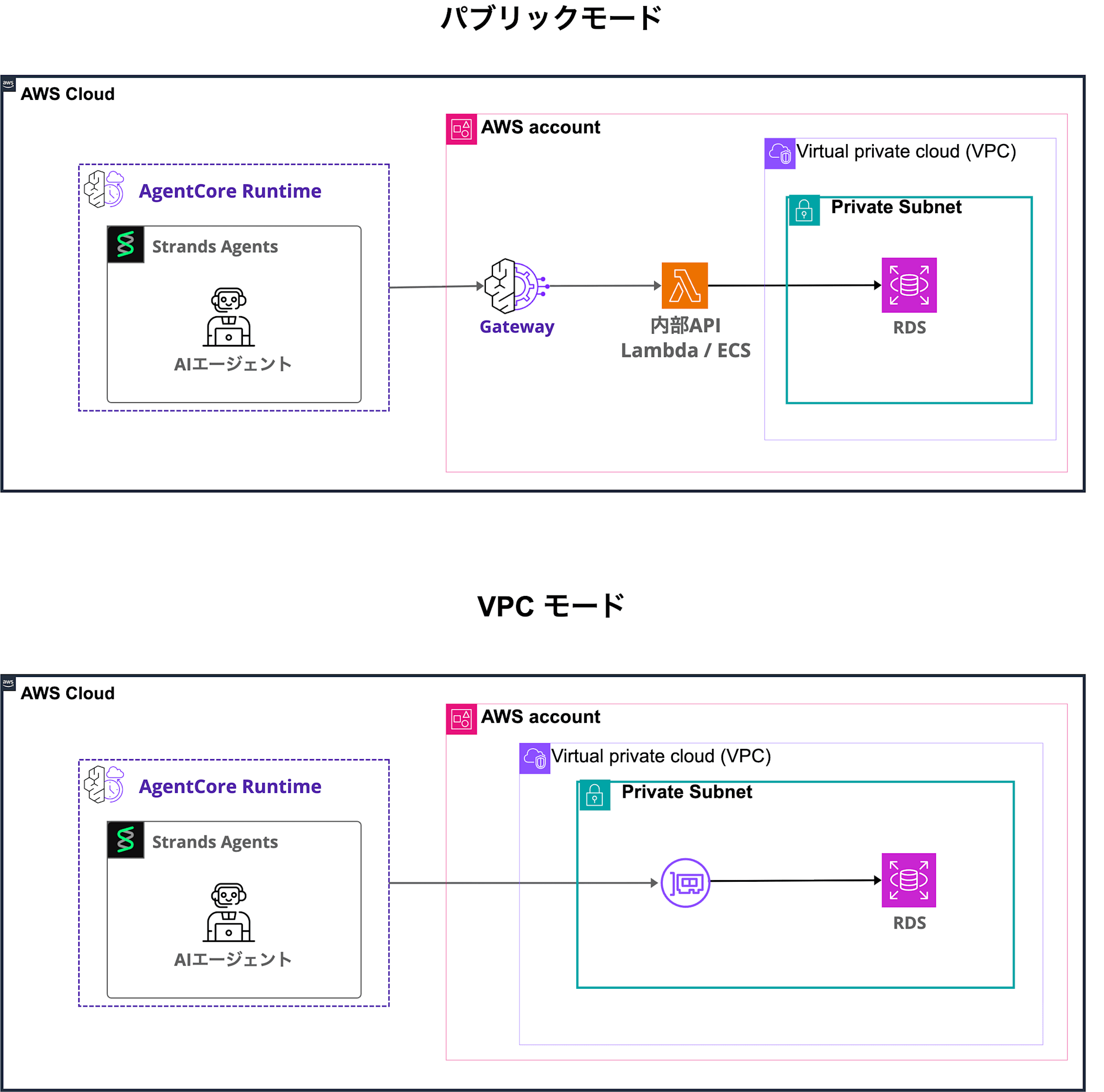
AgentCore Runtime has two network modes: public and VPC.
When you choose VPC mode, the Runtime creates an ENI in the specified subnet. The Runtime communicates with resources inside the VPC through this ENI. The ENI has a private IP, and communication destinations are controlled by the attached security group.
The main benefit of creating a Runtime in VPC mode is that the Runtime's agent can directly reach resources such as databases and internal APIs inside the VPC from the ENI.
A public mode Runtime does not have an ENI inside the VPC. To reach resources inside the VPC, you need to configure VPC egress on the AgentCore Gateway side and route access through the Gateway. Furthermore, since Gateway cannot directly target databases such as RDS, you need to place an intermediary such as Lambda or ECS as an internal API. VPC mode eliminates this intermediate layer and allows direct access to RDS from the ENI.
Other benefits include the ability to confine communication within the organization's network boundary, and the ability to call the Runtime's API via PrivateLink from other applications placed inside the VPC.
On the other hand, using VPC mode introduces costs and operational overhead for network design, VPC endpoints, and NAT. If private connectivity is not required, public mode is sufficient in most cases.
Providing Internet Access
If the Runtime needs to reach the internet, you set up a combination of NAT Gateway, IGW, and route tables. This is because a Runtime connected to a VPC does not have internet access by default.
To provide internet access, you need all of the following configurations:
- Place the Runtime (ENI) in a private subnet
- Place the NAT Gateway in a public subnet
- Attach the IGW to the VPC
- Route tables: point
0.0.0.0/0in the private subnet to the NAT Gateway, and0.0.0.0/0in the public subnet to the IGW
When using the Browser Tool, or when Code Interpreter reaches out to a public endpoint, this NAT-based internet access is required. If your design is self-contained using only VPC endpoints, neither NAT Gateway nor IGW is needed.
Note that placing the Runtime in a public subnet does not provide internet access. The Runtime's ENI only has a private IP, and the IGW only provides internet connectivity to resources with a public IP. A NAT Gateway is required for the ENI to reach the internet.
Security Groups
There are two security groups required in VPC mode. One is specified in the Runtime's NetworkConfiguration, and the other is attached to Interface VPC endpoints (Gateway-type endpoints do not require a security group).
Below is an implementation example in CloudFormation.
# ---- Endpoint SG: Attach to all Interface VPC endpoints ----
VPCEndpointSecurityGroup:
    Type: AWS::EC2::SecurityGroup
    Properties:
        GroupDescription: Security group for VPC endpoints
        VpcId: !Ref VPC
        SecurityGroupIngress:
            - IpProtocol: tcp
              FromPort: 443
              ToPort: 443
              CidrIp: !Ref VpcCidr # Allow HTTPS from within the VPC
        # CFn adds an "allow all outbound" rule by default,
        # so explicitly specify SecurityGroupEgress to override the default.
        # Since Interface endpoints only return responses and do not initiate outbound connections themselves,
        # add a dummy rule to effectively block all outbound.
        SecurityGroupEgress:
            - IpProtocol: tcp
              FromPort: 443
              ToPort: 443
              CidrIp: 127.0.0.1/32

# ---- Runtime SG: Specified in the Runtime's NetworkConfiguration ----
AgentRuntimeSecurityGroup:
    Type: AWS::EC2::SecurityGroup
    Properties:
        GroupDescription: Security group for AgentCore Runtime
        VpcId: !Ref VPC
        SecurityGroupIngress: [] # No inbound needed: reason described below
        SecurityGroupEgress: [] # Remove default allow-all outbound; add only necessary rules below

# Outbound rules are defined as separate resources to avoid circular references
AgentRuntimeToVPCEndpointEgress:
    Type: AWS::EC2::SecurityGroupEgress
    Properties:
        GroupId: !Ref AgentRuntimeSecurityGroup
        IpProtocol: tcp
        FromPort: 443
        ToPort: 443
        DestinationSecurityGroupId: !Ref VPCEndpointSecurityGroup
Note that the inbound rules for the Runtime SG are empty. Even when other applications inside the VPC invoke the Runtime, they call InvokeAgentRuntime via the bedrock-agentcore endpoint rather than connecting directly to the Runtime ENI, so no inbound rules are needed on the Runtime SG side.
VPC Endpoints ①: Container Execution Infrastructure
Since the Runtime operates as a container, the following endpoints are required for image retrieval and log shipping. They are mandatory if there is no internet access (NAT Gateway), and are also recommended even when NAT is available to avoid NAT data processing charges.
| Service | Endpoint | Purpose |
|---|---|---|
| ECR Docker | com.amazonaws.{region}.ecr.dkr |
Retrieving the container image itself |
| ECR API | com.amazonaws.{region}.ecr.api |
Image authentication and metadata retrieval |
| S3 (Gateway type · free) | com.amazonaws.{region}.s3 |
Retrieving image layers (stored in S3) |
| CloudWatch Logs | com.amazonaws.{region}.logs |
Sending agent logs |
VPC Endpoints ②: AgentCore Features
There are three PrivateLink endpoints exposed by AgentCore. Add only the ones you need based on the features you use.
| Service | Endpoint | When Required |
|---|---|---|
| AgentCore Data Plane | com.amazonaws.{region}.bedrock-agentcore |
When using Memory or Identity, or when calling InvokeAgentRuntime privately from a client inside the VPC |
| AgentCore Gateway Data Plane | com.amazonaws.{region}.bedrock-agentcore.gateway |
When using Gateway |
| AgentCore Control Plane | com.amazonaws.{region}.bedrock-agentcore-control |
When executing management APIs such as creating, updating, or deleting a Runtime from within a VPC without internet |
VPC Endpoints ③: Model Inference and Agent Dependencies
These are other endpoints that may be required.
bedrock-runtime is almost always required for model inference, and monitoring and xray are needed when using AgentCore Observability.
In addition to those, add endpoints as needed depending on the AWS services called by the agent's code.
| Service | Endpoint | Purpose |
|---|---|---|
| Bedrock Runtime | com.amazonaws.{region}.bedrock-runtime |
Model inference (InvokeModel / InvokeModelWithResponseStream) |
| CloudWatch | com.amazonaws.{region}.monitoring |
Sending CloudWatch metrics (when using AgentCore Observability) |
| X-Ray | com.amazonaws.{region}.xray |
Sending traces (when using AgentCore Observability) |
| DynamoDB (Gateway type · free) | com.amazonaws.{region}.dynamodb |
When the agent uses DynamoDB |
| Secrets Manager | com.amazonaws.{region}.secretsmanager |
When the agent retrieves secrets |
| KMS | com.amazonaws.{region}.kms |
When the agent performs encryption or decryption |
| SSM | com.amazonaws.{region}.ssm |
When the agent uses Parameter Store |
| RDS Data | com.amazonaws.{region}.rds-data |
When using the RDS Data API |
| STS | com.amazonaws.{region}.sts |
When the agent performs AssumeRole |
Summary
In this article, I explained an overview and benefits of AgentCore Runtime's VPC mode, as well as the additional resources required to enable communication in VPC mode.
Use AgentCore Runtime's VPC mode when the Runtime's agent needs to connect directly to private resources inside the VPC. If that is not necessary, public mode is sufficient.
