
Amazon Linux 2027 Is Now in Public Preview, So I Launched It on EC2 to Check It Out

This page has been translated by machine translation. View original
Introduction
On September 3, 2026, the public preview of Amazon Linux 2027 (AL2027) began. AL2027 is the successor to Amazon Linux 2023 (AL2023), and according to the user guide, support will continue until 2032.
In this article, I launched an EC2 instance from the AL2027 preview AMI in the Tokyo Region and checked the state of the OS using Session Manager and Run Command. I will look at how the SELinux operating mode, the kernel, and package management appear on a real machine right after launch.
Verification
All measured values in this article were confirmed with the AMI of the 2027.0.20260903.0 generation released as the public preview.
Checking the AMI
First, I searched from the Management Console. When I displayed public images in the AMI list of the EC2 console and filtered by owner and AMI name, four AL2027 preview AMIs were listed.
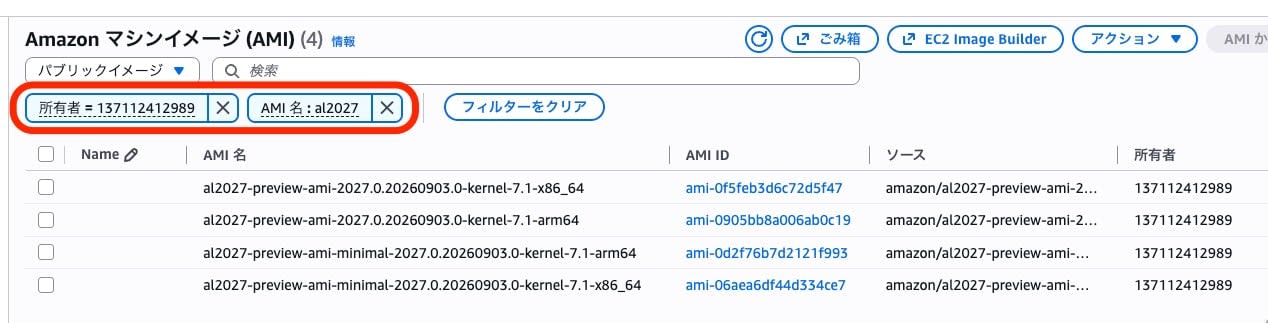
With the AWS CLI describe-images as well, filtering public images by the name al2027-preview-ami-* returned the same four. The standard and minimal editions are each provided for arm64 and x86_64.
| Name | ImageId | Arch | BootMode |
|---|---|---|---|
| al2027-preview-ami-2027.0.20260903.0-kernel-7.1-arm64 | ami-0905bb8a006ab0c19 | arm64 | uefi |
| al2027-preview-ami-2027.0.20260903.0-kernel-7.1-x86_64 | ami-0f5feb3d6c72d5f47 | x86_64 | uefi-preferred |
| al2027-preview-ami-minimal-2027.0.20260903.0-kernel-7.1-arm64 | ami-0d2f76b7d2121f993 | arm64 | uefi |
| al2027-preview-ami-minimal-2027.0.20260903.0-kernel-7.1-x86_64 | ami-06aea6df44d334ce7 | x86_64 | uefi-preferred |
The creation date and time of all four was 2026-09-02T22:42:20.000Z. The AMI IDs displayed in the console also matched this CLI result.
The AMI IDs can also be obtained from SSM public parameters.
aws ssm get-parameters-by-path \
  --path /aws/service/ami-amazon-linux-latest \
  --query "Parameters[?contains(Name,'al2027')].[Name,Value]" --output text
/aws/service/ami-amazon-linux-latest/al2027-preview-ami-kernel-7.1-arm64	ami-0905bb8a006ab0c19
/aws/service/ami-amazon-linux-latest/al2027-preview-ami-kernel-7.1-x86_64	ami-0f5feb3d6c72d5f47
/aws/service/ami-amazon-linux-latest/al2027-preview-ami-kernel-default-arm64	ami-0905bb8a006ab0c19
/aws/service/ami-amazon-linux-latest/al2027-preview-ami-kernel-default-x86_64	ami-0f5feb3d6c72d5f47
/aws/service/ami-amazon-linux-latest/al2027-preview-ami-minimal-kernel-7.1-arm64	ami-0d2f76b7d2121f993
/aws/service/ami-amazon-linux-latest/al2027-preview-ami-minimal-kernel-7.1-x86_64	ami-06aea6df44d334ce7
/aws/service/ami-amazon-linux-latest/al2027-preview-ami-minimal-kernel-default-arm64	ami-0d2f76b7d2121f993
/aws/service/ami-amazon-linux-latest/al2027-preview-ami-minimal-kernel-default-x86_64	ami-06aea6df44d334ce7
The parameter names have a series that includes the kernel version and a kernel-default series. At present, as long as the architecture and edition (standard/minimal) are the same, both series returned the same AMI ID.
Launch and SSM connection
Specifying the AMI ID obtained from the parameters above, I launched one arm64 standard edition instance. The instance type is t4g.small, and the network is a public subnet in the default VPC. The security group has no inbound rules open. To connect with Session Manager, I specified an existing role with AmazonSSMManagedInstanceCore as the IAM instance profile.
aws ec2 run-instances \
  --image-id ami-0905bb8a006ab0c19 \
  --instance-type t4g.small \
  --iam-instance-profile Name=ec2-ssm-core \
  --subnet-id subnet-xxxxxxxxxxxxxxxxx \
  --security-group-ids sg-xxxxxxxxxxxxxxxxx \
  --metadata-options 'HttpTokens=required' \
  --tag-specifications 'ResourceType=instance,Tags=[{Key=Name,Value=al2027-preview-check}]'
After launch, I polled until it was registered as an SSM managed instance.
2026-09-03T17:31:23Z	None
2026-09-03T17:31:38Z	None
2026-09-03T17:31:54Z	None
2026-09-03T17:32:09Z	Online	Amazon Linux	2027	3.3.5226.0
Registration took 52 seconds. The starting point is the launch time of 17:31:17Z, and the end point is 17:32:09Z, when PingStatus was first observed as Online. Since it was not yet registered at the previous poll at 17:31:54Z, the switch to Online happened after 17:31:54Z and no later than 17:32:09Z. The platform reported by SSM was Amazon Linux 2027, and the SSM Agent version was 3.3.5226.0.
After confirming registration, I used both interactive connection and non-interactive execution. All OS-side output shown in this article was obtained via Run Command.
# 対話接続
aws ssm start-session --target i-xxxxxxxxxxxxxxxxx

# 非対話実行(本記事の出力はこの方法で取得)
aws ssm send-command --instance-ids i-xxxxxxxxxxxxxxxxx \
  --document-name AWS-RunShellScript \
  --parameters commands='["cat /etc/os-release"]'
OS information and SELinux
The OS identity appears in os-release.
NAME="Amazon Linux"
VERSION="2027"
ID="amzn"
ID_LIKE="fedora"
VERSION_ID="2027"
VARIANT="Public Preview"
VARIANT_ID="preview"
PLATFORM_ID="platform:al2027"
PRETTY_NAME="Amazon Linux 2027.0.20260903"
ANSI_COLOR="0;33"
CPE_NAME="cpe:2.3:o:amazon:amazon_linux:2027:2027.0.20260903"
HOME_URL="https://aws.amazon.com/linux/"
DOCUMENTATION_URL="https://docs.aws.amazon.com/linux/"
SUPPORT_URL="https://aws.amazon.com/premiumsupport/"
BUG_REPORT_URL="https://github.com/amazonlinux/amazon-linux-2027"
VENDOR_NAME="AWS"
VENDOR_URL="https://aws.amazon.com/"
SUPPORT_END="2026-12-31"
VARIANT and VARIANT_ID indicate that the launched image is the preview version.
The system release string and kernel are as follows.
$ cat /etc/system-release
Amazon Linux release 2027.0.20260903 (Amazon Linux)

$ uname -r
7.1.0-88.111.amzn2027.aarch64
The kernel package name is kernel7.1, not kernel. Searching the installed packages returns kernel7.1-7.1.0-88.111.amzn2027.aarch64, and kernel7.1-tools is also installed.
SELinux was running in enforcing mode by default.
$ sestatus
SELinux status:                 enabled
SELinuxfs mount:                /sys/fs/selinux
SELinux root directory:         /etc/selinux
Loaded policy name:             targeted
Current mode:                   enforcing
Mode from config file:          enforcing
Policy MLS status:              enabled
Policy deny_unknown status:     allowed
Memory protection checking:     actual (secure)
Max kernel policy version:      35
The configuration file side was also enforcing, and there were 426 loaded policy modules. Searching the audit log for recent AVCs found no matches, and the result was the same when I rechecked after adding gcc and compiling, described later.
Package management
Let's start with the parts that seem to have changed from AL2023. The versions of the main components right after launch are as follows.
| Component | Measured value |
|---|---|
| kernel | kernel7.1-7.1.0-88.111.amzn2027.aarch64 |
| glibc | glibc-2.44-2.amzn2027.0.2 (ldd shows GNU libc 2.44) |
| systemd | systemd 260 (260.1-11.amzn2027.0.6) |
| RPM | RPM version 6.0.0 |
| DNF | dnf5 5.4.2.1 (libdnf5 5.4.2.1) |
| Python | Python 3.14.7 (/usr/bin/python3 is a link to python3.14) |
| OpenSSL | OpenSSL 3.5.7 9 Jun 2026 |
| AWS-LC | aws-lc-libs-5.2.0-2.amzn2027 |
| zlib | zlib-ng-compat-2.3.3-1.amzn2027 (zlib itself is absent) |
| PCRE | pcre2-10.47-1.amzn2027.0.1 (PCRE1 is absent) |
| cloud-init | cloud-init-26.1-250.amzn2027.0.5 |
| SSM Agent | amazon-ssm-agent-3.3.5226.0-1.amzn2027 |
| AWS CLI | awscli-2-2.36.2-1.amzn2027.0.1 |
| bash | bash-5.3.0-2.amzn2027 |
| curl | curl 8.18.0 (linked with OpenSSL 3.5.7 and zlib-ng) |
There were 335 installed packages. The standard edition AMI does not include a build environment, and no language runtimes other than Python were installed. gcc, binutils, git, perl, ruby, node, java, go, rustc, php, and dotnet were all not installed.
Package management has moved to DNF5. dnf and yum are symbolic links to dnf5.
$ ls -l /usr/bin/dnf /usr/bin/yum /usr/bin/dnf5
lrwxrwxrwx. 1 root root       4 Aug 31 00:00 /usr/bin/dnf -> dnf5
-rwxr-xr-x. 1 root root 1541400 Aug 31 00:00 /usr/bin/dnf5
lrwxrwxrwx. 1 root root       4 Aug 31 00:00 /usr/bin/yum -> dnf5

$ python3 -c "import dnf"
Traceback (most recent call last):
  File "<string>", line 1, in <module>
    import dnf
ModuleNotFoundError: No module named 'dnf'
Because python3-dnf, the Python API for DNF4, is not installed, importing dnf from Python fails. python3-libdnf5 on the DNF5 side was also not installed by default.
The scope of support during the preview period can be checked with a dnf subcommand.
$ dnf supportinfo --pkg glibc
Name                         : glibc
Version                      : 2.44-2.amzn2027.0.2
State                        : installed
Current Status               : Supported
Patch Priority               : Full Support
Support Level Description    : Full security and bug fix support for all severities
Covered Severities           : Low, Medium, Important, Critical
Origin                       : Amazon Linux 2027 Core
Support Timeline             : from 2026-09-03     : supported (Low, Medium, Important, Critical)
                             : from 2027-03-31     : unsupported
Package Note                 : Amazon Linux will support this package until the end of the AL2027 public preview period
The output shows unsupported from 2027-03-31 onward, and the package note also states the condition of lasting until the end of the public preview period. The kernel also becomes unsupported on the same date, and in the list of installed packages, all rows had the same date and note.
There was only one enabled repository, and all auto-update timers were disabled.
Repository definition and auto-update status
[amazonlinux]
name=Amazon Linux 2027 repository
mirrorlist=https://al2027-repos-$awsregion-7f9a3b4e.s3$dualstack.$awsregion.$awsdomain/core/mirrors/$releasever/$basearch/$mirrorlist
priority=10
enabled=1
repo_gpgcheck=0
type=rpm
gpgcheck=1
gpgkey=file:///etc/pki/rpm-gpg/RPM-GPG-KEY-amazon-linux-2027
report_instanceid=1
The source and debuginfo repositories are disabled. Version locking is handled by the amazon-linux-repo-s3-2027.0.20260903-0.amzn2027 package, and no releasever variable file is placed.
When I checked for updates right after launch, not a single candidate was returned. The AMI and the repository are at the same version. The auto-update-related dnf-makecache.timer, systemd-sysupdate.timer, and update-motd.timer were all disabled.
Since no build environment is included, you also have to install the compiler yourself. The gcc I additionally installed was 16.1.1, and the default C standard was C23.
Additional installation of gcc and GCC 16 defaults
Looking at the package information while it was not yet installed, gcc was 16.1.1-1.amzn2027.0.1 and binutils was 2.46-3.amzn2027.0.1. The installation downloaded 10 packages totaling 62.1 MiB, and in this run it finished in 10.126 seconds.
$ gcc --version
gcc (GCC) 16.1.1 20260501 (Red Hat 16.1.1-1)

$ echo | gcc -dM -E -x c - | grep -E "__STDC_VERSION__|__GNUC__ "
#define __GNUC__ 16
#define __STDC_VERSION__ 202311L
On the arm64 environment, the target defaults were -mabi=lp64 and -march=armv8.2-a+crypto. Compiling and running hello world also worked, and the output was hello AL2027 16.1.1 20260501 (Red Hat 16.1.1-1).
systemd and SSH
The SysV compatibility mechanism was gone without a trace. There was no systemd-sysv-generator in the list of systemd generators; only the cloud-init generator, the SELinux automatic relabel, the standard systemd generators, and the zram generator were present. The /etc/rc.d directory for runlevels, chkconfig, and service were all not found. For network management, systemd-networkd is enabled, and NetworkManager was not-found.
The default SSH configuration is composed via drop-ins. Four files were placed in /etc/ssh/sshd_config.d/. 10-amazon-hardening.conf is hardening by Amazon, and 40-redhat-crypto-policies.conf is the integration with the Red Hat-derived crypto policies. 50-cloud-init.conf is for cloud-init, and 50-redhat.conf is Red Hat's default configuration.
# /etc/ssh/sshd_config.d/10-amazon-hardening.conf(コメント行を除く)
PermitRootLogin no
X11Forwarding no
GSSAPIAuthentication no
KerberosAuthentication no
IgnoreRhosts yes
HostbasedAuthentication no
RekeyLimit 512M 1h
The comments in 10-amazon-hardening.conf give the AL-PDR "AL2027: Harden SSH and login security defaults" as a reference name. They also include an explanation that the design takes advantage of sshd adopting the first value it obtains, so that it takes precedence over subsequent drop-ins.
In the effective values, the only enabled authentication method was public key authentication. Root login, password authentication, and keyboard-interactive authentication were all disabled. Reverse lookup is not performed, and the login grace time was 120 seconds. The first three key exchange algorithms are hybrid methods with post-quantum cryptography: mlkem768x25519-sha256, mlkem768nistp256-sha256, and mlkem1024nistp384-sha384.
Note that the update-crypto-policies command itself, which switches the crypto policy, is not installed. However, 40-redhat-crypto-policies.conf does Include /etc/crypto-policies/back-ends/opensshserver.config.
I also checked the default target.
$ systemctl get-default
graphical.target
It was graphical.target. The table of differences from AL2023 in the AL2027 documentation does not mention the default target, and I did not measure the AL2023 side in this article.
The total boot time was 43.442 seconds, broken down into firmware 1.578 seconds, loader 2.990 seconds, kernel 247 milliseconds, initrd 6.840 seconds, and userspace 31.787 seconds. The unit that took the longest on a per-unit basis was the device unit for the EBS volume, at 20.170 seconds. There were no errors at boot, and the error-priority journal entries and failed units were both 0.
cloud-init reached done, but its state was degraded.
$ cloud-init status --long
status: done
extended_status: degraded done
boot_status_code: enabled-by-generator
last_update: Thu, 01 Jan 1970 00:00:33 +0000
detail: DataSourceEc2
errors: []
recoverable_errors:
WARNING:
	- Failed loading yaml blob. Invalid format at line 7 column 2: "while scanning for the next token found character '%' that cannot start any token   in "<unicode string>", line 7, column 2:     {% set meta_data = (ds | default( ...       ^"
There were no fatal errors, and four WARNINGs with the same content were recorded as recoverable warnings (the output above is an excerpt of one of the four). The last update time is displayed as January 1, 1970. Totaling cloud-init's processing time gave 2.438 seconds in total for one boot record.
Since the checks were finished, I deleted the instance.
aws ec2 terminate-instances --instance-ids i-xxxxxxxxxxxxxxxxx
I confirmed terminated about 80 seconds later, after running and shutting-down. The root EBS volume was gone because the delete-on-termination option was enabled, and a search for volumes attached to the instance returned 0. I used an existing IAM role, VPC, and security group, so I left them as they are.
Summary
AL2027, the first major version in four years, has been released as a public preview. It can be launched as an EC2 instance in the Tokyo Region as well, and I was able to confirm, in a development environment and the like, the absence of SysV compatibility and the updates to major packages such as GCC and the kernel.
Because it is currently a public preview, it is not suitable for production use, but I would like to keep an eye on the future developments of AL2027, the successor to AL2023.
