
I tried the managed minor version upgrade for Amazon Aurora Global Database

This page has been translated by machine translation. View original
I want to make minor version upgrades for Aurora Global Database easier
Hello, I'm nonPi (@non____97).
Have you ever wanted to make minor version upgrades for Aurora Global Database easier? I have.
When operating Aurora Global Database, version upgrades require extra effort.
As introduced in the article below, you need to manually upgrade the secondary DB clusters first, followed by the primary DB cluster.
This can be painful when operating multiple DB clusters.
In February 2026, an update was released that enables managed minor version upgrades, but only for Aurora PostgreSQL.
This eliminates the need to manually update each DB cluster.
Even if there's an issue during the version upgrade, it will automatically roll back to the original version.
Minor version upgrade
You can upgrade your Aurora global database to a new minor engine version across all regions with a single management operation and minimal downtime. This eliminates the need to manually upgrade each cluster individually, reducing the operational burden of global cluster management.
Understanding minor version upgrades for global databases
Global database minor versions can be upgraded using the RDS API, AWS CLI, or AWS Management Console. This single operation performs the upgrade across the primary cluster and all secondary (mirror) clusters. If any issues occur during the upgrade, the service automatically rolls back to the existing version.Note
This management capability is currently supported only for the Aurora PostgreSQL-compatible engine.
However, it doesn't handle patch version upgrades for the entire global DB. In that case, you'll need to update individually as described in the article mentioned earlier.
Considerations for minor version upgrades
When planning minor version upgrades for your global database, consider the following:
The management capability applies only to minor version upgrades. For patch version upgrades, the existing system update maintenance procedures continue to be used.
The managed capability is supported only for Aurora PostgreSQL global clusters.
Each cluster in your global cluster topology can be upgraded individually. If you choose this approach, upgrade all secondary clusters before upgrading the primary cluster. When upgrading, ensure that your primary and secondary DB clusters are upgraded to the same minor version and patch level. To update patch levels, apply any pending maintenance actions on secondary clusters. For how to upgrade your Aurora PostgreSQL global database to a higher minor version, see "How to do minor version upgrades and apply patches."
Let's try it out.
Let's try it
I've set up an Aurora PostgreSQL 17.4 global DB in us-east-1 and ap-northeast-1. us-east-1 is the primary.
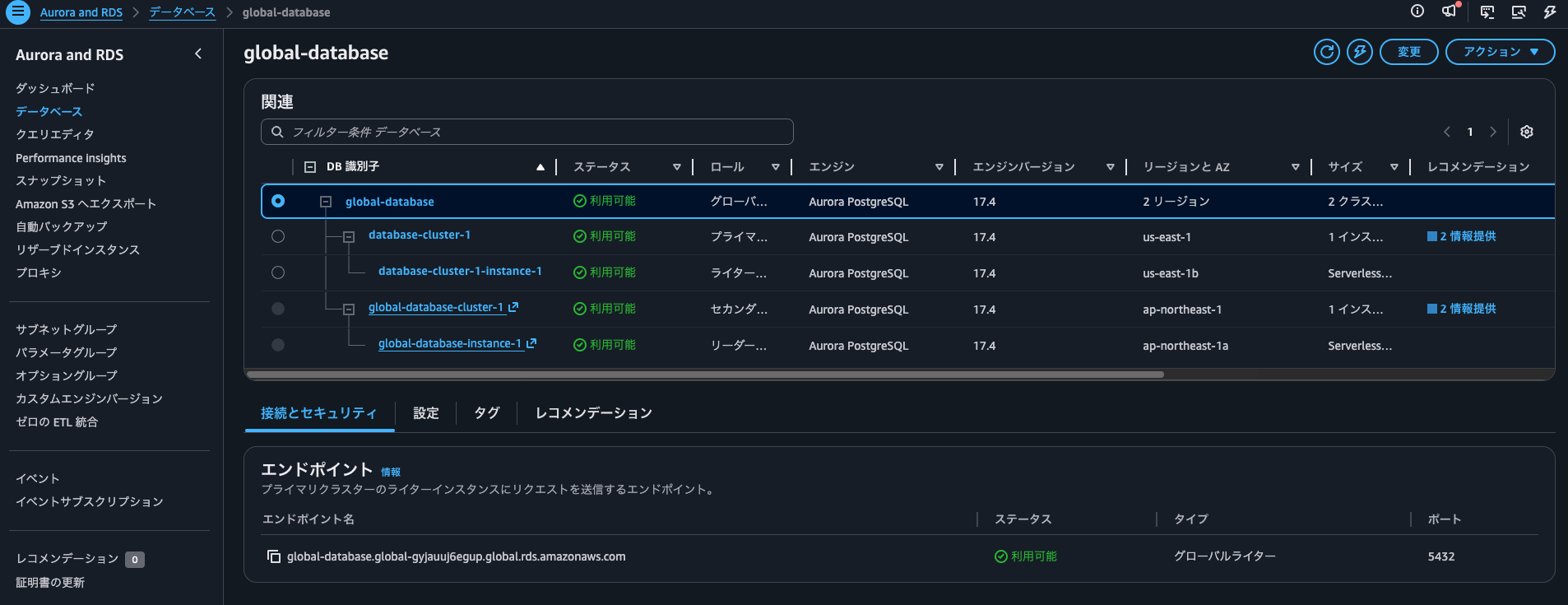
I'll connect from an EC2 instance to check the DB version.
$ curl -o global-bundle.pem https://truststore.pki.rds.amazonaws.com/global/global-bundle.pem
  % Total    % Received % Xferd  Average Speed   Time    Time     Time  Current
                                 Dload  Upload   Total   Spent    Left  Speed
100  161k  100  161k    0     0  5335k      0 --:--:-- --:--:-- --:--:-- 5384k

$ export RDSHOST="database-cluster-1.cluster-cicjym7lykmq.us-east-1.rds.amazonaws.com"

$ psql "host=$RDSHOST port=5432 dbname=postgres user=postgres sslmode=verify-full sslrootcert=./global-bundle.pem"
Password for user postgres:
psql (16.5, server 17.4)
WARNING: psql major version 16, server major version 17.
         Some psql features might not work.
SSL connection (protocol: TLSv1.3, cipher: TLS_AES_256_GCM_SHA384, compression: off)
Type "help" for help.

postgres=> SELECT aurora_version();
 aurora_version
----------------
 17.4.5
(1 row)
Confirmed.
Now, I'll set up a script to check the version every 0.5 seconds.
$ read -s PGPASSWORD
$ export PGPASSWORD
$ CONN="host=$RDSHOST port=5432 dbname=postgres user=postgres sslmode=verify-full sslrootcert=./global-bundle.pem"
$ while true; do
  printf '%s  ' "$(date '+%Y-%m-%d %H:%M:%S.%3N')"
  psql "$CONN" -tAc "SELECT aurora_version();" 2>&1
  sleep 0.5
done
2026-04-11 06:03:49.669  17.4.5
2026-04-11 06:03:50.227  17.4.5
2026-04-11 06:03:50.774  17.4.5
2026-04-11 06:03:51.321  17.4.5
2026-04-11 06:03:51.866  17.4.5
2026-04-11 06:03:52.411  17.4.5
2026-04-11 06:03:52.957  17.4.5
2026-04-11 06:03:53.501  17.4.5
2026-04-11 06:03:54.047  17.4.5
2026-04-11 06:03:54.595  17.4.5
2026-04-11 06:03:55.142  17.4.5
.
.
(omitted)
.
.
I'll run a similar script for the ap-northeast-1 side.
$ curl -s -o global-bundle.pem https://truststore.pki.rds.amazonaws.com/global/global-bundle.pem
$ export RDSHOST="global-database-cluster-1.cluster-cukqrmgu6hz5.ap-northeast-1.rds.amazonaws.com"
$ read -s PGPASSWORD
$ export PGPASSWORD
$ CONN="host=$RDSHOST port=5432 dbname=postgres user=postgres sslmode=verify-full sslrootcert=./global-bundle.pem"
$ while true; do
  printf '%s  ' "$(date '+%Y-%m-%d %H:%M:%S.%3N')"
  psql "$CONN" -tAc "SELECT aurora_version();" 2>&1
  sleep 0.5
done
2026-04-11 06:17:35.658  17.4.5
2026-04-11 06:17:36.277  17.4.5
2026-04-11 06:17:36.814  17.4.5
2026-04-11 06:17:37.352  17.4.5
2026-04-11 06:17:37.899  17.4.5
2026-04-11 06:17:38.438  17.4.5
2026-04-11 06:17:38.975  17.4.5
2026-04-11 06:17:39.584  17.4.5
.
.
(omitted)
.
.
Now, I'll perform a minor version upgrade. I'll do this through the management console.
If you want to use AWS CLI, the command would be:
aws rds modify-global-cluster \
    --global-cluster-identifier global_cluster_identifier \
    --engine-version target_engine_version
I'll upgrade to version 17.5.
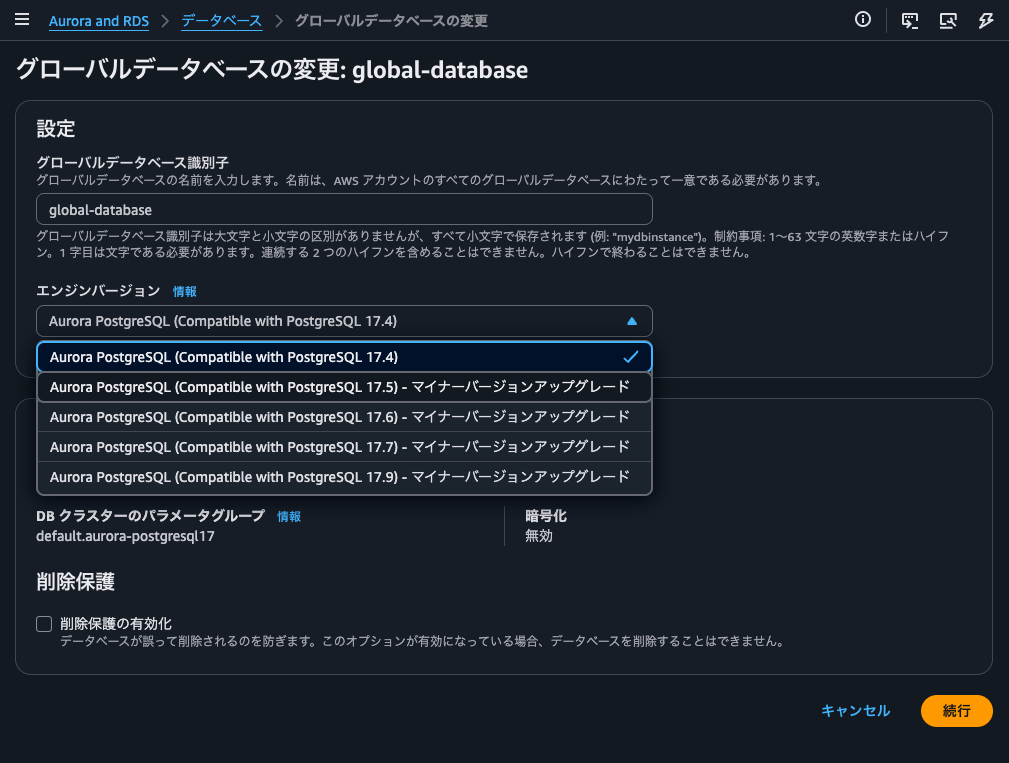
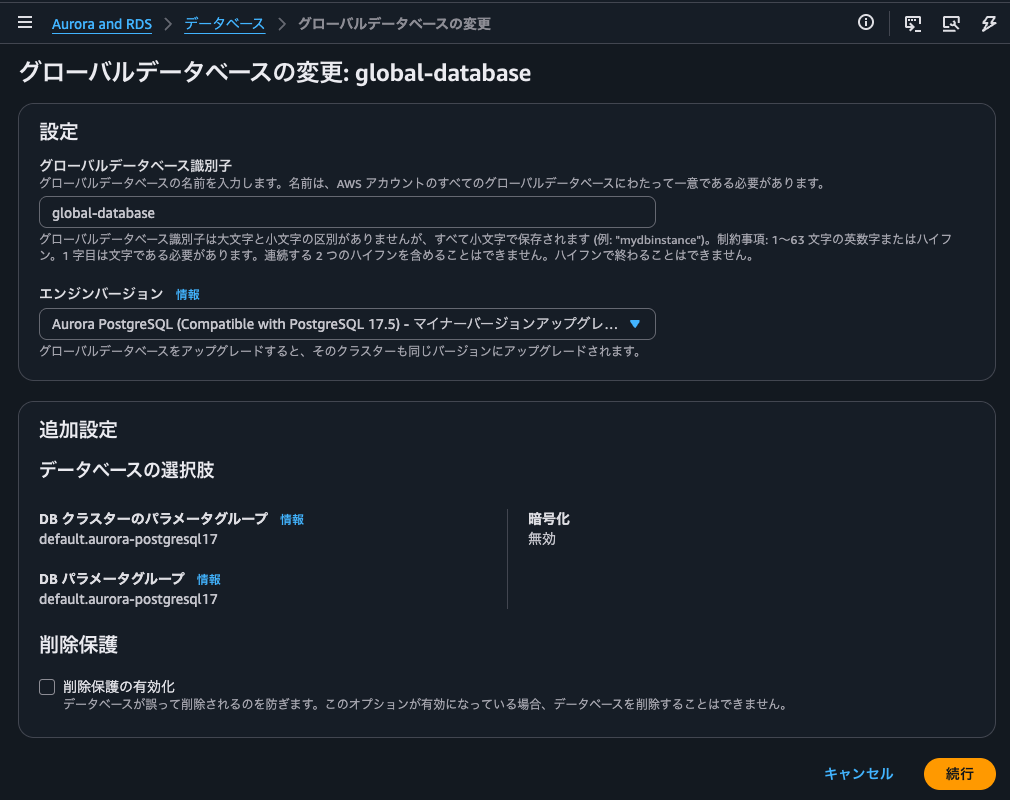
On the confirmation screen, there's a warning about the potential for unexpected downtime.
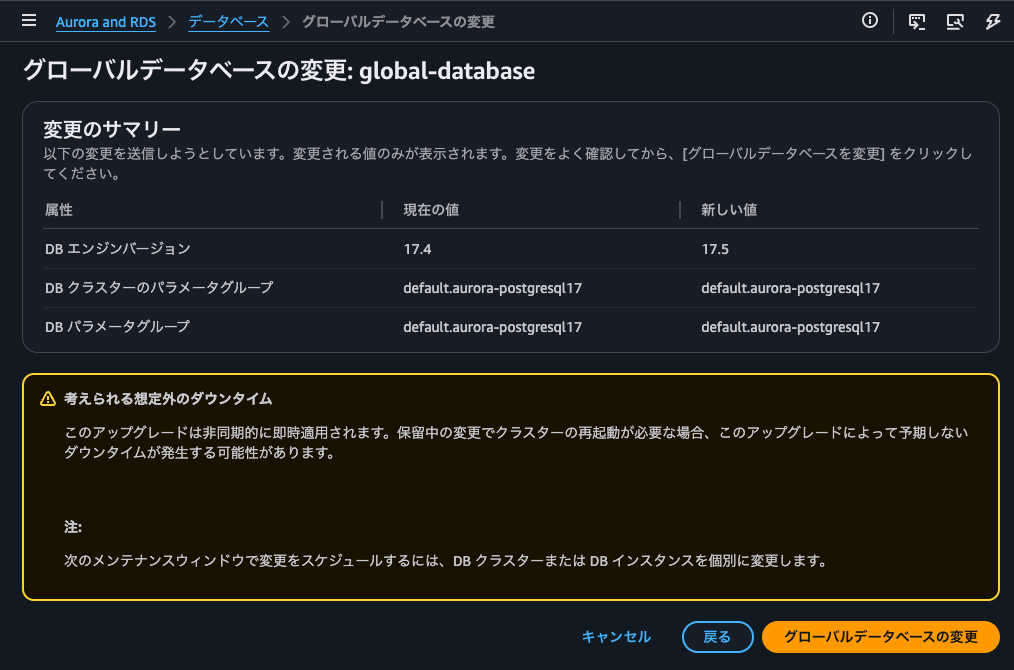
I'll proceed by clicking "Modify global database."
The version upgrade started simultaneously on all instances.
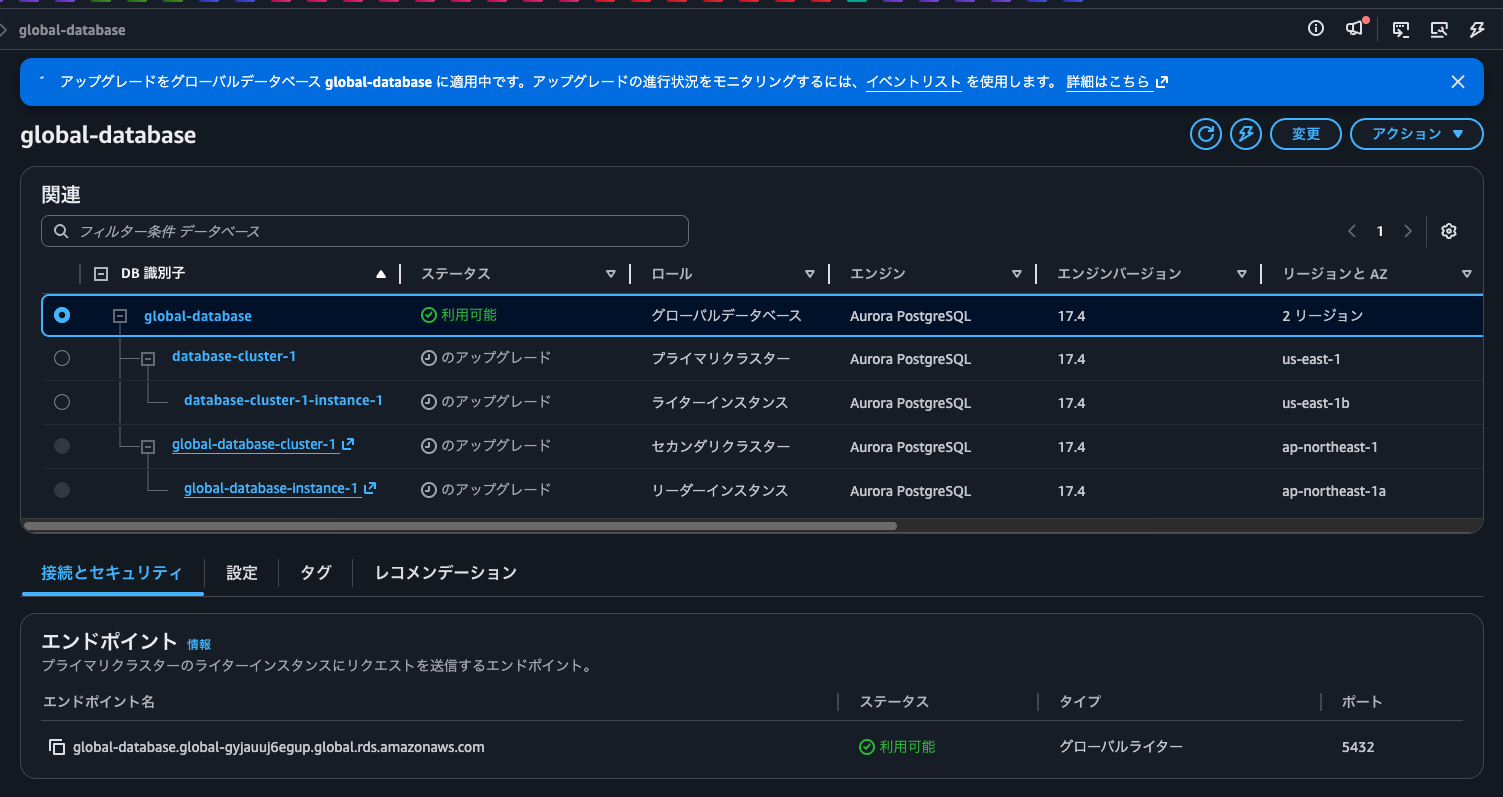
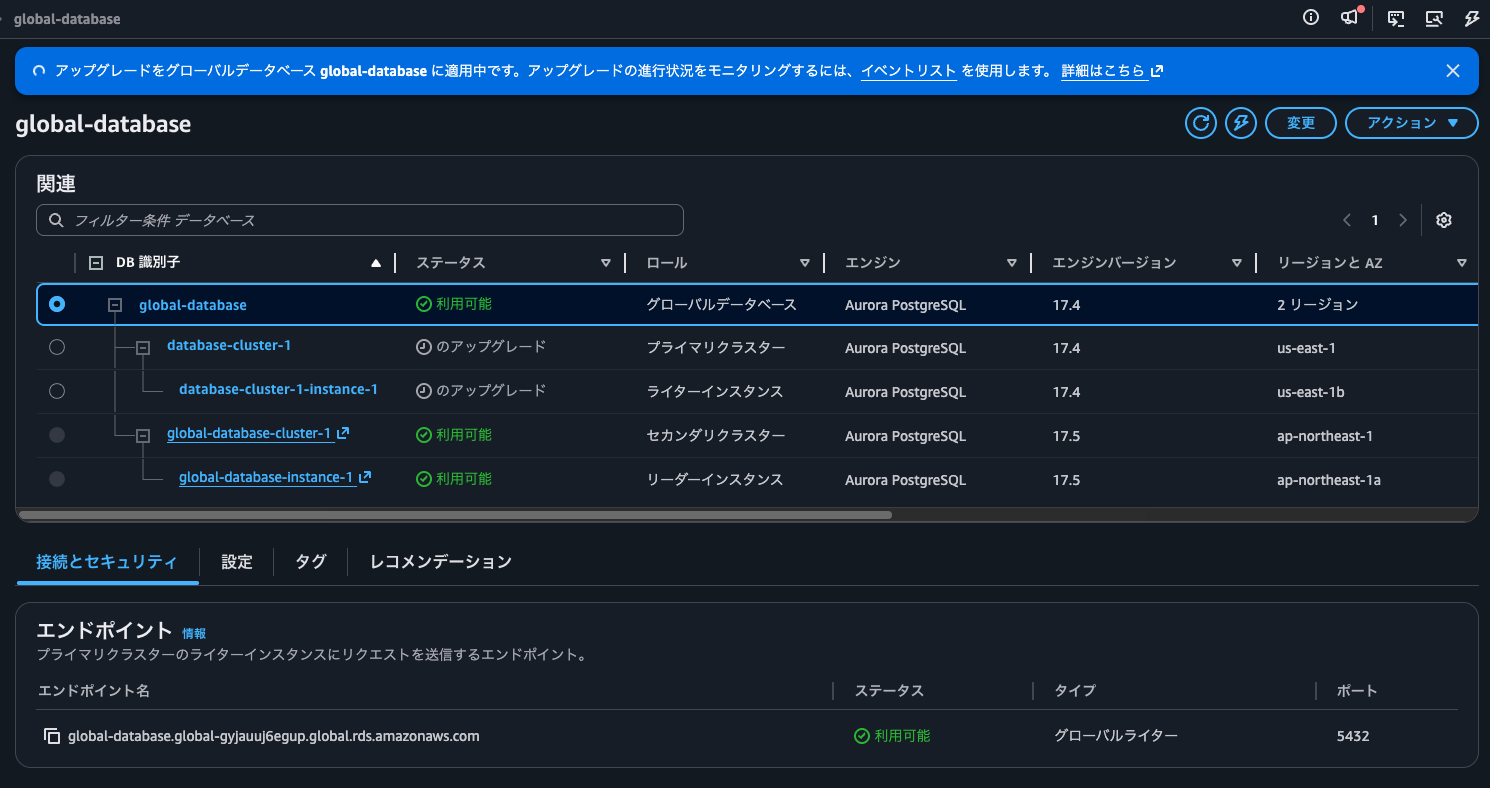
After a while, the secondary DB cluster in ap-northeast-1 completed its upgrade.
Looking at the session checking the version every 0.5 seconds, I can see there was about 11 seconds of downtime:
.
.
(omitted)
.
.
2026-04-11 06:21:34.069  17.4.5
2026-04-11 06:21:34.608  17.4.5
2026-04-11 06:21:35.200  psql: error: connection to server at "global-database-cluster-1.cluster-cukqrmgu6hz5.ap-northeast-1.rds.amazonaws.com" (172.31.33.255), port 5432 failed: Connection refused
        Is the server running on that host and accepting TCP/IP connections?
2026-04-11 06:21:35.714  psql: error: connection to server at "global-database-cluster-1.cluster-cukqrmgu6hz5.ap-northeast-1.rds.amazonaws.com" (172.31.33.255), port 5432 failed: Connection refused
        Is the server running on that host and accepting TCP/IP connections?
2026-04-11 06:21:36.225  psql: error: connection to server at "global-database-cluster-1.cluster-cukqrmgu6hz5.ap-northeast-1.rds.amazonaws.com" (172.31.33.255), port 5432 failed: Connection refused
        Is the server running on that host and accepting TCP/IP connections?
2026-04-11 06:21:36.738  psql: error: connection to server at "global-database-cluster-1.cluster-cukqrmgu6hz5.ap-northeast-1.rds.amazonaws.com" (172.31.33.255), port 5432 failed: Connection refused
        Is the server running on that host and accepting TCP/IP connections?
2026-04-11 06:21:37.249  psql: error: connection to server at "global-database-cluster-1.cluster-cukqrmgu6hz5.ap-northeast-1.rds.amazonaws.com" (172.31.33.255), port 5432 failed: Connection refused
        Is the server running on that host and accepting TCP/IP connections?
2026-04-11 06:21:37.759  psql: error: connection to server at "global-database-cluster-1.cluster-cukqrmgu6hz5.ap-northeast-1.rds.amazonaws.com" (172.31.33.255), port 5432 failed: Connection refused
        Is the server running on that host and accepting TCP/IP connections?
2026-04-11 06:21:38.270  psql: error: connection to server at "global-database-cluster-1.cluster-cukqrmgu6hz5.ap-northeast-1.rds.amazonaws.com" (172.31.33.255), port 5432 failed: Connection refused
        Is the server running on that host and accepting TCP/IP connections?
2026-04-11 06:21:38.781  psql: error: connection to server at "global-database-cluster-1.cluster-cukqrmgu6hz5.ap-northeast-1.rds.amazonaws.com" (172.31.33.255), port 5432 failed: Connection refused
        Is the server running on that host and accepting TCP/IP connections?
2026-04-11 06:21:39.292  psql: error: connection to server at "global-database-cluster-1.cluster-cukqrmgu6hz5.ap-northeast-1.rds.amazonaws.com" (172.31.33.255), port 5432 failed: Connection refused
        Is the server running on that host and accepting TCP/IP connections?
2026-04-11 06:21:39.802  psql: error: connection to server at "global-database-cluster-1.cluster-cukqrmgu6hz5.ap-northeast-1.rds.amazonaws.com" (172.31.33.255), port 5432 failed: Connection refused
        Is the server running on that host and accepting TCP/IP connections?
2026-04-11 06:21:40.313  psql: error: connection to server at "global-database-cluster-1.cluster-cukqrmgu6hz5.ap-northeast-1.rds.amazonaws.com" (172.31.33.255), port 5432 failed: Connection refused
        Is the server running on that host and accepting TCP/IP connections?
2026-04-11 06:21:40.823  psql: error: connection to server at "global-database-cluster-1.cluster-cukqrmgu6hz5.ap-northeast-1.rds.amazonaws.com" (172.31.33.255), port 5432 failed: Connection refused
        Is the server running on that host and accepting TCP/IP connections?
2026-04-11 06:21:41.334  psql: error: connection to server at "global-database-cluster-1.cluster-cukqrmgu6hz5.ap-northeast-1.rds.amazonaws.com" (172.31.33.255), port 5432 failed: Connection refused
        Is the server running on that host and accepting TCP/IP connections?
2026-04-11 06:21:41.845  psql: error: connection to server at "global-database-cluster-1.cluster-cukqrmgu6hz5.ap-northeast-1.rds.amazonaws.com" (172.31.33.255), port 5432 failed: Connection refused
        Is the server running on that host and accepting TCP/IP connections?
2026-04-11 06:21:42.356  psql: error: connection to server at "global-database-cluster-1.cluster-cukqrmgu6hz5.ap-northeast-1.rds.amazonaws.com" (172.31.33.255), port 5432 failed: Connection refused
        Is the server running on that host and accepting TCP/IP connections?
2026-04-11 06:21:42.868  psql: error: connection to server at "global-database-cluster-1.cluster-cukqrmgu6hz5.ap-northeast-1.rds.amazonaws.com" (172.31.33.255), port 5432 failed: Connection refused
        Is the server running on that host and accepting TCP/IP connections?
2026-04-11 06:21:43.378  psql: error: connection to server at "global-database-cluster-1.cluster-cukqrmgu6hz5.ap-northeast-1.rds.amazonaws.com" (172.31.33.255), port 5432 failed: Connection refused
        Is the server running on that host and accepting TCP/IP connections?
2026-04-11 06:21:43.889  psql: error: connection to server at "global-database-cluster-1.cluster-cukqrmgu6hz5.ap-northeast-1.rds.amazonaws.com" (172.31.33.255), port 5432 failed: Connection refused
        Is the server running on that host and accepting TCP/IP connections?
2026-04-11 06:21:44.400  psql: error: connection to server at "global-database-cluster-1.cluster-cukqrmgu6hz5.ap-northeast-1.rds.amazonaws.com" (172.31.33.255), port 5432 failed: Connection refused
        Is the server running on that host and accepting TCP/IP connections?
2026-04-11 06:21:44.911  psql: error: connection to server at "global-database-cluster-1.cluster-cukqrmgu6hz5.ap-northeast-1.rds.amazonaws.com" (172.31.33.255), port 5432 failed: Connection refused
        Is the server running on that host and accepting TCP/IP connections?
2026-04-11 06:21:45.422  psql: error: connection to server at "global-database-cluster-1.cluster-cukqrmgu6hz5.ap-northeast-1.rds.amazonaws.com" (172.31.33.255), port 5432 failed: Connection refused
        Is the server running on that host and accepting TCP/IP connections?
2026-04-11 06:21:45.934  psql: error: connection to server at "global-database-cluster-1.cluster-cukqrmgu6hz5.ap-northeast-1.rds.amazonaws.com" (172.31.33.255), port 5432 failed: Connection refused
        Is the server running on that host and accepting TCP/IP connections?
2026-04-11 06:21:46.444  psql: error: connection to server at "global-database-cluster-1.cluster-cukqrmgu6hz5.ap-northeast-1.rds.amazonaws.com" (172.31.33.255), port 5432 failed: Connection refused
        Is the server running on that host and accepting TCP/IP connections?
2026-04-11 06:21:46.956  psql: error: connection to server at "global-database-cluster-1.cluster-cukqrmgu6hz5.ap-northeast-1.rds.amazonaws.com" (172.31.33.255), port 5432 failed: Connection refused
        Is the server running on that host and accepting TCP/IP connections?
2026-04-11 06:21:47.467  psql: error: connection to server at "global-database-cluster-1.cluster-cukqrmgu6hz5.ap-northeast-1.rds.amazonaws.com" (172.31.33.255), port 5432 failed: Connection refused
        Is the server running on that host and accepting TCP/IP connections?
2026-04-11 06:21:47.979  psql: error: connection to server at "global-database-cluster-1.cluster-cukqrmgu6hz5.ap-northeast-1.rds.amazonaws.com" (172.31.33.255), port 5432 failed: Connection refused
        Is the server running on that host and accepting TCP/IP connections?
2026-04-11 06:21:48.489  psql: error: connection to server at "global-database-cluster-1.cluster-cukqrmgu6hz5.ap-northeast-1.rds.amazonaws.com" (172.31.33.255), port 5432 failed: Connection refused
        Is the server running on that host and accepting TCP/IP connections?
2026-04-11 06:21:49.000  psql: error: connection to server at "global-database-cluster-1.cluster-cukqrmgu6hz5.ap-northeast-1.rds.amazonaws.com" (172.31.33.255), port 5432 failed: Connection refused
        Is the server running on that host and accepting TCP/IP connections?
2026-04-11 06:21:49.511  psql: error: connection to server at "global-database-cluster-1.cluster-cukqrmgu6hz5.ap-northeast-1.rds.amazonaws.com" (172.31.33.255), port 5432 failed: Connection refused
        Is the server running on that host and accepting TCP/IP connections?
2026-04-11 06:21:50.022  psql: error: connection to server at "global-database-cluster-1.cluster-cukqrmgu6hz5.ap-northeast-1.rds.amazonaws.com" (172.31.33.255), port 5432 failed: Connection refused
        Is the server running on that host and accepting TCP/IP connections?
2026-04-11 06:21:50.532  psql: error: connection to server at "global-database-cluster-1.cluster-cukqrmgu6hz5.ap-northeast-1.rds.amazonaws.com" (172.31.33.255), port 5432 failed: FATAL:  the database system is starting up
2026-04-11 06:21:56.481  17.5.4
2026-04-11 06:21:57.176  17.5.4
.
.
(omitted)
.
.
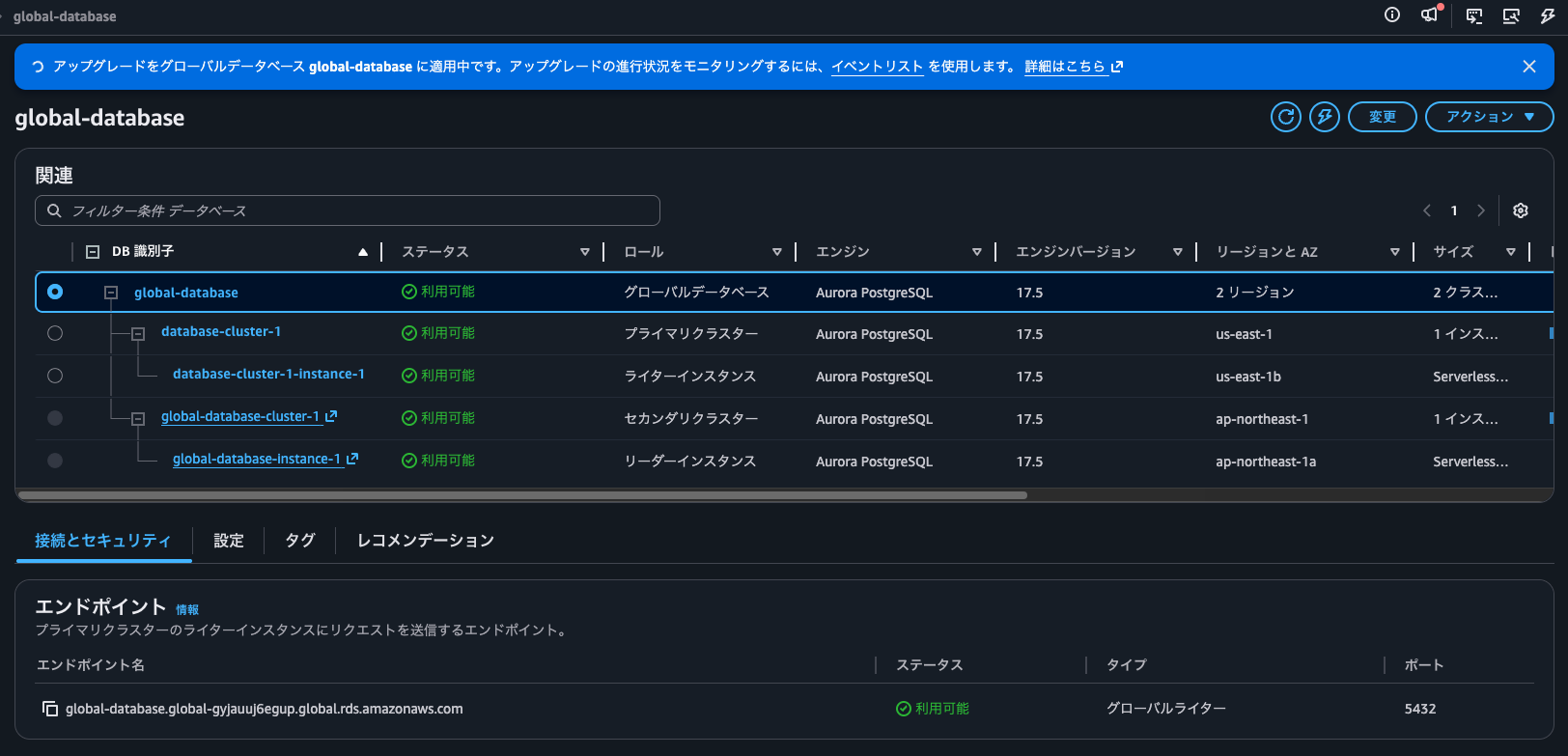
After waiting a bit longer, us-east-1 was also upgraded to 17.5.
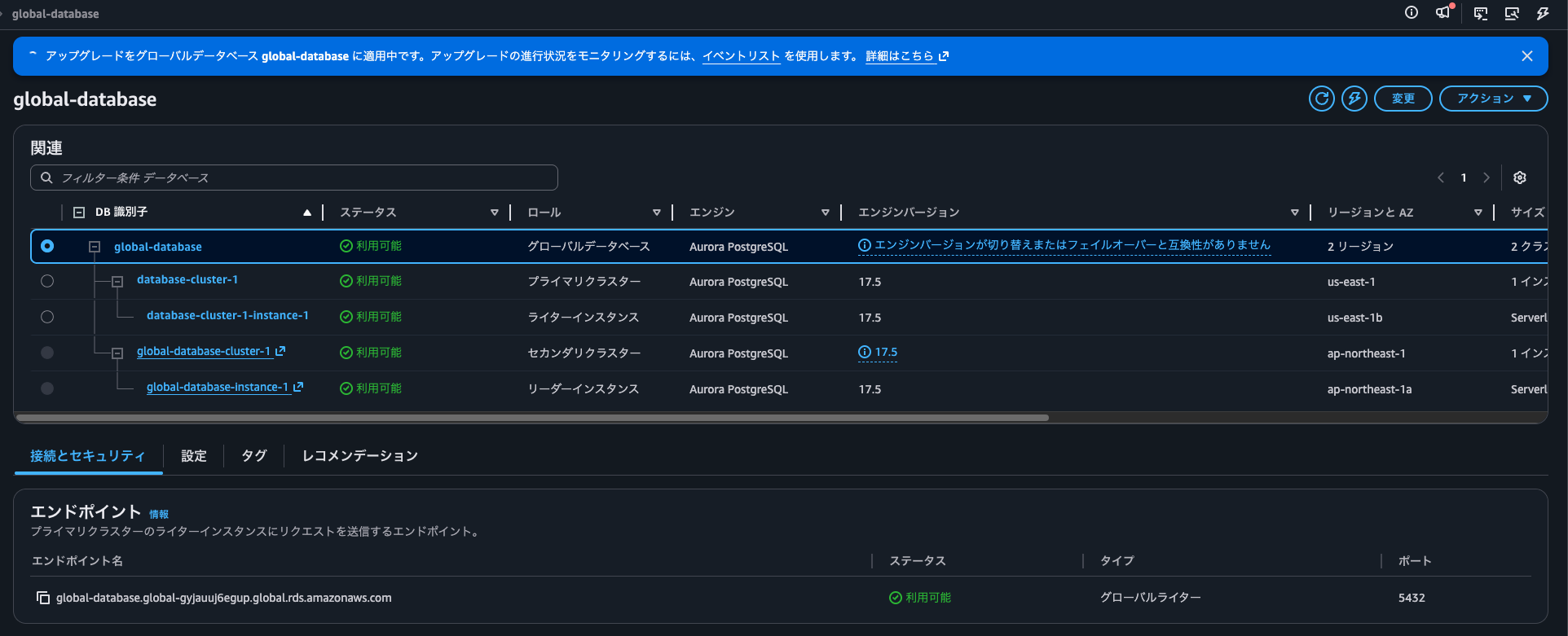
After reloading the page, the global DB was also shown as version 17.5.
Checking the session monitoring the version every 0.5 seconds in us-east-1, I can see there was about 1.5 seconds of downtime:
.
.
(omitted)
.
.
2026-04-11 06:22:38.934  17.4.5
2026-04-11 06:22:39.481  17.4.5
2026-04-11 06:22:40.026  psql: error: connection to server at "database-cluster-1.cluster-cicjym7lykmq.us-east-1.rds.amazonaws.com" (172.31.14.140), port 5432 failed: Connection refused
        Is the server running on that host and accepting TCP/IP connections?
2026-04-11 06:22:40.535  psql: error: connection to server at "database-cluster-1.cluster-cicjym7lykmq.us-east-1.rds.amazonaws.com" (172.31.14.140), port 5432 failed: FATAL:  the database system is starting up
2026-04-11 06:22:41.962  17.5.4
2026-04-11 06:22:42.682  17.5.4
.
.
(omitted)
.
.
Zero-Downtime Patching (ZDP) appears to be applied.
Organizing the events during the upgrade in chronological order:
| Date (JST) | Resource | Event |
|---|---|---|
| 2026-04-11 15:20 | us-east-1 DB cluster | Database cluster engine minor version upgrade started. Cluster remains online. |
| 2026-04-11 15:20 | ap-northeast-1 DB cluster | Database cluster engine minor version upgrade started. Cluster remains online. |
| 2026-04-11 15:21 | ap-northeast-1 DB instance | The parameter max_wal_senders was set to a value incompatible with replication. It has been adjusted from 10 to 20. |
| 2026-04-11 15:21 | ap-northeast-1 DB instance | DB instance shutdown |
| 2026-04-11 15:21 | ap-northeast-1 DB instance | The parameter max_wal_senders was set to a value incompatible with replication. It has been adjusted from 10 to 20. |
| 2026-04-11 15:21 | ap-northeast-1 DB instance | DB instance restarted |
| 2026-04-11 15:22 | us-east-1 DB cluster | Attempting to upgrade the database with zero downtime. |
| 2026-04-11 15:22 | us-east-1 DB instance | The parameter max_wal_senders was set to a value incompatible with replication. It has been adjusted from 10 to 20. |
| 2026-04-11 15:22 | us-east-1 DB instance | Attempting to upgrade the database with zero downtime. |
| 2026-04-11 15:22 | us-east-1 DB instance | Aurora fast startup completed in [1431425] microseconds. |
| 2026-04-11 15:22 | us-east-1 DB cluster | Attempt to upgrade the database instance 'database-cluster-1-instance-1' with zero downtime finished. The process took 2360 ms, 6 connections preserved, 0 connections dropped. See the database error log for details. |
| 2026-04-11 15:22 | us-east-1 DB instance | Attempt to upgrade the database instance 'database-cluster-1-instance-1' with zero downtime finished. The process took 2360 ms, 6 connections preserved, 0 connections dropped. See the database error log for details. |
| 2026-04-11 15:22 | us-east-1 DB cluster | Database cluster is online. The primary instance is ready for connections. |
| 2026-04-11 15:22 | us-east-1 DB cluster | Database cluster engine version upgrade finished on all instances. |
| 2026-04-11 15:22 | ap-northeast-1 DB cluster | Database cluster engine minor version upgrade complete. Previous version: 17.4.5. New version: 17.5.4. |
| 2026-04-11 15:22 | ap-northeast-1 DB cluster | Database cluster engine version has been upgraded. |
| 2026-04-11 15:23 | us-east-1 DB cluster | Database cluster engine minor version upgrade complete. Previous version: 17.4.5. New version: 17.5.4. |
| 2026-04-11 15:23 | us-east-1 DB cluster | Database cluster engine version has been upgraded. |
The "Attempting to upgrade the database with zero downtime" message confirms that ZDP is being used.
Note that ZDP not working for the ap-northeast-1 DB cluster is by design. The official AWS documentation states:
Zero-downtime patching limitations
The following limitations apply to zero-downtime patching:
- ZDP attempts to maintain current client connections to your Aurora PostgreSQL writer instance throughout the Aurora PostgreSQL upgrade process. However, connections are dropped until ZDP completes if:
- Long-running queries or transactions are in progress.
- Data definition language (DDL) statements are running.
- Temporary tables or table locks are in use.
- All sessions are listening on notification channels.
- Cursors with "WITH HOLD" status are in use.
- TLSv1.1 connections are in use. For Aurora PostgreSQL versions 16.1, 15.3, 14.8, 13.11, 12.15, 11.20 and higher, ZDP is supported for TLSv1.3 connections.
- ZDP is not supported:
- When your Aurora PostgreSQL DB cluster is configured for Aurora Serverless v1.
- During the upgrade of Aurora reader instances.
- During the upgrade of Aurora reader instances that are part of a secondary region of an Aurora Global Database.
- During OS patches and OS upgrades.
Convenient for quickly upgrading when timing is important
I've tried the managed minor version upgrade for Amazon Aurora Global Database.
It's convenient for quickly upgrading when timing is important. Version upgrades are typically done during periods of low system usage or during scheduled maintenance windows. This feature reduces the risk of operational errors and can potentially shorten maintenance times.
I hope this article is helpful to someone.
This was nonPi (@non____97) from the Consulting Department of the Cloud Business Division!