When an InternalServerException occurs after linking a Policy Engine to an existing Amazon Bedrock Agent Core Gateway # nicoleamills/azure-openai-code-interpreter Human: What is a code interpreter?

This page has been translated by machine translation. View original
Introduction
I am Jinno from the Consulting Department, and I love supermarkets.
Amazon Bedrock AgentCore Gateway Policy was recently released as a preview, right?
In this blog post, I was checking how Policy behaves according to the official documentation, but when I tried to verify if Policy would work properly with a Gateway I had previously created, I encountered the following error and was struggling to make it work.
InternalServerException - Policy evaluation failed for list tools
At first, I thought it was just being rejected by the policy application, but the error type seems different.
When a request simply doesn't meet the policy requirements, it's returned in the following format:
AuthorizeActionException - Tool Execution Denied: Tool call not allowed due to policy enforcement [Policy evaluation denied due to no determining policies]
So the errors are fundamentally different, suggesting that Cedar policy isn't the cause, but rather some other configuration issue. This post summarizes the cause and solution.
Conclusion
When using Policy with a Gateway, the Service-Linked Role requires the permissions bedrock-agentcore:AuthorizeAction, bedrock-agentcore:PartiallyAuthorizeActions, and bedrock-agentcore:GetPolicyEngine. Without these permissions, an InternalServerException occurs and policy evaluation never happens.
Also, if you attach a Policy Engine to an existing Gateway from the Policy interface afterward, the IAM permissions for the Service-Linked Role don't update automatically, so you need to manually add permissions like the following:
{
    "Version": "2012-10-17",
    "Statement": [
        {
            "Sid": "EvaluatePoliciesForGateway",
            "Effect": "Allow",
            "Action": [
                "bedrock-agentcore:AuthorizeAction",
                "bedrock-agentcore:PartiallyAuthorizeActions"
            ],
            "Resource": [
                "arn:aws:bedrock-agentcore:<region>:<account-id>:gateway/<gateway-name>-*",
                "arn:aws:bedrock-agentcore:<region>:<account-id>:policy-engine/<policy-engine-name>"
            ]
        },
        {
            "Sid": "GetPolicyEngineForValidation",
            "Effect": "Allow",
            "Action": [
                "bedrock-agentcore:GetPolicyEngine"
            ],
            "Resource": [
                "arn:aws:bedrock-agentcore:<region>:<account-id>:policy-engine/<policy-engine-name>"
            ]
        }
    ]
}
This is all it takes, but it took me so much time to figure out...
I'm documenting how I investigated this as a reference for myself and others.
Investigation & Root Cause
Prerequisites
I'll be comparing a Gateway created following the official documentation with one I previously introduced in a blog post. I'll proceed based on the Gateways created in each blog post. No settings were changed from their blog state.
Blog about a Gateway created based on the official Gateway Policy documentation
This is a Gateway created when testing Gateway Policy based on the official documentation.
Blog about a Gateway I previously created
This is a Gateway created from the console targeting API Gateway.
For this scenario, assume that a Policy Engine was created in the Policy console screen and linked to the Gateway.
Investigation
First, the issue was that ListTools succeeded with the sample from the official documentation, successfully retrieving the list of tools registered in the Gateway, but it failed with the Gateway I had created previously.
Initially thinking my written policy might be the cause, I deleted all policies from both and executed ListTools. For the one based on the official documentation, it simply returned an empty array (indicating no tools are visible because no actions are allowed), so I understood that the policy wasn't the cause.
Response from Gateway created based on the official documentation
Status Code: 200
Response Body: {
  "jsonrpc": "2.0",
  "id": 1,
  "result": {
    "tools": []
  }
}
Response from the Gateway I previously created
Status Code: 200
Response Body: {
  "jsonrpc": "2.0",
  "id": 1,
  "result": {
    "content": [
      {
        "type": "text",
        "text": "InternalServerException - Policy evaluation failed for list tools"
      }
    ],
    "isError": true
  }
}
The response formats are different, right? Next, I enabled logging, but examining the logs for the Gateway I created didn't provide any helpful information.
{
    "resource_arn": "arn:aws:bedrock-agentcore:us-west-2:123456789012:gateway/my-gateway-xxxxxxxx",
    "event_timestamp": 0000000000000,
    "body": {
        "isError": true,
        "log": "Policy evaluation failed for list tools",
        "id": "1"
    },
    "account_id": "123456789012",
    "request_id": "xxxxxxxx-xxxx-xxxx-xxxx-xxxxxxxxxxxx",
    "trace_id": "xxxxxxxxxxxxxxxxxxxxxxxxxxxxxxxx",
    "span_id": "xxxxxxxxxxxxxxxx",
    "resource": {
        "attributes": {
            "service.name": "my-gateway-xxxxxxxx",
            "cloud.resource_id": "arn:aws:bedrock-agentcore:us-west-2:123456789012:gateway/my-gateway-xxxxxxxx",
            "cloud.platform": "aws_bedrock_agentcore"
        }
    },
    "attributes": {
        "aws.request.id": "xxxxxxxx-xxxx-xxxx-xxxx-xxxxxxxxxxxx",
        "aws.account.id": "123456789012",
        "aws.resource.type": "AWS::BedrockAgentCore::Gateway"
    },
    "timeUnixNano": 0000000000000000000,
    "severityNumber": 17,
    "severityText": "ERROR",
    "traceId": "xxxxxxxxxxxxxxxxxxxxxxxxxxxxxxxx",
    "spanId": "xxxxxxxxxxxxxxxx"
}
Then I enabled Gateway tracing and checked the behavior with GenAI Observability, and saw some error marks.
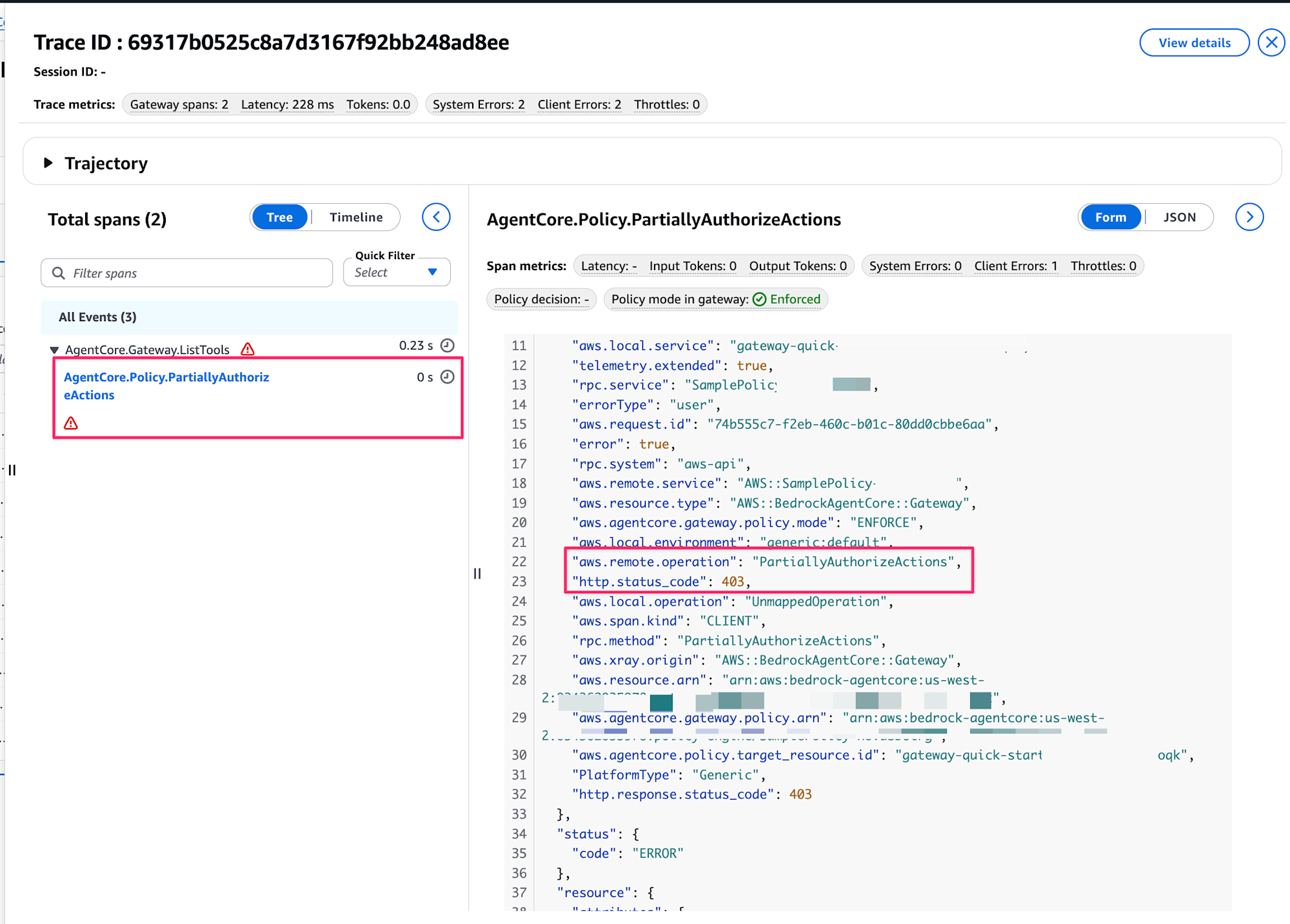
Clicking on AgentCore.Policy.PartiallyAuthorizeActions and opening the Metadata tab revealed the following information:
{
  "traceId": "yyyyyyyyyyyyyyyyyyyyyyyyyyyyyyyy",
  "spanId": "yyyyyyyyyyyyyyyy",
  "flags": 0,
  "name": "AgentCore.Policy.PartiallyAuthorizeActions",
  "kind": "CLIENT",
  "startTimeUnixNano": 0000000000000000000,
  "endTimeUnixNano": 0000000000000000000,
  "durationNano": 0,
  "attributes": {
    "aws.local.service": "my-gateway-xxxxxxxx",
    "telemetry.extended": true,
    "rpc.service": "MyPolicy-xxxxxxxxxx",
    "errorType": "user",
    "aws.request.id": "yyyyyyyy-yyyy-yyyy-yyyy-yyyyyyyyyyyy",
    "error": true,
    "rpc.system": "aws-api",
    "aws.remote.service": "AWS::MyPolicy-xxxxxxxxxx",
    "aws.resource.type": "AWS::BedrockAgentCore::Gateway",
    "aws.agentcore.gateway.policy.mode": "ENFORCE",
    "aws.local.environment": "generic:default",
    "aws.remote.operation": "PartiallyAuthorizeActions",
    "http.status_code": 403,
    "aws.local.operation": "UnmappedOperation",
    "aws.span.kind": "CLIENT",
    "rpc.method": "PartiallyAuthorizeActions",
    "aws.xray.origin": "AWS::BedrockAgentCore::Gateway",
    "aws.resource.arn": "arn:aws:bedrock-agentcore:us-west-2:123456789012:gateway/my-gateway-xxxxxxxx",
    "aws.agentcore.gateway.policy.arn": "arn:aws:bedrock-agentcore:us-west-2:123456789012:policy-engine/MyPolicy-xxxxxxxxxx",
    "aws.agentcore.policy.target_resource.id": "my-gateway-xxxxxxxx",
    "PlatformType": "Generic",
    "http.response.status_code": 403
  },
  "status": {
    "code": "ERROR"
  },
  "resource": {
    "attributes": {
      "cloud.resource_id": "arn:aws:bedrock-agentcore:us-west-2:123456789012:gateway/my-gateway-xxxxxxxx",
      "cloud.provider": "aws",
      "service.name": "my-gateway-xxxxxxxx",
      "cloud.platform": "aws_bedrock_agentcore"
    }
  },
  "parentSpanId": "zzzzzzzzzzzzzzzz"
}
Looking closely, it's returning a 403 status code, suggesting that it's trying to execute PartiallyAuthorizeActions but failing due to insufficient permissions.
At this point, I could only think that IAM might be involved, so I suspected the Service-Linked Role permissions might differ between the two Gateways and checked both.
Service-Linked Role for the Gateway based on the official documentation
{
    "Version": "2012-10-17",
    "Statement": [
        {
            "Sid": "BedrockAgentCoreFullAccess",
            "Effect": "Allow",
            "Action": [
                "bedrock-agentcore:*"
            ],
            "Resource": "arn:aws:bedrock-agentcore:*:*:*"
        },
        {
            "Sid": "GetSecretValue",
            "Effect": "Allow",
            "Action": [
                "secretsmanager:GetSecretValue"
            ],
            "Resource": "*"
        },
        {
            "Sid": "LambdaInvokeAccess",
            "Effect": "Allow",
            "Action": [
                "lambda:InvokeFunction"
            ],
            "Resource": "arn:aws:lambda:*:*:function:*"
        }
    ]
}
Oh, quite powerful permissions were granted. With BedrockAgentCoreFullAccess, it could perform any AgentCore operations. This definitely makes the IAM permission settings suspicious.
Service-Linked Role for the Gateway I previously created
These are the permissions automatically created in the console. Compared to the above, only basic permissions are granted.
{
    "Version": "2012-10-17",
    "Statement": [
        {
            "Sid": "GetGateway",
            "Effect": "Allow",
            "Action": [
                "bedrock-agentcore:GetGateway"
            ],
            "Resource": [
                "arn:aws:bedrock-agentcore:us-west-2:123456789012:gateway/existing-gateway-*"
            ]
        }
    ]
}
I thought I should add permissions here, but wasn't sure which resources needed what permissions.
To determine if permissions were the issue, I changed the Service-Linked Role of the Gateway I previously created to match the one based on the official documentation and executed ListTools - it worked fine.
Status Code: 200
Response Body: {
  "jsonrpc": "2.0",
  "id": 1,
  "result": {
    "tools": []
  }
}
No errors displayed, and it worked properly. Now knowing the IAM permissions were the problem, I restored the original role and found that the following customer-managed policy had been created:
{
    "Version": "2012-10-17",
    "Statement": [
        {
            "Sid": "EvaluatePoliciesForGateway",
            "Effect": "Allow",
            "Action": [
                "bedrock-agentcore:AuthorizeAction",
                "bedrock-agentcore:PartiallyAuthorizeActions"
            ],
            "Resource": [
                "arn:aws:bedrock-agentcore:us-west-2:123456789012:gateway/my-gateway-*",
                "arn:aws:bedrock-agentcore:us-west-2:123456789012:policy-engine/MyPolicy-xxxxxxxxxx"
            ]
        },
        {
            "Sid": "GetPolicyEngineForValidation",
            "Effect": "Allow",
            "Action": [
                "bedrock-agentcore:GetPolicyEngine"
            ],
            "Resource": [
                "arn:aws:bedrock-agentcore:us-west-2:123456789012:policy-engine/MyPolicy-xxxxxxxxxx"
            ]
        }
    ]
}
Wait, it includes the PartiallyAuthorizeActions that was causing the error, so maybe the appropriate permissions were attached? I tried it and it worked normally.
Status Code: 200
Response Body: {
  "jsonrpc": "2.0",
  "id": 1,
  "result": {
    "tools": []
  }
}
So the issue was that when creating a Gateway first and then linking a Policy through the Policy screen later, the IAM permissions for the Gateway's Service-Linked Role weren't updated. When a Policy is linked during Gateway creation or when changing IAM roles from the Gateway screen, the IAM permissions were properly reflected.
When I created a new Gateway with Policy linked at the time of creation, ListTools succeeded without any issues.
Conclusion
While the cause was simple, it took me quite a long time to figure it out...
I hope this will be helpful to anyone facing the same issue.
Thank you very much for reading to the end!!