![[Amazon Bedrock Flows] I created something that suggests recipes based on ingredients in your refrigerator and flyers from local supermarkets](https://devio2024-media.developers.io/image/upload/f_auto,q_auto,w_3840/v1774679350/user-gen-eyecatch/mpnpavv9vv3tioeveryh.png)
[Amazon Bedrock Flows] I created something that suggests recipes based on ingredients in your refrigerator and flyers from local supermarkets

This page has been translated by machine translation. View original
1 Introduction
I'm Hirauchi (SIN) from the Manufacturing Business Technology Department.
"What should I make for dinner tonight..." Have you ever had the experience of opening your refrigerator, staring at its contents, and feeling unsure? You have various ingredients in your refrigerator, but can't think of what to make. Meanwhile, the supermarket flyer in your mailbox lists numerous sale items. If you could effectively use these sale items, you should be able to make delicious meals at a good price...
To solve this challenge, I created a system called "FridgeFlyer" using Amazon Bedrock Flows.
It suggests recipes that utilize ingredients in your refrigerator while recommending a few additional items to purchase from the sales flyer.
In this article, I'll explain the implementation of this system (FridgeFlyer).
First, here's a view of the output data.
At the top, the "refrigerator contents" and "supermarket flyer" are the inputs, and all the extracted information and recipes are generated content.
2 System Overview
FridgeFlyer is a system that receives two images as input and generates multiple outputs.
Inputs
- Refrigerator photo: A photo taken of an open refrigerator
- Flyer image: A local supermarket flyer (featuring sale items)
Outputs
- Recipes: Two main dishes and one dessert, totaling three items
- Food images: AI-generated images for each recipe
- Shopping list: Items to purchase from the flyer and the total cost
- HTML: A webpage that neatly presents all of the above
Technology Stack Used
- Infrastructure: AWS CDK (TypeScript)
- Workflow: Amazon Bedrock Flows
- LLM: Claude Opus 4.6 (for image analysis and recipe generation)
- Image generation: Amazon Nova Canvas
- Computing: AWS Lambda (Python 3.12)
- Storage: Amazon S3
3 Bedrock Flows Configuration
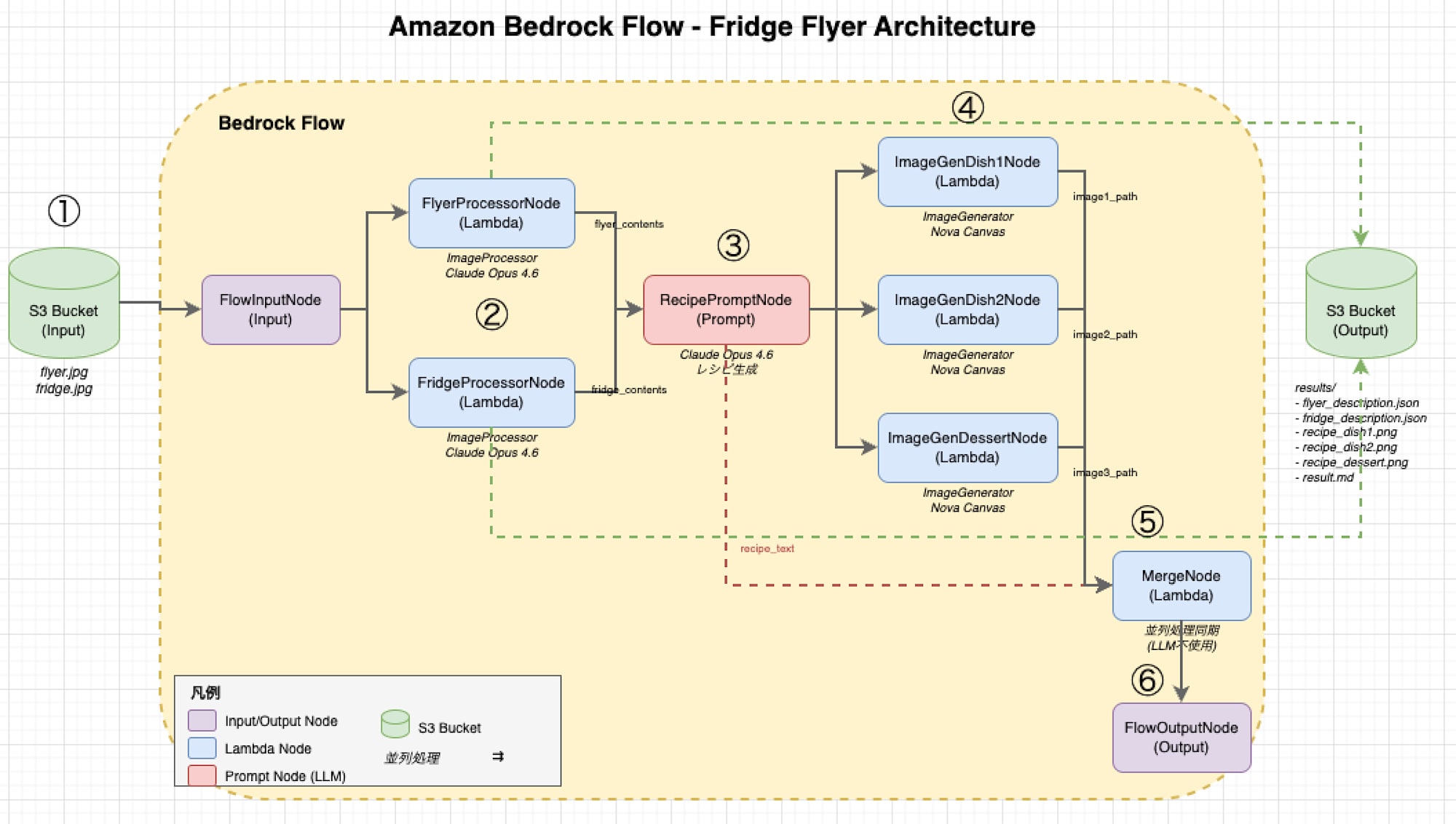
FridgeFlyer's Bedrock Flow has the following structure.
① Input images are placed in an S3 bucket
② Each image is processed on Lambda and its contents are interpreted by Claude Opus 4.6
③ The interpreted contents are added to a prompt, and Claude Opus 4.6 suggests recipes
④ Images for the suggested dishes and dessert are generated using Nova Canvas and saved to S3
⑤ The system waits for all outputs to be ready
⑥ The Flows output consists only of the recipe suggestions
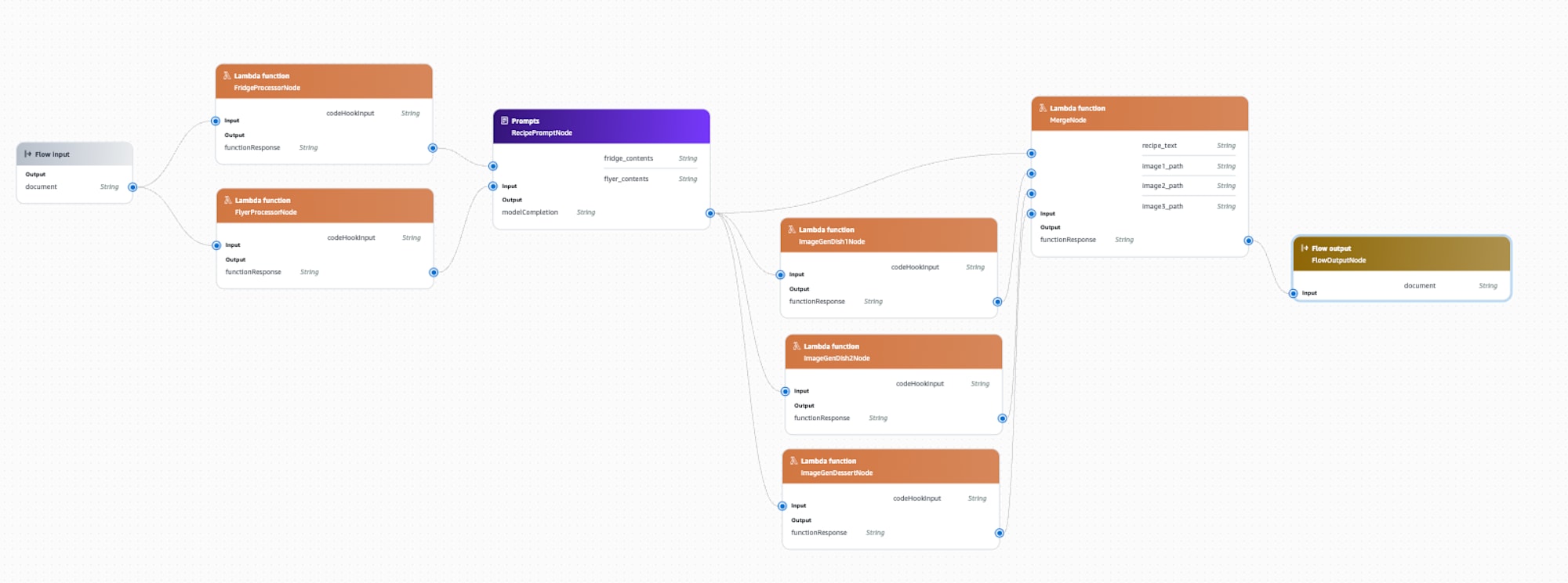
Addressing Bedrock Flow Input Constraints
Currently, Bedrock Flows has a limitation where image data cannot be passed directly to the FlowInputNode. Prompt nodes are designed for text-based input/output, and binary data transfer is not supported.
To address this, I implemented the following approach:
- Upload images to the S3 bucket in advance
- Pass only the string "start" when launching the Flow
- Retrieve images from S3 within the Lambda function and process them with Bedrock
Here's part of the Flow node definition in CDK:
// Flyer processing node - Integrated Lambda (determines processing target by node name)
{
  name: 'FlyerProcessorNode',
  type: 'LambdaFunction',
  configuration: {
    lambdaFunction: {
      lambdaArn: imageProcessorLambda.functionArn,
    },
  },
  inputs: [
    {
      name: 'codeHookInput',
      type: 'String',
      expression: '$.data',
    },
  ],
  // ... omitted
},
// Refrigerator processing node - Uses the same Lambda
{
  name: 'FridgeProcessorNode',
  type: 'LambdaFunction',
  configuration: {
    lambdaFunction: {
      lambdaArn: imageProcessorLambda.functionArn,  // Same Lambda
    },
  },
  // ... omitted
},
Both FlyerProcessorNode and FridgeProcessorNode call the same Lambda function. The Lambda function determines the target file based on the node name.
4 Image Processing Lambda
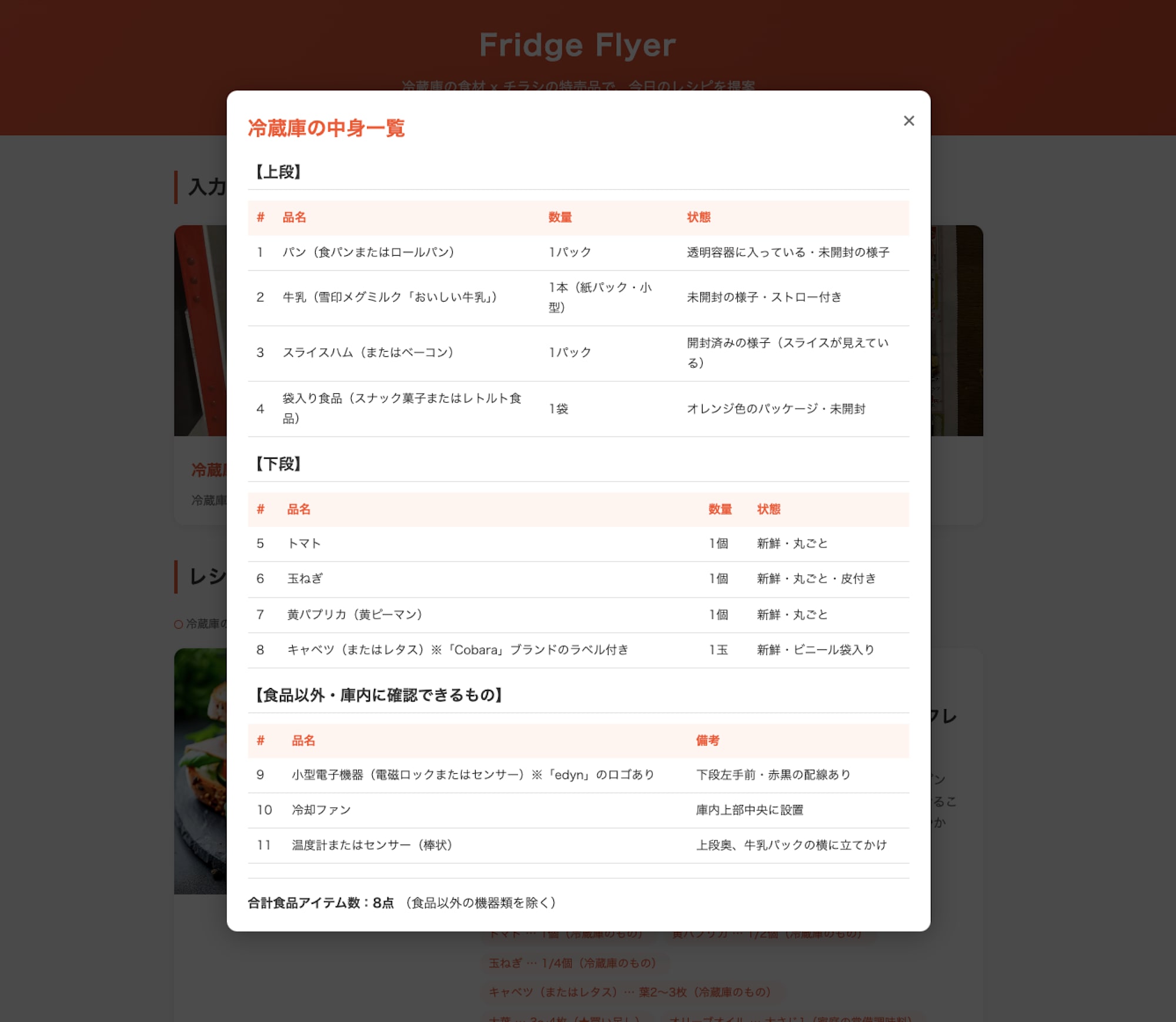
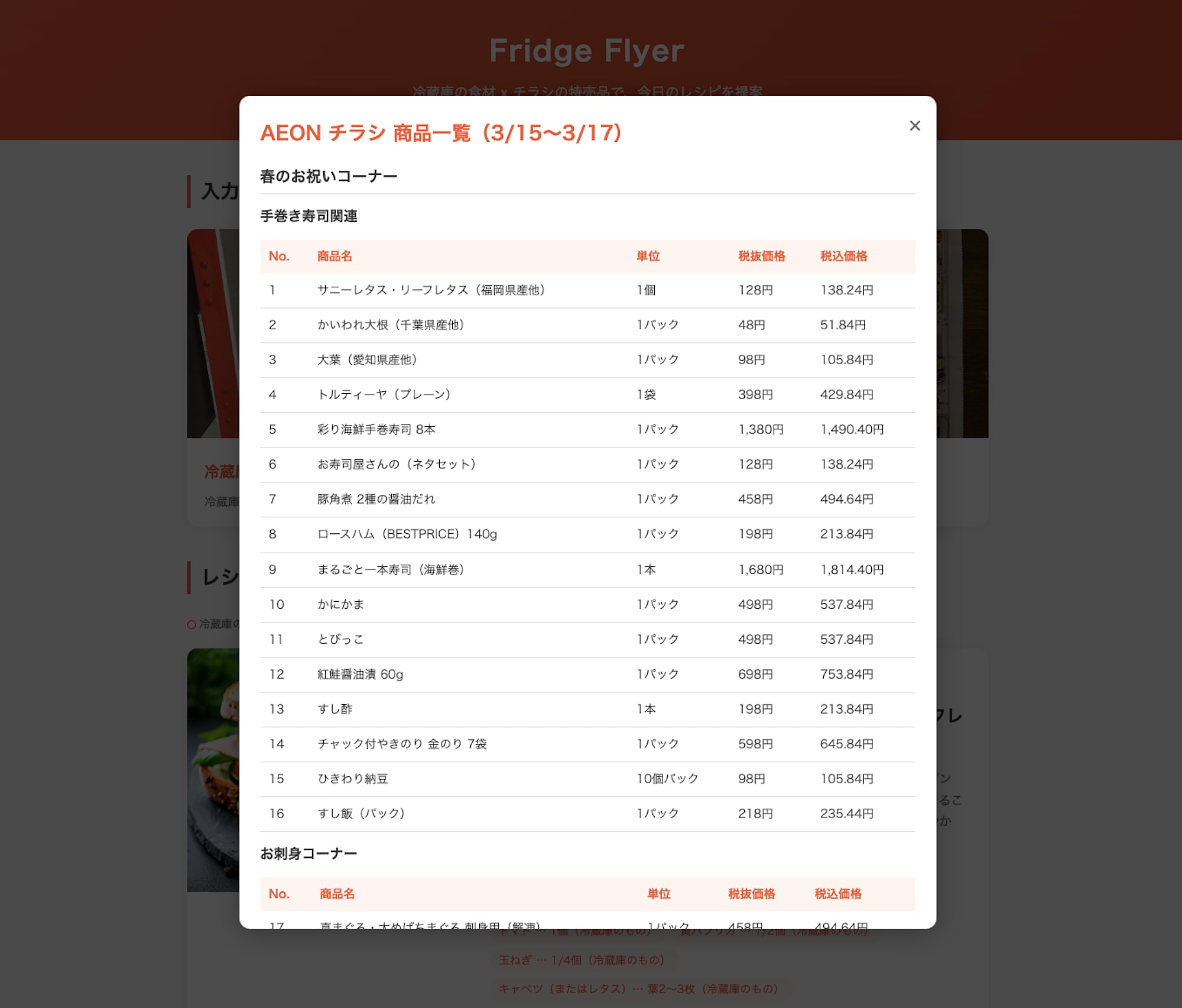
The image processing Lambda (fridge-flyer-image-processor) analyzes the refrigerator photo and flyer image. This Lambda function also branches based on the node name and serves two roles.
Processing Branch by Node Name
When a Lambda is called from Bedrock Flow, the node name is included in the event. This is used to determine the processing target.
def get_source_key_from_node_name(event: dict[str, Any]) -> str:
    """
    Determine the S3 key to process based on the node name
    """
    node_name = event.get("node", {}).get("name", "")

    if "Fridge" in node_name:
        return "fridge.jpg"
    elif "Flyer" in node_name:
        return "flyer.jpg"
    else:
        # Fallback: Get from environment variable
        return os.environ.get("SOURCE_KEY", "fridge.jpg")
When called from FridgeProcessorNode, it processes fridge.jpg, and when called from FlyerProcessorNode, it processes flyer.jpg.
Image Analysis with Claude Opus 4.6
We use Claude Opus 4.6's converse API to analyze image content. Since Claude Opus processing takes time, we extend boto3's timeout settings.
# boto3 timeout settings (extended because Claude Opus takes time to process)
BEDROCK_CONFIG = Config(
    read_timeout=600,  # 10 minutes
    connect_timeout=60,
    retries={'max_attempts': 2}
)
This setting is necessary because without considering the LLM processing time, API calls within Lambda would time out.
Analysis Result Examples
5 Image Generation Lambda and MergeNode
Image Generation Lambda
fridge-flyer-image-generator is a Lambda that generates food images from recipes. It uses Amazon Nova Canvas to generate images corresponding to each recipe.
Like the image processing Lambda, it determines which recipe to generate images for based on the node name.
def get_recipe_index_from_node_name(event: dict[str, Any]) -> int:
    """
    Determine recipe_index from the node name
    """
    node_name = event.get("node", {}).get("name", "")

    if "Dish1" in node_name:
        return 1
    elif "Dish2" in node_name:
        return 2
    elif "Dessert" in node_name:
        return 3
    else:
        return int(os.environ.get("RECIPE_INDEX", "1"))
Need for MergeNode
Bedrock Flow's output node can only receive one input. However, FridgeFlyer runs three image generation processes in parallel. To ensure that all image generation is completed when the Flow finishes, a MergeNode is placed.
def handler(event: dict[str, Any], context: Any) -> str:
    """
    Receives multiple inputs and returns recipe text
    This Lambda is used to wait for the completion of three image generation Lambdas and recipe generation.
    """
    # Handle input format from Bedrock Flow
    if isinstance(event, dict) and "node" in event:
        node_inputs = event.get("node", {}).get("inputs", [])

        inputs_dict: dict[str, str] = {}
        for input_item in node_inputs:
            name = input_item.get("name", "")
            value = input_item.get("value", "")
            inputs_dict[name] = value

        recipe_text = inputs_dict.get("recipe_text", "")
        # Also receives image1_path, image2_path, image3_path,
        # but values are not used because the purpose is only to wait

    return str(recipe_text)
MergeNode is triggered when all four inputs (recipe text + three image paths) are ready, and it outputs the recipe text as is. By implementing this with Lambda instead of using an LLM, cost and speed are optimized.
6 Handling Image Size Limitations
Bedrock's 5MB Limit
Bedrock has an image size limit of 5MB and cannot process images exceeding this size. Moreover, image data is Base64 encoded before transmission, increasing the size by approximately 1.37 times.
This means that if the original image is 4MB, it becomes about 5.5MB after Base64 encoding, exceeding the limit.
Flyer image (flyer.jpg) exceeds Bedrock's 5MB limit:
image exceeds 5 MB maximum: 6591084 bytes > 5242880 bytes

- Size read from S3: 4.9MB
- Size when sent to Bedrock: 6.59MB (increased due to Base64 encoding)
Progressive Compression Processing
To address this issue, we compress images before uploading. The target size is 3.5MB (3.5MB × 1.37 ≈ 4.8MB < 5MB).
def compress_image_if_needed(image_path: Path, max_size_mb: float = 3.5) -> bytes:
    """
    Compress image if it exceeds the specified size
    """
    max_size_bytes = int(max_size_mb * 1024 * 1024)
    original_size = image_path.stat().st_size

    if original_size <= max_size_bytes:
        return image_path.read_bytes()  # No compression needed

    # Progressive compression attempts
    quality = 85
    max_dimension = 2000

    while quality >= 30:
        if max(img.size) > max_dimension:
            ratio = max_dimension / max(img.size)
            new_size = (int(img.size[0] * ratio), int(img.size[1] * ratio))
            resized_img = img.resize(new_size, Image.Resampling.LANCZOS)

        buffer = io.BytesIO()
        resized_img.save(buffer, format="JPEG", quality=quality, optimize=True)
        compressed_data = buffer.getvalue()

        if len(compressed_data) <= max_size_bytes:
            return compressed_data

        quality -= 10        # 85 → 75 → 65 → ...
        max_dimension -= 200  # 2000 → 1800 → 1600 → ...
Compression is done progressively through the following steps:
| Attempt | quality | max_dimension | Description |
|---|---|---|---|
| 1st | 85 | 2000px | High quality |
| 2nd | 75 | 1800px | Slightly compressed |
| 3rd | 65 | 1600px | Moderately compressed |
| 4th | 55 | 1400px | Somewhat low quality |
| 5th | 45 | 1200px | Low quality |
| 6th | 35 | 1000px | Lowest quality |
The loop exits as soon as the size becomes 3.5MB or less.
7 Execution Method and Results
Execution Steps
- Deploy with CDK
cd cdk
npm install
cdk deploy
- Check Flow ID
aws cloudformation describe-stacks \
  --stack-name FridgeFlyerStack \
  --query "Stacks[0].Outputs" \
  --output table
-
Prepare images: Place
fridge.jpgandflyer.jpgin therecipe/directory -
Execute
cd recipe
python3 generate_recipe.py
Example Execution Log
============================================================
Fridge Flyer - Recipe Generation Script
============================================================
Uploading images to S3...
  - flyer.jpg -> s3://fridge-flyer-XXXX/flyer.jpg
  - fridge.jpg -> s3://fridge-flyer-XXXX/fridge.jpg
Running Bedrock Flow...
  (Image analysis and recipe generation will take a few minutes. Please wait...)
  - Received output
  - Flow completed
  - Response received (1906 characters)
Generating HTML...
  - HTML saved: output/index.html
============================================================
Completed!
============================================================
Output Results
When execution completes, the HTML opens automatically in a browser.
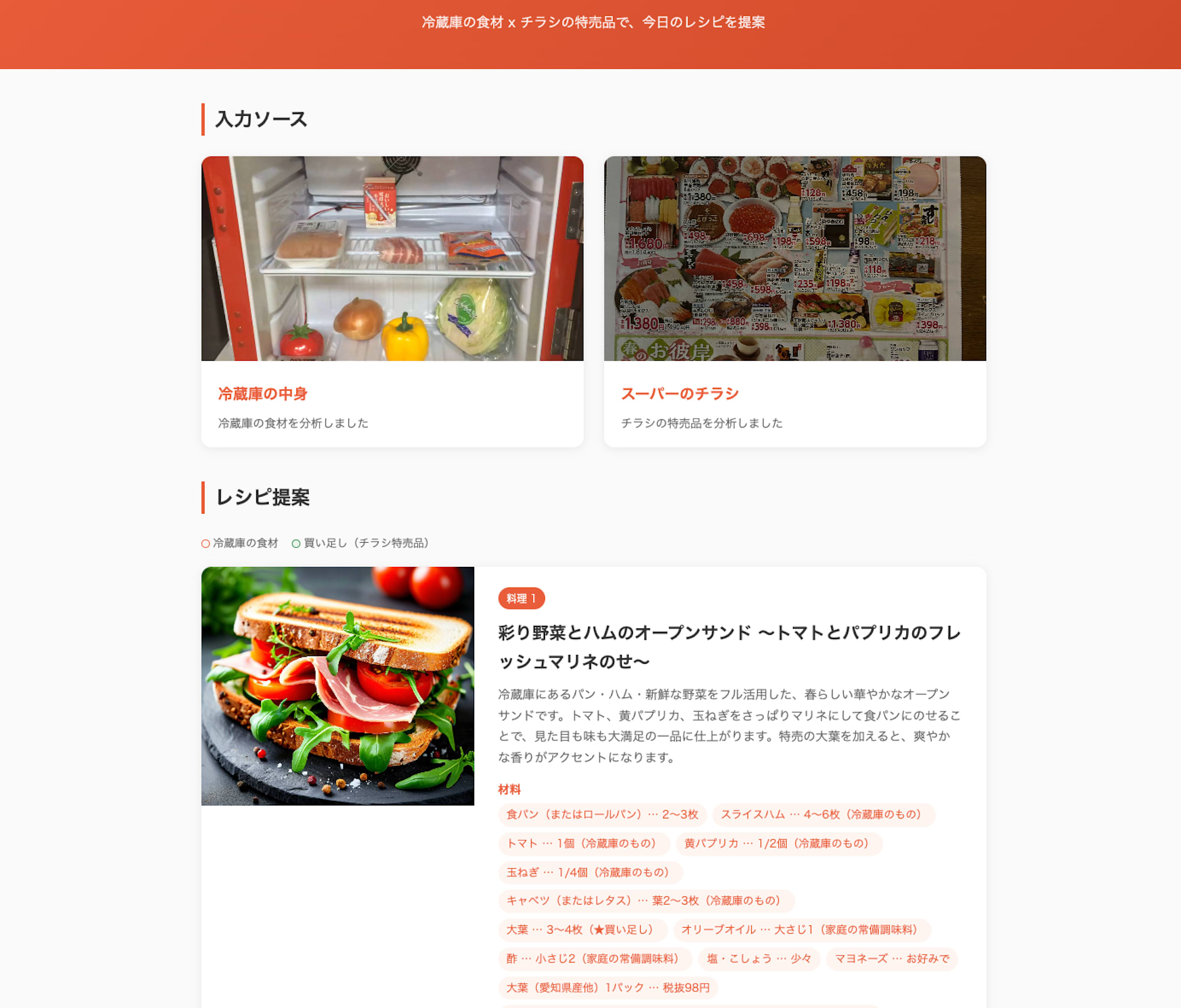
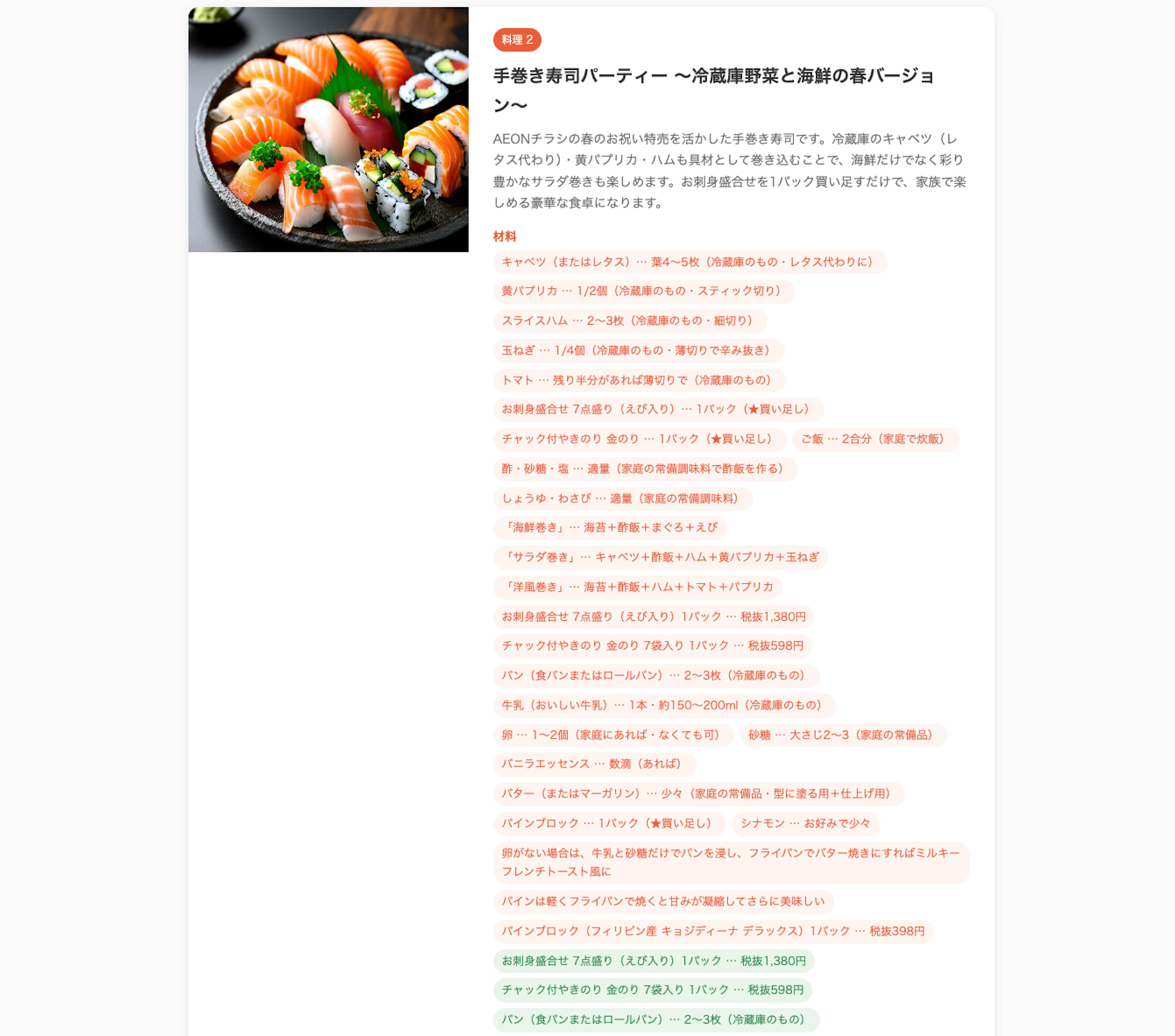
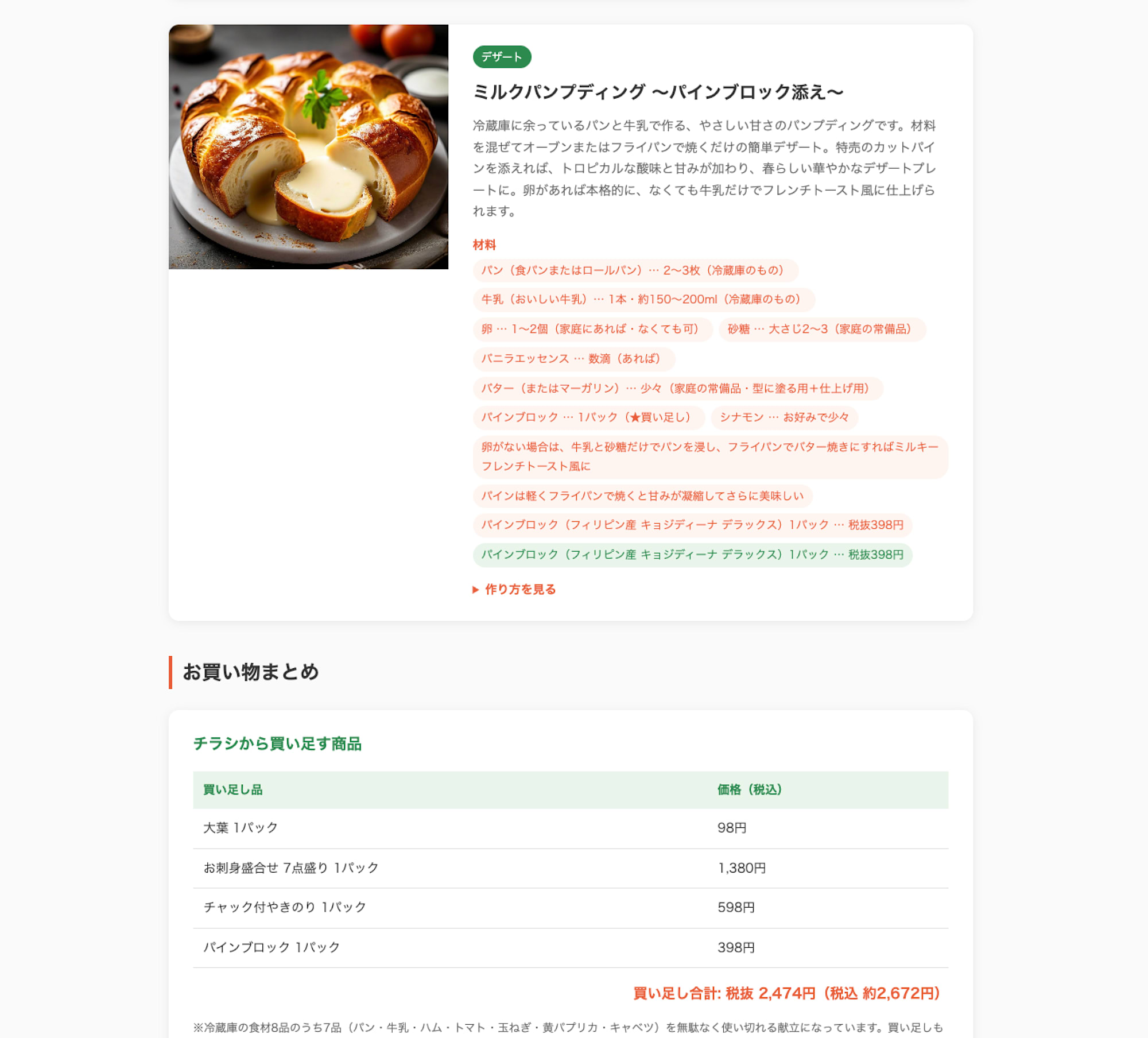
8 Conclusion
In this article, I built a system using Amazon Bedrock Flows that "suggests recipes based on refrigerator photos and flyers."
Currently, Amazon Bedrock Flows cannot handle images as inputs or outputs directly, so implementation inevitably relies on S3 and Lambda. However, I found it very useful for organizing and adjusting the overall processing.
What impressed me the most was Opus 4.6's image comprehension capability. However, I learned that with such large models that take time to process, you need to be mindful not only of Lambda's timeout but also boto3's read_timeout.
The complete source code is available in the GitHub repository below.
9 Bonus
The refrigerator that appears in this article was purchased by my company previously for the purpose of "writing blog posts." There have been several blogs featuring this refrigerator, and I've arranged them in chronological order to show the evolution of LLMs.
2021.01 Deep Learning Object Detection
[Cashier-less Unmanned Vending Refrigerator] Finally Completed! \(^o^)/
2023.05 Segment Anything Model + Classification Model
[ChatGPT] I Received "Recommended Recipes" from Refrigerator Photos — Food items are detected using Segment Anything and a transfer-learned classification model —
2024.11 LLM GPT-4o
[GPT-4o] I Received "Recommended Recipes" from Refrigerator Photos.
This Time 2026.04 LLM Opus 4.6 + Amazon Nova Canvas
[Amazon Bedrock Flows] I Created a System That Suggests Recipes Based on Refrigerator Ingredients and Local Supermarket Flyers