
I tried direct ingestion of Amazon Bedrock Knowledge Base with S3 data source

This page has been translated by machine translation. View original
Introduction
Hello, I'm Kanno from the Consulting Department, and I love supermarkets.
When building RAG applications using Amazon Bedrock Knowledge Bases, have you ever encountered situations where you want to immediately reflect documents in Knowledge Bases and need to do this frequently? At the very least, I've experienced this recently.
While you could simply synchronize every time a file changes, what about cases where many people need to sync large amounts of data? For example, you want your uploaded file to be incorporated into RAG immediately, but if hundreds of people are updating one file at a time simultaneously... this would likely cause synchronization job queues and degrade the user experience.
Of course, running batch jobs at certain time intervals is an option, but it would be nicer if only the file an individual uploaded could be synchronized at that exact moment.
Looking for a better solution, I discovered that Bedrock has a Direct Ingestion feature.
Using the IngestKnowledgeBaseDocuments API, you can directly import specified documents into Knowledge Bases without going through a full synchronization job.
This seems close to what we want to achieve and smells promising. Let's dive deeper into this direct ingestion feature by performing create, update, and delete operations!
Prerequisites
Environment
I used the following environment for this demonstration:
| Item | Version/Value |
|---|---|
| aws-cdk-lib | 2.235.1 |
| Node.js | 25.4.0 |
| Region | us-west-2 |
Direct Ingestion
The normal document ingestion process for Knowledge Bases involves uploading documents to an S3 bucket, executing a synchronization job with the StartIngestionJob API, after which Knowledge Bases scans, chunks, and vectorizes the documents.
With direct ingestion, you send documents directly using the IngestKnowledgeBaseDocuments API, and Knowledge Bases immediately performs chunking and vectorization. In other words, it bypasses the scanning process of the synchronization job, allowing documents to be reflected more quickly.
Both custom data sources and S3 data sources support direct ingestion, but we'll focus on S3 data sources in this article.
Implementation
Building Knowledge Bases Environment with CDK
First, let's build a Knowledge Bases environment for testing with CDK.
We'll use S3 Vectors as the vector store and create an S3 type data source.
Full code
import * as cdk from "aws-cdk-lib/core";
import { Construct } from "constructs";
import * as s3vectors from "aws-cdk-lib/aws-s3vectors";
import * as s3 from "aws-cdk-lib/aws-s3";
import * as bedrock from "aws-cdk-lib/aws-bedrock";
import * as iam from "aws-cdk-lib/aws-iam";

export interface CdkS3VectorsKbStackProps extends cdk.StackProps {
  /**
   * Vector dimension for embeddings (default: 1024 for Titan Embeddings V2)
   */
  vectorDimension?: number;
  /**
   * Embedding model ID (default: amazon.titan-embed-text-v2:0)
   */
  embeddingModelId?: string;
}

export class CdkIngestKbStack extends cdk.Stack {
  public readonly vectorBucket: s3vectors.CfnVectorBucket;
  public readonly vectorIndex: s3vectors.CfnIndex;
  public readonly knowledgeBase: bedrock.CfnKnowledgeBase;
  public readonly dataSourceBucket: s3.Bucket;

  constructor(scope: Construct, id: string, props?: CdkS3VectorsKbStackProps) {
    super(scope, id, props);

    const vectorDimension = props?.vectorDimension ?? 1024;
    const embeddingModelId =
      props?.embeddingModelId ?? "amazon.titan-embed-text-v2:0";
    const vectorBucketName = `vector-bucket-${cdk.Aws.ACCOUNT_ID}-${cdk.Aws.REGION}`;

    // ===========================================
    // S3 Vector Bucket
    // ===========================================
    this.vectorBucket = new s3vectors.CfnVectorBucket(this, "VectorBucket", {
      vectorBucketName: vectorBucketName,
    });

    // ===========================================
    // S3 Vector Index
    // ===========================================

    this.vectorIndex = new s3vectors.CfnIndex(this, "VectorIndex", {
      vectorBucketName: vectorBucketName,
      indexName: "kb-vector-index",
      dimension: vectorDimension,
      distanceMetric: "cosine",
      dataType: "float32",
    });
    this.vectorIndex.addDependency(this.vectorBucket);

    // ===========================================
    // Data Source S3 Bucket (for documents)
    // ===========================================
    this.dataSourceBucket = new s3.Bucket(this, "DataSourceBucket", {
      bucketName: `kb-datasource-${cdk.Aws.ACCOUNT_ID}-${cdk.Aws.REGION}`,
      removalPolicy: cdk.RemovalPolicy.DESTROY,
      autoDeleteObjects: true,
    });

    // ===========================================
    // IAM Role for Knowledge Bases
    // ===========================================
    const knowledgeBaseRole = new iam.Role(this, "KnowledgeBaseRole", {
      assumedBy: new iam.ServicePrincipal("bedrock.amazonaws.com"),
      inlinePolicies: {
        BedrockKnowledgeBasePolicy: new iam.PolicyDocument({
          statements: [
            // S3 Vectors permissions
            new iam.PolicyStatement({
              effect: iam.Effect.ALLOW,
              actions: [
                "s3vectors:CreateIndex",
                "s3vectors:DeleteIndex",
                "s3vectors:GetIndex",
                "s3vectors:ListIndexes",
                "s3vectors:PutVectors",
                "s3vectors:GetVectors",
                "s3vectors:DeleteVectors",
                "s3vectors:QueryVectors",
                "s3vectors:ListVectors",
              ],
              resources: [
                // ARN format: arn:aws:s3vectors:REGION:ACCOUNT:bucket/BUCKET_NAME
                `arn:aws:s3vectors:${cdk.Aws.REGION}:${cdk.Aws.ACCOUNT_ID}:bucket/${vectorBucketName}`,
                `arn:aws:s3vectors:${cdk.Aws.REGION}:${cdk.Aws.ACCOUNT_ID}:bucket/${vectorBucketName}/index/*`,
              ],
            }),
            // S3 Data Source permissions
            new iam.PolicyStatement({
              effect: iam.Effect.ALLOW,
              actions: ["s3:GetObject", "s3:ListBucket"],
              resources: [
                this.dataSourceBucket.bucketArn,
                `${this.dataSourceBucket.bucketArn}/*`,
              ],
            }),
            // Bedrock Foundation Model permissions
            new iam.PolicyStatement({
              effect: iam.Effect.ALLOW,
              actions: ["bedrock:InvokeModel"],
              resources: [
                `arn:aws:bedrock:${cdk.Aws.REGION}::foundation-model/${embeddingModelId}`,
              ],
            }),
          ],
        }),
      },
    });

    // ===========================================
    // Bedrock Knowledge Bases with S3 Vectors
    // ===========================================
    this.knowledgeBase = new bedrock.CfnKnowledgeBase(this, "KnowledgeBase", {
      name: "S3VectorsKnowledgeBase",
      description: "Knowledge Bases using S3 Vectors as vector store",
      roleArn: knowledgeBaseRole.roleArn,
      knowledgeBaseConfiguration: {
        type: "VECTOR",
        vectorKnowledgeBaseConfiguration: {
          embeddingModelArn: `arn:aws:bedrock:${cdk.Aws.REGION}::foundation-model/${embeddingModelId}`,
        },
      },
      storageConfiguration: {
        type: "S3_VECTORS",
        s3VectorsConfiguration: {
          vectorBucketArn: this.vectorBucket.attrVectorBucketArn,
          indexName: this.vectorIndex.indexName!,
        },
      },
    });
    this.knowledgeBase.addDependency(this.vectorIndex);
    this.knowledgeBase.node.addDependency(knowledgeBaseRole);

    // ===========================================
    // Bedrock Data Source (S3 Type)
    // ===========================================
    const dataSource = new bedrock.CfnDataSource(this, "DataSource", {
      name: "S3DataSource",
      description: "S3 data source for knowledge base",
      knowledgeBaseId: this.knowledgeBase.attrKnowledgeBaseId,
      dataSourceConfiguration: {
        type: "S3",
        s3Configuration: {
          bucketArn: this.dataSourceBucket.bucketArn,
        },
      },
    });
    dataSource.addDependency(this.knowledgeBase);

    // ===========================================
    // Outputs
    // ===========================================
    new cdk.CfnOutput(this, "VectorBucketArn", {
      value: this.vectorBucket.attrVectorBucketArn,
      description: "ARN of the S3 Vector Bucket",
    });

    new cdk.CfnOutput(this, "VectorIndexArn", {
      value: this.vectorIndex.attrIndexArn,
      description: "ARN of the Vector Index",
    });

    new cdk.CfnOutput(this, "KnowledgeBaseId", {
      value: this.knowledgeBase.attrKnowledgeBaseId,
      description: "ID of the Bedrock Knowledge Bases",
    });

    new cdk.CfnOutput(this, "DataSourceId", {
      value: dataSource.attrDataSourceId,
      description: "ID of the S3 Data Source",
    });

    new cdk.CfnOutput(this, "DataSourceBucketName", {
      value: this.dataSourceBucket.bucketName,
      description: "Name of the S3 bucket for data source documents",
    });
  }
}
We're using S3 Vectors as our affordable vector store and setting the data source type to S3.
We're using Titan Embeddings V2 as our embedding model.
Deployment and Initial Synchronization
Let's deploy.
pnpm dlx cdk deploy
After deployment completes, the Knowledge Base ID, Data Source ID, and bucket name will be output.
CdkIngestKbStack.DataSourceBucketName = kb-datasource-123456789012-us-west-2
CdkIngestKbStack.DataSourceId = YYYYYYYYYY
CdkIngestKbStack.KnowledgeBaseId = XXXXXXXXXX
CdkIngestKbStack.VectorBucketArn = arn:aws:s3vectors:us-west-2:123456789012:bucket/vector-bucket-123456789012-us-west-2
CdkIngestKbStack.VectorIndexArn = arn:aws:s3vectors:us-west-2:123456789012:bucket/vector-bucket-123456789012-us-west-2/index/kb-vector-index
It's convenient to set these as environment variables for use in subsequent commands.
export KB_ID="XXXXXXXXXX"        # KnowledgeBaseId output value
export DS_ID="YYYYYYYYYY"        # DataSourceId output value
export BUCKET_NAME="kb-datasource-123456789012-us-east-1"  # DataSourceBucketName output value
Run the initial synchronization via console or CLI.
aws bedrock-agent start-ingestion-job \
  --knowledge-base-id "$KB_ID" \
  --data-source-id "$DS_ID"
Once completed, our foundation is set, so let's proceed with the verification!
Verification
Let's test common operations like document creation, update, and deletion!
We'll use APIs rather than the console, assuming we're integrating this into an application.
Creating Documents
First, let's use the IngestKnowledgeBaseDocuments API to ingest a document.
For S3 data sources, we specify the file on S3 for ingestion.
First, upload a document to S3.
echo "Amazon Bedrock is a fully managed service that provides access to high-performance foundation models from leading AI companies through a single API." > bedrock-intro.txt

aws s3 cp bedrock-intro.txt s3://${BUCKET_NAME}/documents/bedrock-intro.txt
Next, ingest it into Knowledge Bases using the ingest-knowledge-base-documents API for direct ingestion.
aws bedrock-agent ingest-knowledge-base-documents \
  --knowledge-base-id "$KB_ID" \
  --data-source-id "$DS_ID" \
  --documents '[
    {
      "content": {
        "dataSourceType": "S3",
        "s3": {
          "s3Location": {
            "uri": "s3://'"${BUCKET_NAME}"'/documents/bedrock-intro.txt"
          }
        }
      }
    }
  ]'
When executed, an asynchronous process begins and returns a response like this.
The status is shown as STARTING.
{
    "documentDetails": [
        {
            "knowledgeBaseId": "XXXXXXXXXX",
            "dataSourceId": "YYYYYYYYYY",
            "status": "STARTING",
            "identifier": {
                "dataSourceType": "S3",
                "s3": {
                    "uri": "s3://kb-datasource-123456789012-us-west-2/documents/bedrock-intro.txt"
                }
            },
            "updatedAt": "2026-01-25T12:21:37.536031+00:00"
        }
    ]
}
The ingestion is processed asynchronously, and the status transitions through the following states:
| Status | Description |
|---|---|
STARTING |
Ingestion process has started |
IN_PROGRESS |
Chunking and vectorization in progress |
INDEXED |
Successfully completed ingestion |
FAILED |
Ingestion failed |
PARTIALLY_INDEXED |
Only partially successful ingestion |
You might be concerned about how to determine completion status, but don't worry.
You can check the status using the GetKnowledgeBaseDocuments API with the S3 path as the key.
Let's run this after starting the ingestion and waiting a bit.
aws bedrock-agent get-knowledge-base-documents \
  --knowledge-base-id "$KB_ID" \
  --data-source-id "$DS_ID" \
  --document-identifiers '[
    {
      "dataSourceType": "S3",
      "s3": {
        "uri": "s3://'"${BUCKET_NAME}"'/documents/bedrock-intro.txt"
      }
    }
  ]'
When executed, it returns a response in the same format as when we performed the direct ingestion.
{
    "documentDetails": [
        {
            "knowledgeBaseId": "XXXXXXXXXX",
            "dataSourceId": "YYYYYYYYYY",
            "status": "INDEXED",
            "identifier": {
                "dataSourceType": "S3",
                "s3": {
                    "uri": "s3://kb-datasource-123456789012-us-west-2/documents/bedrock-intro.txt"
                }
            },
            "statusReason": "",
            "updatedAt": "2026-01-25T12:21:40.992274+00:00"
        }
    ]
}
Looking at the status, it's now INDEXED which differs from before. Ingestion has completed successfully.
When integrating this into an application, you'll need to be aware of the asynchronous nature and periodically poll the status using GetKnowledgeBaseDocuments. You'll want to be mindful of completion detection and error handling.
Let's test this on the console by querying the knowledge base.
I'll simply ask "Tell me about Bedrock."
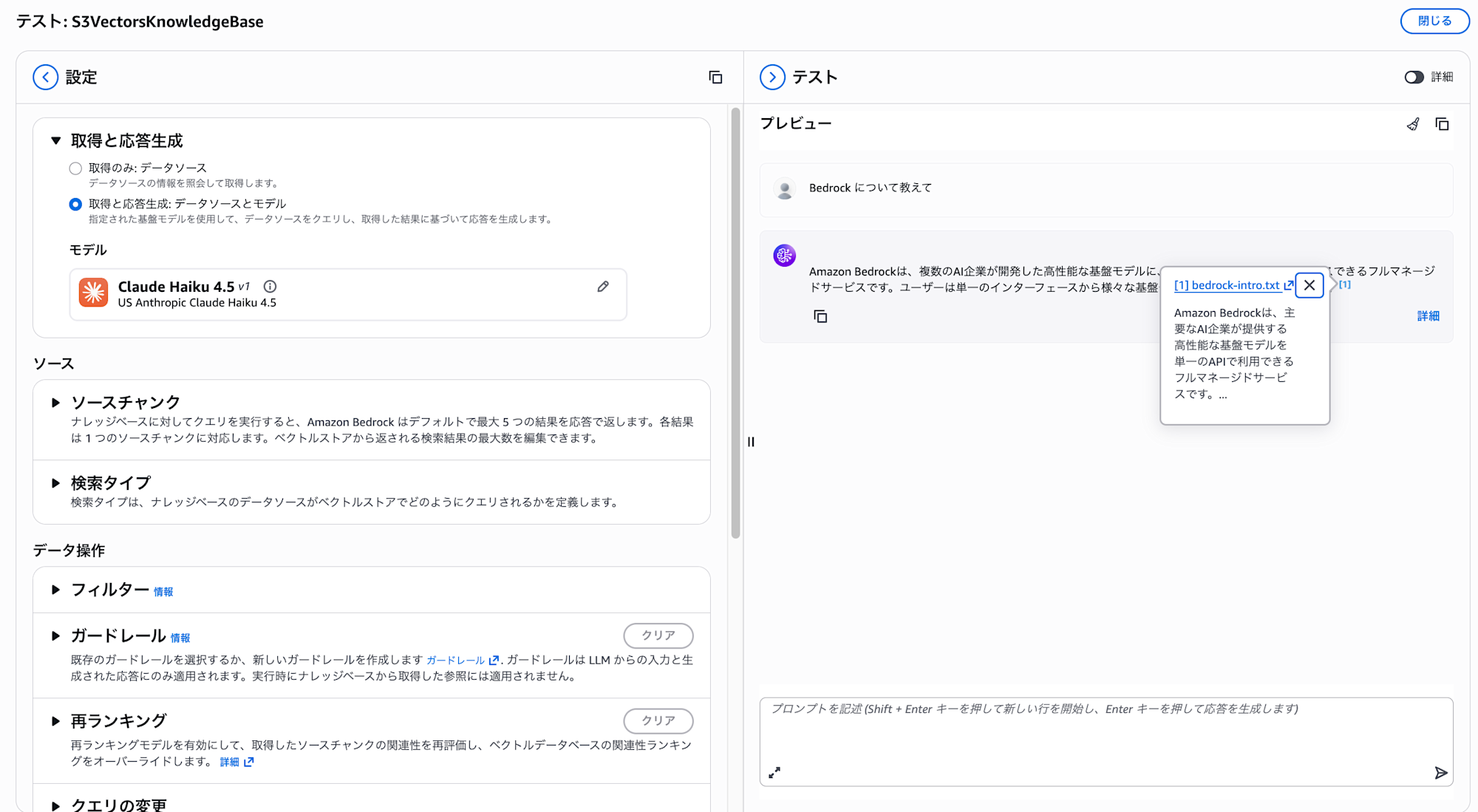
It's referencing our uploaded document in the response!
Updating Documents
Next, let's update the S3 file we created earlier.
echo "Amazon Bedrock is a fully managed service that provides access to high-performance foundation models from leading AI companies through a single API. It supports numerous models including Claude, Titan, Mistral, and more." > bedrock-intro.txt

aws s3 cp bedrock-intro.txt s3://${BUCKET_NAME}/documents/bedrock-intro.txt
Calling IngestKnowledgeBaseDocuments again will update the document.
aws bedrock-agent ingest-knowledge-base-documents \
  --knowledge-base-id "$KB_ID" \
  --data-source-id "$DS_ID" \
  --documents '[
    {
      "content": {
        "dataSourceType": "S3",
        "s3": {
          "s3Location": {
            "uri": "s3://'"${BUCKET_NAME}"'/documents/bedrock-intro.txt"
          }
        }
      }
    }
  ]'
The execution returns a response. It's in the same format as during creation, but of course the timestamp has been updated.
{
    "documentDetails": [
        {
            "knowledgeBaseId": "XXXXXXXXXX",
            "dataSourceId": "YYYYYYYYYY",
            "status": "STARTING",
            "identifier": {
                "dataSourceType": "S3",
                "s3": {
                    "uri": "s3://kb-datasource-123456789012-us-west-2/documents/bedrock-intro.txt"
                }
            },
            "updatedAt": "2026-01-25T12:40:40.567801+00:00"
        }
    ]
}
Specifying the same S3 URI overwrites the existing document, so by updating the file on S3 and then executing direct ingestion, the Knowledge Bases side is also updated.
Let's check the behavior on the console again.
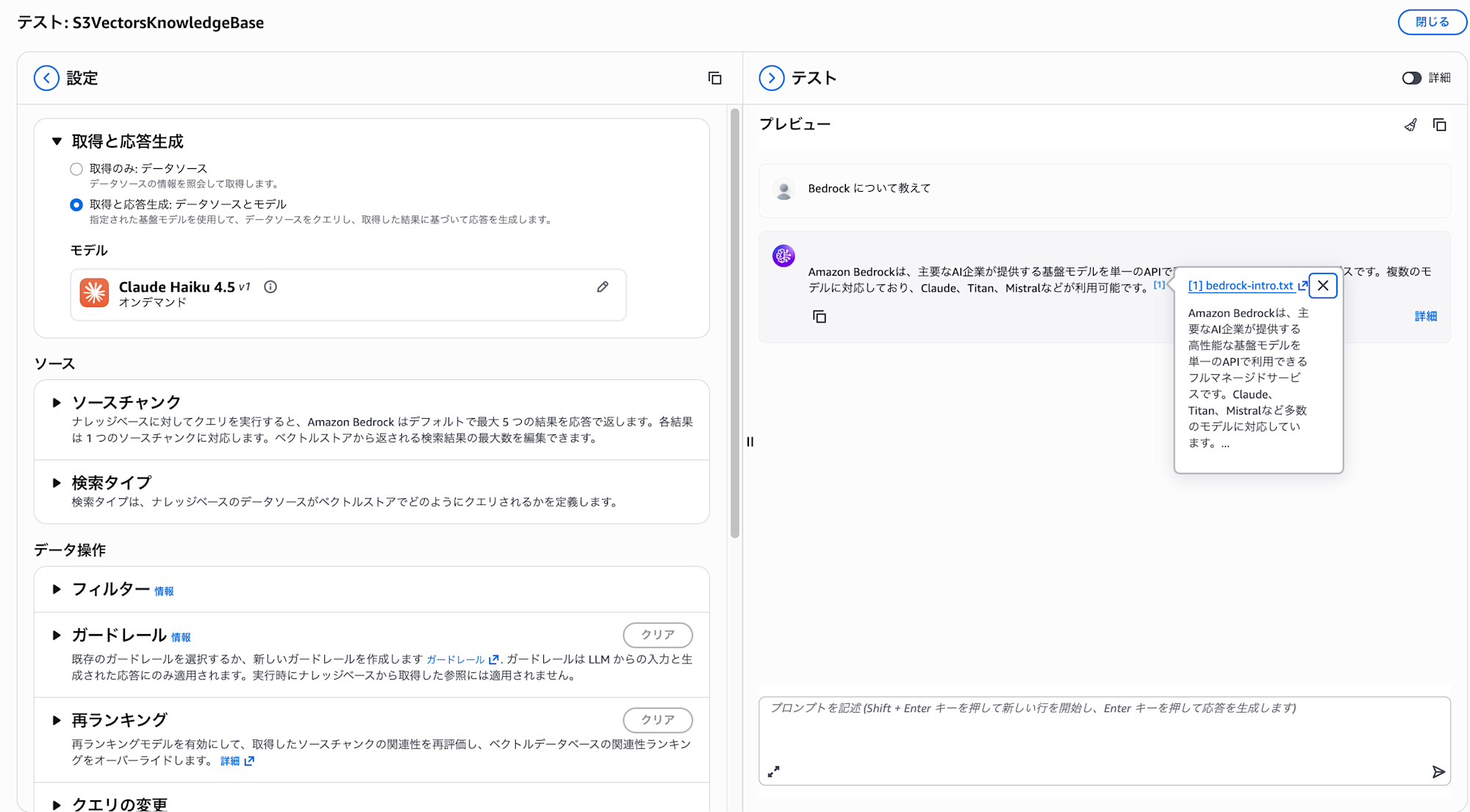
The updated content is being retrieved!
Deleting Documents
Next, let's check how to delete documents.
To delete documents, use the DeleteKnowledgeBaseDocuments API.
aws bedrock-agent delete-knowledge-base-documents \
  --knowledge-base-id "$KB_ID" \
  --data-source-id "$DS_ID" \
  --document-identifiers '[
    {
      "dataSourceType": "S3",
      "s3": {
        "uri": "s3://'"${BUCKET_NAME}"'/documents/bedrock-intro.txt"
      }
    }
  ]'
{
    "documentDetails": [
        {
            "knowledgeBaseId": "XXXXXXXXXX",
            "dataSourceId": "YYYYYYYYYY",
            "status": "DELETING",
            "identifier": {
                "dataSourceType": "S3",
                "s3": {
                    "uri": "s3://kb-datasource-123456789012-us-west-2/documents/bedrock-intro.txt"
                }
            },
            "updatedAt": "2026-01-25T12:42:47.503248+00:00"
        }
    ]
}
The deletion process has started. Deletion is also processed asynchronously, transitioning through the DELETING status before completion.
However, note that direct ingestion deletion only removes the document from Knowledge Bases, not from the S3 bucket.
The file will be re-ingested during the next sync job execution, so you should also delete the file from the S3 bucket. Maintaining consistency is an important consideration.
Let's check this on the console as well.
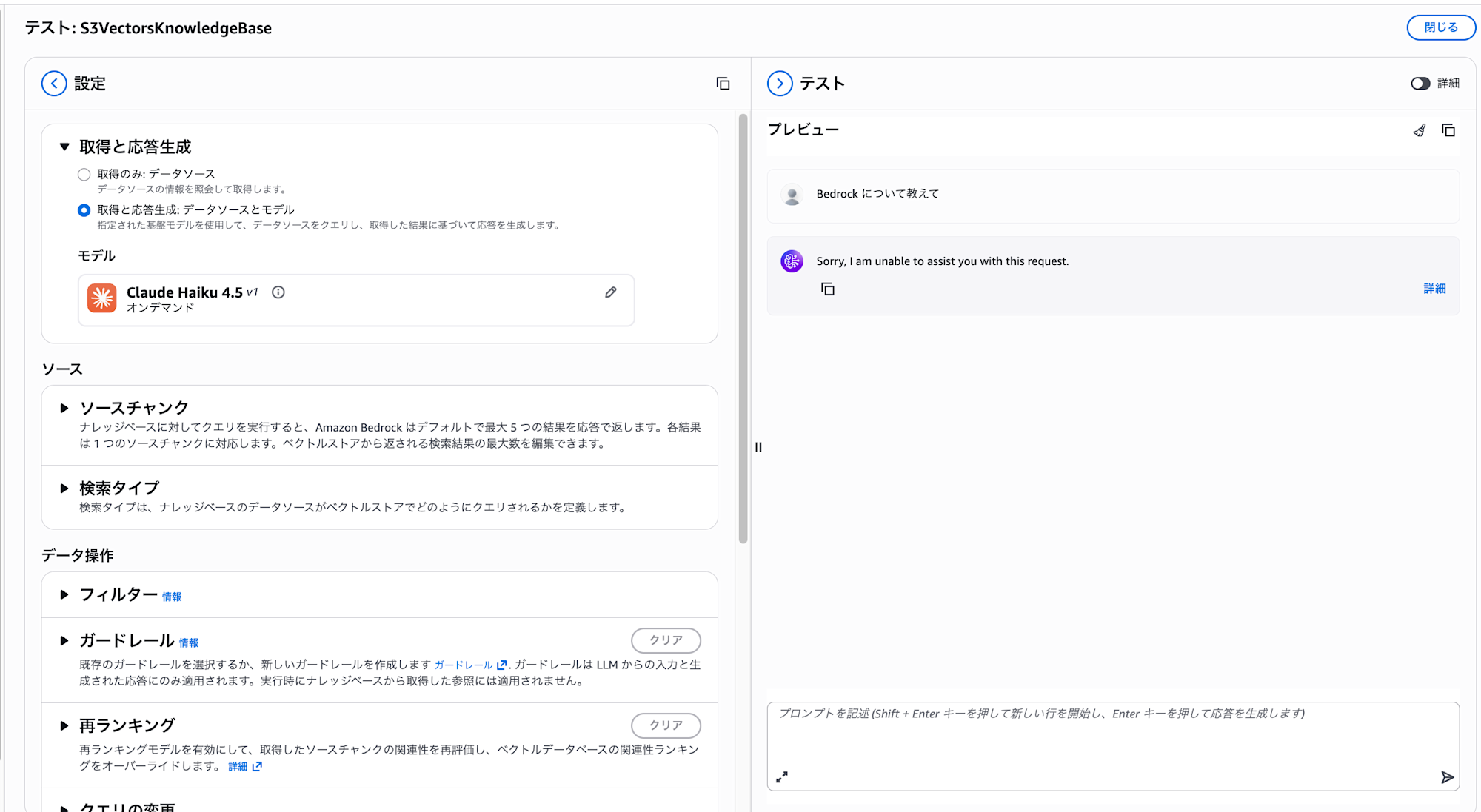
As there are no synchronized documents left, it can't provide an answer. This is as expected.
Batch Processing Multiple Documents
You can process up to 10 documents at once from the console, or up to 25 documents in a single API call.
First, let's upload multiple documents to S3.
echo "AWS Lambda is a serverless computing service." > lambda.txt
echo "Amazon S3 is an object storage service." > s3.txt
echo "Amazon DynamoDB is a fully managed NoSQL database." > dynamodb.txt

aws s3 cp lambda.txt s3://${BUCKET_NAME}/documents/
aws s3 cp s3.txt s3://${BUCKET_NAME}/documents/
aws s3 cp dynamodb.txt s3://${BUCKET_NAME}/documents/
After uploading, execute ingest-knowledge-base-documents just like we did for a single file.
It's simply a matter of specifying multiple files in the array, which is straightforward.
aws bedrock-agent ingest-knowledge-base-documents \
  --knowledge-base-id "$KB_ID" \
  --data-source-id "$DS_ID" \
  --documents '[
    {
      "content": {
        "dataSourceType": "S3",
        "s3": {
          "s3Location": {
            "uri": "s3://'"${BUCKET_NAME}"'/documents/lambda.txt"
          }
        }
      }
    },
    {
      "content": {
        "dataSourceType": "S3",
        "s3": {
          "s3Location": {
            "uri": "s3://'"${BUCKET_NAME}"'/documents/s3.txt"
          }
        }
      }
    },
    {
      "content": {
        "dataSourceType": "S3",
        "s3": {
          "s3Location": {
            "uri": "s3://'"${BUCKET_NAME}"'/documents/dynamodb.txt"
          }
        }
      }
    }
  ]'
When executed, multiple statuses are returned.
{
    "documentDetails": [
        {
            "knowledgeBaseId": "XXXXXXXXXX",
            "dataSourceId": "YYYYYYYYYY",
            "status": "STARTING",
            "identifier": {
                "dataSourceType": "S3",
                "s3": {
                    "uri": "s3://kb-datasource-123456789012-us-west-2/documents/lambda.txt"
                }
            },
            "updatedAt": "2026-01-25T12:46:42.231326+00:00"
        },
        {
            "knowledgeBaseId": "XXXXXXXXXX",
            "dataSourceId": "YYYYYYYYYY",
            "status": "STARTING",
            "identifier": {
                "dataSourceType": "S3",
                "s3": {
                    "uri": "s3://kb-datasource-123456789012-us-west-2/documents/s3.txt"
                }
            },
            "updatedAt": "2026-01-25T12:46:42.252964+00:00"
        },
        {
            "knowledgeBaseId": "XXXXXXXXXX",
            "dataSourceId": "YYYYYYYYYY",
            "status": "STARTING",
            "identifier": {
                "dataSourceType": "S3",
                "s3": {
                    "uri": "s3://kb-datasource-123456789012-us-west-2/documents/dynamodb.txt"
                }
            },
            "updatedAt": "2026-01-25T12:46:42.275428+00:00"
        }
    ]
}
Let's try asking "Tell me about Lambda."
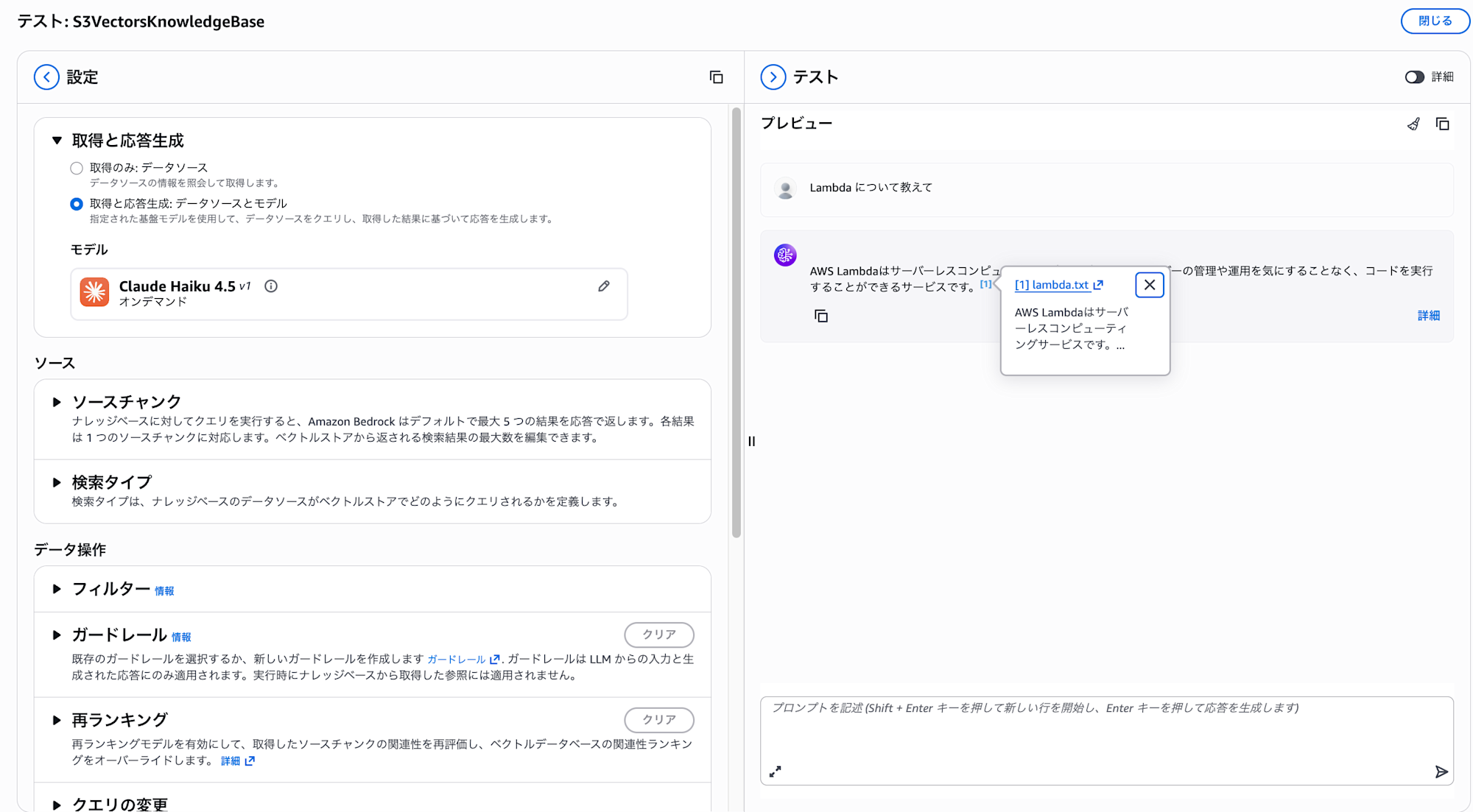
Even with multiple files uploaded, they're being ingested properly!
Ensuring Idempotence with clientToken
When implementing direct ingestion processing in applications, it's common to implement retry logic when network errors or timeouts occur.
However, in cases where the initial request actually succeeded, there's a risk that the same document could be processed multiple times.
To prevent such issues, the clientToken parameter is provided.
Let's create a file and upload it as a test.
echo "Amazon CloudWatchはAWSリソースの監視サービスです。" > cloudwatch.txt

aws s3 cp cloudwatch.txt s3://${BUCKET_NAME}/documents/
Let's execute a direct ingestion with a specified clientToken.
aws bedrock-agent ingest-knowledge-base-documents \
  --knowledge-base-id "$KB_ID" \
  --data-source-id "$DS_ID" \
  --client-token "user123-cloudwatch-20260125124500" \
  --documents '[
    {
      "content": {
        "dataSourceType": "S3",
        "s3": {
          "s3Location": {
            "uri": "s3://'"${BUCKET_NAME}"'/documents/cloudwatch.txt"
          }
        }
      }
    }
  ]'
When sending this request consecutively, the response shows that the status is IN_PROGRESS instead of STARTING.
{
    "documentDetails": [
        {
            "knowledgeBaseId": "XXXXXXXXXX",
            "dataSourceId": "YYYYYYYYYY",
            "status": "IN_PROGRESS",
            "identifier": {
                "dataSourceType": "S3",
                "s3": {
                    "uri": "s3://kb-datasource-123456789012-us-west-2/documents/cloudwatch.txt"
                }
            },
            "statusReason": "",
            "updatedAt": "2026-01-25T13:01:11.857718+00:00"
        }
    ]
}
When sending requests with the same clientToken, only the first one is processed, and subsequent requests are not executed redundantly.
For example, when implementing an API for users to upload documents, creating a unique token using a combination like userID + filename + timestamp provides safety during retries.
| Parameter | Description |
|---|---|
clientToken |
A unique string of 33-256 characters. Requests with the same token become idempotent |
About Adding Metadata
There are limitations on how to specify metadata with S3 data sources.
You cannot specify metadata inline in the request body.
| Data Source Type | Inline Specification | S3 location Specification |
|---|---|---|
| CUSTOM | ○ | ○ |
| S3 | × | ○ |
To attach metadata to an S3 data source with direct ingestion, upload a metadata file (.metadata.json) to S3 and set metadata.type to S3_LOCATION and specify the URI.
Let's try it. First, create metadata and upload it to S3.
cat << 'EOF' > bedrock-intro.txt.metadata.json
{
  "metadataAttributes": {
    "category": "aws-service",
    "year": 2023
  }
}
EOF

aws s3 cp bedrock-intro.txt.metadata.json s3://${BUCKET_NAME}/documents/
After the upload is complete, specify parameters to include the metadata.
aws bedrock-agent ingest-knowledge-base-documents \
  --knowledge-base-id "$KB_ID" \
  --data-source-id "$DS_ID" \
  --documents '[
    {
      "content": {
        "dataSourceType": "S3",
        "s3": {
          "s3Location": {
            "uri": "s3://'"${BUCKET_NAME}"'/documents/bedrock-intro.txt"
          }
        }
      },
      "metadata": {
        "type": "S3_LOCATION",
        "s3Location": {
          "uri": "s3://'"${BUCKET_NAME}"'/documents/bedrock-intro.txt.metadata.json"
        }
      }
    }
  ]'
Let's check the response.
{
    "documentDetails": [
        {
            "knowledgeBaseId": "XXXXXXXXXX",
            "dataSourceId": "YYYYYYYYYY",
            "status": "STARTING",
            "identifier": {
                "dataSourceType": "S3",
                "s3": {
                    "uri": "s3://kb-datasource-123456789012-us-west-2/documents/bedrock-intro.txt"
                }
            },
            "updatedAt": "2026-01-25T13:14:29.316549+00:00"
        }
    ]
}
You can't tell from the response whether metadata has been attached.
Let's try searching with metadata filtering.
You can specify filter conditions with the --retrieval-configuration parameter of the retrieve command.
Let's search for documents where category is aws-service only.
aws bedrock-agent-runtime retrieve \
  --knowledge-base-id "$KB_ID" \
  --retrieval-query '{"text": "AWSサービスについて教えて"}' \
  --retrieval-configuration '{
    "vectorSearchConfiguration": {
      "filter": {
        "equals": {
          "key": "category",
          "value": "aws-service"
        }
      }
    }
  }'
Let's check the execution results.
{
    "retrievalResults": [
        {
            "content": {
                "text": "Amazon Bedrockは、主要なAI企業が提供する高性能な基盤モデルを単一のAPIで利用できるフルマネージドサービスです。Claude、Titan、Mistralなど多数のモデルに対応しています。",
                "type": "TEXT"
            },
            "location": {
                "s3Location": {
                    "uri": "s3://kb-datasource-123456789012-us-west-2/documents/bedrock-intro.txt"
                },
                "type": "S3"
            },
            "metadata": {
                "x-amz-bedrock-kb-source-file-modality": "TEXT",
                "category": "aws-service",
                "year": 2023.0,
                "x-amz-bedrock-kb-chunk-id": "xxxxxxxx-xxxx-xxxx-xxxx-xxxxxxxxxxxx",
                "x-amz-bedrock-kb-data-source-id": "YYYYYYYYYY"
            },
            "score": 0.592372715473175
        }
    ],
    "guardrailAction": null
}
The metadata we added is reflected and retrieved!
Let's check if filtering with year 2024 returns no results.
aws bedrock-agent-runtime retrieve \
  --knowledge-base-id "$KB_ID" \
  --retrieval-query '{"text": "AWSサービスについて教えて"}' \
  --retrieval-configuration '{
    "vectorSearchConfiguration": {
      "filter": {
        "equals": {
          "key": "year",
          "value": "2024"
        }
      }
    }
  }'
Let's check the execution results.
{
    "retrievalResults": [],
    "guardrailAction": null
}
Nothing was returned! We've confirmed that metadata filtering is working.
Considerations when using direct ingestion with S3 data sources
When using direct ingestion with S3 data sources, note that deleting documents from Knowledge Bases does not automatically delete files from S3, and the next synchronization job will overwrite with the state of the S3 bucket.
Since S3 and Knowledge Bases don't automatically synchronize, to maintain consistency between them, you need to be conscious of a workflow where you add, update, or delete files on the S3 bucket and then immediately reflect those changes to Knowledge Bases using the direct ingestion API. It's also good to consider implementing mechanisms to roll back and ensure consistency when errors occur.
Conclusion
Direct ingestion using S3 data sources requires attention to the consistency between S3 and Knowledge Bases, but being able to reflect documents immediately without waiting for synchronization jobs is great.
This seems particularly useful for RAG applications requiring real-time capabilities or use cases where documents are frequently updated. I also have a recent case where I want to use it, so I'm planning to incorporate it into my application.
I hope this article was helpful. Thank you for reading until the end!!