![[Update] Amazon CloudFront now supports WebSocket for VPC origins](https://images.ctfassets.net/ct0aopd36mqt/wp-thumbnail-f66629e23bafcf47fa6477fd0349a4f7/3e371b05917375d87daf613d54a600d8/amazon-cloudfront?w=3840&fm=webp)
[Update] Amazon CloudFront now supports WebSocket for VPC origins

This page has been translated by machine translation. View original
I wanted to completely eliminate public subnets using CloudFront VPC Origins, but couldn't because I needed WebSocket
Hello, I'm Nonpi (@non____97)
Have you ever wanted to completely eliminate public subnets using CloudFront VPC Origins, but couldn't because you needed WebSocket? I have.
By using CloudFront VPC Origins, you can use internal ALBs, NLBs, and EC2 instances as CloudFront origins without using Global Accelerator.
This not only eliminates direct access paths to the origin, but also makes it easy to communicate with only the specified CloudFront distribution, and helps reduce the cost of public IPv4 addresses — all of which are welcome benefits.
However, at the time of VPC Origins GA, WebSocket communication was not supported.
Therefore, when using WebSocket for some paths at the origin, resources such as ALB/NLB that serve as the origin had to be placed in public subnets. This was a problem.
This time, Amazon CloudFront added WebSocket support for VPC Origins.
This means that even origins handling WebSocket traffic can now be configured in private subnets.
I actually tried it out.
Tried It Out
Verification Environment
The verification environment is as follows.

In a VPC with no public subnets, an internal ALB that distributes traffic to ECS Fargate running an application that communicates via WebSocket is specified as the VPC origin.
By the way, using WebSocket with CloudFront is mentioned in the following official AWS documentation.
All resources were deployed with AWS CDK.
There is also an L2 Construct called aws_cloudfront_origins, making implementation very easy.
The code used is stored in the following GitHub repository.
Resource Verification
Let's verify the created resources.
Looking at the VPC resource map, you can see that there are no subnets assigned a route table with a route to the IGW — meaning no public subnets exist.

The VPC Origin settings are as follows.
There is no special setting "for WebSocket at the origin."


The origin settings on the CloudFront distribution side are the same.


Operation Verification
Now let's verify the operation.
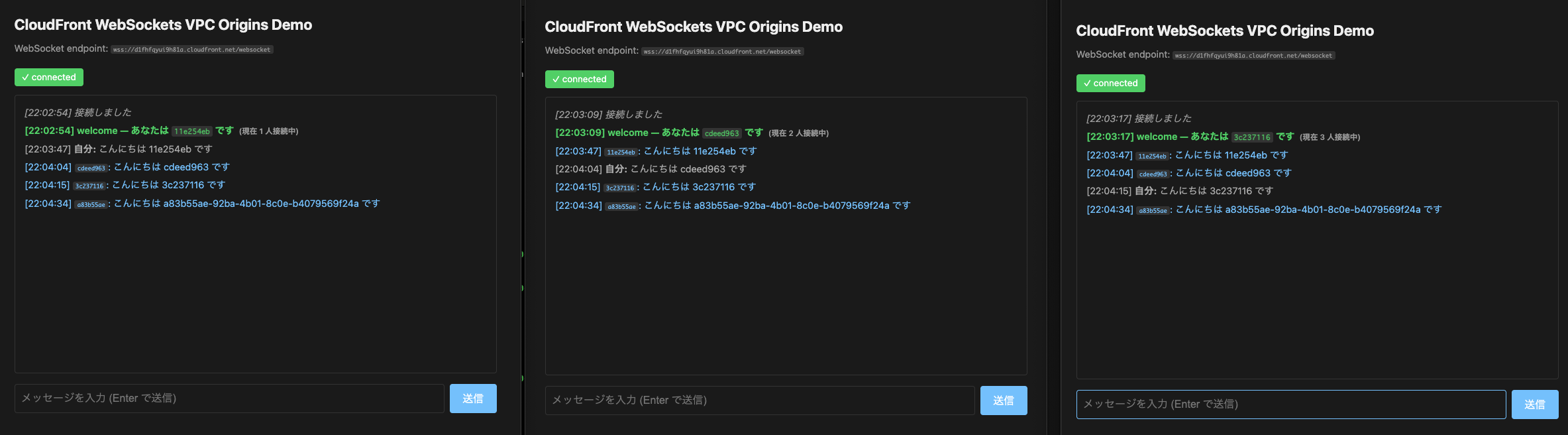
I opened three windows in the browser, connected via WebSocket from the terminal as well, and exchanged messages.
> pnpm dlx wscat -c wss://d1fhfqyui9h81a.cloudfront.net/websocket
Connected (press CTRL+C to quit)
< {"type":"welcome","id":"a83b55ae-92ba-4b01-8c0e-b4079569f24a","clientCount":4}
> Hello, I am a83b55ae-92ba-4b01-8c0e-b4079569f24a
< {"type":"echo","from":"a83b55ae-92ba-4b01-8c0e-b4079569f24a","message":"Hello, I am a83b55ae-92ba-4b01-8c0e-b4079569f24a"}
< {"type":"broadcast","from":"cdeed963-7774-4afb-a565-b9344ddfc327","message":"How are you?"}
Without any issues, the posted strings were reflected in real time to each client.
Also, after the connection timeout set on the ALB elapsed following the last message posted, the connection was disconnected.

Some of the logs output by the application running on ECS Fargate for the series of processes are as follows.
{
    "level": "info",
    "time": "2026-05-25T13:02:54.569Z",
    "pid": 6,
    "hostname": "ip-10-10-8-174.ec2.internal",
    "id": "11e254eb-5557-40ca-8832-3c37f5ed37ea",
    "url": "/websocket",
    "userAgent": "<user agent>",
    "forwardedFor": "<client IPv6 address>, 130.176.119.40",
    "cloudfrontId": "snx71Wifama59uLy3vfwcHaHwHmRrcVUi-e8vZtyU1FpHh069dBYQA==",
    "clientCount": 1,
    "msg": "ws connected"
}
{
    "level": "info",
    "time": "2026-05-25T13:03:08.958Z",
    "pid": 6,
    "hostname": "ip-10-10-8-174.ec2.internal",
    "id": "cdeed963-7774-4afb-a565-b9344ddfc327",
    "url": "/websocket",
    "userAgent": "<user agent>",
    "forwardedFor": "<client IPv6 address>, 130.176.116.164",
    "cloudfrontId": "MraeHrTsMC2y5IHzWfDEVIKfI0tO2Pe47ev-C75yV822i2ANbcsmUw==",
    "clientCount": 2,
    "msg": "ws connected"
}
{
    "level": "info",
    "time": "2026-05-25T13:03:17.351Z",
    "pid": 6,
    "hostname": "ip-10-10-8-174.ec2.internal",
    "id": "3c237116-9d54-4647-8e56-464c1025a9f5",
    "url": "/websocket",
    "userAgent": "<user agent>",
    "forwardedFor": "<client IPv6 address>, 130.176.118.52",
    "cloudfrontId": "WEHsZ_fwFs8GOmrQbrighqlVkRAaRtURlpeKO0a9QPbvly5e8Pjdbw==",
    "clientCount": 3,
    "msg": "ws connected"
}
{
    "level": "info",
    "time": "2026-05-25T13:03:46.975Z",
    "pid": 6,
    "hostname": "ip-10-10-8-174.ec2.internal",
    "id": "11e254eb-5557-40ca-8832-3c37f5ed37ea",
    "bytes": 31,
    "isBinary": false,
    "msg": "ws message received"
}
{
    "level": "info",
    "time": "2026-05-25T13:03:46.976Z",
    "pid": 6,
    "hostname": "ip-10-10-8-174.ec2.internal",
    "id": "11e254eb-5557-40ca-8832-3c37f5ed37ea",
    "broadcastCount": 2,
    "msg": "ws message broadcasted"
}
{
    "level": "info",
    "time": "2026-05-25T13:04:04.623Z",
    "pid": 6,
    "hostname": "ip-10-10-8-174.ec2.internal",
    "id": "cdeed963-7774-4afb-a565-b9344ddfc327",
    "bytes": 31,
    "isBinary": false,
    "msg": "ws message received"
}
{
    "level": "info",
    "time": "2026-05-25T13:04:04.623Z",
    "pid": 6,
    "hostname": "ip-10-10-8-174.ec2.internal",
    "id": "cdeed963-7774-4afb-a565-b9344ddfc327",
    "broadcastCount": 2,
    "msg": "ws message broadcasted"
}
{
    "level": "info",
    "time": "2026-05-25T13:08:50.946Z",
    "pid": 6,
    "hostname": "ip-10-10-8-174.ec2.internal",
    "id": "71ca940a-8e32-4471-9938-9b9af4c18687",
    "code": 1006,
    "reason": "",
    "clientCount": 0,
    "msg": "ws closed"
}
Also, when configured to output all headers at connection time, the following log was output.
{
    "level": "info",
    "time": "2026-05-25T13:42:28.172Z",
    "pid": 8,
    "hostname": "ip-10-10-8-98.ec2.internal",
    "id": "4ddd7969-9270-4ff6-b7e5-eadb48066e43",
    "method": "GET",
    "httpVersion": "1.1",
    "url": "/websocket",
    "headers": {
        "x-forwarded-for": "<client IPv6 address>, 130.176.114.52",
        "x-forwarded-proto": "http",
        "x-forwarded-port": "80",
        "host": "d1fhfqyui9h81a.cloudfront.net",
        "x-amzn-trace-id": "Root=1-6a1451c4-4e3233e1196d4b12222f32ce",
        "upgrade": "websocket",
        "connection": "upgrade",
        "sec-websocket-key": "Rnhou3qbnI2nVKLvsTWapg==",
        "sec-websocket-extensions": "permessage-deflate; client_max_window_bits",
        "cache-control": "no-cache",
        "pragma": "no-cache",
        "user-agent": "<user agent>",
        "via": "1.1 ece5d4a731ece5ff46c564ab2b946ede.cloudfront.net (CloudFront)",
        "x-amz-cf-id": "3QinF8qURdlfjvILoXcZZqalpUXpxOCEI4nLyjxNpODDTK1thF1D7w==",
        "sec-websocket-version": "13",
        "origin": "https://d1fhfqyui9h81a.cloudfront.net",
        "accept-language": "ja,en-US;q=0.9,en;q=0.8",
        "accept-encoding": "gzip, deflate, br, zstd"
    },
    "remoteAddress": "10.10.8.96",
    "remotePort": 10026,
    "remoteFamily": "IPv4",
    "clientCount": 1,
    "msg": "ws connected"
}
The 130.176.114.52 in the X-Forwarded-For header is the IP address of the CloudFront origin.
> whois 130.176.114.52
% IANA WHOIS server
% for more information on IANA, visit http://www.iana.org
% This query returned 1 object

refer:        whois.arin.net

inetnum:      130.0.0.0 - 130.255.255.255
organisation: Administered by ARIN
status:       LEGACY

whois:        whois.arin.net

changed:      1993-05
source:       IANA

# whois.arin.net

NetRange:       130.175.0.0 - 130.176.255.255
CIDR:           130.176.0.0/16, 130.175.0.0/16
NetName:        AMAZO-4
NetHandle:      NET-130-175-0-0-1
Parent:         NET130 (NET-130-0-0-0-0)
NetType:        Direct Allocation
OriginAS:
Organization:   Amazon.com, Inc. (AMAZO-4)
RegDate:        2021-01-28
Updated:        2022-06-22
Ref:            https://rdap.arin.net/registry/ip/130.175.0.0


OrgName:        Amazon.com, Inc.
OrgId:          AMAZO-4
Address:        Amazon Web Services, Inc.
Address:        P.O. Box 81226
City:           Seattle
StateProv:      WA
PostalCode:     98108-1226
Country:        US
RegDate:        2005-09-29
Updated:        2026-04-17
Comment:        For details of this service please see
Comment:        http://ec2.amazonaws.com
Ref:            https://rdap.arin.net/registry/entity/AMAZO-4


OrgRoutingHandle: IPROU3-ARIN
OrgRoutingName:   IP Routing
OrgRoutingPhone:  +1-206-555-0000
OrgRoutingEmail:  aws-routing-poc@amazon.com
OrgRoutingRef:    https://rdap.arin.net/registry/entity/IPROU3-ARIN

OrgNOCHandle: AANO1-ARIN
OrgNOCName:   Amazon AWS Network Operations
OrgNOCPhone:  +1-206-555-0000
OrgNOCEmail:  amzn-noc-contact@amazon.com
OrgNOCRef:    https://rdap.arin.net/registry/entity/AANO1-ARIN

OrgRoutingHandle: ARMP-ARIN
OrgRoutingName:   AWS RPKI Management POC
OrgRoutingPhone:  +1-206-555-0000
OrgRoutingEmail:  aws-rpki-routing-poc@amazon.com
OrgRoutingRef:    https://rdap.arin.net/registry/entity/ARMP-ARIN

OrgDNSHandle: DNS1131-ARIN
OrgDNSName:   DNS
OrgDNSPhone:  +1-202-555-0000
OrgDNSEmail:  ipmanagement+dns@amazon.com
OrgDNSRef:    https://rdap.arin.net/registry/entity/DNS1131-ARIN

OrgAbuseHandle: AEA8-ARIN
OrgAbuseName:   Amazon EC2 Abuse
OrgAbusePhone:  +1-206-555-0000
OrgAbuseEmail:  trustandsafety@support.aws.com
OrgAbuseRef:    https://rdap.arin.net/registry/entity/AEA8-ARIN

OrgTechHandle: ANO24-ARIN
OrgTechName:   Amazon EC2 Network Operations
OrgTechPhone:  +1-206-555-0000
OrgTechEmail:  amzn-noc-contact@amazon.com
OrgTechRef:    https://rdap.arin.net/registry/entity/ANO24-ARIN
With CloudFront VPC Origins now supporting WebSocket, public subnets can be completely eliminated even when using WebSocket
I introduced the update where CloudFront added WebSocket support for VPC Origins.
With CloudFront VPC Origins now supporting WebSocket, public subnets can be completely eliminated even when handling WebSocket traffic.
Both from a cost and security perspective, eliminating public subnets is desirable if possible. If you were unable to adopt VPC Origins due to WebSocket usage, now is a good time to reconsider.
The AWS Blogs also has an article introducing steps to migrate from public origins to VPC Origins, which may be helpful.
The recommended approach appears to be the method using CloudFront continuous deployment, also introduced in the following article.
I hope this article helps someone.
That's all from Nonpi (@non____97) of the Cloud Business Division, Consulting Department!
