I Checked Whether Multibyte Characters Can Be Used in S3 Access Point Policies for Amazon FSx for NetApp ONTAP

This page has been translated by machine translation. View original
Wondering whether multibyte characters can be used in S3 Access Point policies
Hello, this is Non-pi (@non____97).
Have you ever wondered whether multibyte characters can be used in S3 Access Point policies? I have.
As introduced in the article below, with Amazon FSx for NetApp ONTAP (hereafter FSxN), you can interact with a volume through the S3 API by attaching an S3 Access Point to it.
In my experience so far, when using FSxN as an SMB file server, file and folder names almost always contain multibyte characters such as kanji.
This means we also need to consider multibyte characters when controlling access with an S3 Access Point.
For example, you would use this when denying access to a certain directory under this S3 Access Point to everyone except a specific IAM role.
The AWS Blogs article below introduces a method of allowing/denying access by comparing the user's SID with the SIDs permitted in the ACL, but it is quite laborious.
Personally, if rough group-level permission separation is sufficient, I think it would be lower in both implementation cost and maintenance cost to separate the Knowledge Bases themselves by directory path and S3 Access Policy, and provide separate entry points for users to access.
I actually verified that access control can be done using multibyte characters in an S3 Access Point policy.
Trying it out
Test environment
The test environment is as follows.
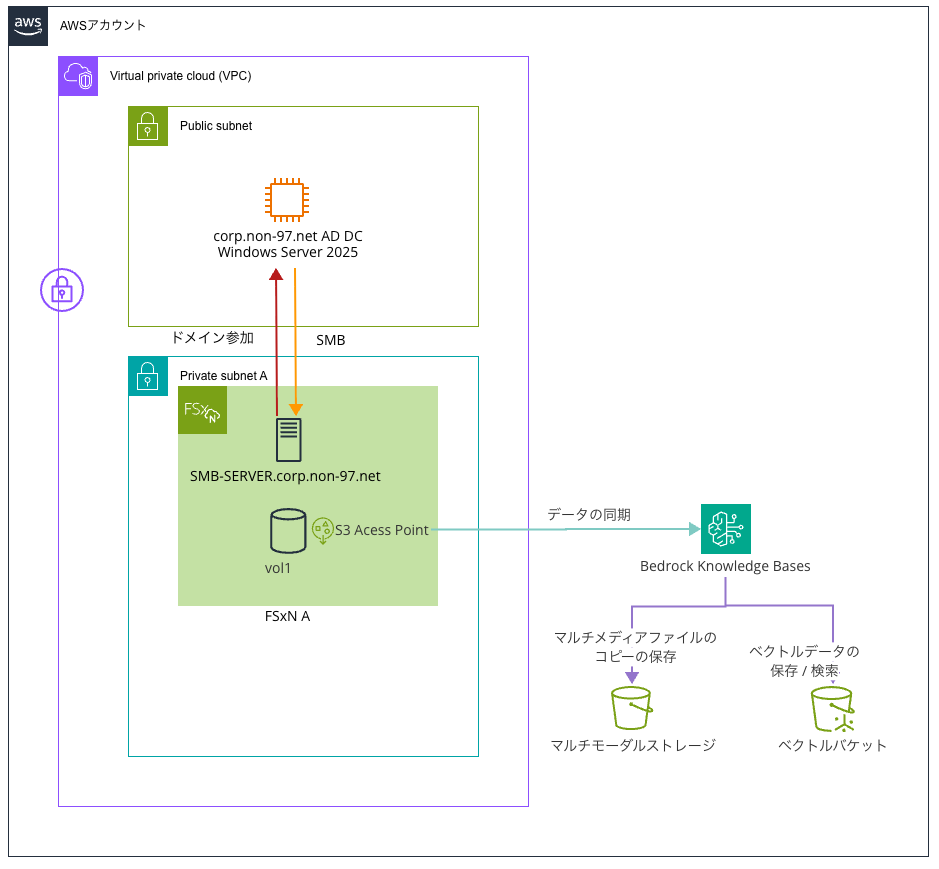
I'm using almost the same environment as in the article mentioned earlier.
When creating the SVM, I configured it to join a domain as follows.
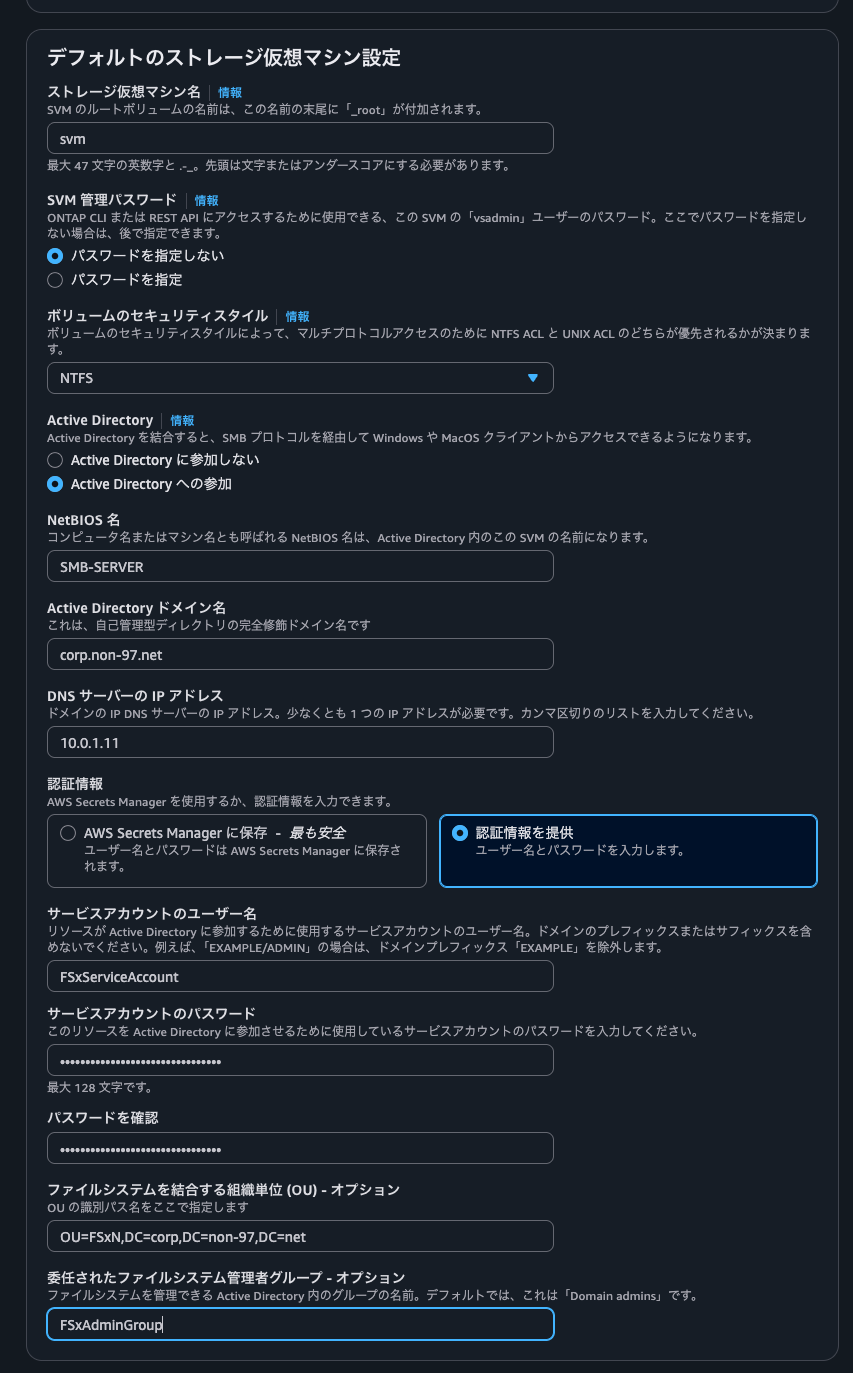
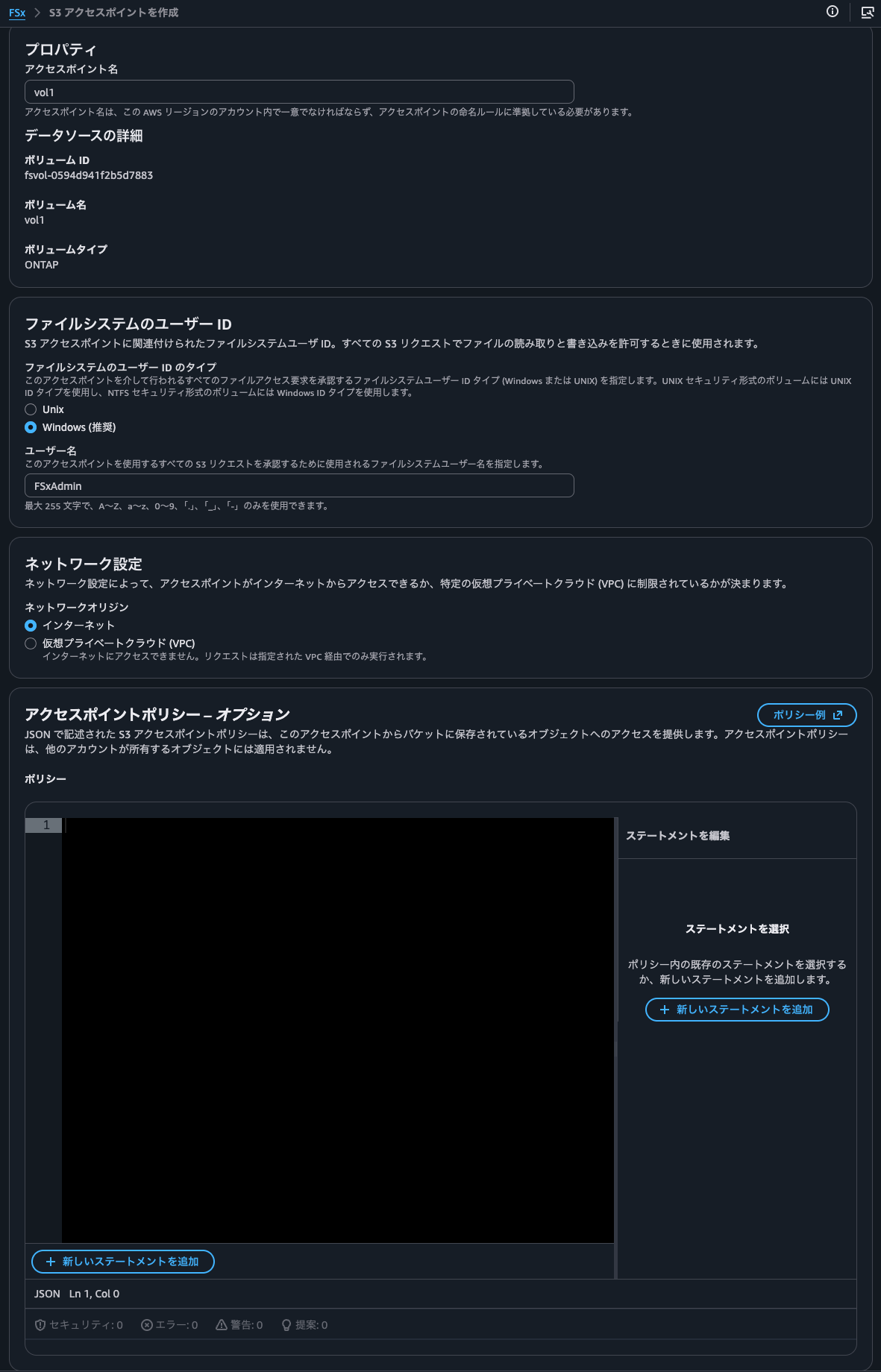
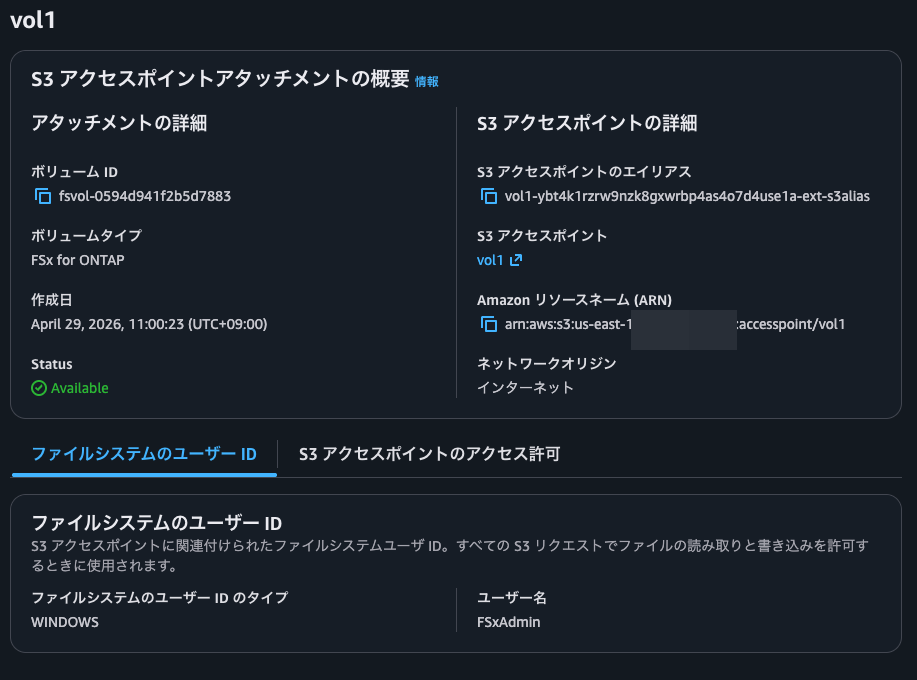
I created the S3 access point as follows. No policy has been defined yet at the time of creation.
Accessing the S3 Access Point with the AWS CLI
Let's access the S3 Access Point with the AWS CLI.
The files currently in the volume are as follows.
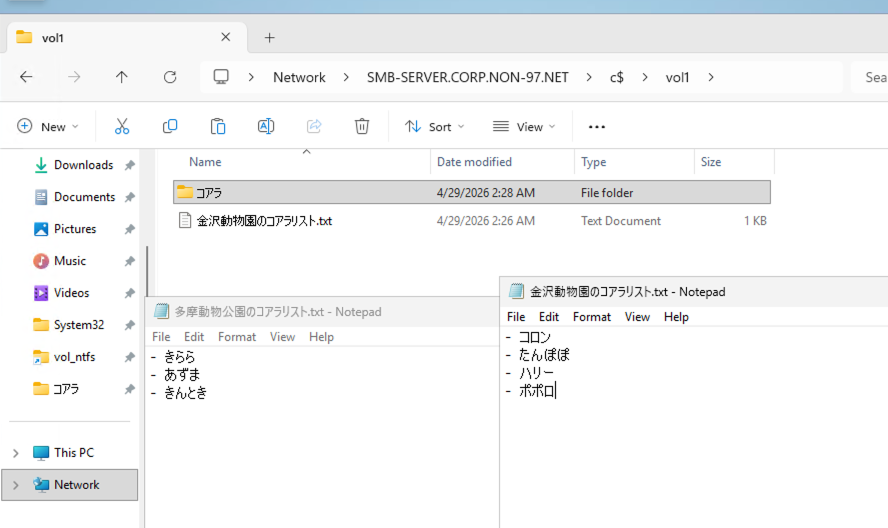
Let's check with the AWS CLI as well.
> aws s3 ls s3://vol1-ybt4k1rzrw9nzk8gxwrbp4as4o7d4use1a-ext-s3alias/
                           PRE コアラ/
2026-04-29 11:26:11         53 金沢動物園のコアラリスト.txt

> aws s3 ls s3://vol1-ybt4k1rzrw9nzk8gxwrbp4as4o7d4use1a-ext-s3alias/コアラ
                           PRE コアラ/

> aws s3 ls --recursive s3://vol1-ybt4k1rzrw9nzk8gxwrbp4as4o7d4use1a-ext-s3alias
2026-04-29 11:27:57    2870346 コアラ/こまち.jpeg
2026-04-29 11:25:08         40 コアラ/多摩動物公園のコアラリスト.txt
2026-04-29 11:26:11         53 金沢動物園のコアラリスト.txt

> aws s3 cp s3://vol1-ybt4k1rzrw9nzk8gxwrbp4as4o7d4use1a-ext-s3alias/金沢動物園のコアラリスト.txt -
- コロン
- たんぽぽ
- ハリー
- ポポロ%

> aws s3 cp s3://vol1-ybt4k1rzrw9nzk8gxwrbp4as4o7d4use1a-ext-s3alias/コアラ/多摩動物公園のコアラリスト.txt -
- きらら
- あずま
- きんとき%
Yes, we can access them without any problem.
In this state, I'll set a policy on the S3 Access Point.
The policy I set is as follows.
{
  "Version": "2012-10-17",
  "Statement": [
    {
      "Sid": "DenyAllKoalaObjectActions",
      "Effect": "Deny",
      "Principal": "*",
      "Action": "s3:*",
      "Resource": "arn:aws:s3:us-east-1:<AWSアカウントID>:accesspoint/vol1/object/コアラ/*"
    },
    {
      "Sid": "DenyKoalaListing",
      "Effect": "Deny",
      "Principal": "*",
      "Action": "s3:ListBucket",
      "Resource": "arn:aws:s3:us-east-1:<AWSアカウントID>:accesspoint/vol1",
      "Condition": {
        "StringLike": {
          "s3:prefix": ["コアラ/*", "コアラ"]
        }
      }
    }
  ]
}
No errors occurred when setting the policy.
In this state, let's run the same commands as before.
> aws s3 ls s3://vol1-ybt4k1rzrw9nzk8gxwrbp4as4o7d4use1a-ext-s3alias/
                           PRE コアラ/
2026-04-29 11:26:11         53 金沢動物園のコアラリスト.txt

> aws s3 ls s3://vol1-ybt4k1rzrw9nzk8gxwrbp4as4o7d4use1a-ext-s3alias/コアラ

aws: [ERROR]: An error occurred (AccessDenied) when calling the ListObjectsV2 operation: User: arn:aws:sts::<AWSアカウントID>:assumed-role/cm-yamamoto.ryota/cm-yamamoto.ryota is not authorized to perform: s3:ListBucket on resource: "arn:aws:s3:us-east-1:<AWSアカウントID>:accesspoint/vol1" with an explicit deny in a resource-based policy

> aws s3 ls --recursive s3://vol1-ybt4k1rzrw9nzk8gxwrbp4as4o7d4use1a-ext-s3alias
2026-04-29 11:27:57    2870346 コアラ/こまち.jpeg
2026-04-29 11:25:08         40 コアラ/多摩動物公園のコアラリスト.txt
2026-04-29 11:26:11         53 金沢動物園のコアラリスト.txt

> aws s3 cp s3://vol1-ybt4k1rzrw9nzk8gxwrbp4as4o7d4use1a-ext-s3alias/金沢動物園のコアラリスト.txt -
- コロン
- たんぽぽ
- ハリー
- ポポロ%

> aws s3 cp s3://vol1-ybt4k1rzrw9nzk8gxwrbp4as4o7d4use1a-ext-s3alias/コアラ/多摩動物公園のコアラリスト.txt -
download failed: s3://vol1-ybt4k1rzrw9nzk8gxwrbp4as4o7d4use1a-ext-s3alias/コアラ/多摩動物公園のコアラリスト.txt to - An error occurred (403) when calling the HeadObject operation: Forbidden
Yes, as specified in the policy, an error occurred when trying to access a key starting with コアラ by specifying it. So control with multibyte characters works without any problem.
The key point is that an error occurs only when it is specified. Even if the results include items starting with コアラ, they cannot be controlled. This is because the policy controls the request, not the response.
Synchronization with Bedrock Knowledge Bases
I'll also check synchronization with Bedrock Knowledge Bases.
Before the policy change, it was already in a synchronized state. When I ran a sync after the policy change, no sync error occurred.
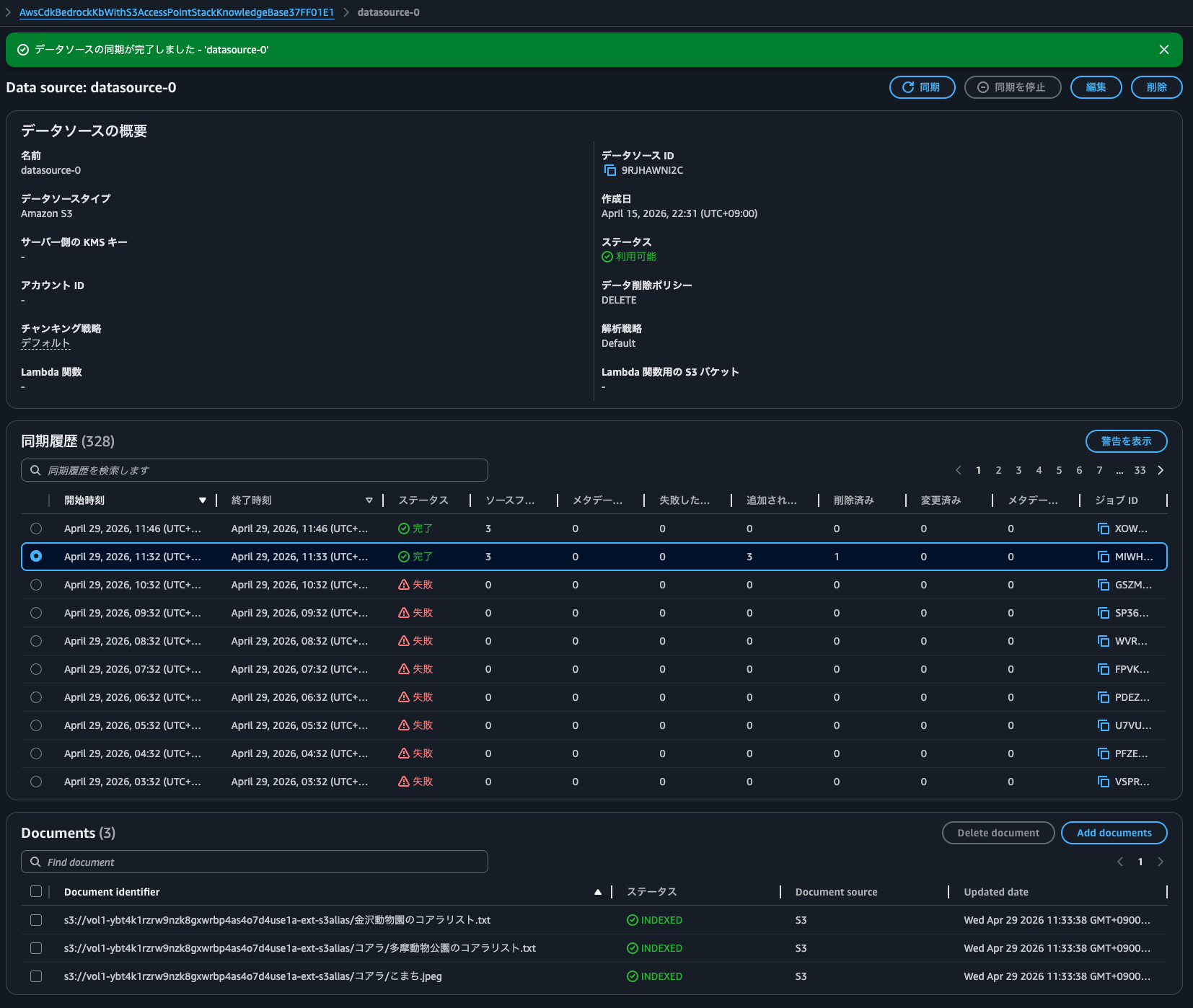
As with the AWS CLI test above, it seems that if it retrieves the object list and the metadata shows no difference from what is registered in Bedrock Knowledge Bases, it doesn't access the objects.
I'll recreate the Bedrock Knowledge Bases and run the sync again.
Then, the sync failed as follows.
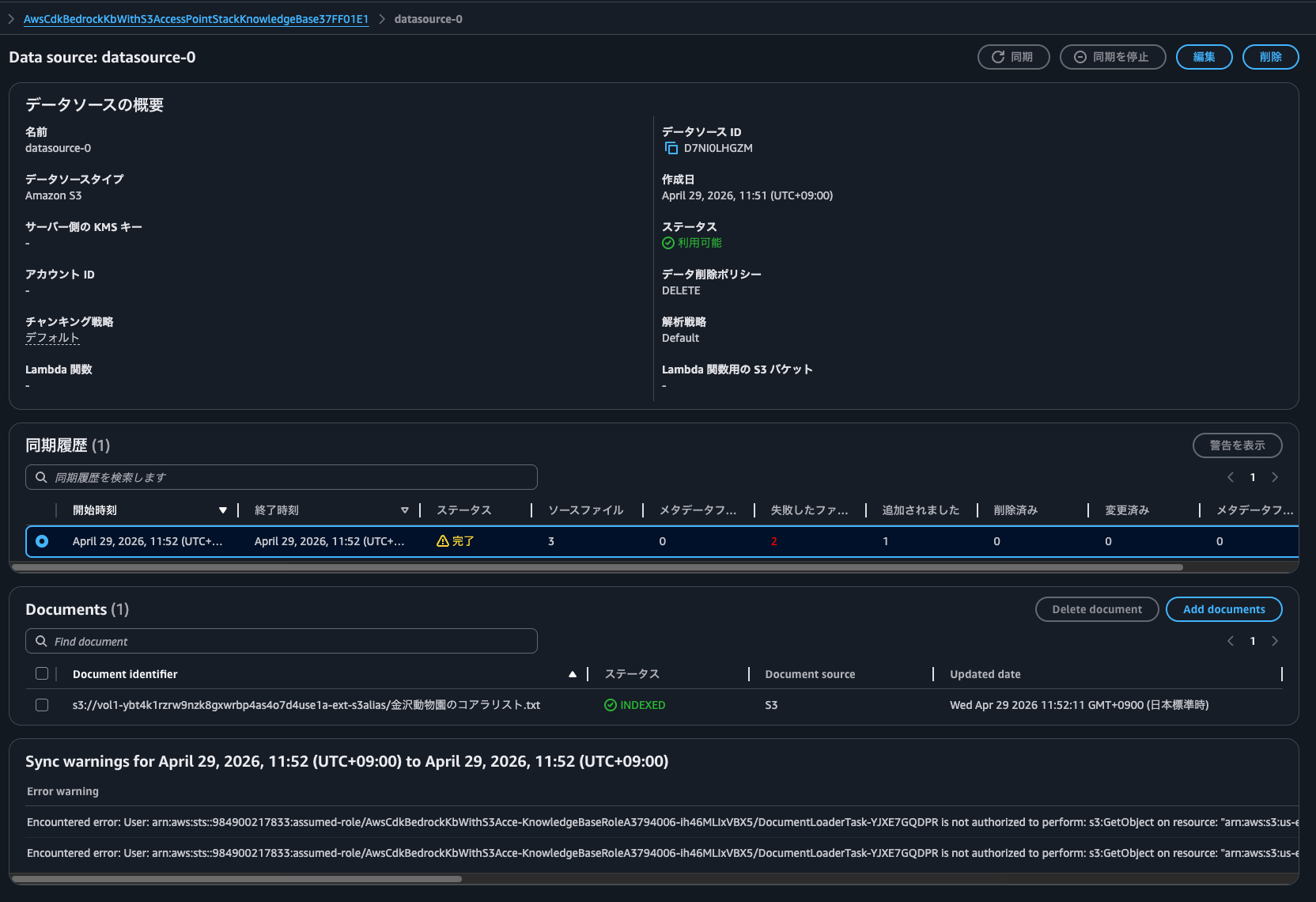
Checking the error details shows the following, and we can see that the error occurred because it tried to access files not permitted by the policy.
Encountered error: User: arn:aws:sts::<AWSアカウントID>:assumed-role/AwsCdkBedrockKbWithS3Acce-KnowledgeBaseRoleA3794006-ih46MLIxVBX5/DocumentLoaderTask-YJXE7GQDPR is not authorized to perform: s3:GetObject on resource: "arn:aws:s3:us-east-1:<AWSアカウントID>:accesspoint/vol1/object/コアラ/多摩動物公園のコアラリスト.txt" with an explicit deny in a resource-based policy (Service: S3, Status Code: 403, Request ID: G1CAE873CN4XQQ53, Extended Request ID: Kiz79+w0D+KwUaH1uwXtKotLOgZNDioa+H4WqLelUCq2Fy3yXkP1Lx0jSQMKjoleW7RdXZv4HBw=) (SDK Attempt Count: 1). Issue occurred while processing file: コアラ/多摩動物公園のコアラリスト.txt. Call to Customer Source did not succeed.
Encountered error: User: arn:aws:sts::<AWSアカウントID>:assumed-role/AwsCdkBedrockKbWithS3Acce-KnowledgeBaseRoleA3794006-ih46MLIxVBX5/DocumentLoaderTask-YJXE7GQDPR is not authorized to perform: s3:GetObject on resource: "arn:aws:s3:us-east-1:<AWSアカウントID>:accesspoint/vol1/object/コアラ/こまち.jpeg" with an explicit deny in a resource-based policy (Service: S3, Status Code: 403, Request ID: G1C62Q6H8RFEK8A6, Extended Request ID: hiiMFfz3AS+SP1OwPhbyn8Nc+w4XqKjC8RA8E+tHLH8OyCzqq7qhY4vINhwvXMlkMG32fZ1lOy8=) (SDK Attempt Count: 1). Issue occurred while processing file: コアラ/こまち.jpeg. Call to Customer Source did not succeed.
S3 Access Point can be used without problems even in environments that use multibyte characters
I checked whether multibyte characters can be used in the policy of an Amazon FSx for NetApp ONTAP S3 Access Point.
In conclusion, I believe S3 Access Point can be used without problems even in environments that use multibyte characters. However, S3 API clients do not necessarily support multibyte characters, so be careful about that.
I hope this article helps someone.
This was Non-pi (@non____97) from the Consulting Department, Cloud Business Unit!