Check if switching AmazonEC2RoleforSSM to AmazonSSMManagedInstanceCore causes any issues

This page has been translated by machine translation. View original
Introduction
Hello everyone, I'm Akaike.
Have you ever encountered a managed policy called AmazonEC2RoleforSSM in an IAM role attached to an EC2 instance?
I have.
This policy has been announced as deprecated, and replacing it with AmazonSSMManagedInstanceCore is recommended. However, when it actually comes time to switch, I found myself feeling uneasy, thinking "since this change restricts permissions, I'm worried it might break something that's currently working…"
So this time, I've summarized the permission differences between both policies and how to verify whether switching from AmazonEC2RoleforSSM to AmazonSSMManagedInstanceCore is safe.
AmazonEC2RoleforSSM and AmazonSSMManagedInstanceCore
Before getting into the main topic, let me organize what kind of relationship these two policies have.
Simply put, they are positioned as follows.
AmazonEC2RoleforSSM(old)- In addition to core Systems Manager features, includes broad permissions such as Session Manager, domain join, CloudWatch, and command output to S3
AmazonSSMManagedInstanceCore(new)- Contains only the minimum permissions required for core Systems Manager functionality
AWS announced the deprecation of AmazonEC2RoleforSSM as of 2019, and replacing it with the least-privilege AmazonSSMManagedInstanceCore is recommended.
Of course, since it's only deprecated, permissions won't be immediately revoked from roles that already have it attached. However, it's a good idea to proceed with replacing it with AmazonSSMManagedInstanceCore whenever you rebuild resources, such as when setting up new servers or rebuilding servers during OS updates.
Permission Differences Between Both Policies
As mentioned earlier, AmazonSSMManagedInstanceCore only covers core functionality and Session Manager, so if you're using other features, additional policies will be required. This is the most important point when switching.
When comparing the actual policy JSONs, the differences that arise from switching are as follows.
Permissions added in AmazonSSMManagedInstanceCore
ssm:GetParameter
Permissions removed in AmazonSSMManagedInstanceCore
cloudwatch:PutMetricData

ec2:DescribeInstanceStatus

ds:CreateComputer
ds:DescribeDirectories

logs:CreateLogGroup
logs:CreateLogStream
logs:DescribeLogGroups
logs:DescribeLogStreams
logs:PutLogEvents

s3:GetBucketLocation
s3:PutObject
s3:GetObject
s3:GetEncryptionConfiguration
s3:AbortMultipartUpload
s3:ListMultipartUploadParts
s3:ListBucket
s3:ListBucketMultipartUploads
The added ssm:GetParameter doesn't need to be a concern,
but the potentially problematic side is what gets removed, with each serving the following purposes.
ds:*- Seamless Domain Join (joining EC2 to an Active Directory domain)
cloudwatch:PutMetricData/logs:*- Sending metrics and logs via the CloudWatch agent, and outputting Session Manager and Run Command logs to CloudWatch Logs
s3:*- Outputting Session Manager session logs and Run Command execution results to S3 buckets
ec2:DescribeInstanceStatus- Viewing instance status
If you are not using these permissions, switching to AmazonSSMManagedInstanceCore will have no impact.
Conversely, if you are using the above features, you will need to additionally attach the corresponding policies (AmazonSSMDirectoryServiceAccess, CloudWatchAgentServerPolicy, custom policies for S3, etc.) at the same time as switching.
The contents of both policies are as follows.
Investigation Method
Now that we understand the differences, let's verify whether switching is safe.
What to do is simple: confirm that the target role is not actually using the permissions being removed (ds:*, cloudwatch:PutMetricData, logs:*, s3:*, ec2:DescribeInstanceStatus).
There are two main approaches to verification.
- Code base
- Statically verify from the code base (IaC and configurations) that no features depending on the permissions being removed are in use
- API execution history
- Verify from CloudTrail that the role has not actually called the relevant APIs
Since relying on only one of these approaches can lead to oversights, it's recommended to use both in combination.
Code Base
First, check the code base and configurations to confirm that no features related to the permissions being removed are in use.
Specifically, check the following points.
- Does the IaC (CloudFormation, Terraform, etc.) or EC2 launch template directly reference
AmazonEC2RoleforSSM?- If it does, the reference will also need to be updated at the time of switching
- Is there a configuration to output Session Manager session logs or Run Command execution results to an S3 bucket or CloudWatch Logs?
- Check the Session Manager settings (Preferences) and the log output destination settings when executing Run Command
- If outputting,
s3:*andlogs:*will be required
- Is the CloudWatch agent installed?
- If installed,
cloudwatch:PutMetricDataandlogs:*will be required
- If installed,
- Is EC2 Active Directory domain join (Seamless Domain Join) being used?
- If in use,
ds:*will be required
- If in use,
For any features found to be "in use" here, you can simply attach the corresponding policies (CloudWatchAgentServerPolicy, AmazonSSMDirectoryServiceAccess, custom policies for S3) at the same time as switching.
API Execution History
Along with the code base verification, it's reassuring to also cross-check with actual API execution history.
Here, we use CloudTrail to verify from the event history whether the target instance has ever called APIs corresponding to the permissions being removed.
In the CloudTrail event history screen, you can narrow down by specifying the role session name in Username or specifying the API name in Event name.
When checking from the CLI, you can search the call history for a specific API using commands like the following.
# Example: Search call history for ds:CreateComputer (domain join) (last 90 days, management events)
aws cloudtrail lookup-events \
  --lookup-attributes AttributeKey=EventName,AttributeValue=CreateComputer \
  --start-time "$(date -u -d '90 days ago' +%Y-%m-%dT%H:%M:%SZ)" \
  --query 'Events[].{Time:EventTime,User:Username,Event:EventName}' \
  --output table
# Example: Search for API calls from a specific EC2 (instance ID)
#     Since the instance ID is included in the EC2 role session name, filter by that
aws cloudtrail lookup-events \
  --lookup-attributes AttributeKey=Username,AttributeValue=i-0123456789abcdef0 \
  --start-time "$(date -u -d '90 days ago' +%Y-%m-%dT%H:%M:%SZ)" \
  --query 'Events[].{Time:EventTime,User:Username,Event:EventName}' \
  --output table
If no calls to the relevant APIs are found, it can be judged that those permissions are likely not being used.
Notes
When checking with CloudTrail, please be aware of the following two points.
- S3 object operations (such as
s3:PutObject) are classified as data events and are not recorded by default. Therefore, if data events are not being recorded, make your judgment primarily based on the code base verification. aws cloudtrail lookup-events(event history) can only look back 90 days of management events. If you want to target a longer period, consider using Trails or CloudTrail Lake.
For details, refer to CloudTrail management events and data events.
Supplement: Also Utilize IAM Access Advisor
IAM last accessed information (Access Advisor) is also useful as a supplementary verification tool.
This feature displays which services an IAM role last accessed, and if there is no record of the target role accessing certain AWS services, it serves as grounds for judging that those permissions are not being used.
Unlike CloudTrail, it is at the service-level granularity, but since it can be checked immediately without any additional configuration, it is suitable for initial assessment.
From the details screen of the policy attached to the target role, open the Last accessed tab to view a list of the last access dates for each service permitted by that policy.
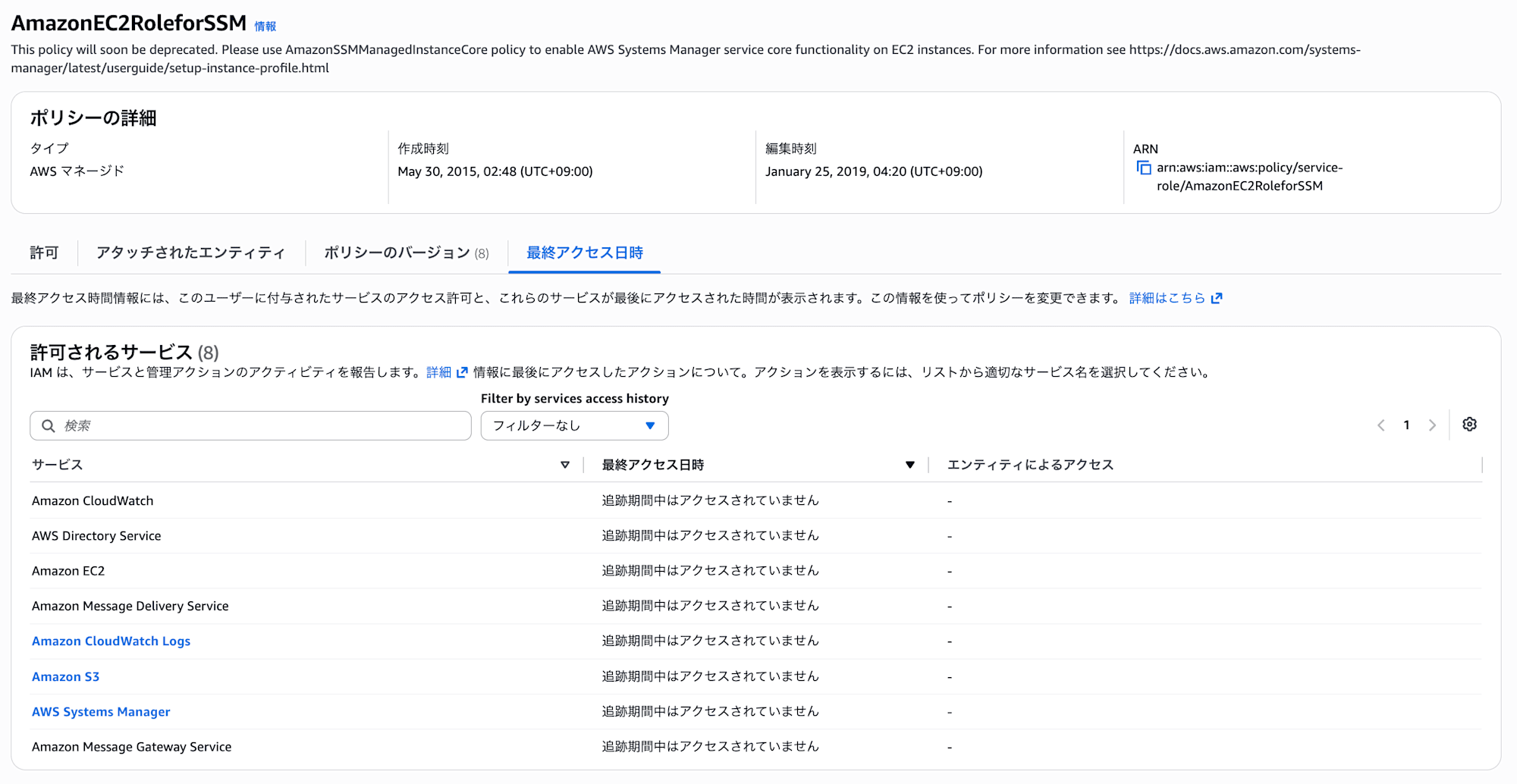
The screen above is for AmazonEC2RoleforSSM. Services corresponding to permissions removed by the switch—such as CloudWatch, Directory Service, S3, and CloudWatch Logs—all show Not accessed during the tracking period, which serves as evidence that these features are not being used.
Furthermore, clicking on a service name allows you to drill down to see which roles (entities) accessed that service and when.
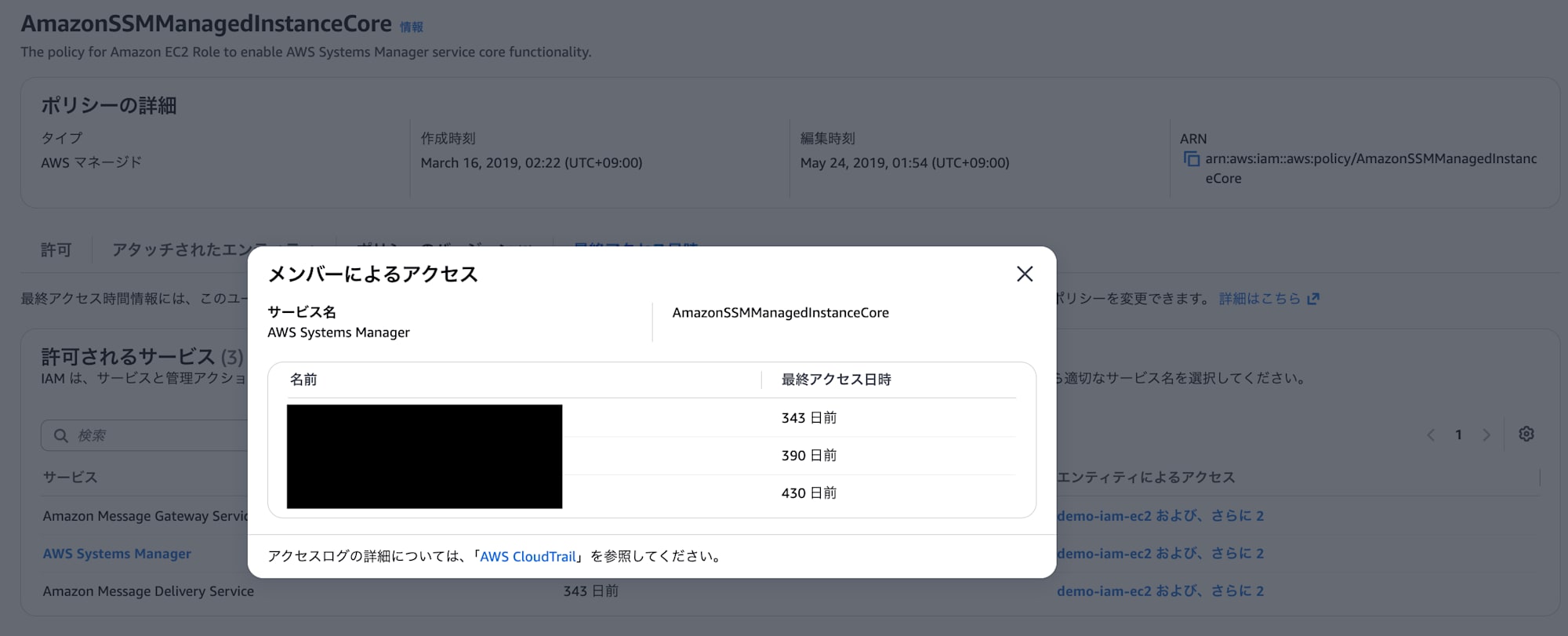
This is the screen showing Access by members for AWS Systems Manager.
Since the last access date (343 days ago, 390 days ago, and 450 days ago in this example) is displayed per role, you can individually understand which roles are actually using it.
Conclusion
That covers how to verify whether switching from AmazonEC2RoleforSSM to AmazonSSMManagedInstanceCore is safe.
I hope this serves as a helpful reference for those planning to proceed with the policy migration.
