
I checked what changed since Automated Security Response on AWS was updated to v4.0.0

This page has been translated by machine translation. View original
Introduction
Are you using Automated Security Response on AWS (hereinafter ASR)? While browsing update information, I noticed there was an update to ASR.
From the title alone, it looks like an update that simply "adds an AI Toolkit." However, when I checked the CHANGELOG on GitHub, it turned out that numerous changes were bundled together and released as v4.0.0. This article summarizes what changed across v4.0.0 as a whole.
What Changed
I have organized the main additions in v4.0.0 (released 2026-08-26).
Expanded Automated Remediation for Inspector, GuardDuty, and Macie Findings
Until now, ASR focused primarily on remediation for Security Hub CSPM standard controls (CIS, AFSBP, PCI DSS, NIST 800-53, etc.). With this release, remediation is now also provided for findings detected by Amazon Inspector, Amazon GuardDuty, and Amazon Macie.
Inspector.InstanceVulnerability: Automatic patch application for package vulnerabilities on EC2 instancesGuardDuty.IAMUser: Response to findings where IAM credential compromise is suspected. UsesAWSSupport-ContainIAMPrincipalto disable access keys and block console accessMacie.SensitiveDataS3Object: Enable Block Public Access on S3 buckets where sensitive data was detected
GuardDuty.IAMUser and Macie.SensitiveDataS3Object are positioned as containment steps before root cause remediation. According to the GitHub description, findings after execution become IN_PROGRESS and root cause remediation requires manual confirmation. On the other hand, Inspector.InstanceVulnerability applies patches directly via Systems Manager Patch Manager, making it an actual fix rather than containment.
Enhanced Web UI and Findings Notifications
The Web UI has been revamped, making centralized management of controls easier. In addition, notifications to Email, Slack, Jira, and ServiceNow are now supported. The actual screens are described later.
AI Toolkit for Custom Remediations
This feature assists an AI assistant when writing custom remediations for ASR, using guided prompts and built-in guardrails. It is intended to be loaded into tools like Claude Code or Amazon Q Developer, and does not call a runtime such as Bedrock.
Looking at the GitHub repository, the actual content is the file ai-assets/prompts/remediation-generator-system-prompt.md. It contains detailed guardrails such as naming conventions required by ASR, least-privilege IAM role practices, and rules like "always include a verification step at the end of a remediation." It does not change deployment or runtime remediation behavior itself — it is purely a development-support prompt.
API Access via M2M Authentication
Previously, operating the ASR API required authentication as a human Cognito user logged into the Web UI. Looking at the source code on GitHub (cognito-construct.ts), v4.0.0 adds a method for registering a confidential client with Cognito. An access token can be obtained using the OAuth2 client_credentials grant, and this token is granted the asr-api/full-access scope, equivalent to administrator access.
In other words, it is now possible to call the ASR API programmatically without a person logging in. Compliance status can be checked from a CI/CD pipeline before deployment. It also seems possible to retrieve findings, execute remediations, and enable controls from an internal automation platform or ChatOps bot.
This API access becomes available when the Web UI is enabled. AWS WAF rate-based rules and API Gateway throttling were also added alongside this.
New Control Remediations
Three new control remediations have been added.
S3.14: Enable versioning on S3 bucketsS3.11: Configure event notifications on S3 bucketsCloudFormation.3: Enable termination protection on CloudFormation stacks
With these feature additions, the architecture now looks like the following.
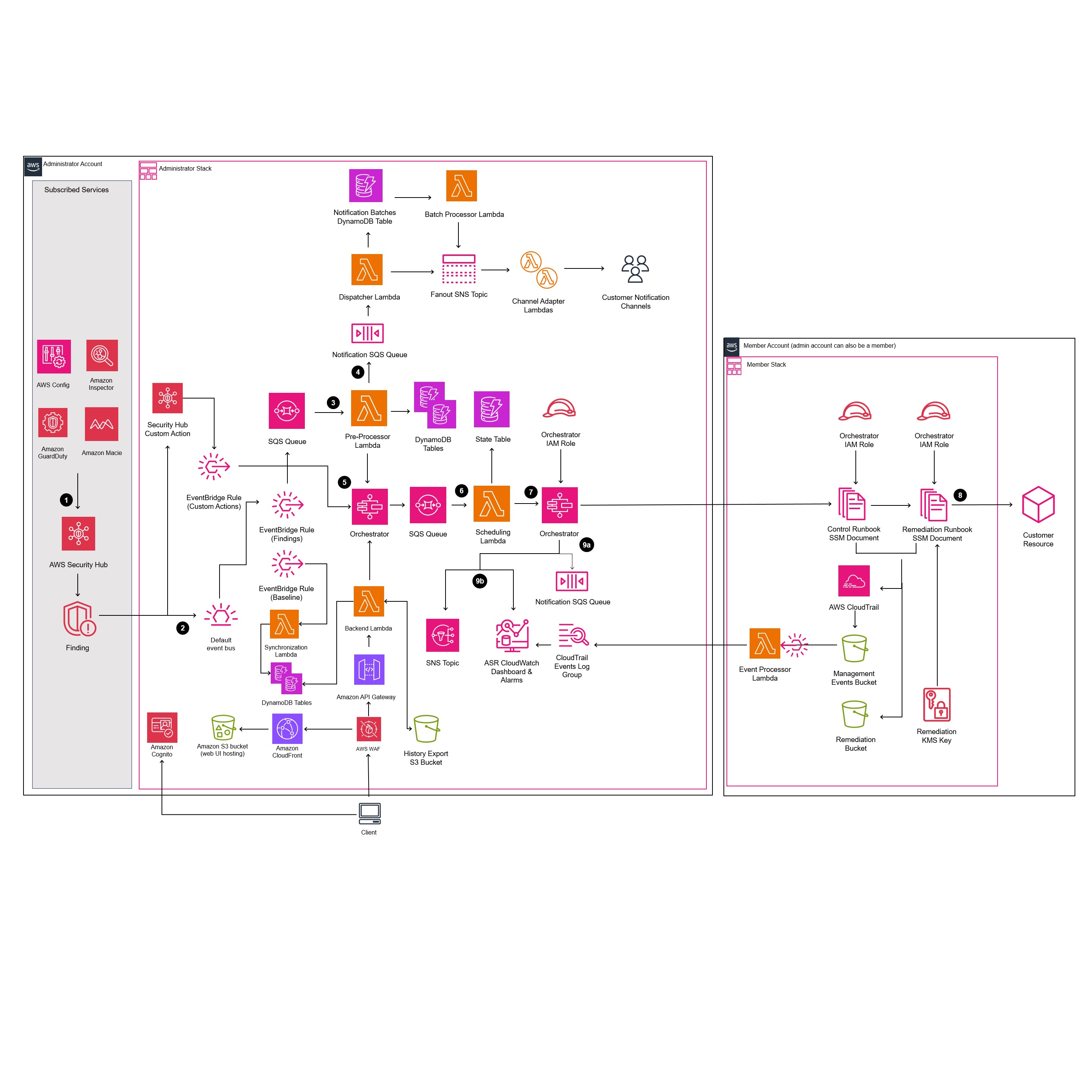
Quoted from Architecture overview - Automated Security Response on AWS.
The impression is that resources around finding sources and notifications have increased significantly.
Changes to Watch Out for for Existing Users
If you are already operating ASR, there are several points to check when upgrading to v4.0.0.
Migration of Auto-Remediation Settings
Up to v2.x, auto-remediation enable/disable was managed via EventBridge rules for each control. From v3 onward, this changed to management via a DynamoDB table, and when upgrading to v4.0.0, a custom resource runs to automatically migrate v2 settings.
Controls that could not be migrated will be output as a list in the CloudWatch Logs of a Lambda function named SO0111-ASR-MigrationAutoRemediation. If migration fails, a notification is also sent to an SNS topic named SO0111-ASR_Topic. This ARN can be retrieved from the SSM parameter /Solutions/SO0111/SNS_Topic_ARN, and a confirmed subscription to this topic is required before upgrading. If you upgrade without subscribing, CloudWatch Logs will be the only way to notice failures.
For upgrades from v3.x or later, this migration is unnecessary and settings are carried over as-is.
Direct Upgrade May Not Be Possible Depending on Version
If upgrading from v2.1.4 or earlier, you cannot go directly to v4.0.0. You must go through v2.3.0 first; any other path will cause the stack update to fail. Upgrading from v2.0.x also requires first upgrading to v2.3.0.
Upgrades from below v1.4 are not covered by stack updates — you will need to uninstall and then perform a fresh installation of the latest version.
Bug Fix for IAM Password Policy Default Value
There was also a bug fix in the remediation runbook called ASR-SetIAMPasswordPolicy. The issue was that the default value of MaxPasswordAge was 0, which is not accepted by the IAM UpdateAccountPasswordPolicy API. This reportedly affected controls IAM.7 and IAM.11 through IAM.17. If you have auto-remediation enabled for these controls, it would be worth checking for changes in behavior.
Cleanup of Deprecated Controls
Four controls — CloudFormation.1, CodeBuild.5, S3.4, and SNS.2 — have been excluded from active remediation targets following their deprecation on the AWS side.
Deploying and Verifying Behavior
I actually deployed ASR v4.0.0 to a single AWS account for verification and checked its behavior. It works on a single account without using Organizations, as long as Security Hub CSPM is enabled.
Deployment Steps
Using the official templates as-is, I deployed in order Admin → Member-Roles → Member using the AWS CLI. Each preceding stack must be complete before executing the next.
aws cloudformation create-stack \
  --stack-name automated-security-response-on-aws-admin \
  --template-url "https://s3.amazonaws.com/solutions-reference/automated-security-response-on-aws/latest/automated-security-response-admin.template" \
  --parameters \
    ParameterKey=AdminUserEmail,ParameterValue=xxx@example.com \
    ParameterKey=Namespace,ParameterValue=devioasr \
  --capabilities CAPABILITY_NAMED_IAM CAPABILITY_IAM
After Admin completes, deploy Member-Roles, then Member. Parameters other than the template URL and stack name are mostly the same.
aws cloudformation create-stack \
  --stack-name automated-security-response-on-aws-member-roles \
  --template-url "https://s3.amazonaws.com/solutions-reference/automated-security-response-on-aws/latest/automated-security-response-member-roles.template" \
  --parameters \
    ParameterKey=SecHubAdminAccount,ParameterValue=<account-id> \
    ParameterKey=Namespace,ParameterValue=devioasr \
  --capabilities CAPABILITY_NAMED_IAM CAPABILITY_IAM

aws cloudformation create-stack \
  --stack-name automated-security-response-on-aws-member \
  --template-url "https://s3.amazonaws.com/solutions-reference/automated-security-response-on-aws/latest/automated-security-response-member.template" \
  --parameters \
    ParameterKey=SecHubAdminAccount,ParameterValue=<account-id> \
    ParameterKey=Namespace,ParameterValue=devioasr \
    ParameterKey=LogGroupName,ParameterValue=<multi-region-cloudtrail-log-group> \
    ParameterKey=LoadSCMemberStack,ParameterValue=yes \
  --capabilities CAPABILITY_NAMED_IAM CAPABILITY_IAM
Verifying Newly Added Remediation Documents
When I checked with aws ssm list-documents, 164 SSM Automation documents for ASR had been created. Among these, I was able to confirm that ASR-GuardDuty.IAMUser, which is the actual implementation of the GuardDuty integration, and the three new control remediations actually exist.
> aws ssm list-documents --filters Key=Name,Values=ASR- \
    --query "DocumentIdentifiers[?contains(Name, 'S3.14') || contains(Name, 'S3.11') || contains(Name, 'CloudFormation.3') || contains(Name, 'GuardDuty.IAMUser')].Name" \
    --output text

ASR-GuardDuty.IAMUser  ASR-SC_2.0.0_CloudFormation.3  ASR-SC_2.0.0_S3.11  ASR-SC_2.0.0_S3.14
Checking the Web UI
When I checked the Web UI, a Control Panel had been added to the left navigation, with three items: Controls, Resource Filters, and Notifications.
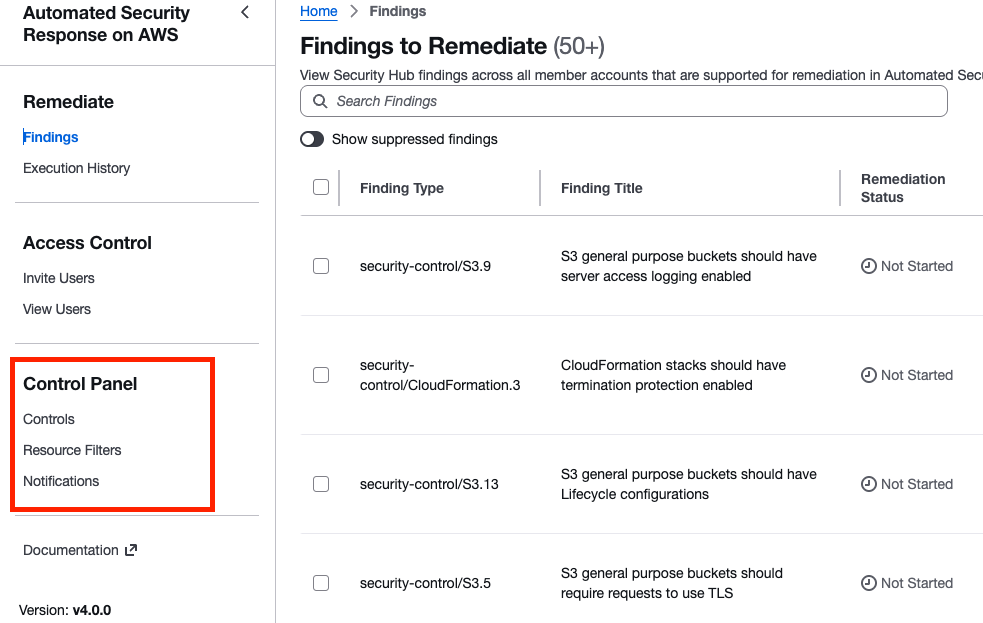
Controls allows you to enable or disable auto-remediation on a per-control basis. Previously it was necessary to directly rewrite DynamoDB values, so this is a quietly appreciated change.
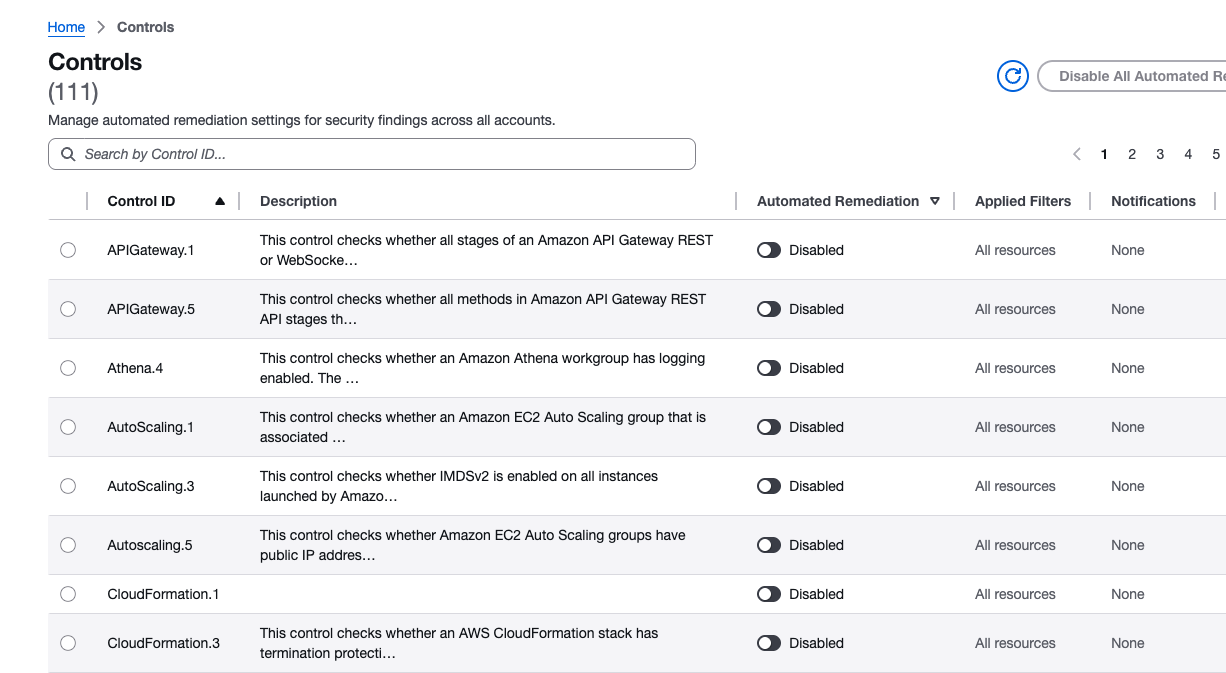
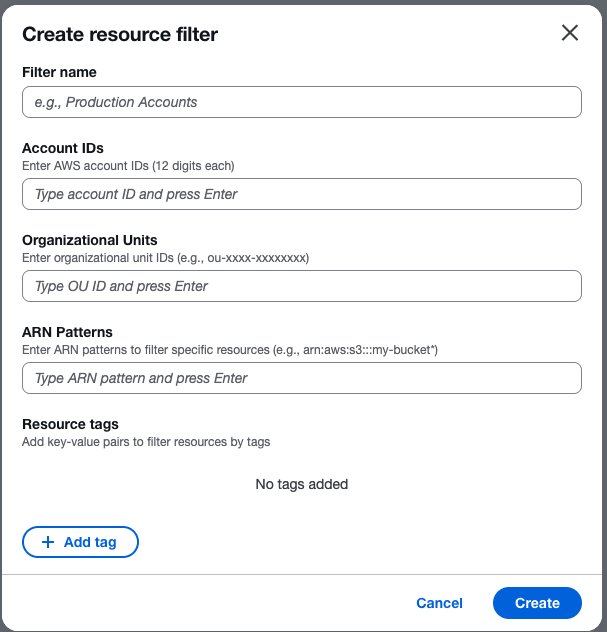
Resource Filters allows you to configure the scope of auto-remediation. In v3, the configuration was done via Systems Manager parameters under ASR/Filters/, but from v4 onward it can be configured from the UI. In addition to account ID, OU, and tags, you can also filter by ARN pattern.
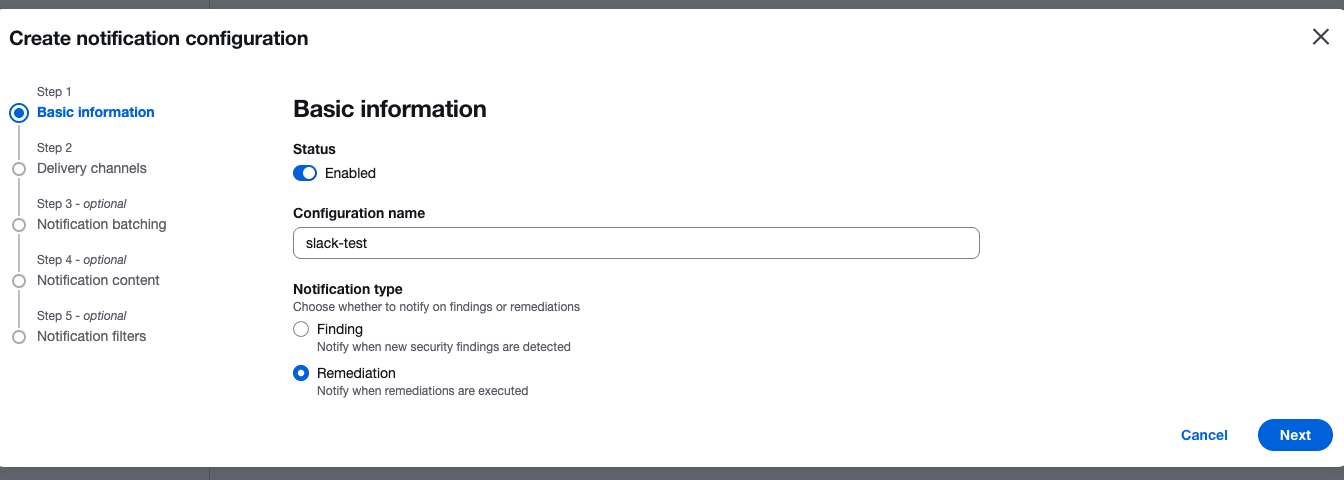
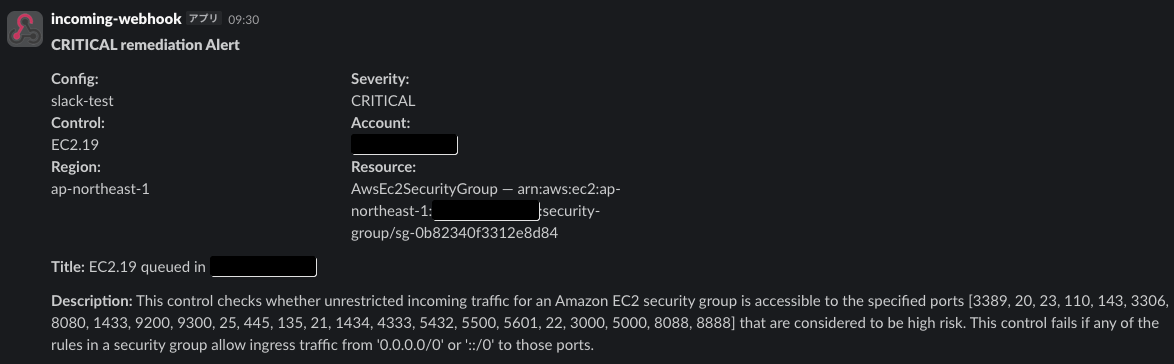
Notifications allows notifications via Email/Slack/Jira/ServiceNow/SNS. Proceeding through the configuration screen, you can choose whether the notification trigger is "when a finding is detected" or "when a remediation is executed."
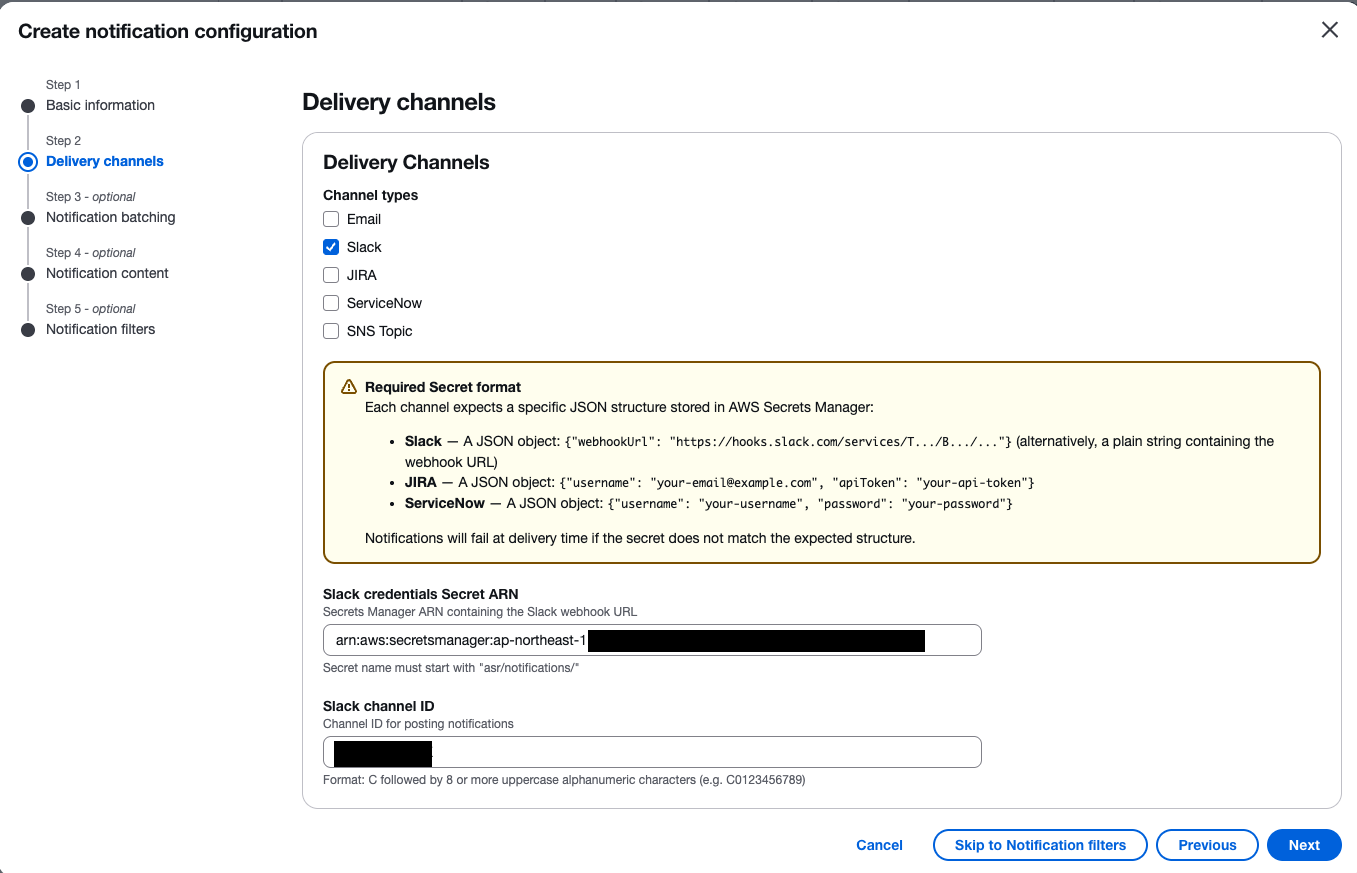
I tried setting up Slack integration. The Webhook URL is registered in Secrets Manager, and note that the secret name must follow the naming convention of starting with asr/notifications/.
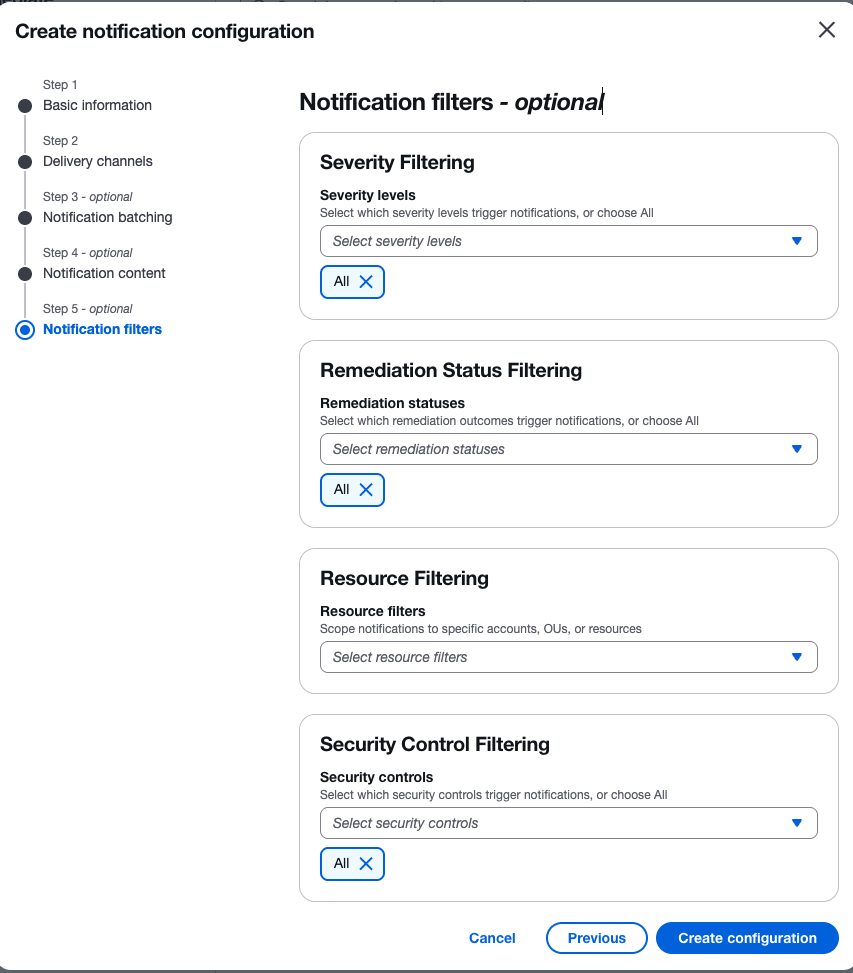
There was also Notification batching, which combines multiple findings into a single message. There is also Notification content, which can attach IaC remediation code, and Notification filters, which can filter by severity, remediation status, resource, and control. I proceeded without configuring these here.
When I tried a manual remediation, a notification arrived in Slack.
Summary
I reviewed what changed in Automated Security Response on AWS v4.0.0 using the CHANGELOG and source code on GitHub. Beyond the AI Toolkit, this was an update with many changes, including a revamped Web UI, expanded security service integrations, M2M authentication, and new controls.
In particular, the Web UI now enables operations that previously could only be done outside the UI, so please give it a try.
That's all from Jun Suzuki.
