
What I thought about when working on improvements to AWS account deletion operations - How to avoid local optimization and the "isolate then delete" Organizations separation method for deletion

This page has been translated by machine translation. View original
Hey there! I'm Yuji Nishimura from the Operations Department!
At Classmethod, we manage a large number of AWS accounts as part of our comprehensive AWS support services.
Not only do we provision accounts, but account deletions accompanying contract terminations are also a regular daily operation.
Among account management tasks, "deleting AWS accounts" is probably one of the more mentally taxing categories. The operation is irreversible, and a mistake could wipe out a customer's environment, so it had long been handled manually with multiple rounds of double-checking by human staff.
Meanwhile, as the number of accounts under management grew, so did the volume of deletions. Because of the sensitive nature of the work, outsourcing was difficult, and a system where a small number of core members—who also handled other duties—dealt with everything manually led to problems such as longer lead times and an inability to meet customers' preferred dates.
So I took the lead on automating and streamlining this AWS account deletion workflow, and for accounts meeting certain conditions, built and launched a flow that requires almost no human intervention from intake to execution of deletion. In this article, I'll share my thinking throughout the process and the architecture I developed for safely automating irreversible deletions—what I call the Deletion-Dedicated Organizations Isolation Method.
The deletion workflow was held together by "human carefulness"
Before the improvement, the deletion workflow was a relay of manual tasks spanning multiple teams.
Customer cancellation request
     │
     ▼
Assistant
  - Receive the request
  - Manual pre-checks (resource confirmation, contract status, request content verification, etc.)
     │
     ▼  Work request
Account Team
  - Confirm whether deletion is possible (adjust deletion schedule, etc.)
  - Double-check Organizations operations, account closure, internal system cancellation processing
  - Record work, report completion
     │
     ▼
Complete
The defining characteristic of this flow is that quality was almost entirely dependent on "people being careful not to make mistakes." There were many items to check, human verification was required for each case, and wait times accumulated from requests and handoffs between teams. And since deletion is an irreversible operation, the person executing it faced a certain level of tension every time.
The first thing I did wasn't write code—it was lay out the workflow
This initiative started as a story about improving efficiency only on the Account Team side, which is the department I belong to. When it comes to improvement, there's a temptation to jump straight into implementing tools for whatever is most immediately at hand. But the first thing I did was take stock of the workflow. Without limiting myself to my own team's scope, I wrote out end-to-end who confirms what and where wait times occur—from the assistant's intake through the Account Team's deletion execution and recordkeeping. I also got to see the work procedure templates the assistants were using, and I went through each checklist item one by one.
Two things became clear once I laid everything out.
The first was that automating only the Account Team's work wouldn't maximize efficiency. Even if only that part were automated, someone on the Account Team would still need to receive the work request, launch the tool, and enter the target—the work would just be replaced by tool operation, and the Account Team's effort wouldn't go to zero. And since the deletion workflow is a relay spanning two teams, speeding up just one leg still leaves the manual work and handoff waits on either side intact. Conversely, improving only the intake side creates a bottleneck at the deletion step downstream. Local optimization yields limited results.
The second was that among the manual checklist items, there were things a system could determine instantly. Checks like whether a duplicate request existed, the contract status, and the configuration of the target account can all be answered mechanically by referencing data.
So I expanded beyond the original scope and reframed the unit of improvement from "a team's work" to "the entire flow of work," designing everything from intake to deletion completion as a single pipeline—including the assistant's work, which belongs to a different department.
- When a support ticket is created, the system checks whether the case can be handled automatically and comments the result on the ticket
- The assistant performs pre-checks as before, and if there are no issues, registers a deletion reservation on the ticket
- Reserved cases proceed automatically through the schedule to deletion, without going through the Account Team
Don't switch all at once. Add one "automated lane" alongside the existing flow.
When a new system is ready, it's possible to decide to replace the existing flow all at once—but that's not the approach I chose. Right after a cutover is exactly when unexpected things tend to happen, and the impact shows up not in the system but in field operations, in the form of handling irregular cases, unfamiliarity with rollback procedures, and confusion during the period when old and new flows coexist. These costs don't appear in design documents, but the people on the ground will definitely pay them.
Instead, I added one "automated lane" alongside the existing flow.
- Don't change the intake point (ticket operations). Keep the additional steps for assistants to just checking a checkbox and registering a reservation
- Keep existing specs as-is, such as the structure of the request form and the rule that "the deletion date is a fixed period after the request." From the customer's perspective, it looks almost the same as the previous manual handling, so there's less risk of confusion from the transition
- The system determines case by case whether automatic processing is possible, and routes only eligible cases into the automated lane. Cases that don't meet the criteria are handled through the manual flow as before
- Start with accounts that have simple configurations and a small blast radius. Accounts with complex configurations are excluded from the initial scope because of the risk of Organizations transfers or SCP application failures. Irregulars like management accounts and large batch deletions are likewise excluded
What I was particularly careful about in this design was not introducing branching into the middle of the workflow. With incremental automation, there will always be cases that "can't be automated" or "require special handling." If this is expressed as a branch in the middle of a procedure, the people on the ground end up having to judge case by case, "from here, is this automatic or manual?"—which actually increases their burden. In fact, in a different system in the past, I was told "I want to stop using this because the procedure gets too complicated." If automation makes field procedures more complex, people won't use it.
So I consolidated the branching to a single entry point. Cases that enter the automated lane at the time of ticket creation go all the way through automatically; cases that don't enter it follow the existing flow from start to finish, with no branching or merging in between. From the field's perspective, the procedure manual is simply two parallel tracks: "the same old one" and "just check and reserve."
However, knowing exactly which cases get special handling and where is something you can only write out after understanding the operations from entry to exit. This is why the initial full workflow inventory matters so much.
With this structure, even if the automation system encounters something unexpected, all you need to do is remove that case from the automated lane and handle it through the traditional flow—the overall operation doesn't stop. The plan is to advance one step at a time: once the first phase is running stably, move on to eliminating the coexistence with manual handling, expanding the scope, and shortening lead times. Alongside this, I record in a measurement sheet the number of cases processed automatically and the reasons cases couldn't be automated, so we can decide which conditions to add to the automatic scope next.
How can accounts be deleted safely?
The thing I agonized over most in designing the automation was the mechanism for safely deleting accounts. To automate deletion, the system needs to be given the strong permission to delete. If that permission is added to the configuration of the existing Organizations where customer accounts reside, bugs or misoperations in the tool become a direct risk to customer environments.
That said, a semi-automated approach that inserts a human check just before execution also has its problems. The system assembles the process, and at the end a person visually confirms it and presses a button. It might seem reassuring, but this is just using human attention as a safety device—as long as that final check remains, human work time and the possibility of oversight never go away. And when you build with the premise that "a person checks at the end so it's fine," the system's own safety design tends to get sloppy.
After thinking it through, I settled on a policy of guaranteeing safety through structure rather than human attentiveness, with minimal human intervention. The design has the system go directly to the filed ticket to get information like the target account ID, eliminating any step where a person transcribes or enters data. On top of that, I made it a design requirement that the deletion process operates safely even when no one is watching. How to achieve this—that's what the following Deletion-Dedicated Organizations Isolation Method addresses.
Isolate first, then delete: The Deletion-Dedicated Organizations Isolation Method
AWS account closure can be executed via the CloseAccount API. The straightforward approach would be to grant closure permissions to the management account of the existing AWS Organizations where the account resides—but as mentioned above, with this approach, if a bug or misoperation occurs, all accounts under the Organization could become deletion targets. "Running a tool with deletion permissions in the same place where production accounts live" is itself the source of risk.
So I flipped the approach: instead, I set up a dedicated Organizations for deletion (the "deletion Org"), isolate the account to be deleted there, and then close it.
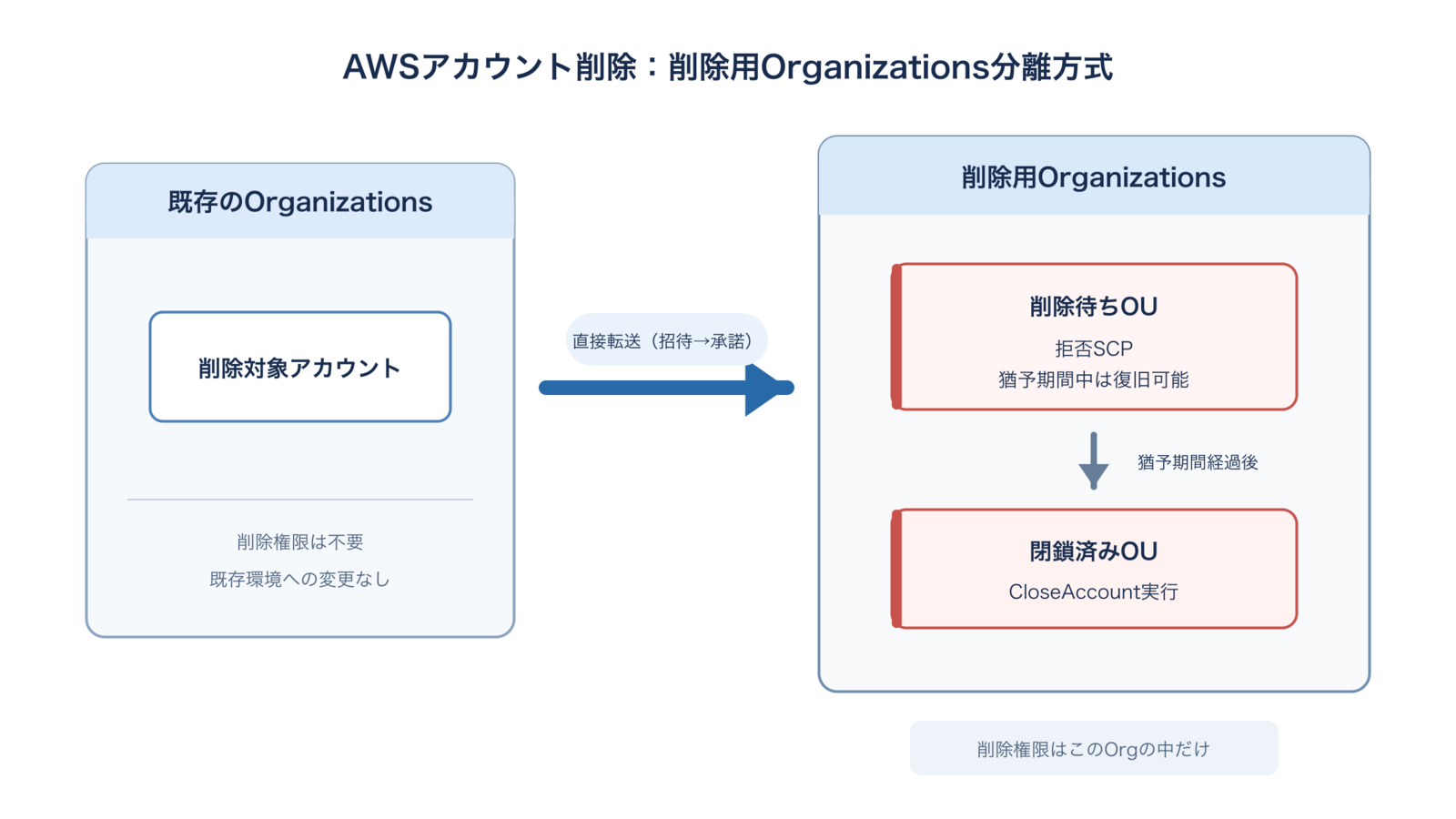
The design leaves the account completely untouched until the day of the scheduled deletion, then moves it to the deletion Org on that day.
Delete in two stages: logical deletion and physical deletion
Deletion is not executed in a single step—it's divided into two stages.
- Logical deletion: Transfer the target account to the deletion Org and move it to the "awaiting deletion OU" (an OU is an organizational unit that groups accounts). An SCP that denies almost all operations is applied to this OU, putting the account in a state where it is effectively unusable. However, since the account itself still exists, it can be restored during this grace period.
- Physical deletion: After the grace period elapses, a scheduled execution moves it to the "closed OU" and runs CloseAccount.
The design inserts one cancellable state before the irreversible closure. If an erroneous request is discovered, simply canceling the schedule registration is all that's needed before the scheduled deletion date. Even on the day of the scheduled date, if it's still within the logical deletion grace period, all you need to do is move it back to the original Organizations. Furthermore, per AWS specifications, an account can be recovered within 90 days of closure. This gives three layers of cancellation options.
Safety is guaranteed through separation of permissions
In this method, the permission to execute closure exists only within the deletion Org.
Even if the automation tool runs amok due to a bug and issues a deletion command for the wrong account ID, the scope the command can reach is limited to within the deletion Org—that is, only "accounts isolated for deletion." It cannot directly close accounts on the existing Organizations side. This is not a logical control like narrowing down with IAM policy conditions—the closure permission itself is separated into a different Organizations.
Beyond this, before executing closure, checks such as cross-referencing ticket information against the target account and confirming the deletion-scheduled tag are performed, with results notified to the internal chat. This is a structure that layers pre-execution checks on top of the foundation of permission separation.
"The system can only act in a place where even a mistake causes no damage" is more reliable than "people check carefully." The decision to minimize human intervention was only possible because this structure exists.
A tailwind: the direct transfer update
This method became practical with the AWS Organizations direct account transfer update in November 2025.
Previously, moving an account between Organizations required first leaving the organization and becoming a standalone account—which also triggered the need to reconfigure payment methods, contact information, and support plans. With this update, direct transfer is possible via just "invite → accept" without going through the standalone state, allowing the step of moving an account to the deletion Org to be automated entirely via API. Governance features and consolidated billing are maintained before and after the transfer.
Build quotas into the design too
AWS Organizations has a quota on the number of member accounts that can be closed within 30 days.
| Number of member accounts in the organization | Maximum closures within 30 days |
|---|---|
| Fewer than 1,250 | Up to 250 accounts |
| 1,250–5,000 | 20% of member accounts |
| More than 5,000 | Up to 1,000 accounts |
There was a tailwind here as well. At the time of method evaluation, small Organizations had a strict limit of a maximum of 10 accounts closeable within 30 days, and the design of preparing multiple deletion Orgs for distribution was premised on this. Since then, the limit has been relaxed to a maximum of 250 accounts, making it possible to handle volume with room to spare even with a single deletion Org.
Since this quota applies per Organization, using a method that deletes within the existing Organizations means sharing the closure quota with other operations. By isolating a deletion Org, the closure quota can be reserved exclusively for deletion work. Furthermore, by preparing multiple deletion Orgs, the per-Org quota can be distributed to increase processing capacity.
Note that a "maximum number of accounts in an organization" quota (which can be increased by request) also applies separately to the deletion Org. Closed accounts continue to count toward this account number until fully closed (up to 90 days after closure). Therefore, it's necessary to proactively increase the maximum account count quota in advance, in proportion to the deletion pace.
Comparison with the method of deleting within the existing Org
| Comparison item | Method of deleting within existing Org | Deletion-dedicated Org isolation method |
|---|---|---|
| Blast radius of bugs/misoperations | Can affect all accounts under the Org | Only isolated accounts |
| Changes to existing environment | Requires adding deletion permissions and revising SCP design | Minimal changes (transfer operations only) |
| SCP design | Must account for interplay with existing SCP design | Dedicated deletion Org, so deny SCPs can be safely applied |
| Deletion quota | Shared with other operations under existing Org quota | Can be reserved exclusively for deletion; can also be distributed across multiple Orgs |
| Audit logs | Deletion operations mixed into existing Org logs | Consolidated in the deletion Org |
Result: The "be careful" work is gone
With this system and approach in operation, the flow for automatically processable cases now looks like this:
Customer cancellation request
     │
     ▼
Assistant
  - Receive the request
  - Review the results of the system's automatic check
  - Register a deletion reservation on the ticket (deletion date is automatically calculated by the system)
     │
     ▼  No work request or handoff
Automation system
  - On the scheduled deletion date, isolate to deletion Org (logical deletion)
  - Account closure, internal system cancellation processing
  - Record work, report completion
     │
     ▼
Complete
Work requests to the Account Team are gone, and what humans handle is just the intake, reviewing check results, and registering the reservation. From there, the system automatically handles everything from deletion to completion reporting with no handoffs. The effects are as follows:
- On the Account Team side, the confirmation, deletion, and recordkeeping work that had taken more than ten minutes per case has almost entirely disappeared, freeing up what amounts to tens of hours of work per month
- On the assistant side, deletion reservations are now completed entirely through ticket operations
- Cross-team handoff waits have been eliminated, and for automatically processable cases, deletion can be executed on the customer's preferred date
- The moment when a human executes an irreversible operation has itself been eliminated
The last point in particular has value beyond time savings. When a "task that absolutely cannot be wrong" disappears from the workflow, the person responsible is freed from confirmation work accompanied by tension. The scope is planned to expand incrementally going forward.
Summary
The three principles I kept in mind while automating the AWS account deletion workflow are:
- Avoid local optimization: Don't decide what to improve until you've understood not just one team's work, but the entire connected scope of the workflow
- Don't switch all at once: Add an automated lane alongside the existing flow, start routing automatically processable cases through it, and expand the scope incrementally. Consolidate branching at the entry point, not in the middle of procedures
- Don't assume human intervention: Don't use human attentiveness as a safety device—guarantee safety through architecture
Something else I felt strongly was the impact of AI. Of course it helped with code implementation, but the biggest speed gains came in areas beyond implementation: researching and getting up to speed on work outside my domain, and building the improvement framework itself. I think it was largely thanks to AI that I was able to make the time-consuming approach of "understand the entire workflow before touching it" a practical reality.
The more irreversible an automated operation is, the more worth it there is to design for "safe even without human confirmation" rather than "safe because a human confirms it."
I hope this is useful to someone.
Reference links:

