![[Update] You can now attach custom metadata to records in AWS Agent Registry](https://devio2024-media.developers.io/image/upload/f_auto,q_auto,w_3840/f_auto,q_auto/v1790875048/eyecatch/edq4dfptctqlcwjhffhs.png)
[Update] You can now attach custom metadata to records in AWS Agent Registry

This page has been translated by machine translation. View original
Introduction
Hello, I'm Kamino from the Consulting Division, and I love supermarkets.
On October 13, 2026, it became possible to attach custom metadata to records in AWS Agent Registry!
Let's check out the update and give it a try!
What You Can Do with Custom Metadata
The feature added in this update lets you define "what fields to include" in the registry ahead of time, then enter values when registering records!
There are two ways to define these fields: one that is common across all records, and one that is specified per record type (agent, MCP Server, skill-specific).
| Type | API Name | Target |
|---|---|---|
| Common fields | defaultSchema |
All record types |
| Per-record-type fields | recordTypeSchemaOverrides |
Specified types such as MCP servers, agents, etc. |
Since text alone can be hard to follow, here's a simple diagram.
For example, the relationship looks like this: MCP server records can have only the common fields, while agent records can have both the common fields and agent-specific fields.
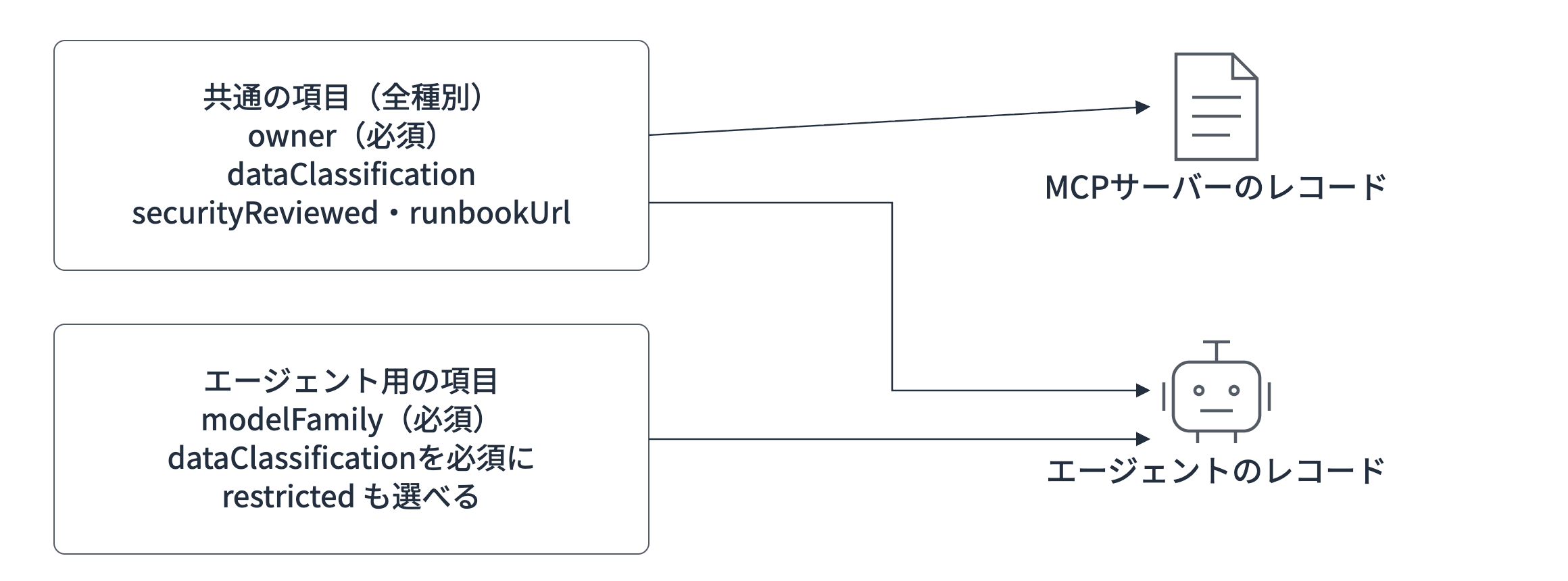
You can use four types — text, choices (enum), URL, and boolean — written in JSON Schema. If you rewrite a common field on the record-type side, you can make it required only for that type or add more choices.
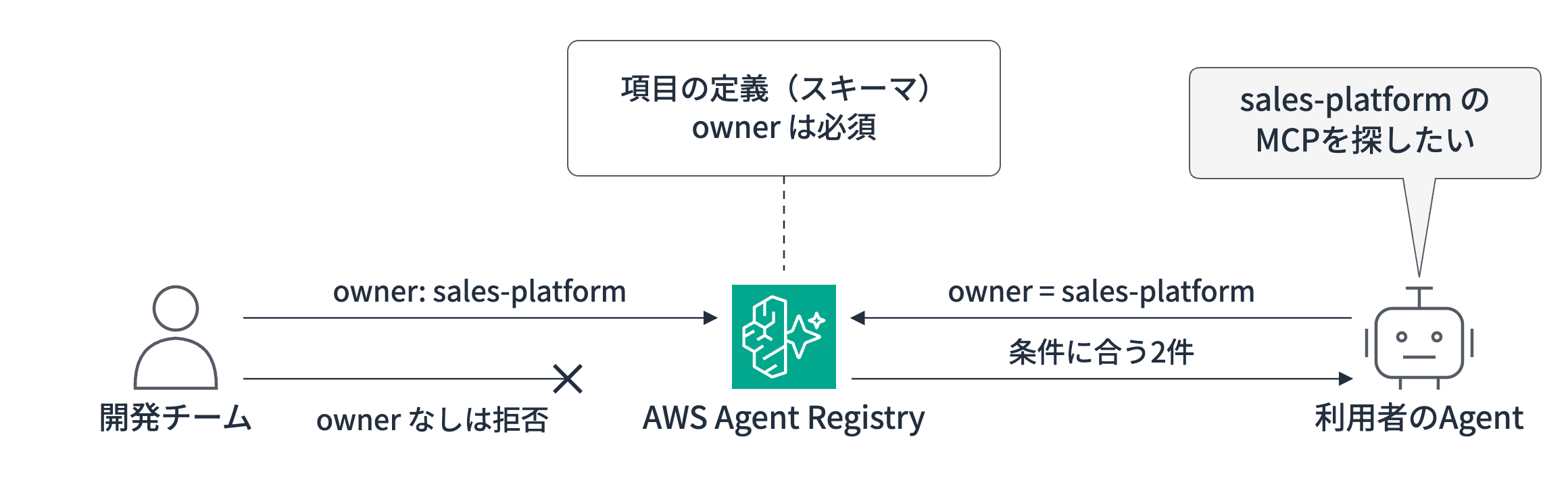
When searching, you can filter by customMetadata.fieldName. You can use match ($eq), no match ($ne), and match any ($in), combined with $and and $or.
Here's the general idea: registered values are validated against the schema, and users search using the same fields as conditions.
When Might You Use This
When would you use this new feature? Let's think through some scenarios.
For example, consider a case where you use skills from the same registry for both external-facing and internal agents. You wouldn't want an external-facing chat agent to use skills that handle internal procedures or customer information. By making data classification a field, you can filter to only the usable skills when the agent searches.
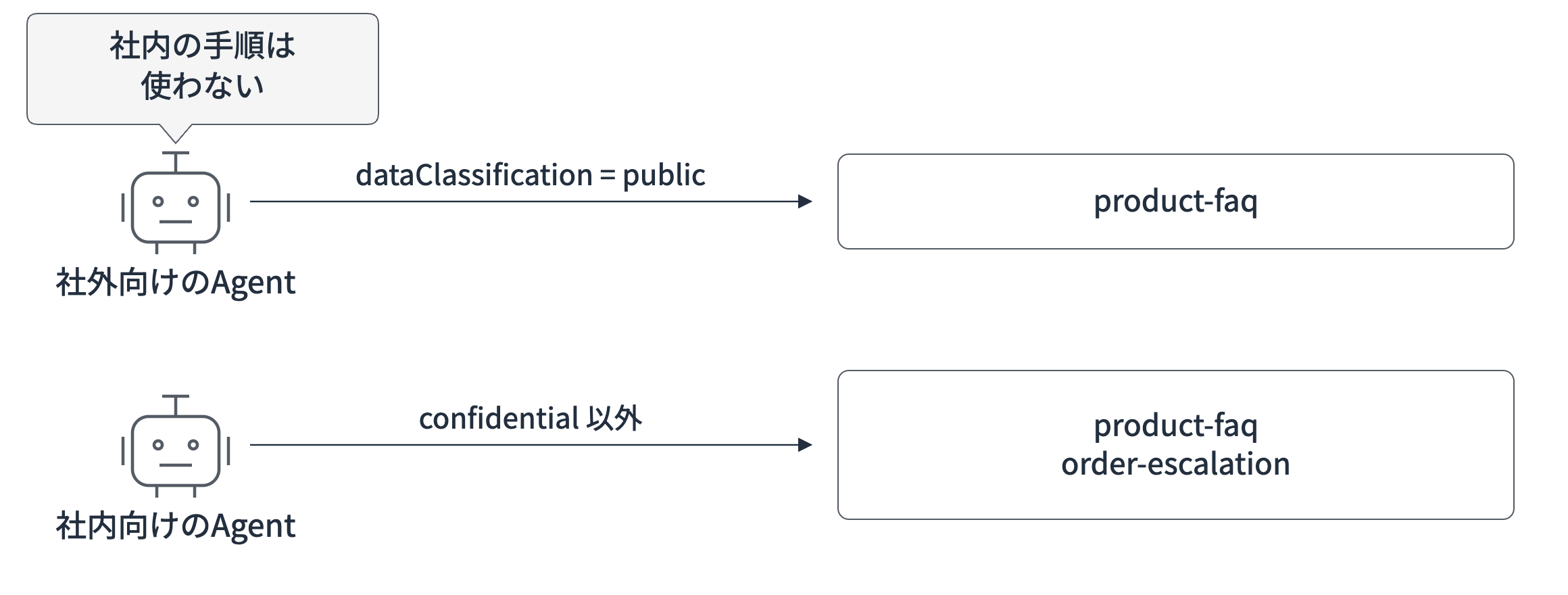
Other use cases are also conceivable.
- When an internal MCP server or agent stops responding, if the record includes the responsible team (
owner) and the URL of the operations runbook (runbookUrl), you can tell who to contact and what to check just by looking at the Registry. If you make these required fields, records that are missing them cannot proceed to approval. - By filtering by responsible team, you can find only the agents, MCP servers, and skills published by your team. This is also useful for inventory checks and cleaning up things that are no longer in use.
- When calling agents or MCP servers from external-facing apps, you can limit candidates to those with a public data classification.
This applies not just to skills, but also to agent and MCP server records.
It's a handy feature when a single Registry contains many skills, agents, and MCPs and you want to narrow things down by category!
Trying It Out
Now that we have a rough overall picture, let's give it a try.
This time, we'll filter the skills loaded by an external-facing and an internal-facing agent based on data classification. We'll proceed with AWS CLI from registry creation through search, and then finish by loading the target skills from a Strands Agents agent!
Prerequisites
We'll proceed with the following assumptions.
- Region: Tokyo (ap-northeast-1)
- AWS CLI 2.37.13, jq 1.7.1
- Agent portion: Python 3.14.6, strands-agents 1.60.0, boto3 1.43.111
- Model: Claude Sonnet 4.5 on Amazon Bedrock (us-east-1)
Define Fields and Create the Registry
This time, we defined two common fields — responsible team (owner) and data classification (dataClassification) — and set both as required fields!
{
  "type": "object",
  "properties": {
    "owner": {"type": "string"},
    "dataClassification": {"type": "string", "enum": ["public", "internal", "confidential"]}
  },
  "required": ["owner", "dataClassification"]
}
Since the schema must be passed as a JSON string to defaultSchema, we format it with jq before creating the registry. We also want to verify the approval flow behavior, so we set the auto-approval rules to empty to disable them.
export AWS_REGION=ap-northeast-1
jq -n --rawfile s schema.json '{defaultSchema: $s}' > schema-config.json

aws agent-registry-control create-registry \
  --name skills-custom-metadata \
  --approval-configuration '{"autoApprovalRules": []}' \
  --custom-metadata-schema-configuration file://schema-config.json

aws agent-registry-control wait registry-ready --registry-id <Registry ID>
{
    "registryArn": "arn:aws:agent-registry:ap-northeast-1:123456789012:registry/hCbYcobDKaxhSSNx"
}
The end of the registryArn is the registry ID.
Register Three Skills
We prepared three types of skills with different data classification settings.
| Skill | Responsible Team | Data Classification | Content |
|---|---|---|---|
| product-faq | sales-platform | public | Answer customers politely. Do not include internal procedures |
| order-escalation | support-team | internal | Internal escalation procedures for order issues |
| customer-lookup | crm-team | confidential | Procedures for looking up customer purchase history |
SKILL.md (3 files)
---
name: product-faq
description: Answer customer questions about products and orders in polite language
---

Rules for answering customer questions.

- Use polite language and answer within 3 sentences
- Do not make definitive statements about inventory or delivery dates; say "We will check and get back to you"
- Do not include the names of internal staff or internal procedures
---
name: order-escalation
description: Internal escalation procedures for order issues (non-delivery, damage, mis-delivery)
---

When you receive an inquiry about an order issue, guide them through the following steps.

1. Confirm the order number and shipping date
2. If more than 5 business days have passed since shipping, post the order number in Slack's #order-trouble channel
3. For damage or mis-delivery, attach a photo and request a re-shipment from the logistics team
---
name: customer-lookup
description: Procedures for looking up purchase history and contact information from a customer ID
---

When looking up a customer's purchase history or contact information, search using the CRM customer ID.
Use contact information only for inquiries where identity has been verified.
The contents of SKILL.md are stored in agentSkillsDefinition.additionalData.skillMd.data. Custom metadata is specified in the --custom-metadata option. The command to register product-faq is as follows.
jq -n --rawfile md skills/product-faq/SKILL.md \
  '{agentSkillsDefinition: {additionalData: {skillMd: {data: $md}}}}' > product-faq.json

aws agent-registry-control create-registry-record \
  --registry-id <Registry ID> \
  --name product-faq \
  --description "Answer customer questions about products and orders in polite language" \
  --record-type SKILL --record-version 1.0 \
  --descriptors file://product-faq.json \
  --custom-metadata '{"owner": "sales-platform", "dataClassification": "public"}'
Register the remaining two by substituting the name, description, and --custom-metadata parameters respectively. After creating the records, submit them for approval to advance to approved status.
aws agent-registry-control submit-registry-record-for-approval \
  --registry-id <Registry ID> --record-id <Record ID>

aws agent-registry-control update-registry-record-status \
  --registry-id <Registry ID> --record-id <Record ID> \
  --status APPROVED --status-reason "custom metadata test"

aws agent-registry-control wait registry-record-approved \
  --registry-id <Registry ID> --record-id <Record ID>
After approval, checking with the get-registry-record command lets you retrieve the configured metadata.
{
    "name": "product-faq",
    "status": "APPROVED",
    "customMetadata": {
        "dataClassification": "public",
        "owner": "sales-platform"
    },
    "customMetadataSchemaComplianceStatus": "COMPLIANT"
}
It was registered without issues!
If the schema is satisfied it becomes COMPLIANT, and if not it becomes NON_COMPLIANT. All three were COMPLIANT.
Try Filtering with CLI
Let's try searching with the CLI. We'll keep the search query fixed and switch the --filters condition between runs.
aws agent-registry search-discoverable-registry-records \
  --registry-ids <Registry ARN> \
  --search-query "Skills for handling order and product inquiries" \
  --filters '{"customMetadata.dataClassification": {"$eq": "public"}}' \
  --query 'registryRecords[].[name, customMetadata.dataClassification]' --output text
Here are the results from running with three patterns: no filter, $eq specified, and $ne specified.
| Condition | Skills returned |
|---|---|
| None | product-faq (public), order-escalation (internal), customer-lookup (confidential) |
{"customMetadata.dataClassification": {"$eq": "public"}} |
product-faq |
{"customMetadata.dataClassification": {"$ne": "confidential"}} |
product-faq, order-escalation |
When no filter is specified all records are retrieved, and when a condition is specified the records are filtered according to the data classification condition!
Load Skills from an Agent
Next, let's have a Strands Agents agent load the skills filtered from the registry. We'll pass only public skills to the external-facing (external) agent, and skills other than confidential to the internal-facing (internal) agent.
uv init --bare --python 3.14
uv add boto3 strands-agents
"""Load skills from Agent Registry by data classification and answer with Strands Agents."""
import os
import sys

import boto3
from strands import Agent
from strands.models import BedrockModel
from strands.vended_plugins.skills import AgentSkills, Skill

REGISTRY_ARN = os.environ['REGISTRY_ARN']
# External-facing loads only public skills; internal-facing loads skills other than confidential
FILTERS = {
    'external': {'customMetadata.dataClassification': {'$eq': 'public'}},
    'internal': {'customMetadata.dataClassification': {'$ne': 'confidential'}},
}

def load_skills(filters):
    registry = boto3.client('agent-registry', region_name='ap-northeast-1')
    records = registry.search_discoverable_registry_records(
        registryIds=[REGISTRY_ARN], searchQuery='Skills for handling order and product inquiries',
        filters={'$and': [{'recordType': {'$eq': 'SKILL'}}, filters]},
    )['registryRecords']
    return [Skill.from_content(r['descriptors']['agentSkillsDefinition']['additionalData']['skillMd']['data'])
            for r in records]

skills = load_skills(FILTERS[sys.argv[1]])
print('Loaded skills:', [s.name for s in skills])

model = BedrockModel(model_id='us.anthropic.claude-sonnet-4-5-20250929-v1:0', region_name='us-east-1', temperature=0)
agent = Agent(model=model, plugins=[AgentSkills(skills=skills)], callback_handler=None)
print(agent('I ordered a product and it has been over a week and still has not arrived. What should I do?'))
Since the search results from the registry are passed directly as skills, the functions the agent can reference are determined by the filters condition. Let's ask the same question with both configurations.
export REGISTRY_ARN=<Registry ARN>
uv run agent.py external
uv run agent.py internal
Loaded skills: ['product-faq']
We sincerely apologize for any concern caused by your order not arriving. We will check on the delivery status and get back to you. Could you please provide us with your order number and name?
Loaded skills: ['product-faq', 'order-escalation']
We are very sorry to hear that your order has not arrived and for the concern this has caused.

To look into this for you, could you please provide the following information?

1. **Your order number**
2. **Shipping date** (listed in your shipping confirmation email)

If more than 5 business days have passed since shipping, we will immediately ask our internal logistics team to investigate. We will look into the situation and respond as quickly as possible, so please share the above information.

We apologize for the inconvenience.
The external-facing agent answered using only product-faq, while the internal-facing agent answered using the "5 business days since shipping" criterion from order-escalation as well! customer-lookup was not loaded by either.
This time filters is fixed on the application side, but searching without conditions would also return confidential skills. For cases where you want to filter reliably, it seems best to narrow down conditions using JWT user attributes or external parameters.
You Can Also Add Per-Record-Type Fields
The responsible team and data classification fields up to this point were common fields attached to all records. However, the information you want to store differs slightly between MCP servers, agents, and skills. Such fields can be added per record type.
| Type | Examples of useful fields to add |
|---|---|
| MCP server | Target environment (production, staging) |
| Agent | Model in use |
| Skill | Supported languages |
The way to write it is simply to add per-type schemas to recordTypeSchemaOverrides. For example, to require the model family (modelFamily) only for agents, it would look like this.
{
  "type": "object",
  "properties": {
    "modelFamily": {"type": "string"}
  },
  "required": ["modelFamily"]
}
jq -n --rawfile common schema.json --rawfile agent agent.json \
  '{defaultSchema: $common, recordTypeSchemaOverrides: [{recordType: "AGENT", schema: $agent}]}' > schema-config.json
When we tested with a separate registry, omitting modelFamily in an agent record was rejected with required property 'modelFamily' not found, while an MCP server record could be registered without modelFamily!
Things to Watch Out For
Here are some points I noticed while actually using it.
If something isn't working the way you expect, keeping these in mind might help!
- If you specify a value that doesn't exist in the schema definition, an error will occur when registering the record. For example, when we passed
secretas the data classification, registration was rejected with the messagedoes not have a value in the enumeration ["public", "internal", "confidential"]. - A note about searching: if you specify a field name incorrectly (e.g.,
dataClasification), no error occurs and an empty result (0 records) is returned. If you get 0 results, it's a good idea to check the field name spelling. - When searching via the registry's MCP endpoint, specify the filter argument in the singular form
filter. Passing the pluralfiltersto match the API causes the argument to be ignored and all records to be returned. - Schema updates support adding fields. Removing fields or choices, and changing required fields to optional, are rejected. Making a previously optional field required will cause existing records to become
NON_COMPLIANT, but they remain approved and will still appear in search results.
Cleanup
Delete the created records and registry. Since the registry cannot be deleted while records exist, delete the records first and then delete the registry itself.
for id in $(aws agent-registry-control list-registry-records --registry-id <Registry ID> \
  --query 'registryRecords[].recordId' --output text); do
  aws agent-registry-control delete-registry-record --registry-id <Registry ID> --record-id $id
done

aws agent-registry-control delete-registry --registry-id <Registry ID>
Closing
We were able to define fields and go all the way from validating at registration time to filtering in searches and differentiating the skills loaded by an agent! It's a handy feature when you want to filter by category!
Since fields cannot be removed later, it seems best to start with fields that are needed for every record, such as responsible team and data classification!
Thank you for reading to the end!