
Thinking about how to apply credits received from AWS Community Builders and how to use them

This page has been translated by machine translation. View original
Introduction
Hello everyone, I'm Akaike.
I was fortunate enough to be selected for AWS Community Builders, and as one of the benefits, I received $500 in AWS credits.
Thank you, thank you, thank you so much.
However, when I actually tried to use the credits, I found myself unexpectedly struggling with questions like "Which account should I apply this to?" and "What services can I even use this for?" Before I knew it, more than a month had passed since I received the credit email...
I finally managed to apply them the other day, so I'd like to organize the application process, the eligible services, and since I'm at it, summarize what seems like the best way to use them.
I hope this will be helpful for others who received credits and are wondering how to use them.
What is AWS Community Builders?
AWS Community Builders is an official AWS program targeting people who share their AWS technical knowledge with the community through blogs, presentations, OSS, and other means.
Those selected receive various benefits, including early access to AWS service teams and feedback opportunities, invitations to exclusive programs such as hackathons, discounts for AWS Summit and re:Invent attendance, and certification exam vouchers.
The $500 in AWS credits I received is one of those benefits.
It seems that these credits are granted each year upon re-certification into the program.
If you're interested, please visit the official page.
Applying the Credits
Which Account Should You Apply Them To?
The first thing I struggled with was "which account to apply the credits to."
The conclusion is that you can think of it as follows, depending on your account structure.
- For standalone accounts
- Apply directly to that account
- When using AWS Organizations
- It is recommended to apply to the management account
When using AWS Organizations, if you apply credits to the management account, they will automatically be allocated to member accounts within the organization through the credit sharing settings.
In other words, by applying to the management account, the credits will be applied to usage across any member account you use for testing, making this the recommended approach for those who test across multiple accounts.
Note that sharing is enabled by default, and you can check or change the on/off status of sharing per account under "Billing and Cost Management > Settings > Credit sharing settings."
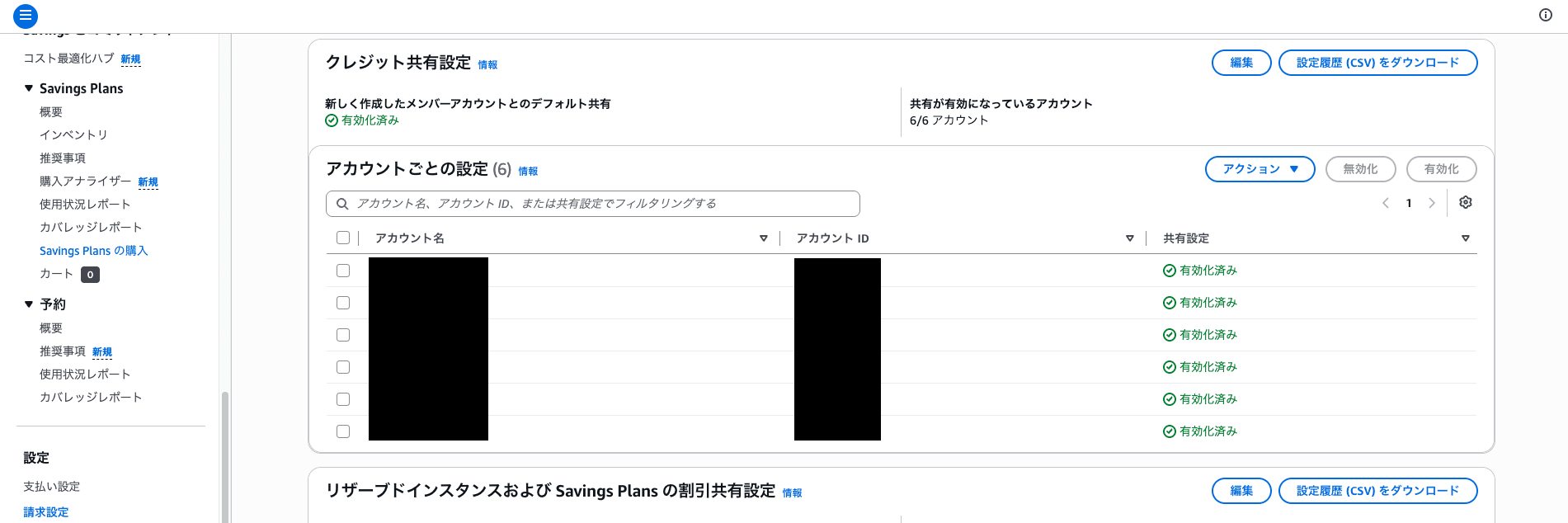
Please refer to the following documentation for details on credit sharing and allocation.
How to Apply Credits
Once you've decided which account to apply the credits to, you can apply them simply by entering the promotion code (credit code) included in the credit notification email through the Management Console.
First, open "Billing and Cost Management > Credits" and click "Redeem credit" in the upper right corner.
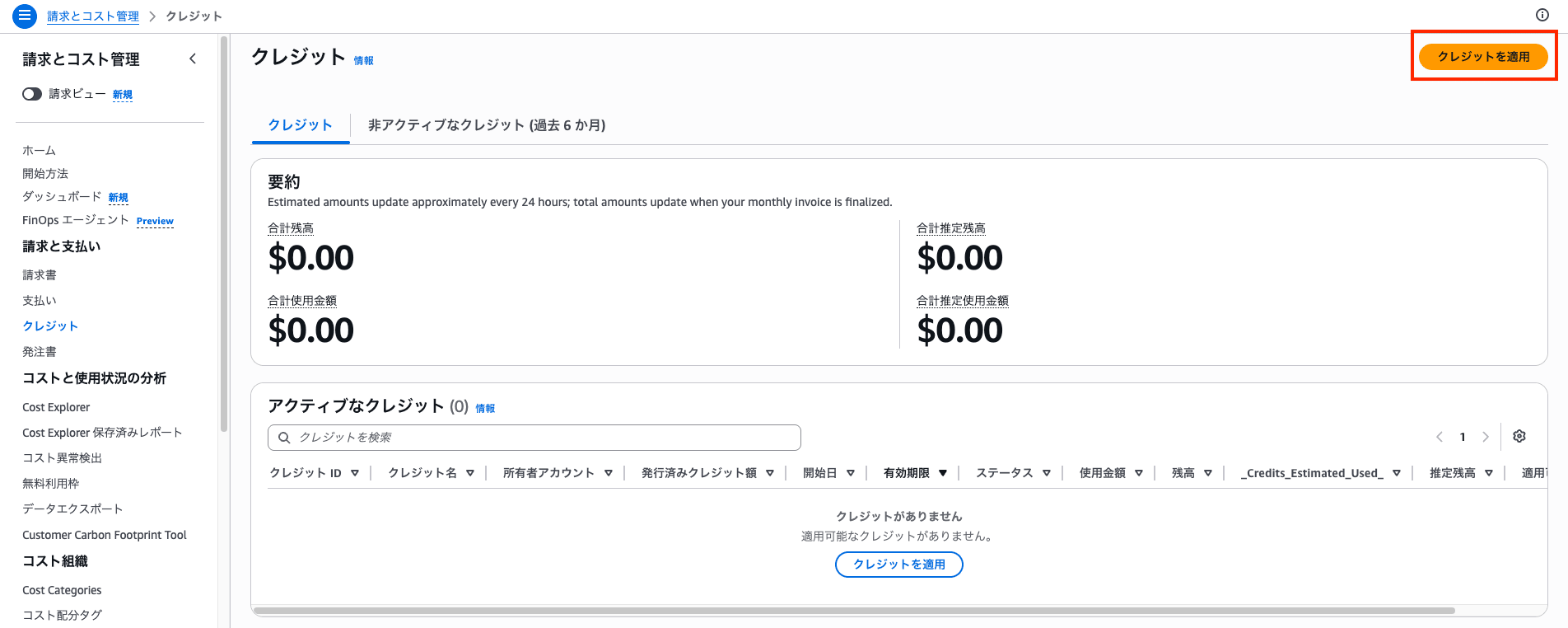
An input screen for the promotion code will appear. Enter the code from the email as-is and click "Redeem credit."

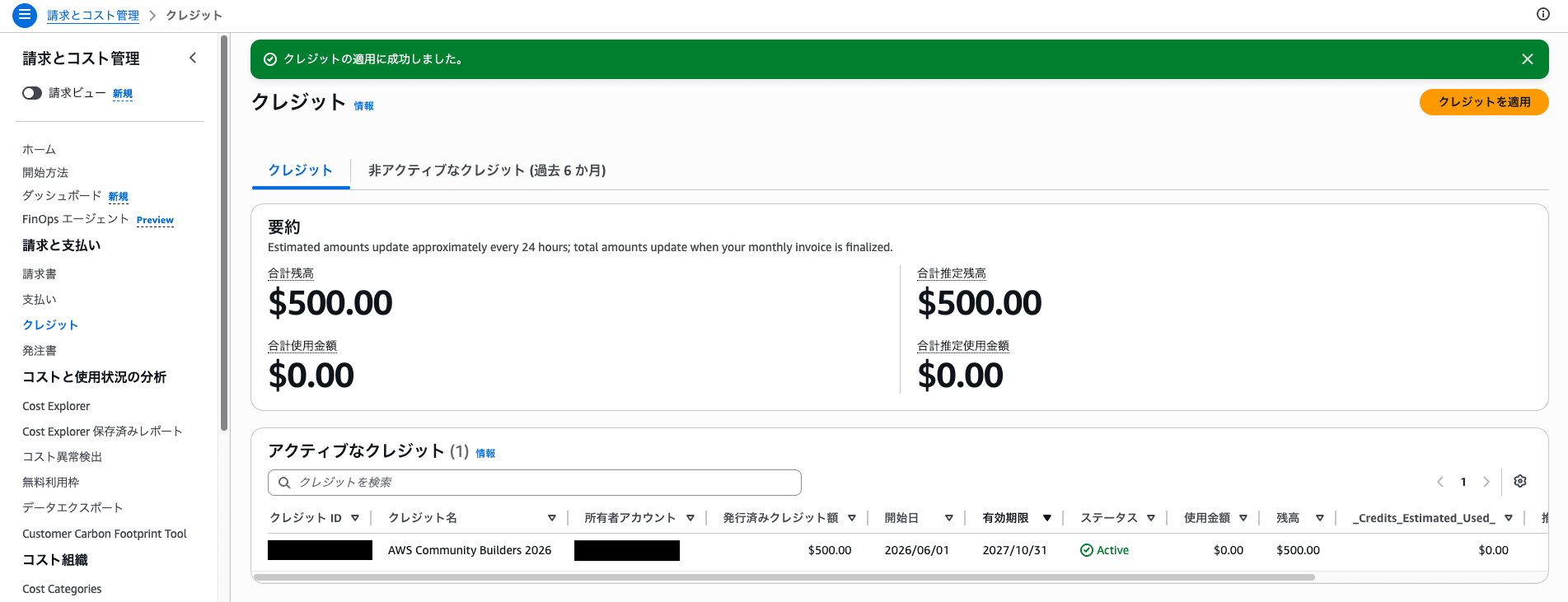
Once "Credit redeemed successfully." is displayed and an active credit has been added, you're done. In this case, you can confirm that the total balance is $500.00.
AWS Services Eligible for Credits
In the credit details screen, you can check the expiration date, balance, and "Applicable products" in addition to other information.
The credits I received this time had a start date of 2026/6/1 and an expiration date of 2027/10/31, giving them a validity period of about one and a half years.
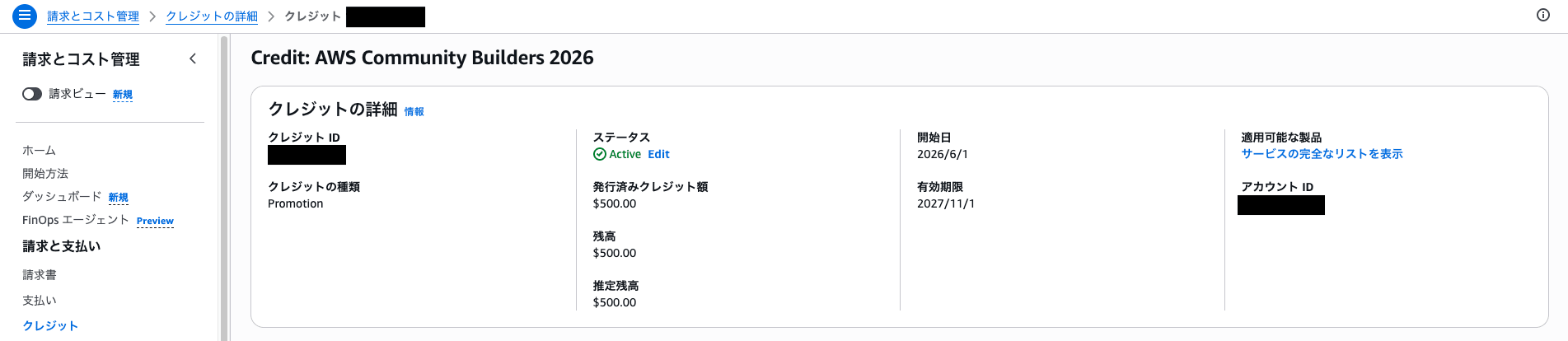
You can view the full list of eligible services by clicking "View complete list of services."
Here are the results I found when I checked:
Service List
Amazon Comprehend
Amazon Managed Workflows for Apache Airflow
Contact Lens for Amazon Connect
Health Agent
AWS IoT
VMware Cloud on AWS
Amazon MemoryDB
AWS End User Messaging Third Party Fees
AWS Import/Export Snowball
Amazon Detective
AWS Elemental MediaPackage
AWS Elemental MediaStore
Kiro
AWS Audit Manager
AWS Database Migration Service
Amazon GuardDuty
AWS Cloud WAN
AWS Entity Resolution
AWS Fault Injection Simulator
AWS Global Accelerator
Amazon API Gateway
Amazon Route 53
AWS Billing Conductor
Amazon Elastic Container Service for Kubernetes
AWS IoT 1 Click
Amazon Managed Blockchain
AWS SimSpace Weaver
Amazon Simple Workflow Service
Amazon Relational Database Service
AWS Security Hub
Amazon Lookout for Vision
AWS Device Farm
AWS Config
Amazon Augmented AI
AWS Import/Export
AWS Resilience Hub
AWS Modular Data Center
AWS Service Catalog
Amazon Macie
AWS OpsWorks
Amazon Simple Email Service
Amazon Machine Learning
Amazon Chime Dial In a service sold by AMCS LLC
Amazon Elastic MapReduce
Amazon HealthLake
Amazon GameLift
AWS Certificate Manager
Amazon MQ
Amazon Textract
Amazon CodeWhisperer
Amazon Polly
Aurora DSQL
Amazon S3 Glacier Deep Archive
AWS Data Exchange
AWS Outposts
Amazon Chime Dialin
AWS Transfer Family
Amazon Chime
AWS App Runner
AWS App Studio
Amazon QuickSight
Contact Center Telecommunications Korea
Amazon Inspector
Amazon Quantum Ledger Database
AWS Clean Rooms
AWS Direct Connect
Alexa for Business
Amazon Neptune
AWS Network Firewall
AWS RoboMaker
Amazon Inspector
Amazon Monitron
Amazon DataZone
NovaAct
AWS Mainframe Modernization
Amazon Omics
Amazon Lex
AWS Compute Optimizer
Amazon Chime Call Me
AWS Storage Gateway
Amazon Kinesis Video Streams
Amazon Q
AWS X-Ray
AWS Cloud Map
Amazon Security Lake
AWS Budgets
AWS Identity and Access Management Access Analyzer
AWS Greengrass
AWS Route 53 Application Recovery Controller
AWS Interconnect
AWS Snowball Extra Days
AWS CodePipeline
Amazon Lookout for Metrics
Amazon WorkSpaces
Amazon WorkSpaces Thin Client
Amazon WorkDocs
AWS Elemental MediaLive
Amazon Kinesis
Contact Center Telecommunications South Africa
CodeBuild
Amazon Quick Suite
Amazon Honeycode
AWS DataSync
Amazon Elastic File System
AWS Security Incident Response
AWS CodeArtifact
AWS re:Post Private
AWS Elemental MediaConnect
Comprehend Medical
Amazon Chime Voice Connector a service sold by AMCS LLC
Amazon Bedrock Service
Amazon CloudFront
AWS Transform
Alexa Top Sites
AWS Security Agent
Elastic VMware Service
AWS Support (Business)
AWS Step Functions
AWS Elemental MediaTailor
AWS CloudFormation
AWS Systems Manager for SAP
Amazon RDS Optimize CPU License Included Third Party Fees
AWS AppFabric
AWS Support (Developer)
AWSDevOpsAgent
AWS WAF
Amazon Cloud Directory
Q in Connect
Amazon Mobile Analytics
AWS Certificate Manager
Amazon Personalize
AWS Storage Gateway Deep Archive
Amazon Bio Discovery
AWS RTB Fabric
Amazon Transcribe
Amazon AppFlow
Amazon Managed Service for Prometheus
AWS IoT Device Defender
Amazon Redshift
AmazonCloudWatch
Amazon Chime Features
Oracle Database@AWS
AWS Parallel Computing Service
Amazon GameLift Streams
Amazon Deadline Cloud
Amazon Elastic Transcoder
AWS Wickr
Amazon Timestream
Amazon Keyspaces (for Apache Cassandra)
Amazon Managed Grafana
Amazon SageMaker
AWS Directory Service
Amazon Cognito
Amazon Elastic Container Service
Amazon EC2 Container Registry (ECR)
AWS Glue Elastic Views
DynamoDB Accelerator (DAX)
AWS Glue
Amazon Cognito Sync
Amazon Kinesis Analytics
Amazon Elastic Container Registry Public
Amazon Kendra
Amazon Managed Streaming for Apache Kafka
AmazonWorkMail
Amazon Simple Queue Service
Amazon WorkSpaces Applications
Amazon Glacier
Amazon WorkSpaces Instances
AmazonConnectCases
CodeGuru
AWS Systems Manager
CloudFront Flat-Rate Plans
Amazon Elastic Compute Cloud
AWS Backup
Amazon Simple Notification Service
AWS Pricing Calculator
AWS Data Pipeline
CodeCatalyst
Amazon ElastiCache
AWS CodeCommit
Amazon FSx
Amazon Braket
AWS Migration Hub Refactor Spaces
Amazon Connect Customer Profiles
Alexa Web Information Service
Amazon Location Service
Amazon DynamoDB
Amazon Elastic Inference
Amazon Forecast
Amazon Chime Call Me a service sold by AMCS LLC
Amazon Fraud Detector
AWS B2B Data Interchange
AWS AppSync
AWS IoT SiteWise
Amazon EVS License Included Fees
AWS CloudHSM
AWS IoT Device Management
Amazon OpenSearch Service
AWS Key Management Service
Amazon WorkLink
Amazon WorkSpaces Web
AWS Application Migration Service
AWS Telco Network Builder
Amazon EKS Anywhere
Amazon SimpleDB
AWS Secrets Manager
Amazon CloudSearch
AWS Elastic Disaster Recovery
AWS IoT Events
AWS Amplify
Amazon IVS Chat
Amazon Translate
AWS Data Transfer Terminal
AmazonBedrockFoundationModels
AWS DeepRacer
AWS Elemental MediaConvert
AWS IoT TwinMaker
AWS IoT Things Graph
AWS Business Support+
Amazon Athena
Elastic Load Balancing
Amazon Nimble Studio
AWS Elemental Inference
AWS IoT FleetWise
CloudWatch Events
AWS Lake Formation
AWS IoT Analytics
AWS Cost Explorer
AWS Firewall Manager
AWS HealthImaging
AWS CodeDeploy
AWS CloudTrail
AWS Private 5G
AWS Shield
Amazon Chime Services
Amazon Simple Storage Service
AWS Lambda
Amazon Sumerian
AWS Payment Cryptography
Amazon Lightsail
Amazon Bedrock
Amazon Connect
Amazon Connect Voice ID
Amazon Verified Permissions
Amazon EC2 Optimize CPU License Included Third Party Fees
Contact Center Telecommunications (service sold by AMCS, LLC)
AWS End User Messaging
Amazon Interactive Video Service
Amazon DevOps Guru
Amazon FinSpace
Amazon Virtual Private Cloud
AWS Ground Station
AWS Data Transfer
Amazon Chime Business Calling a service sold by AMCS LLC
Amazon Connect Decisions
Amazon WorkSpaces Application Manager
Amazon Lookout for Equipment
Amazon Bedrock AgentCore
Amazon Rekognition
Amazon DocumentDB (with MongoDB compatibility)
Amazon Kinesis Firehose
Looking through the list, it covers a wide range of services—from staples like EC2, S3, Lambda, and RDS, to services that are usually too expensive to casually try for personal testing, such as Bedrock, SageMaker, OpenSearch Service, and Redshift.
On the other hand, services not listed here are basically not eligible for credits, so it's a good idea to check the list before using them.
Recommended Ways to Use the Credits
From here, I'd like to share some thoughts on "how to best use the credits," from my own perspective.
To begin with, the credits provided through AWS Community Builders are intended to support community outreach activities.
So rather than "saving on personal expenses," I think it's natural to consider usage with the premise of using credits for testing and learning, then giving back to the community through blogs, presentations, OSS, and similar contributions.
With that premise in mind, here are three recommended ways to use the credits.
1. Use Them for Testing High-Cost Services You Usually Avoid Due to Cost
This is the first thing that comes to mind.
There are several AWS services that you'd like to try but hesitate to use because the costs are unpredictable and intimidating. GPU instances or services that keep billing you for the entire time a cluster is running are prime examples.
With credits, this barrier is significantly lowered, so you can boldly try services you'd normally avoid and write a blog post about your findings. I think this is the approach that aligns most cleanly with the premise of "giving back to the community."
What you test will vary from person to person, but since you have credits available, it's worth putting them toward the things you'd normally hesitate to try.
2. Keep Security and Operations Services "Always Enabled" and Observe Them Carefully Over Time
Security and operations services like GuardDuty, Security Hub, Detective, Macie, and Config tend to accumulate costs gradually based on data volume and resource count when left enabled continuously.
For that reason, they're probably the top services that people feel they "can't afford to leave always-on" in personal accounts.
By directing credits toward these services, you can leave them fully enabled for one to two months straight and observe:
- What kinds of threats and anomalies are actually detected in a real environment after creating vulnerable AWS resource configurations and leaving them for a few weeks
- How deeply you can investigate incidents using Detective based on accumulated activity
- How Security Hub scores and findings change over time as resources fluctuate and daily operations continue
This approach also allows you to write blogs with a time-based perspective that simply isn't possible with one-off feature testing—something uniquely enabled by this usage style.
3. Apply Them to an AWS Support Plan to Back Up Technical Findings During Testing
This is easy to overlook, but the list of eligible services includes AWS Support (both Developer and Business).
Support plans start at a minimum of $29/month for Developer and $100/month for Business—amounts that make it somewhat hesitant to maintain as a personal subscription.
However, since support can be subscribed to on a monthly basis (minimum 30 days, cancellable anytime afterward), you can use credits to subscribe only during periods when testing is intensive.
In the course of daily testing, there are often moments when you can't determine from documentation alone—or can't be confident—whether "this behavior is by design" or "this architecture is considered appropriate by AWS." In those situations, being able to confirm technical details through Support is a significant advantage.
Rather than writing "it seemed to work this way," being able to write "I confirmed this as expected behavior" raises the quality of your output—this is the value I'd highlight for this particular way of using the credits.
Closing Thoughts
That's all for the overview of how to apply and use the credits received through AWS Community Builders.
When I first received the credits, I wasn't sure how to use them, but after taking the time to organize my thoughts, the simple approach of "testing services that are normally hard to try and giving that learning back to the community" felt like the most natural fit.
Since these are benefits I was fortunate enough to receive, I'd like to make the most of them without letting them go to waste, and use them as a catalyst for sharing.
I hope this has been helpful for others who are similarly wondering how to use their credits.
