![[Tip] AWS CLI's AssumeRole and Management Console switch role (with multi-session disabled) use different credentials](https://images.ctfassets.net/ct0aopd36mqt/wp-thumbnail-7bf2dfb6b7a0dd9b7561e87b396ccdc3/018019c86ac567eceba7268550750d9f/aws-iam?w=3840&fm=webp)
[Tip] AWS CLI's AssumeRole and Management Console switch role (with multi-session disabled) use different credentials

This page has been translated by machine translation. View original
Introduction
Hello everyone, this is Akaike.
Recently, while performing multi-step switch roles, I encountered a situation where AssumeRole worked fine from the AWS CLI, but the Management Console switch role would fail.
Of course, since I was using the same role, I assumed the operations were being performed with the same credentials, so I had no idea at first why the results were different…
However, after investigating, I found that the cause was that the credentials used differ between the AWS CLI and the Management Console.
This article summarizes those differences.
Note that this issue occurs when Management Console multi-session is disabled, so it will not occur when multi-session is enabled.
For information on multi-step switch roles using multi-session, please refer to the following if you'd like.
What Happened
The situation I encountered was a configuration where roles are switched in multiple steps from an IAM user, as shown below.
In this configuration, AssumeRole worked without issues from the AWS CLI, while the Management Console switch role failed.
IAM User / IAM Role Permission Settings
Let me organize the IAM user / IAM role permission settings for this case.
First, IAM User A is granted an IAM policy to assume each role.
{
  "Version": "2012-10-17",
  "Statement": [
    {
      "Effect": "Allow",
      "Action": "sts:AssumeRole",
      "Resource": "arn:aws:iam::<ACCOUNT-B-ID>:role/iam-role-b"
    }
  ]
}
The trust policy for IAM Role B is as follows.
It is configured to allow IAM User A to assume IAM Role B.
{
  "Version": "2012-10-17",
  "Statement": [
    {
      "Effect": "Allow",
      "Principal": {
        "AWS": "arn:aws:iam::<ACCOUNT-A-ID>:user/iam-user-a"
      },
      "Action": "sts:AssumeRole"
    }
  ]
}
Additionally, IAM Role B is granted an IAM policy to assume IAM Role C.
{
  "Version": "2012-10-17",
  "Statement": [
    {
      "Effect": "Allow",
      "Action": "sts:AssumeRole",
      "Resource": "arn:aws:iam::<ACCOUNT-C-ID>:role/iam-role-c"
    }
  ]
}
The trust policy for IAM Role C is as follows.
It is configured to allow IAM Role B to assume IAM Role C.
{
  "Version": "2012-10-17",
  "Statement": [
    {
      "Effect": "Allow",
      "Principal": {
        "AWS": "arn:aws:iam::<ACCOUNT-B-ID>:role/iam-role-b"
      },
      "Action": "sts:AssumeRole"
    }
  ]
}
Operations with the AWS CLI
For operations with the AWS CLI, first log in to Account A's Management Console as IAM User A, and then execute the subsequent commands in CloudShell.
First, confirm that the current credentials are for IAM User A.
aws sts get-caller-identity
{
    "UserId": "XXXXXXXXXXXXXXXXXXXXX",
    "Account": "<ACCOUNT-A-ID>",
    "Arn": "arn:aws:iam::<ACCOUNT-A-ID>:user/iam-user-a"
}
Next, use IAM User A's credentials to obtain temporary credentials for IAM Role B.
aws sts assume-role \
  --role-arn arn:aws:iam::<ACCOUNT-B-ID>:role/iam-role-b \
  --role-session-name iam-role-b-session
Set the obtained temporary credentials as environment variables and confirm that the credentials have switched to IAM Role B.
export AWS_ACCESS_KEY_ID=<Obtained AccessKeyId>
export AWS_SECRET_ACCESS_KEY=<Obtained SecretAccessKey>
export AWS_SESSION_TOKEN=<Obtained SessionToken>

aws sts get-caller-identity
{
    "UserId": "XXXXXXXXXXXXXXXXXXXXX:iam-role-b-session",
    "Account": "<ACCOUNT-B-ID>",
    "Arn": "arn:aws:sts::<ACCOUNT-B-ID>:assumed-role/iam-role-b/iam-role-b-session"
}
Next, use IAM Role B's temporary credentials to obtain temporary credentials for IAM Role C.
aws sts assume-role \
  --role-arn arn:aws:iam::<ACCOUNT-C-ID>:role/iam-role-c \
  --role-session-name iam-role-c-session
After setting the obtained temporary credentials as environment variables, you can confirm that the credentials have switched to IAM Role C.
export AWS_ACCESS_KEY_ID=<Obtained AccessKeyId>
export AWS_SECRET_ACCESS_KEY=<Obtained SecretAccessKey>
export AWS_SESSION_TOKEN=<Obtained SessionToken>

aws sts get-caller-identity
{
    "UserId": "XXXXXXXXXXXXXXXXXXXXX:iam-role-c-session",
    "Account": "<ACCOUNT-C-ID>",
    "Arn": "arn:aws:sts::<ACCOUNT-C-ID>:assumed-role/iam-role-c/iam-role-c-session"
}
Operations with the Management Console
For operations with the Management Console, first log in with IAM User A in Account A.
Next, switch roles to IAM Role B. This succeeds without any issues.
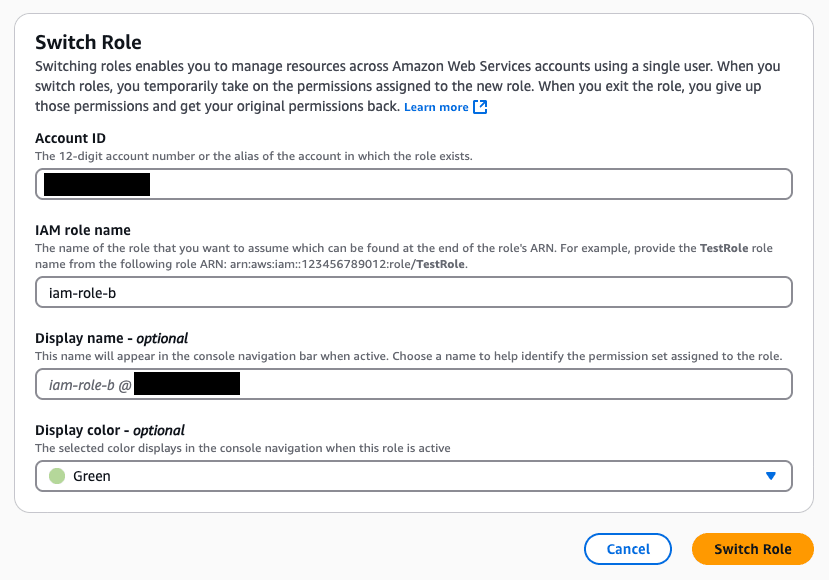
Then, when attempting to switch roles from IAM Role B to IAM Role C…
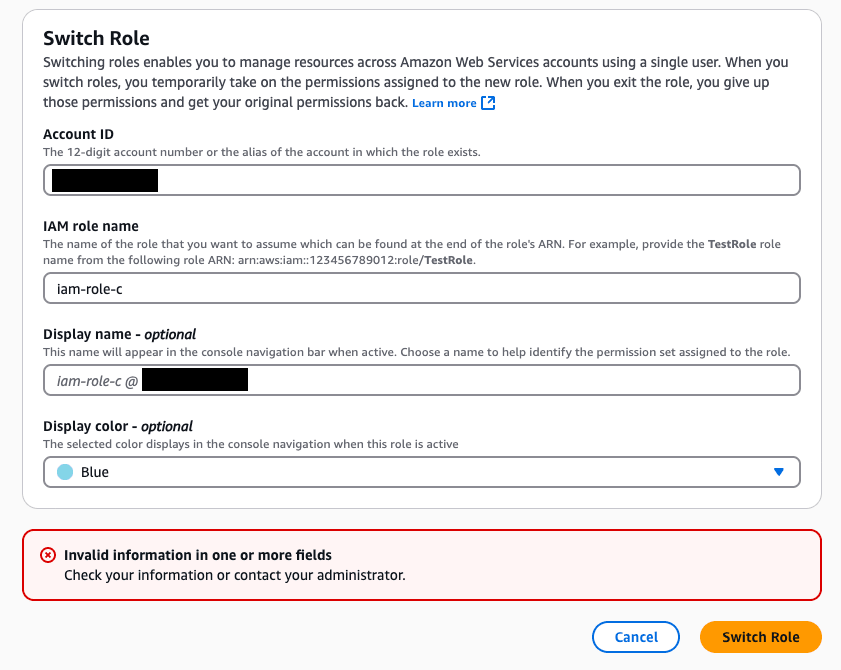
It fails.
Differences in How AssumeRole Is Called Between the AWS CLI and the Management Console
In a nutshell, the difference between the two lies in whether role chaining is supported.
In the Case of the AWS CLI
The AWS CLI supports role chaining.
Therefore, it calls AssumeRole for the next IAM Role C using the temporary credentials of the assumed IAM Role B.
Since IAM Role C's trust policy permitted IAM Role B in this case, the AWS CLI was able to assume it without issues.
In the Case of the Management Console
On the other hand, the Management Console's switch role does not support role chaining.
Regardless of which role you have switched to, it always calls AssumeRole using the original credentials.
In other words, even if you try to switch to IAM Role C while IAM Role B is switched in the console, the AssumeRole for IAM Role C is actually called using IAM User A's credentials.
And with the settings in this case, since IAM User A is not included in IAM Role C's trust policy, the switch role was failing.
Note that this behavior is also explicitly documented in the official AWS documentation.
When you switch a role in the AWS Management Console, the console always uses the original authorization information to authorize the switch. This applies when signing in as an IAM user, SAML federated role, or web identity federated role.
Solution
To switch to IAM Role C from the Management Console, it is necessary to allow IAM User A's credentials to directly assume IAM Role C.
Since this is a cross-account AssumeRole, both of the following must be configured.
- IAM policy on the IAM User A side: Add permission to assume IAM Role C
- Trust policy on the IAM Role C side: Allow assumption from IAM User A
First, add permission to assume IAM Role C to IAM User A's IAM policy.
{
  "Version": "2012-10-17",
  "Statement": [
    {
      "Effect": "Allow",
      "Action": "sts:AssumeRole",
      "Resource": [
        "arn:aws:iam::<ACCOUNT-B-ID>:role/iam-role-b",
        "arn:aws:iam::<ACCOUNT-C-ID>:role/iam-role-c"
      ]
    }
  ]
}
Then, add IAM User A to IAM Role C's trust policy.
{
  "Version": "2012-10-17",
  "Statement": [
    {
      "Effect": "Allow",
      "Principal": {
        "AWS": [
          "arn:aws:iam::<ACCOUNT-B-ID>:role/iam-role-b",
          "arn:aws:iam::<ACCOUNT-A-ID>:user/iam-user-a"
        ]
      },
      "Action": "sts:AssumeRole"
    }
  ]
}
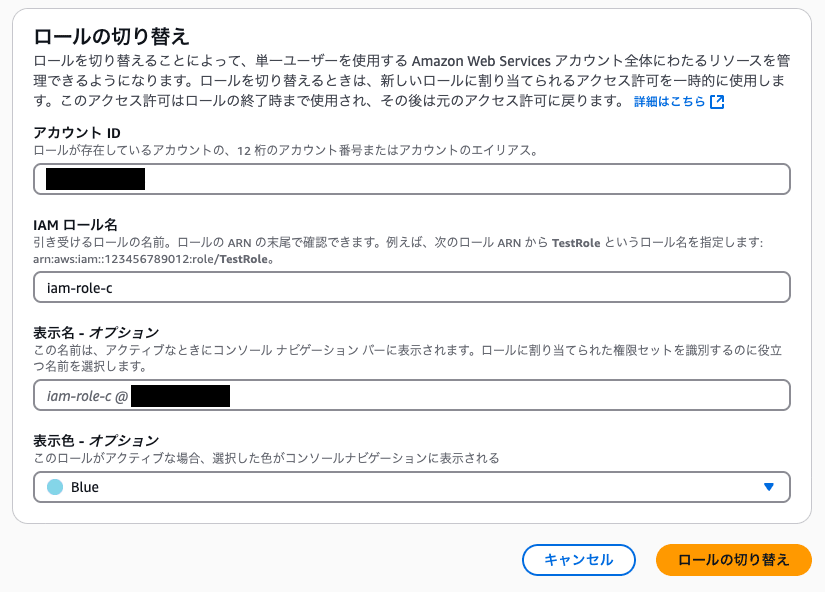
After making the changes, when attempting to switch roles from the Management Console…
The switch role now works without any issues.
Conclusion
That covers the story of why switch role works in the AWS CLI but fails in the Management Console.
Even when using the same role, the difference in results was caused by whether role chaining is supported.
- The AWS CLI supports role chaining
- It calls
sts:AssumeRoleusing the temporary credentials of the assumed role
- It calls
- The Management Console does not support it (when multi-session is disabled)
- Regardless of the assumed role, it always calls
sts:AssumeRoleusing the credentials of the switch role source
- Regardless of the assumed role, it always calls
I hope this helps anyone else who is struggling with the same issue.
