I Tried Having DevOps Agent Perform Cross-Account Investigations with Athena + A Talk on Config Advanced Queries #opsmethod Presentation Materials

This page has been translated by machine translation. View original
At Study Session opsmethod #6 held on 2026/11/25, I gave a presentation titled "I Had DevOps Agent Run a Cross-Account Investigation with Athena".
Thank you to everyone who came!
I'm sharing the slides and the content used in the presentation on this blog.
The table of contents is as follows.
- Introduction
- How to Set Up a Cross-Account Investigation
- Making Athena Usable
- Investigating Config
- Turning the Retrospective into a Skill
- Investigating CUR
- Supplement: Advanced Queries with a Config Aggregator
- Conclusion
Introduction
Because I support multi-account environments in a role similar to a CCoE, I often look across accounts rather than digging deeply into a specific account. Examples include per-service costs for the entire organization and inventories of Lambda and RDS. DevOps Agent is often used for log investigation during incidents, but I wondered whether it could also be used for this kind of cross-account investigation.
Note that this verification was done in a single account. I built a configuration with cross-account use in mind, and at this stage I have only confirmed that it works with the data of one account.
How to Set Up a Cross-Account Investigation
When you register secondary accounts, DevOps Agent assumes the IAM role of each account to investigate. Being able to ask across accounts in natural language is convenient, but the more accounts there are, the more places there are to visit. The agent takes time moving in and out of accounts, and the investigation is not very efficient.
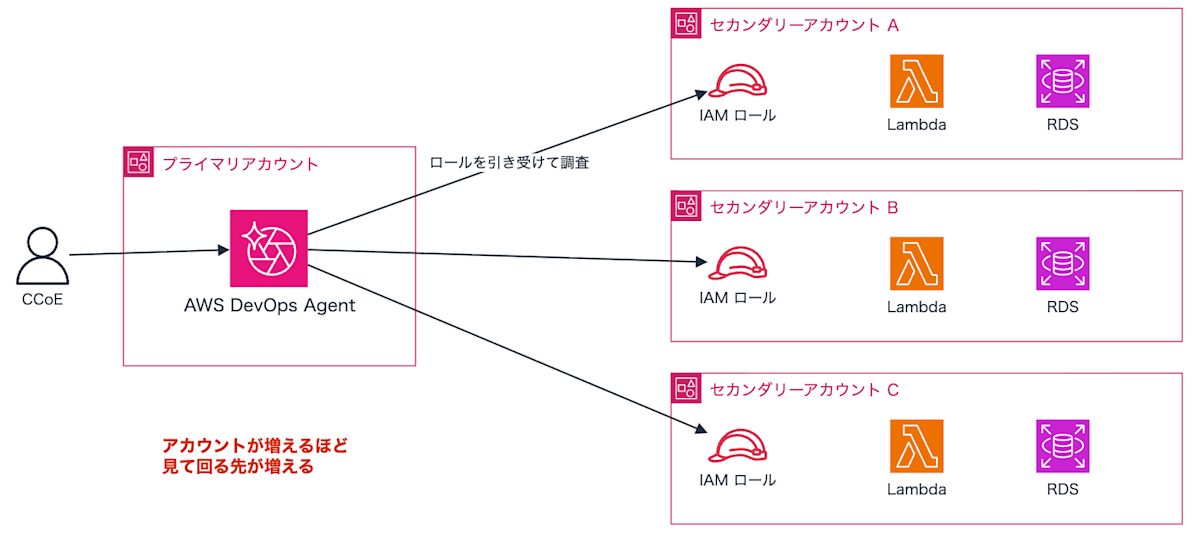
A setup that visits accounts one by one
On the other hand, CUR, Config, and various logs can be aggregated across accounts into a single S3 bucket. If the aggregation S3 bucket can be queried with Athena, a cross-account investigation can be done with a single query. This time, I aimed to make this setup usable from DevOps Agent.
Making Athena Usable
To use Athena from DevOps Agent, you need to adjust both the IAM role and the workgroup. Here, I first check what cannot be done with the default permissions, and then describe the necessary settings in order.
Default Permissions
DevOps Agent investigates AWS using the IAM role associated with the agent space. This role has the AWS managed policy AIDevOpsAgentAccessPolicy attached.
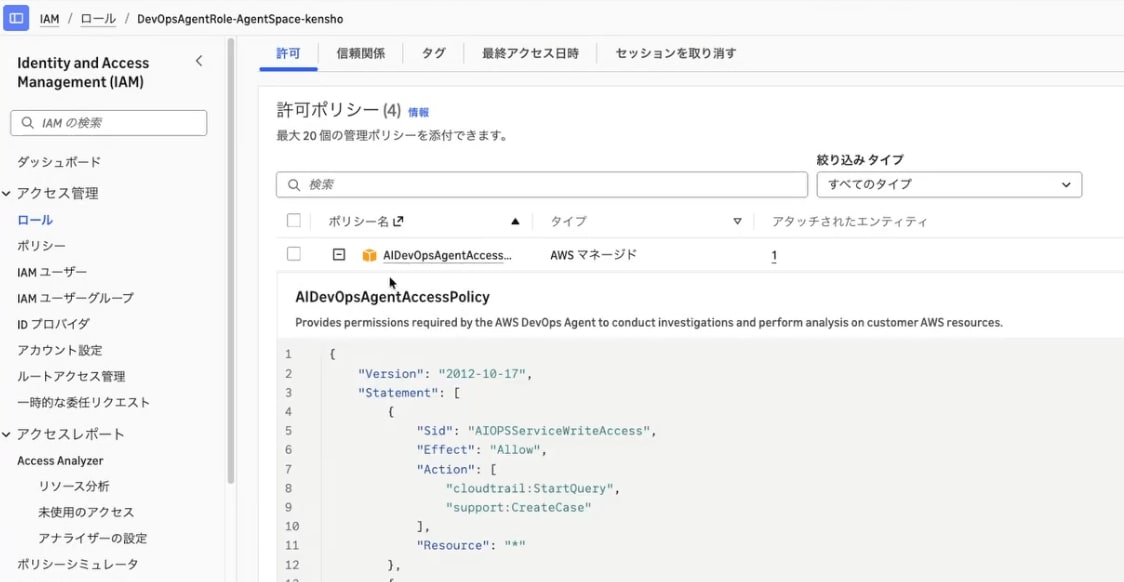
AIDevOpsAgentAccessPolicy attached to the agent space role
| Item | What AIDevOpsAgentAccessPolicy allows |
|---|---|
| General | Read access via Describe / Get / List for each service |
| Athena | Only viewing workgroups and catalogs. Queries cannot be executed |
| S3 | Object contents cannot be read |
With the defaults, you cannot investigate S3 data with Athena.
Adding Permissions
Missing permissions can be added by attaching an inline policy to the role. However, operations outside the guardrails defined by AWS cannot be executed even if you write them in the policy. The guardrails are the scope of ReadOnlyAccess plus some additional operations, and they almost entirely exclude write operations.
| Operation | Usable if added? |
|---|---|
| athena:StartQueryExecution | Usable |
| s3:GetObject | Usable |
| s3:PutObject | Not usable |
This time I added the following inline policy. The Athena execution permissions are limited to the workgroup, and the S3 read permissions are limited to the buckets being investigated. The Glue permissions used for referencing table definitions are already included in the default policy.
{
  "Version": "2012-10-17",
  "Statement": [
    {
      "Sid": "AthenaQueryExecution",
      "Effect": "Allow",
      "Action": [
        "athena:StartQueryExecution",
        "athena:StopQueryExecution",
        "athena:GetQueryExecution",
        "athena:GetQueryResults"
      ],
      "Resource": "arn:aws:athena:ap-northeast-1:123456789012:workgroup/devops-agent-kensho"
    },
    {
      "Sid": "ConfigDataRead",
      "Effect": "Allow",
      "Action": ["s3:GetObject", "s3:ListBucket"],
      "Resource": [
        "arn:aws:s3:::config-bucket-123456789012",
        "arn:aws:s3:::config-bucket-123456789012/*"
      ]
    },
    {
      "Sid": "CurDataRead",
      "Effect": "Allow",
      "Action": ["s3:GetObject", "s3:ListBucket"],
      "Resource": [
        "arn:aws:s3:::example-cur-hourly",
        "arn:aws:s3:::example-cur-hourly/*"
      ]
    }
  ]
}
Using Managed Query Results
Adding permissions alone is not enough; you need to set the workgroup's query result location to managed query results. Managed query results is a feature that stores query results in storage managed by Athena. It is enabled by selecting Athena managed in the workgroup's query result settings. No output bucket or write permissions are needed, and results are automatically deleted after 24 hours.
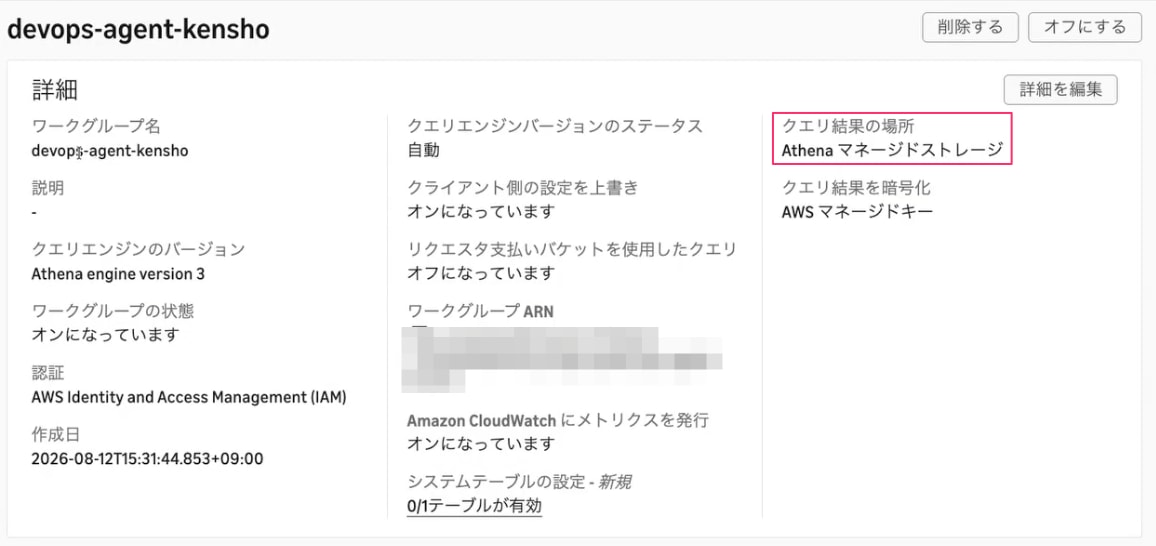
The query result location is set to Athena managed storage
If you set the destination to your own S3 bucket, DevOps Agent's queries will fail. When Athena writes query results to that bucket, s3:PutObject is required, but this operation is outside the guardrails.
When making requests to DevOps Agent, specify this workgroup by name. If you don't, the primary workgroup is used and the query fails.
Architecture Diagram
Summarizing the settings so far as an architecture diagram for investigating Config gives the following.
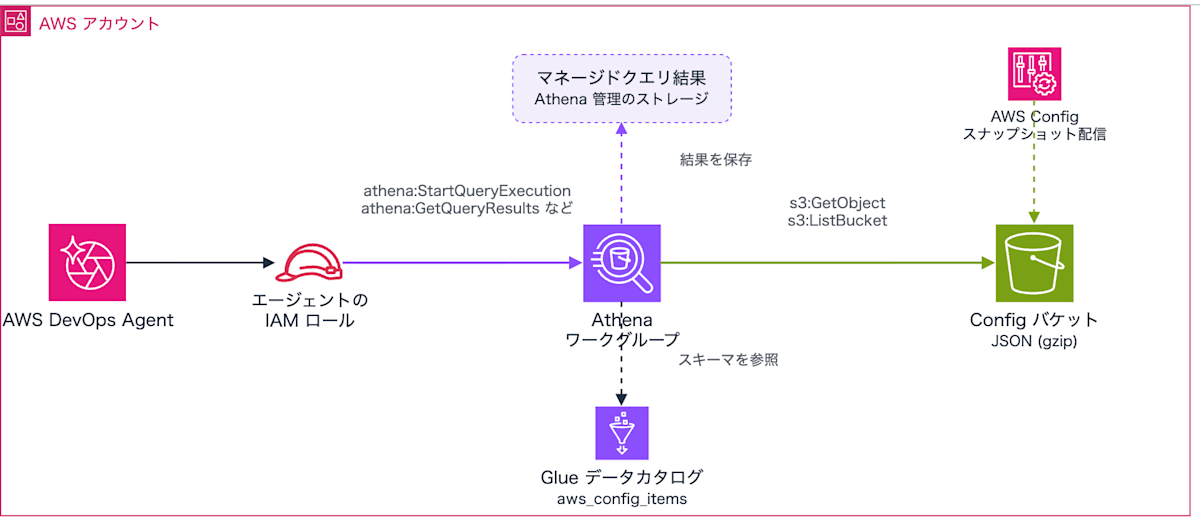
A setup that investigates Config with Athena
Investigating Config
First, I had DevOps Agent investigate Config configuration information. The flow was to prepare the table, make the request, and then review the points where things went wrong.
Preparing the Table and View
I delivered Config configuration snapshots to S3 daily and created the Athena table aws_config. Partitions are defined using partition projection.
CREATE EXTERNAL TABLE IF NOT EXISTS kensho_db.aws_config (
  fileversion string,
  configsnapshotid string,
  configurationitems array<struct<
    configurationitemversion: string,
    configurationitemcapturetime: string,
    configurationstateid: bigint,
    awsaccountid: string,
    configurationitemstatus: string,
    resourcetype: string,
    resourceid: string,
    resourcename: string,
    arn: string,
    awsregion: string,
    availabilityzone: string,
    resourcecreationtime: string,
    configuration: string,
    supplementaryconfiguration: string,
    tags: map<string,string>,
    relationships: array<struct<
      resourcetype: string, resourceid: string,
      resourcename: string, name: string>>
  >>
)
PARTITIONED BY (accountid string, region string, dt string, filetype string)
ROW FORMAT SERDE 'org.openx.data.jsonserde.JsonSerDe'
LOCATION 's3://config-bucket-123456789012/AWSLogs/'
TBLPROPERTIES (
  'projection.enabled'='true',
  'projection.accountid.type'='enum',
  'projection.accountid.values'='123456789012',
  'projection.region.type'='enum',
  'projection.region.values'='ap-northeast-1',
  'projection.dt.type'='date',
  'projection.dt.format'='yyyy/M/d',
  'projection.dt.range'='2019/1/1,NOW',
  'projection.dt.interval'='1',
  'projection.dt.interval.unit'='DAYS',
  'projection.filetype.type'='enum',
  'projection.filetype.values'='ConfigSnapshot,ConfigHistory',
  'storage.location.template'='s3://config-bucket-123456789012/AWSLogs/${accountid}/Config/${region}/${dt}/${filetype}/'
)
The accountid value covers just one account this time. If the bucket aggregates the accounts of an organization, you can list the account IDs here and query across them.
Because each file contains the configuration items as an array, I also created a view aws_config_items that expands them to one row per resource. I had the agent use this view.
CREATE OR REPLACE VIEW kensho_db.aws_config_items AS
SELECT
  t.dt, t.filetype,
  ci.configurationitemversion, ci.configurationitemcapturetime, ci.configurationstateid,
  ci.awsaccountid, ci.configurationitemstatus, ci.resourcetype, ci.resourceid, ci.resourcename,
  ci.arn, ci.awsregion, ci.availabilityzone, ci.resourcecreationtime,
  ci.configuration, ci.supplementaryconfiguration, ci.tags, ci.relationships
FROM kensho_db.aws_config t
CROSS JOIN UNNEST(t.configurationitems) AS u(ci)
Identifying IAM Roles That Trust External Accounts
In the DevOps Agent chat, I made the following request.
AWS Config の構成情報を Athena で調べてください。
ワークグループは devops-agent-kensho を使ってください。
テーブルは kensho_db.aws_config_items です。
filetype と dt でパーティションが切られているので、必ず条件に含めてください。
2026/11/16 時点の IAM Role のうち、信頼ポリシーで外部アカウントを許可しているものを洗い出してください。
DevOps Agent examined the trust policies of 213 IAM roles and identified 13 roles that trust 4 external accounts. The results were organized by external account, and also showed whether the trusted principal was the entire account or a specific user or role. Account IDs are omitted here.
| External account | Number of roles | Trusted principal |
|---|---|---|
| Account A | 8 | Entire account and a specific IAM user |
| Account B | 3 | Entire account |
| Account C | 1 | Entire account |
| Account D | 1 | A specific IAM role |
For roles that trust an entire account, it also added a caution that every IAM entity in the other account can assume them.
Where Things Went Wrong
I got the results in the end, but the queries failed many times along the way. After the investigation, I had DevOps Agent itself reflect on the causes of the failures.
| Problem | Cause |
|---|---|
| Error with the output location | Added --result-configuration to a workgroup using managed query results |
| Wrong column name | Guessed accountid instead of awsaccountid without checking the schema |
| Zero rows returned | Wrote dt with hyphen separators and also mixed up filetype |
| Could not read JSON | The trust policy was a URL-encoded string |
| Function not found | Used PostgreSQL's json_typeof. Athena's SQL is Trino |
All of these are failures that could have been avoided by knowing the data format and Athena's dialect. Each round of trial and error sends a query, which wastes both time and scan costs.
Turning the Retrospective into a Skill
If you register the content of the retrospective as a DevOps Agent skill, it pays off in the next investigation. This time I created a skill called athena-query and wrote in its description that it should be read before writing queries in Athena. Its content is simply the points where things went wrong, turned around.
---
name: athena-query
description: Athena で AWS Config や CUR を調べるときの前提と注意点。Athena クエリを実行する前に読む。
---

# Athena クエリ

## 実行環境

- ワークグループは `devops-agent-kensho` を必ず指定する。
- `--result-configuration` は付けない。結果はマネージドストレージに出力される。
- データベースは `kensho_db` を使う。

## テーブル

| テーブル | 中身 | 必ず WHERE に入れる列 |
|---|---|---|
| `aws_config_items` | Config の構成アイテム | `filetype`, `dt` |
| `cur_hourly` | CUR 2.0 | `billing_period` |

パーティションの値は次の形式で書く。

- `filetype`: ある時点の全リソースは `ConfigSnapshot`、変更履歴は `ConfigHistory`
- `dt`: `'2026/11/16'`。スラッシュ区切りでゼロ埋めしない
- `billing_period`: `'2026-10'`

## Config の dt と filetype

- `dt` は文字列なので、`ORDER BY` や `BETWEEN` は辞書順になる。`'2026/9/9'` が `'2026/10/31'` より大きく扱われる。
- 月で絞るときは `dt LIKE '2026/1/%'` のように末尾にスラッシュを付ける。`'2026/1%'` は10月から12月にもマッチする。
- `ConfigHistory` には変更があった日の分しかない。単日で数件しか出なくても、データ欠損とは限らない。
- `ConfigSnapshot` は 2026/11/16 から日次で配信している。それより前は `ConfigHistory` だけになる。

## 書き始める前に

- 初回は `DESCRIBE` で列名を確かめる。列名を推測で書かない。
- JSON の列は、`LIMIT` 付きで数件取得してキー名と形式を見てから書く。

## Config の configuration 列

- JSON 文字列なので `json_extract` や `json_extract_scalar` で取り出す。
- キーの大文字小文字はリソースタイプで異なる。IAM Role は `assumerolepolicydocument`、SSM Document は `Content` のようになる。
- IAM のポリシー文書は URL エンコードされている。`url_decode()` してから `json_extract` に渡す。

```sql
CROSS JOIN UNNEST(
  CAST(json_extract(
    url_decode(json_extract_scalar(configuration, '$.assumerolepolicydocument')),
    '$.Statement') AS ARRAY(JSON))
) AS t(stmt)
```

## SQL の方言

- Athena の SQL は Trino。PostgreSQL や DuckDB の関数は使えない。`json_typeof` もない。
- JSON が配列かどうかは、`TRY(CAST(x AS ARRAY(JSON)))` が NULL になるかで判定する。
The issue with dt sorting in lexicographic order was found in the CUR investigation that follows, and I added it to the skill afterward. I think of a skill not as something you create once and are done with, but as something you grow with each investigation.
Investigating CUR
Next, I had it investigate cost information from CUR as well. I exported CUR 2.0 data in Parquet format to S3 and created a table cur_hourly partitioned by billing_period. The column definitions follow the CUR 2.0 schema and are long, so only the partition definition is shown here.
CREATE EXTERNAL TABLE IF NOT EXISTS kensho_db.cur_hourly (
  -- CUR 2.0 column definitions (omitted)
)
PARTITIONED BY (billing_period string)
STORED AS PARQUET
LOCATION 's3://example-cur-hourly/cur-hourly/cur-hourly/data/'
TBLPROPERTIES (
  'projection.enabled'='true',
  'projection.billing_period.type'='date',
  'projection.billing_period.format'='yyyy-MM',
  'projection.billing_period.range'='2026-05,NOW',
  'projection.billing_period.interval'='1',
  'projection.billing_period.interval.unit'='MONTHS',
  'storage.location.template'='s3://example-cur-hourly/cur-hourly/cur-hourly/data/BILLING_PERIOD=${billing_period}/'
)
Services with High Costs and the Configuration of Related Resources
I made a request that combines CUR and Config.
Athena で AWS のコストと構成を調べてください。
ワークグループは devops-agent-kensho、データベースは kensho_db です。
CUR は cur_hourly で、billing_period で必ず絞ってください。
Config は aws_config_items で、filetype と dt で必ず絞ってください。
2026-10 にコストが大きかったサービスについて、関連リソースの構成を調べてください。
DevOps Agent returned per-service costs broken down to usage type. The top three services are as follows.
| Service | Cost (USD) | Main breakdown |
|---|---|---|
| DevOpsAgent | 19.07 | Investigation and evaluation |
| CloudTrail | 13.39 | 5.21 GB of log ingestion in the Tokyo Region |
| Security Hub | 13.37 | Monitoring of IAM roles and multi-Region event analysis |
On the Config side, it aggregated the resources changed in October by resource type. SSM Document changes stood out at 31, and it listed them as a candidate for a deeper dive.
This time no query errors occurred, but unexpected behavior was found. When sorting dt with ORDER BY, it sorted in lexicographic order, and the data for October 2026 appeared not to exist. I added this lesson to the skill mentioned earlier.
Daily Cost Trend and the Days of Spikes
Next, I had it produce the daily trend and dig down to the cause.
Athena で CUR を調べてください。
2026-10 と 2026-11 の日次コストの推移を出し、前日から大きく増えた日があればサービスと使用タイプまで掘り下げて原因を説明してください。
DevOps Agent drew the daily cost as a bar chart and identified two days with sharp increases. Costs normally hover around $1 per day, but there were two spikes in October.
| Date | Daily cost (USD) | Main cause |
|---|---|---|
| 10/5 | 13.90 | 12.13 from DevOps Agent investigation |
| 10/8 | 5.89 | 4.80 from DevOps Agent evaluation |
On both days, DevOps Agent's own investigation and evaluation were the main cost drivers. Since CloudTrail log ingestion also increased on the same days, it explained this by linking it to the large number of logs read during the investigation.
Supplement: Advanced Queries with a Config Aggregator
If you only wanted to look across Config information, preparing S3 and Athena was not necessary. I learned this after the verification. Config has features called advanced queries and aggregators, and they can also be used from DevOps Agent.
Advanced Queries and Aggregators
Advanced queries is a feature that searches the current configuration of resources recorded by Config using SQL-like syntax. For example, the following query lets you take an inventory of EC2 instances.
SELECT
  accountId, awsRegion,
  resourceId, configuration.instanceType
WHERE resourceType = 'AWS::EC2::Instance'
An aggregator is a feature that aggregates Config data from multiple accounts and Regions into a single account. If you choose an aggregator as the target of an advanced query, you can search across accounts.
Using It from DevOps Agent
AIDevOpsAgentAccessPolicy includes permissions to run advanced queries via an aggregator. It does not include permissions to target only your own account.
| Permission | Target | Included in the policy? |
|---|---|---|
| config:SelectResourceConfig | Own account | Not included |
| config:SelectAggregateResourceConfig | Aggregator | Included |
SelectAggregateResourceConfig was added in version 10 of the policy, published in August 2026. Therefore, as long as you have an aggregator, you can investigate across accounts with the default permissions. I actually tried making the following request. In the request, I deliberately specified SelectResourceConfig.
AWS Config の高度なクエリ(SelectResourceConfig)で調べてください。Athena は使わないでください。
現在記録されているリソースをリソースタイプ別に数え、件数の多い上位 10 件を出してください。
あわせて、Lambda 関数の一覧をランタイム付きで出してください。
最後に、実行したクエリ文と、エラーになった試行があればその内容を添えてください。
After being denied with SelectResourceConfig, DevOps Agent switched on its own to SelectAggregateResourceConfig via the aggregator. It returned counts by resource type and a list of 13 Lambda functions. It also pointed out that 9 of the 13 use runtimes that have reached end of support.
The query it ran was as follows.
SELECT resourceId, resourceName, configuration.runtime, awsRegion
WHERE resourceType = 'AWS::Lambda::Function'
Here too, several attempts resulted in errors. According to the agent's retrospective, the causes are as follows.
| Attempt that errored | Cause |
|---|---|
| Calling SelectResourceConfig | The agent's role lacks the permission |
Aliasing a column with AS |
Not usable in queries via an aggregator |
Writing LIMIT 10 in the query |
LIMIT is not usable; specify it with the API's MaxResults |
As with Athena, writing this kind of constraint into a skill should reduce wasted attempts.
Conclusion
DevOps Agent can use Athena too, but it requires some advance preparation.
- Add StartQueryExecution, GetObject, and others to the agent's IAM role
- Set the workgroup's query results to managed query results
Even after preparation, the agent stumbles on data formats and SQL dialects. Having it reflect on its failures and turning them into a skill reduces wasted queries from the next investigation onward.
If you just want to investigate resource configurations across accounts, advanced queries with a Config aggregator are handy. When you want to look across data not in Config, such as costs and logs, I think the S3 and Athena setup will come into its own.
That's all. I hope this is helpful.
References
- Limiting agent access in an AWS account - AWS DevOps Agent User Guide
- Connecting multiple AWS accounts - AWS DevOps Agent User Guide
- Managed query results - Amazon Athena User Guide
- Querying the current configuration state - AWS Config Developer Guide
- I Asked AWS DevOps Agent to Investigate Using Athena Without S3 Write Permissions - DevelopersIO
- AWS Introduction Blog Relay 2024: AWS Config Edition - DevelopersIO
