The Story of How We Tried to Streamline GuardDuty Detection Operations in a Multi-Account Environment Using AWS DevOps Agent as CCoE

This page has been translated by machine translation. View original
A certain CCoE team is working to promote the use of AWS DevOps Agent. To start, we wanted to establish results by incorporating it into the existing frameworks that CCoE is involved with, and we chose GuardDuty as our first theme.
After a GuardDuty detection, an initial investigation occurs every time where the person in charge reads the raw detection message, opens the console as needed to review the Finding details, and determines whether it is a false positive. While some parts of the procedures and decision branches are standardized, much of it relies on the implicit knowledge of the first responder, so we determined there was significant room to delegate this to DevOps Agent.
This article covers building a system where DevOps Agent automatically runs investigations triggered by GuardDuty detections and notifies results to Slack. We will also introduce how to integrate it into existing operational flows and our impressions after using it.
The table of contents is as follows.
- Prerequisites: What is DevOps Agent
- Setting up DevOps Agent
- Auto-trigger mechanism (Lambda + EventBridge)
- Tuning investigations (AGENTS.md / Agent Skill)
- Integrating into operational flows
- Closing thoughts
Prerequisites: What is DevOps Agent
AWS DevOps Agent is a managed AI operations agent provided by AWS. Starting from alerts from CloudWatch alarms and observability tools, it autonomously performs initial incident investigation and root cause analysis. It also supports multi-account environments, enabling analysis across multiple accounts.
The agent's operations are restricted to read-only. DevOps Agent provides investigation results and mitigation candidates, while the final judgment and response are designed to be performed by humans.
CCoE's Policy for Using DevOps Agent
We established the following policy on how to position DevOps Agent.
- Judgment and response are performed by humans, and DevOps Agent is dedicated to providing reference information.
- What DevOps Agent outputs are investigation results and mitigation candidates; the final judgment and actual response are the responsibility of CCoE / operators.
- By clearly separating the areas of responsibility between the Agent and humans, we establish the premise for safe utilization.
- We define an operational process incorporating DevOps Agent and create a mechanism the team can operate.
- We clarify where and how DevOps Agent is used throughout the flow from alert detection to initial investigation, response decision, and post-incident recording.
- To avoid over-reliance on specific individuals, we promote process definition, verbalization, and documentation, aiming for a state where the entire team can use it in the same way.
- We continuously tune the behavior to be optimized for CCoE operations.
- DevOps Agent is equipped with mechanisms to develop the agent, such as Agent Skills, MCP, and external data source integration.
- We utilize these to continuously adjust so that investigations are suited to the CCoE team's operational context (multi-account configuration, monitoring targets, monitoring tools in use, etc.).
- We also use it not only for alert response but also for efforts to reduce alerts.
- DevOps Agent can generate proactive improvement proposals based on past incident patterns.
- By leveraging this capability, we incorporate it as input for operational improvements to reduce alerts themselves, in addition to incident response.
- We also use it as a means to convert tacit operational knowledge into explicit knowledge.
- To have the agent conduct investigations, investigation procedures and judgment criteria must be written out as AGENTS.md or Agent Skills.
- We position the process of verbalizing the knowledge that was in the minds of team members as one of the purposes of utilization.
Setting up DevOps Agent
The DevOps Agent agent space was built in the account that centrally manages GuardDuty and Security Hub CSPM. We configured the Slack integration so that investigation results are posted in thread format to a dedicated channel.
The setup itself is completed in a few steps from the management console, so we will omit the detailed procedure in this article.
The simplified architecture diagram up to this point is as follows.
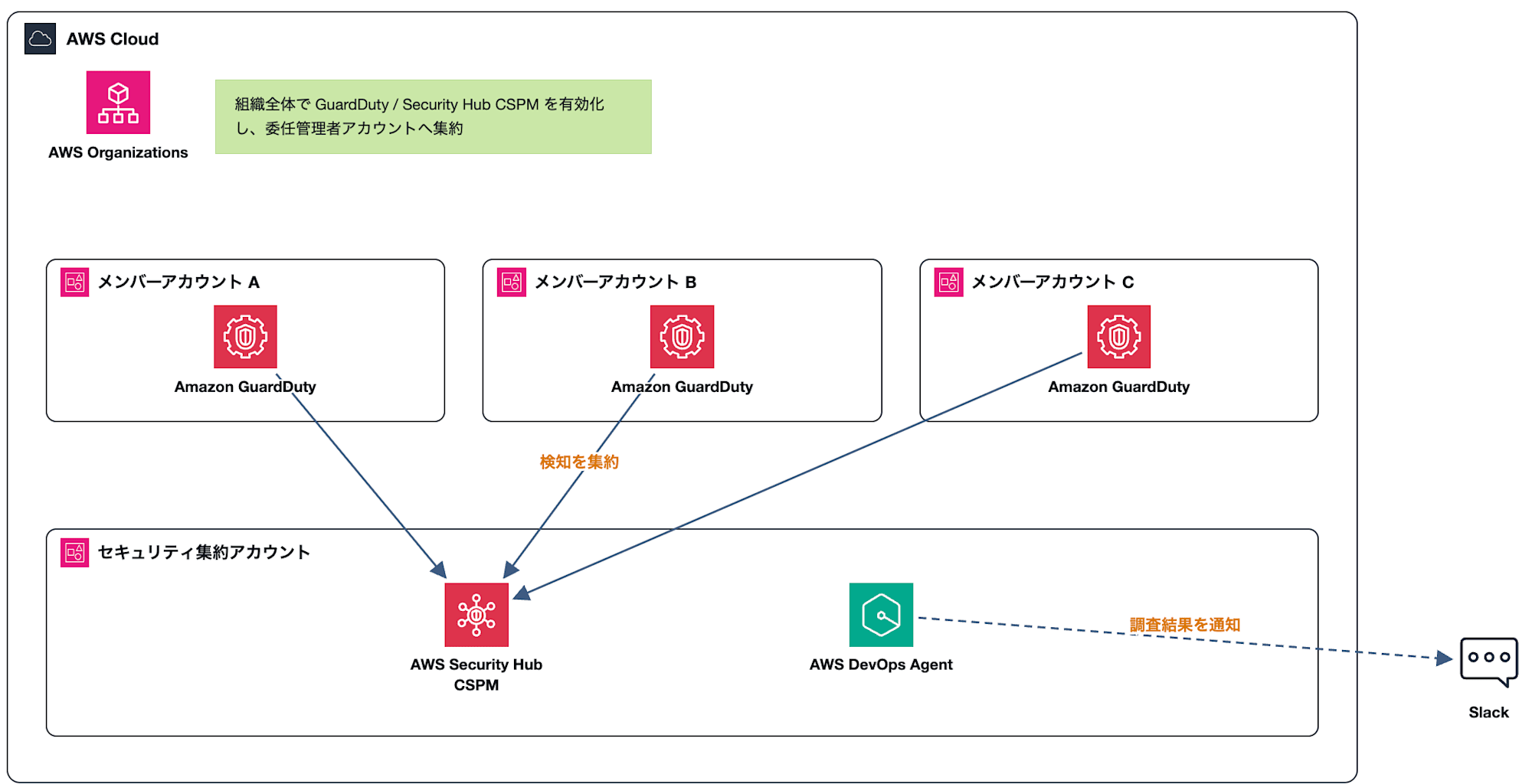
Build an agent space in the security aggregation account and notify investigation results to Slack
Auto-trigger mechanism (Lambda + EventBridge)
We built a pipeline to automate the flow from GuardDuty detection to the start of a DevOps Agent investigation.
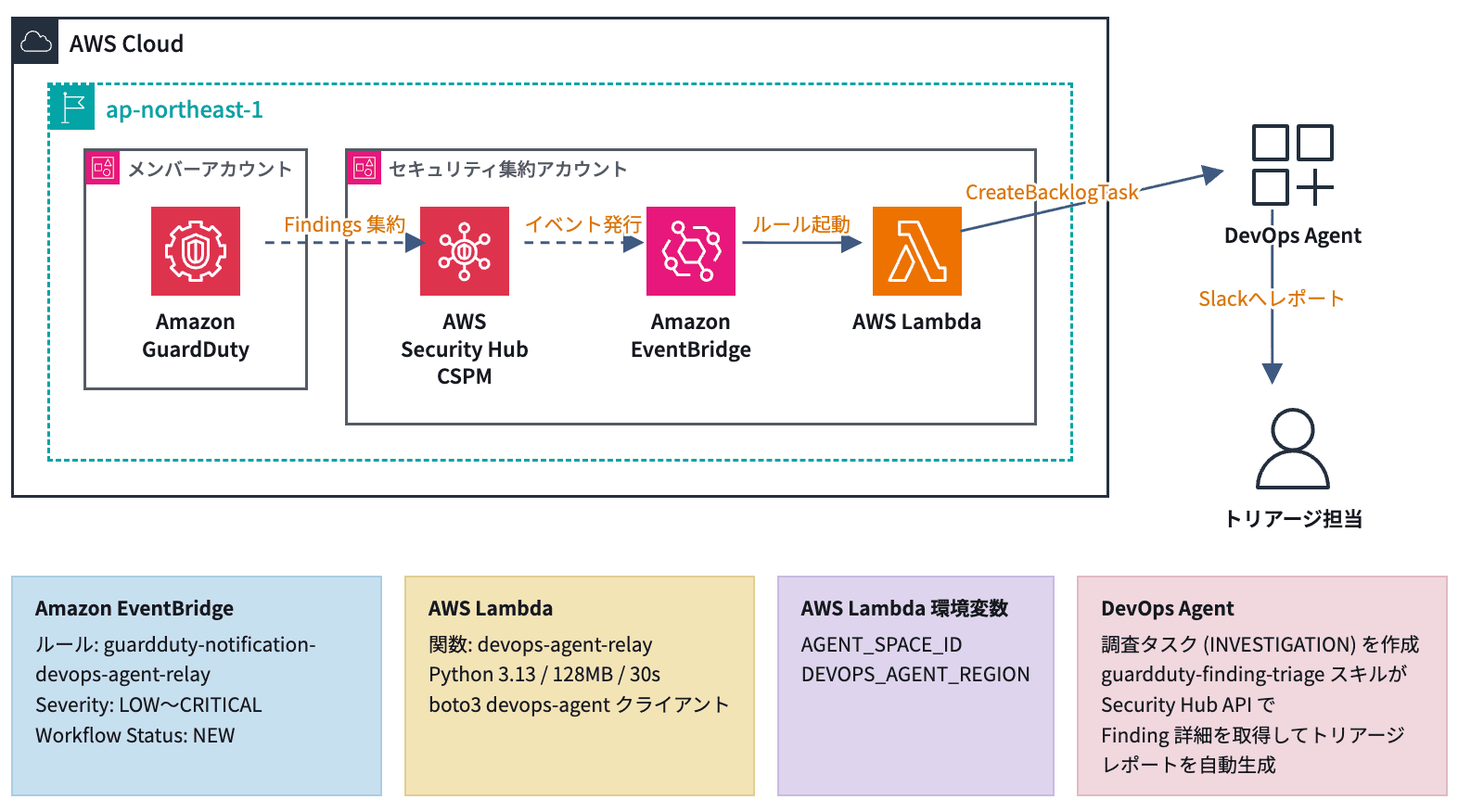
Architecture from GuardDuty detection to the start of a DevOps Agent investigation
The overall flow is as follows.
- GuardDuty detections from each member account are aggregated in Security Hub
- Security Hub publishes events to EventBridge
- An EventBridge rule filters new GuardDuty Findings and triggers Lambda
- Lambda uses the DevOps Agent SDK to create an investigation task
- DevOps Agent runs the investigation and notifies results to Slack
EventBridge Rule
We configured an event pattern to capture only new Findings originating from GuardDuty among the events flowing from Security Hub.
{
  "detail": {
    "findings": {
      "ProductName": ["GuardDuty"],
      "RecordState": ["ACTIVE"],
      "Severity": {
        "Label": ["LOW", "MEDIUM", "HIGH", "CRITICAL"]
      },
      "Workflow": {
        "Status": ["NEW"]
      }
    }
  },
  "detail-type": ["Security Hub Findings - Imported"],
  "source": ["aws.securityhub"]
}
※ In this environment, a separate mechanism is deployed to automatically set notified Findings to NOTIFIED. This is to prevent duplicate triggers from updates to existing Findings.
Lambda Function
In the Lambda function, we use the boto3 devops-agent client and create an investigation task using the create_backlog_task API.
import json
import os

import boto3

AGENT_SPACE_ID = os.environ["AGENT_SPACE_ID"]
REGION = os.environ.get("DEVOPS_AGENT_REGION", "ap-northeast-1")

SEVERITY_MAP = {
    "CRITICAL": "CRITICAL",
    "HIGH": "HIGH",
    "MEDIUM": "MEDIUM",
    "LOW": "LOW",
    "INFORMATIONAL": "MINIMAL",
}

client = boto3.client("devops-agent", region_name=REGION)

def lambda_handler(event, context):
    finding = event["detail"]["findings"][0]
    account_id = finding.get("AwsAccountId", "")
    account_name = finding.get("AwsAccountName", "Unknown")
    severity = finding.get("Severity", {}).get("Label", "")
    title = finding.get("Title", "Security Finding")
    priority = SEVERITY_MAP.get(severity, "MEDIUM")

    task = client.create_backlog_task(
        agentSpaceId=AGENT_SPACE_ID,
        taskType="INVESTIGATION",
        priority=priority,
        title=f"{account_name} ({account_id}) : {title}",
        description=f'{finding.get("Description", "")}\n\nFinding ID: {finding.get("Id", "")}\nSource: {finding.get("SourceUrl", "")}',
    )["task"]
    task_id = task["taskId"]
    execution_id = task["executionId"]
    print(f"Created backlog task {task_id} (execution {execution_id})")

    return {
        "statusCode": 200,
        "body": json.dumps({
            "taskId": task_id,
            "executionId": execution_id,
        }),
    }
Here are a few supplementary points.
Specifying taskType="INVESTIGATION" in create_backlog_task submits it to DevOps Agent as an investigation task. Calling the API causes DevOps Agent to start the investigation.
The title becomes the title of the Slack notification as-is. To make it immediately clear which account the detection is from, we formatted it as Account Name (Account ID) : Finding Title.
The description embeds the Description and Finding ID. For the Finding details, we instructed in AGENTS.md and Agent Skill (described later) to "look it up this way when you receive a GuardDuty Finding ID," having DevOps Agent retrieve the information itself.
The aidevops:CreateBacklogTask permission has been additionally granted to the Lambda execution role.
Tuning Investigations (AGENTS.md / Agent Skill)
Investigation behavior can be customized with agent instructions (AGENTS.md) and agent skills (SKILL.md). AGENTS.md contains the overall investigation rules for the agent. SKILL.md is a feature for defining investigation procedures specialized to a specific domain.
This time, we created an Agent Skill specialized for GuardDuty investigations and configured AGENTS.md to reference that skill.
AGENTS.md
AGENTS.md contains just one line of investigation rules. This is because in the default state, the guardduty-finding-triage skill described later would sometimes not activate.
# Investigation Rules

- For investigations related to GuardDuty, use the guardduty-finding-triage skill
SKILL.md (guardduty-finding-triage)
The contents of the skill are as follows.
---
name: guardduty-finding-triage
description: Investigate GuardDuty detections (Findings) and provide information to support initial response decisions
---
# Purpose

This skill aims to create a state where triage personnel and related business unit members
can quickly make handling decisions and initial response judgments for GuardDuty detections.

The output assumes readers have some knowledge but are not deeply familiar with AWS or IT,
so supplementary explanations are added to technical terms.

Your (DevOps Agent's) role is to provide decision-making materials; the final judgment and response are performed by humans.

# Assumptions / Scope

- The investigation targets are limited to the contents of the received Finding and information obtainable within the Security account
- Direct access to resources in member accounts is not possible / will not be done
- Items that could not be investigated are briefly listed in "Supplementary Information"

# Investigation Procedure

1. Retrieve Finding Details

   Retrieve the full information for the Finding from Security Hub CSPM.
   Use the Id received in the notification and execute the use_aws tool with the following input.

   ```json
   {
     "service_name": "securityhub",
     "operation_name": "get_findings",
     "aws_account_id": "{Security Account ID}",
     "aws_region": "ap-northeast-1",
     "parameters": {
       "Filters": {
         "AwsAccountId": [
           { "Comparison": "EQUALS", "Value": "{Target Account ID}" }
         ],
         "ProductName": [
           { "Comparison": "EQUALS", "Value": "GuardDuty" }
         ],
         "ProductFields": [
           {
             "Comparison": "EQUALS",
             "Key": "aws/securityhub/FindingId",
             "Value": "arn:aws:securityhub:ap-northeast-1::product/aws/guardduty/{Finding ARN}"
           }
         ]
       }
     }
   }
   ```

2. Interpret the Finding Type

   Organize the meaning of the Finding Type and the general attack scenario,
   and verbalize what is estimated to have actually occurred in this case.

3. Make a Determination and Create a Report

   Create a report following the output format below.

# Output Format

## Summary (within 4 lines)

- Assessment of whether it is likely a false positive / expected behavior or not
- What was detected
- Affected resources (account / region / resource name)
- Recommended initial action (one from the decision categories)

## Explanation of Detection

- Meaning of the Finding Type and general attack scenarios
- What is estimated to have actually occurred in this case

## Possibility of False Positive / Expected Behavior

- Whether it matches known operational activities (batch jobs, scanning tools, access via bastion hosts, etc.)

## Recommended Initial Action (clearly state the decision category)

- [Immediate action required]: Containment recommended. Present specific actions.
- [Escalation required]: Organize handover items for CCoE / security personnel.
- [Monitor and wait]: Reason why continued monitoring is sufficient, and trigger conditions for recurrence.
- [High possibility of false positive]: Basis for the assessment and whether a suppression rule should be created.

## Supplementary Information

- Uninvestigated items and additional information that should be confirmed

# Constraints

- Clearly distinguish between speculation and fact (use "there is a possibility that ~" and "it was confirmed that ~" appropriately)
- Add supplementary explanations for technical terms

# Known Expected Behavior Patterns

Detections matching the following patterns are likely expected behavior. Use as a reference for judgment.

## Stealth:IAMUser/PasswordPolicyChange by an Administrator Role

Operations by the administrator role used by the CCoE team.
These are due to initial account setup work and should generally be left as-is.

## Stealth:IAMUser/CloudTrailLoggingDisabled by Control Tower

This is normal behavior of Control Tower and should be left as-is.
The points we were conscious of are as follows.
- Provide specific instructions for the initial steps of the investigation procedure
- We specified the
get_findingscall to Security Hub down to the JSON parameters - This is because without these instructions, it would use different means to retrieve the information each time and sometimes fail in the API execution
- We specified the
- Fix the output format to a certain degree
- This is to reduce the cognitive load on those receiving the information
- We placed a summary at the top to enable initial judgments as quickly as possible
- ※ This also doubles as a countermeasure since long messages in Slack are truncated midway
- Record "Known Expected Behavior Patterns"
- Patterns previously judged as false positives are recorded within the skill
- By appending new false positives as they appear, judgment accuracy improves over time
- ※ For cases where conditions are clear, the proper approach is to mechanically exclude them using GuardDuty suppression rules
- ※ The division is to write qualitative judgments that cannot be mechanically cut here
Output Example
In practice, it is posted to Slack in a format like the following.
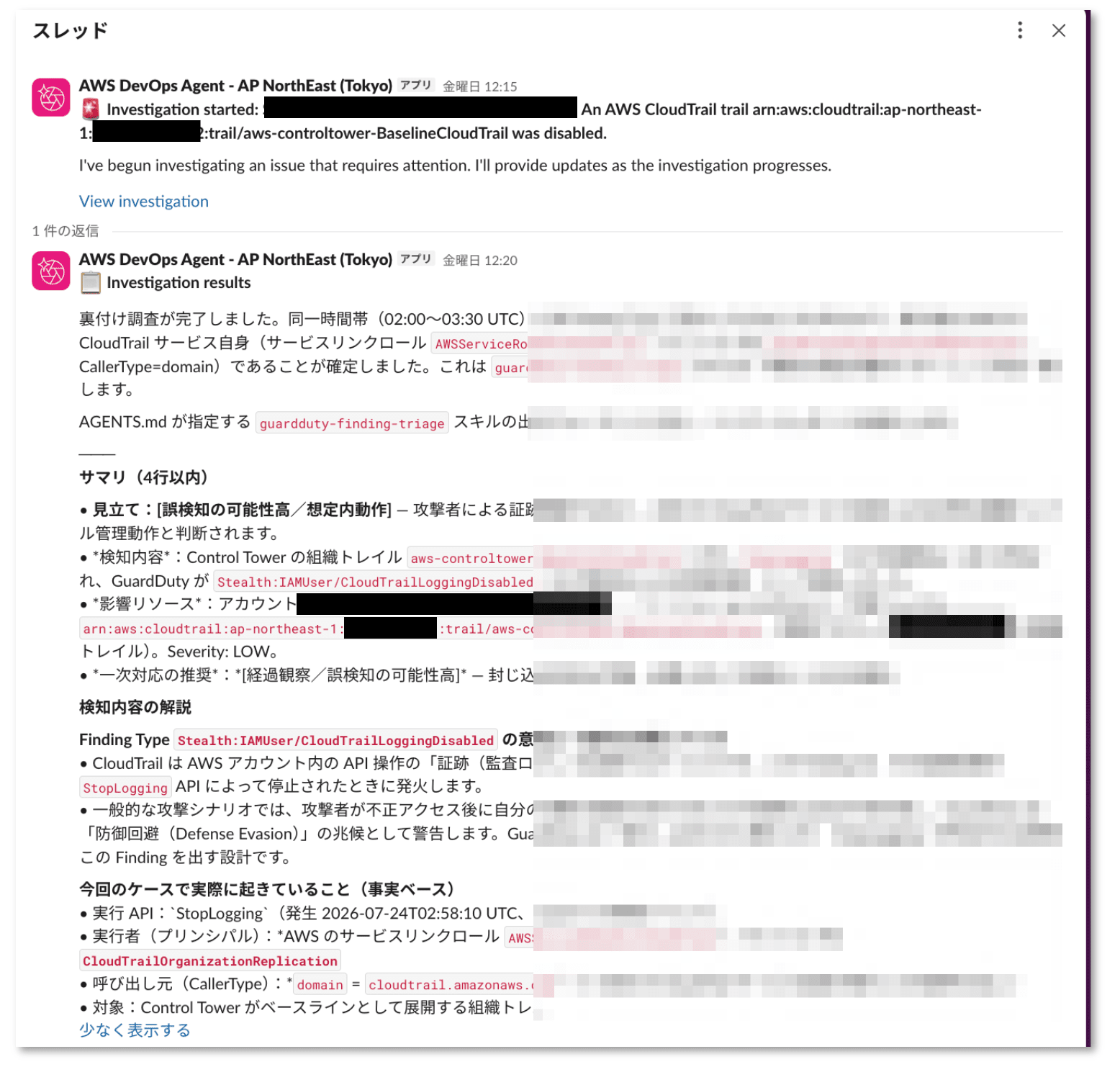
Investigation start notification and investigation results are posted in thread format
The Slack message also includes a link to the DevOps Agent console, where the timeline and details can be checked.
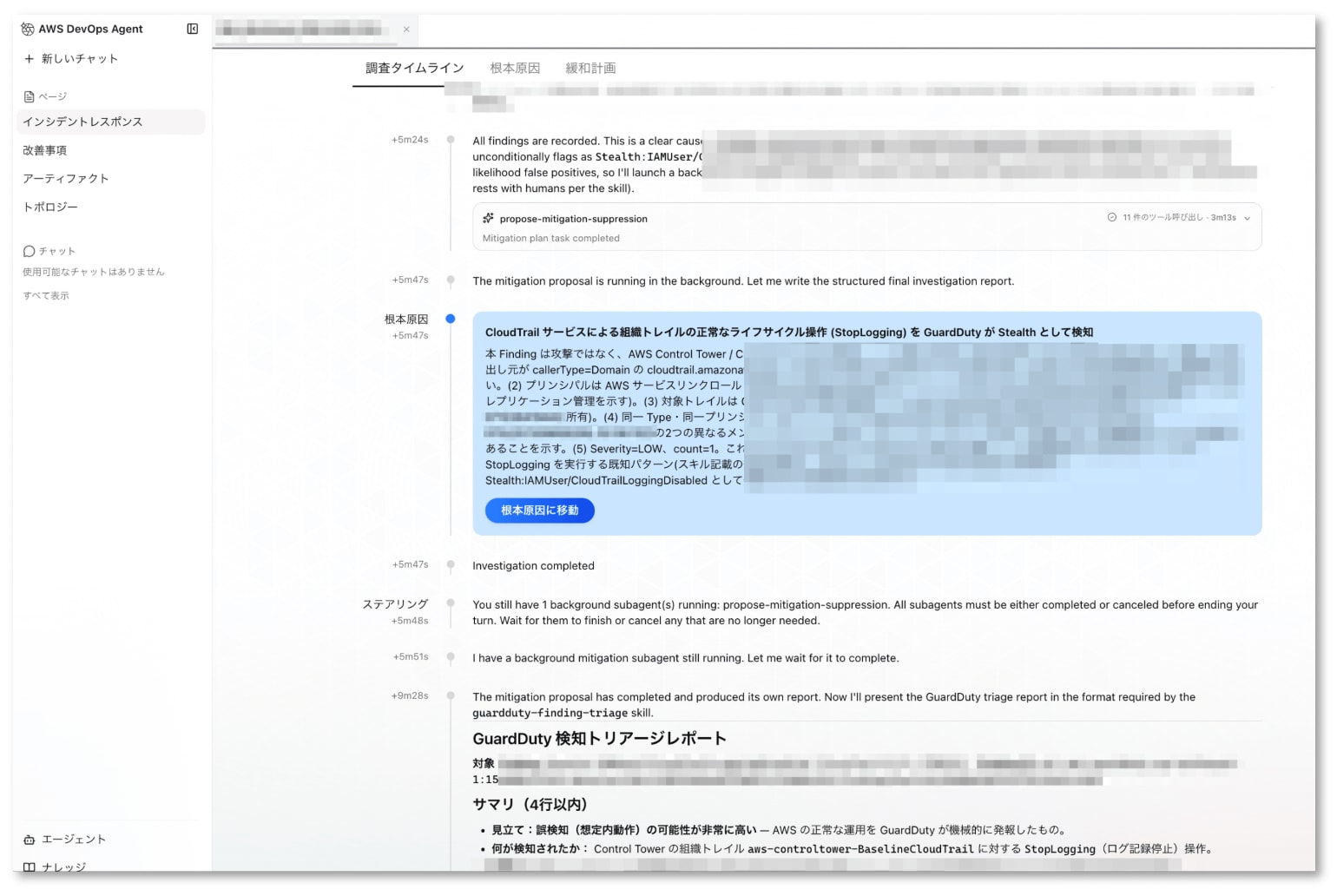
The console allows you to check the investigation timeline and root cause determination
Integrating into Operational Flows
We incorporated DevOps Agent into the existing GuardDuty response flow.
The following screenshot shows the updated portion of the document we manage.
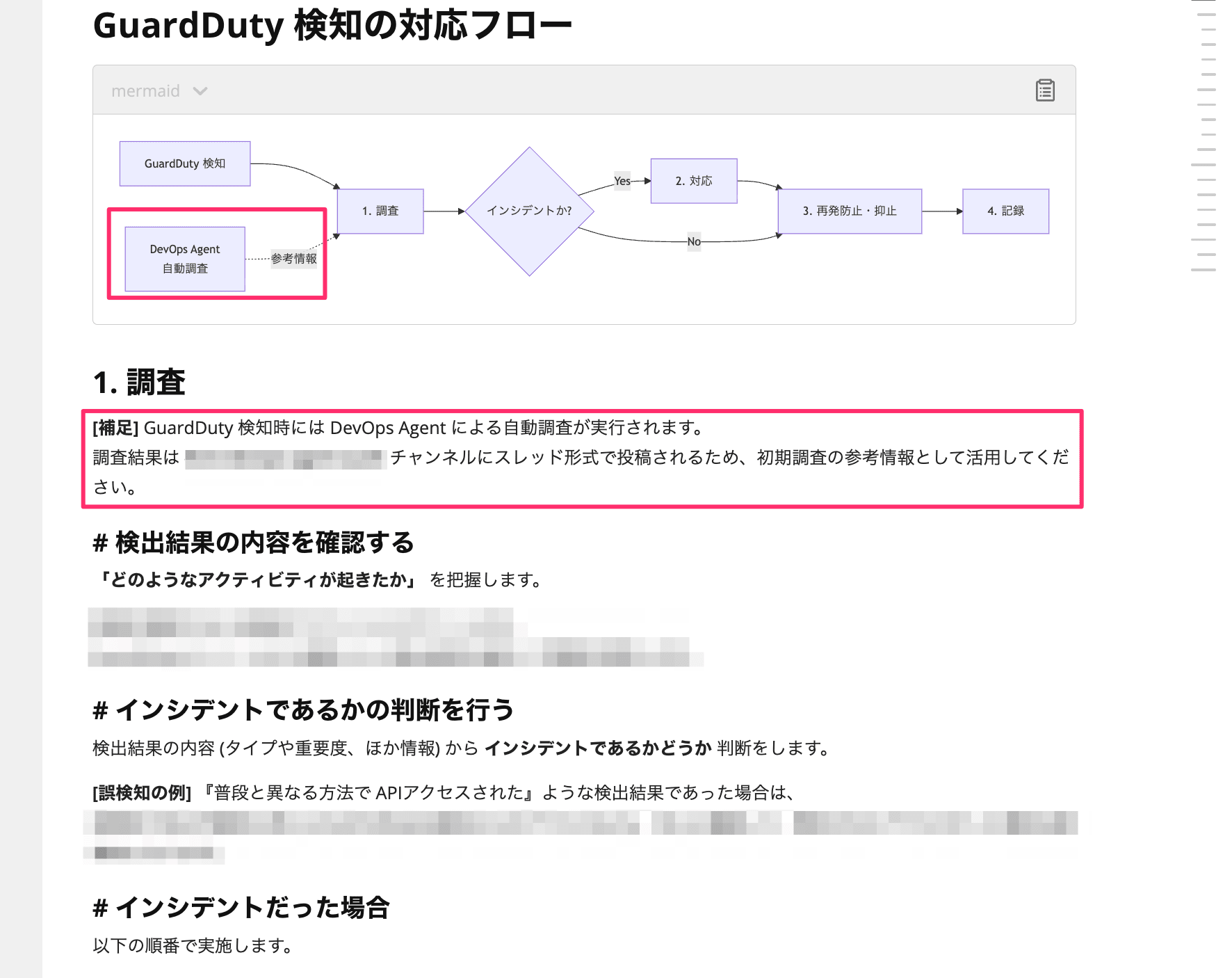
DevOps Agent's automated investigation was added to the existing response flow procedure document
This time, we simply added reference information to the "Investigation" step of the existing flow without significantly changing the flow itself. A full-scale review looked like it would be a heavy task, so it has been planned as a separate task.
Closing Thoughts
DevOps Agent produced a nice summary for GuardDuty Findings. Since the meaning of the Finding Type, the estimated situation, and recommended actions are delivered in a structured format, I think it does make the initial triage investigation easier.
However, for those who have some experience with initial investigations, there is also no small amount of content where the feeling is " it's helpful that it investigates, but honestly I already knew that ." If the only value is viewed as reducing initial investigation time, it could also be evaluated as not having that large an impact.
What's important, I think, is leaving behind the judgment criteria that were in the minds of team members as documents. To have the agent conduct investigations, you must verbalize "what procedure is used to investigate" and "which patterns are false positives," and in that process, tacit knowledge becomes explicit knowledge. The true aim is to get closer to a state where initial investigations of the same standard can be carried out regardless of who is on duty.
Going forward, we will proceed with deploying cross-account investigations to all member accounts. At the same time, we will continue as CCoE with individual deployment to business units and subsequent follow-up.
That's all — we hope this is helpful.

