Elastic Load Balancing for Envoy Has Been Released, So I Tried It Out

This page has been translated by machine translation. View original
Introduction
On November 25, 2026, the general availability of Elastic Load Balancing (ELB) for Envoy was announced.
ELB for Envoy is a load balancer that AWS provides as a managed service based on the open-source Envoy, and it can be used as a reverse proxy to any endpoint.
This article presents the results of creating an ELB for Envoy and trying out forwarding and routing to backends, HTTPS termination with an ACM certificate, and a Lua filter.
Test Environment
- Region: Tokyo (ap-northeast-1)
- aws-cli: 2.42.4
- Proxy version: 1.40
Creating the Proxy
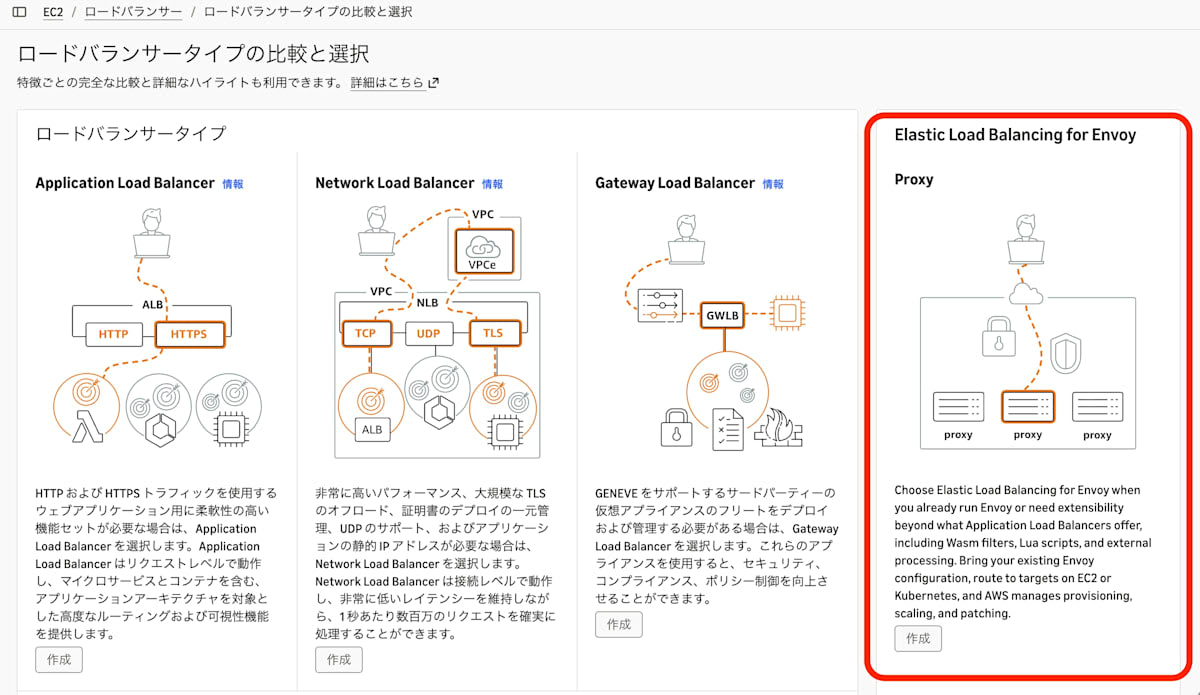
ELB for Envoy has been added to the EC2 console's load balancer creation screen (Compare and select load balancer type), alongside Application Load Balancer and others. In this article, I created it with the CLI.
Prerequisite Resources
Creating a proxy requires an IAM role, a VPC with subnets in two AZs, and a security group (SG). I created the role and SG with the following commands.
Commands to create the role and SG
The principal in the role's trust policy is elasticloadbalancing.amazonaws.com. For permissions, I attached only write access under /aws/elb-proxy/ in CloudWatch Logs.
trust-policy.json
{
  "Version": "2012-10-17",
  "Statement": [
    {
      "Effect": "Allow",
      "Principal": { "Service": "elasticloadbalancing.amazonaws.com" },
      "Action": "sts:AssumeRole"
    }
  ]
}
logs-policy.json
{
  "Version": "2012-10-17",
  "Statement": [
    {
      "Effect": "Allow",
      "Action": [
        "logs:CreateLogGroup",
        "logs:CreateLogStream",
        "logs:PutLogEvents"
      ],
      "Resource": [
        "arn:*:logs:*:*:log-group:/aws/elb-proxy/*",
        "arn:*:logs:*:*:log-group:/aws/elb-proxy/*:log-stream:*"
      ]
    }
  ]
}
aws iam create-role \
  --role-name aws-elb-proxy-role \
  --assume-role-policy-document file://trust-policy.json \
  --output json

aws iam put-role-policy \
  --role-name aws-elb-proxy-role \
  --policy-name aws-elb-proxy-logs \
  --policy-document file://logs-policy.json
aws ec2 create-security-group \
  --group-name elb-proxy-verify \
  --description "ELB for Envoy verification" \
  --vpc-id <vpc-id> \
  --output json

aws ec2 authorize-security-group-ingress \
  --group-id <security-group-id> \
  --ip-permissions \
    'IpProtocol=tcp,FromPort=80,ToPort=80,IpRanges=[{CidrIp=<your-ip>/32,Description=verify}]' \
    'IpProtocol=tcp,FromPort=443,ToPort=443,IpRanges=[{CidrIp=<your-ip>/32,Description=verify}]' \
  --output json
Configuration File and Creation Command
The input passed to create-proxy is the following create-proxy-input.json. It specifies internet-facing IPv4, two subnets, and an SG.
{
  "name": "verify-proxy",
  "type": "envoy",
  "proxyVersion": "1.40",
  "roleArn": "arn:aws:iam::123456789012:role/aws-elb-proxy-role",
  "networkConfiguration": {
    "ipConfiguration": {
      "ipAddressingConfiguration": { "ipv4Addressability": "internet-facing", "ipv6Addressability": "off" }
    },
    "vpcConfiguration": {
      "subnets": [ { "subnetId": "<subnet-id-1>" }, { "subnetId": "<subnet-id-2>" } ],
      "securityGroups": [ { "securityGroupId": "<security-group-id>" } ]
    }
  }
}
For the first proxy, I used the getting-started sample configuration as is. It is a configuration that returns a fixed string on port 80.
config-01-direct-response.yaml
admin:
  address:
    socket_address:
      address: 127.0.0.1
      port_value: 9901
static_resources:
  listeners:
  - name: listener_0
    address:
      socket_address:
        address: 0.0.0.0
        port_value: 80
    filter_chains:
    - filters:
      - name: envoy.filters.network.http_connection_manager
        typed_config:
          "@type": type.googleapis.com/envoy.extensions.filters.network.http_connection_manager.v3.HttpConnectionManager
          stat_prefix: ingress_http
          route_config:
            name: local_route
            virtual_hosts:
            - name: local_service
              domains: ["*"]
              routes:
              - match:
                  prefix: "/"
                direct_response:
                  status: 200
                  body:
                    inline_string: "Your proxy is running\n"
          http_filters:
          - name: envoy.filters.http.router
            typed_config:
              "@type": type.googleapis.com/envoy.extensions.filters.http.router.v3.Router
The configuration file is passed to configurationBytes via --configuration.
aws elb-proxy create-proxy \
  --cli-input-json file://create-proxy-input.json \
  --cli-binary-format raw-in-base64-out \
  --configuration configurationFile={configurationBytes@=file://config-01-direct-response.yaml} \
  --output json
The status in the response was create-in-progress, and dnsName was in the form <proxy-name>-<ID>.elb-proxy.ap-northeast-1.on.aws. The arn in the response is passed to --proxy-identifier in subsequent commands. In this article, I write it as <proxy-arn>.
Time to Start Up and Response
About 3 minutes 20 seconds after the creation request was accepted, I confirmed with get-proxy that the status had become active.
aws elb-proxy get-proxy --proxy-identifier <proxy-arn> --output json
After it became active, sending a request to the DNS name with curl returned the following response.
$ curl -sS -i --max-time 15 http://<dns-name>/
HTTP/1.1 200 OK
content-length: 22
content-type: text/plain
date: Thu, 26 Nov 2026 04:32:47 GMT
server: envoy

Your proxy is running
Forwarding to Backends
For the test of running it as a reverse proxy, I created a second proxy (verify-proxy-2) with the same procedure and forwarded to backends.
Relaying to an External Host
The second input, create-proxy-input-2.json, is the first input with only the name (verify-proxy-2) and the securityGroupId changed.
config-09-checkip.yaml is config-01 with the fixed response (direct_response) changed to forwarding to the backend checkip.amazonaws.com.
In the route, the following two are specified:
- cluster: checkip specifies the destination cluster
- auto_host_rewrite: true makes Envoy overwrite the Host header of requests sent to checkip.amazonaws.com with checkip.amazonaws.com
              routes:
              - match:
                  prefix: "/"
                route:
                  cluster: checkip
                  auto_host_rewrite: true
The clusters section contains the backend address.
  clusters:
  - name: checkip
    type: STRICT_DNS
    dns_lookup_family: V4_ONLY
    connect_timeout: 5s
    load_assignment:
      cluster_name: checkip
      endpoints:
      - lb_endpoints:
        - endpoint:
            address:
              socket_address:
                address: checkip.amazonaws.com
                port_value: 80
I passed the two files to create-proxy and created the second proxy.
aws elb-proxy create-proxy \
  --cli-input-json file://create-proxy-input-2.json \
  --cli-binary-format raw-in-base64-out \
  --configuration configurationFile={configurationBytes@=file://config-09-checkip.yaml} \
  --output json
The backend's response was returned to the client as is. The IP address in the body was Envoy's IP address.
$ curl -si --max-time 20 http://<dns-name>/
HTTP/1.1 200 OK
content-type: text/plain;charset=UTF-8
server: envoy
x-envoy-upstream-service-time: 134

<proxy-ip-1>
This IP address was one of the A records of the proxy's DNS name (one per AZ, two in total). When I fixed the destination IP address with curl's --resolve, the IP address returned by checkip was the same as the destination.
Forwarding to a Lambda Function URL
As an example of using an AWS resource as the backend, I tried forwarding to a Lambda function URL.
For the backends, I used two Python 3.13 Lambda functions (A and B) with function URLs without authentication (AuthType NONE). The functions return origin=<A or B> path=<received path>. The origin=A and origin=B in the tables below are this response.
A filter that invokes Lambda with IAM authentication is also provided, but this time I used function URLs without authentication.
The cluster that connects to the backend via TLS is as follows. lambda_b is the same except for the hostname.
  - name: lambda_a
    type: STRICT_DNS
    dns_lookup_family: V4_ONLY
    connect_timeout: 5s
    load_assignment:
      cluster_name: lambda_a
      endpoints:
      - lb_endpoints:
        - endpoint:
            address:
              socket_address:
                address: <lambda-a-host>
                port_value: 443
    transport_socket:
      name: envoy.transport_sockets.tls
      typed_config:
        "@type": type.googleapis.com/envoy.extensions.transport_sockets.tls.v3.UpstreamTlsContext
        sni: <lambda-a-host>
        common_tls_context:
          validation_context:
            system_root_certs: {}
This cluster does not include SAN matching. I tested it in a state where it can connect even if the endpoint's hostname does not match the certificate.
Routing by Header and Path
For routing, I used config-09 for the listener and lambda_a and lambda_b above for the clusters in common, and tried three configurations in which only the routes were changed.
Request header values such as User-Agent can also be used as routing conditions. config-10a-user-agent.yaml forwards to lambda_a if the User-Agent contains curl, and to lambda_b otherwise. Routes are evaluated from the top, and the first one that matches is used.
              routes:
              - match:
                  prefix: "/"
                  headers:
                  - name: user-agent
                    string_match:
                      contains: curl
                route:
                  cluster: lambda_a
                  auto_host_rewrite: true
              - match:
                  prefix: "/"
                route:
                  cluster: lambda_b
                  auto_host_rewrite: true
I sent requests to the path / with different User-Agents. curl's User-Agent was curl/8.18.0, and the other User-Agent was specified with -A "Mozilla/5.0".
| User-Agent | Response body |
|---|---|
| curl | origin=A path=/ |
| Mozilla | origin=B path=/ |
config-10b-path.yaml forwards to lambda_a if the path starts with /a/, and to lambda_b if it starts with /b/. Requests that match neither get a 404 returned via direct_response.
              routes:
              - match:
                  prefix: "/a/"
                route:
                  cluster: lambda_a
                  auto_host_rewrite: true
                  prefix_rewrite: "/"
              - match:
                  prefix: "/b/"
                route:
                  cluster: lambda_b
                  auto_host_rewrite: true
              - match:
                  prefix: "/"
                direct_response:
                  status: 404
                  body:
                    inline_string: "no route\n"
I sent requests with a curl User-Agent to the following paths.
| Path | Response body |
|---|---|
| /a/hello | origin=A path=/hello |
| /b/hello | origin=B path=/b/hello |
| /c/hello | 404 no route |
| /a | 404 no route |
| /b | 404 no route |
In the /a/ route with prefix_rewrite, the path passed to the backend changes from /a/hello to /hello. In the /b/ route without it, the original path /b/hello is passed as is. Because /a and /b have no trailing slash, they do not match the /a/ and /b/ routes and result in a 404.
config-10c-combined.yaml is a configuration that splits requests to /a/ between A and B by User-Agent.
route of config-10c-combined.yaml
              routes:
              - match:
                  prefix: "/a/"
                  headers:
                  - name: user-agent
                    string_match:
                      contains: curl
                route:
                  cluster: lambda_a
                  auto_host_rewrite: true
                  prefix_rewrite: "/"
              - match:
                  prefix: "/a/"
                route:
                  cluster: lambda_b
                  auto_host_rewrite: true
                  prefix_rewrite: "/"
              - match:
                  prefix: "/"
                direct_response:
                  status: 404
                  body:
                    inline_string: "no route\n"
| Path | User-Agent | Response body |
|---|---|---|
| /a/hello | curl | origin=A path=/hello |
| /a/hello | Mozilla | origin=B path=/hello |
| /b/hello | curl | 404 no route |
Routing by JWT Claim
I also tried a configuration that validates a token with jwt_authn, sets a claim value in a request header, and switches between A and B in the route. The cluster in config-11-1b-jwt-clear-route-cache.yaml is the same as in config-10a.
The route branches on the value of the x-tenant header. If the value is a, it forwards to lambda_a; if b, to lambda_b; otherwise it returns 403 via direct_response.
              routes:
              - match:
                  prefix: "/"
                  headers:
                  - name: x-tenant
                    string_match:
                      exact: a
                route:
                  cluster: lambda_a
                  auto_host_rewrite: true
              - match:
                  prefix: "/"
                  headers:
                  - name: x-tenant
                    string_match:
                      exact: b
                route:
                  cluster: lambda_b
                  auto_host_rewrite: true
              - match:
                  prefix: "/"
                direct_response:
                  status: 403
                  body:
                    inline_string: "unknown tenant\n"
jwt_authn is placed before the router. The configuration update, in which an HS256 symmetric key (disposable) was specified inline in local_jwks, was accepted. claim_to_headers outputs the tenant claim to the x-tenant header.
          - name: envoy.filters.http.jwt_authn
            typed_config:
              "@type": type.googleapis.com/envoy.extensions.filters.http.jwt_authn.v3.JwtAuthentication
              providers:
                verify_provider:
                  issuer: verify-issuer
                  local_jwks:
                    inline_string: '{"keys":[{"kty":"oct","alg":"HS256","kid":"verify-key","k":"<base64url-secret>"}]}'
                  claim_to_headers:
                  - header_name: x-tenant
                    claim_name: tenant
                  clear_route_cache: true
              rules:
              - match:
                  prefix: "/"
                requires:
                  provider_name: verify_provider
I sent the token in the Authorization: Bearer header. The results are as follows.
| Request | Response |
|---|---|
| Token with tenant=a | origin=A path=/hello |
| Token with tenant=b | origin=B path=/hello |
| Token with tenant=x | 403 unknown tenant |
Configuration Updates
From here, I go back to the first proxy (verify-proxy) and add a Lua filter and an HTTPS listener with update-proxy-configuration.
Adding a Lua Filter
config-02-lua.yaml is config-01 with a Lua filter added at the beginning of http_filters. The Lua filter that was added is as follows.
- name: envoy.filters.http.lua
  typed_config:
    "@type": type.googleapis.com/envoy.extensions.filters.http.lua.v3.Lua
    default_source_code:
      inline_string: |
        function envoy_on_response(response_handle)
          response_handle:headers():add("x-verify-lua", "hello-from-lua")
        end
aws elb-proxy update-proxy-configuration \
  --proxy-identifier <proxy-arn> \
  --cli-binary-format raw-in-base64-out \
  --configuration-file configurationBytes@=file://config-02-lua.yaml \
  --output json
After the update, the response included an x-verify-lua header that was not there before the update.
$ curl -sS -i --max-time 15 http://<dns-name>/
HTTP/1.1 200 OK
content-length: 22
content-type: text/plain
x-verify-lua: hello-from-lua
server: envoy
date: Thu, 26 Nov 2026 04:33:15 GMT

Your proxy is running
HTTPS Termination with an ACM Certificate
Use an ACM certificate in the same account and region as the proxy. Association with the proxy is performed using the caller's credentials. Therefore, the IAM principal running associate-certificate needs the acm:CreateCertificateRelation permission on the target certificate.
This time, I used a wildcard certificate (*.example.com) issued by ACM. I associate this certificate with the proxy. A configuration update that references the certificate's ARN is done after the association becomes active.
aws elb-proxy associate-certificate \
  --proxy-identifier <proxy-arn> \
  --certificate-identifier arn:aws:acm:ap-northeast-1:123456789012:certificate/<certificate-id> \
  --output json
The status in the response was associate-in-progress. When I checked list-certificate-associations every 3 seconds, it was active at the check about 3 seconds after the request was accepted.
aws elb-proxy list-certificate-associations --proxy-identifier <proxy-arn> --output json
In the HTTPS listener, write the certificate's ARN in the name of tls_certificate_sds_secret_configs. The certificate and private key are not included in the configuration file. config-03-lua-acm.yaml is config-02 with the following https_listener added to listeners.
  - name: https_listener
    address:
      socket_address:
        address: 0.0.0.0
        port_value: 443
    filter_chains:
    - transport_socket:
        name: envoy.transport_sockets.tls
        typed_config:
          "@type": type.googleapis.com/envoy.extensions.transport_sockets.tls.v3.DownstreamTlsContext
          common_tls_context:
            tls_certificate_sds_secret_configs:
            - name: "arn:aws:acm:ap-northeast-1:123456789012:certificate/<certificate-id>"
      filters:
      - name: envoy.filters.network.http_connection_manager
        typed_config:
          "@type": type.googleapis.com/envoy.extensions.filters.network.http_connection_manager.v3.HttpConnectionManager
          stat_prefix: ingress_https
          route_config:
            name: local_route_https
            virtual_hosts:
            - name: local_service
              domains: ["*"]
              routes:
              - match:
                  prefix: "/"
                direct_response:
                  status: 200
                  body:
                    inline_string: "Your proxy is running with an ACM certificate\n"
          http_filters:
          - name: envoy.filters.http.router
            typed_config:
              "@type": type.googleapis.com/envoy.extensions.filters.http.router.v3.Router
I update with this configuration.
aws elb-proxy update-proxy-configuration \
  --proxy-identifier <proxy-arn> \
  --cli-binary-format raw-in-base64-out \
  --configuration-file configurationBytes@=file://config-03-lua-acm.yaml \
  --output json
Using curl's --connect-to, you can connect to the proxy with a hostname that matches the certificate's domain (www.example.com) without changing DNS.
$ curl -sv --max-time 15 --connect-to www.example.com:443:<dns-name>:443 https://www.example.com/
* SSL connection using TLSv1.3 / TLS_AES_256_GCM_SHA384 / X25519MLKEM768 / RSASSA-PSS
* Server certificate:
*   subject: CN=*.example.com
*   issuer: C=US; O=Amazon; CN=Amazon RSA 2048 M01
*   subjectAltName: "www.example.com" matches cert's "*.example.com"
* SSL certificate verified via OpenSSL.
< HTTP/1.1 200 OK
< content-length: 46
Your proxy is running with an ACM certificate
Time to Apply
From acceptance of the update to completion of the rollout, it took 15 to 16 seconds for both the Lua filter and the HTTPS listener. The rollout status can be checked with get-proxy-update. For --update-identifier, pass the updateId from the update-proxy-configuration response.
aws elb-proxy get-proxy-update \
  --proxy-identifier <proxy-arn> \
  --update-identifier <update-id> \
  --output json
Unsupported Envoy Features
If you bring over an existing Envoy configuration, check the following items.
- Updates that include resources using file, stderr, or stdout access loggers or admin.access_log_path are rejected. To output access logs, use the open_telemetry, http_grpc, tcp_grpc, or fluentd access loggers
- Dynamic modules are not supported
- The only supported Wasm runtime is V8
Summary
I confirmed that ELB for Envoy works as a reverse proxy and can terminate HTTPS with an ACM certificate.
If you operate your own Envoy or Nginx and maintenance has become a challenge, please give ELB for Envoy, now offered as a managed service, a try.
Reference Links
