I tried dynamic registration of IoT devices with AWS IoT Greengrass V2

This page has been translated by machine translation. View original
Introduction
Imagine a factory-like scenario where IoT devices are added one after another. Having a human manually create a Thing in AWS IoT Core and issue a certificate for each device one by one is simply not practical. What you really want is a mechanism where devices can register their own IDs at startup.
This time, I decided to try that out with AWS IoT Greengrass V2. I put together a setup entirely using Podman containers, where a Greengrass core acts as a local broker and client devices obtain their own certificates and complete Thing registration on their first boot. The repository is here: https://github.com/cm-obuchi-hugo-examples/iot-greengrass-minimal
Test Environment
- macOS 26.6.2
- Podman 6.1.1 +
podman-compose1.6.0 (Compose functionality is not included inpodmanitself; installed separately via Homebrew) - Terraform (
required_version = ">= 1.10"ininfra/*/versions.tf, AWS provider~> 6.0, awscc provider~> 1.0) - AWS IoT Core / Greengrass V2 (region is
ap-northeast-1, the default value of theregionvariable ininfra/*/variables.tf) - Greengrass Nucleus 2.18.3 (the version pinned in
infra/20-fleet/deployment.tf, same as the Greengrass core container image tag2.18.3) - AWS IoT Device SDK for Python on the client side (
awsiotsdk==1.31.0, the version pip-installed inclient-image/Containerfile)
Architecture Diagram
Based on the Architecture section in README.md, here is the configuration with just the key points extracted.
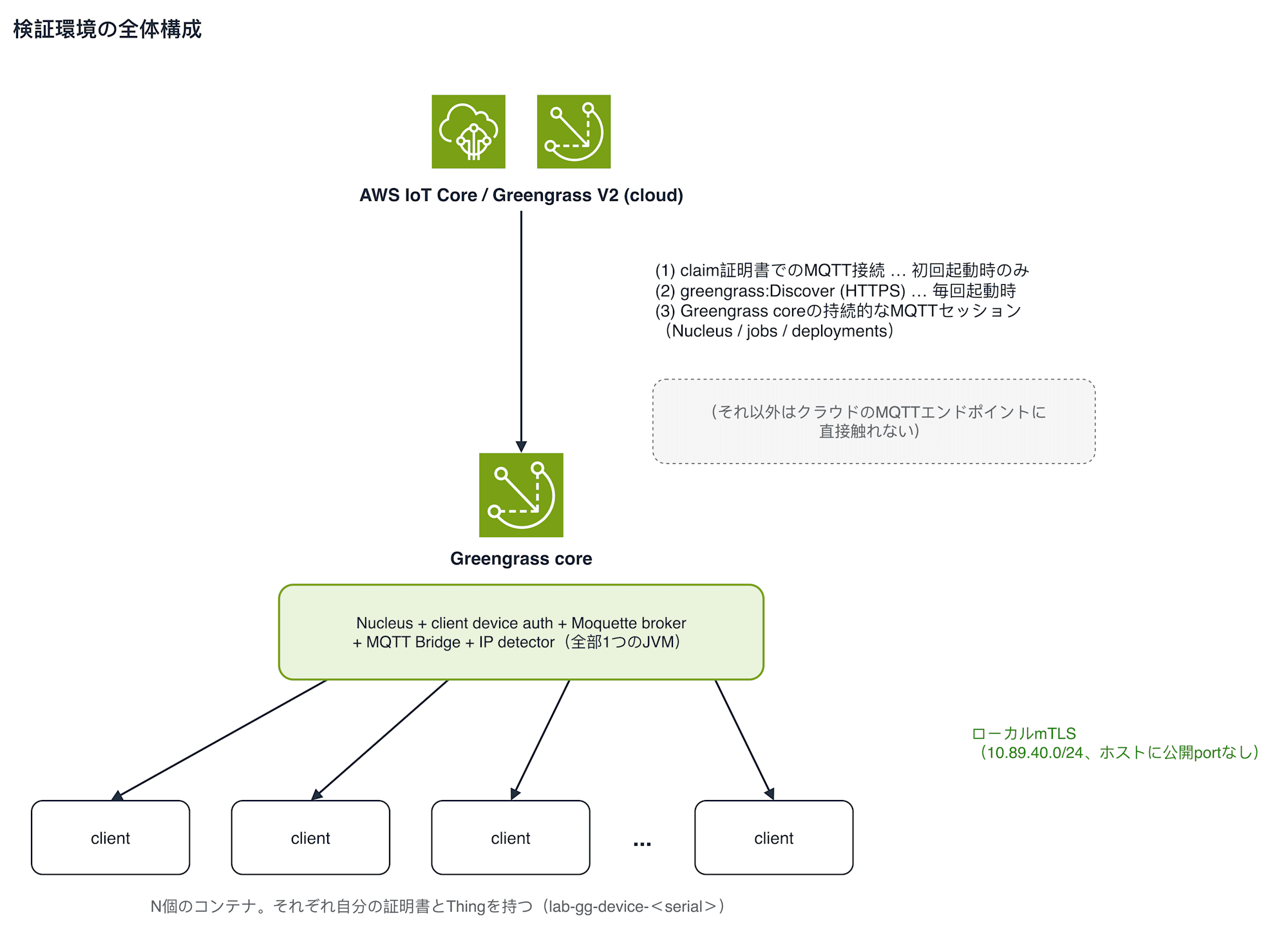
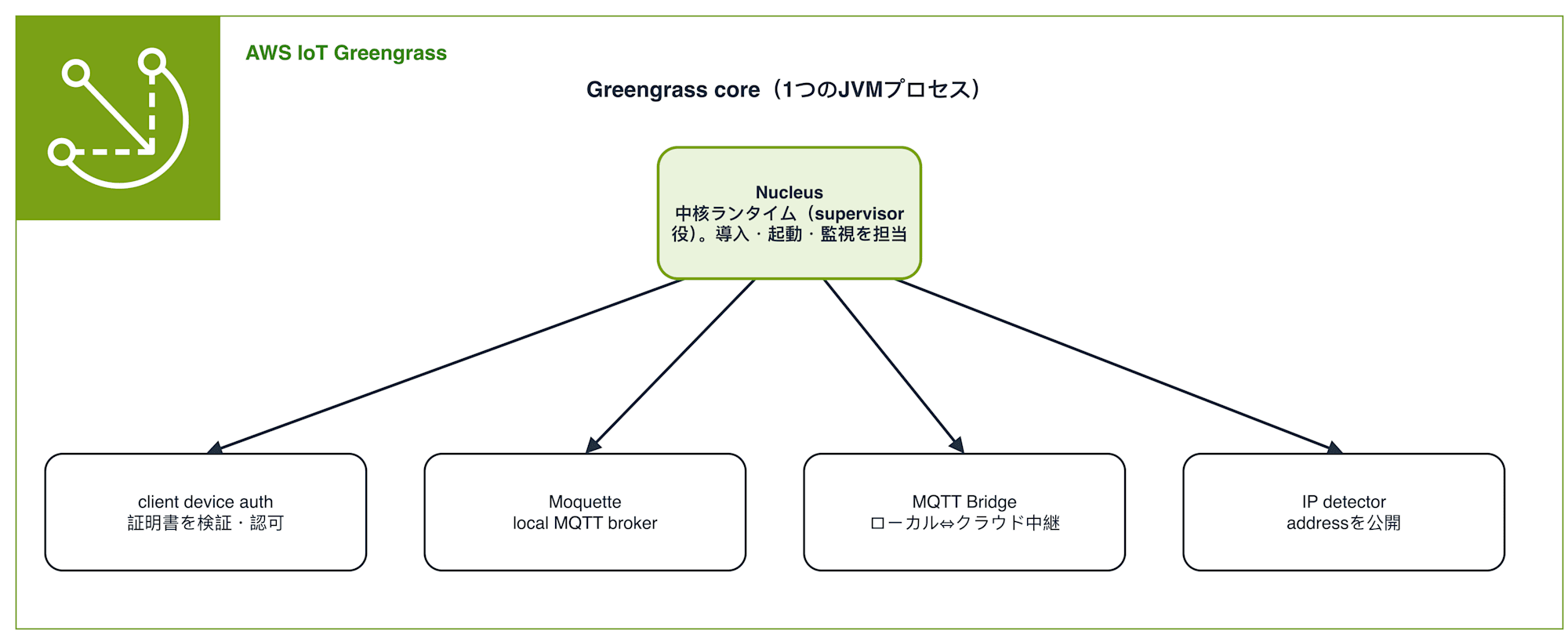
The abbreviations in the diagram refer to: Nucleus (the core runtime), client device auth (certificate verification and connection authorization), Moquette broker (local MQTT broker), MQTT Bridge (relay to the cloud), and IP detector (publishing the connection address). The detailed role of each is explained in the next section, "What is Greengrass."
The structure has one Greengrass core container with N client containers hanging beneath it. Clients cannot reach AWS IoT Core in the cloud except through the Greengrass core.
What is Greengrass
A Greengrass core is not a special entity in itself — it is simply a device (or process) that is first registered as a single AWS IoT Thing, and then runs the full suite of Greengrass core software on top of it.
Inside the Greengrass core, the Nucleus — the central runtime — resides as a single JVM process and handles the installation, startup, and monitoring of other components. When configured to accept client devices, the following components run within the same JVM alongside the Nucleus.
A "client device" here refers to an end device that does not run Greengrass itself, but participates in the AWS IoT world by connecting to the local broker of a nearby Greengrass core. It does not communicate directly with AWS IoT Core in the cloud — it goes through the Greengrass core.
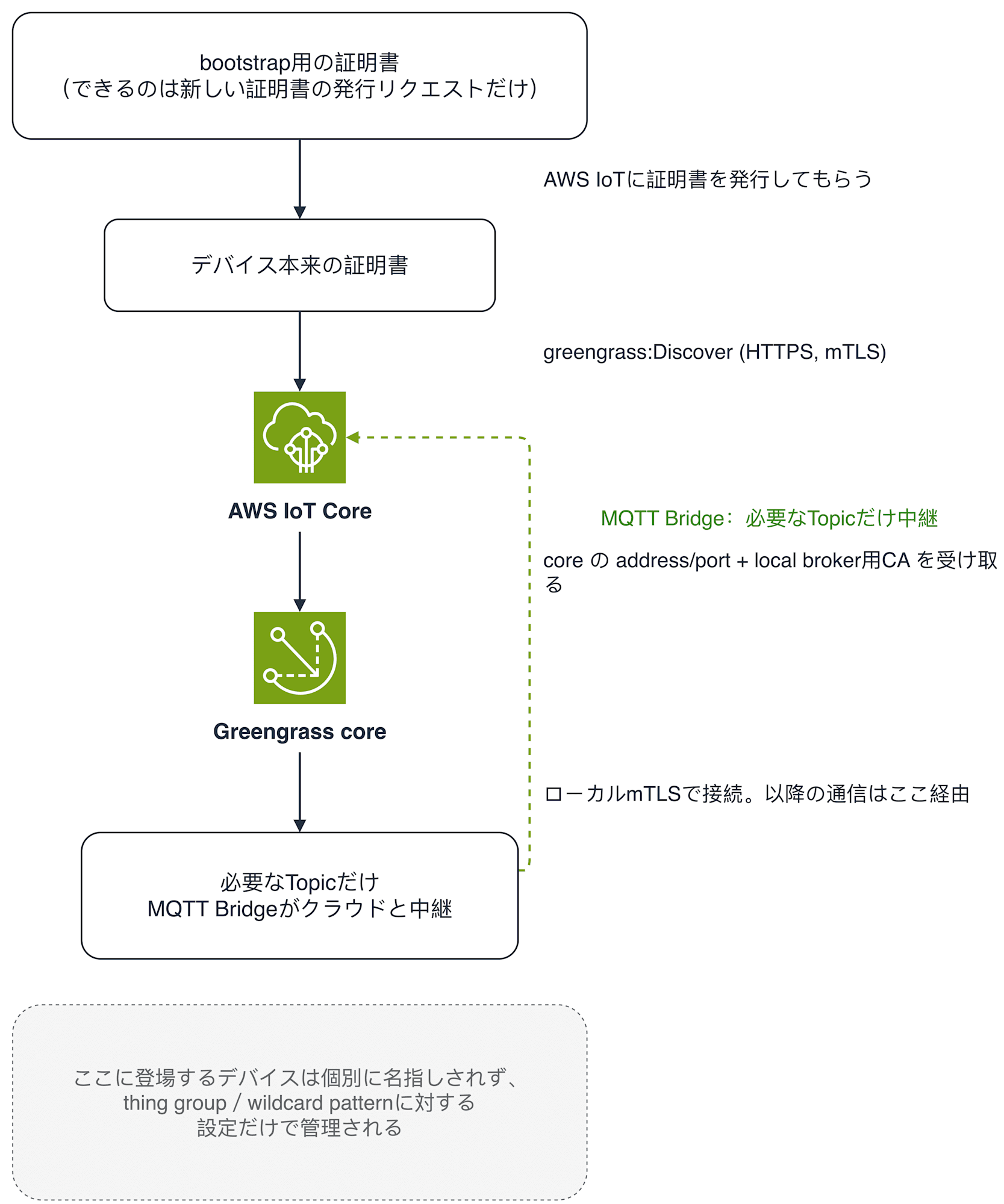
The flow for a client device to interact with the Greengrass core can be summarized as follows.
What Is Minimally Required for Greengrass Core-as-Gateway
From here, rather than tracing the file structure of this repository, I will reorganize things component by component from the perspective of "what is needed to run a Greengrass core as a gateway." For each component, I will only list the actual resources prepared and their purpose.
1. Account Prerequisite: Greengrass Service Role
This needs to be done before creating even a single Greengrass core.
- IAM Role (service role): The role that Greengrass uses to call AWS APIs on its own behalf for Thing registration and Greengrass core state management.
Since this is an account-level singleton — "only one per account+region" — it is not one per Greengrass core or per fleet. The AWS account I'm using is a sandbox shared with other projects, so to absolutely avoid overwriting an existing association, I first check for an existing association and only create a new one if none exists.
2. Greengrass Core Identity: Thing and X.509 Certificate
- AWS IoT Thing: Registers the Greengrass core itself as a single entity.
- X.509 Certificate: Authentication credentials for the Greengrass core. It is issued by passing only the CSR (Certificate Signing Request) to the cloud, so the private key is generated locally and never sent to the cloud or to Terraform state.
3. IoT Policy for Greengrass Core
The certificate requires IoT Policy permissions corresponding to what the Greengrass core actually does.
- Runtime Policy: Permissions for the Nucleus itself and MQTT Bridge to maintain persistent MQTT sessions with the cloud side.
{
  "Version": "2012-10-17",
  "Statement": [
    {
      "Effect": "Allow",
      "Action": "iot:Connect",
      "Resource": "arn:aws:iot:ap-northeast-1:<account-id>:client/lab-gg-core-*"
    },
    {
      "Effect": "Allow",
      "Action": ["iot:Publish", "iot:Receive"],
      "Resource": [
        "arn:aws:iot:ap-northeast-1:<account-id>:topic/$aws/things/lab-gg-core-*/greengrassv2/health/json",
        "arn:aws:iot:ap-northeast-1:<account-id>:topic/$aws/things/lab-gg-core-*/jobs/*",
        "arn:aws:iot:ap-northeast-1:<account-id>:topic/$aws/things/lab-gg-core-*/shadow/*"
      ]
    },
    {
      "Effect": "Allow",
      "Action": "iot:Subscribe",
      "Resource": [
        "arn:aws:iot:ap-northeast-1:<account-id>:topicfilter/$aws/things/lab-gg-core-*/jobs/*",
        "arn:aws:iot:ap-northeast-1:<account-id>:topicfilter/$aws/things/lab-gg-core-*/shadow/*"
      ]
    },
    {
      "Effect": "Allow",
      "Action": "iot:AssumeRoleWithCertificate",
      "Resource": "arn:aws:iot:ap-northeast-1:<account-id>:rolealias/lab-gg-token-exchange-alias"
    },
    {
      "Effect": "Allow",
      "Action": [
        "greengrass:GetComponentVersionArtifact",
        "greengrass:ResolveComponentCandidates",
        "greengrass:GetDeploymentConfiguration",
        "greengrass:ListThingGroupsForCoreDevice"
      ],
      "Resource": "*"
    }
  ]
}
- Client-auth Policy: Permissions for verifying client device certificates (such as
VerifyClientDeviceIdentity).
{
  "Version": "2012-10-17",
  "Statement": [
    {
      "Effect": "Allow",
      "Action": ["greengrass:PutCertificateAuthorities", "greengrass:VerifyClientDeviceIdentity"],
      "Resource": "*"
    },
    {
      "Effect": "Allow",
      "Action": "greengrass:VerifyClientDeviceIoTCertificateAssociation",
      "Resource": "arn:aws:iot:ap-northeast-1:<account-id>:thing/lab-gg-device-*"
    },
    {
      "Effect": "Allow",
      "Action": ["greengrass:GetConnectivityInfo", "greengrass:UpdateConnectivityInfo"],
      "Resource": "arn:aws:iot:ap-northeast-1:<account-id>:thing/lab-gg-core-*"
    },
    {
      "Effect": "Allow",
      "Action": "iot:Publish",
      "Resource": "arn:aws:iot:ap-northeast-1:<account-id>:topic/$aws/things/lab-gg-core-*-gci/shadow/get"
    },
    {
      "Effect": "Allow",
      "Action": ["iot:Subscribe", "iot:Receive"],
      "Resource": [
        "arn:aws:iot:ap-northeast-1:<account-id>:topicfilter/$aws/things/lab-gg-core-*-gci/shadow/update/delta",
        "arn:aws:iot:ap-northeast-1:<account-id>:topicfilter/$aws/things/lab-gg-core-*-gci/shadow/get/accepted",
        "arn:aws:iot:ap-northeast-1:<account-id>:topic/$aws/things/lab-gg-core-*-gci/shadow/update/delta",
        "arn:aws:iot:ap-northeast-1:<account-id>:topic/$aws/things/lab-gg-core-*-gci/shadow/get/accepted"
      ]
    }
  ]
}
- Bridge Policy: Permissions for relaying application topics (telemetry/commands).
{
  "Version": "2012-10-17",
  "Statement": [
    {
      "Effect": "Allow",
      "Action": "iot:Publish",
      "Resource": "arn:aws:iot:ap-northeast-1:<account-id>:topic/lab/greengrass/devices/*/telemetry"
    },
    {
      "Effect": "Allow",
      "Action": "iot:Subscribe",
      "Resource": "arn:aws:iot:ap-northeast-1:<account-id>:topicfilter/lab/greengrass/devices/+/commands"
    },
    {
      "Effect": "Allow",
      "Action": "iot:Receive",
      "Resource": "arn:aws:iot:ap-northeast-1:<account-id>:topic/lab/greengrass/devices/*/commands"
    }
  ]
}
Although split into three separate policies by role, all three are attached together to the same single certificate, so from AWS's perspective they are evaluated as the union of these three sets of permissions.
4. Token Exchange Role (AWS API Credentials)
The Greengrass core sometimes needs to call AWS APIs directly — not just through IoT Policy — for example, resolving component artifacts published by AWS (i.e., retrieving from S3). Rather than giving it static AWS access keys, a mechanism is set up to exchange the certificate for temporary AWS credentials.
- IAM Role + IAM Policy: The content of the temporary credentials actually issued by the token exchange. CloudWatch Logs-related permissions that this lab does not use are excluded, limiting it to only
s3:GetBucketLocation. - IoT Role Alias: The bridge that allows the Greengrass core certificate to assume this IAM Role. The Greengrass core receives temporary credentials via this alias using
iot:AssumeRoleWithCertificate(this permission itself is included in the runtime policy).
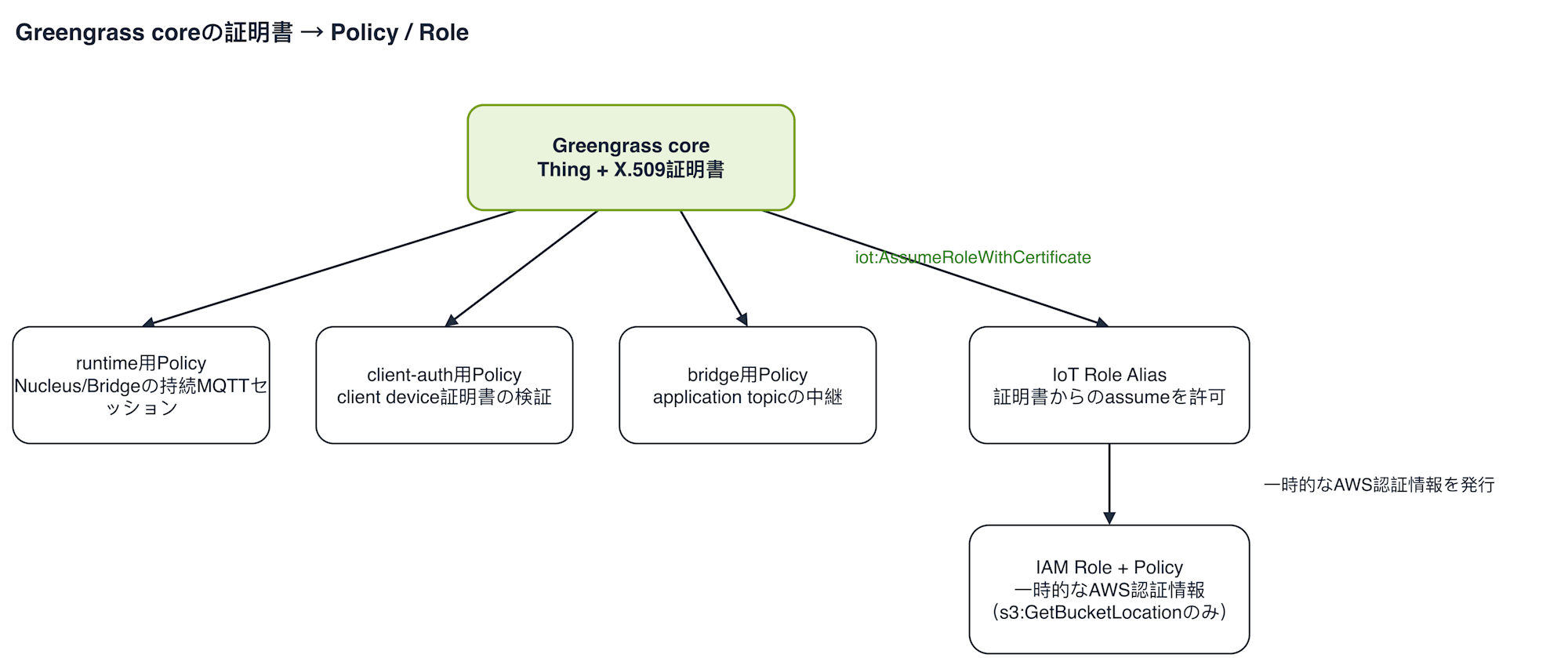
Putting together the Thing, certificate, three IoT Policies, and token exchange role, the overall picture starting from the Greengrass core certificate looks like this.
5. Components to Deploy
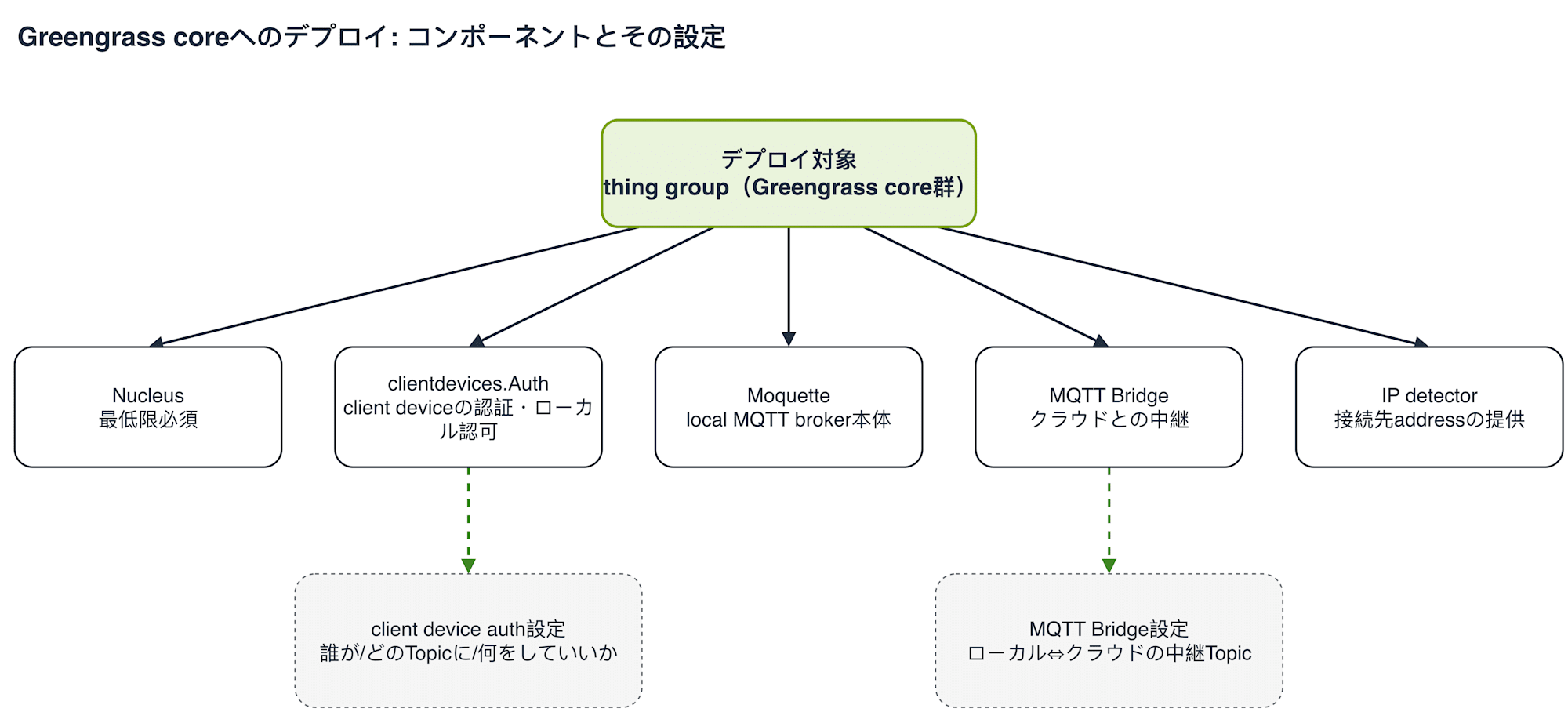
Once the Thing, certificate, Policy, and token exchange role are in place, you can finally configure the Greengrass deployment. The target is not an individual Greengrass core but a thing group that groups multiple Greengrass cores together. Both clientdevices.Auth and clientdevices.mqtt.Bridge have JSON configuration at the deployment level (separate from IoT Policy) in addition to the components themselves.
| Component | Role | Configuration (if any) |
|---|---|---|
| Nucleus | Minimum required | - |
| clientdevices.Auth (client device auth) | Client device authentication and local authorization | Target is determined by a wildcard on the Thing name; restricts publishing to only the device's own telemetry topic and subscribing to only its commands topic |
| clientdevices.mqtt.Moquette (Moquette) | The local MQTT broker itself | - |
| clientdevices.mqtt.Bridge (MQTT Bridge) | Relay to the cloud | Relays only 2 topics using wildcards: telemetry from local→cloud, commands from cloud→local |
| clientdevices.IPDetector (IP detector) | Provides connection address for discovery | - |
Since both configurations express Thing names and Topics using wildcards, this configuration itself does not change even as the number of devices increases or decreases. If you are not accepting client devices, everything except Nucleus is unnecessary.
6. When Using Client Devices: How to Provision the Client's Own Identity
The client device auth and MQTT Bridge were discussed with the premise that clients already have certificates. There are two ways to prepare a client's own certificate and Thing: having a human create them one by one in advance, or using fleet provisioning by claim to let devices self-register only on their first boot. Since I wanted to try a scenario where the number of devices dynamically increases and decreases, I used the latter approach.
- IoT Policy for claim certificate: Permissions granted to the shared certificate dedicated solely to self-registration. Only Publish/Subscribe to the two topics
CreateCertificateFromCsrandRegisterThingare allowed — no access to application-side topics whatsoever. - Fleet provisioning template: The blueprint that determines which Thing name, thing group, and Policy to use. The device only passes a serial number; the Thing name, thing group membership, and attached Policy are all determined by this template (the server side).
- IoT Policy for the client's actual certificate: Permissions granted to the certificate the client actually holds after self-registration is complete. The only permission is
greengrass:Discover— not eveniot:Connectto the cloud MQTT endpoint. Local authorization is separately handled by theclientdevices.Authconfiguration in step 5.
7. Associating Greengrass Core with Client Devices
Even after a client device completes self-registration, the Greengrass core does not automatically become aware of that client's existence.
BatchAssociateClientDeviceWithCoreDeviceAPI call: The procedure to explicitly inform the Greengrass core of the client's existence. This API does not have a form where you can specify a thing group as a whole — only a form that enumerates Thing names individually. This is the only gap in the overall mechanism where AWS has not provided a declarative solution.
This gap is filled with a script that reads the current members of the thing group and passes them in batch to this API. Since no client names are hardcoded in the script itself, it associates whatever members have completed self-registration at that point.
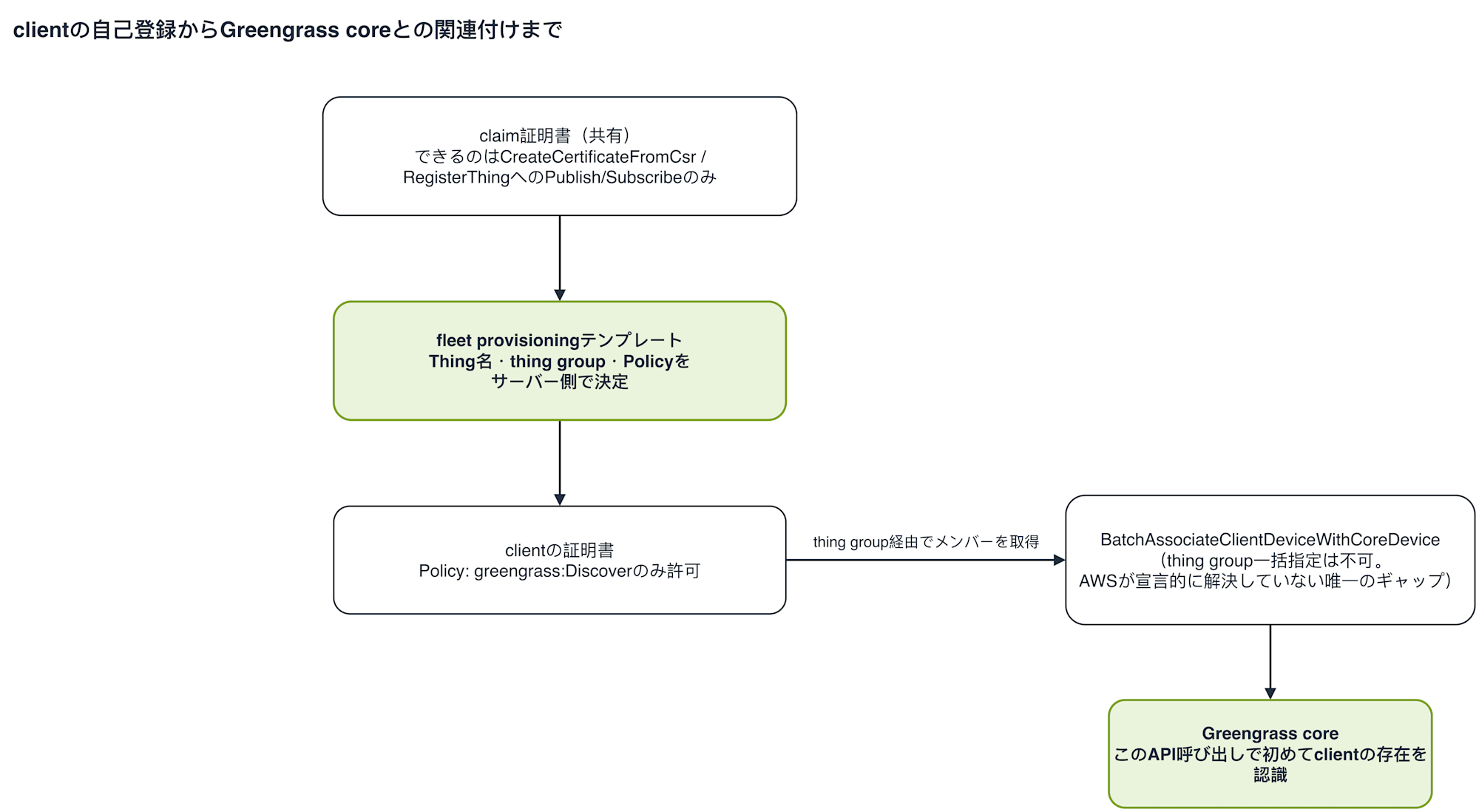
The flow from self-registration with the claim certificate to association with the Greengrass core can be summarized as follows.
Running It
Using the repository (https://github.com/cm-obuchi-hugo-examples/iot-greengrass-minimal ), let's actually get our hands on it. Here is a quick look at how the elements explained so far are arranged within the repository.
iot-greengrass-minimal/
├── infra/
│   ├── 10-account/     Once per account: service role, provisioning role
│   └── 20-fleet/       Per fleet: core Thing/certificate, IoT Policy, deployment, thing group
├── local/
│   └── compose.yaml    Podman Compose runtime definition
├── client-image/       Containerfile, provision.py, client.py, entrypoint.sh
├── scripts/            gen-core-csr.sh, gen-core-config.sh, associate.sh, verify.sh ...
├── certs/              Locally generated private keys and certificates (gitignored)
├── config/             Generated config.yaml for core (gitignored)
├── greengrass.env      Static Nucleus environment variables for the core container
└── client.env          Generated environment variables for client containers (gitignored)
infra/10-account is applied only once per account and region; infra/20-fleet is a layer applied per fleet. certs/, config/, and client.env are all gitignored — the repository itself does not contain these actual files.
The steps I actually carried out follow the Runbook in README.md as follows.
1) Apply Account-wide Resources Once
terraform -chdir=infra/10-account apply. Checks for an existing service role association, and creates a new one only if none exists.
2) Generate Certificate-related Resources Locally
scripts/gen-core-csr.sh / scripts/gen-claim-csr.sh. The private key is created here for the first time and never passed to Terraform.
3) Apply Fleet Layer Resources
terraform -chdir=infra/20-fleet apply. The core Thing/certificate, claim certificate, various IoT Policies, fleet provisioning template, token exchange role, two thing groups, and the Greengrass deployment (5 components) are all created at once.
4) Generate Core Local Configuration
scripts/gen-core-config.sh. Renders config/config.yaml and client.env from Terraform outputs.
5) Clone the Core Image Build Source
Check out aws-greengrass-docker at the commit corresponding to the Nucleus version pinned in infra/20-fleet/deployment.tf.
AWS Resources Created Up to This Point
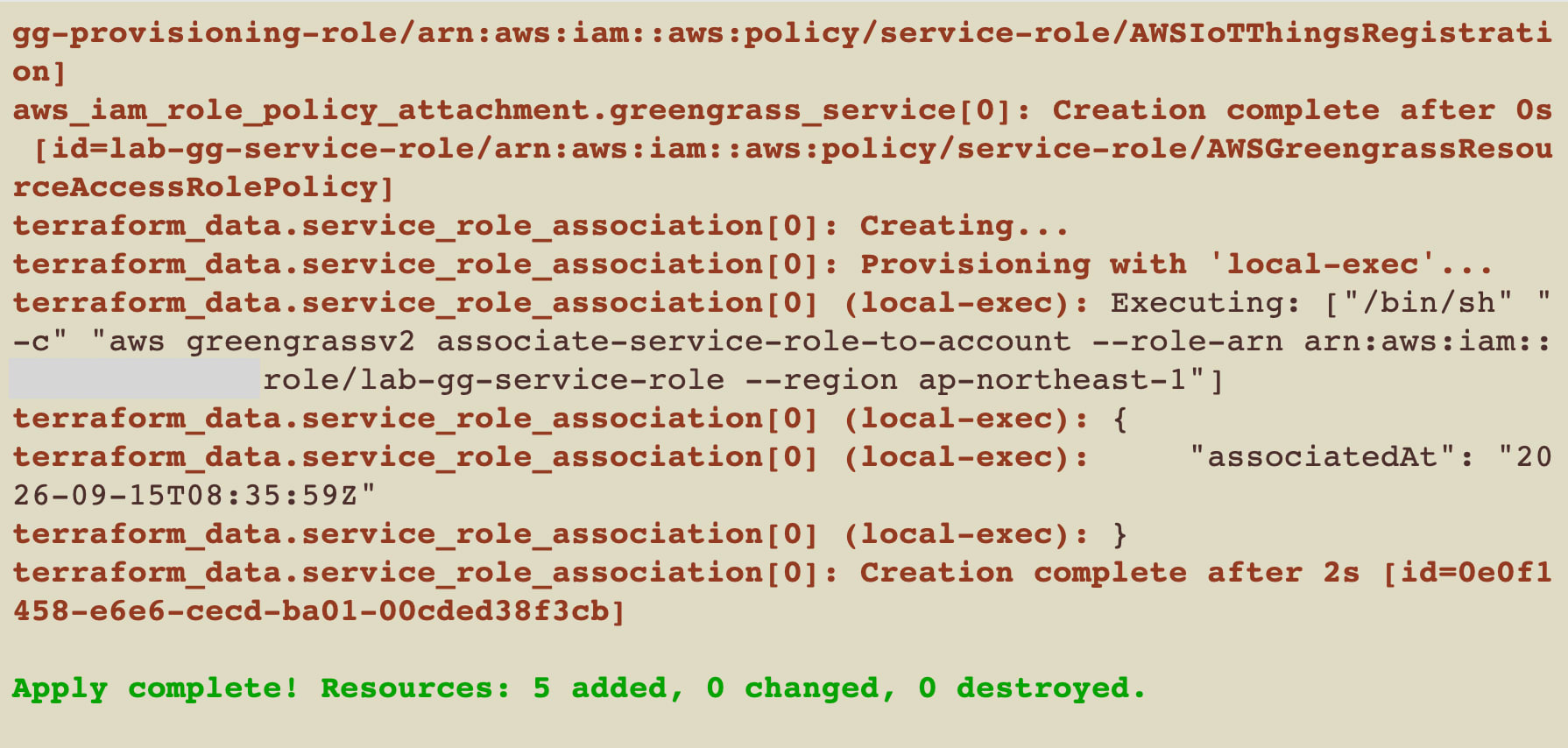
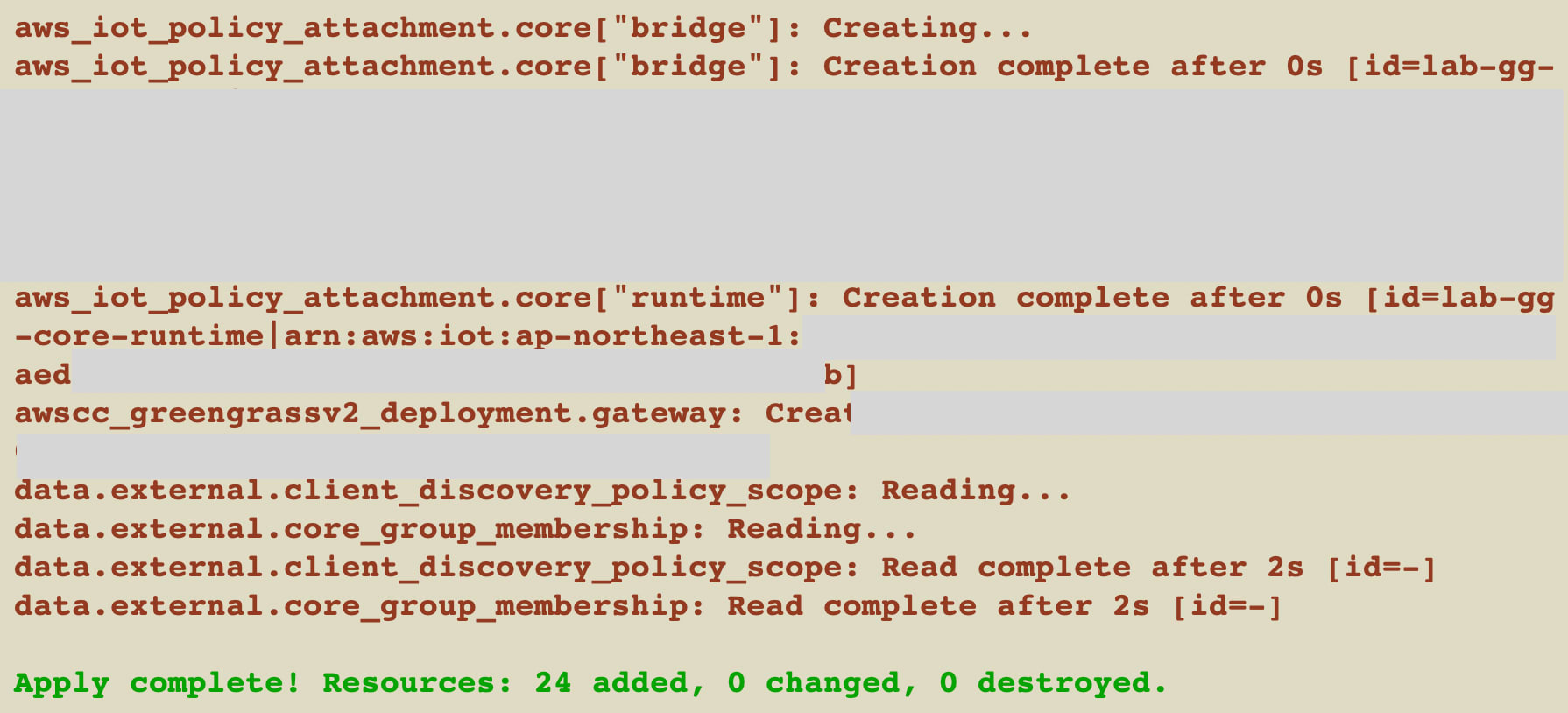
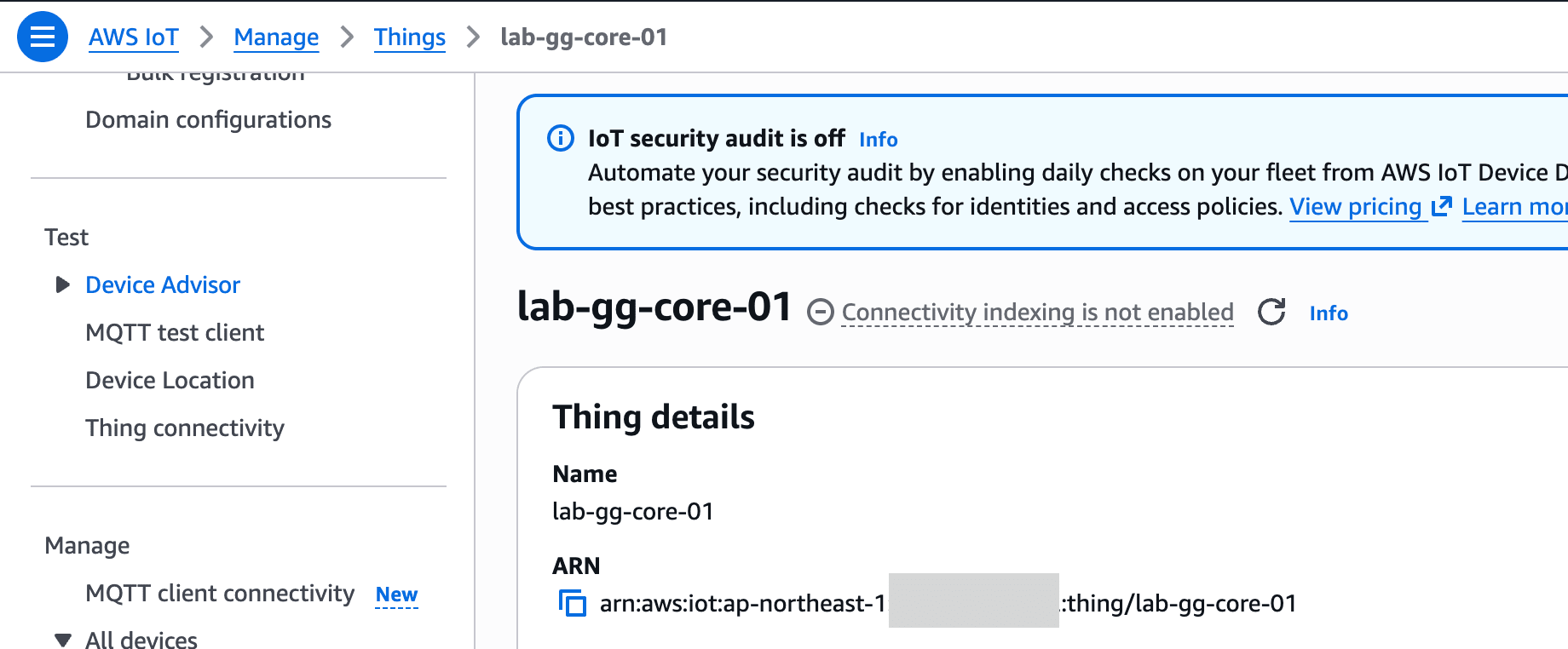
Up through these steps, the following resources have actually been created on AWS (no containers have started yet at this point).
infra/10-account (per account, once only)
├── IAM Role: provisioning role (used by fleet provisioning by claim)
└── IAM Role: service role (created new only if no existing association)

infra/20-fleet (per fleet)
├── AWS IoT Core
│   ├── Thing: lab-gg-core-01 (the core itself)
│   ├── X.509 Certificate ×1 (for core; three IoT Policies attached together)
│   ├── X.509 Certificate ×1 (for claim, shared)
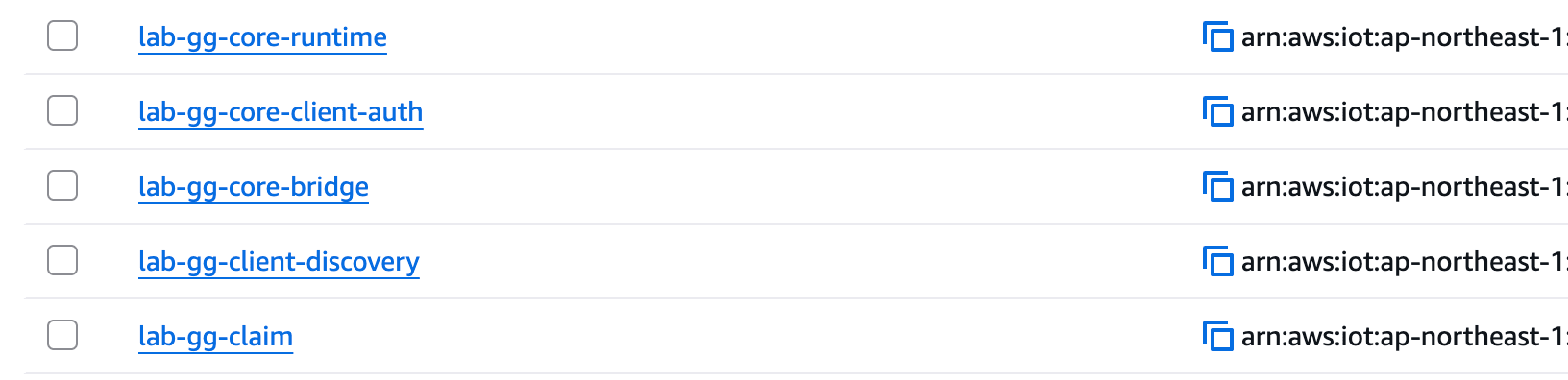
│   ├── IoT Policy ×5 (core runtime / core client-auth / core bridge / claim / client discovery)
│   ├── Fleet provisioning template
│   └── Thing Group ×2 (lab-gg-cores / lab-gg-clients)
├── IAM (token exchange)
│   ├── IAM Role + IAM Policy
│   └── IoT Role Alias
└── AWS IoT Greengrass V2
    └── Deployment (targeting thing group, 5 components: Nucleus, clientdevices.Auth,
        clientdevices.mqtt.Moquette, clientdevices.mqtt.Bridge, clientdevices.IPDetector)
The client's own Things and certificates do not yet exist at this point. They are created only when a client starts up and self-registers via fleet provisioning by claim.
6) Start the Fleet
podman compose -f local/compose.yaml up -d --build --scale client=3
This started 1 Greengrass core and 3 clients.
7) Run the Association
scripts/associate.sh. Associates the current members of the lab-gg-clients thing group with the Greengrass core via BatchAssociateClientDeviceWithCoreDevice.
What associate.sh and verify.sh Actually Do
associate.sh is a one-way process that simply reads the registry and passes it directly to a single API.
Current member list of the lab-gg-clients thing group
        │  (list-things-in-thing-group)
        ▼
List of Thing names (batched up to 100 at a time)
        │  (batch-associate-client-device-with-core-device)
        ▼
Associated with lab-gg-core-01
Since no Thing names or counts are hardcoded in the script itself, it associates whatever members have completed self-registration at that point.
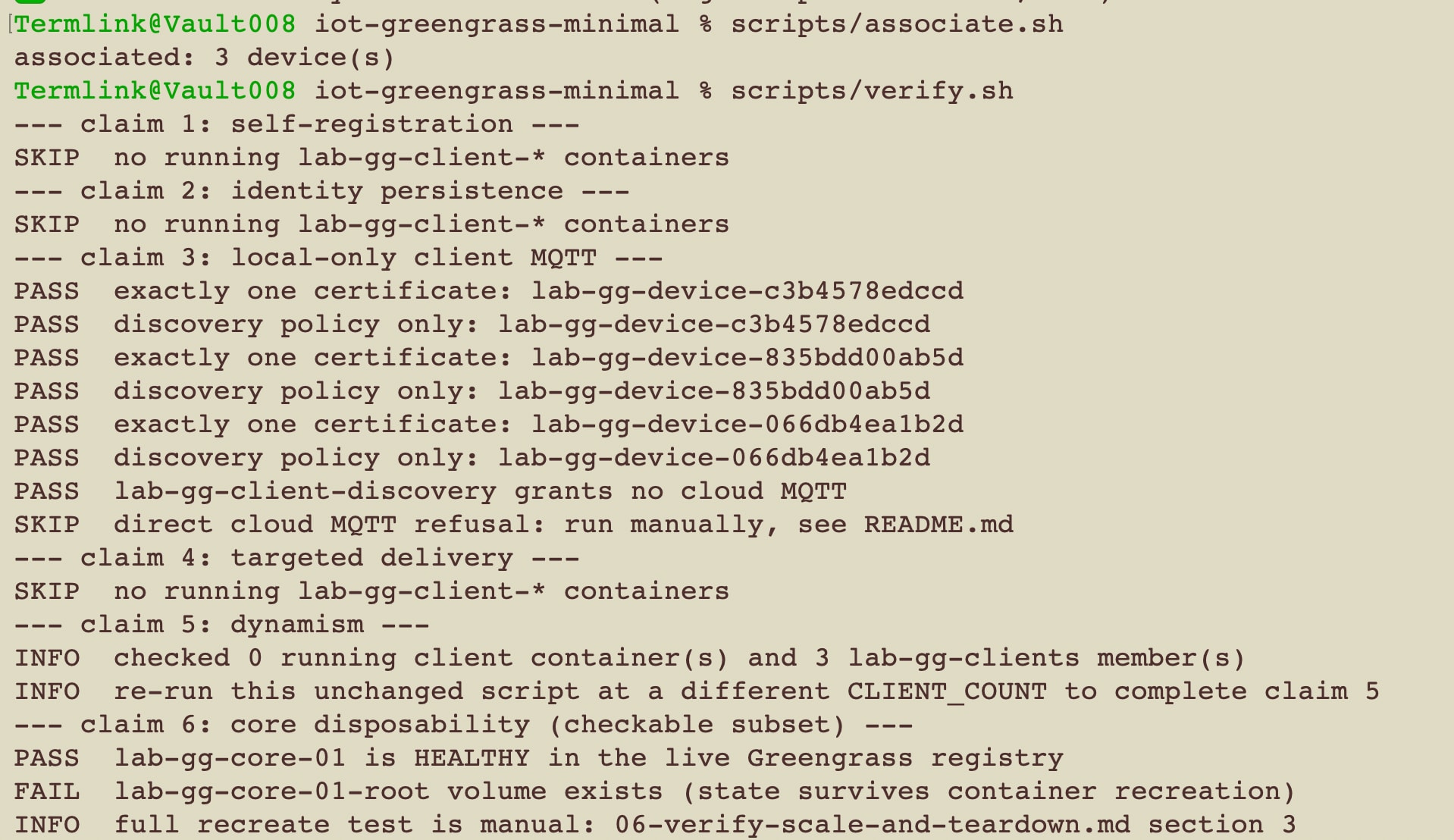
Whether the premises built up so far (self-registration, identity persistence, local-only client MQTT, targeted delivery, dynamism, Greengrass core disposability) actually hold cannot be determined just by reading the code. verify.sh reads the current state from podman ps and the AWS registry and independently judges each of the 6 claims as PASS or FAIL.
Input: podman ps (running containers) + current state of AWS registry
        │
        ├─ claim 1  self-registration        Are all running containers members of the thing group?
        ├─ claim 2  identity persistence     Does restarting one container not create a new Thing?
        ├─ claim 3  local-only MQTT          Does the client certificate have only the discovery policy?
        ├─ claim 4  targeted delivery        Does a command to one specific container not leak to others?
        ├─ claim 5  dynamism                 Display only (the script itself does not depend on count)
        └─ claim 6  core disposability(partial) Is the core HEALTHY? Does the stateful volume remain?
        │
        ▼
Outputs PASS/FAIL per claim; deliberately not using `set -e`, so if one fails the rest all still run
Claim 3 has a second half that requires manual verification (confirming direct connection is refused), which always displays as SKIP. Claim 6 also covers only the non-destructive portion — checking registry state and volume existence — and the test of actually destroying the core, recreating it, and comparing certificates is manual.
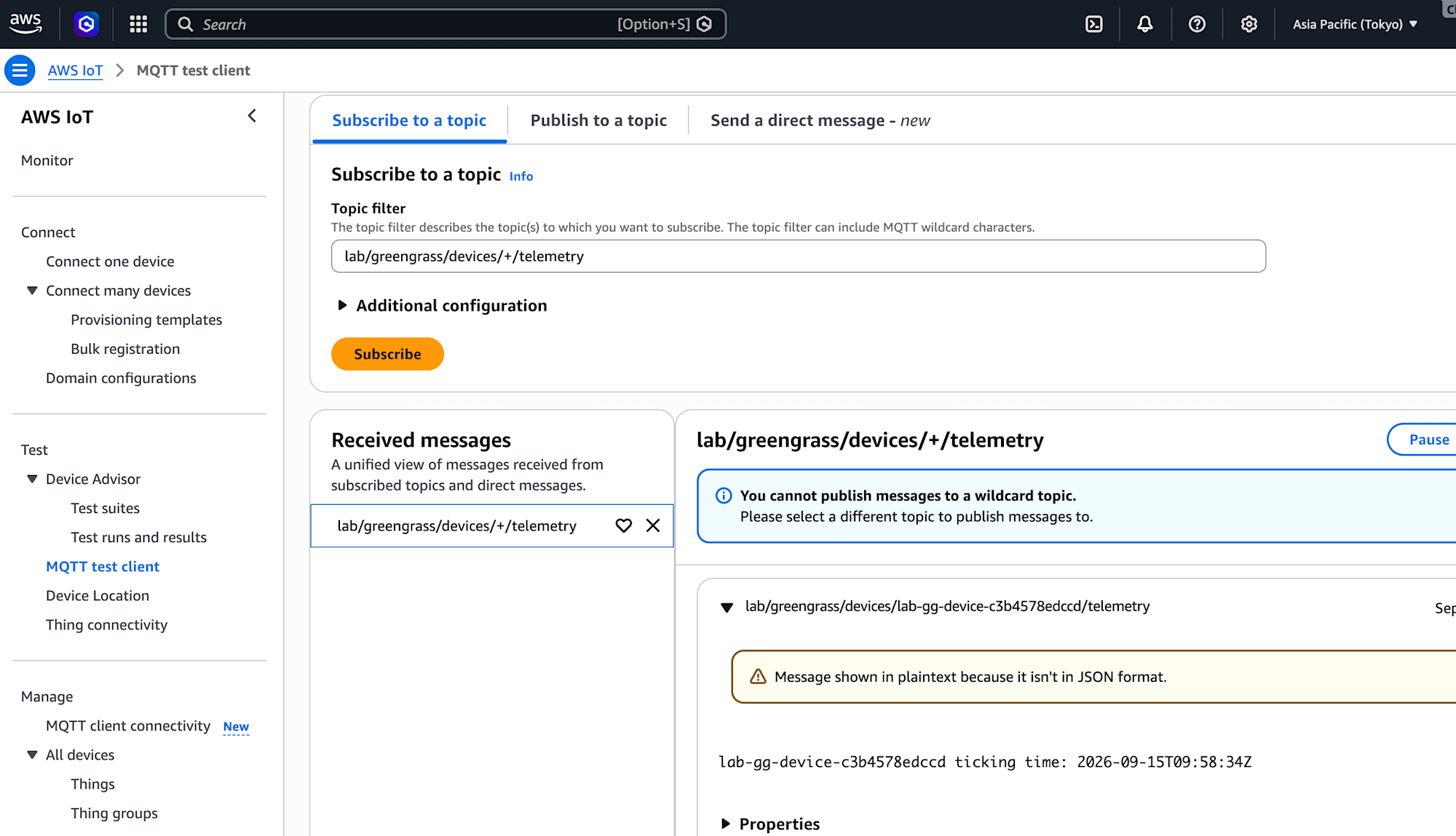
By subscribing to lab/greengrass/devices/+/telemetry in the AWS IoT Console's MQTT test client, ticking messages like the following actually arrive every minute.
Conclusion
It was a small setup of just 1 Greengrass core and 3 clients, but I was able to fully assemble the goal stated at the beginning: "devices provision their own certificates and Things at startup, and cannot reach the cloud except through the Greengrass core."
For scenarios like a factory where devices are continuously added and replaced, I felt that the Greengrass V2 client device feature is a mechanism built exactly for this purpose. Being able to actually build and experience a design where — thanks to wildcard naming conventions for Thing names and IoT Policies — there is no need to individually touch Terraform or IoT Policies as the number of devices changes, was a valuable takeaway. For anyone considering similarly dynamic device management, I think this is a configuration worth trying out.
