I Tried Out the Ability to Set the AWS Sign-In Session Duration Up to a Maximum of 90 Days

This page has been translated by machine translation. View original
Introduction
On November 23, 2026, an update was announced that allows the AWS Sign-In sign-in duration to be set up to a maximum of 90 days for each IAM user and IAM role.
The sign-in duration is the period during which the sign-in session of OAuth-enabled applications such as aws login and the AWS MCP Server is valid. AWS Management Console sessions are not covered. I set the sign-in duration and checked the sessions created with aws login.
Verification environment
- aws-cli: 2.42.2
- Required aws-cli: the sign-in duration argument and the aws signin session management commands require 2.41.1 or later, and aws login requires 2.32.0 or later
- Policy attached to the signing-in user: SignInLocalDevelopmentAccess
I attached the policy with the following command.
aws iam attach-user-policy --user-name signin-duration-verify-user --policy-arn arn:aws:iam::aws:policy/SignInLocalDevelopmentAccess
Setting the sign-in duration
Specify the sign-in duration in seconds with --max-signin-session-duration. 90 days is 7776000 seconds. This argument is also available in create-role and create-login-profile, so it can be specified at creation time.
Role
For a role, set it with update-role and check the value with get-role. To return to the default state, specify --reset-max-signin-session-duration.
Before the setting, both MaxSessionDuration and MaxSigninSessionDuration of the role were 3600.
$ aws iam get-role --role-name signin-duration-verify-role
...
        "MaxSessionDuration": 3600,
        "MaxSigninSessionDuration": 3600,
...
I set 90 days and checked it.
$ aws iam update-role --role-name signin-duration-verify-role --max-signin-session-duration 7776000
$ aws iam get-role --role-name signin-duration-verify-role --query Role.\[RoleName\,MaxSessionDuration\,MaxSigninSessionDuration\]
[
    "signin-duration-verify-role",
    3600,
    7776000
]
After returning to the default state, MaxSigninSessionDuration became 3600.
$ aws iam update-role --role-name signin-duration-verify-role --reset-max-signin-session-duration
$ aws iam get-role --role-name signin-duration-verify-role --query Role.\[RoleName\,MaxSessionDuration\,MaxSigninSessionDuration\]
[
    "signin-duration-verify-role",
    3600,
    3600
]
MaxSessionDuration remained 3600 before and after the setting.
The validity period of each temporary credential is determined by MaxSessionDuration, not by the sign-in duration.
User
For an IAM user, set it with update-login-profile and check the value with get-login-profile.
Immediately after creating the login profile, the value was 43200 (12 hours), and after returning to the default state it became 43200 again. The output of get-login-profile shows only the MaxSigninSessionDuration line as an excerpt.
$ aws iam get-login-profile --user-name signin-duration-verify-user
        "MaxSigninSessionDuration": 43200
$ aws iam update-login-profile --user-name signin-duration-verify-user --max-signin-session-duration 7776000
$ aws iam get-login-profile --user-name signin-duration-verify-user
        "MaxSigninSessionDuration": 7776000
$ aws iam update-login-profile --user-name signin-duration-verify-user --reset-max-signin-session-duration
$ aws iam get-login-profile --user-name signin-duration-verify-user
        "MaxSigninSessionDuration": 43200
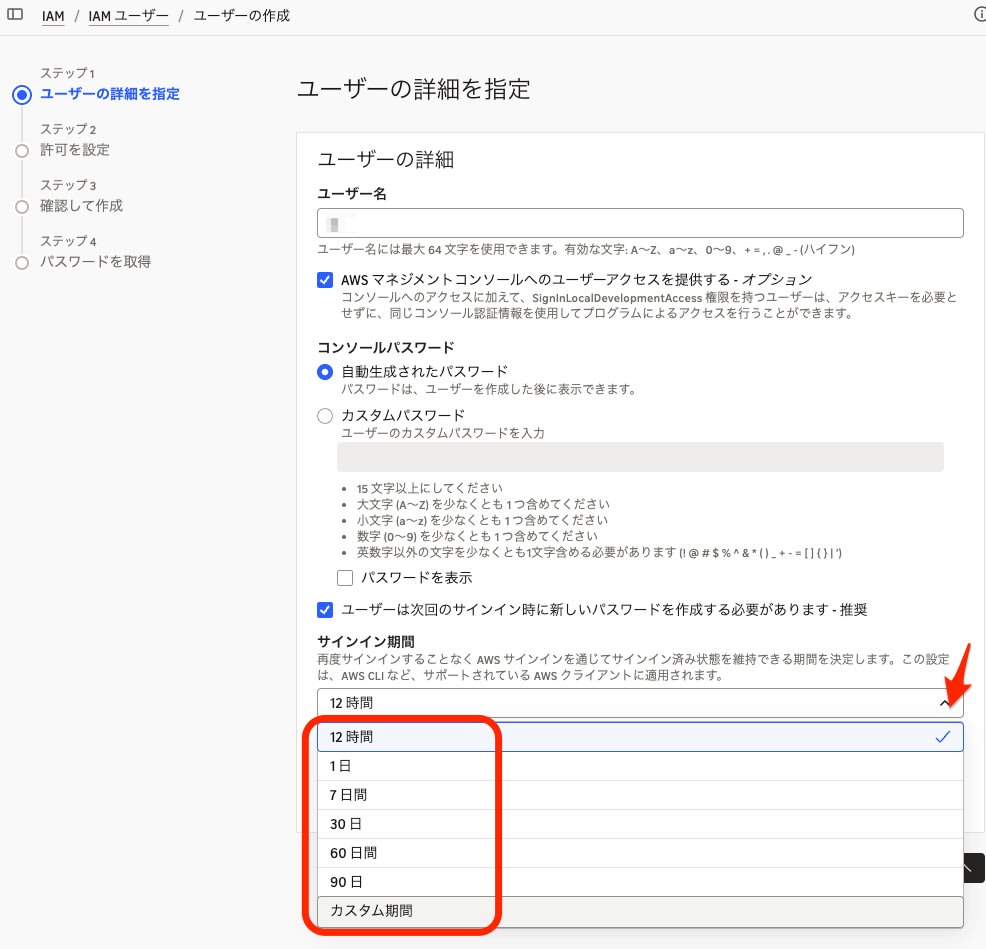
The user creation screen of the IAM console also has a "Sign-in duration" option, and the default is 12 hours.
Checking the sessions
For the verification, I used signin-duration-verify-user, whose login profile I created in the IAM console. I created sessions with aws login before and after setting the sign-in duration and compared their expiration times. The session created while MaxSigninSessionDuration was at the default 43200 was issued in ap-northeast-1. After that, I set 7776000 with update-login-profile and created a new session in us-east-1.
Running aws login
I created the session after the setting with the following command.
AWS_REGION=us-east-1 aws login --profile signin-verify --remote
Comparing expiration times
I retrieved the session after the setting with get-session and checked the duration from the difference between issuedAt and expiresAt. This time, I ran it with administrator permissions, specifying --principal-arn.
$ aws signin get-session --region us-east-1 --session-arn arn:aws:signin:us-east-1:123456789012:session/<session-id> --principal-arn arn:aws:iam::123456789012:user/signin-duration-verify-user
{
    "sessionArn": "arn:aws:signin:us-east-1:123456789012:session/<session-id>",
    "principalArn": "arn:aws:iam::123456789012:user/signin-duration-verify-user",
    "status": "ACTIVE",
    "clientId": "arn:aws:signin:::devtools/cross-device",
    "clientType": "CLI",
    "issuedAt": 1795518073,
    "expiresAt": 1803294073,
    "issuedInRegion": "us-east-1",
    ...
}
The comparison of the two sessions is as follows. Times are in UTC.
| Item | Session before setting | Session after setting |
|---|---|---|
| MaxSigninSessionDuration | 43200 | 7776000 |
| Issuing region | ap-northeast-1 | us-east-1 |
| issuedAt | 2026-11-24 10:58:51 | 2026-11-24 11:01:13 |
| expiresAt | 2026-11-24 22:58:51 | 2027-02-22 11:01:13 |
| expiresAt − issuedAt | 43200 seconds | 7776000 seconds |
The expiration of the session after the setting was 90 days after issuance. The session before the setting had an unchanged expiresAt even when I checked it with list-sessions after issuing the 90-day session. The change in the setting was reflected only in sessions created after the change.
CloudTrail records
The issuance of the sessions was recorded in CloudTrail as CreateOAuth2Token. I ran lookup-events in each region where the sessions were issued (ap-northeast-1 and us-east-1). The following is the command for us-east-1.
aws cloudtrail lookup-events --region us-east-1 --lookup-attributes AttributeKey=EventName,AttributeValue=CreateOAuth2Token --start-time 2026-11-24T10:50:00Z --max-results 10
In the event's additionalEventData, the session duration was recorded in seconds as SignInDuration.
Session revocation
When I revoked the session with batch-revoke-sessions, the status in list-sessions became REVOKED.
$ aws signin batch-revoke-sessions --region us-east-1 --principal-arn arn:aws:iam::123456789012:user/signin-duration-verify-user --session-arns arn:aws:signin:us-east-1:123456789012:session/<session-id> --reason "devio verification cleanup"
{
    "revokedSessions": [
        {
            "sessionArn": "arn:aws:signin:us-east-1:123456789012:session/<session-id>"
        }
    ],
    ...
}
$ aws signin list-sessions --region us-east-1 --principal-arn arn:aws:iam::123456789012:user/signin-duration-verify-user
{
    "items": [
        {
            "sessionArn": "arn:aws:signin:us-east-1:123456789012:session/<session-id>",
            "principalArn": "arn:aws:iam::123456789012:user/signin-duration-verify-user",
            "status": "REVOKED",
            ...
        }
    ]
}
Conclusion
I was able to set the sign-in duration of IAM users and roles to 90 days.
If you were using access keys for long-running workflows because aws login sessions would expire, this update may make it possible to replace them with aws login or AWS MCP Server sign-in and retire the access keys.
The sign-in duration can be set up to a maximum of 90 days, but avoid specifying a longer period than necessary. If you need a long session, we recommend minimizing IAM permissions in case the temporary credentials are stolen, and if possible, also restricting the source IP before use.
