Try implementing access control using more granular permissions for AWS Support

This page has been translated by machine translation. View original
Introduction
Hello everyone, this is Akaike.
When I opened the AWS Support console, a banner was displayed prompting me to update permissions.
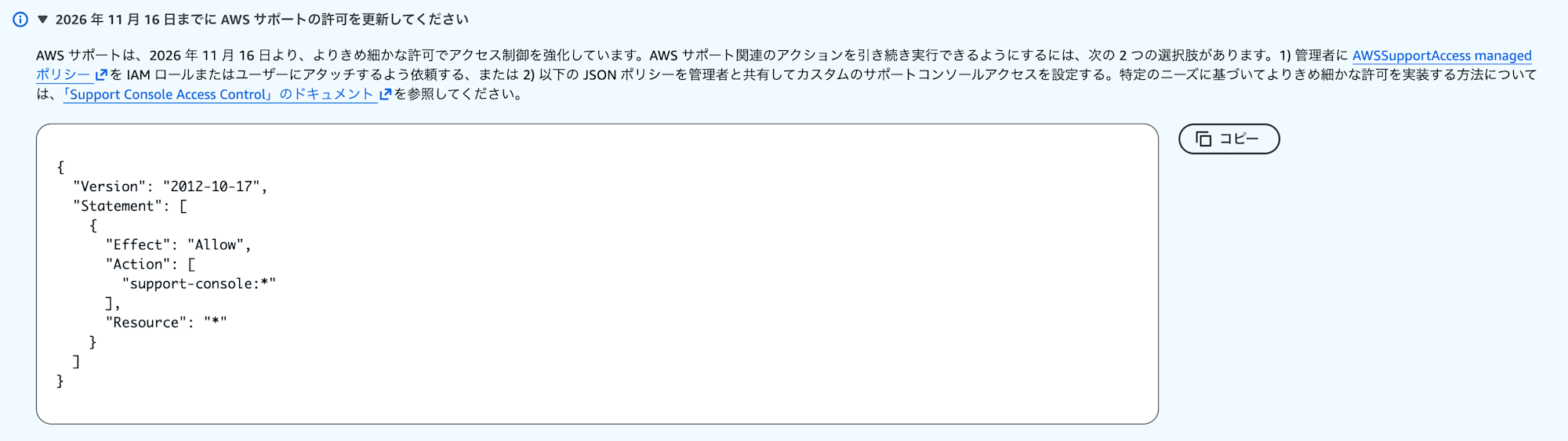
Since a deadline is mentioned, I couldn't just ignore it, but just reading the banner wasn't enough to understand what needed to be fixed and to what extent...
So this time, I'll confirm what is changing and summarize how to handle it.
Banner Content
The banner content can be roughly summarized into the following 2 points.
- Starting November 16, 2026, AWS Support will strengthen access control with more granular permissions
- There are 2 ways to handle this:
- Attach the
AWSSupportAccessmanaged policy - Prepare a custom policy that allows
support-console:*
- Attach the
Also, the following documentation states that if you don't prepare a policy before the deadline, you will get AccessDenied, so some action seems necessary.
Before November 16, 2026, you must create AWS Identity and Access Management policies for Support Center console API operations. If you do not create these policies by November 16, 2026, you will receive AccessDenied errors.
What Changes?
The aforementioned support-console is a separate service prefix from the conventional support.
support-console is an action exclusive to the Support Center console and cannot be called from the CLI or SDK.
However, since I couldn't quite understand what was changing just by reading the documentation, I'll compare CloudTrail logs between cases with and without permissions.
Log Without Permissions
This is the log when I tried to create a case draft from the Support Center using a role that only has ReadOnlyAccess.
(The following logs have the account ID and other information masked, and some fields are omitted)
{
    "eventTime": "2026-09-24T08:06:22Z",
    "eventSource": "support-console.amazonaws.com",
    "eventName": "CreateCaseDraft",
    "awsRegion": "us-east-1",
    "userIdentity": {
        "type": "AssumedRole",
        "arn": "arn:aws:sts::111122223333:assumed-role/AWSReservedSSO_ReadOnlyAccess_xxxxxxxxxxxxxxxx/test-user"
    },
    "errorCode": "AccessDenied",
    "errorMessage": "User: arn:aws:sts::111122223333:assumed-role/AWSReservedSSO_ReadOnlyAccess_xxxxxxxxxxxxxxxx/test-user is not authorized to perform: support:CreateCase because no identity-based policy allows the support:CreateCase action",
    "readOnly": false,
    "eventType": "AwsApiCall",
    "managementEvent": true,
    "tlsDetails": {
        "clientProvidedHostHeader": "api.us-east-1.prod.support-console.support.aws.dev"
    }
}
The event name is CreateCaseDraft and the event source is support-console.amazonaws.com.
However, the errorMessage points to the conventional support:CreateCase, not support-console:CreateCaseDraft.
Log With Permissions
Next, I'll add a policy that allows support:* to the permission set and try the same operation.
{
    "eventTime": "2026-09-24T08:13:32Z",
    "eventSource": "support-console.amazonaws.com",
    "eventName": "CreateCaseDraft",
    "awsRegion": "us-east-1",
    "userIdentity": {
        "type": "AssumedRole",
        "arn": "arn:aws:sts::111122223333:assumed-role/AWSReservedSSO_ReadOnlyAccess_xxxxxxxxxxxxxxxx/test-user"
    },
    "additionalEventData": {
        "authZHeader": "User: arn:aws:sts::111122223333:assumed-role/AWSReservedSSO_ReadOnlyAccess_xxxxxxxxxxxxxxxx/test-user is not authorized to perform: support-console:CreateCaseDraft because no identity-based policy allows the support-console:CreateCaseDraft action"
    },
    "readOnly": false,
    "eventType": "AwsApiCall",
    "managementEvent": true,
    "tlsDetails": {
        "clientProvidedHostHeader": "api.us-east-1.prod.support-console.support.aws.dev"
    }
}
The errorCode is gone and the request succeeded.
However, a message saying "support-console:CreateCaseDraft is not authorized" remains in additionalEventData.authZHeader.
This means that the current authorization is handled by the conventional support:*, and the evaluation result of support-console:* is only recorded in the log.
From this, we can infer that after November 16, 2026, these will switch to actual denials.
Also, the specific permissions that will be affected are likely those listed in the following documentation.
How to Handle It
Using a Managed Policy
This is the method of attaching AWSSupportAccess.
The current version (v4) allows both support:* and support-console:*, so simply attaching this is sufficient.
{
  "Version": "2012-10-17",
  "Statement": [
    {
      "Effect": "Allow",
      "Action": [
        "support:*",
        "support-console:*"
      ],
      "Resource": "*"
    }
  ]
}
Using a Customer Managed Policy
This is for cases where you want fine-grained control, such as "I want to allow viewing cases, but not allow creating cases."
The documentation's list of operations includes access levels, so select only what you need.
| Access Level | Operations |
|---|---|
| READ | GetAccountState / GetAccountGovCloudEnabled / GetCaseDraft / GetBanner / DescribeDynamicHelp / CheckSubscription / GetQuestionnaire |
| WRITE | CreateCaseDraft / DeleteCaseDraft / CreateContact / SaveFeedback |
For example, if you want to allow only read access, it would look like the following.
{
  "Version": "2012-10-17",
  "Statement": [
    {
      "Effect": "Allow",
      "Action": [
        "support-console:GetAccountState",
        "support-console:GetAccountGovCloudEnabled",
        "support-console:GetCaseDraft",
        "support-console:GetBanner",
        "support-console:DescribeDynamicHelp",
        "support-console:CheckSubscription",
        "support-console:GetQuestionnaire"
      ],
      "Resource": "*"
    }
  ]
}
However, with a customer managed policy, you need to keep up with changes each time (such as when AWS adds actions), so if fine-grained control is not a requirement, I think it's easier to simply use the managed policy.
Specific Image of Permission Assignment
Here I'll think about it in terms of predefined permission sets in IAM Identity Center.
The key point is whether the base AWS managed policy includes support-console, and the results were as follows.
| Permission Set | support-console Permission |
Additional Action |
|---|---|---|
AdministratorAccess |
Yes | Not required |
PowerUserAccess |
Yes | Not required |
ReadOnlyAccess |
No | Required |
ViewOnlyAccess |
No | Required |
AdministratorAccess
Since Action is "*", it automatically includes any namespaces that AWS adds later.
Therefore, no action is required.
PowerUserAccess
This uses NotAction to exclude only iam:*, organizations:*, and account:*.
Since it doesn't enumerate the actions to allow, support-console:* is automatically included.
Therefore, no action is required.
ReadOnlyAccess
The only support-related permissions it has are support:Describe* and support:SearchForCases, and support-console is not included.
Therefore, action is required.
Note that ReadOnlyAccess does not include permissions to create cases, but attaching AWSSupportAccess grants support:*, which also allows case creation.
Therefore, if you're treating it as a read-only permission set, it may be worth checking whether the resulting permissions align with your design.
ViewOnlyAccess
This has no support-related actions at all, so like ReadOnlyAccess, action is required.
Conclusion
That's it for handling the transition to more granular permission-based access control in AWS Support.
The action itself is simply attaching AWSSupportAccess or creating and attaching a customer managed policy, but it took some time to understand the differences from the current state.
Comparing CloudTrail logs was the clearest approach, and I was able to confirm the transitional state where authorization is still handled by support:* while the evaluation result of support-console:* is only being recorded.
I hope this helps those who are similarly trying to understand the content of the AWS Support banner.
