I organized the authentication flow between AWS IoT Greengrass Core devices and AWS services

This page has been translated by machine translation. View original
Introduction
When using AWS IoT Greengrass (hereinafter referred to as Greengrass), various resources such as certificates, roles, and policies appear for authentication and authorization, which often causes confusion when troubleshooting permission issues.
Therefore, in this article, I would like to organize Greengrass authentication and authorization using diagrams.
Note that this article targets Greengrass V2.
Also, this time we are focusing on communication between Greengrass Core devices and AWS services.
Communication between Greengrass Core devices and client devices is not covered in this article.
Overview
When organizing the authentication and authorization flow that occurs in communication between Greengrass Core devices and AWS, I think what's important is: what resources exist on the device side and the AWS side?
First, let's look at the overall picture.
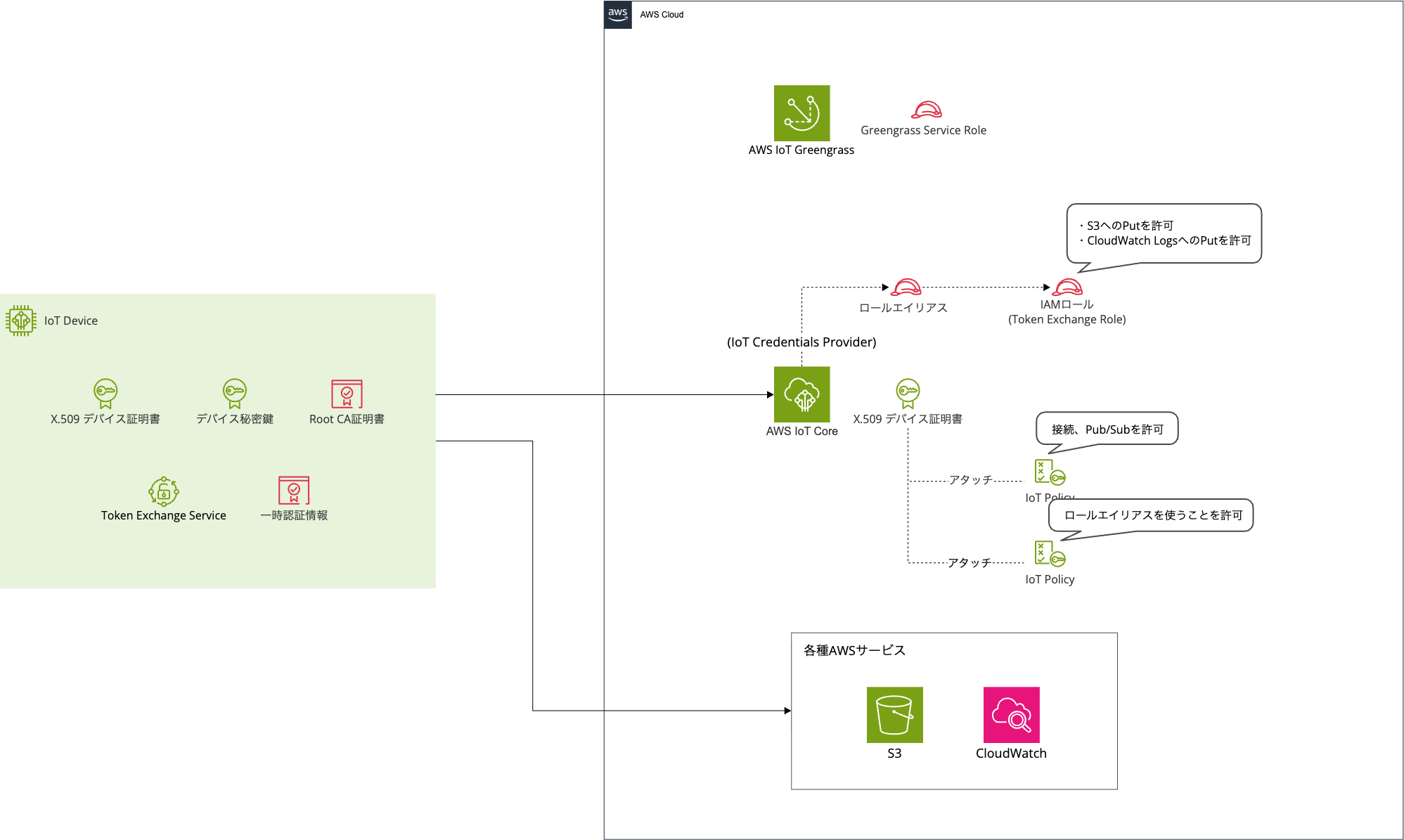
The left side represents the Greengrass Core device side, and the right side represents the AWS side.
It's not very clear what's happening just from the overview.
So let's break it down one by one.
Communication Paths
First, let's check what types of communication occur between Greengrass Core devices and AWS services.
There are two main patterns for Greengrass Core device authentication and authorization.
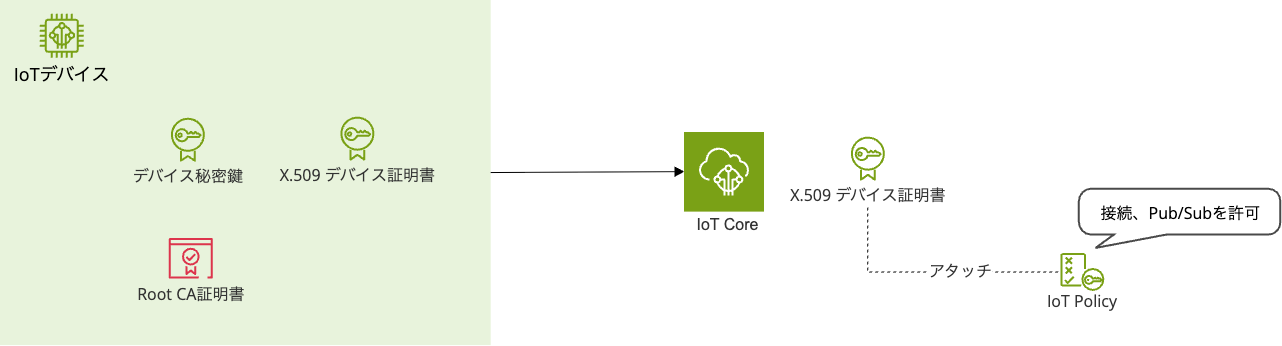
The first pattern is when the Greengrass Core device communicates with AWS IoT Core via MQTT/HTTPS.
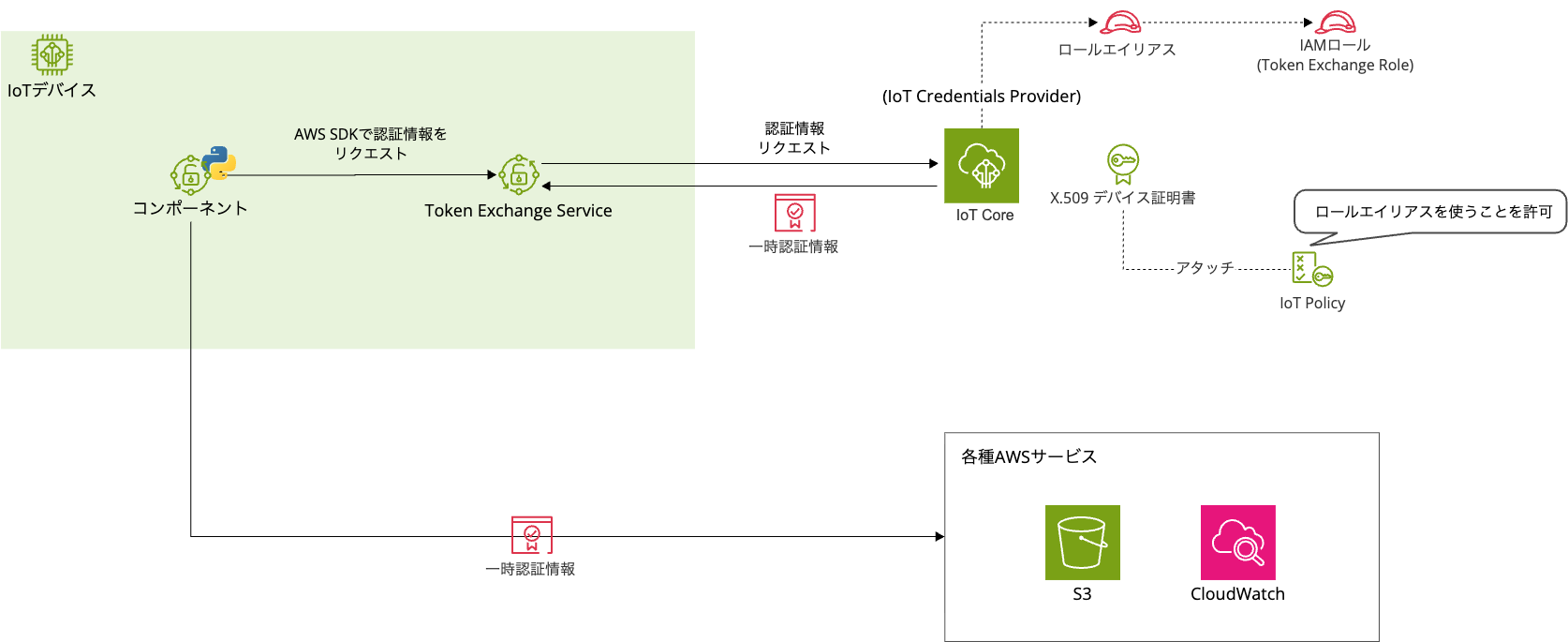
The second pattern is when the Greengrass Core device directly uses AWS services such as S3 and CloudWatch Logs.
Since these two patterns use different credentials and roles, let's first organize each of the actors involved.
Authentication Credentials and Roles
Several authentication credentials and roles appear in Greengrass authentication and authorization.
Let's organize them by dividing them between device side and AWS side.
Actors on the Device Side
First, the actors on the device side.
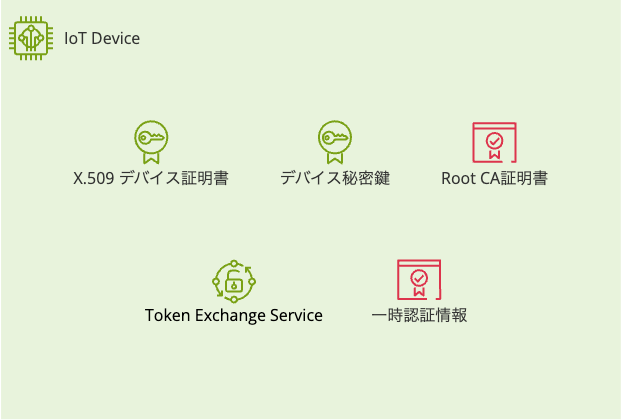
| Authentication Credential | Type | Description |
|---|---|---|
| X.509 Device Certificate + Private Key | Certificate | Device ID. Used for connecting to AWS IoT Core and obtaining AWS credentials |
| Amazon Root CA Certificate | Certificate | Root certificate for validating AWS IoT Core server certificates |
| AWS Temporary Credentials | Credentials | Temporary credentials for communicating with AWS services like S3 and CloudWatch |
| Token Exchange Service | Greengrass Component | Uses X.509 certificates to obtain temporary credentials from IoT Credentials Provider and provide them to components |
Certificates
Normally, when accessing AWS from a client terminal, access keys and secret keys are required, but Greengrass Core devices do not store AWS access keys or secret keys on the device.
Device identification is entirely based on mutual authentication using X.509 certificates + private keys + CA certificates.
Note that there are multiple patterns for issuing device certificates, including issuance by AWS IoT Core CA, issuance by custom CA (JITP/JITR), and Fleet Provisioning, but the authentication flow after the certificate is placed on the device is the same for all patterns.
Token Exchange Service and Temporary Credentials
Token Exchange Service is an intermediary service for obtaining the credentials needed for Greengrass Core devices to interact directly with AWS services.
You don't usually need to be conscious of it, but when you provision a Greengrass Core device, it runs as a local server.
If you check the Greengrass management console, you can see that the Token Exchange Service is running.
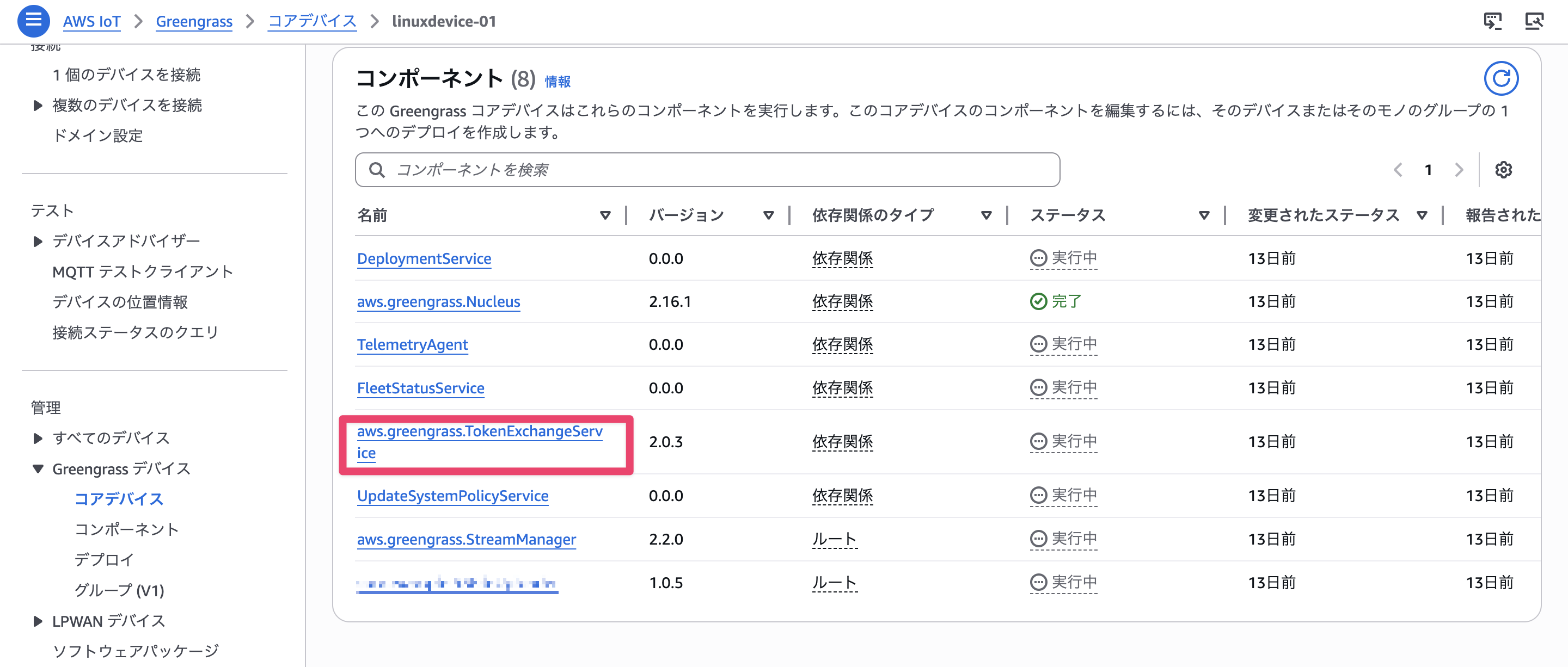
When a custom component calls an AWS service, this Token Exchange Service obtains temporary credentials on its behalf and passes them to the component.
Actors on the AWS Side
Next are the actors on the AWS side.
This might be the part that gives you a headache.
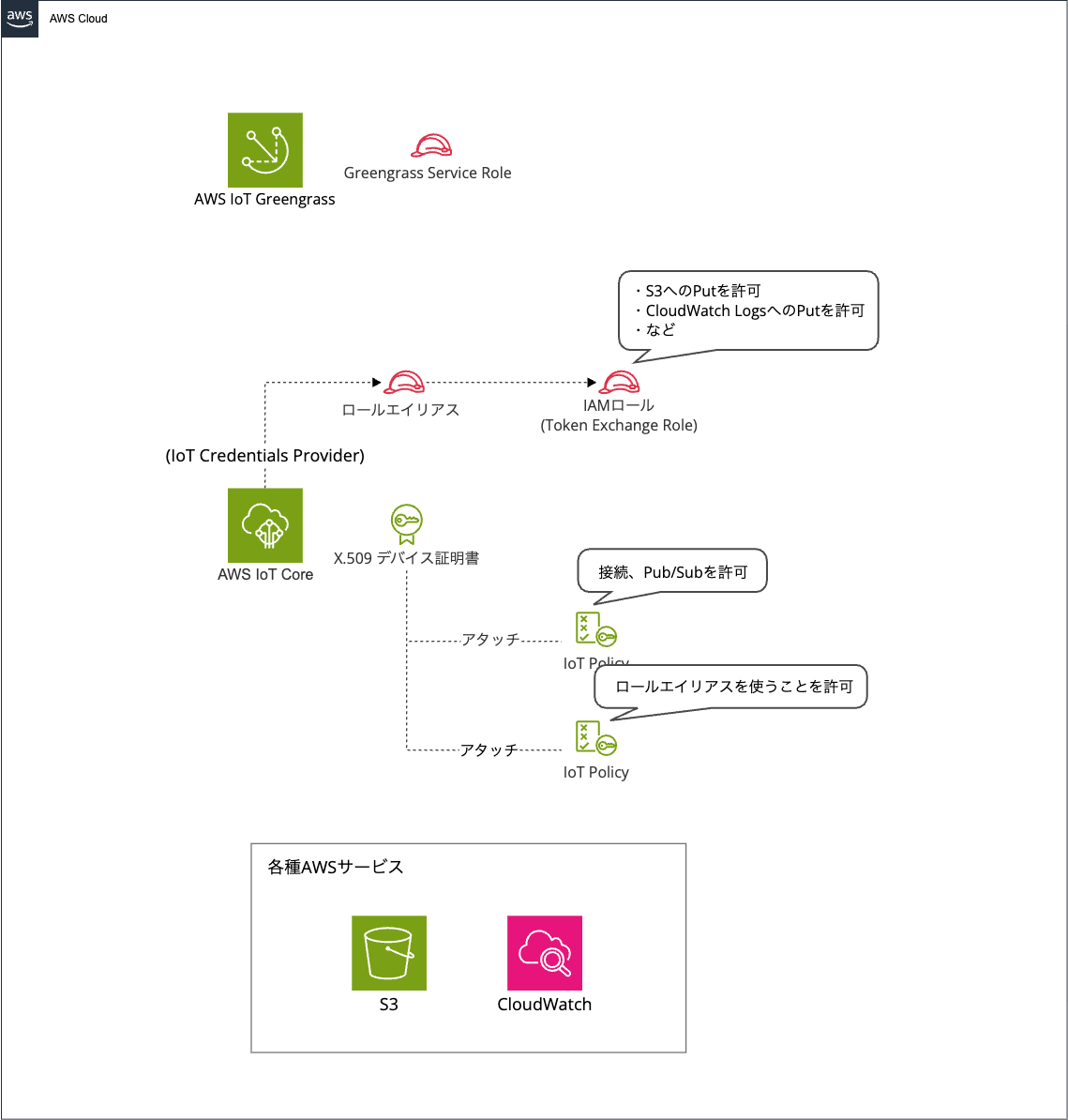
| Resource | Type | Purpose |
|---|---|---|
| Device Certificate | Certificate | The same X.509 certificate as on the device side. Registered with IoT Core and verifies the device's identity during mutual authentication |
| AWS IoT Policy | IoT Policy | Authorizes IoT Core and Greengrass data plane operations (MQTT connection, Pub/Sub, etc.) |
| Role Alias | Role Alias | Links device certificates to IAM roles |
| IAM Role (Token Exchange Role) |
IAM Role | Permissions for devices to use AWS services (S3, CloudWatch Logs, etc.) |
| AWS IoT Core credential provider | IoT Core Feature | Receives requests from Token Exchange Service and issues temporary credentials in cooperation with AWS STS |
| AWS Security Token Service (AWS STS) | AWS Service | Issues temporary credentials based on IAM Roles in response to requests from AWS IoT Core credential provider |
| Greengrass Service Role | IAM Role | Permissions for the Greengrass service itself to access AWS resources |
The relationship between IoT policies, IoT Role Alias, and IAM Role is particularly confusing.
The unclear point is "what is being authorized where, and why are three different things needed?"
IoT Policy
This policy authorizes communication with IoT Core, such as connecting to IoT Core and MQTT Pub/Sub.
Multiple policies can be attached to a single certificate in IoT policies.
Role Alias
This acts as a bridge connecting the world of X.509 certificates with the IAM world. It defines the correspondence: "devices with this certificate may use this IAM Role."
Since general AWS services like S3 cannot understand X.509 certificates, they need to be converted to IAM (STS temporary credentials).
This is why Role Alias is necessary.
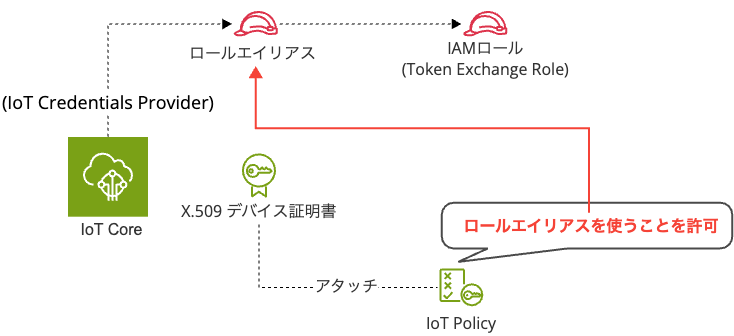
To be a bit more specific, IoT policies and role aliases are not directly linked. Rather, the IoT policy specifies the role alias as a "Resource" (operation target) and authorizes assuming that role alias (iot:AssumeRoleWithCertificate).
IAM Role (Token Exchange Role)
This is the role that authorizes access to AWS services such as S3 and CloudWatch Logs.
It defines permissions by attaching IAM policies.
IoT policies are for authorization in the IoT Core world, IAM Roles are for authorization in the AWS service world, and IoT Role Alias connects these two.
Greengrass Service Role
While the Greengrass Service Role doesn't need to be considered for communication between Core devices and AWS services, it is the service role for Greengrass and is used when AWS IoT Greengrass accesses AWS service resources.
Based on the documentation and the actual service role policy, it appears to be a role used behind the scenes by the Greengrass service (cloud side) when client devices connect to the Greengrass Core device.
Since this is mainly about client devices, I won't go into depth here.
The IoT Credentials Provider and STS listed in the table will be explained in the Token Exchange flow described later.
Now, let's see how the actors introduced here actually work together and how they are used for each connection method.
Communication with AWS IoT Core (TLS Mutual Authentication)
First, let's look at communication between Greengrass Core devices and AWS IoT Core.
This communication is used for basic operations of Greengrass Core devices, such as connecting to IoT Core and publishing/subscribing to MQTT messages.
Authentication and Authorization Flow
Let's look at the actual flow of authentication and authorization.
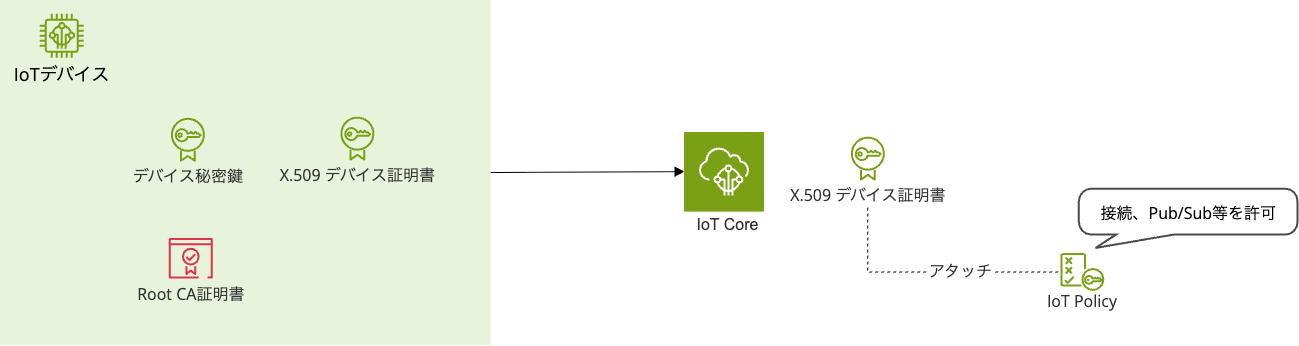
- Greengrass Core device connects to AWS IoT Core using X.509 device certificate and private key
- AWS IoT Core also presents its server certificate (verified by the device using Root CA certificate)
- Both parties confirm the validity of each other's certificates
- Post-connection operations are authorized by IoT policies attached to the device certificate
Communication between Greengrass Core devices and AWS IoT Core isn't that complicated.
It simply determines who with the device certificate and defines what they can do with the IoT policy attached to the device certificate.
Actions Controlled by IoT Policies
IoT policies control actions for both IoT Core and Greengrass.
At a minimum, the following policies are required.
Reference: AWS IoT Greengrass V2 policy actions
IoT Core actions:
| Action | Description |
|---|---|
iot:Connect |
Connection to IoT Core |
iot:Publish |
Publishing to MQTT topics |
iot:Subscribe |
Subscribing to MQTT topics |
iot:Receive |
Receiving MQTT messages |
iot:AssumeRoleWithCertificate |
Getting temporary credentials for Token Exchange (required for communication with AWS services described later) |
Greengrass actions:
| Action | Description |
|---|---|
greengrass:GetComponentVersionArtifact |
Downloading component artifacts |
greengrass:ResolveComponentCandidates |
Resolving component dependencies during deployment |
greengrass:GetDeploymentConfiguration |
Getting deployment configurations |
greengrass:ListThingGroupsForCoreDevice |
Getting Thing Group hierarchy |
Communication with AWS Services
Next, let's look at communication when Greengrass Core devices directly use AWS services like S3 and CloudWatch Logs.
This might be the most confusing point.
The base is the same as the IoT Core communication we just discussed, but when directly accessing AWS services, credentials are needed.
The important point in AWS service communication is how these credentials are obtained.
Why Token Exchange Service is Necessary
As mentioned briefly when organizing the actors, Token Exchange Service is needed to obtain credentials for accessing AWS services.
But why is Token Exchange Service necessary?
General AWS services like S3 and CloudWatch Logs don't support X.509 certificate authentication like IoT Core does.
To call these services, AWS credentials (access key, secret key, session token) are required.
However, embedding access keys in devices is not desirable from a security perspective.
Therefore, a mechanism called Token Exchange is provided to obtain temporary AWS credentials from X.509 certificates.
Let's see how AWS services are actually connected using Token Exchange Service.
Obtaining Temporary Credentials
The overall flow looks like this:
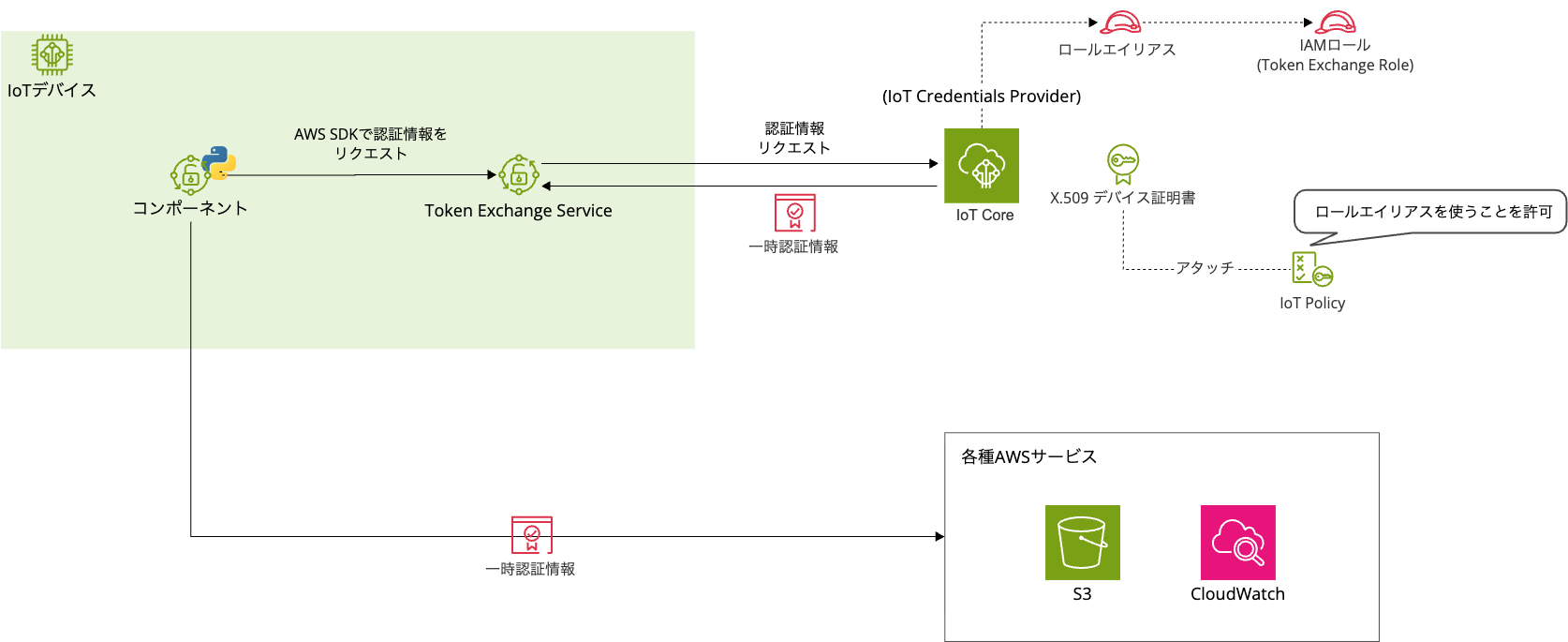
Let's assume a component deployed on Greengrass is sending data to S3 or CloudWatch Logs.
Let's go through it step by step.
-
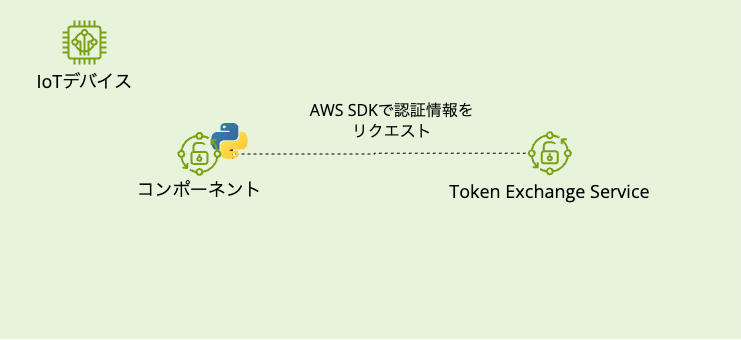
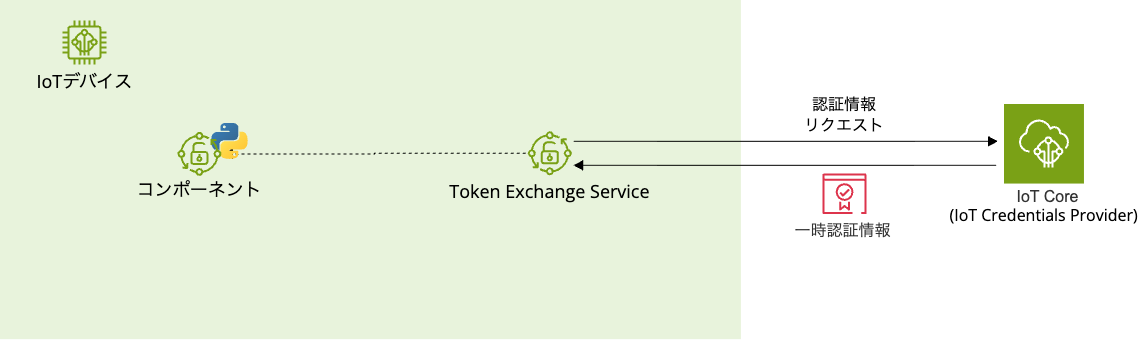
The component on Greengrass calls an AWS service using the AWS SDK
-
The AWS SDK refers to the environment variable
AWS_CONTAINER_CREDENTIALS_FULL_URIand requests credentials from the Token Exchange Service
-
Token Exchange Service makes an HTTPS request to IoT Credentials Provider using the X.509 device certificate

-
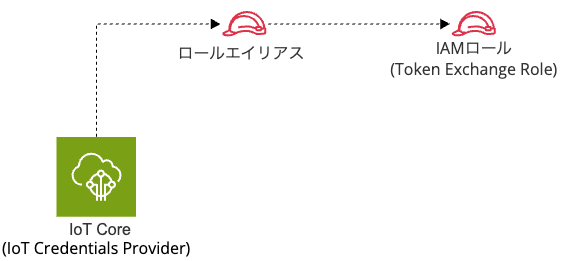
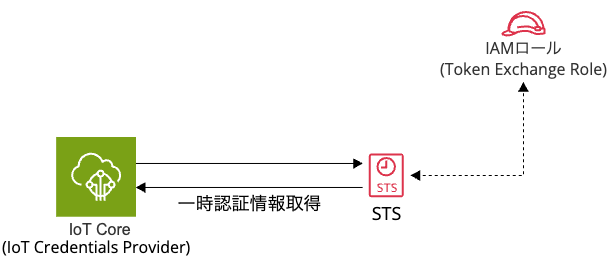
IoT Credentials Provider verifies the certificate and identifies the IAM role (Token Exchange Role) linked to the Role Alias
-
IoT Credentials Provider executes STS's
AssumeRoleto obtain temporary credentials
-
Temporary credentials are returned to the component via Token Exchange Service
-
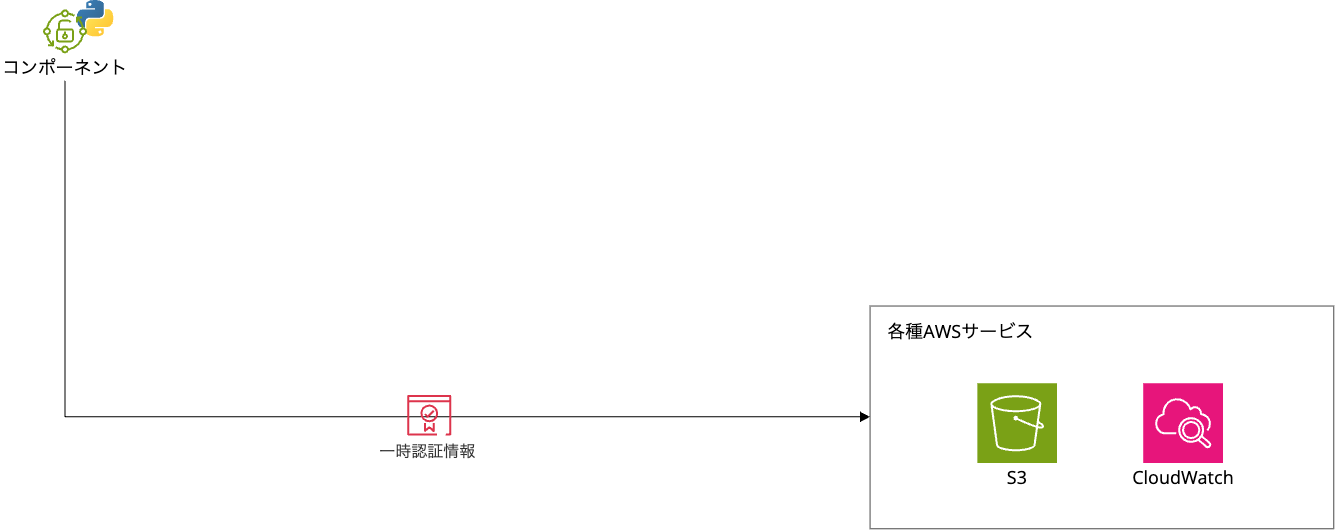
The component calls AWS services using these credentials with SigV4 signature
It's a bit complex, but essentially it connects to IoT Core (IoT Credentials Provider) to obtain credentials.
Then it uses those credentials to access AWS services.
If troubleshooting is needed for AWS service connections, first check the IAM policy attached to the Token Exchange Role.
The default permissions of the Token Exchange Role are minimal, mainly for CloudWatch Logs output and S3 bucket location retrieval.
A common permission error occurs when deploying component artifacts from S3 without sufficient permissions.
If deploying artifacts from S3, you need to add the s3:GetObject permission separately.
How to Find Certificates, Policies, Role Aliases, and IAM Roles Linked to a Device
When facing permission errors, you'll likely want to check the certificates, policies, role aliases, and IAM roles linked to the device.
However, it can be confusing to figure out what is linked to what and where to check, so let's look at how to check in the AWS management console.
Certificates
AWS IoT console > All devices > Select the target device > Certificates
Multiple certificates may be attached to a single device.
IoT Policies
AWS IoT console > All devices > Select the target device > Certificates > Select the target certificate
Multiple IoT policies may be attached to a single device.
Role Alias
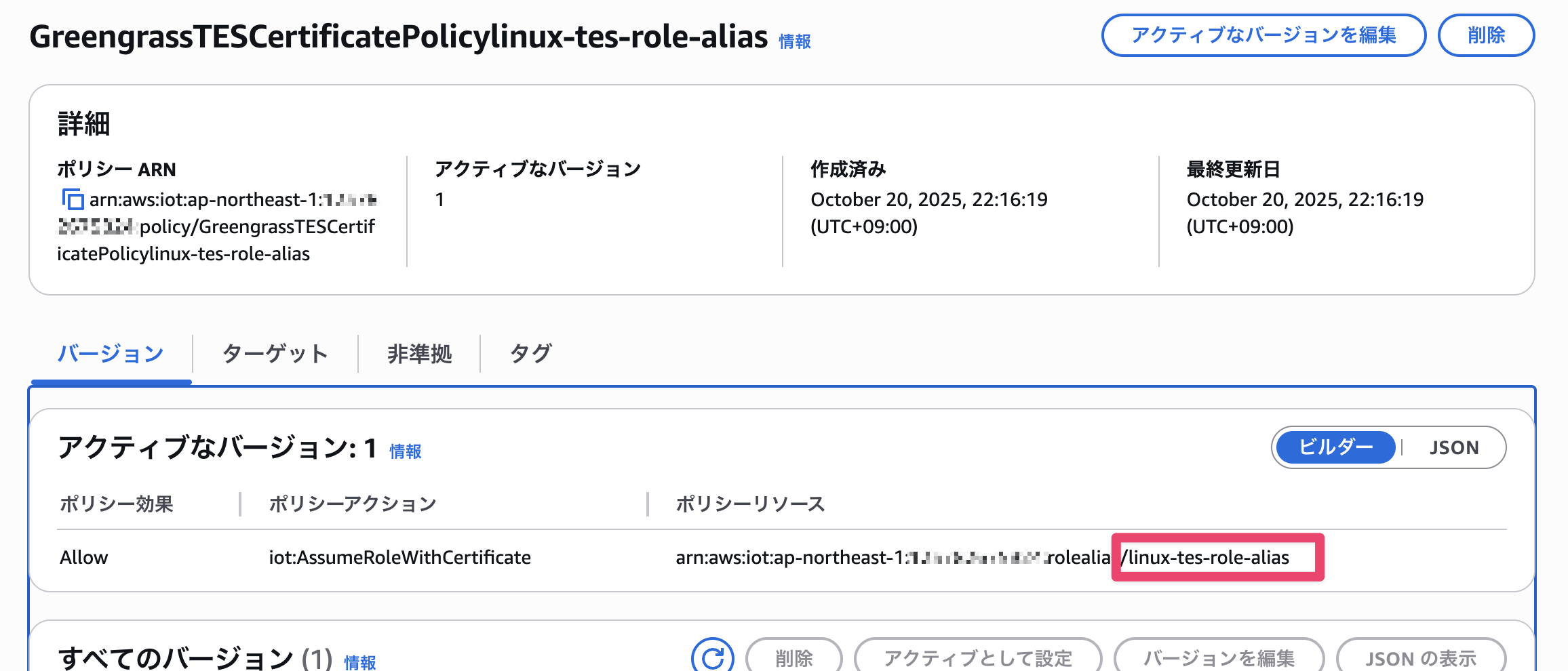
AWS IoT console > All devices > Select the target device > Certificates > Select the target certificate > Look for a policy with the iot:AssumeRoleWithCertificate policy action attached (it's helpful to include TES or Token Exchange Service in the policy name) > The string following rolealias in the policy resource
IAM Role
AWS IoT console > Security > Role aliases > Select the role alias obtained in the previous step > Role
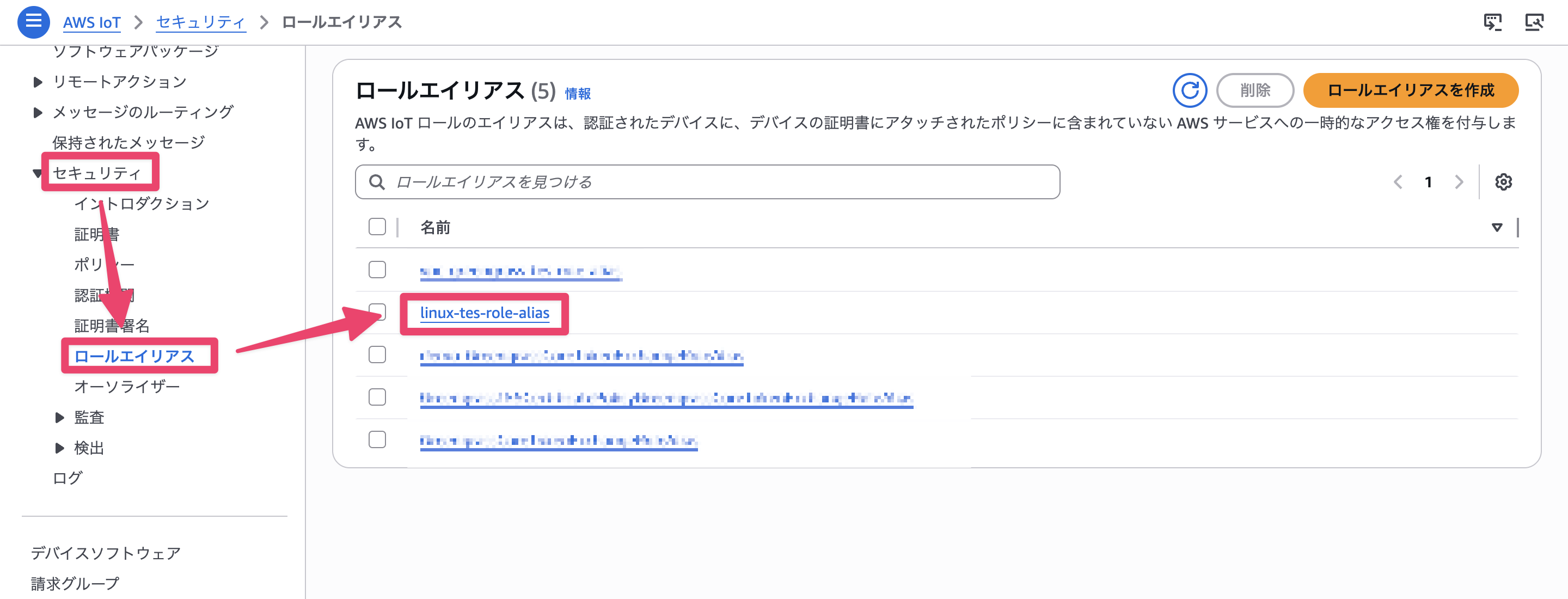
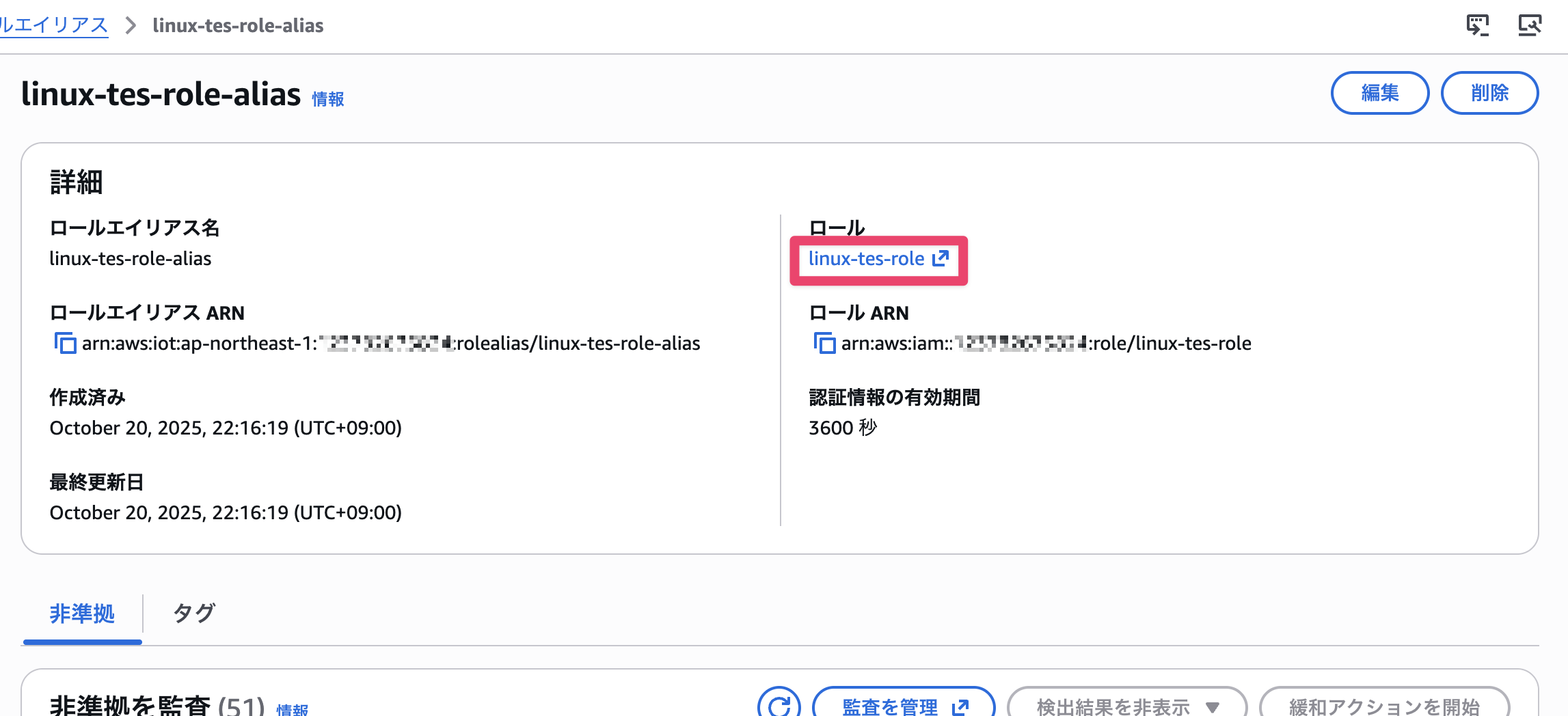
You need to check each item one by one starting from the certificate.
If you try to search from IAM roles or role aliases first, you won't know what they're linked to, so start from the certificate and follow the trail.
Summary
In this article, we organized the authentication and authorization around Greengrass Core devices.
There are two authentication and authorization paths, and the method changes depending on which AWS service you are communicating with.
This knowledge can also help when troubleshooting to determine "is it an IoT policy issue or an IAM policy issue?", so it might be useful to keep in mind.