
If you stop an Azure Blob SAS before it expires, what happens to the other URLs? I tested the scope of revocation with 6 SAS tokens

This page has been translated by machine translation. View original
Hello! I'm Yuji Nishimura from the Operations Department!
To hand over files in Azure Blob Storage temporarily, I sometimes distribute URLs with a SAS (shared access signature). If such a URL leaks, or if the contract with the recipient ends, can you stop it without waiting for the expiry time?
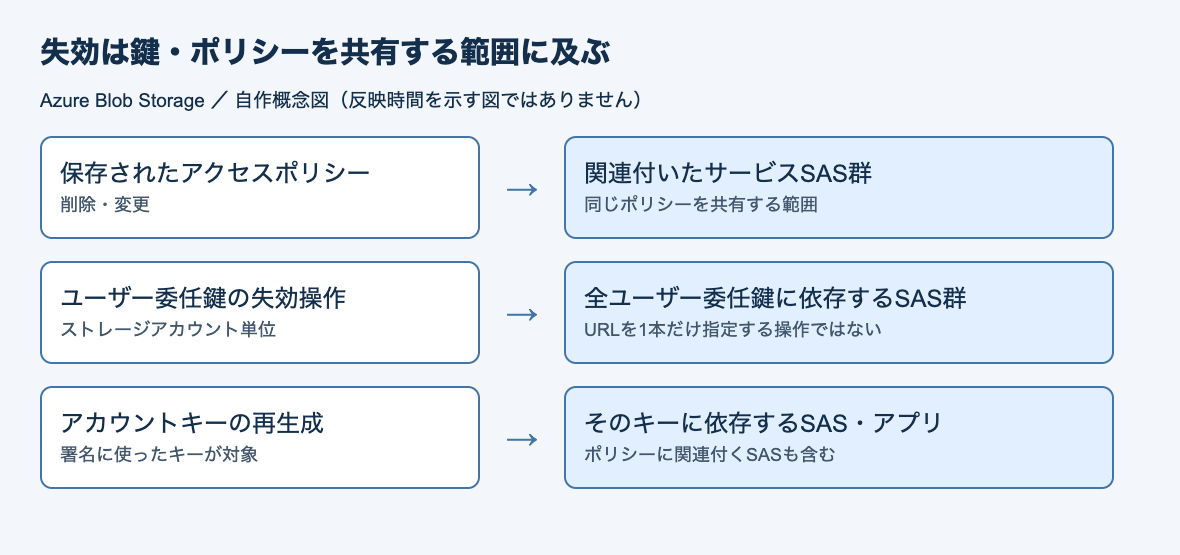
There are ways to stop it before expiry. However, there is no operation to specify and revoke a single URL. What you stop is the policy the SAS refers to, or the key used to sign it. Therefore, other URLs that use the same policy or key stop along with it.
In this article, I issued six different kinds of SAS and checked the HTTP status of all six after each revocation operation. Based on which operation stopped which URLs and how many seconds it took to take effect, I consider how to issue SAS when you want to stop access per recipient. These are the results of trials on November 10, 2026, with Azure CLI 2.91.0 and a storage account in the Japan East region.
URLs stopped by each revocation operation
A storage account has two account keys (access keys), key1 and key2. The six SAS are as follows.
- Four service SAS: signed with key1 and associated with policy A (one), associated with policy B (one), with no policy (one), plus one with no policy signed with key2
- One account SAS signed with key1
- One user delegation SAS
A policy (stored access policy) is a named set of permissions and an expiry time saved on a container. The SAS refers to that name.
The table below shows the results of performing operations from top to bottom and checking all six after each one. ○ means the file could be retrieved (200), and × means it was denied (403). Because the operations were performed consecutively, URLs stopped by an earlier operation remain × , except for the recreated policy A. Bold marks URLs whose state changed with that operation.
| Operation | Policy A | Policy B | No policy (key1) | No policy (key2) | Account SAS (key1) | User delegation SAS | Propagation |
|---|---|---|---|---|---|---|---|
| Before operation | ○ | ○ | ○ | ○ | ○ | ○ | - |
| Delete policy A | × | ○ | ○ | ○ | ○ | ○ | Immediate |
| Recreate policy A with the same name | ○ | ○ | ○ | ○ | ○ | ○ | Immediate |
| Regenerate key2 | ○ | ○ | ○ | × | ○ | ○ | Immediate |
| Regenerate key1 | × | × | × | × | × | ○ | About 30 seconds |
| Revoke user delegation keys | × | × | × | × | × | × | 10–20 seconds |
Five things became clear from the results.
- The only way to stop access per recipient without affecting other SAS or apps was a service SAS with a separate policy for each recipient (regenerating key2 also stopped just one, but only because there was just one SAS signed with key2)
- When I recreated the deleted policy with the same name, the SAS that should have been stopped worked again
- Regenerating key1 also stopped the SAS associated with policies. This is because even when associated with a policy, the signature uses the account key
- Right after regenerating key1, for about 30 seconds, 200 and 403 alternated for SAS signed with the old key
- The user delegation SAS kept working even after both account keys were regenerated, and stopped 10–20 seconds after the user delegation keys were revoked
What you stop before expiry is not the URL but the policy or key
A SAS is a mechanism that delegates limited access by specifying the target resource, permissions, validity period, and so on. The token is used by attaching it to the URL query.
According to the official documentation, a SAS can be generated on the client side, and Azure Storage does not track tokens at all. Therefore, to stop one before expiry, you invalidate the key used to sign it or the policy the SAS refers to.
The Amazon S3 presigned URL documentation also generally explains that revoking or deleting the credentials used to create the URL makes the URL unusable even before expiry. It is similar in that what you stop is not the URL. In Azure, what you stop is divided into policies, account keys, and user delegation keys, so the range that stops together changes depending on which you stop.
| SAS type | Key used for signing | How to stop before expiry |
|---|---|---|
| Service SAS associated with a policy | Account key | Delete or modify the policy, or regenerate the key that signed it |
| Service SAS not associated with a policy | Account key | Regenerate the key that signed it |
| Account SAS | Account key | Regenerate the key that signed it (stored access policies cannot be used) |
| User delegation SAS | User delegation key obtained with Microsoft Entra ID credentials | Revoke the user delegation key, or change the role of the principal that issued it |
This table summarizes the official documentation of the SAS overview, stored access policies, and revoking a user delegation SAS.
The following is a conceptual diagram I made myself, not an official architecture diagram.
Note that this article does not cover the User-bound user delegation SAS, which requires binding to the user's Entra ID.
I issued six SAS by varying the key used for signing
- Azure CLI 2.91.0 (macOS)
- Storage account: Japan East region, Standard_LRS, StorageV2. Shared key access allowed
- One text file
report.txtplaced in the containershare(no anonymous access) - The operations were performed with a service principal that has the subscription's Contributor role and the Storage Blob Data Contributor role (already signed in with Azure CLI)
To allow reading with a user delegation SAS, the issuing principal itself must be able to read the blob. For that reason, I also assigned a data operation role (Storage Blob Data Contributor).
I passed the account name and key to Azure CLI with the environment variables AZURE_STORAGE_ACCOUNT and AZURE_STORAGE_KEY. Initially I put key1 in AZURE_STORAGE_KEY, so the SAS associated with policies, the service SAS with no policy, and the account SAS are signed with key1. For the SAS signed with key2, I changed AZURE_STORAGE_KEY to key2 when issuing it, and switched it back to key1 afterward. The --expiry time is in UTC, and in the article the date and time of execution are put in a variable.
export AZURE_STORAGE_ACCOUNT=<storage-account>
export AZURE_STORAGE_KEY="$(az storage account keys list --resource-group <resource-group> --account-name <storage-account> --query "[?keyName=='key1'].value" -o tsv)"
expiry=$(date -u -v+2d '+%Y-%m-%dT%H:%MZ')   # 2 days later (macOS date. In the article's verification: 2026-11-11T15:48Z)

# Create two stored access policies (read only)
az storage container policy create --container-name share --name partner-a --permissions r --expiry "$expiry"
az storage container policy create --container-name share --name partner-b --permissions r --expiry "$expiry"

# Service SAS associated with a policy (permissions and expiry are held on the policy side)
# Even when only --policy-name is specified, a WARNING saying "do not specify --expiry and --permissions" appears, but the SAS is issued
az storage blob generate-sas --container-name share --name report.txt --policy-name partner-a -o tsv

# Service SAS not associated with a policy
az storage blob generate-sas --container-name share --name report.txt --permissions r --expiry "$expiry" -o tsv

# Account SAS
az storage account generate-sas --services b --resource-types o --permissions r --expiry "$expiry" -o tsv

# User delegation SAS (issued with the signed-in Microsoft Entra ID credentials, without using an account key)
unset AZURE_STORAGE_KEY
az storage blob generate-sas --container-name share --name report.txt --permissions r \
  --expiry "$(date -u -v+1d '+%Y-%m-%dT%H:%MZ')" --as-user --auth-mode login -o tsv
I set the expiry of the user delegation SAS to 1 day later, shorter than the others, within the validity period of the user delegation key (7 days at most).
| Name | Notation in logs | Type | What was used for signing |
|---|---|---|---|
| Policy A | policy-a |
Service SAS (policy partner-a) |
key1 |
| Policy B | policy-b |
Service SAS (policy partner-b) |
key1 |
| No policy (key1) | adhoc-key1 |
Service SAS | key1 |
| No policy (key2) | adhoc-key2 |
Service SAS | key2 |
| Account SAS (key1) | account-key1 |
Account SAS | key1 |
| User delegation SAS | user-delegation |
User delegation SAS | User delegation key |
generate-sas returns only the SAS token (the query string). I appended each to the blob URL like https://<storage-account>.blob.core.windows.net/share/report.txt?<SAS token> and saved the six tokens to files. For checking, I used a small script like the one below. I ran it right after each operation, and then every 5–10 seconds afterward.
#!/usr/bin/env bash
# GET the six URLs and line up the time and HTTP statuses on one line (each SAS token is saved one by one in sas/)
line="$(date '+%T')"
for n in policy-a policy-b adhoc-key1 adhoc-key2 account-key1 user-delegation; do
  code=$(curl -s -o /dev/null -w '%{http_code}' "https://<storage-account>.blob.core.windows.net/share/report.txt?$(cat sas/$n)")
  line="$line $n=$code"
done
echo "$line"
The logs below are excerpts of that output (times are in JST).
Deleting a stored access policy stops only the related SAS
First, I deleted the policy partner-a.
az storage container policy delete --container-name share --name partner-a
In the check right after the deletion finished, only policy A returned 403. The other five, including policy B on the same container, stayed at 200.
00:49:22 policy-a=200 policy-b=200 adhoc-key1=200 adhoc-key2=200 account-key1=200 user-delegation=200   # before deletion
00:49:37 policy-a=403 policy-b=200 adhoc-key1=200 adhoc-key2=200 account-key1=200 user-delegation=200   # after deletion
When the SAS whose policy was deleted was denied, the response body was AuthenticationFailed, with the detail SAS identifier cannot be found for specified signed identifier (obtained by repeating the same operation with a different policy). The reason is that the name (identifier) of the policy the SAS refers to cannot be found.
The stored access policy documentation says that deleting or modifying a policy takes effect immediately on the related SAS. Here too, requests were denied right after the deletion.
Recreating it with the same name makes the stopped SAS work again
Next, I recreated the policy with the same name partner-a as the deleted one.
az storage container policy create --container-name share --name partner-a --permissions r --expiry "$expiry"
In the check right after creation, policy A, which had been returning 403, went back to 200, and the URL that should have been stopped became usable again.
00:49:59 policy-a=200 policy-b=200 adhoc-key1=200 adhoc-key2=200 account-key1=200 user-delegation=200 # after recreating
The same page also says that creating or updating a policy can take up to 30 seconds to take effect. This time, it switched by the immediate check.
The explanation of service SAS revocation also warns that recreating a policy with the same name may make old SAS that have not yet expired valid again.
Up to five policies per container
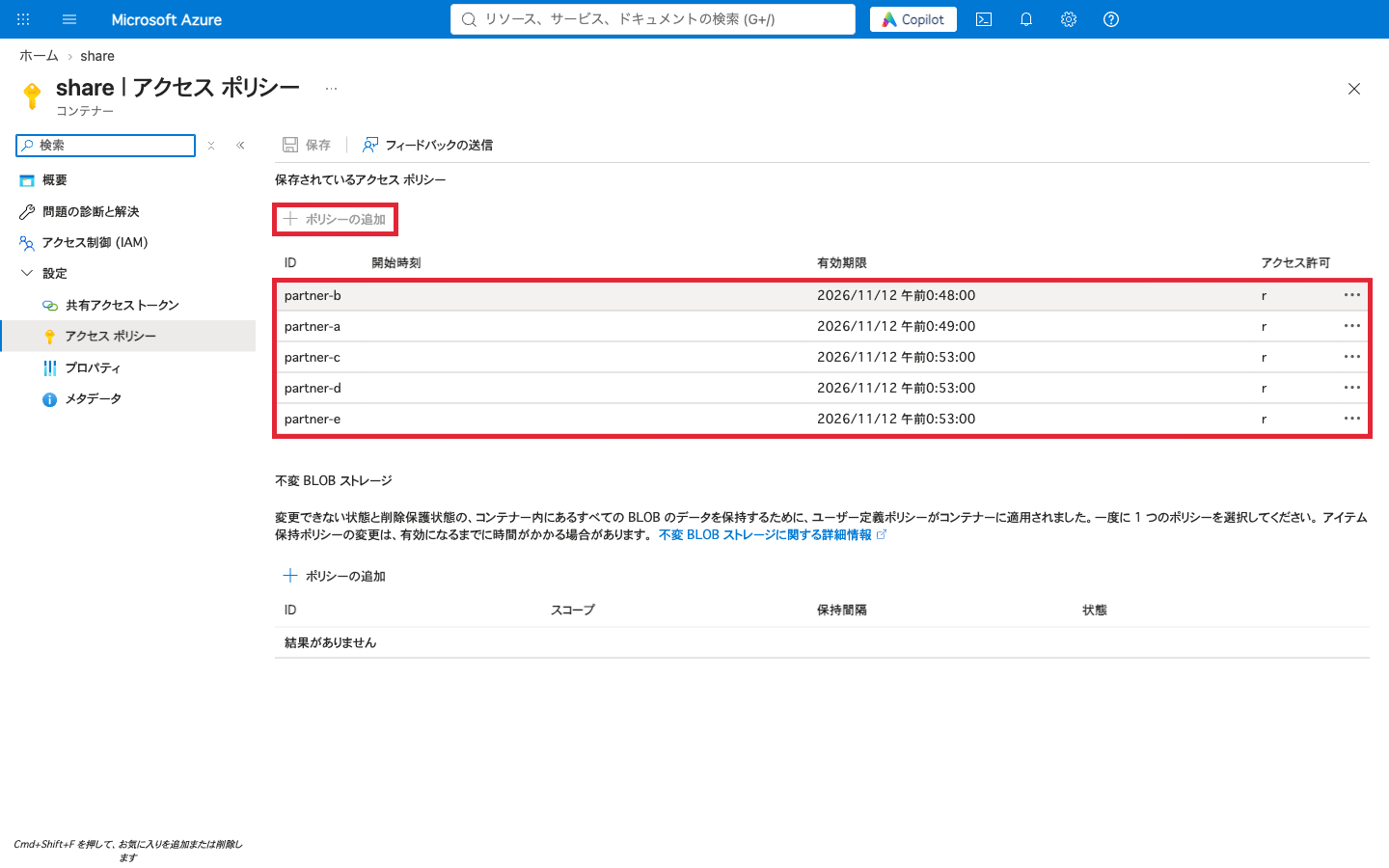
Separating policies per recipient lets you stop them one company at a time, but there is an upper limit on the number of policies. When I added partner-c through partner-f, I could create up to the fifth, partner-e. The sixth, partner-f, could not be created because Azure CLI returned an error before sending the request.
ERROR: The command failed with an unexpected error. Here is the traceback:
ERROR: Too many access policies provided. The server does not support setting more than 5 access policies on a single resource.
(以降、トレースバックが続く)
The official documentation says that if you try to set more than five, the service returns 400. This time Azure CLI stopped it before sending, so I did not verify the server's response. In the portal's "Access policy" screen too, with five policies, the "Add policy" button could not be pressed (the red frames were added by me).
Regenerating an account key stops all SAS signed with that key
First, I regenerated key2. In Azure CLI's --key, primary is key1 and secondary is key2.
az storage account keys renew --resource-group <resource-group> --account-name <storage-account> --key secondary
Only the SAS signed with key2 stopped. The four signed with key1 and the user delegation SAS stayed at 200 even when I kept checking for about 50 seconds afterward. Which SAS stop depends on which key you regenerate, so you need to regenerate the key used to sign the SAS you want to stop.
00:50:21 policy-a=200 policy-b=200 adhoc-key1=200 adhoc-key2=403 account-key1=200 user-delegation=200 # after regenerating key2
Next, I regenerated key1 (--key primary). The four signed with key1 stopped. These four include the SAS associated with policies (policy A and policy B).
However, right after regeneration, 200 and 403 alternated on the same URL.
00:51:23 policy-a=200 policy-b=403 adhoc-key1=403 adhoc-key2=403 account-key1=403 user-delegation=200   # right after regenerating key1
00:51:33 policy-a=403 policy-b=403 adhoc-key1=403 adhoc-key2=403 account-key1=403 user-delegation=200
00:51:43 policy-a=403 policy-b=403 adhoc-key1=403 adhoc-key2=403 account-key1=200 user-delegation=200
00:51:53 policy-a=403 policy-b=403 adhoc-key1=403 adhoc-key2=403 account-key1=403 user-delegation=200
In the check right after regeneration finished, policy A still worked. After 20 seconds, the account SAS returned to 200 just once. All four became 403 and stopped returning to 200 about 30 seconds after regeneration. I did not look at which server responded, so I have not isolated the cause of the return to 200. Also, this is a single measurement, so other accounts or times of day may not show the same number of seconds.
The access key management documentation warns that regenerating a key also affects the apps and Azure services that use that key. Not only the distributed SAS but also batch jobs and the like that use the same key through a connection string will stop.
Revoking user delegation keys stops all user delegation SAS in the account
The user delegation SAS kept working even after both account keys were regenerated. To stop it, revoke the user delegation keys.
az storage account revoke-delegation-keys --resource-group <resource-group> --name <storage-account>
This command revokes all user delegation keys of the specified storage account. You cannot select only the key used to issue the leaked URL.
The check 10 seconds after the command completed still returned 200, and the check after 20 seconds returned 403.
00:52:32 ... user-delegation=200   # right after revocation
00:52:42 ... user-delegation=200
00:52:52 ... user-delegation=403
According to the explanation of revoking a user delegation SAS, user delegation keys and role assignments are cached in Azure Storage. For that reason, there can be a delay between the revocation operation and existing SAS becoming invalid. The 10–20 seconds this time is the range narrowed down by checks every 10 seconds. This is a single measurement, so other accounts or times of day may not show the same number of seconds.
The same documentation says that user delegation SAS can also be stopped by changing or deleting the role assignments or POSIX ACLs of the principal that issued the SAS. I did not try this method, so I have not verified the number of seconds from removing the role until it stops, or the impact on other SAS issued by the same principal.
If you want to stop only recipient A, decide before issuing
Consider a requirement where the same blob is handed to partner companies A and B, and you want to stop only company A when the contract with A ends. Based on the results so far and the official documentation, the suitability of each option is as follows.
| Distribution method | Can you stop only company A? | Notes |
|---|---|---|
| Service SAS associated with the same policy for companies A and B | No | Deleting the policy also stops company B |
| Service SAS with separate policies for companies A and B | Yes (this time, only policy A stopped) | Up to five per container. Do not reuse the name of a stopped policy |
| Service SAS not associated with a policy, account SAS | Not suitable | There are only two keys, and apps use the same keys. Regenerating a key stops all SAS of that key and the apps |
| User delegation SAS (one issuing principal) | No | Revoking delegation keys is per account. There is a delay until it stops |
| User delegation SAS (separate issuing principal per recipient) | Can be stopped according to the official documentation (unverified) | Stopped by removing the role of the issuing principal. Managing principals increases with the number of recipients |
When you notice a leak, you can tell which operation is needed from the URL query. A service SAS associated with a policy contains si, which represents the policy name. A user delegation SAS contains skoid, which represents the principal that obtained the user delegation key (see the parameter descriptions for service SAS and user delegation SAS). There is no parameter indicating whether it was signed with key1 or key2, so when signing with an account key, you need to record which key you used at issuance.
Microsoft recommends the user delegation SAS if you use SAS. This is because an app can issue it without holding an account key. However, as the results here show, if there is only one issuing principal, it is not suited to stopping just one recipient.
Personally, to avoid needing to stop things before expiry as much as possible, I would first consider an operation that shortens the validity period of user delegation SAS and reissues them only to legitimate users when they expire. If there are only a few recipients and you have a requirement to stop them one company at a time before expiry, a service SAS with separate, differently named policies per recipient is an option.
If there are many recipients and you need to stop them one company at a time before expiry, rather than trying to meet the requirement with SAS alone, it seems best to compare it with an approach where the app authenticates the user before returning the data.
Summary
An Azure Blob SAS can be stopped before expiry, but the unit you stop is not a single URL but the policy the SAS refers to or the key used to sign it. On the actual environment, deleting a policy stopped only the related SAS, and regenerating an account key stopped all SAS of that key regardless of whether they had a policy. The user delegation SAS stopped 10–20 seconds after the user delegation keys were revoked.
How to choose when you want to stop per recipient before expiry is as follows.
- A few recipients, and you want to stop them one company at a time: a service SAS with separate, differently named policies per recipient (up to five per container; do not reuse the name of a stopped policy)
- If you do not need to stop before expiry: a user delegation SAS with a short validity period, reissued when it expires
- Many recipients: do not rely on SAS alone; compare with an approach where the app authenticates the user
Whichever you choose, it seems necessary to decide, for each recipient, which policy to associate and which key to sign with before issuing, not after distributing.
Reference links
- Grant limited access to data with shared access signatures (SAS)
- Define a stored access policy
- Create a service SAS
- Create an account SAS
- Create a user delegation SAS
- Manage storage account access keys
- az storage account revoke-delegation-keys
- az storage container policy
- Download and upload objects with presigned URLs(Amazon S3)