Azure Owner vs. Entra Global Administrator: What's the Difference in Permissions?

This page has been translated by machine translation. View original
Hello! I'm Yuji Nishimura from the Operations Department!
"I'm a Global Administrator, but I can't manage Azure VMs." "I'm a subscription Owner, but I can't manage Microsoft Entra ID users." In situations like these, you need to think separately about what each administrator role targets.
Azure roles and Microsoft Entra roles are, by default, separate permission systems. Global Administrator is a role on the Entra ID side, and Owner is a role on the Azure resource side, and neither automatically grants management permissions for the other.
Using user management and VM management as examples, this article explains the target, role, and scope you should sort out when requesting permissions. This explanation is based on Microsoft Learn as of October 27, 2026. I have not performed actual role assignments, allowed or denied operations, or elevated access in a real environment. Setup procedures and general investigation of error causes are not covered.
Owner and Global Administrator manage different targets
Microsoft Entra ID manages identities such as users, groups, and apps. Azure RBAC, on the other hand, is a mechanism for managing access to Azure resources such as VMs and storage. A resource group is a unit for managing related Azure resources together.
| Perspective | Microsoft Entra roles | Azure roles (Azure RBAC) |
|---|---|---|
| Managed targets | Entra ID users, groups, apps, etc. | Azure VMs, networks, storage, etc. |
| Typical examples | Global Administrator, User Administrator | Owner, Contributor, Reader |
| Scenario used in this example | Create and manage Entra ID users | Manage VMs in a development resource group |
| Permissions for the other side | Permissions to manage Azure resources are not granted automatically | Permissions to manage Entra ID are not granted automatically |
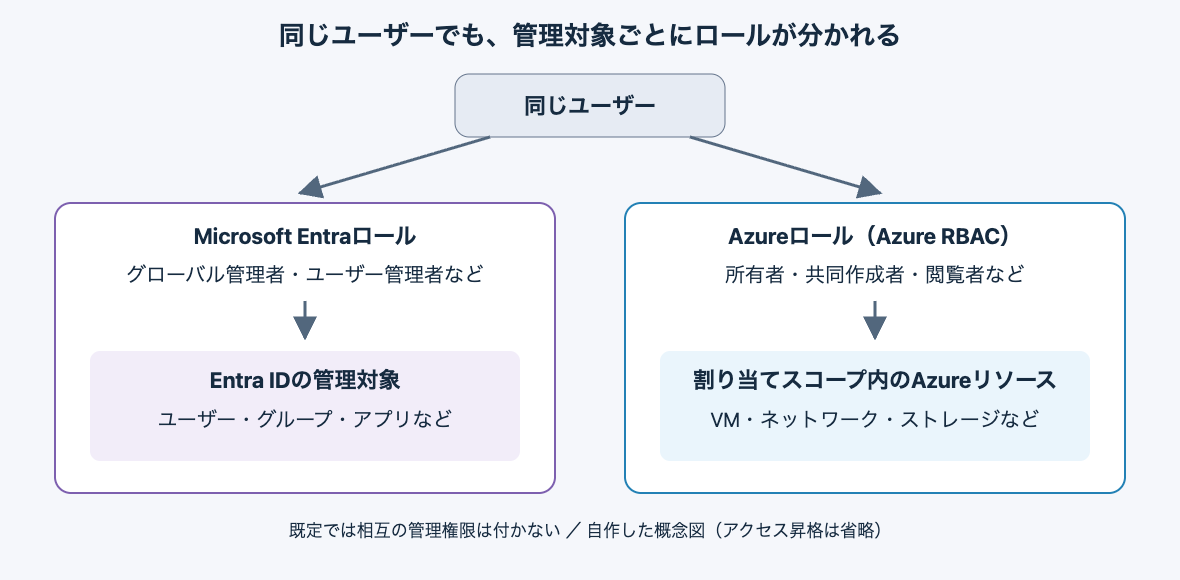
Both roles can be assigned to the same user. Even then, don't think of it as "operating everything with a single administrator permission"; instead, think separately about which role permits each operation.
The diagram is a concept diagram I created myself, not an official architecture diagram. Even for the same user, managing Entra ID and managing Azure resources involve separate role assignments. The diagram shows the difference in normal management targets and omits the access elevation described later.
An Azure Owner has a "where are you the Owner"
An Azure RBAC role assignment can be organized into three points: "who" is granted "which role" at "what scope." This range is called the scope.
The normal scope hierarchy is management group, subscription, resource group, and individual resource. Permissions assigned at a higher level are inherited by lower levels.
For example, suppose the same subscription has dev-rg for development and prod-rg for production. An assignment as Owner of dev-rg alone does not give you management permissions for prod-rg. If you are the subscription Owner, both resource groups under it are within your management scope.
Therefore, saying "I'm an Owner" alone doesn't convey the management scope. It needs to be considered together with the target, such as "I'm the Owner of the development resource group."
Think about permission requests starting from the operation you want to perform
Once you know the management target, the next step is to choose a role that fits the required operations. The following are examples for organizing the roles' responsibilities.
| What you want to do | Permission to consider | Points for considering scope |
|---|---|---|
| Create and manage Entra ID users | Entra User Administrator, etc. | Confirm the scope needed to manage the target users |
| View resources in the development resource group | Azure Reader | Target the development resource group |
| Manage resources in the development resource group | Azure Contributor, etc. | Separate out whether managing role assignments is also needed |
| Assign access to Azure resources | Azure Role Based Access Control Administrator, etc. | Separately consider the delegation scope and conditions |
The User Administrator role is described in Entra built-in roles, and the permissions of Owner, Contributor, and access-management roles are described in Azure privileged built-in roles. The Reader permissions can be checked in the Reader definition. A Contributor can manage resources but cannot make Azure RBAC role assignments. An Owner also has that assignment permission.
For example, rather than requesting "I need Global Administrator for development work," it is easier to decide what permissions to grant if the operation and scope are clear, like this:
I want to manage resources such as VMs within
dev-rgin the development subscription. I will not be responsible for assigning roles to other users.
With this requirement, you can consider Azure-side roles at the dev-rg scope. It can be treated separately from granting Global Administrator, which manages all of Entra. Whether a more limited service-specific role than Contributor would suffice depends on the operations actually being performed.
Global Administrators have an exception for recovering Azure-side access
The explanation so far of "separate permission systems" has an exception worth knowing: elevating access as a Global Administrator.
The official documentation explains that a Global Administrator can elevate their own access, for example when they have lost access to Azure subscriptions or management groups.
What is granted at this time is not Owner, but User Access Administrator at the root scope /. This makes it possible to view resources and assign access in all subscriptions and management groups within the same Entra tenant.
Elevation alone does not grant permission to change VM configurations. However, because you can assign Azure roles, it is a powerful permission that lets you grant yourself or other users roles such as Owner.
Assigning an Azure role with the scope needed for normal work and tenant-wide access elevation need to be kept distinct. The official documentation also advises removing the elevated access once the necessary changes are complete.
Summary
Azure Owner and Entra Global Administrator are not roles whose strength can be compared on the same management target. Separating whether you are doing Entra user management or Azure resource management helps you sort out the permissions you need.
When requesting permissions, it seems good to include not only the role name but also "what you want to operate" and "at what scope." Access elevation by a Global Administrator exists as an exception, but its scope and purpose differ from normal permission assignment.
Reference links: