
Does deleting an Azure NSG allow rule not disconnect an active SSH session? I stayed connected for 20 minutes to find out

This page has been translated by machine translation. View original
Hello! I'm Yuji Nishimura from the Operations Department!
Suppose you delete a rule that allows SSH to a VM in an Azure network security group (NSG). If you can still keep working in the connected terminal, is it safe to conclude that "the configuration change has not taken effect"?
I checked on an actual machine, and even after I deleted the allow rule, the connected SSH session was not dropped. On the other hand, a new SSH connection that I tried after the deletion timed out. Because the new connection was rejected, the rule deletion had taken effect. Even so, the existing connection did not stop.
Based on these results, this article organizes how to check, after changing a rule, whether "new connections were stopped" and whether "existing connections also ended" without confusing the two. I also tried flushConnection, which re-evaluates existing connections, but I could not enable it in the verification subscription as of November 10, 2026. I include that result as well. These are the results from testing with Azure CLI 2.91.0 and a VM in the Japan East region.
I prepared an NSG that allows only SSH, and an SSH session that outputs every 5 seconds
- VM: Japan East region, Standard_F1als_v7, Ubuntu 24.04 LTS, with a public IP. A pay-as-you-go subscription
- The NSG
nsg-sshwas associated with the network interface (NIC) when the VM was created. No NSG is attached to the subnet - In
nsg-ssh, I created the ruleallow-ssh-from-me(priority 100), which allows only TCP port 22 from my global IP address (/32). My local traffic goes through a VPN, so what I specified here is the egress IP address as seen from Azure - My local machine uses OpenSSH on macOS
az network nsg create --resource-group <resource-group> --name nsg-ssh
az network nsg rule create --resource-group <resource-group> --nsg-name nsg-ssh --name allow-ssh-from-me \
  --priority 100 --direction Inbound --access Allow --protocol Tcp \
  --source-address-prefixes <手元のグローバルIPアドレス>/32 --destination-port-ranges 22

# --nsg を付けないと、SSHを全送信元に開けたNSGが別に作られてNICに付く
az vm create --resource-group <resource-group> --name vm-nsg \
  --image Canonical:ubuntu-24_04-lts:server:latest --size Standard_F1als_v7 \
  --admin-username azureuser --ssh-key-values <公開鍵のファイル> \
  --nsg nsg-ssh --public-ip-sku Standard --storage-sku Standard_LRS
To tell whether the connected session is still alive, I established an SSH session that keeps printing the VM's time every 5 seconds.
ssh azureuser@<VMのパブリックIP> 'for i in $(seq 1 240); do echo "vm $(date +%T) tick $i"; sleep 5; done'
After 240 outputs (about 20 minutes), the loop ends and the session closes. If the output stops, you can tell that the connection was dropped at that point.
Even after deleting the allow rule, the connected SSH session kept producing output
20 seconds after establishing the session, I deleted the allow rule. Next, I tried a new SSH connection from another terminal and also checked the rule's verdict with IP flow verify.
az network nsg rule delete --resource-group <resource-group> --nsg-name nsg-ssh --name allow-ssh-from-me
Here are my operation log and the session output side by side. The time on the left is JST. Lines starting with vm show the VM's time, which is displayed 9 hours behind JST because its time zone is UTC.
00:34:01 接続中のSSHセッションを開始
00:34:21 許可規則 allow-ssh-from-me の削除を開始
           vm 15:34:23 tick 5
00:34:25 削除が完了
           vm 15:34:28 tick 6
00:34:35 別のターミナルで新しいSSH接続を開始
00:34:55 新しいSSH接続がタイムアウト
           vm 15:35:23 tick 17
00:35:35 IP flow verify を実行(00:35:51 に結果。判定は Deny)
           vm 15:35:48 tick 22
           ...
           vm 15:53:58 tick 240   <- ループが終わり、セッションが閉じた
The output was not interrupted before or after the deletion, and all 240 lines from tick 1 to tick 240 arrived at 5-second intervals. The output of the existing session continued while the new connection was timing out and while IP flow verify was returning a deny verdict. For about 19.5 minutes from the deletion until the loop ended, the output kept arriving without interruption.
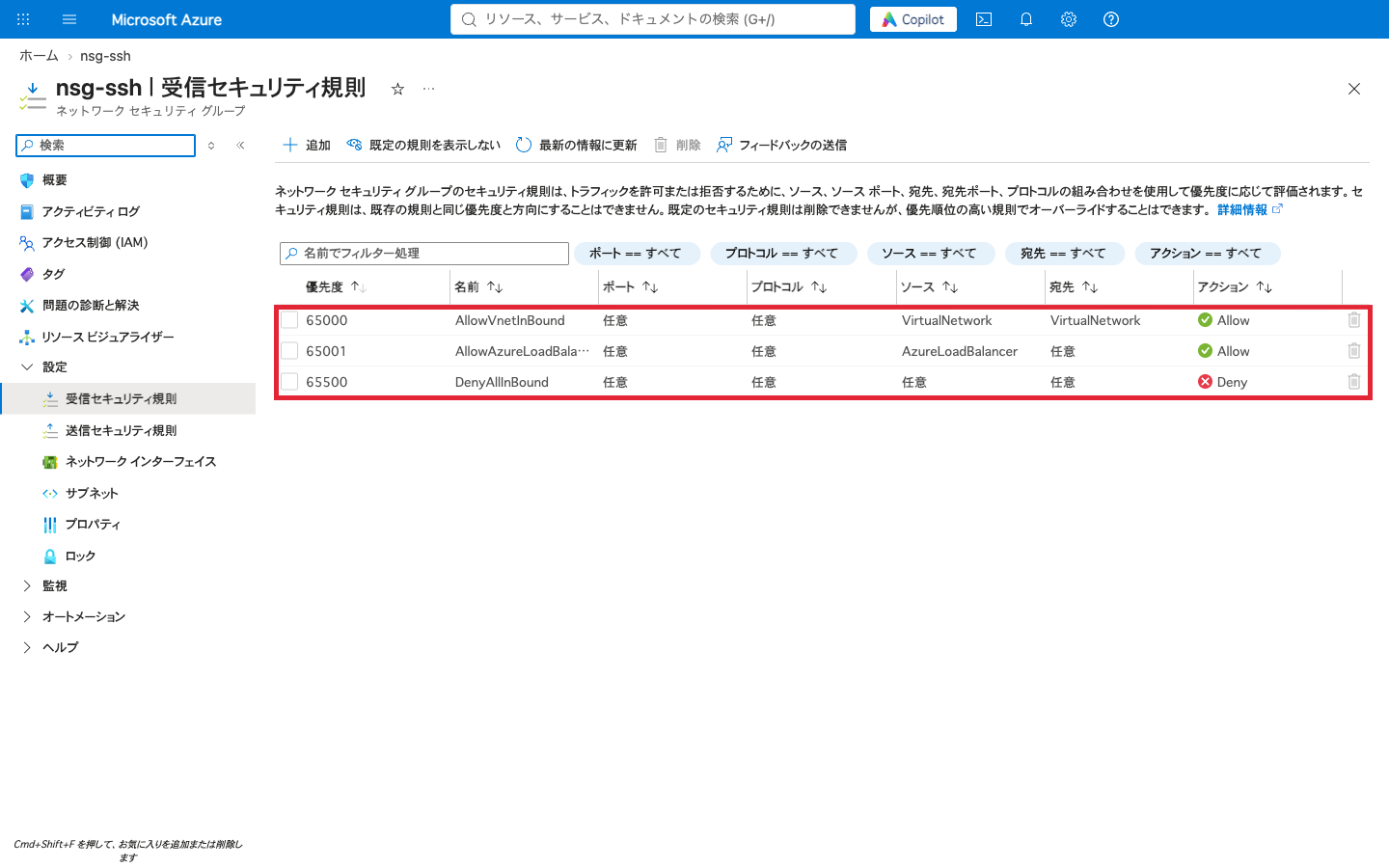
After the deletion, only the three default rules remain in the portal's "Inbound security rules" (the red frame was added by me). There is no longer a rule that allows SSH from my machine.
The new SSH connection timed out, and the rule verdict was also Deny
I tried the new SSH connection with the wait time specified as 20 seconds.
ssh -o ConnectTimeout=20 azureuser@<VMのパブリックIP>
ssh: connect to host <VMのパブリックIP> port 22: Operation timed out
The 20 seconds is a wait time I specified myself. If you do not specify one, it waits up to the OS default time before timing out.
For IP flow verify, I specified newly arriving inbound traffic from my local IP address to port 22 of the VM. IP flow verify requires that Network Watcher be enabled in that region (in this case it was created automatically).
az network watcher test-ip-flow --resource-group <resource-group> --vm vm-nsg \
  --direction Inbound --protocol TCP \
  --local <VMのプライベートIP>:22 --remote <手元のグローバルIPアドレス>:50000
{
  "access": "Deny",
  "ruleName": "defaultSecurityRules/DenyAllInBound"
}
The IP flow verify verdict was a denial by the default DenyAllInBound. IP flow verify returns whether the specified packet is allowed or denied by the configured rules. As the session continuing while the verdict was Deny shows, whether an existing connection remains does not show up in this result.
NSGs keep the state of connections
The reason the existing connection did not drop is that the NSG keeps state for each connection. According to the Security rules section of the official documentation, a flow record is created for an existing connection, and traffic is allowed or denied based on that connection state. This is the property known as "stateful."
The same section also contains an example almost identical to this experiment.
- Even if you delete a rule that allowed a connection, the existing connection is not interrupted
- Adding, changing, or deleting NSG rules affects only new connections
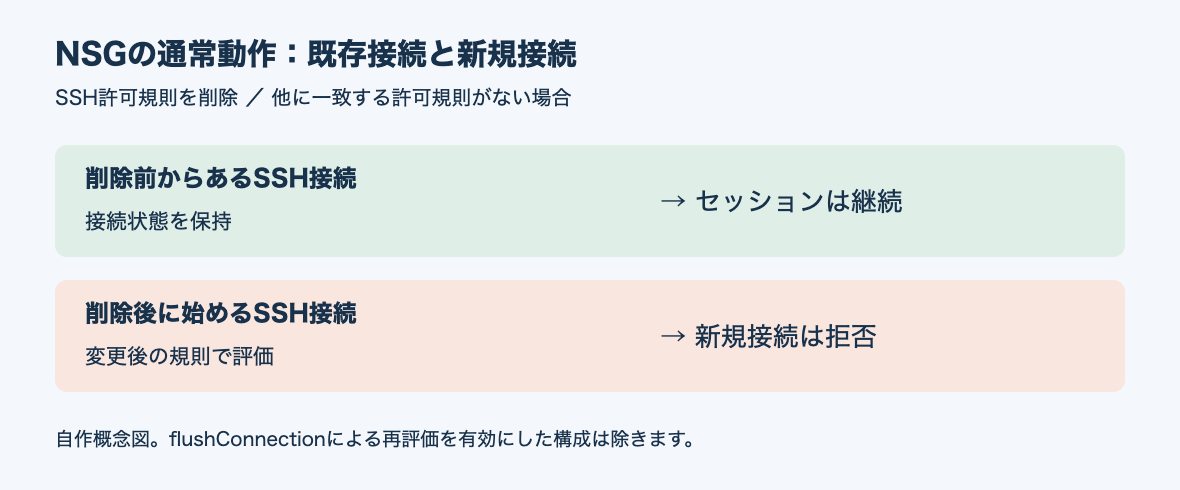
- If you delete a rule that allows SSH during an SSH session to a VM, that session remains usable and continues, and a new SSH connection attempted after the deletion is blocked
The following figure is a conceptual diagram I made myself, not an official architecture diagram. It separates connections established before the rule deletion from connections started after it.
AWS security groups are also similar to NSGs in that they handle response traffic based on connection state. However, this comparison is limited to the concept of "stateful" and does not mean the behavior when rules are changed is the same.
The Flow timeout section of the official documentation also says that you can configure how long a flow record remains valid (the flow timeout). What I tested was only a session that kept sending data every 5 seconds. If you leave open an SSH session with long idle periods, I cannot tell from this article's results whether the session would remain after the rule is deleted or be dropped when the flow expires.
flushConnection: It exists in the API, but I could not enable it this time
It cannot be said that "NSGs can never stop existing connections." properties.flushConnection is defined in the NSG REST API reference. According to its description, when this property is enabled, the NSG's connection flows are re-evaluated at the time it is enabled and at the time a rule is updated.
So, to test whether existing connections would be dropped, I tried to enable flushConnection on nsg-ssh.
az network nsg update --resource-group <resource-group> --name nsg-ssh --set flushConnection=true
(FlushingNetworkSecurityGroupConnectionIsNotEnabled) Network Security Group Connection Flushing is not enabled yet for japaneast region. Please set networkSecurityGroup.FlushConnection property to false.
The error said that this feature is not yet enabled in the Japan East region. To check other regions too, I tried to create NSGs (without VMs) with flushConnection enabled in 8 regions, including Japan East, using the REST API (api-version 2024-05-01).
az rest --method put \
  --url "/subscriptions/{subscriptionId}/resourceGroups/<resource-group>/providers/Microsoft.Network/networkSecurityGroups/flush-<region>?api-version=2024-05-01" \
  --body '{"location": "<region>", "properties": {"flushConnection": true}}'
The result was rejection with the same FlushingNetworkSecurityGroupConnectionIsNotEnabled in all of japaneast, japanwest, eastus, westus2, westcentralus, centralus, northeurope, and southeastasia.
Also, when I checked this subscription's preview features, Microsoft.Network/AllowNsgFlushConnection was not registered. I submitted a registration request, but as of 1:32 on November 10, 2026 (JST), it is still pending approval (Pending).
az feature register --namespace Microsoft.Network --name AllowNsgFlushConnection
I tried flushConnection while this preview feature was unregistered. Because I could not enable it, I also could not confirm whether existing connections are actually dropped once it is enabled. I also have not determined whether registering the preview feature is the condition, or whether I need to wait for the rollout to the region.
Check new connections and existing connections separately
When making a change that narrows the allowed range for SSH, checking "new connections" and "existing connections" separately makes it harder to mix up the results.
| What to check | How to check | Result this time | What this alone does not tell you |
|---|---|---|---|
| New connections | Rule verdict (IP flow verify) | Deny (DenyAllInBound) |
Whether connections already established remain |
| New connections | A newly established SSH connection | Timeout | Whether connections already established remain |
| Existing connections | State of the SSH session that existed before the change | Output was not interrupted for about 19.5 minutes (a session that kept communicating every 5 seconds) | Whether new connections are rejected |
If you judge "SSH has stopped" by looking only at the rule verdict, you will not notice that connected sessions remain. Conversely, judging that "the rule has not taken effect" just because a connected session continues is also a mistake.
If ending existing sessions immediately is a requirement, rather than treating the NSG rule alone as complete, it seems better either to check whether flushConnection can be used in the target subscription and region, or to prepare separately a procedure to terminate SSH sessions on the VM side. I did not try operations on the VM such as listing or terminating connected SSH sessions this time, so this article cannot show which procedure reliably drops existing connections.
Summary
Even after deleting an allow rule in an Azure NSG, the connected SSH session was not dropped. On the actual machine, communication continued after the deletion for about 19.5 minutes, until the loop ended and the session closed. On the other hand, a new connection tried after the deletion timed out. The official documentation also says that, in normal settings without flushConnection, adding, changing, or deleting a rule affects only new connections.
After changing a rule, you need to check "whether new connections are rejected" and "whether existing connections have ended" as separate completion conditions. flushConnection, which re-evaluates existing connections, is defined in the API, but in the verification subscription as of November 10, 2026, I could not enable it in any of the 8 regions I tried.