I tried out the Decisions API that became generally available (GA) in Azure OpenAI right away

This page has been translated by machine translation. View original
Hello, I'm Keima.
On October 22, 2026, OpenAI made the Decisions API generally available (GA), and it also became available on Microsoft Foundry on the same day.
A dedicated endpoint was added to Azure OpenAI resources, so you can call it if you have a gpt-6-luna deployment.
This article summarizes the key points from the official documentation as of October 25, 2026, and includes the results of one call made using my own resource.
1. What is the Decisions API
The Decisions API is an API that calls a decision model like TypeSafe AI's Jev, which does not generate free-form text but only returns answers in a predetermined format.
It is suited for processing where the range of possible answers is fixed, such as automatic routing of inquiries or determining whether specific conditions are met.
It accepts not only text but also images as input.
The Azure OpenAI Decisions API evaluates text, images, or both and returns typed answers instead of generated text.
Source: Use the Azure OpenAI Decisions API | Microsoft Learn
It was originally announced as a limited preview at OpenAI DevDay 2026 on September 29, 2026.
It was then released to all developers as a public beta on October 6, and became GA on October 22.
According to OpenAI's changelog, at the time of GA, the maximum number of questions increased from 200 in beta to 400, and prompt caching and JSON input were added.
Source: Changelog | OpenAI API
There are three question types.
| Type | What is returned |
|---|---|
predicate |
Probability that the condition is true (0 to 1) |
choice |
One of the provided choices, along with the probability and confidence for each choice |
score |
Probability-weighted average over ordered levels, along with the probability and confidence for each level |
2. Requirements for use on Azure
| Item | Details |
|---|---|
| Endpoint | /openai/v1/decisions of the Azure OpenAI resource |
| Supported model | gpt-6-luna only |
| Region | Rolling out to regions where gpt-6-luna is available. East US 2 is not included |
| Authentication | API key (api-key header) or Microsoft Entra ID |
| Per-request limits | 400 questions, 128 images, 32 MB total |
| Pricing (per 1 million tokens) | Input $0.10, cached input $0.01. No charge for output |
3. Trying it out
I sent a POST to the gpt-6-luna deployment in an eastus Foundry resource using an Entra ID token.
I tested both text and image once each, sending the same request 3 times for each.
Amounts are converted at 150 yen per dollar, and response times were measured with curl from my local Mac, including the communication time from Japan to eastus.
3.1 Evaluating text
I combined three types of questions for a single inquiry message into one request.
Here is the request body.
{
  "model": "gpt-6-luna",
  "input": "先週注文したキーボードが届いたら、Enterキーが反応しません。交換か返金をお願いします。",
  "questions": [
    {"type": "predicate", "name": "refund_requested", "instructions": "Is the customer requesting a refund or exchange"},
    {"type": "choice", "name": "department", "instructions": "Which department should handle this",
     "choices": [
       {"value": "billing", "description": "Billing / Refunds"},
       {"value": "technical", "description": "Product defects"},
       {"value": "shipping", "description": "Delivery / Tracking"},
       {"value": "other", "description": "Other"}]},
    {"type": "score", "name": "severity", "instructions": "How severe is the issue",
     "levels": [
       {"label": "Minor", "description": "No loss of functionality"},
       {"label": "Workaround available", "description": "Can work using another method"},
       {"label": "Completely unusable", "description": "No workaround available"}]}
  ]
}
Here is the response from the first attempt.
{
  "model": "gpt-6-luna",
  "answers": [
    {"type": "predicate", "name": "refund_requested", "probability": 1.0},
    {"type": "choice", "name": "department", "choice": "technical",
     "probabilities": [
       {"value": "billing", "probability": 0.03},
       {"value": "technical", "probability": 0.97},
       {"value": "shipping", "probability": 0.0},
       {"value": "other", "probability": 0.0}],
     "confidence": 0.96},
    {"type": "score", "name": "severity", "score": 1.08,
     "probabilities": [
       {"value": 0, "label": "軽微", "probability": 0.06},
       {"value": 1, "label": "回避策あり", "probability": 0.8},
       {"value": 2, "label": "完全に使えない", "probability": 0.14}],
     "confidence": 0.7}
  ],
  "usage": {"input_tokens": 477, "output_tokens": 0, "total_tokens": 477}
}
The probability for a refund/exchange request was 1.0, the department was technical, and the severity was 1.08, leaning toward "workaround available."
Sending the request 3 times yielded the same answers each time, with only the choice confidence fluctuating between 0.96 and 0.95.
The input consumed was 477 tokens, costing approximately $0.000048 (about 0.007 yen) per request.
Response times were approximately 2.05 seconds (2045ms) for the 1st attempt, approximately 1.61 seconds (1607ms) for the 2nd, and approximately 1.40 seconds (1400ms) for the 3rd.
3.2 Evaluating an image
I used the following photo of a dog as input.
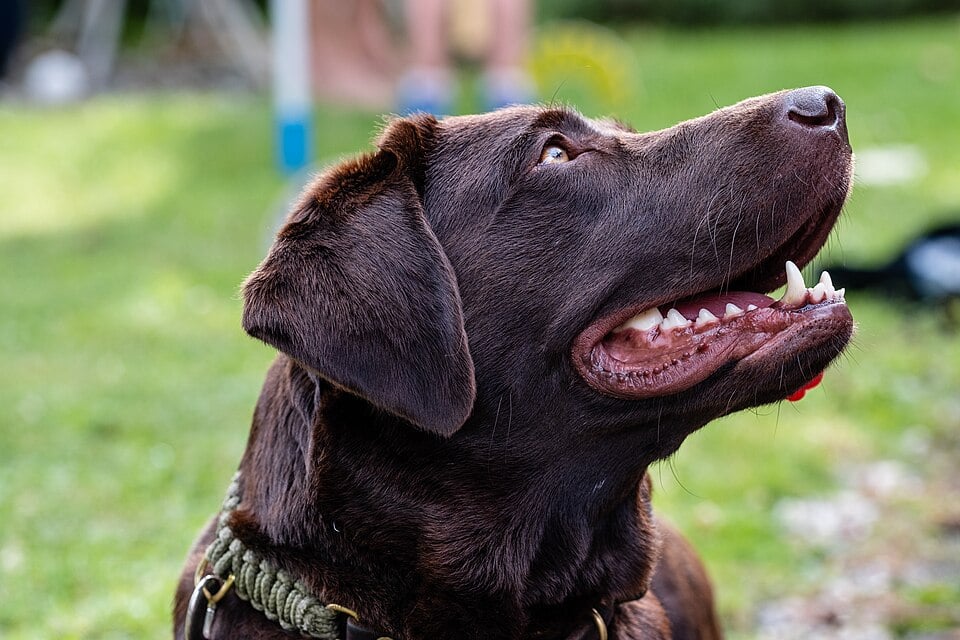
Photo: Dktue "File:Portrait of a labrador retriever.jpg | Wikimedia Commons" (CC0 1.0). A reduced 960px version was used.
The image is converted to base64 and placed in input_image in the format data:image/jpeg;base64,....
I asked three predicate questions — whether a dog is in the photo, whether a cat is in the photo, and whether the animal is wearing a collar — and one choice question about coat color.
Here is the request body (the base64 portion is omitted).
{
  "model": "gpt-6-luna",
  "input": [{"role": "user", "content": [
    {"type": "input_text", "text": "Please look at this photo and answer."},
    {"type": "input_image", "image_url": "data:image/jpeg;base64,<base64 of the image>"}
  ]}],
  "questions": [
    {"type": "predicate", "name": "is_dog", "instructions": "Is there a dog in the photo"},
    {"type": "predicate", "name": "is_cat", "instructions": "Is there a cat in the photo"},
    {"type": "predicate", "name": "wearing_collar", "instructions": "Is the animal wearing a collar"},
    {"type": "choice", "name": "coat_color", "instructions": "Which of the following best describes the coat color of the animal in the photo",
     "choices": [
       {"value": "black", "description": "Black"},
       {"value": "yellow", "description": "Cream / Yellow"},
       {"value": "chocolate", "description": "Brown"},
       {"value": "other", "description": "Other"}]}
  ]
}
Here is the response from the first attempt.
{
  "model": "gpt-6-luna",
  "answers": [
    {"type": "predicate", "name": "is_dog", "probability": 1.0},
    {"type": "predicate", "name": "is_cat", "probability": 0.0},
    {"type": "predicate", "name": "wearing_collar", "probability": 1.0},
    {"type": "choice", "name": "coat_color", "choice": "black",
     "probabilities": [
       {"value": "black", "probability": 0.99},
       {"value": "yellow", "probability": 0.0},
       {"value": "chocolate", "probability": 0.01},
       {"value": "other", "probability": 0.0}],
     "confidence": 0.99}
  ],
  "usage": {"input_tokens": 1207, "output_tokens": 0, "total_tokens": 1207}
}
The probability of a dog being in the photo was 1.0, a cat 0.0, and a collar 1.0 — all matching what is shown in the photo.
On the other hand, the coat color was selected as black with a probability of 0.99, with chocolate at only 0.01.
To me, the dog in the photo could appear either black or brown, so assigning 0.99 to a coat color that could be interpreted either way felt excessive.
All three attempts yielded the same answers, and the confidence was 1.0 for the 2nd and 3rd attempts.
The input included one 960×640 image for a total of 1207 tokens, at a cost of approximately $0.00012 (about 0.018 yen) per request.
Response times were approximately 5.53 seconds (5530ms) for the 1st attempt, approximately 2.42 seconds (2421ms) for the 2nd, and approximately 2.79 seconds (2793ms) for the 3rd.
4. Differences from Microsoft-Decision-1
Although the names are quite similar, Microsoft-Decision-1, released on October 9, is Microsoft's own decision model and is a separate product from this one.
Its endpoint is /providers/microsoft/v1/systemone, it accepts only text as input, and the pricing is $0.042 per 1 million input tokens.
The Decisions API covered in this article, on the other hand, runs OpenAI's API with gpt-6-luna and also accepts images as input.
5. Summary
As demonstrated in this verification, it was possible to call the Decisions API normally by specifying gpt-6-luna from an Azure OpenAI resource.
Until now, it could only be used via the original OpenAI API, but now that it is accessible through Azure, the barrier to adopting the Decisions API for companies in Japan should be significantly lower.
As someone who primarily works in an AWS environment, I hope to see similar support added in Amazon Bedrock as well.

