
Can Azure Service Bus Duplicate Detection Prevent Double Processing? Testing Resends with the Same MessageId and Redelivery

This page has been translated by machine translation. View original
Hello! I'm Yuji Nishimura from the Operations Department!
When making order registration asynchronous with an Azure Service Bus queue, is it safe to assume that "if I enable duplicate detection, there's no need to worry about orders being registered twice"?
I checked on a real environment: when I resent with the same MessageId, the send succeeded but the second message did not enter the queue. On the other hand, when the receiving app stopped receiving before notifying completion, the same message was delivered once more. Duplicate detection prevents duplicate sends. You need to prepare separately a design in which the result is not doubled even if the receiving app processes the same order repeatedly.
Separating send retries from redelivery after receipt, I tested on a Standard namespace created in the East Japan region on November 10, 2026. I used Azure CLI 2.91.0, Python 3.13, and azure-servicebus 7.15.0.
Summary of what I tried
| What I tried | Result |
|---|---|
| Create a queue with duplicate detection enabled in a Basic namespace | Could not be created (RequiresDuplicateDetection cannot be set in Basic) |
Send twice with the same MessageId |
Both sends succeeded. Only the first entered the queue |
For the same order, send a different operation (cancel) with a different MessageId |
Accepted |
Send twice with a random MessageId each time |
Both messages were accepted |
After receiving and completing the first message, send the same MessageId within the time window |
The send succeeded, but the message was discarded |
Send the same MessageId outside the time window (1 minute) |
Accepted |
| Receive in PeekLock and stop receiving without notifying completion | In a receive after the lock expired, the same message was redelivered (the Python SDK's delivery_count went from 0 → 1) |
It couldn't be created in Basic, so I prepared a queue with a 1-minute time window in Standard
Duplicate detection is available in Standard and Premium. When I tried to create a queue with duplicate detection enabled in a Basic namespace, it resulted in an error.
SubCode=40000. The property 'RequiresDuplicateDetection' cannot be set when creating a Queue because the namespace '<namespace>' is using 'Basic' tier.
In a Standard namespace, I created the queue orders with duplicate detection enabled. To see results quickly, I set the duplicate detection time window to 1 minute and the lock duration to 30 seconds. Partitioning is disabled.
az group create --name <resource-group> --location japaneast
az servicebus namespace create --resource-group <resource-group> --name <namespace> --location japaneast --sku Standard
az servicebus queue create --resource-group <resource-group> --namespace-name <namespace> --name orders \
  --enable-duplicate-detection true --duplicate-detection-history-time-window PT1M \
  --lock-duration PT30S --enable-partitioning false

# 送受信に使う接続文字列(名前空間の RootManageSharedAccessKey)を環境変数に入れる
export SB_CONN="$(az servicebus namespace authorization-rule keys list --resource-group <resource-group> \
  --namespace-name <namespace> --name RootManageSharedAccessKey --query primaryConnectionString -o tsv)"
I did sending and receiving with Python's azure-servicebus. The scripts included in this article are the ones I actually used, with the log formatting removed.
A resend with the same MessageId was discarded even though the send succeeded
The sender resends the same request when it can't tell whether it got through, for example when no response comes back. To simulate that resend, I sent twice with the same MessageId (order-300/register).
import os
from azure.servicebus import ServiceBusClient, ServiceBusMessage

with ServiceBusClient.from_connection_string(os.environ["SB_CONN"]) as client:
    with client.get_queue_sender("orders") as sender:
        for body in ["register order-300 (1st send)", "register order-300 (retry)"]:
            sender.send_messages(ServiceBusMessage(body, message_id="order-300/register"))
No exception was raised either time, and both sends succeeded. When I checked the queue's message count about 17 seconds later, it was 1.
az servicebus queue show --resource-group <resource-group> --namespace-name <namespace> --name orders \
  --query '{active:countDetails.activeMessageCount, dup:requiresDuplicateDetection, window:duplicateDetectionHistoryTimeWindow}'
{
  "active": 1,
  "dup": true,
  "window": "PT1M"
}
The queue overview in the portal also showed duplicate detection enabled and one active message (red frames added by me).
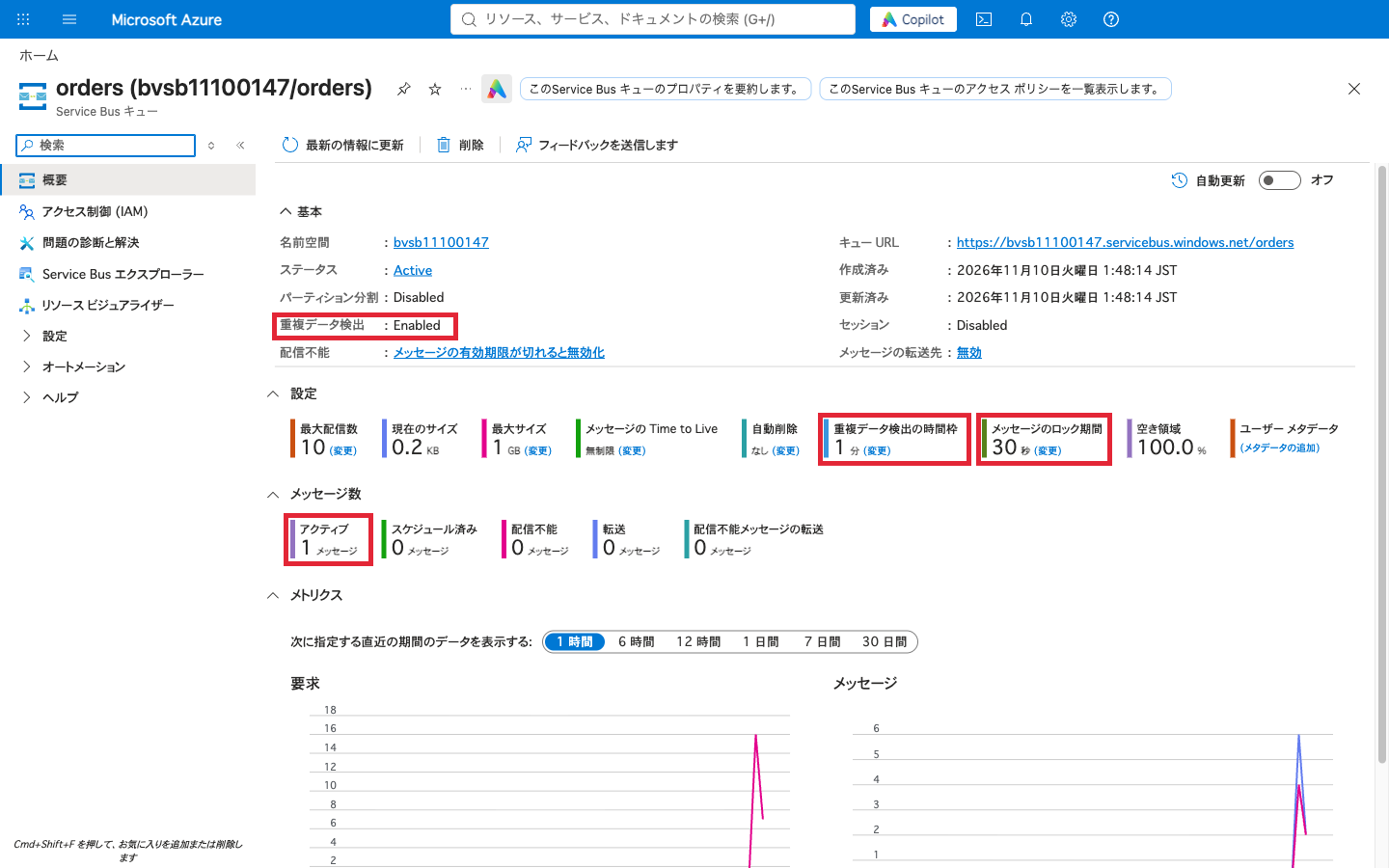
The official explanation of duplicate detection also says that Service Bus records the MessageId of messages sent to a queue or topic for the duration of the time window. A message resent with the same ID during that time is discarded after returning success to the sender. It is not a mechanism that compares the body to decide whether it's the same order. When partitioning is enabled, the decision is made on the combination of MessageId and PartitionKey (I tested with it disabled).
Service Bus duplicate detection is similar in mechanism to the deduplication ID of an Amazon SQS FIFO queue. The SQS documentation also says that subsequent messages with the same ID are accepted but not delivered to consumers. The length of the time window (5 minutes for SQS) and where it's configured differ, so I mention it only as an analogy for the concept.
How the ID was assigned changed how duplicates were handled
Before this test, I tried varying how IDs were assigned on an empty queue. After sending the following five and then receiving from the queue, I was able to retrieve 4 messages (all received messages were completed).
| Message sent | MessageId | Result |
|---|---|---|
| Registration of order-123 (1st time) | order-123/register |
Accepted |
| Registration of order-123 (resend) | order-123/register |
Discarded |
| Cancellation of order-123 | order-123/cancel |
Accepted |
| Registration of order-456 (1st time) | Random ID | Accepted |
| Registration of order-456 (resend) | A different random ID | Accepted (not treated as a duplicate) |
If you assign a new random ID on every resend, Service Bus sees them as different messages. For resends of the same order registration, you need to keep the same ID, as in order-123/register. Conversely, even for the same order, "registration" and "cancellation" are different requests, so if you use only the order number as the shared ID, there is a risk that even necessary messages will be discarded.
Even after receipt, it was discarded within the time window
Immediately after emptying the queue (about 13 seconds after the first send), I sent the same order-123/register again. The send succeeded, but the only message I could retrieve in the subsequent receive was the one sent after the time window had passed (73 seconds after the first send). The log times are in Japan time.
01:49:28 send ok: order-123/register | register order-123 (1st send)
01:49:41 drained: 4
01:49:41 send ok: order-123/register | register order-123 (resend after consumed)
01:49:43 peek: 0 message(s) []
01:50:41 send ok: order-123/register | register order-123 (resend after window)
01:50:44 peek: 1 message(s) [('order-123/register', 'register order-123 (resend after window)')]
01:50:47 drained: 1
drained is the number of messages received and completed. A peek (an operation that looks at messages without taking their contents) doesn't necessarily return all messages at once, so I used the drained count as the basis for the numbers.
Service Bus remembers the same ID for the duration of the time window even after the first message has been processed. According to the official explanation, the time window defaults to 10 minutes, with a minimum of 20 seconds and a maximum of 7 days. Enabling duplicate detection and the size of the time window affect throughput, and the smaller the time window, the less the impact. The length of the time window needs to be decided based on the period during which resends may occur and the load.
Without notifying completion, the same message arrived again
With PeekLock, the message is locked on receipt, and when processing is finished you notify completion with Complete (complete_message in the Python SDK). If you don't specify a receive mode, receiving in the Python SDK uses PeekLock.
I sent order-789/register, received it in PeekLock, and closed the receiver without calling complete_message. I waited 35 seconds and then received again.
import os, time
from azure.servicebus import ServiceBusClient

with ServiceBusClient.from_connection_string(os.environ["SB_CONN"]) as client:
    with client.get_queue_receiver("orders", max_wait_time=5) as receiver:
        m = receiver.receive_messages(max_message_count=1)[0]
        print(m.message_id, m.delivery_count, m.locked_until_utc)
        # complete_message を呼ばずに受信側を閉じる
    time.sleep(35)
    with client.get_queue_receiver("orders", max_wait_time=10) as receiver:
        m = receiver.receive_messages(max_message_count=1)[0]
        print(m.message_id, m.delivery_count)
        receiver.complete_message(m)
The log times are in Japan time, and only locked_until is in UTC (01:51:19 in Japan time, 30 seconds after receipt).
01:50:49 received: order-789/register delivery_count: 0 locked_until(UTC): 16:51:19
01:50:49 simulate crash: close receiver without Complete
01:51:26 received again: order-789/register delivery_count: 1 | register order-789
01:51:26 completed
In a receive after the lock expired, the same order-789/register arrived once more, and delivery_count increased from 0 to 1. The sender did not resend anything. Duplicate detection is a send-time mechanism, so it cannot prevent this redelivery.
This time, I simulated a state in which the receiving app stopped midway through processing by closing the receiver's connection. I did not test abnormal process termination or network disconnection. I also did not test whether the message could be received before the lock expired, so I have not determined whether the lock was released when the receiver was closed or whether it waited until expiry.
Registering the order in the DB and notifying Service Bus of completion (Complete) are separate operations. If the receiving app stops right after the order registration succeeds and before Complete reaches Service Bus, the same message may arrive after the lock expires and the order registration may run again. When processing is long, you can renew the lock to extend its expiry, but if the app stops right after the DB update, the process that would renew it no longer exists, so the lock expires and the message is redelivered.
The following diagram is a conceptual diagram I made myself, not an official architecture diagram. It shows the boundary between duplicate detection on the sending side and redelivery on the receiving side.
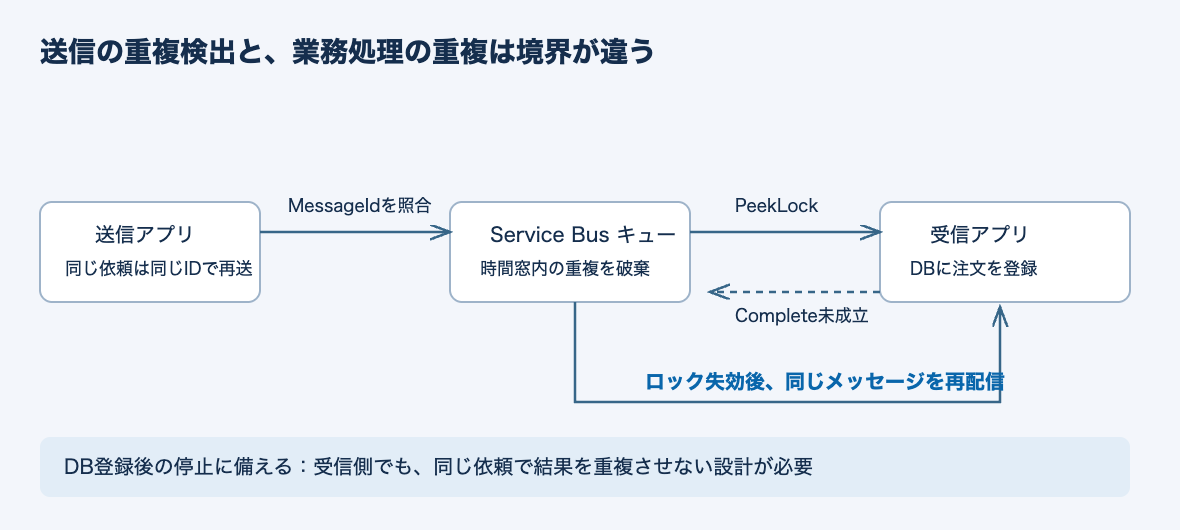
The receiving side needs the property that the result is not duplicated even when the same request is reprocessed, that is, idempotency.
For order registration, consider ID consistency and the DB commit scope
The Idempotent Consumer pattern shows a method of committing the processed ID and the business update in the same transaction. Merely "checking whether it has been processed" cannot handle concurrent processing or mid-process stops.
For order registration, the following four points are items to check in the design. The first row, for the sending side, is based on this test's results; the three rows for the receiving side are design examples based on the official pattern and are not implementations verified on a specific DB.
| Check point | Approach for order registration | State to avoid |
|---|---|---|
| Can the same request be sent with the same ID even on resend? (sending side) | Keep an ID that combines the order and the operation, such as order-123/register, across resends |
Assigning a random ID on every resend. Using only the order number as the ID |
| Can the same request be identified? (receiving side) | Use the ID of the order registration operation, which doesn't change on redelivery (the MessageId was the same in this redelivery too) |
Creating a different ID each time it's received |
| Even if two processes handle the same message at the same time, can double registration be prevented? (receiving side) | Put a unique constraint or similar on the processed ID | Both judge it "unprocessed" and register |
| Are the business update and the processed record committed together? (receiving side) | Include the order registration and the processed record in the same DB transaction | Only the registration succeeds and the process stops before recording |
With this form, when a message is redelivered, you can look at the processed record and Complete it without repeating the same order registration. Conversely, if you commit only the processed record before the DB update, a stop right after that would cause an unregistered order to be skipped.
When to delete the processed records is also a separate decision. Simply matching the sending-side time window of Service Bus is not enough. In addition to the period during which receive retries continue, you also need to consider when an operator will resubmit from the dead-letter queue, where messages that exceeded the maximum delivery count (10 in this case) are set aside.
External payment APIs and email sending usually cannot be included in that DB transaction. Even if the order DB can prevent double registration, the external calls are not necessarily made just once. The idempotency key on the callee's side, and the methods of reconciliation and recovery when the result is unknown, need to be designed separately.
Summary
Duplicate detection discards send retries, but it does not stop redelivery after receipt. This time as well, a resend with the same MessageId was discarded within the time window, and a message for which receiving stopped without notifying completion was redelivered in a receive after the lock expired.
In design reviews, it seems good to check the two boundaries separately. On the sending side, check "when resending because the result is unknown, can the same request be sent with the same ID?"; on the receiving side, check "even if it stops right after the business update, do we commit the processed record together with the business update so that the next receive doesn't duplicate the result?"