
How Far Do Azure Storage Delete Locks Protect You? Sorting Out Measures Against Accidental Blob Deletion

This page has been translated by machine translation. View original
Hi there! I'm Yuji Nishimura from the Operations Department!
Putting a delete lock on an Azure Storage storage account prevents the account itself from being deleted by mistake. So, if you put a lock on an account that stores images, will the images (blobs) inside it also be protected from deletion?
A lock alone cannot prevent blobs from being deleted or overwritten. In a verification subscription, I tried deleting the account itself, a container, and a blob on a storage account with a delete lock. Only the deletion of the account and the deletion of a container through Azure Resource Manager (the management plane) were rejected. Even after switching to a read-only lock, I could still delete a blob using a key I had already obtained.
In this article, I check which operations a lock stops, using the official documentation and results on a real environment, and then organize the additional measures needed for each protection target (account, container, blob). Retention periods, cost estimates, deletion prevention with immutable storage, and recovery design including backups are out of scope. The materials I referred to are as of November 9, 2026.
A delete lock only stops management plane operations
There are two kinds of Azure resource locks. The official documentation for storage accounts describes their restrictions as follows.
| Lock | Restrictions on the storage account | Deleting/overwriting stored blobs |
|---|---|---|
CanNotDelete (delete lock) |
Prevents deleting the account. Reading and changing the configuration are still possible | Not prevented |
ReadOnly (read-only lock) |
Prevents deleting the account and changing its configuration. Reading the configuration is still possible | Not prevented |
"Read-only" here does not mean that the stored blob data becomes read-only. Making data impossible to delete or overwrite for a fixed period, like AWS S3 Object Lock, is the job of immutable storage, not resource locks.
Azure operations are divided into the management plane and the data plane. Management operations such as creating or deleting an account are sent to Azure Resource Manager, which manages Azure resources. Data operations such as reading and writing blobs are sent to the Blob service endpoint.
According to the official documentation on resource locks, locks apply only to management plane operations. They do not apply to data plane operations such as deleting or overwriting blobs.
The following diagram is a conceptual diagram I made myself, not an official architecture diagram. The upper row is the management plane path, and the lower row is the data plane path.
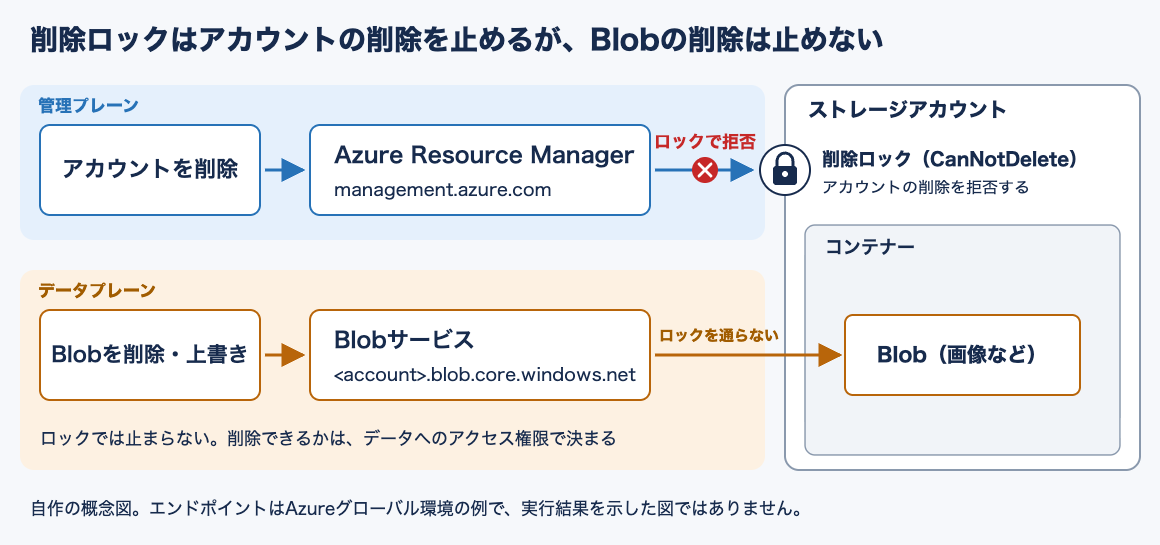
The lock itself can be deleted by users who have roles such as Owner or User Access Administrator. Because the account can also be deleted once the lock is removed, you need to narrow down the users who can manage locks, separately from data operation permissions.
Trying it out: checking what can be deleted on an account with a lock
In addition to the two paths in the diagram, I also tried deleting a container through the management plane and a read-only lock, using the Azure CLI and the Azure portal.
- Date performed: November 9, 2026
- Azure CLI 2.91.0 (macOS)
- Storage account: East Japan region (
japaneast), Standard_LRS, StorageV2. Shared key access was allowed (--allow-shared-key-access true), and it was created without specifying soft delete or versioning - User who performed the operations: a user with the Owner role on the subscription
- After attaching a lock, I waited about 30 seconds before trying
On the account bvlock11092018, I created three containers, images, mgmt-test, and data-test, and placed cat.png and dog.png in images before testing. The contents are text of a few dozen bytes, and only the names resemble images.
For data operations on blobs and containers, I put the account name and account key in environment variables and authorized with --auth-mode key. I obtained the key first and kept using the same value even after switching to the read-only lock in step 5.
export AZURE_STORAGE_ACCOUNT=bvlock11092018
export AZURE_STORAGE_KEY="$(az storage account keys list --account-name bvlock11092018 \
  --resource-group blog-verify-azure-storage-lock-protection-scope --query '[0].value' -o tsv)"
1. Put a delete lock on the account
az lock create --name blog-verify-cannotdelete --lock-type CanNotDelete \
  --resource-group blog-verify-azure-storage-lock-protection-scope \
  --resource bvlock11092018 --resource-type Microsoft.Storage/storageAccounts \
  --notes "blog verification"
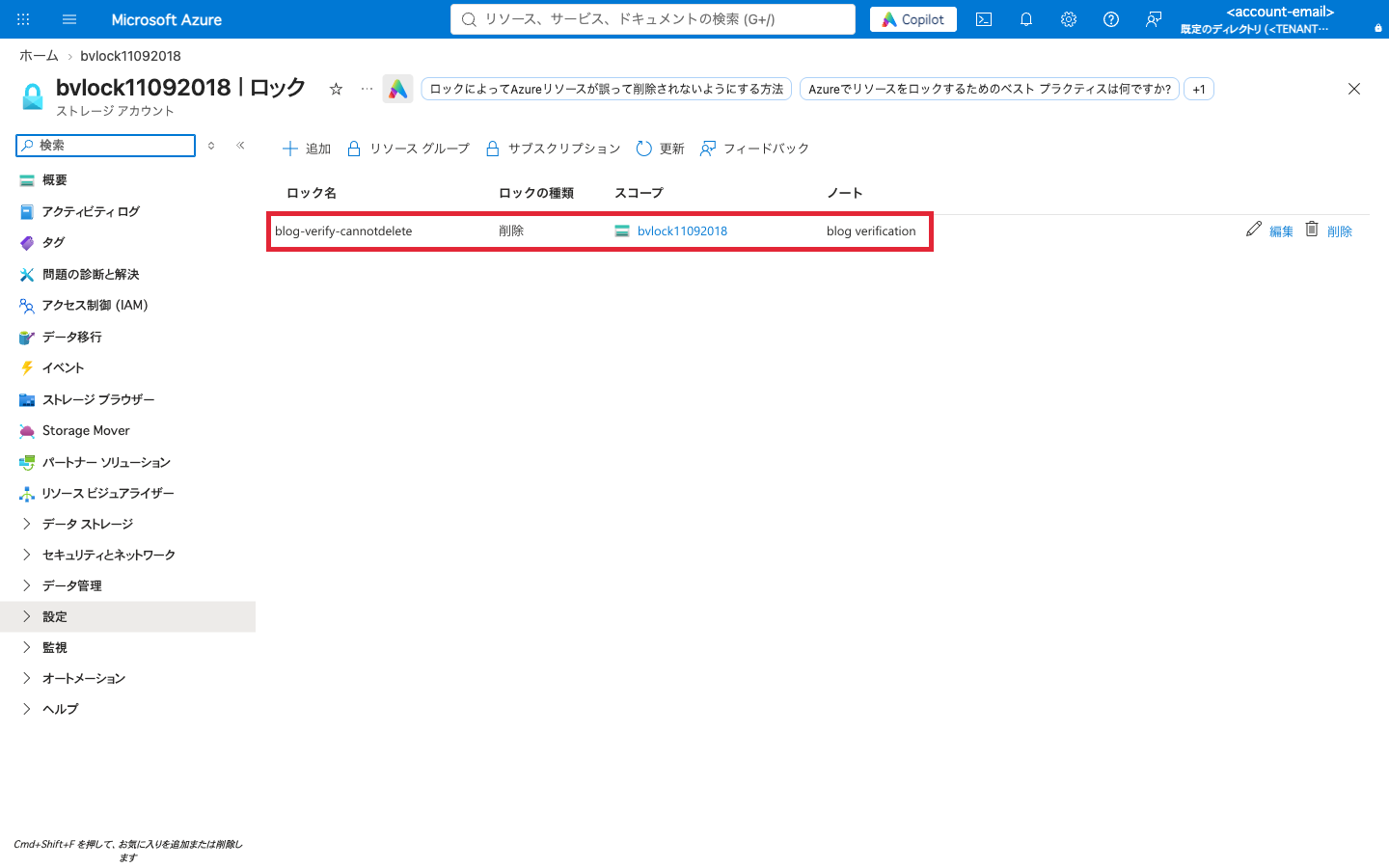
When you open "Locks" for the account in the portal, the lock you created is displayed with the lock type "Delete" (the red frame was added by me).
2. Deleting the account is rejected
az storage account delete --name bvlock11092018 \
  --resource-group blog-verify-azure-storage-lock-protection-scope --yes
ERROR: (ScopeLocked) The scope '/subscriptions/<subscription-id>/resourceGroups/blog-verify-azure-storage-lock-protection-scope/providers/Microsoft.Storage/storageAccounts/bvlock11092018' cannot perform delete operation because following scope(s) are locked: '/subscriptions/<subscription-id>/resourcegroups/blog-verify-azure-storage-lock-protection-scope/providers/Microsoft.Storage/storageAccounts/bvlock11092018'. Please remove the lock and try again.
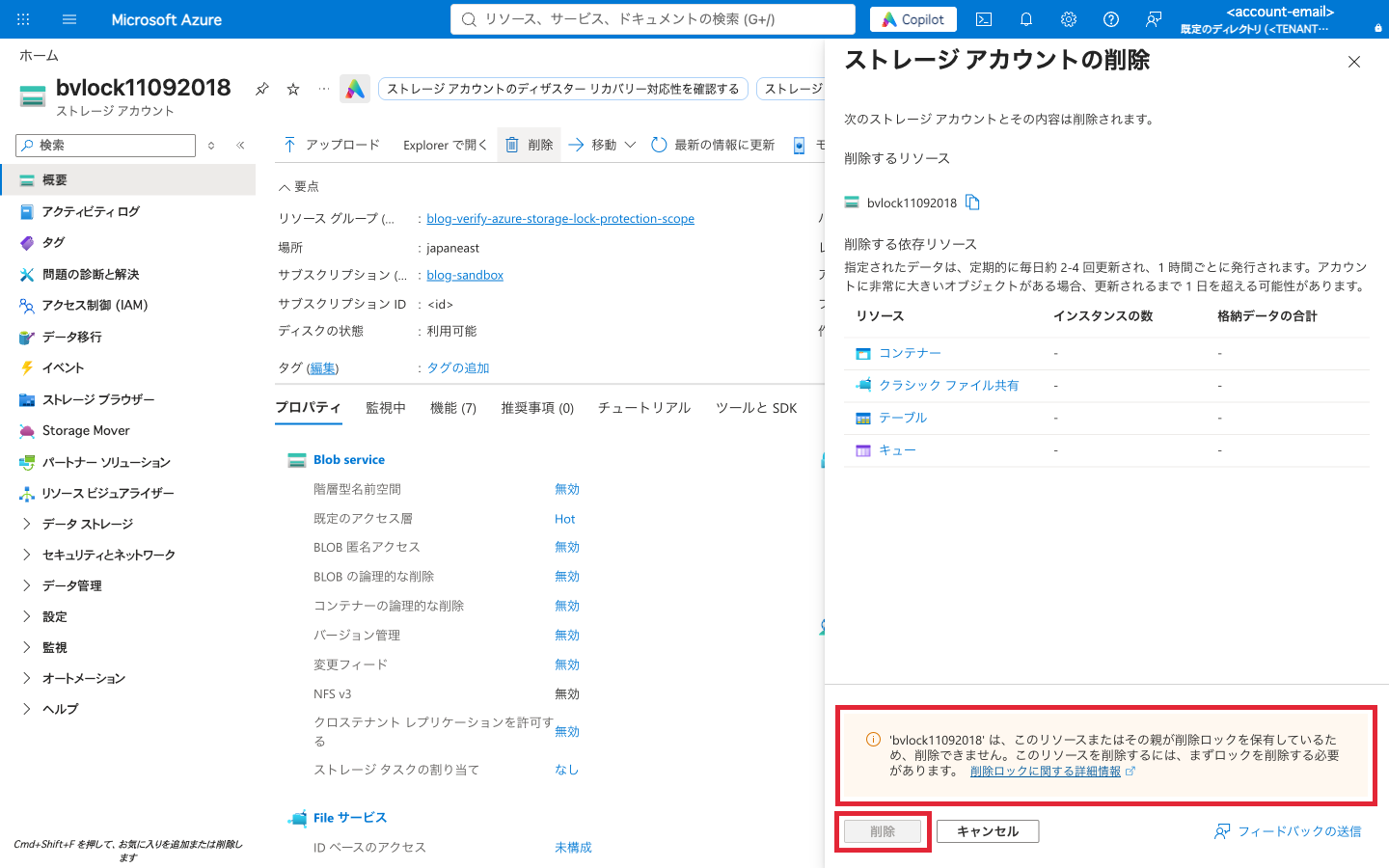
Even when run by a user with the Owner role, the deletion was rejected with ScopeLocked, and the storage account remained. In the portal, the lock is detected as soon as you open "Delete" on the overview page, a warning appears, and the "Delete" button cannot be pressed (the red frame was added by me).
3. Deleting and overwriting blobs succeeds
With the same lock still in place, I deleted dog.png and overwrote cat.png with different content.
az storage blob delete --container-name images --name dog.png --auth-mode key
az storage blob upload --container-name images --name cat.png --file cat-v2.txt --overwrite --auth-mode key
az storage blob list --container-name images --auth-mode key \
  --query '[].{name:name,size:properties.contentLength}' -o table
Name     Size
-------  ------
cat.png  27
Both succeeded. dog.png disappeared from the list, and cat.png was replaced with 27 bytes of content instead of 13 bytes. This matches the lower path in the diagram.
4. Deleting a container gives different results depending on the destination
Storage accounts also have APIs for operating on containers and other resources through the management plane. According to the official documentation on resource locks, operations on this path are protected by locks.
Container deletion also comes in two forms: Blob Containers - Delete on the management plane, and Delete Container on the data plane. In the Azure CLI, az storage container-rm corresponds to the former and operates on containers through the Microsoft.Storage resource provider. The latter is az storage container.
# Via the management plane (Azure Resource Manager)
az storage container-rm delete --storage-account bvlock11092018 \
  --resource-group blog-verify-azure-storage-lock-protection-scope --name mgmt-test --yes
ERROR: (ScopeLocked) The scope '/subscriptions/<subscription-id>/resourceGroups/blog-verify-azure-storage-lock-protection-scope/providers/Microsoft.Storage/storageAccounts/bvlock11092018/blobServices/default/containers/mgmt-test' cannot perform delete operation because following scope(s) are locked: '/subscriptions/<subscription-id>/resourcegroups/blog-verify-azure-storage-lock-protection-scope/providers/Microsoft.Storage/storageAccounts/bvlock11092018'. Please remove the lock and try again.
# Via the data plane (Blob service)
az storage container delete --name data-test --auth-mode key -o tsv
True
Deletion via the management plane was rejected by the lock placed on the account. Deletion via the data plane went through as is, and data-test was removed.
The official documentation recommends using management plane operations for storage accounts. However, which API is used differs depending on the tool or command. Even if deletion via the management plane is rejected, a user with data operation permissions can delete via the data plane. For this reason, I consider protecting containers not with locks but with soft delete, described later.
5. Even with a read-only lock, a blob can be deleted with an already-obtained key
A ReadOnly lock also stops List Keys, which retrieves account keys. According to the official documentation, this is because List Keys is an HTTPS POST operation, and a read-only lock rejects all POST operations.
With the key still in the environment variable, I switched the lock from CanNotDelete to ReadOnly.
az lock delete --name blog-verify-cannotdelete \
  --resource-group blog-verify-azure-storage-lock-protection-scope \
  --resource bvlock11092018 --resource-type Microsoft.Storage/storageAccounts
az lock create --name blog-verify-readonly --lock-type ReadOnly \
  --resource-group blog-verify-azure-storage-lock-protection-scope \
  --resource bvlock11092018 --resource-type Microsoft.Storage/storageAccounts \
  --notes "blog verification"
After waiting about 30 seconds, I tried retrieving the key.
az storage account keys list --account-name bvlock11092018 \
  --resource-group blog-verify-azure-storage-lock-protection-scope
ERROR: (ScopeLocked) The scope '/subscriptions/<subscription-id>/resourceGroups/blog-verify-azure-storage-lock-protection-scope/providers/Microsoft.Storage/storageAccounts/bvlock11092018' cannot perform write operation because following scope(s) are locked: '/subscriptions/<subscription-id>/resourcegroups/blog-verify-azure-storage-lock-protection-scope/providers/Microsoft.Storage/storageAccounts/bvlock11092018'. Please remove the lock and try again.
Retrieving the key was rejected as a write operation (write operation). The "Access keys" page in the portal also shows a ScopeLocked error, with the message "Cannot access the data plane because of a read lock on the resource or its parent." (the red frame was added by me).
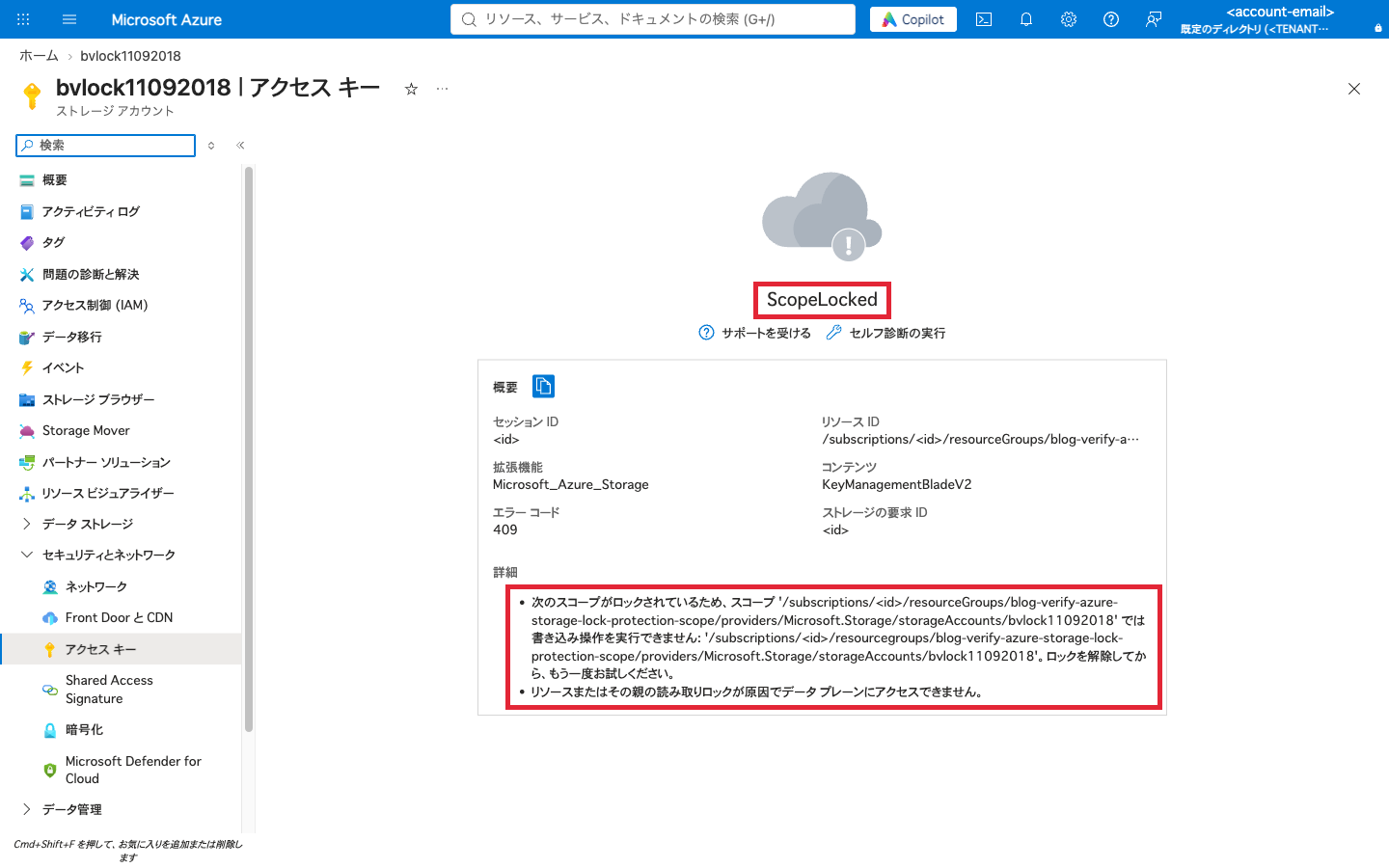
However, what was stopped was retrieving the key. The official documentation also says that a client that already holds the key when the lock is applied can keep accessing data with that key. In fact, using the key obtained before the switch, I could delete cat.png even with the ReadOnly lock in place, and the container images became empty.
az storage blob delete --container-name images --name cat.png --auth-mode key
az storage blob list --container-name images --auth-mode key --query 'length(@)' -o tsv
0
According to the same documentation, users who do not have the key need to access data with Microsoft Entra ID credentials. I did not try operations using Entra ID credentials (data operation roles) this time. Whether ReadOnly has any effect in a configuration that does not use keys needs to be checked separately.
Only management plane operations were rejected
| Operation tried | Lock applied | Destination | Result |
|---|---|---|---|
| Delete the account | CanNotDelete |
Management plane | Rejected (ScopeLocked) |
| Delete/overwrite a blob | CanNotDelete |
Data plane | Succeeded |
Delete a container (az storage container-rm) |
CanNotDelete |
Management plane | Rejected (ScopeLocked) |
Delete a container (az storage container) |
CanNotDelete |
Data plane | Succeeded |
| Retrieve account keys | ReadOnly |
Management plane | Rejected (ScopeLocked) |
| Delete a blob with an already-obtained key | ReadOnly |
Data plane | Succeeded |
Within the scope I tried, every rejected operation went through the management plane, and operations through the data plane succeeded under both locks.
Even when inherited from a resource group, data operations are not covered
Locks are inherited from a parent scope to child resources. For example, a delete lock placed on a resource group also applies to the storage accounts under it. Resources added later are also subject to inheritance.
However, inheritance only extends the range of resources the lock applies to, and data plane operations remain out of scope. Even if you lock an entire resource group, the lower path in the diagram does not pass through the lock, so a user with data operation permissions can delete the blobs inside. What I tried this time was an account-level lock. The explanation of resource-group-level locks is based on the official documentation.
Combine locks and recovery features for each protection target
For accidental deletion of blobs or containers, you use features other than locks. The data protection overview recommends, as a basic configuration, enabling soft delete for containers and blobs in addition to locking the account. In the comparison table by resource type in the same document, locks are also not counted as a feature that prevents container deletion.
The following table takes the case where an app stores images as block blobs (the common blob type for storing text and binary data) as an example, and summarizes the features to consider for each expected mistake. The table lists only the typical use of each feature.
| Expected mistake | Feature to consider | Approach to protection |
|---|---|---|
| Deleting the storage account | Delete lock on the account | Prevent: rejects deleting the account |
| Deleting a container | Soft delete for containers | Restore: restores the container and its contents within the retention period |
| Deleting one image while leaving the container | Soft delete for blobs | Restore: restores the deleted blob within the retention period |
| Accidentally overwriting an image | Blob versioning | Restore: restores from a previous version |
In the account I created with the Azure CLI without specifying soft delete or versioning this time, both were disabled.
az storage account blob-service-properties show --account-name bvlock11092018 \
  --resource-group blog-verify-azure-storage-lock-protection-scope \
  --query '{blobSoftDelete:deleteRetentionPolicy.enabled,containerSoftDelete:containerDeleteRetentionPolicy.enabled,versioning:isVersioningEnabled}' -o json
{
  "blobSoftDelete": false,
  "containerSoftDelete": null,
  "versioning": null
}
No values were set for container soft delete and versioning (null), and in the left side of the image in step 2 (the portal overview), blob soft delete, container soft delete, and versioning were all "Disabled". The dog.png I deleted in step 3 did not appear even in the list that includes deleted blobs (az storage blob list --include d), so it could not be recovered. Even with a lock in place, you cannot get back a blob you deleted by mistake with this setting. I did not try the default values when an account is created from the portal.
Container soft delete is used for restoring when an entire container has been deleted. It cannot be used when only individual blobs are deleted, so you also need to consider blob soft delete or blob versioning separately. With both container and blob soft delete, items past the retention period are permanently deleted. If you enable both, it seems good to align the retention periods. If the blob-side retention period is shorter, the blobs inside may already have been permanently deleted even if you restore the container.
On accounts where the hierarchical namespace (a namespace with a directory hierarchy, used by Data Lake Storage) is disabled, blob soft delete also has protection on overwrite. If versioning is disabled, the pre-overwrite state remains as a soft-deleted snapshot, and if it is enabled, it remains as a previous version.
Blob versioning is suited to continuously keeping the pre-overwrite state. However, storage charges also apply to past versions. It cannot be used on accounts with the hierarchical namespace enabled, and it is not a feature for recovering from deletion of the account or container itself.
I did not try deleting, overwriting, and restoring with soft delete or versioning enabled this time. The explanation that a snapshot or previous version remains after an overwrite and you can restore from it is based on the official documentation.
Summary
A delete lock on Azure Storage is a measure for preventing accidental deletion of the account itself. In my tests, only management plane operations were rejected, while deleting or overwriting blobs and deleting containers via the data plane went through. Even when inherited from a resource group, the protection scope does not extend to blob data operations. Operations that locks do not stop have to be restricted through data access permissions such as keys, SAS, and data operation roles.
Use locks to prevent account deletion, soft delete to restore containers and blobs, and versioning to keep the pre-overwrite state. Both soft delete and versioning must be enabled before a mistake happens. In the account I created with the Azure CLI without specifying settings, they remained disabled, so it would be good to check whether they are enabled on the accounts you use.