Does Creating a Private Endpoint for Azure Storage Not Stop Public Access? I Verified by Reading from Inside and Outside the VNet

This page has been translated by machine translation. View original
Hello! I'm Yuji Nishimura from the Ops team!
"I only want to use Blob from my app, so creating a Private Endpoint should also stop public access." When designing Azure Storage connectivity, relying on this understanding alone can cause you to overlook public paths and connection sources needed for operations.
Azure Storage Private Endpoint is a mechanism that provides a private connection point in a virtual network (VNet). When I tested it on real resources, I could still read a Blob from my local PC via the public path even after creating the Private Endpoint. Reads from outside were rejected only after I disabled public network access.
Here, "public access" means the network path to the public endpoint. It is a separate setting from anonymous access, which lets anyone read Blobs without authentication. In this test, anonymous access stayed disabled, and I read the Blob with a signed URL.
In this article, I read a Blob from both a VM inside the VNet and my local PC, and checked whether the read succeeded or was rejected for each of the path, name resolution, and data authorization. Based on the results, I organize how to design the connectivity. These are the results of testing on November 10, 2026, in the Japan East region using Azure CLI 2.91.0.
Results of reading from inside and outside the VNet
| State | Local PC (public path) | VM inside the VNet (via Private Endpoint) |
|---|---|---|
| Right after creating the Private Endpoint (public network access still enabled) | 200 (readable) | 200 (readable) |
| After disabling public network access | 403 (AuthorizationFailure) |
200 (readable) |
| Still disabled, reading with the VM's managed identity without a data role | - | 403 (AuthorizationPermissionMismatch) |
Rows 1 and 2 are the results of reading with a URL carrying a read-only SAS signed with the account key. Only row 3 reads with the VM's managed identity.
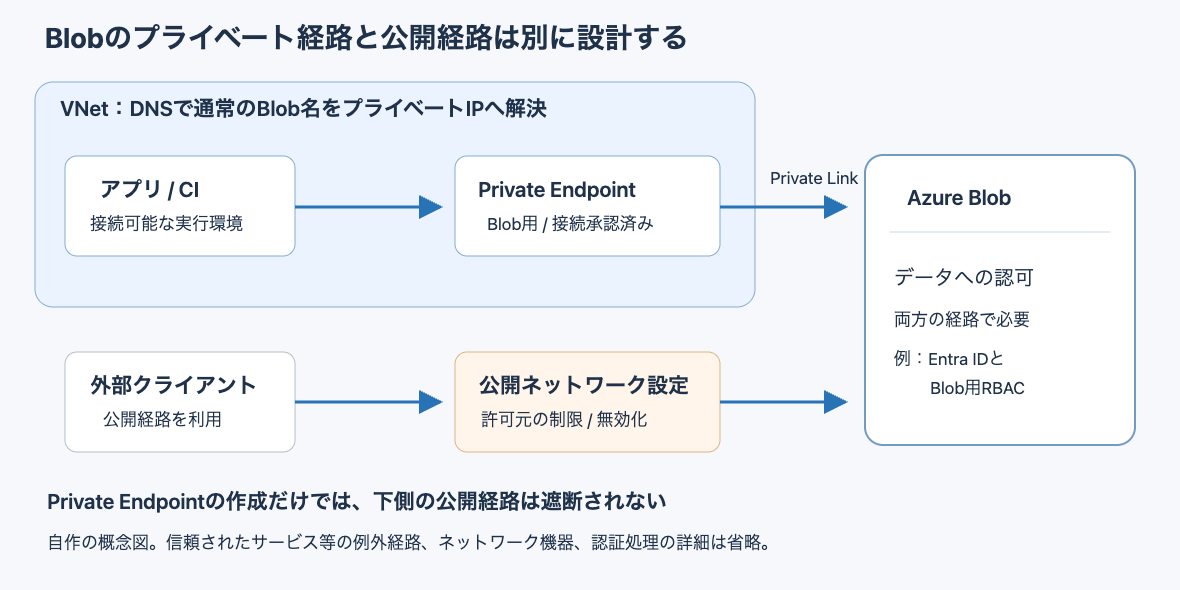
The diagram is a conceptual diagram I made myself, not an official architecture diagram. It separates the private path and the public path to the Blob, and shows at which stage of the connection name resolution and authorization each come into play. Exception paths such as trusted services are omitted.
Configuration with a Private Endpoint and a private DNS zone
- Storage account: Japan East region, Standard_LRS, StorageV2. Public network access was enabled at creation (all networks allowed). Anonymous access to Blobs is disabled
- Place one text file,
hello.txt, in the containerdata - Add a subnet
10.0.1.0/24for the Private Endpoint to the VNet (10.0.0.0/16), and create a Private Endpoint for Blob (group IDblob). The assigned IP address is10.0.1.4 - Create a private DNS zone
privatelink.blob.core.windows.net, link it to the VNet, and register it in the Private Endpoint's DNS zone group - The client inside the VNet is an Ubuntu 24.04 VM in the same VNet. Commands are run with
az vm run-command invoke - The local PC is macOS
az network private-endpoint create --resource-group <resource-group> --name pe-blob --location japaneast \
  --subnet <サブネットのリソースID> --private-connection-resource-id <ストレージアカウントのリソースID> \
  --group-id blob --connection-name pe-blob-conn
az network private-dns zone create --resource-group <resource-group> --name privatelink.blob.core.windows.net
az network private-dns link vnet create --resource-group <resource-group> --zone-name privatelink.blob.core.windows.net \
  --name link-vnet --virtual-network <VNetのリソースID> --registration-enabled false
az network private-endpoint dns-zone-group create --resource-group <resource-group> --endpoint-name pe-blob \
  --name default --private-dns-zone privatelink.blob.core.windows.net --zone-name blob
For reading, I used the same SAS URL on the local PC and the VM, and checked the HTTP status.
# Issue the SAS (pass the account key via the environment variable AZURE_STORAGE_KEY)
SAS=$(az storage blob generate-sas --account-name <account> --container-name data --name hello.txt \
  --permissions r --expiry <UTCの日時> -o tsv)

# Run on both the local PC and the VM (on the VM, run with az vm run-command invoke --command-id RunShellScript)
curl -s -o /dev/null -w '%{http_code}\n' "https://<account>.blob.core.windows.net/data/hello.txt?$SAS"
Even after creating the Private Endpoint, the Blob was readable from the public path
After creating the Private Endpoint, I checked the storage account settings.
az storage account show --resource-group <resource-group> --name <account> \
  --query '{publicNetworkAccess:publicNetworkAccess, defaultAction:networkRuleSet.defaultAction}' -o tsv
Enabled Allow
Public network access remained Enabled, and the default action of the network rules (defaultAction) remained Allow. In this state, when I read the Blob with the SAS from my local PC, I got a 200 and retrieved the contents.
Public network access is a separate setting from the Private Endpoint. It determines from which networks the public endpoint can be used. The main options are the following three (there is also an option to protect with a network security perimeter).
| Public network access setting | Handling of the public path |
|---|---|
| Enabled, allow all networks | Not restricted by network conditions (the state right after creation in this test) |
| Enabled, allow selected networks | Leaves the public path open to the allowed connection sources (not tested this time) |
| Disabled | Blocks connections from the normal public path. Connections via the Private Endpoint are not affected (the VM in this test got 200) |
After disabling public network access, reads from outside were rejected
Next, I disabled public network access.
az storage account update --resource-group <resource-group> --name <account> --public-network-access Disabled
A check 1 second after the update completed still returned 200, but a check 12 seconds later returned 403 (times are JST; the 403 line is an excerpt of Code and Message from the response XML).
01:17:07 公開ネットワークアクセスの無効化が完了
01:17:08 手元のPCからGET: 200
01:17:19 手元のPCからGET: 403 AuthorizationFailure
         This request is not authorized to perform this operation.
This is the result of a single check at roughly 10-second intervals, so the time until the change takes effect may vary by environment. Right after disabling, it seems best to assume the Blob may remain readable from the public path for a while.
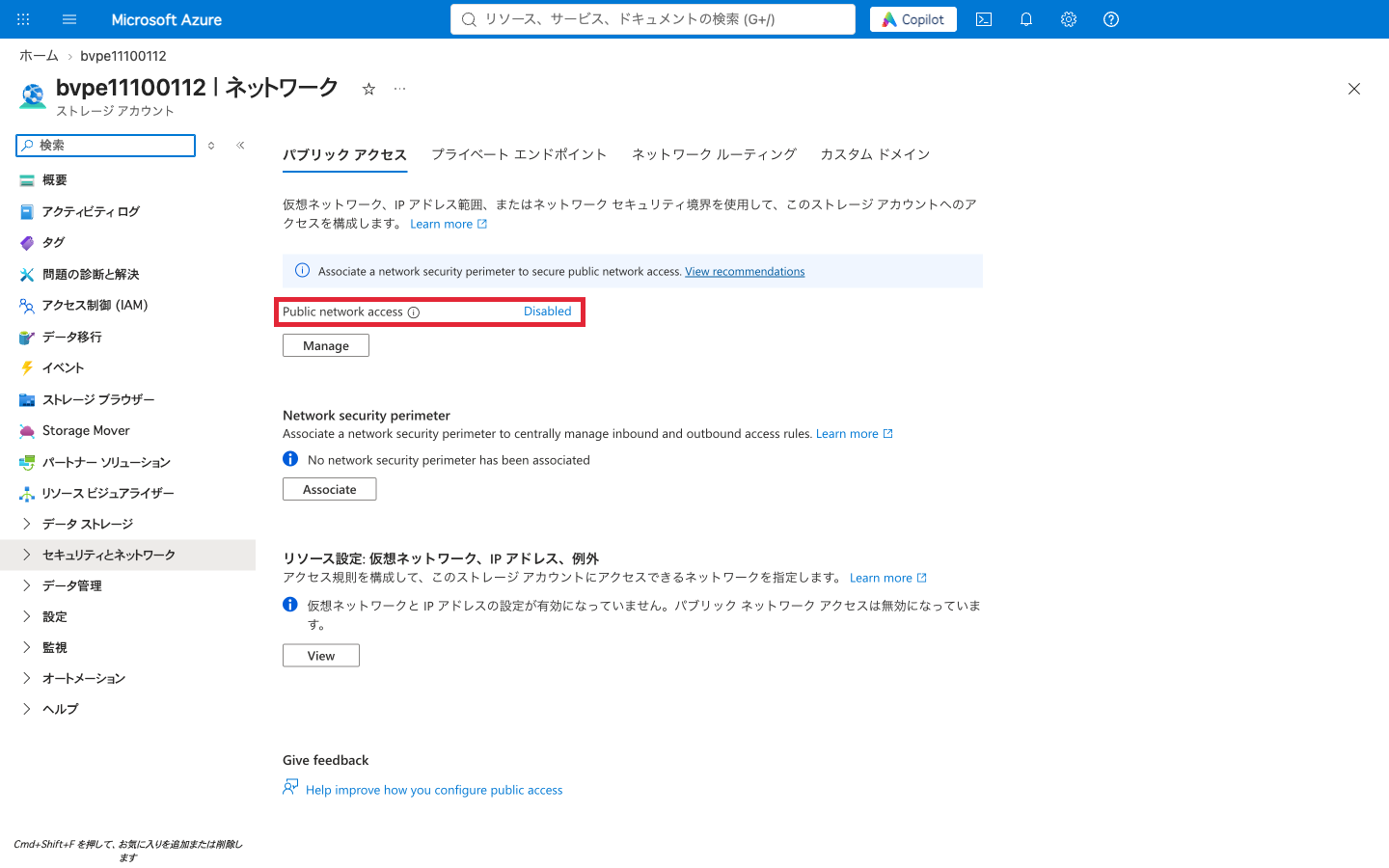
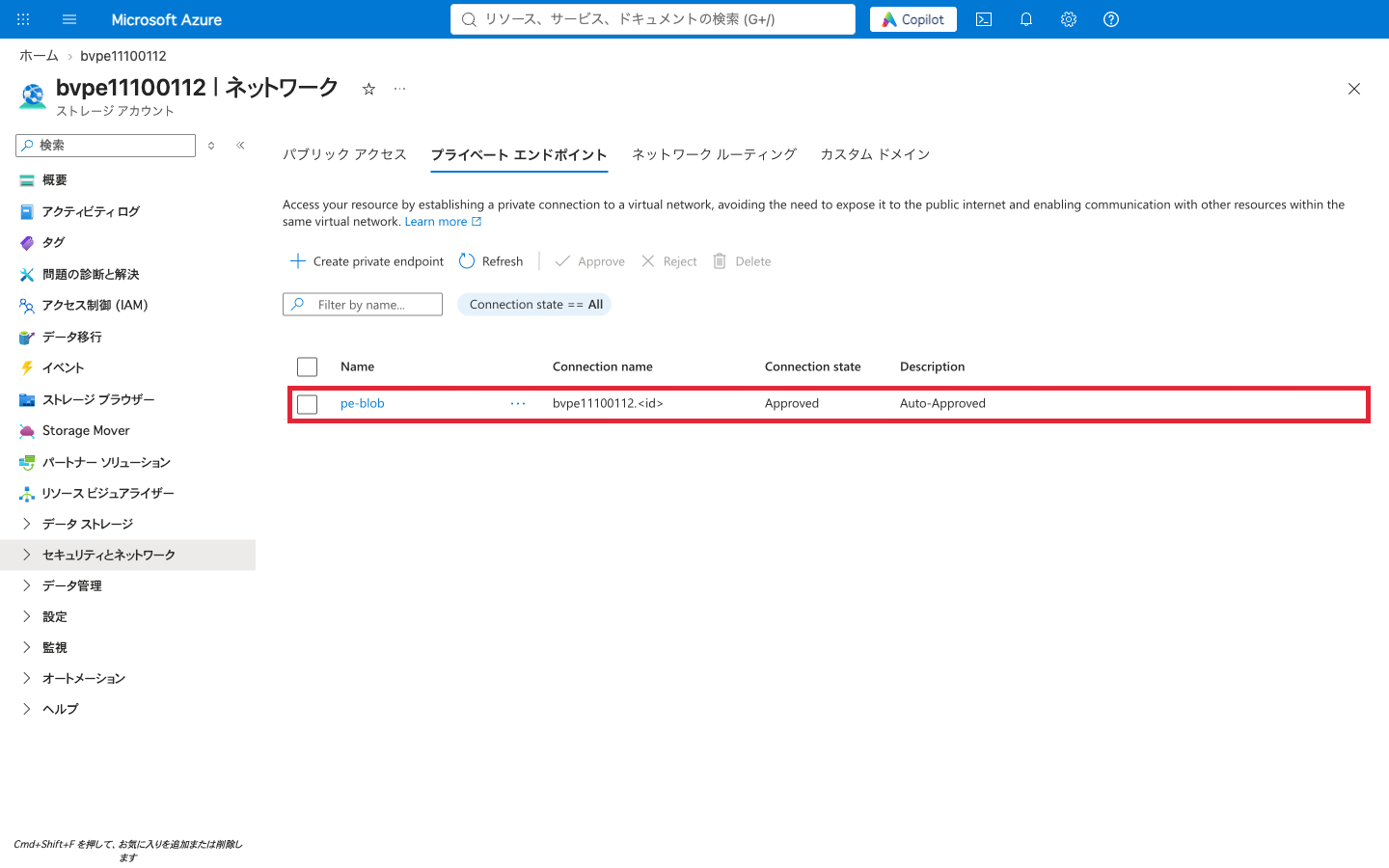
In the same state, the VM inside the VNet could read with 200. In the portal's "Networking" screen, public network access is shown as "Disabled" and the Private Endpoint connection as "Approved" (red frames added).
Note that even after disabling public network access, I could still retrieve the settings with az storage account show from my local PC. The Storage firewall limitations explain that network restrictions apply only to data operations, and the control plane (management operations via Azure Resource Manager) is not covered. Being able to view settings in the CLI or portal is a separate matter from being able to read the Blob's contents.
The name stayed the same, and DNS split the paths
Even via a Private Endpoint, the app uses the normal name <account>.blob.core.windows.net. The results of resolving the same name from the local PC and from the VM inside the VNet are as follows.
# Local PC (dig)
<account>.blob.core.windows.net.              CNAME <account>.privatelink.blob.core.windows.net.
<account>.privatelink.blob.core.windows.net.  CNAME blob.tyo20prdstr12a.store.core.windows.net.
blob.tyo20prdstr12a.store.core.windows.net.   A     <パブリックIP>

# VM inside the VNet (nslookup)
<account>.blob.core.windows.net  canonical name = <account>.privatelink.blob.core.windows.net.
Name:    <account>.privatelink.blob.core.windows.net
Address: 10.0.1.4
Both go through a name containing privatelink along the way, but inside the VNet it resolved to 10.0.1.4 via the private DNS zone record, and on the local PC it resolved to a public IP. The presence of the string privatelink alone cannot tell you which path is being used.
- The absence of the string
privatelinkin the app's connection URL is not evidence that the public path is being used. The VM in this test also read through the Private Endpoint using the normal name - Even if a name containing
privatelinkappears in the DNS response, that does not mean the private path is being used. The local PC also went through theprivatelinkCNAME and resolved to a public IP
The Private Endpoint DNS configuration explains that by using a private DNS zone, links to the VNet, and so on, clients can resolve the normal name to the Private Endpoint's IP address. The same page also states that the public-side privatelink CNAME is built to be resolvable from anywhere on the internet, and that DNS name resolution and access control are independent. If you use your own DNS or on-premises DNS, you also need that DNS to resolve the normal Blob name to the Private Endpoint's IP address.
Even when requests reached the Blob via the Private Endpoint, a separate permission to read it was required
Finally, I attached a system-assigned managed identity to the VM. Without assigning a role that reads Blob data, and with public network access still disabled, I tried reading the Blob using Microsoft Entra ID authentication.
# Run inside the VM (get a token for storage from IMDS and read)
TOKEN=$(curl -s -H Metadata:true 'http://169.254.169.254/metadata/identity/oauth2/token?api-version=2018-02-01&resource=https://storage.azure.com/' \
  | python3 -c 'import json,sys; print(json.load(sys.stdin)["access_token"])')
curl -s -w '\n%{http_code}\n' -H "Authorization: Bearer $TOKEN" -H 'x-ms-version: 2023-11-03' \
  'https://<account>.blob.core.windows.net/data/hello.txt'
I was able to obtain a token, but the read was rejected with 403 (an excerpt of Code and Message from the response XML).
AuthorizationPermissionMismatch
This request is not authorized to perform this operation using this permission.
The message means "the operation is not permitted with this permission," and it was a different error code from the AuthorizationFailure returned when the request was rejected on the public path. The request is considered to have reached the Blob via the Private Endpoint and was rejected at the identity's permission check. A Private Endpoint only provides a path; it does not grant access rights to data.
In the first half, the read succeeded with the SAS because the SAS itself, signed with the account key, carried read permission. When reading with Entra ID, the identity is said to need a role that reads Blob data. However, I did not test reading with a managed identity that has the role assigned (because the service principal used for the verification lacked permission to assign roles).
Check the path, name resolution, and authorization for each connection source
In Blob connectivity design, check the following three separately for each connection source.
- Path: Can that execution environment reach the Private Endpoint? If it uses the public path, is it allowed by the public network access setting?
- Name resolution: Does the DNS in that execution environment resolve the normal Blob name to the Private Endpoint's IP address?
- Authorization: Does that identity (or SAS) have permission to read or write the target data?
Even with a requirement like "only apps inside the VNet read the Blob," the connection sources you need grow once you count CI that places files and admin machines that inspect the Blob during incidents. The following is a design-oriented summary based on the results of this test and official explanations. I did not test CI or admin machine configurations.
| User / execution environment | What is needed when disabling public network access |
|---|---|
| App inside the VNet | A path to the Private Endpoint, name resolution via the private DNS zone, and the app identity's data permissions |
| CI that places artifacts in Blob | A path to the Private Endpoint and name resolution from the CI execution environment, and write permission. If these cannot be provided, you need to decide whether to keep part of the public path |
| Administrator's local PC | To read data: a path into the VNet such as VPN, name resolution, and data permissions. Viewing settings is not affected |
If I were designing this configuration myself, before disabling public network access I would list the execution environments that read from and write to the Blob. Then I would decide whether to provide each environment with a path to the Private Endpoint or whether some public path needs to remain. If I restrict connection sources to only the Private Endpoint, I would also check that no previously configured trusted service or resource instance exceptions remain.
Summary
Creating a Private Endpoint and disabling public network access are separate operations, and it was the latter that stopped reads from outside. Inside the VNet, the normal name resolved to the Private Endpoint's IP address, and reads via the Private Endpoint continued to work after disabling. On the other hand, even with the path open, an identity without data permissions was rejected.
There are three caveats. One second after disabling, the Blob was still readable from the public path (rejected after 12 seconds). Exceptions configured earlier may remain. Management operations are not affected by disabling. In Blob connectivity design, it seems necessary to check the path, name resolution, and authorization for each connection source, including not only the app but also CI and admin machines.
Reference links
- Use private endpoints for Azure Storage
- Set the default public network access rule
- Firewall rules and network access for Azure Blob, Data Lake, Queue, and Table Storage
- Guidelines and limitations for the Azure Storage firewall
- Azure Private Endpoint private DNS zone values
- Authorize access to blobs using Microsoft Entra ID
- az network private-endpoint