
I tried setting up guardrails with hooks to prevent accidentally registering issues to the wrong project via the Backlog MCP Server

This page has been translated by machine translation. View original
This is Iwata from the Retail App Co-Creation Division @ Osaka.
Backlog MCP Server is a very convenient tool for operating Backlog from AI agents like Claude Code.
However, just because it's convenient doesn't mean you should use it without setting appropriate guardrails — there's a risk of accidents caused by unintended AI behavior. In this blog post, I'll introduce an implementation sample that uses hooks as guardrails when using Backlog MCP Server, restricting operations to specific Backlog projects.
※ From this point on, "project" refers to the directory where Claude Code is being executed. It is used in the context of user-level settings/project-level settings, and does NOT refer to Claude's projects. Also, Backlog projects will be explicitly written as "Backlog projects."
Introduction
If there are multiple Backlog projects within the Backlog space connected to Backlog MCP Server, there is a concern that you might accidentally register an issue in Backlog project B when you intended to register it in Backlog project A. Even if you write "Always specify 12345 as the Backlog project ID when using Backlog MCP Server!!!" in Claude.md, there is no guarantee it will be followed. To reliably prevent unintended behavior, deterministic defense through hooks is effective.
Let's Try It
So, let's go ahead and register the hooks.
Thinking About the Design
First, I thought about which scope the hooks should be set at. Setting them at the project level raises concerns about missing hook configurations for newly added projects in the future, so it seems better to add them as user-level settings.
However, making it a user-level setting means project-specific configurations cannot be written, which requires the hooks to be generic. You cannot hardcode a Backlog project ID into a shell script. On the other hand, the Backlog projects for which issue operations should be allowed will vary by project, so I decided to enumerate the allowed Backlog projects in a text file within the project, and have the script read this text file to determine whether a tool call is permitted.
For this implementation, I'll enumerate the IDs of Backlog projects permitted for operations in a text file called backlog.allow.
Registering the PreToolUse Hook
First, add the hooks description to ~/.claude/settings.json as follows.
  "hooks": {
    "PreToolUse": [
      {
        "matcher": "mcp__backlog__add_issue",
        "hooks": [
          {
            "type": "command",
            "command": "${HOME}/.claude/hooks/backlog/project-check.sh || { echo 'hook script execution failed' 1>&2; exit 2; }"
          }
        ]
      }
    ]
  }
mcp__backlog__add_issue is specified for matcher. This assumes that Backlog MCP Server is registered under the name backlog, but with this configuration, the hooks will be triggered by calls to Backlog MCP Server's add_issue tool.
project-check.sh is specified as a shell script for command. If this shell script does not exist, || { echo 'hook script execution failed' 1>&2; exit 2; is specified so that it exits with completion code 2 and the tool call is blocked.
Implementing the Shell Script
Next, let's implement project-check.sh that was specified in the hooks earlier. Here's what it looks like.
#!/bin/bash

PROJECT_ID=$(jq -r '.tool_input.projectId')
ALLOW_FILE="${CLAUDE_PROJECT_DIR}/.backlog.allow"

if [ ! -f "$ALLOW_FILE" ]; then
  jq -n "{
      hookSpecificOutput: {
        hookEventName: \"PreToolUse\",
        permissionDecision: \"deny\",
        permissionDecisionReason: \"Allow file not found: $ALLOW_FILE\"
      }
    }"
  exit 2
fi

if ! grep -Fxq "$PROJECT_ID" "$ALLOW_FILE"; then
  jq -n "{
      hookSpecificOutput: {
        hookEventName: \"PreToolUse\",
        permissionDecision: \"deny\",
        permissionDecisionReason: \"Project ID $PROJECT_ID not allowed\"
      }
    }"
  exit 2
fi

exit 0
First, PROJECT_ID=$(jq -r '.tool_input.projectId') retrieves the Backlog project ID from the tool call arguments.
In the subsequent processing, it checks whether a .backlog.allow file exists under the project directory, and if it does not exist, the tool call is denied. If the file exists, it checks whether the Backlog project ID specified in the tool arguments exists within .backlog.allow to determine whether the tool call is permitted.
Testing It Out
The hooks are ready, so let's run some tests. All of the following tests were conducted using the prompt below with Sonnet 5.
 Please register an issue using the mcp__backlog__add_issue tool
  Project ID is 826921
  Title is "test from claude code", issueTypeId is 4436305, priorityId is 2
First, what happens when you forget to grant execute permission to the shell script...

It resulted in an error saying "Issue registration is blocked because the hook script ~/.claude/hooks/backlog/project-check.sh does not have execute permission," and it did not proceed to register the issue.
Next is the result when the .backlog.allow text file does not exist.

This also resulted in an error as expected.
It did not proceed to register the issue, with an error saying "An error occurred indicating that the .backlog.allow file was not found. It seems a .backlog.allow file is needed in this working directory — do you have any idea why?"
Next is the result when the Backlog project ID specified in the prompt does not exist in .backlog.allow.
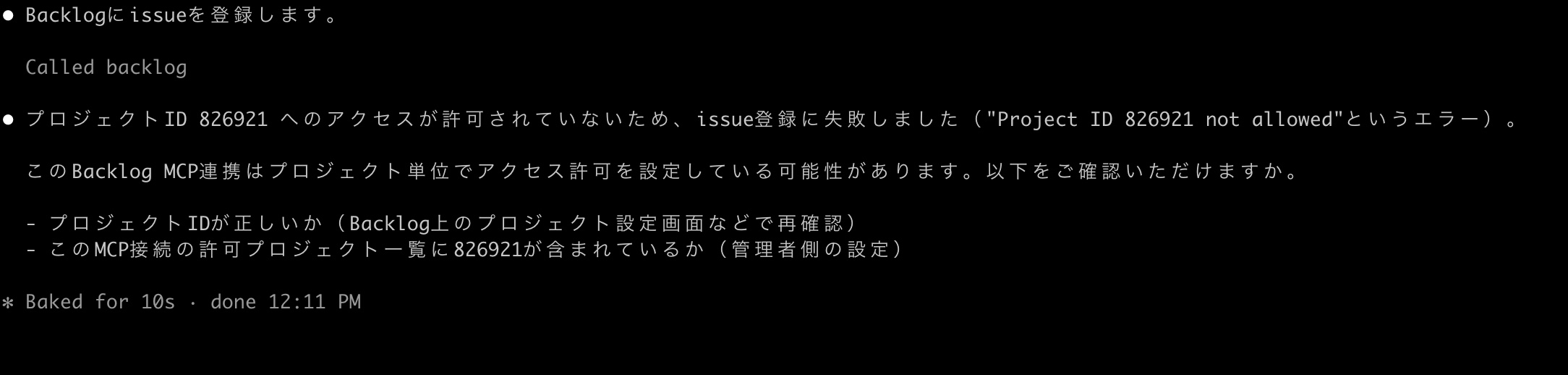
It displayed "Issue registration failed because access to project ID 826921 is not permitted (error: 'Project ID 826921 not allowed')," and this also did not proceed to register the issue.
Finally, here is the result when the Backlog project ID specified in the prompt exists in .backlog.allow.

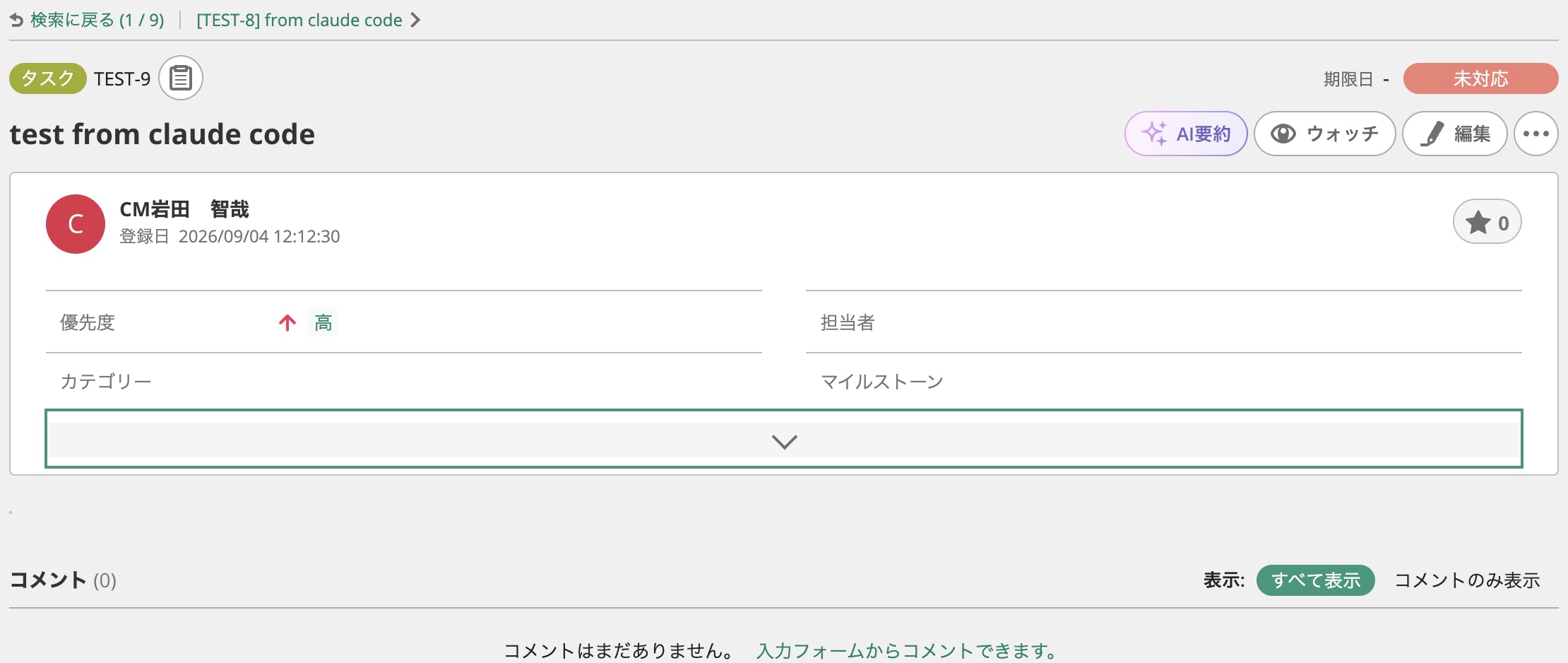
It successfully registered with the message "Issue created. Registered as TEST-9 ('test from claude code', type: Task, priority: High) in project ID 826921." The issue was properly registered.
Summary
This time I only tested add_issue for now, but for delete_issue and update_issue as well, it seems possible to implement guardrails that allow issue operations only for specific Backlog projects by implementing hooks that deny tool calls specifying an issueId while checking the prefix of the issueKey.
※ I regret that the design of enumerating Backlog project IDs in a text file has poor extensibility — it would have been better to store the configuration in JSON format.
Another issue is that if the MCP server is not registered under the name backlog, the tool name won't become mcp__backlog__add_issue and it won't match the hooks matcher...
