Building a Simple Generative AI Chatbot with Amazon Bedrock AgentCore (2): Deploying a FastAPI BFF on ECS Fargate and Relaying Runtime via SSE

This page has been translated by machine translation. View original
List of articles in this series:
- Running a Strands agent on Runtime
- Placing a FastAPI BFF on ECS Fargate to relay Runtime via Server-Sent Events (SSE) (this article)
- Serving an SPA from S3 + CloudFront to run the chat in a browser
- Adding authentication with Cognito to complete the baseline
- Persisting conversations with AgentCore Memory
- Observing agents with AgentCore Observability
Hello, I'm Simon from the Consulting Division.
In this series, we are building a generative AI chatbot accessible from a browser on AWS using Amazon Bedrock AgentCore. The approach is to first create a minimal working configuration, then grow it by adding AgentCore features.
In Part 1, we deployed an agent written with Strands to AgentCore Runtime and got it to return responses from the AWS CLI. However, in its current state, only those with AWS credentials can invoke it. It cannot be accessed from a browser.
In this article, Part 2, we write a BFF (Backend for Frontend) that sits between the browser and the agent using FastAPI and place it on ECS Fargate. We will relay the Runtime's streaming response as SSE and get to the point where we can have a conversation via curl through an ALB. How SSE works was explained in Part 1.
Sample Code Repository
The code at the point of this article can be referenced with the entry-2 tag.
What Does the BFF Handle?
What we are building this time is the BFF portion shown in the diagram below.
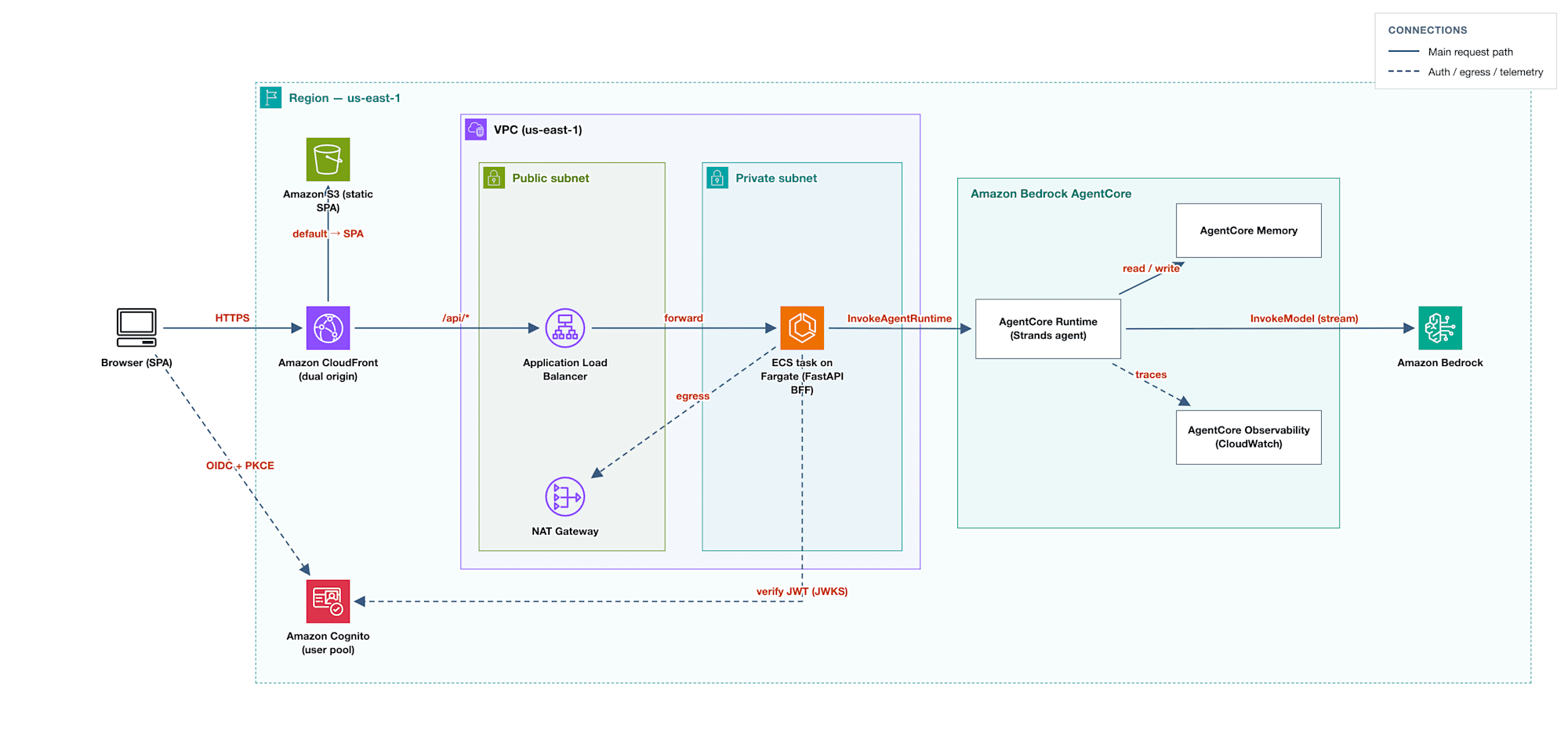
The BFF handles the following 3 things. In this article, we build items 1 and 2, and the health check endpoint portion of item 3.
- Calling the Runtime. Invoking
InvokeAgentRuntimerequires SigV4 signing, and since we cannot place those credentials in the browser, the BFF holds the IAM credentials and calls the API on the server side - Relaying responses. It reassembles the stream returned from the Runtime into a form the browser can read directly and forwards it
- Handling non-inference processing. In addition to endpoints like the health check receiver, it serves as the place to put logic needed before and after inference, such as authentication and session handling
Non-Inference Logic Cannot Live in the Agent
The only Runtime endpoint that callers can hit is /invocations, and beyond that is the agent's processing. There is no place for other processing required by the application.
- The target for ALB health checks
- Access token validation to be added in Part 4
- Reading conversation history to be added in Part 5
- Mapping session IDs to users to be added in Part 4
You also cannot place the Runtime behind an ALB and supplement missing APIs with other targets. The target types available for ALB target groups are 3 kinds (instance, ip, lambda), and Runtime, which is called by passing an ARN to InvokeAgentRuntime, does not fit any of them.
Among these, permission-related decisions cannot be left to the browser side. Decisions about which users can access which sessions cannot be placed somewhere that users can rewrite.
As a result, a server-side layer between the browser and Runtime becomes necessary. That is the BFF.
At the stage of this article, the BFF passes the received session_id to Runtime without verifying who it belongs to. Mapping session IDs to users, which was listed as a BFF responsibility at the end of Part 1, is inseparable from authentication, so it will be covered together in Part 4.
Writing the SSE Chat Endpoint with FastAPI
The BFF implementation is a single file, bff/app.py. We will expose only 2 endpoints.
GET /health: Target for ALB health checksPOST /api/chat: The chat itself
Receiving the Body with ChatRequest and Determining the Session ID
This is the definition of POST /api/chat. This endpoint will be the destination where the SPA built in Part 3 sends user input. At the point of this article, we verify it by calling it from curl.
class ChatRequest(BaseModel):
    prompt: str
    session_id: str | None = None

@app.post("/api/chat")
def chat(request: ChatRequest):
    session_id = request.session_id or str(uuid.uuid4())
By specifying ChatRequest as the argument type, FastAPI maps the request body JSON to this model and passes it. The prompt is required; the session ID is optional.
If the session ID is omitted, the BFF generates a uuid4. The generated value is returned in the X-Session-Id response header, so if the client sends the same value on the next turn, it will reach the same session on the Runtime side. The mechanism by which that becomes a continuation of the conversation is explained after the operational verification.
Calling the Runtime
We call invoke-agent-runtime, which we called from the AWS CLI in Part 1, from boto3.
We create a single client when the module is loaded.
agent_core = boto3.client("bedrock-agentcore", region_name=AWS_REGION)
The call is inside chat. All the code from here on is inside this function.
    response = agent_core.invoke_agent_runtime(
        agentRuntimeArn=AGENT_RUNTIME_ARN,
        runtimeSessionId=session_id,
        payload=json.dumps({"prompt": request.prompt}).encode(),
    )
payload is a byte sequence. What the Part 1 agent was reading with payload.get("prompt") corresponds to this JSON. The argument for passing the session ID is runtimeSessionId. In the body text going forward, we will call it the session ID.
Branching on contentType and Returning the Response
The response from invoke_agent_runtime changes shape based on contentType, so we branch on it.
    content_type = response.get("contentType", "")
    headers = {"X-Session-Id": session_id}

    if "text/event-stream" in content_type:
        headers["Cache-Control"] = "no-cache"
        return StreamingResponse(
            relay_sse(response["response"]),
            media_type="text/event-stream",
            headers=headers,
        )
The reason it returns as text/event-stream is because we wrote the agent's entry point as an async generator in Part 1. When the model yields a fragment of text it has written, AgentCore Runtime converts it to an SSE event and returns them one by one. The following code is from agent/app.py in Part 1; the app here refers to the agent-side application, not the BFF.
@app.entrypoint
async def invoke(payload):
    user_message = payload.get("prompt")
    ...
    async for event in agent.stream_async(user_message):
        # Strands emits many event types; forward only the text deltas.
        if "data" in event:
            yield event["data"]
From the BFF's perspective, the response is relayed as follows:
Model → Agent (yield) → Runtime (SSE) → BFF (SSE) → Client
In FastAPI, when you pass a generator to StreamingResponse, the strings yielded by that generator are written to the response body as soon as they are yielded. It does not wait for the entire response to be ready.
The generator passed here is relay_sse. It reads from the stream arriving from Runtime and yields as it goes. While invoke's yield was output from the agent to Runtime, relay_sse's yield is output from the BFF to the client.
Cache-Control: no-cache is specified to prevent intermediaries in the route from caching this response. Since we will place CloudFront in front in Part 3, this will take effect there.
When Runtime returns an error, it returns as application/json, so we handle that as well.
    if "application/json" in content_type:
        # The body arrives either as a stream or as a sequence of byte chunks.
        body = b"".join(response["response"])
        return JSONResponse(json.loads(body), headers=headers)
relay_sse Reads One Byte at a Time
def relay_sse(body):
    for line in body.iter_lines(chunk_size=1):
        decoded = line.decode("utf-8")
        if decoded.startswith("data: "):
            yield decoded + "\n\n"
We read response["response"] (a botocore StreamingBody) line by line and forward only lines starting with data: to the client.
iter_lines(chunk_size) internally calls read(chunk_size) and does not return until the specified number of bytes is accumulated or the stream closes. The default is 1024, and since one SSE event is tens of bytes, with the default setting, not a single line will be read until 1024 bytes worth of events accumulate. If the response is less than that, it all arrives together after the stream closes. This is an easy-to-miss issue because no error is raised and the response content is correct. This is why we specify chunk_size=1 here.
Reading one byte at a time reduces transfer efficiency, but it is not a problem for this use case. The speed at which the model generates text is much slower than this transfer speed.
CloudFormation Settings Specific to This Configuration
The VPC is in infra/network.yaml, and the ALB and ECS are in infra/bff.yaml. Explanation of ECS and ALB themselves is omitted.
- The task role grants
bedrock-agentcore:InvokeAgentRuntimepermission for both the Runtime ARN and${AgentRuntimeArn}/runtime-endpoint/*. Since the endpoint that invoke actually resolves is a sub-resource of Runtime, permission for the ARN alone is insufficient AWS_REGIONis set as an environment variable in the task definition. Unlike Lambda, ECS does not pass this variable automatically, so omitting this setting causes the BFF to fall back to a default region. Additionally, the stack parameterAgentRuntimeArnis passed asAGENT_RUNTIME_ARN- The ALB idle timeout is raised to 300 seconds. The default is 60 seconds, and while the agent is executing tools, the stream goes silent
- The target group's
deregistration_delayis lowered to 30 seconds. The default is 300 seconds, to avoid waiting 5 minutes on every deploy and test
AgentRuntimeArn is received as a stack parameter. Therefore, the BFF stack and Runtime stack have no dependency relationship, and the Runtime side can be deleted independently.
Deployment
Deployment is 4 steps. Since the ECS service requires a pre-pushed image, and the BFF stack references outputs from the network stack, this order cannot be changed.
First, redeploy infra/ecr.yaml to add a BFF repository to the ECR stack created in Part 1. This template at the entry-2 tag has 2 repositories defined. This update only adds the BFF repository; the repository created in Part 1 and the already-pushed images remain intact.
aws cloudformation deploy \
  --region us-east-1 \
  --stack-name agentcore-chatbot-sample-ecr \
  --template-file infra/ecr.yaml \
  --parameter-overrides \
    RepositoryName=agentcore-chatbot-sample-agent \
    BffRepositoryName=agentcore-chatbot-sample-bff
Now that the repository is ready, we build and push the BFF image. The flow is the same as the Part 1 agent, but we use the image URI of the BFF repository. Since arm64 is specified in the task definition, we also build the image for arm64.
ACCOUNT_ID="$(aws sts get-caller-identity --query Account --output text)"
REGISTRY="${ACCOUNT_ID}.dkr.ecr.us-east-1.amazonaws.com"
BFF_IMAGE_URI="${REGISTRY}/agentcore-chatbot-sample-bff:latest"

aws ecr get-login-password --region us-east-1 \
  | docker login --username AWS --password-stdin "${REGISTRY}"

docker build --platform linux/arm64 --tag agentcore-chatbot-sample-bff:latest bff
docker tag agentcore-chatbot-sample-bff:latest "${BFF_IMAGE_URI}"
docker push "${BFF_IMAGE_URI}"
Next, deploy infra/network.yaml. This creates the VPC, public/private subnets, and NAT gateway.
aws cloudformation deploy \
  --region us-east-1 \
  --stack-name agentcore-chatbot-sample-network \
  --template-file infra/network.yaml
Now that the network is ready, we extract the ARN from the Part 1 Runtime stack and deploy infra/bff.yaml. This creates the ALB, ECS cluster, Fargate service, and task role.
RUNTIME_ARN="$(aws cloudformation describe-stacks \
  --region us-east-1 \
  --stack-name agentcore-chatbot-sample-runtime \
  --query "Stacks[0].Outputs[?OutputKey=='RuntimeArn'].OutputValue" \
  --output text)"

aws cloudformation deploy \
  --region us-east-1 \
  --stack-name agentcore-chatbot-sample-bff \
  --template-file infra/bff.yaml \
  --capabilities CAPABILITY_IAM \
  --parameter-overrides \
    ImageUri="${BFF_IMAGE_URI}" \
    AgentRuntimeArn="${RUNTIME_ARN}"
Extract the ALB's DNS name for use in operational verification.
ALB_DNS="$(aws cloudformation describe-stacks \
  --region us-east-1 \
  --stack-name agentcore-chatbot-sample-bff \
  --query "Stacks[0].Outputs[?OutputKey=='AlbDnsName'].OutputValue" \
  --output text)"
The steps up to here are summarized in scripts/bff-deploy.sh. As in Part 1, the reason for executing commands one by one is to follow what is happening at each step.
Verifying That Responses Arrive Incrementally via ALB
We send a request to the ALB with curl --no-buffer. Without --no-buffer, the response is displayed all at once and the incremental delivery is not visible.
To make the timestamp of each line's arrival visible, we pipe through a simple filter that appends elapsed seconds since the request started.
curl --no-buffer -N -X POST "http://${ALB_DNS}/api/chat" \
  -H "Content-Type: application/json" \
  -d '{"prompt": "生成 AI のストリーミング応答について、200 字程度で説明してください。"}' \
  | python3 -c "
import sys, time
start = time.time()
for line in sys.stdin:
    line = line.rstrip('\n')
    if line:
        print(f'[t+{time.time()-start:5.2f}s] {line}')
"
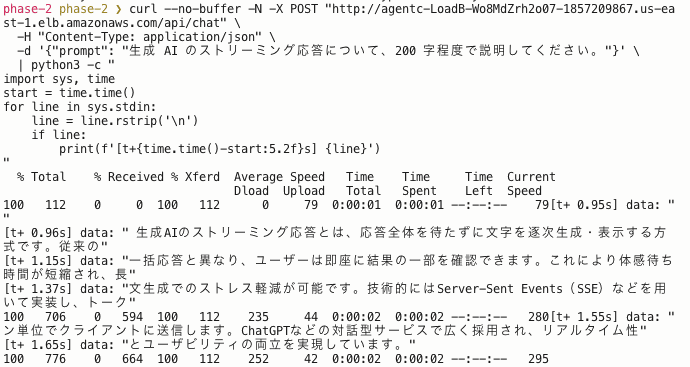
If the response were returned all at once, all lines would have the same timestamp. In practice, they arrived with different timestamps each time: 0.95 seconds, 0.96 seconds, 1.15 seconds, 1.37 seconds, 1.55 seconds, 1.65 seconds. We confirmed that, without waiting for the agent to finish writing, the generated content is delivered to the client in order as it is produced.
Verifying That the Conversation Continues with the Same Session ID
We call twice with the same session_id value and check whether it remembers the previous statement.
curl --no-buffer -N -X POST "http://${ALB_DNS}/api/chat" \
  -H "Content-Type: application/json" \
  -d '{"prompt": "My name is Simon.", "session_id": "'"${SESSION_ID}"'"}'
curl --no-buffer -N -X POST "http://${ALB_DNS}/api/chat" \
  -H "Content-Type: application/json" \
  -d '{"prompt": "What is my name?", "session_id": "'"${SESSION_ID}"'"}'
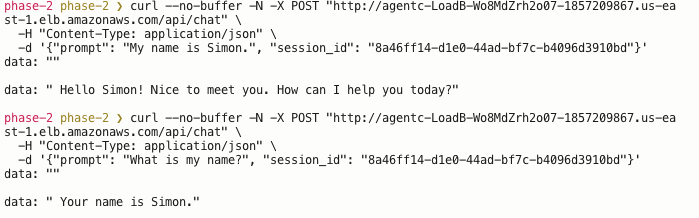
The second response was "Your name is Simon." It answered while remembering the exchange from the first call.
As seen in Part 1, the same session ID is delivered to the same container. The BFF only passes the received session ID without holding any history. The conversational context is the message history that the Strands Agent object maintains inside the container. If that container stops and the session becomes Stopped, this context is also lost. The mechanism for preserving conversations across sessions will be added in Part 5 with AgentCore Memory.
Deleting Resources
The ALB, NAT gateway, and Fargate tasks created this time accumulate costs on an hourly basis until deleted. Delete them once verification is complete.
Deletion is summarized in scripts/bff-teardown.sh. We delete the BFF stack first, then the network stack. Attempting to delete the network stack first would fail because the ENI held by the BFF's ECS task is still attached to the subnet.
The Part 1 Runtime and ECR are left as is. Once the Runtime session stops, billing stops, and ECR's image storage charges are small.
Summary
The BFF now relays Runtime's streaming response as SSE, enabling conversation with the agent via HTTP through an ALB. There is still no browser-facing UI.
In the next article, we will serve the SPA from S3 and CloudFront, call this BFF from the browser, and build the experience of streamed text flowing across the screen.
Thank you for reading to the end.