
I tried implementing semantic cache with Amazon ElastiCache for Valkey + Amazon Bedrock AgentCore

This page has been translated by machine translation. View original
Introduction
Hello, I'm Jinno from the Consulting Department, a big fan of cheese naan.
It feels like quite a while ago, but I watched the session "DAT451: Optimize gen AI apps with semantic caching in Amazon ElastiCache" at AWS re:Invent 2025.
This session introduced techniques for using ElastiCache as a caching layer to reduce costs and latency in generative AI applications.
The session referenced a blog for specific implementation details.
I wrote this article to build what was described in the blog using AgentCore, Strands Agents, and ElastiCache for Valkey. While the blog used LangChain for implementation, I decided to use Strands Agents.
Semantic Cache
First, semantic caching differs from traditional exact-match caching by searching and reusing cache based on semantic similarity of queries.
For example, the following questions are semantically almost identical, but the wording is slightly different:
- How do I install the VPN app on my laptop?
- What are the steps to set up the company VPN?
Traditional caches would only match if the strings were identical, but semantic caching uses vector embeddings to determine similarity, allowing reuse of the same answer.
The process flow can be visualized as follows:
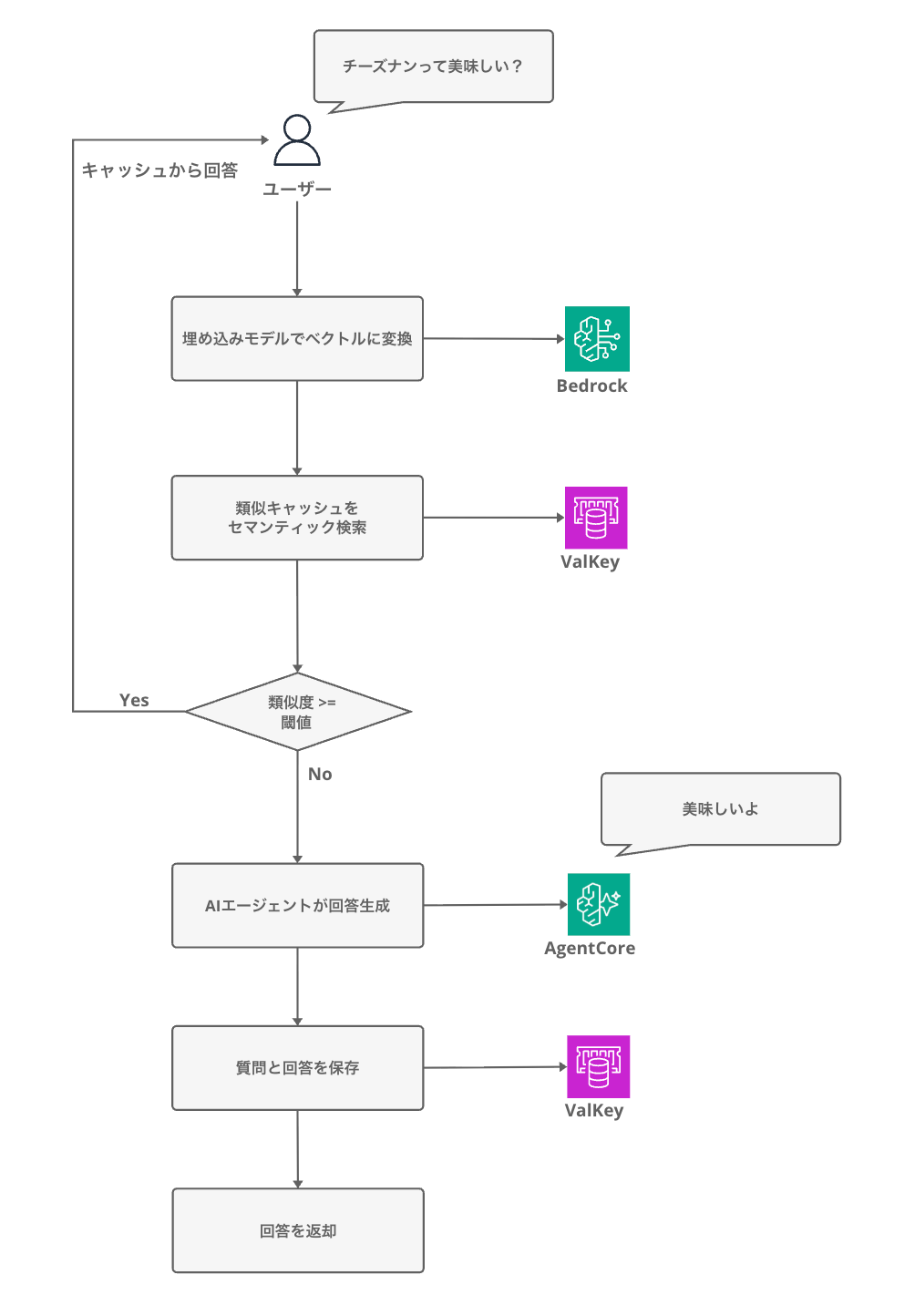
When there's a cache hit, we can avoid calling the LLM, reducing both latency and cost.
According to the AWS blog, implementing semantic caching provides the following benefits. The differences in cost and latency are quite significant. It's amazing that this much improvement is possible...
| Metric | Baseline | With Cache (threshold 0.75) | Improvement |
|---|---|---|---|
| Average Latency | 4.35 sec | 0.51 sec | 88% |
| Daily Cost | $49.5 | $6.8 | 86% |
| Cache Hit Rate | - | 90.3% | - |
I wasn't very familiar with this concept until I heard this session, so it was very educational. Let's try it out.
Prerequisites
Environment
Here's the environment I used for this project:
| Tool / Library | Version |
|---|---|
| AWS CDK | 2.232.1 |
| @aws-cdk/aws-bedrock-agentcore-alpha | 2.232.2-alpha.0 |
| Node.js | 25.x |
| Python | 3.12 |
| uv | 0.9.26 |
| strands-agents | 1.25.0 |
| bedrock-agentcore | 1.2.1 |
| valkey (Python client) | 6.1.1 |
| ElastiCache for Valkey (engine) | 8.2 |
| Region | us-west-2 |
Architecture
Here's the architecture we'll be building:
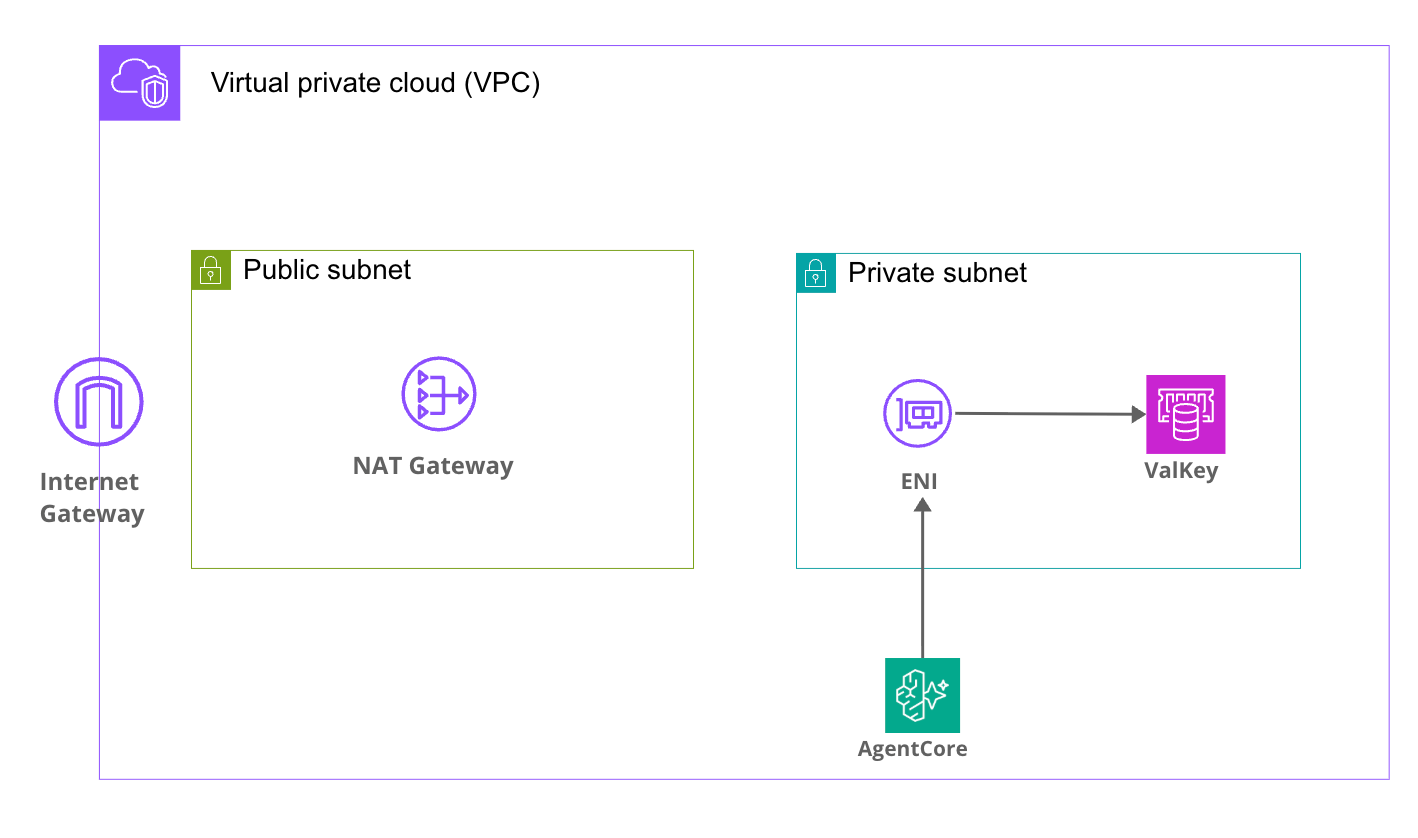
The AgentCore Runtime operates in VPC mode, placing ENIs in Private Subnets to communicate with Valkey within the VPC in a simple setup.
AgentCore accesses other AWS resources (like Bedrock) via NAT Gateway.
Implementation
The sample code for this project is available in the following GitHub repository:
Clone the repository and install dependencies:
git clone https://github.com/yuu551/agentcore-elastic-cache-blog-sample.git
cd agentcore-elastic-cache-blog-sample
pnpm install
Note that this is sample code for verification purposes and is not intended for direct use in production environments.
It may not include security settings, error handling, and other considerations necessary for operations.
ElastiCache must be created within a VPC.
This requires that the AgentCore Runtime also be placed in VPC mode, which necessitates network resources such as VPC, NAT Gateway, VPC endpoints, etc.
Also note that ElastiCache for Valkey Serverless does not support Vector Search. We look forward to future support.
Agent Implementation
Let's implement the semantic cache logic.
We'll use Strands Agents as our agent framework.
The official AWS blog implemented semantic caching using LangChain or LangGraph features, but Strands Agents doesn't have such built-in functionality. To deepen my understanding, I've implemented it directly using Valkey's vector search commands.
First, here's the Config class that consolidates settings. It reads various parameters from environment variables.
import os
from dataclasses import dataclass

@dataclass
class Config:
    # Valkey connection settings
    valkey_host: str = os.getenv('VALKEY_HOST', 'localhost')
    valkey_port: int = int(os.getenv('VALKEY_PORT', '6379'))
    valkey_ssl: bool = os.getenv('VALKEY_SSL', 'true').lower() == 'true'

    # Amazon Bedrock model settings
    embedding_model_id: str = os.getenv('EMBEDDING_MODEL_ID', 'amazon.titan-embed-text-v2:0')
    llm_model_id: str = os.getenv('LLM_MODEL_ID', 'us.anthropic.claude-haiku-4-5-20251001-v1:0')

    # Semantic cache settings
    similarity_threshold: float = float(os.getenv('SIMILARITY_THRESHOLD', '0.8'))

    # AWS / vector search settings
    aws_region: str = os.getenv('AWS_REGION', 'us-west-2')
    vector_dims: int = int(os.getenv('VECTOR_DIMS', '1024'))
Next is the semantic cache processing.
We'll use Valkey's vector search functionality to search and save cache.
Since many people may not be familiar with Valkey's vector search commands, I'll explain them in detail. (I wasn't familiar with them either)
Valkey Connection and Index Creation
import json
import struct
import time
from hashlib import md5
from typing import Optional

import boto3
import valkey
from .config import Config

class SemanticCache:
    INDEX_NAME = 'semantic_cache_idx'
    KEY_PREFIX = 'cache:'

    def __init__(self, config: Config):
        self.config = config

        # Bedrock client (for generating embedding vectors)
        self.bedrock_client = boto3.client('bedrock-runtime', region_name=config.aws_region)

        # Valkey client
        self.client = valkey.Valkey(
            host=config.valkey_host,
            port=int(config.valkey_port),
            decode_responses=False,
            ssl=config.valkey_ssl,
        )
        self.client.ping()
        self._setup_index()
We set decode_responses=False because we need to handle vector data in binary format. If set to True, the binary would be decoded as a string, corrupting the vector data.
After connecting, we create a vector search index with _setup_index().
    def _setup_index(self) -> None:
        """Set up the vector search index"""
        try:
            self.client.execute_command('FT.INFO', self.INDEX_NAME)
        except Exception as e:
            if 'unknown index name' in str(e).lower() or 'no such index' in str(e).lower():
                self.client.execute_command(
                    'FT.CREATE', self.INDEX_NAME,
                    'ON', 'HASH',
                    'PREFIX', '1', self.KEY_PREFIX,
                    'SCHEMA',
                    'query', 'TAG',
                    'embedding', 'VECTOR', 'HNSW', '6',
                    'TYPE', 'FLOAT32',
                    'DIM', str(self.config.vector_dims),
                    'DISTANCE_METRIC', 'COSINE',
                )
FT.CREATE is a command provided by Valkey (and Redis Stack) Search functionality for creating indexes for full-text and vector searches.
Let me add some explanation about the field types used in the schema.
TAG is one of the field types in Valkey Search, used to store short identifiers like tenant_id or category for exact matching and tag-based filtering.
Here's what each parameter means:
| Parameter | Value | Description |
|---|---|---|
| ON HASH | - | Create an index on Valkey hash type data |
| PREFIX 1 cache: | - | Only index keys that start with cache: |
| query TAG | - | Store query strings as TAG type (for exact matching) |
| embedding VECTOR HNSW 6 | - | Index vector field using HNSW algorithm |
| TYPE FLOAT32 | - | Store each vector element as 32-bit floating point |
| DIM 1024 | - | Vector dimension (Titan V2 uses 1024 dimensions) |
| DISTANCE_METRIC COSINE | - | Calculate distance between vectors using cosine |
By the way, HNSW stands for Hierarchical Navigable Small World graphs, a fast approximate nearest neighbor search algorithm. It's slightly less precise than exact full search, but it can search large vector collections quickly.
It sounds complex, but the gist is that it trades a bit of accuracy for the ability to quickly search large amounts of vector data.
We check if the index exists with FT.INFO and create it if it doesn't. This function is called every time the application starts, but it skips if the index already exists, making it idempotent.
Generating Embedding Vectors
    def _get_embedding(self, text: str) -> list[float]:
        """Generate vector using Titan Text Embeddings V2"""
        response = self.bedrock_client.invoke_model(
            modelId=self.config.embedding_model_id,
            contentType='application/json',
            accept='application/json',
            body=json.dumps({'inputText': text}),
        )
        return json.loads(response['body'].read())['embedding']
We use Amazon Titan Text Embeddings V2 to convert text into 1024-dimensional numerical vectors.
Cache Search
    def search(self, query: str, k: int = 3, min_similarity: Optional[float] = None) -> Optional[dict]:
        """Search for similar queries"""
        threshold = min_similarity if min_similarity is not None else self.config.similarity_threshold

        # Convert query to vector
        embedding = self._get_embedding(query)
        embedding_bytes = struct.pack(f'{len(embedding)}f', *embedding)

        # Execute KNN vector search with FT.SEARCH
        results = self.client.execute_command(
            'FT.SEARCH', self.INDEX_NAME,
            f'*=>[KNN {k} @embedding $vec AS score]',
            'PARAMS', '2', 'vec', embedding_bytes,
            'RETURN', '1', 'score',
        )

        if not results or results[0] == 0:
            return None

        # Get document key and score
        doc_key = results[1]
        if isinstance(doc_key, bytes):
            doc_key = doc_key.decode('utf-8')

        top_fields = results[2]
        score_value = top_fields[1]
        if isinstance(score_value, bytes):
            score_value = score_value.decode('utf-8')

        # Convert COSINE distance to similarity (0=exact match → similarity 1.0)
        distance = float(score_value)
        similarity = 1 - (distance / 2)

        if similarity < threshold:
            return None

        # The answer body is not in the index, retrieve it with HGET
        answer = self.client.hget(doc_key, 'answer')
        if isinstance(answer, bytes):
            answer = answer.decode('utf-8')

        return {
            'answer': answer,
            'score': similarity,
            'timing_ms': { ... },  # Processing time measurements (omitted)
        }
First, we convert the query to a vector using _get_embedding(), then convert it to FLOAT32 binary format with struct.pack() for Valkey.
The FT.SEARCH command is the vector search processing part.
The *=>[KNN 3 @embedding $vec AS score] part is the KNN (K-Nearest Neighbors) search query, which finds the 3 closest vectors to the provided vector in the embedding field and returns the distance as "score".
The score returned by FT.SEARCH is cosine distance (0 for exact match, 2 for opposite), so we convert it to a 0-1 similarity score with 1 - (distance / 2).
If this similarity is above the threshold (0.8), we return the answer as a cache hit; if below, we return None as a cache miss.
For cache hits, we use the document key (cache:xxxxx) from the FT.SEARCH result to retrieve the answer text using HGET.
Cache Storage
    def store(self, query: str, answer: str) -> bool:
        """Store query and answer in cache"""
        key = f"cache:{md5(query.encode('utf-8')).hexdigest()}"
        embedding = self._get_embedding(query)
        embedding_bytes = struct.pack(f'{len(embedding)}f', *embedding)

        self.client.hset(key, mapping={
            'query': query,
            'answer': answer,
            'embedding': embedding_bytes,
        })
        return True
Storage is straightforward. We use the MD5 hash of the query as the key and store all three items (query, answer, and embedding vector) together using Valkey's hash type (hset). Since we add the cache: prefix to the key, it is automatically added to the vector search index according to the PREFIX 1 cache: rule we specified earlier in FT.CREATE.
Next, here's the main.py entrypoint:
import logging
import time
from typing import Any

from bedrock_agentcore.runtime import BedrockAgentCoreApp
from strands import Agent

from .config import Config
from .semantic_cache import SemanticCache

logging.basicConfig(level=logging.INFO, format='%(asctime)s - %(name)s - %(levelname)s - %(message)s')
logger = logging.getLogger(__name__)

config = Config()
cache = SemanticCache(config=config)
agent = Agent(model=config.llm_model_id)

app = BedrockAgentCoreApp()

@app.entrypoint
def invoke(payload: dict) -> dict[str, Any]:
    user_message = payload.get('prompt', 'Hello! How can I help you today?')
    threshold = payload.get('min_similarity', config.similarity_threshold)

    request_start = time.perf_counter()

    # 1. Search semantic cache
    cache_search_start = time.perf_counter()
    cached = cache.search(query=user_message, min_similarity=threshold)
    cache_search_ms = (time.perf_counter() - cache_search_start) * 1000

    if cached:
        total_ms = (time.perf_counter() - request_start) * 1000
        return {
            'response': cached['answer'],
            'cache_hit': True,
            'similarity_score': cached['score'],
            'timing_ms': {
                'cache_search': round(cache_search_ms, 1),
                'total': round(total_ms, 1),
                **cached.get('timing_ms', {}),
            },
        }

    # 2. Cache miss → Generate answer with Strands Agent
    agent_start = time.perf_counter()
    result = agent(user_message)
    agent_ms = (time.perf_counter() - agent_start) * 1000

    # result.message is a dictionary, extract the text part
    message = result.message
    if isinstance(message, dict):
        content = message.get('content', [])
        answer = content[0].get('text', str(result)) if content else str(result)
    else:
        answer = str(message)

    # 3. Store generated answer in cache
    cache_store_start = time.perf_counter()
    cache.store(user_message, answer)
    cache_store_ms = (time.perf_counter() - cache_store_start) * 1000

    total_ms = (time.perf_counter() - request_start) * 1000
    return {
        'response': answer,
        'cache_hit': False,
        'model_id': config.llm_model_id,
        'timing_ms': {
            'cache_search': round(cache_search_ms, 1),
            'agent_invocation': round(agent_ms, 1),
            'cache_store': round(cache_store_ms, 1),
            'total': round(total_ms, 1),
        },
    }

if __name__ == '__main__':
    app.run()
First, we search the cache. If we get a hit, we return it directly without calling the LLM. If we miss, we generate an answer with Strands Agent and store the result in the cache.
We include the time taken for each processing step as timing_ms in the response so we can quantitatively check how much latency differs between cache hits and misses.
Deployment
Execute the following command to deploy:
pnpm dlx cdk deploy SemanticCacheStack
Upon successful deployment, you'll see Outputs like this:
 ✅  SemanticCacheStack-dev

✨  Deployment time: 617.23s

Outputs:
SemanticCacheStack-dev.AgentCoreConstructRuntimeArnC90D93E6 = arn:aws:bedrock-agentcore:us-west-2:xxxxxxxxxxxx:runtime/semanticCacheAgent-xxxxxxxxxx
SemanticCacheStack-dev.AgentCoreConstructRuntimeId94C4621A = semanticCacheAgent-xxxxxxxxxx
SemanticCacheStack-dev.ElastiCacheConstructClusterEndpointCDBE4A08 = master.semantic-cache-dev-cluster.xxxxx.usw2.cache.amazonaws.com:6379
SemanticCacheStack-dev.StackEnvironment = dev
If the Runtime ARN and Runtime ID are displayed, it's working correctly!
Testing
Let's invoke the deployed agent. I'm using a Python script with boto3.
First, set up the Python project with uv and add boto3:
uv init
uv add boto3
Create the invoke.py script. Replace AGENT_RUNTIME_ARN with the Runtime ARN from your deployment output.
invoke.py (click to expand)
import argparse
import json
import sys
import uuid

import boto3

# Value obtained from stack output at deployment
AGENT_RUNTIME_ARN = "arn:aws:bedrock-agentcore:us-west-2:xxxxxxxxxxxx:runtime/semanticCacheAgent-xxxxxxxxxx"
REGION = "us-west-2"

def invoke_agent(prompt: str, session_id: str | None = None, min_similarity: float | None = None) -> None:
    """Invoke the agent and display the result."""
    client = boto3.client("bedrock-agentcore", region_name=REGION)

    payload_dict = {"prompt": prompt}
    if min_similarity is not None:
        payload_dict["min_similarity"] = min_similarity

    payload = json.dumps(payload_dict, ensure_ascii=False).encode("utf-8")

    if session_id is None:
        session_id = str(uuid.uuid4())

    print(f"━━━ Request ━━━")
    print(f"  Prompt: {prompt}")
    print(f"  Session ID: {session_id}")
    print()

    response = client.invoke_agent_runtime(
        agentRuntimeArn=AGENT_RUNTIME_ARN,
        runtimeSessionId=session_id,
        payload=payload,
    )

    content_type = response.get("contentType", "")

    if content_type == "application/json":
        raw = b""
        for chunk in response.get("response", []):
            raw += chunk
        result = json.loads(raw.decode("utf-8"))
        _print_result(result)
    else:
        print(f"━━━ Response (content-type: {content_type}) ━━━")
        print(response)

def _print_result(result: dict) -> None:
    """Display response results in a readable format."""
    cache_hit = result.get("cache_hit", False)
    status = "Cache Hit ✓" if cache_hit else "Cache Miss ✗"

    print(f"━━━ Response ({status}) ━━━")
    print()
    print(result.get("response", ""))
    print()

    print(f"── Meta Information ──")
    if cache_hit and "similarity_score" in result:
        print(f"  Similarity Score: {result['similarity_score']:.4f}")
    if not cache_hit and "model_id" in result:
        print(f"  Model Used: {result['model_id']}")

    timing = result.get("timing_ms", {})
    if timing:
        print(f"── Processing Time ──")
        for key, value in timing.items():
            label = {
                "cache_search": "Cache Search",
                "embedding": "Embedding Generation",
                "vector_search": "Vector Search",
                "agent_invocation": "LLM Call",
                "cache_store": "Cache Storage",
                "total": "Total",
            }.get(key, key)
            print(f"  {label}: {value:.1f} ms")

if __name__ == "__main__":
    parser = argparse.ArgumentParser(description="Invoke the semantic cache agent")
    parser.add_argument("prompt", help="Query string for the agent")
    parser.add_argument("--session-id", "-s", help="Session ID (auto-generated if omitted)")
    parser.add_argument("--min-similarity", "-m", type=float, help="Similarity threshold for cache hits (0.0-1.0)")

    args = parser.parse_args()
    invoke_agent(args.prompt, session_id=args.session_id, min_similarity=args.min_similarity)
Once prepared, let's invoke it:
uv run invoke.py "What is semantic caching?"
Since there's nothing in the cache for the first invocation, the agent will generate an answer:
━━━ Request ━━━
  Prompt: What is semantic caching?
  Session ID: eb3b6afe-bd02-43fb-b550-933e07c9507a

━━━ Response (Cache Miss ✗) ━━━

# About Semantic Caching

## Overview

Semantic caching is a caching technique that reuses cached results for semantically similar queries.

(omitted)

── Meta Information ──
  Model Used: us.anthropic.claude-haiku-4-5-20251001-v1:0
── Processing Time ──
  Cache Search: 145.2 ms
  LLM Call: 4802.0 ms
  Cache Storage: 119.9 ms
  Total: 5067.4 ms
It took 5067.4ms in total. Most of that time was spent on the LLM call.
Let's try asking the same question again:
uv run invoke.py "What is semantic caching?"
━━━ Request ━━━
  Prompt: What is semantic caching?
  Session ID: ddd93382-9a59-4959-82d1-8d29c0c04607

━━━ Response (Cache Hit ✓) ━━━

# About Semantic Caching

(Same answer is returned as before)

── Meta Information ──
  Similarity Score: 1.0000
── Processing Time ──
  Cache Search: 161.1 ms
  Total: 161.1 ms
  Embedding Generation: 141.8 ms
  Vector Search: 18.2 ms
The cache hit successfully! Great!
The first time took 5067.4ms, but the second time returned in just 161.1ms. Since we asked exactly the same question, the similarity score is 1.0000, indicating an exact match.
Looking at the breakdown, of the 161.1ms, 141.8ms was spent on embedding generation (request to Bedrock API), while the vector search itself completed in just 18.2ms. Valkey's vector search is fast!
Cache Hit with Similar Questions
Next, let's try a question with different wording but similar meaning. Will it hit the cache?
uv run invoke.py "Is semantic caching difficult?"
━━━ Request ━━━
  Prompt: Is semantic caching difficult?
  Session ID: fcaf3ed5-a2d5-4934-b4b1-c84219724786

━━━ Response (Cache Hit ✓) ━━━

# About Semantic Caching

(Same answer is returned as before)

── Meta Information ──
  Similarity Score: 0.9020
── Processing Time ──
  Cache Search: 143.0 ms
  Total: 143.0 ms
  Embedding Generation: 124.4 ms
  Vector Search: 17.2 ms
Great! It returns an answer based on similarity even though it's not an exact match!
"What is semantic caching?" and "Is semantic caching difficult?" are different as strings, but they hit the cache with a similarity score of 0.9020.
Since it's above the 0.8 threshold, the answer is returned from the cache without calling the LLM.
Cache Miss with Unrelated Questions
Conversely, what happens when we ask a completely unrelated question?
uv run invoke.py "Is cheese naan delicious?"
━━━ Request ━━━
  Prompt: Is cheese naan delicious?
  Session ID: 0e8f9a58-d7b8-4793-aaf3-86b17fef66fb

━━━ Response (Cache Miss ✗) ━━━

# About Cheese Naan

(omitted)

── Meta Information ──
  Model Used: us.anthropic.claude-haiku-4-5-20251001-v1:0
── Processing Time ──
  Cache Search: 152.2 ms
  LLM Call: 3443.9 ms
  Cache Storage: 123.0 ms
  Total: 3719.4 ms
I'm relieved it didn't match at all.
Semantically different questions properly result in a cache miss, and a new answer is generated using the LLM.
Conclusion
We've confirmed that semantic caching can reduce LLM invocation latency.
I think this would be particularly useful in chatbots or FAQ systems where similar questions are repeatedly asked.
It would be interesting to explore tuning for cache lifetime and other parameters!
On the other hand, it's debatable whether it's worth placing AgentCore ENIs in a VPC just for this purpose, so it's something to consider based on your needs.
I hope this article was helpful. Thank you for reading to the end!
References