![[Update] I tried out the Web Search tool that was added to Amazon Bedrock AgentCore Gateway targets](https://images.ctfassets.net/ct0aopd36mqt/7M0d5bjsd0K4Et30cVFvB6/5b2095750cc8bf73f04f63ed0d4b3546/AgentCore2.png?w=3840&fm=webp)
[Update] I tried out the Web Search tool that was added to Amazon Bedrock AgentCore Gateway targets

This page has been translated by machine translation. View original
Introduction
Hello, I'm Kanno from the Consulting Division, and I love supermarkets.
At AWS Summit New York 2026, held on June 17, 2026, several new features for Amazon Bedrock AgentCore were announced. One of them is the Web Search tool I'm introducing today!
Until now, to give an AI agent web search capabilities, you needed to connect external search APIs like Tavily or Brave Search via an MCP server. You had to use separate services, and I always wished it could all be handled within AWS services — so this is a long-awaited update.
It's built in as a connector target for AgentCore Gateway and can be used as-is with an MCP-compliant interface. This time, I set up a Gateway and Harness from the console and actually tried searching with it!
Web Search on Amazon Bedrock AgentCore
Quoting from the official What's New:
Today, AWS announced the general availability of Web Search on Amazon Bedrock AgentCore, a fully managed tool that enables agents to ground responses in current, cited web knowledge with zero data egress from the customer's secured AWS environment.
The key points are as follows:
- A fully managed web search tool. No need to separately contract an external search API
- Uses a web index independently built and operated by Amazon (on the scale of tens of billions of documents). Based on the search infrastructure cultivated through Alexa+, Amazon Quick, Kiro, and more
- Multi-source grounding that leverages not only the web index but also structured data from the Amazon Knowledge Graph
- Queries are completed within AWS and data is not sent to external search engines (zero data egress)
- MCP-compliant. Can be used from any MCP client including Strands Agents, LangChain, CrewAI, etc.
Sounds great! I'm curious about how accurate it is!
Please also check the official blog for more details.
Prerequisites
-
Region: Only US East (N. Virginia)
us-east-1is supported (as of June 2026)- Note that the Tokyo region is not supported at this time.
-
Pricing: No additional charges for the Web Search tool itself. Only Gateway data transfer charges apply
- It's great that there are no additional charges for the tool itself!
Let's Try It
Let me try it out right away, mainly through the console!
Creating a Gateway
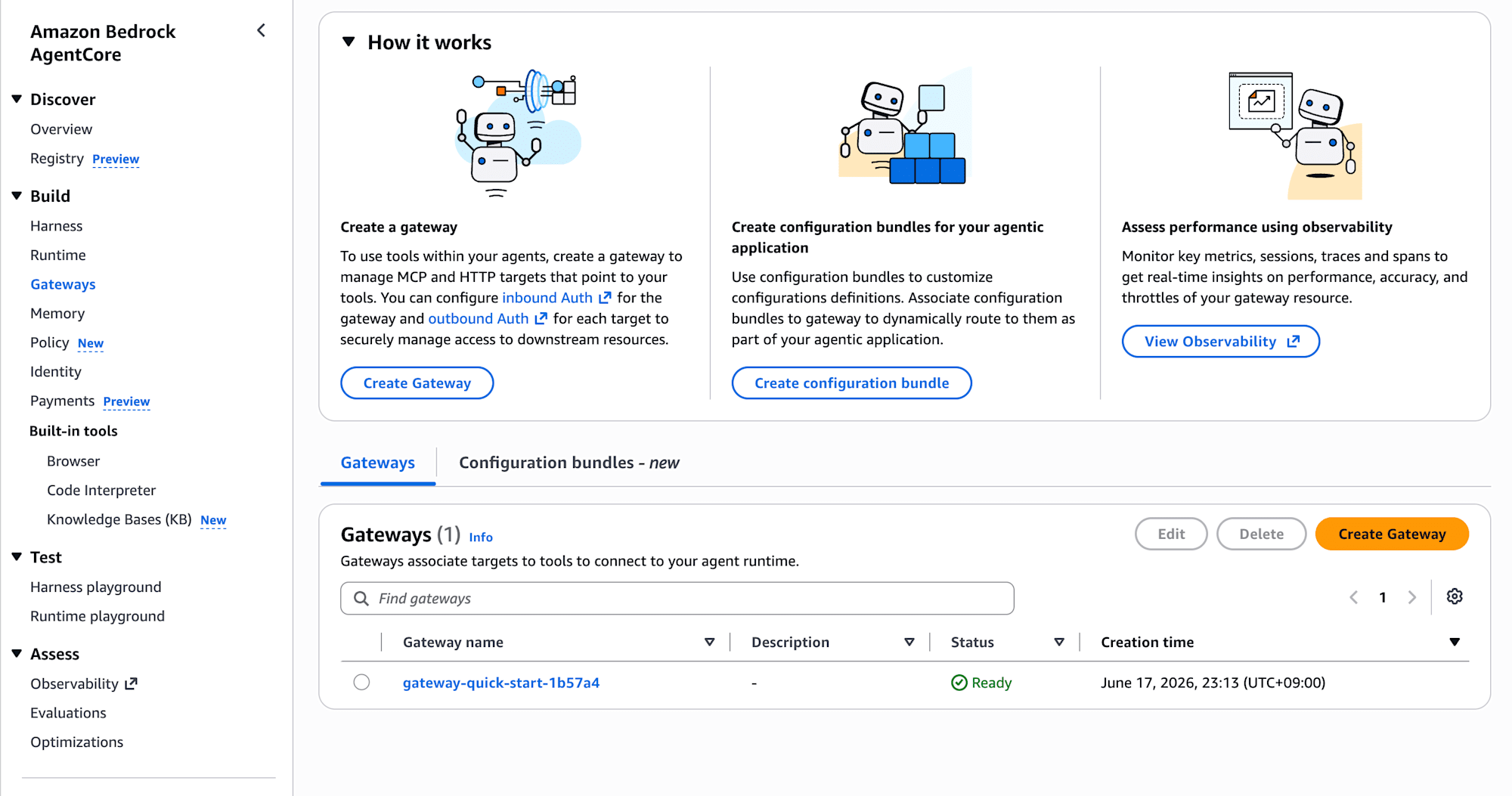
First, create an AgentCore Gateway. Click "Create Gateway" from Gateways in the left menu.
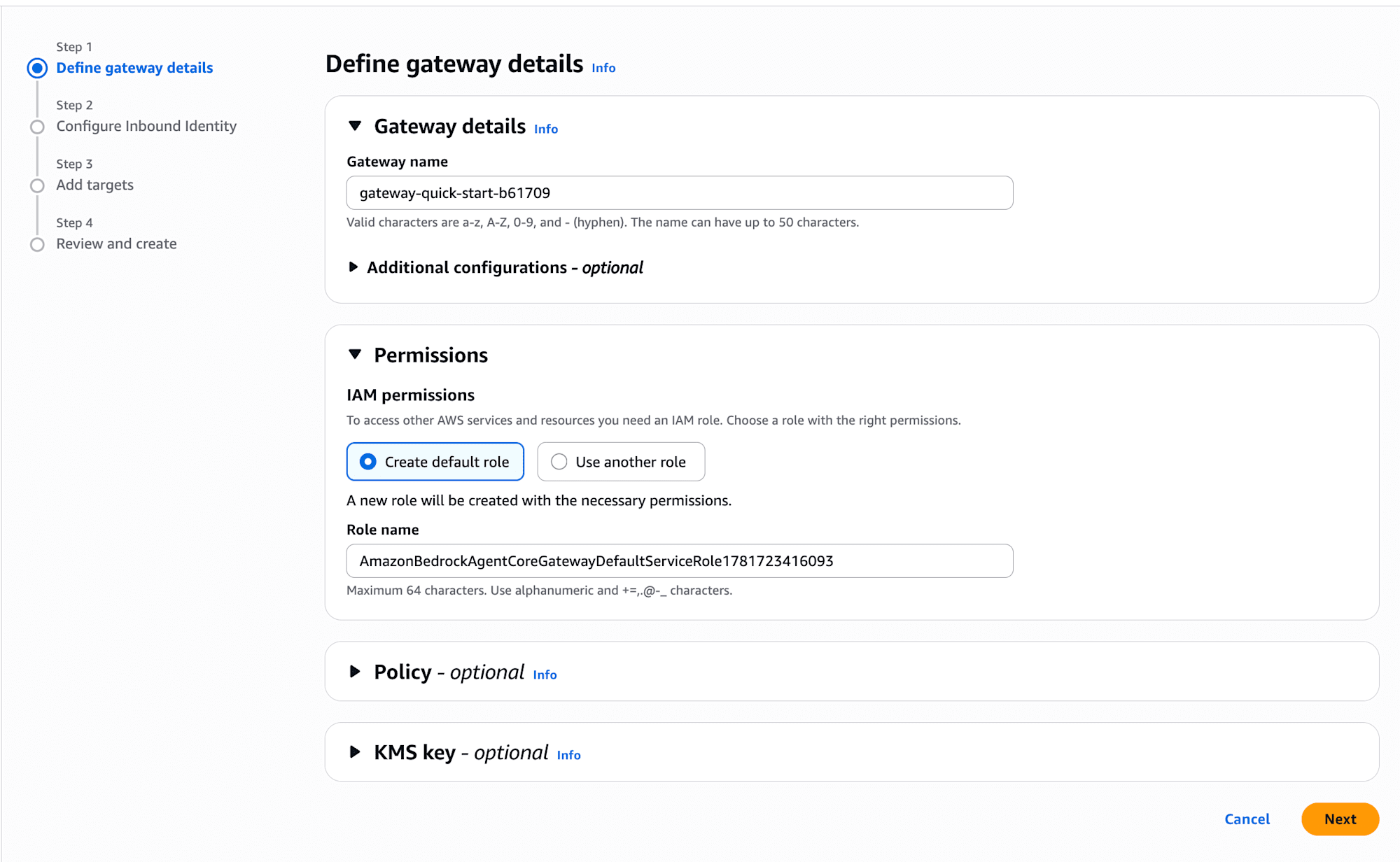
Define gateway details
Enter a Gateway name and select "Create default role" for IAM permissions. The required service role will be automatically created.
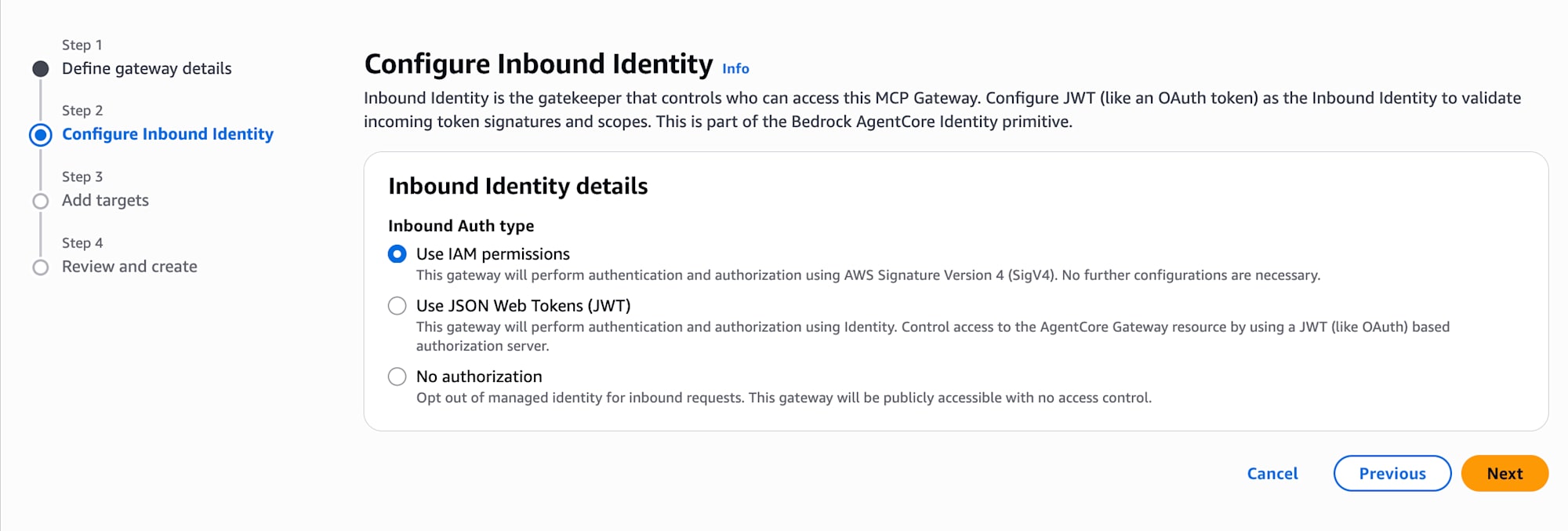
Configure Inbound Identity
Select "Use IAM permissions" for Inbound Auth type. Since authentication and authorization will be handled via IAM from Harness, no additional configuration is required.
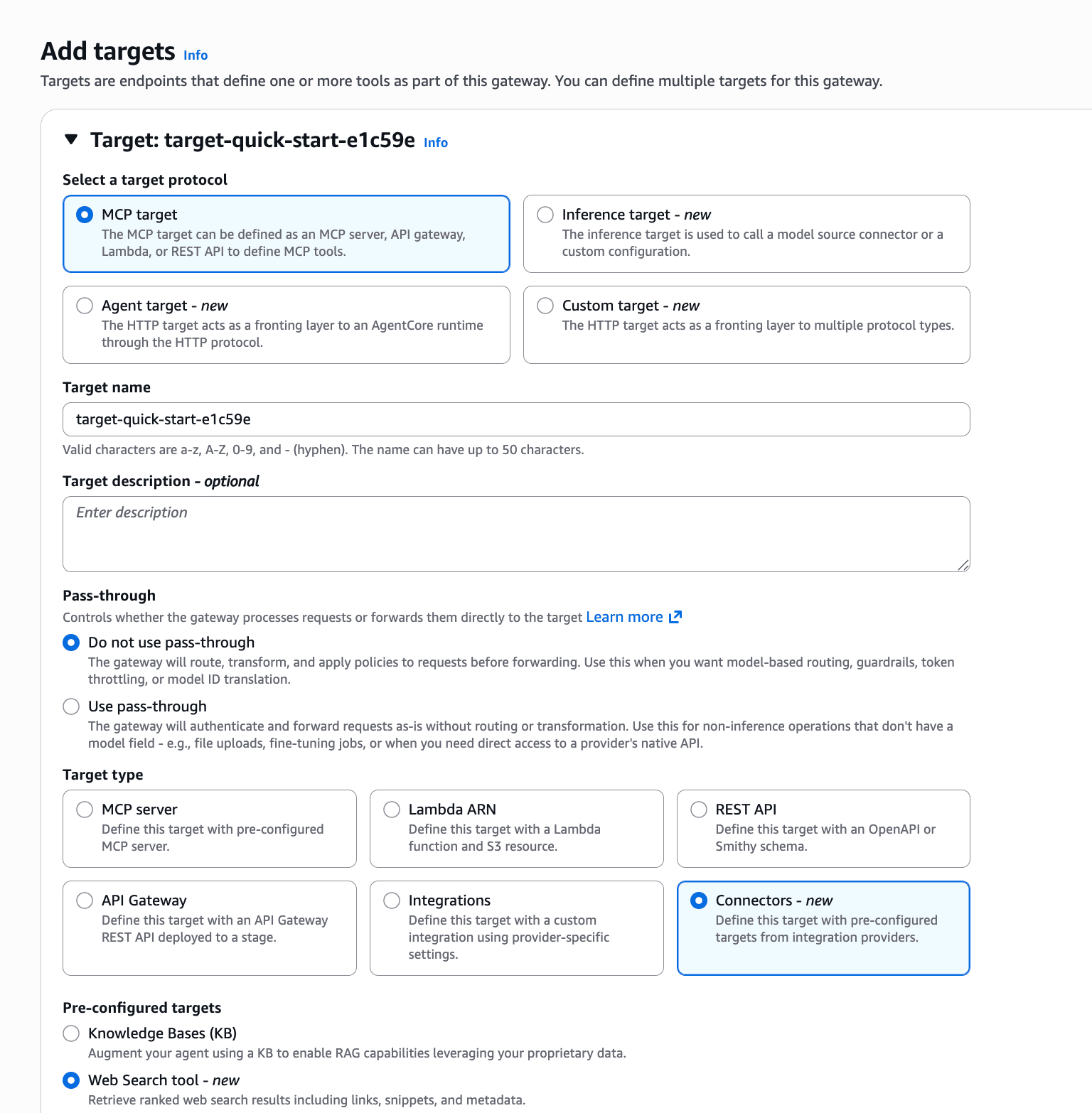
Add targets
This is the newly added configuration for this update. Select the following in the target settings:
- Select a target protocol: MCP target
- Pass-through: Do not use pass-through
- Tool type: Connectors
- Newly added!
"Web Search tool - new" is displayed in the Pre-configured targets section, so select it.
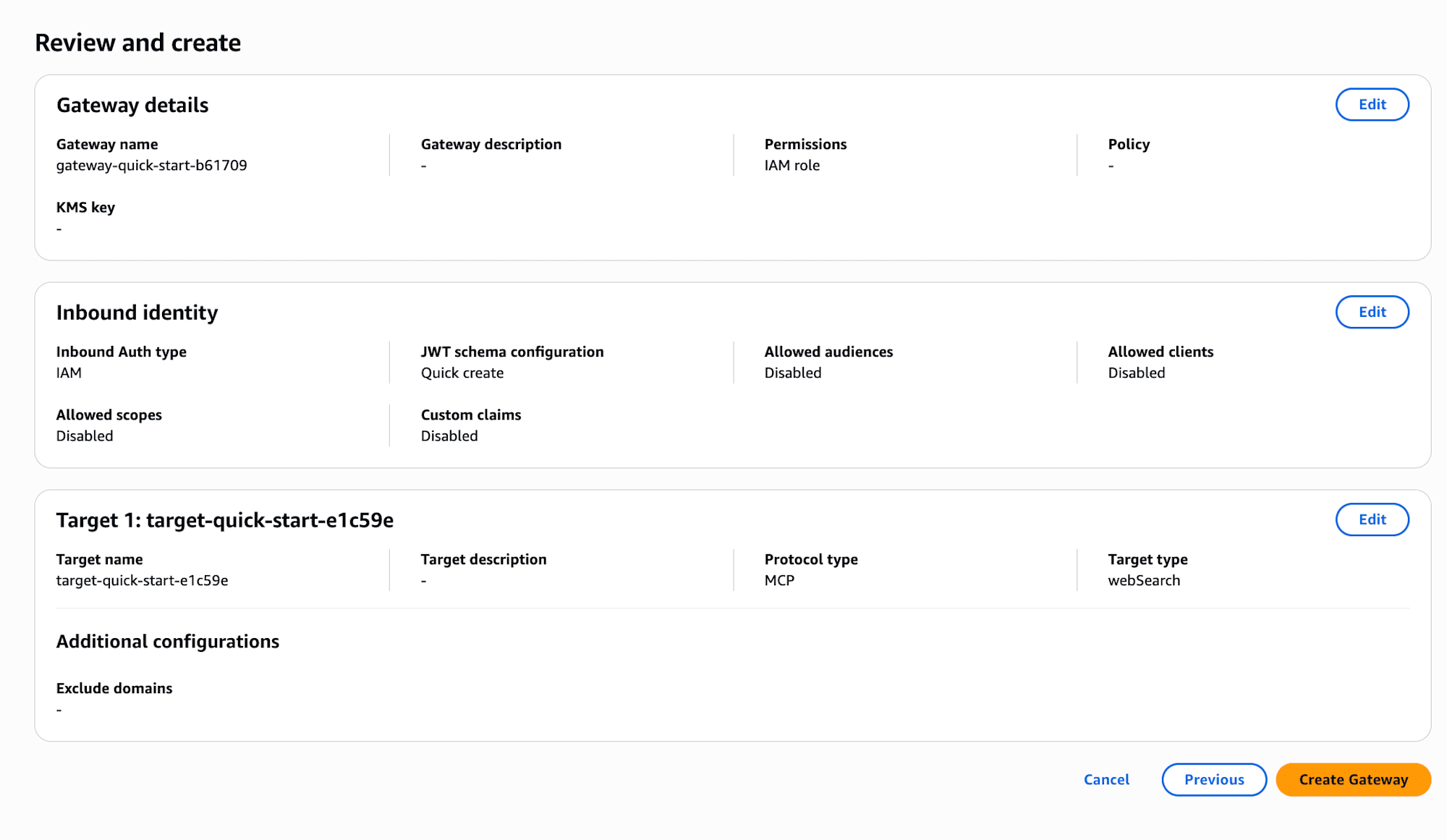
Review and create
Review the settings and click "Create Gateway". It's fine if the Target type shows webSearch.
Creating a Harness
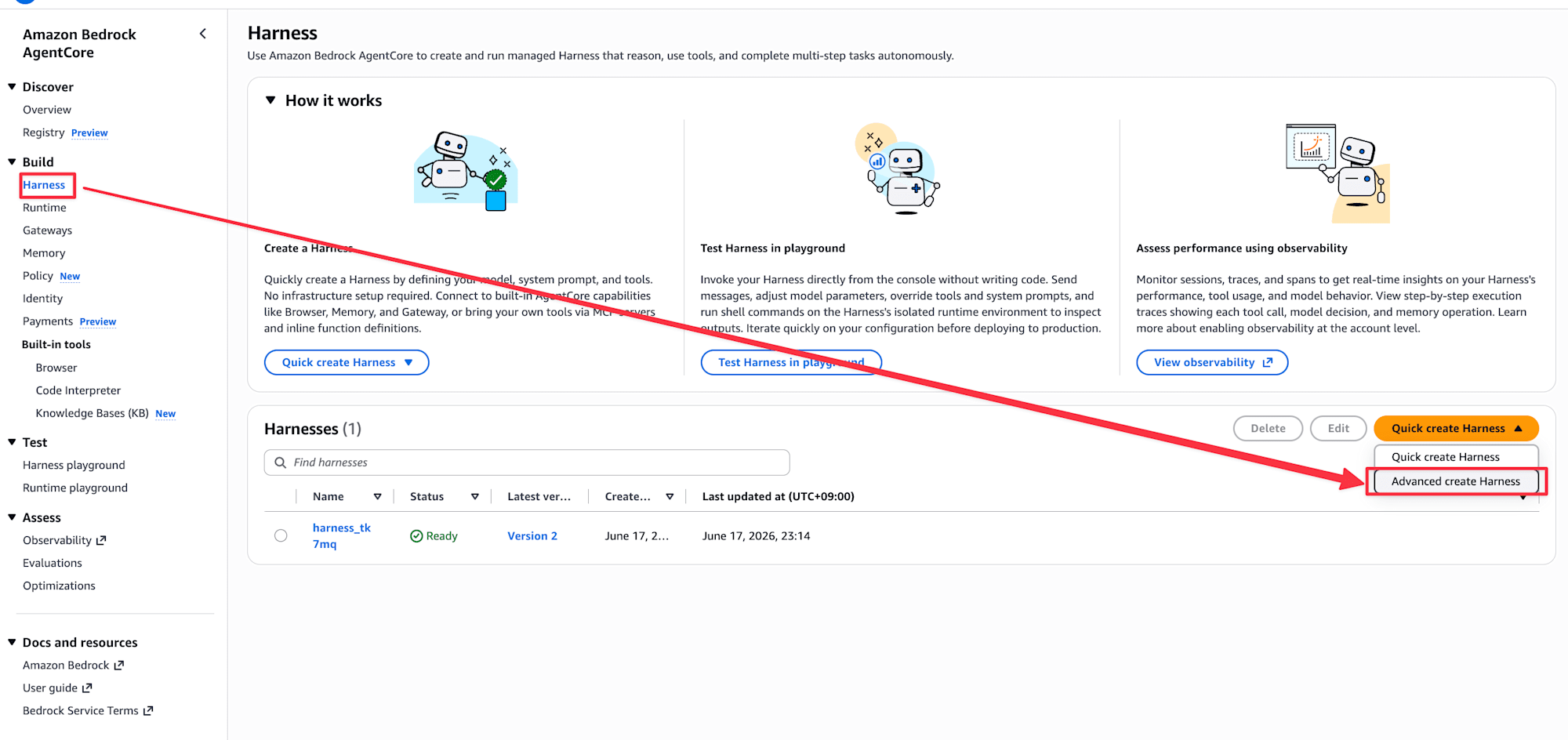
Now that the Gateway is created, let's create a Harness and try searching from the Playground.
Open the "Quick create Harness" dropdown from Harness in the left menu and select "Advanced create Harness".
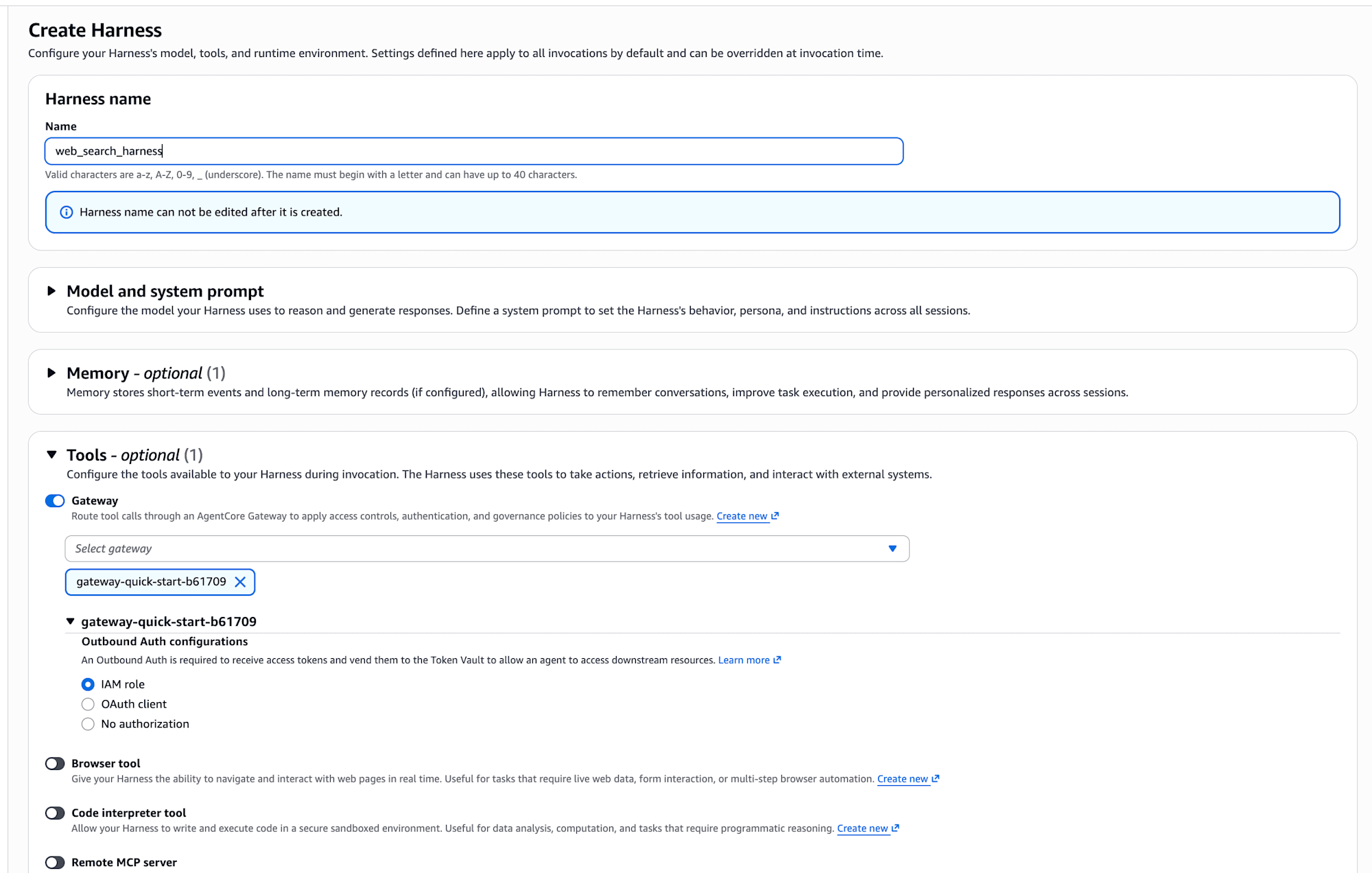
Harness Configuration
Enter a Harness name and enable the Gateway in the Tools section. Select the Gateway you just created, and specify an IAM role for Outbound Auth configuration.
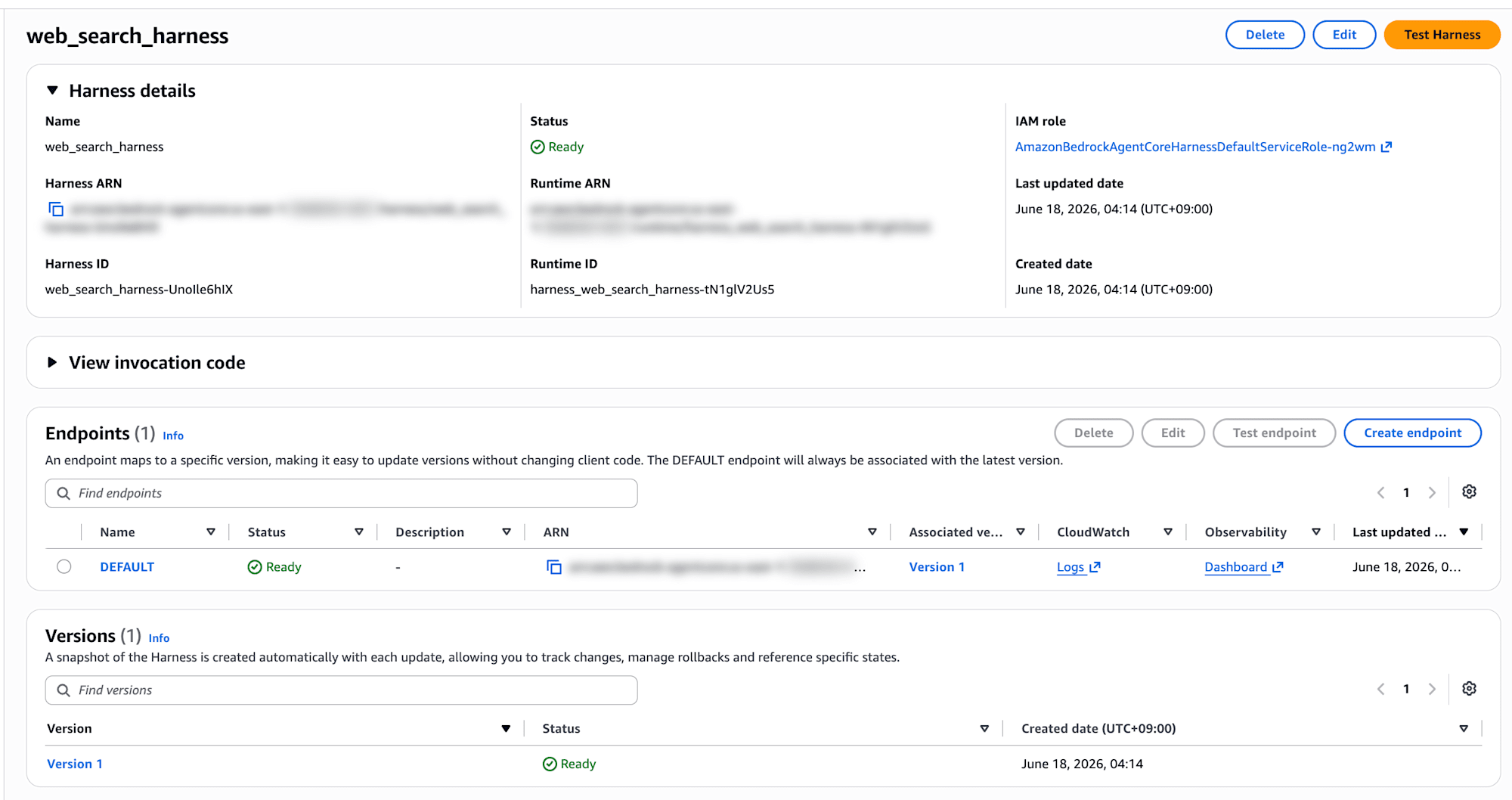
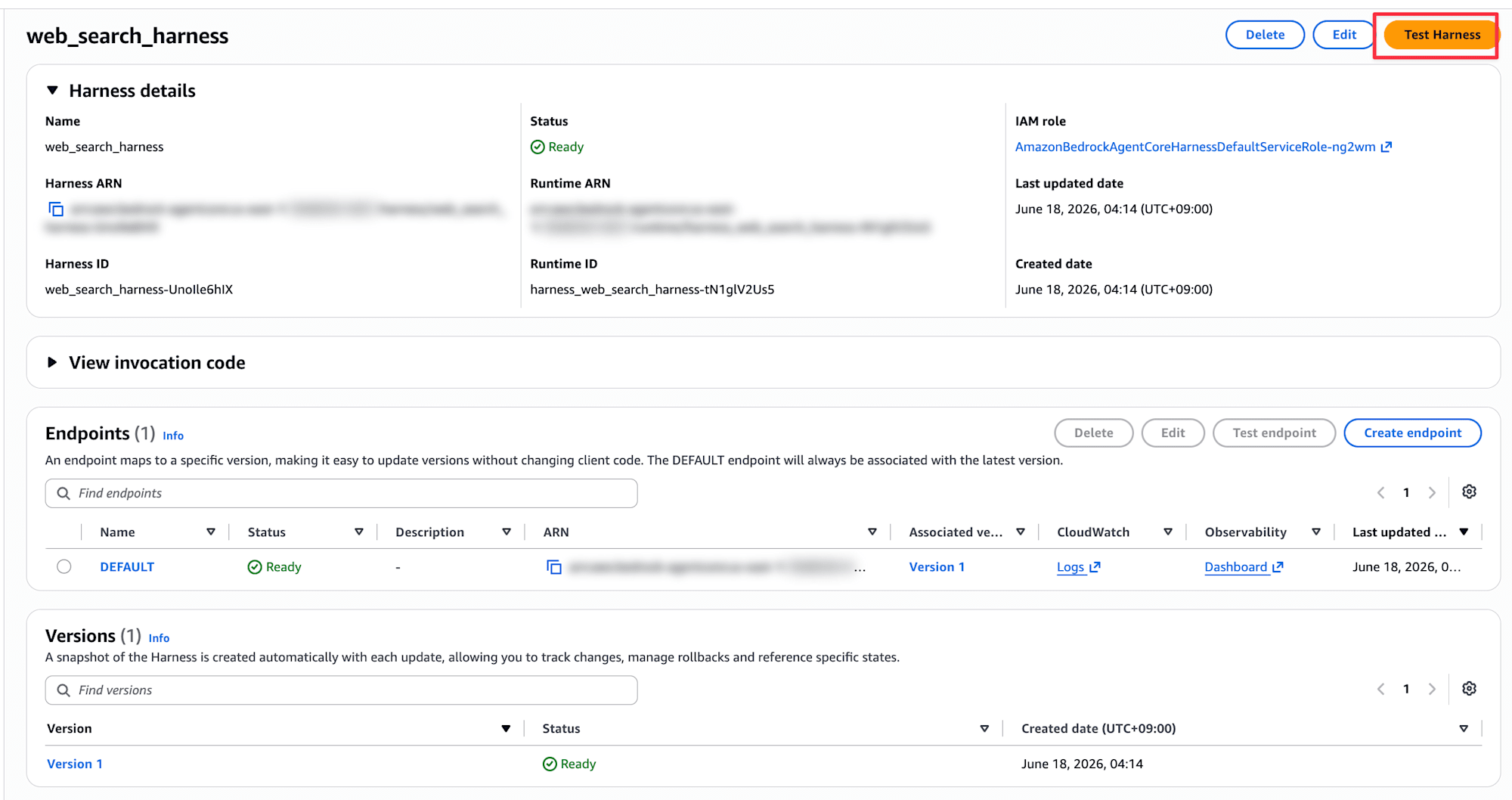
Once creation is complete, the Harness detail screen is displayed. You're ready to go when the Status shows Ready.
Trying it in the Harness Playground
Open the Playground from "Test Harness" in the upper right. I used Claude Sonnet 4.6 as the model.
Asking about Classmethod, Inc.
First, I asked "Tell me about Classmethod, Inc."
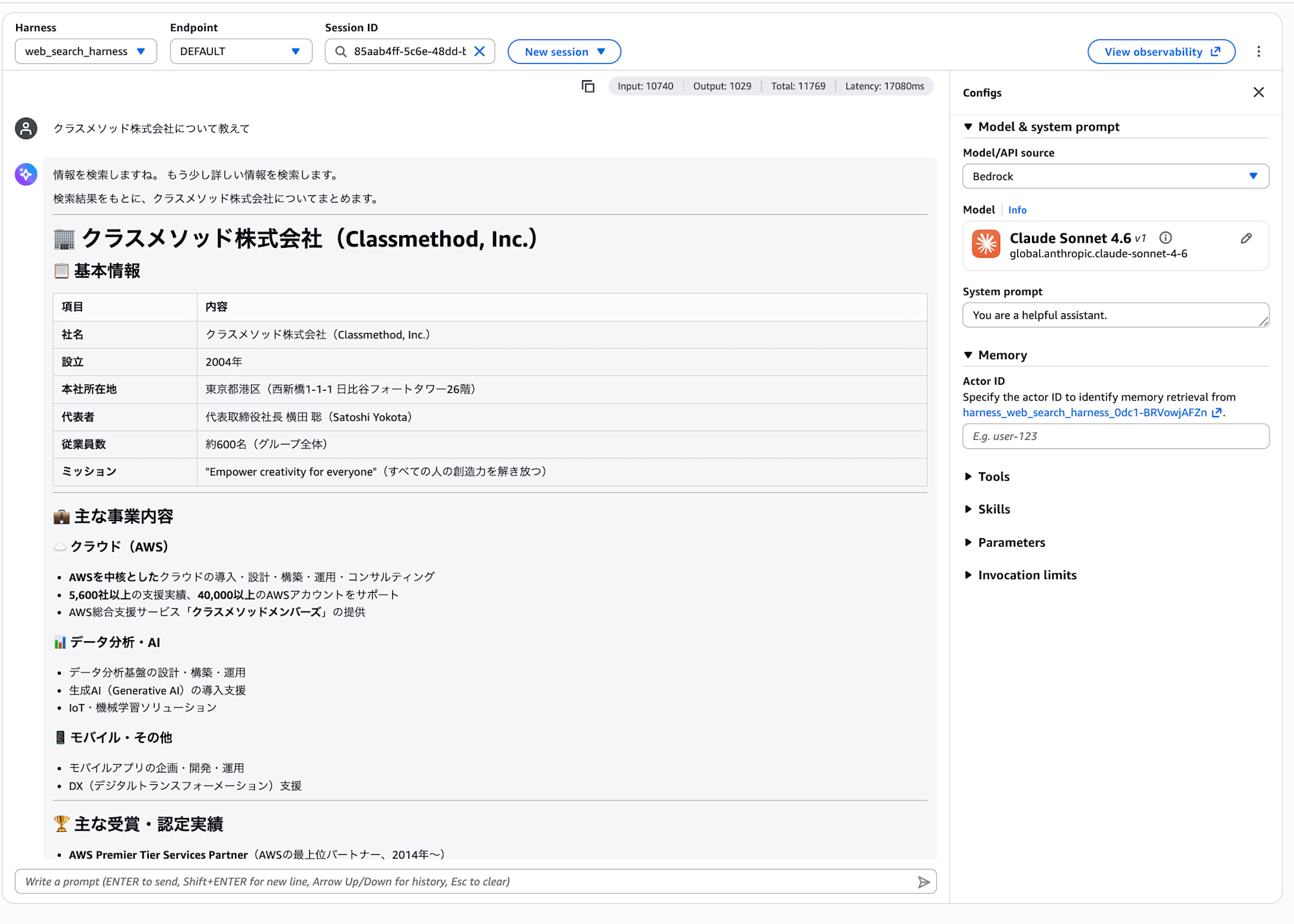
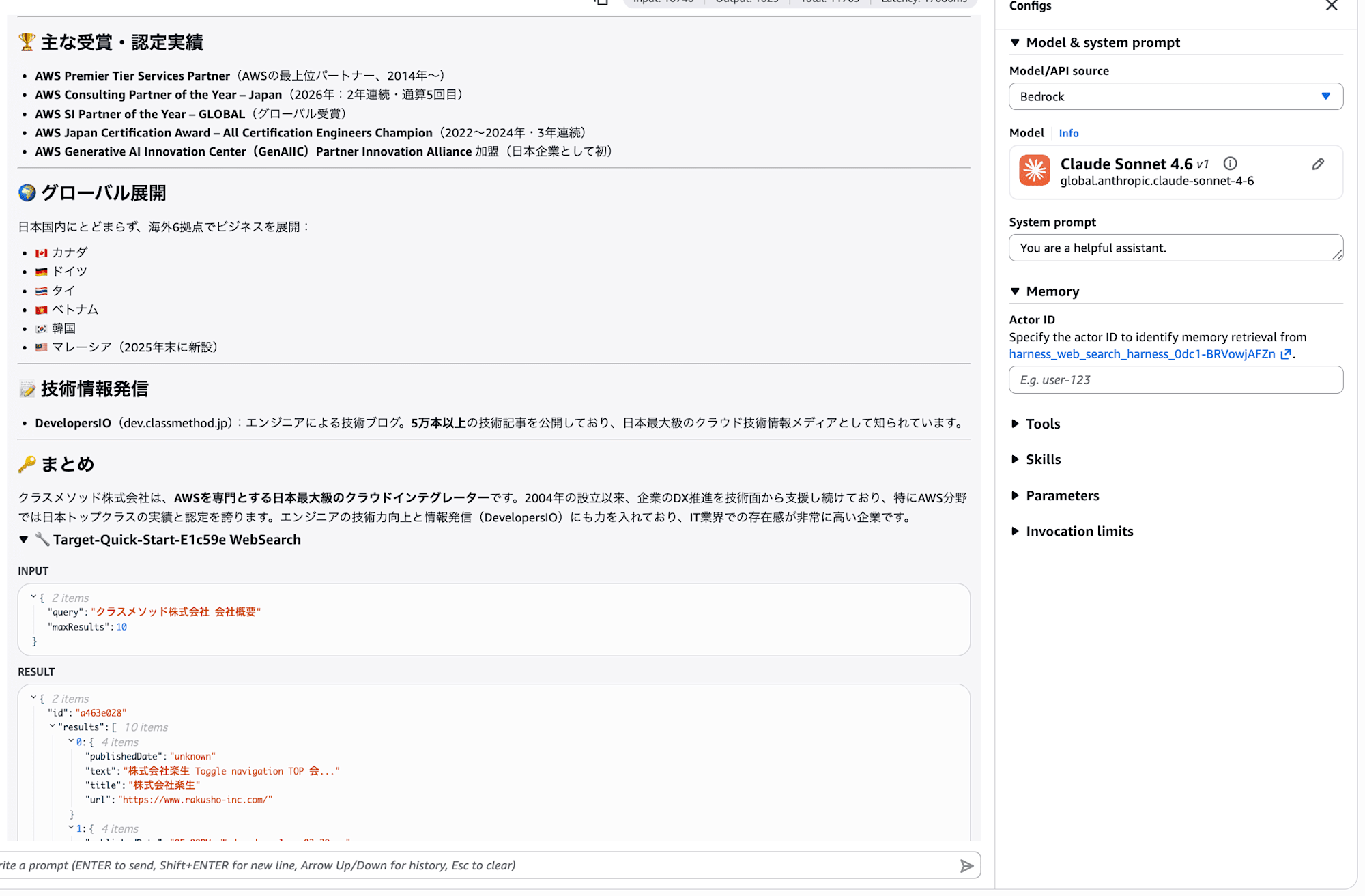
Basic information, business content, award achievements, global expansion, and more were summarized! A structured answer was generated based on search result snippets.
However, when comparing it against publicly available information, there were some concerning points. For example, the number of employees was answered as "approximately 600," but the official website shows approximately 820 (as of July 2025). The Japanese translation of the mission also differed from the current official expression. Outdated information and third-party information included in the search results were adopted as-is.
Looking at the tool call trace at the bottom, you can see that the WebSearch tool was called multiple times.
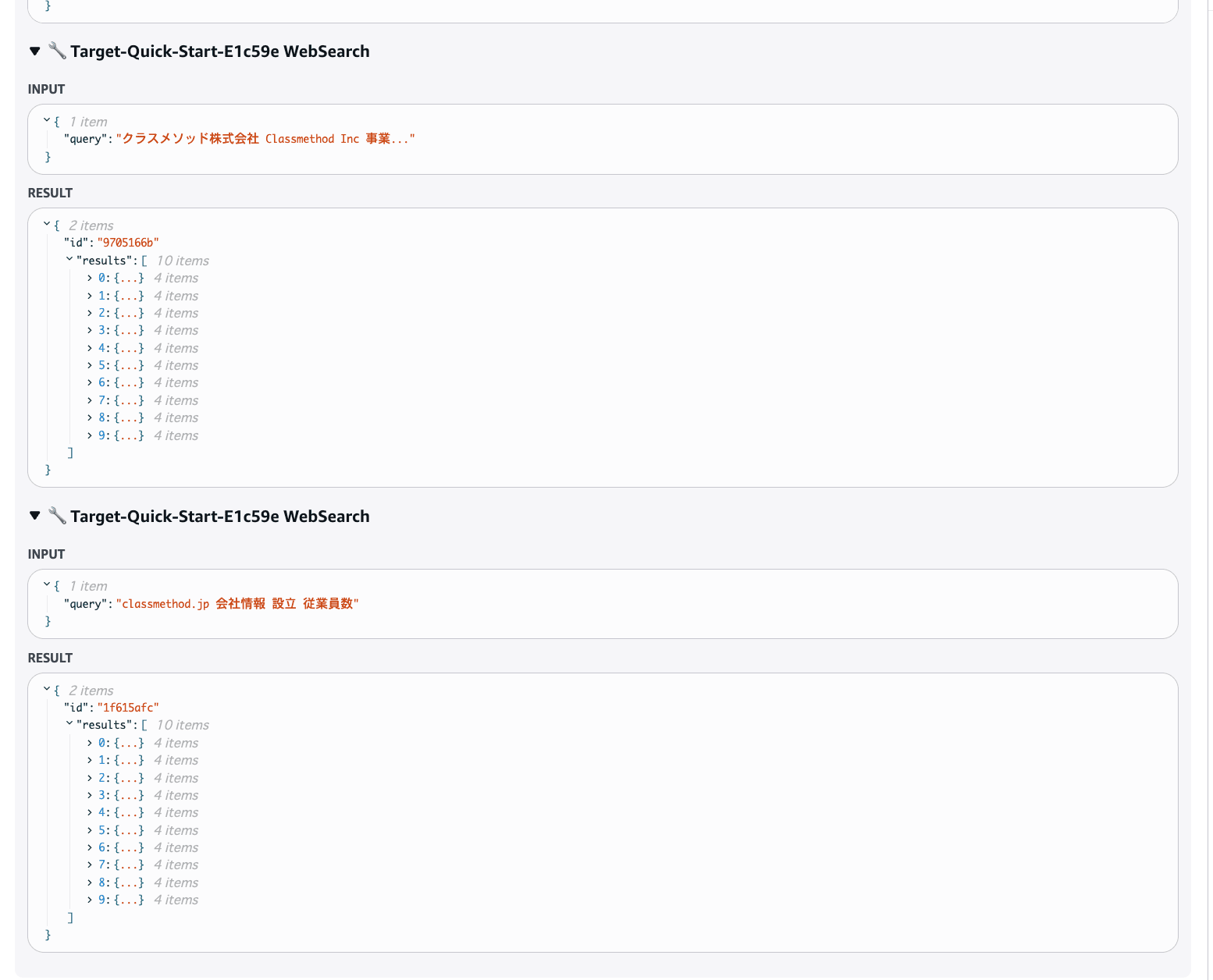
Looking at the query content, the agent autonomously crafted queries like "クラスメソッド株式会社 Classmethod Inc 事業..." and "classmethod.jp 会社情報 設立 従業員数" and searched multiple times. However, the search results also included loosely related Japanese sites like Rakusei Co., Ltd. and CrossGuild.
Asking about my recent blog posts
Next, I asked "Please tell me the most recent blog post written by Kanno from Classmethod."
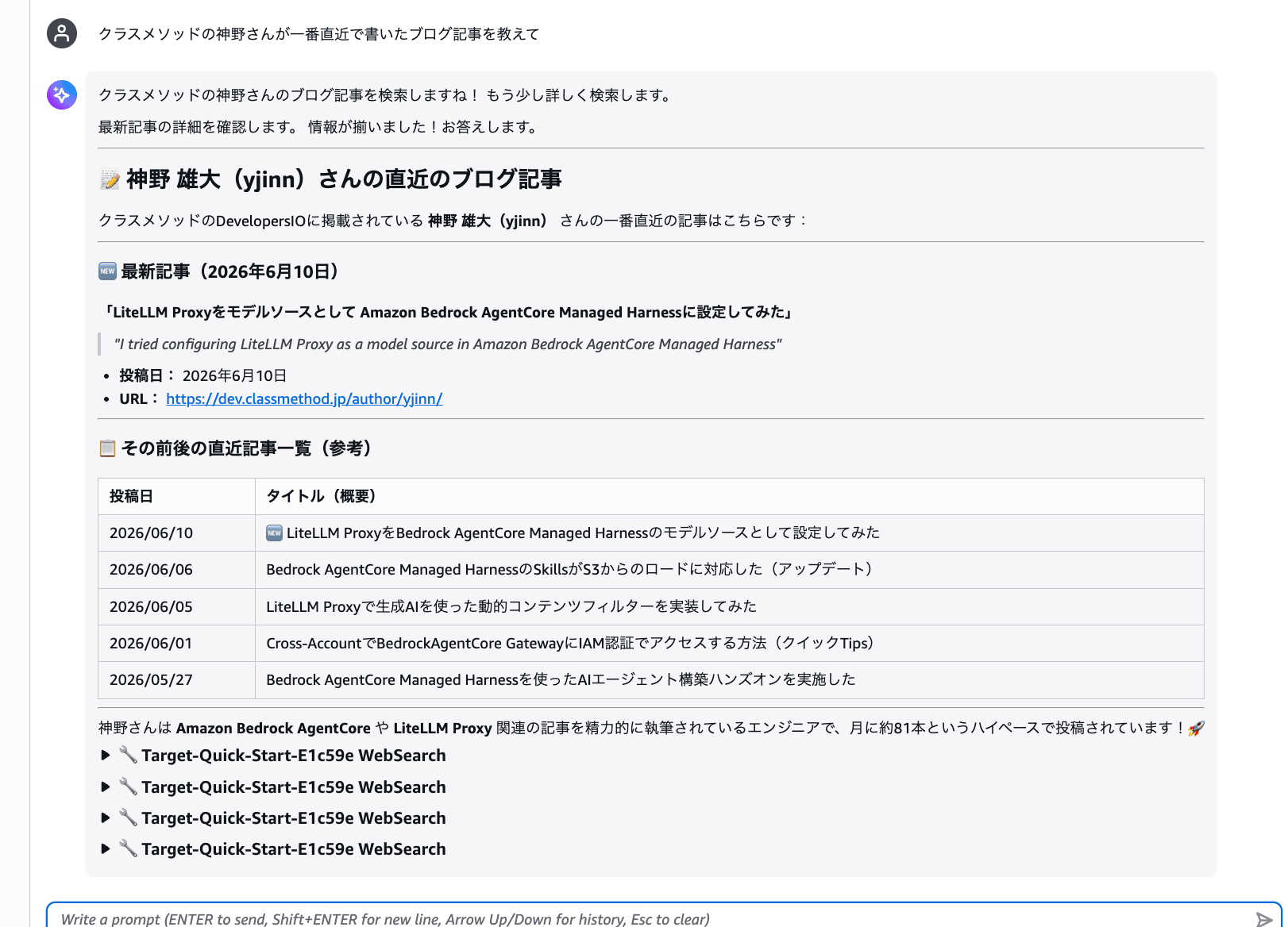
The list of recent articles was mostly retrieved, but the latest article was not found.
Looking at the tool call trace, the search queries were crafted as site:dev.classmethod.jp 神野 最新記... and dev.classmethod.jp 神野 author D..., but the URLs that were matched were mostly https://dev.classmethod.jp/en/... — the English version of the pages. It seems that the English translation version is indexed rather than the Japanese article pages of DevelopersIO. Combined with the Classmethod search results earlier, I got the impression that the index is currently centered around English content.
Asking in English
Since I was concerned about the accuracy of Japanese queries, I tried asking in English instead. I asked "What new features were announced for Amazon Bedrock AgentCore at AWS Summit New York 2026?"
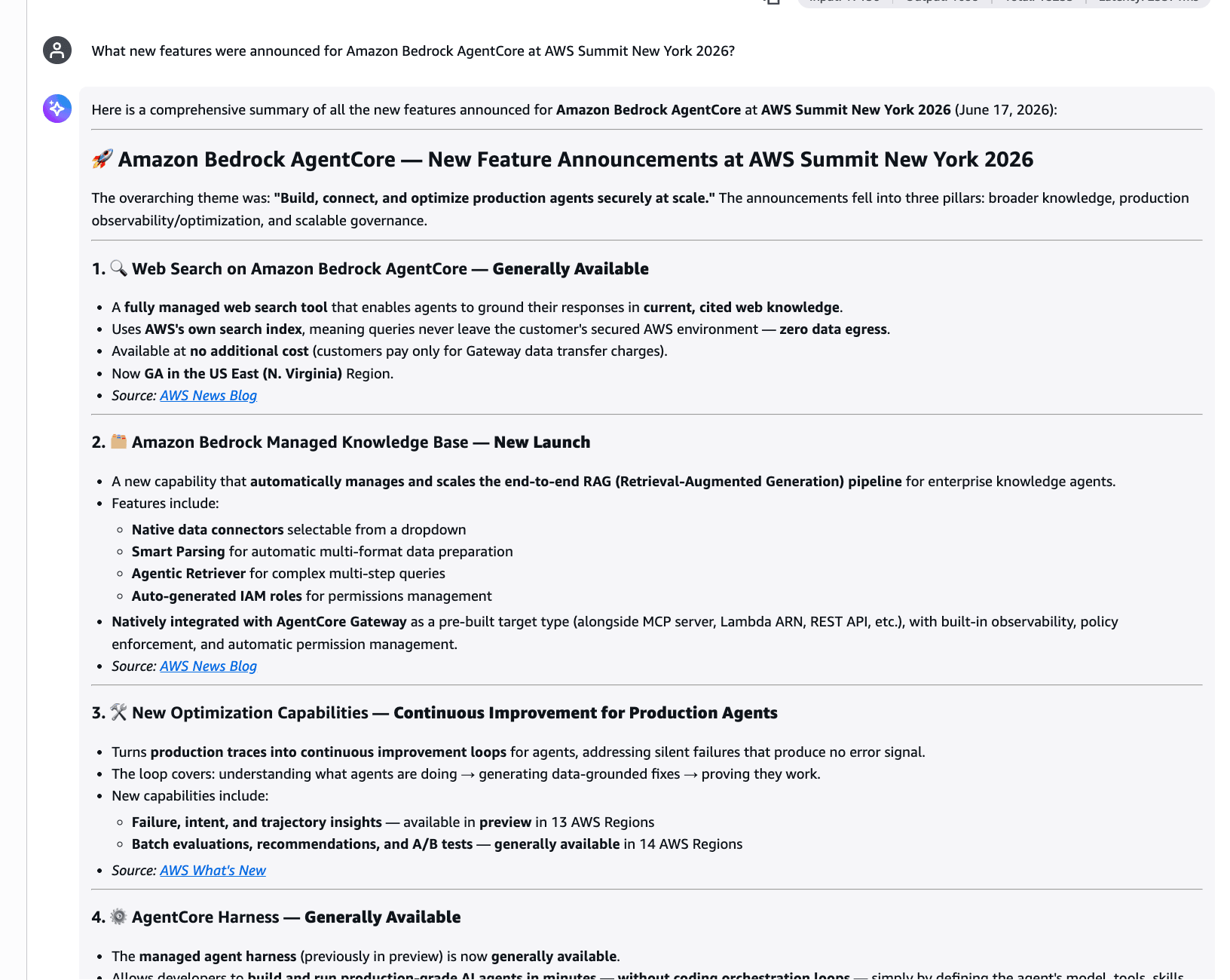
Wow, the AgentCore-related updates announced at AWS Summit NYC 2026 appear to be covered quite comprehensively!
- Web Search on AgentCore (GA)
- Amazon Bedrock Managed Knowledge Base (New)
- Optimization Capabilities (Insights: Preview / Batch Evals: GA)
- AgentCore Harness (GA)
- AWS Context (Coming Soon)
Each item was organized with official sources.
Response Details
Here is a comprehensive summary of all the new features announced for **Amazon Bedrock AgentCore** at **AWS Summit New York 2026** (June 17, 2026):

---

## 🚀 Amazon Bedrock AgentCore — New Feature Announcements at AWS Summit New York 2026

The overarching theme was: **"Build, connect, and optimize production agents securely at scale."** The announcements fell into three pillars: broader knowledge, production observability/optimization, and scalable governance.

---

### 1. 🔍 Web Search on Amazon Bedrock AgentCore — **Generally Available**
- A **fully managed web search tool** that enables agents to ground their responses in **current, cited web knowledge**.
- Uses **AWS's own search index**, meaning queries never leave the customer's secured AWS environment — **zero data egress**.
- Available at **no additional cost** (customers pay only for Gateway data transfer charges).
- Now **GA in the US East (N. Virginia)** Region.
- *Source: [AWS News Blog](https://aws.amazon.com/blogs/aws/announcing-web-search-on-amazon-bedrock-agentcore-ground-your-ai-agents-in-current-accurate-web-knowledge/)*

---

### 2. 🗂️ Amazon Bedrock Managed Knowledge Base — **New Launch**
- A new capability that **automatically manages and scales the end-to-end RAG (Retrieval-Augmented Generation) pipeline** for enterprise knowledge agents.
- Features include:
  - **Native data connectors** selectable from a dropdown
  - **Smart Parsing** for automatic multi-format data preparation
  - **Agentic Retriever** for complex multi-step queries
  - **Auto-generated IAM roles** for permissions management
- **Natively integrated with AgentCore Gateway** as a pre-built target type (alongside MCP server, Lambda ARN, REST API, etc.), with built-in observability, policy enforcement, and automatic permission management.
- *Source: [AWS News Blog](https://aws.amazon.com/blogs/aws/introducing-amazon-bedrock-managed-knowledge-base-for-faster-more-accurate-enterprise-ai-applications/)*

---

### 3. 🛠️ New Optimization Capabilities — **Continuous Improvement for Production Agents**
- Turns **production traces into continuous improvement loops** for agents, addressing silent failures that produce no error signal.
- The loop covers: understanding what agents are doing → generating data-grounded fixes → proving they work.
- New capabilities include:
  - **Failure, intent, and trajectory insights** — available in **preview** in 13 AWS Regions
  - **Batch evaluations, recommendations, and A/B tests** — **generally available** in 14 AWS Regions
- *Source: [AWS What's New](https://aws.amazon.com/about-aws/whats-new/2026/06/amazon-bedrock-agentcore-new-optimization-capabilities/)*

---

### 4. ⚙️ AgentCore Harness — **Generally Available**
- The **managed agent harness** (previously in preview) is now **generally available**.
- Allows developers to **build and run production-grade AI agents in minutes — without coding orchestration loops** — simply by defining the agent's model, tools, skills, and instructions in configuration.

---

### 5. 🌐 Coming Soon: AWS Context (Integration with AgentCore)
- A brand-new companion service, **AWS Context**, was announced that automatically maps relationships across organizational data into a **knowledge graph**.
- It provides **agentic search** so agents can access governed data relationships, business rules, and domain knowledge at runtime — deeply integrated with the AgentCore ecosystem.

---

### Summary Table

| Feature | Status | Key Benefit |
|---|---|---|
| Web Search on AgentCore | **GA** | Current, cited web knowledge inside AWS environment |
| Managed Knowledge Base | **New Launch** | Fully managed RAG pipeline with native AgentCore Gateway integration |
| Optimization Capabilities (Failure/Intent/Trajectory Insights) | **Preview** (13 Regions) | Detect silent production failures |
| Optimization Capabilities (Batch Evals, A/B Tests) | **GA** (14 Regions) | Continuous agent improvement loop |
| AgentCore Harness | **GA** | No-code orchestration for production agents |
| AWS Context (Knowledge Graph) | **Coming Soon** | Org-wide agentic knowledge access |

These announcements were positioned as helping customers **connect agents to broader knowledge sources, continuously improve them in production, and enforce controls that scale as agents grow more capable**.
I felt there was a difference in answer accuracy compared to when accessing information centered on Japanese. At this point, my impression is that accuracy is better when information is available in English.
For reference, the following article provides a clear summary of information from AWS NYC Summit. I think comparing that article with the search results makes it easy to understand the level of accuracy.
Conclusion
Being able to incorporate web search into agents without an external API was easy, including the setup!
There still seems to be room for improvement in Japanese search accuracy and answer correctness, but it's great that it's provided as a managed service and stays entirely within AWS.
I'd like to start incorporating it right away and continue verifying how to actually use it going forward.
I hope this article has been helpful in some way. Thank you so much for reading to the end!
Supplementary Notes
I'll pick up a few useful specifications from the official documentation.
Input Schema
The parameters when calling with tools/call are as follows:
| Field | Type | Required | Description |
|---|---|---|---|
| query | string | Yes | Search query. Up to 200 characters |
| maxResults | integer | No | Maximum number of results to return. Range of 1–25. Default is 10 |
Response Format
The response is returned in MCP-compliant JSON format. Each search result includes text / url / title / publishedDate.
{
  "isError": false,
  "content": [
    {
      "type": "text",
      "text": "{\"id\":\"824f89d0\",\"results\":[{\"text\":\"Python 3.13 was released on...\",\"publishedDate\":\"2024-10-07\",\"url\":\"https://example.com/python/releases/3.13\",\"title\":\"Python 3.13 Release Highlights\"}]}"
    }
  ]
}
Domain Filtering
By configuring a domain blocklist, you can exclude specific domains from search targets.
Acceptable Use
When using search results, you must display source citations and links to end users. Additionally, bulk extraction and storage of search results, and using them to build competing indexes or databases, are prohibited.