
I tried checking IAM principal-based cost allocation (Amazon Bedrock) from CUR 2.0

This page has been translated by machine translation. View original
I tried out the Bedrock cost analysis using CUR (Cost and Usage Report) 2.0 described in the following AWS blog.
In short, this is a feature where who called Amazon Bedrock is recorded as an IAM principal in CUR 2.0. The recorded destination is the line_item_iam_principal column in CUR. (※ The AWS blog also mentions "cost allocation by IAM principal tags")
In this article, I prepared 4 different callers to invoke Bedrock and verified what values are actually recorded in the line_item_iam_principal column of CUR 2.0.
I also introduce the steps for setting up CUR 2.0 data exports and Athena tables.
Background: What is IAM Principal-Based Cost Allocation?
IAM principal-based cost allocation is a mechanism that links costs to the IAM principal that executed the request. IAM principals include IAM users, IAM roles, IAM Identity Center users (which are actually IAM roles), and EC2 instance profiles (which are also actually IAM roles).
Currently, it only supports Bedrock inference requests. A line_item_iam_principal column is added to CUR 2.0, where the ARN of the caller is recorded.
To view consolidated data for the entire organization, you enable this in the management account. Specifically, you enable "Include caller identity (IAM principal) allocation data" when creating a CUR 2.0 data export.
Trying It Out (Preparation)
Creating a CUR 2.0 Data Export
I created a CUR 2.0 from the data exports section of the Billing and Cost Management console in the management account.
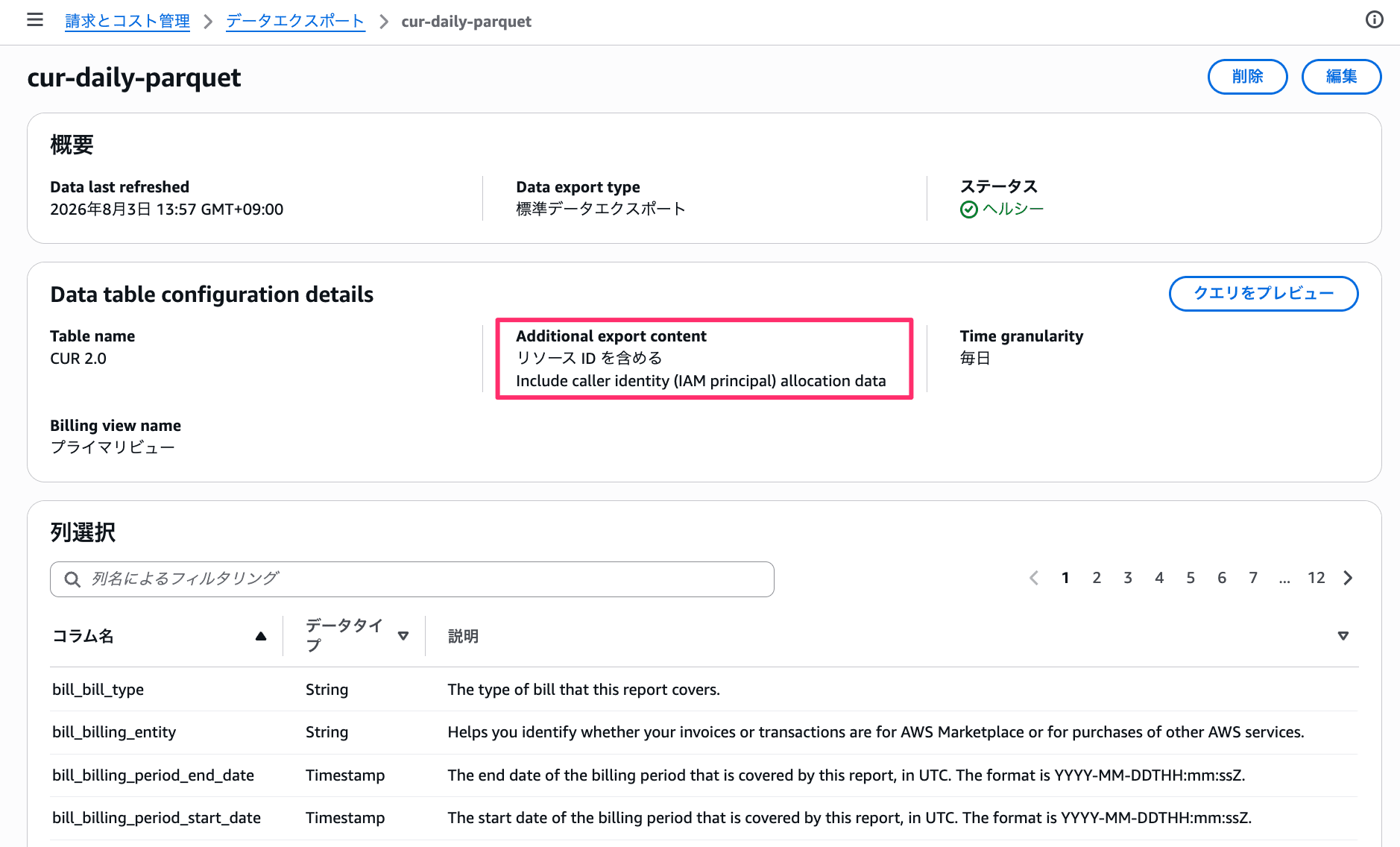
CUR 2.0 data export settings screen. Include caller identity (IAM principal) allocation data is enabled
The main configuration values are as follows.
| Item | Value |
|---|---|
| Export type | Detailed data export |
| Data table | CUR 2.0 |
| Include resource IDs | ON |
| Include caller identity (IAM principal) allocation data | ON |
| Time granularity | Daily |
| Column selection | All |
| Compression type and file format | Parquet |
Creating an Athena Table
To read the Parquet output to S3 from Athena, I created a Glue table using CloudFormation. The CFn template is available on Gist.
I created the database cur_daily_parquet and table cur_daily_parquet as shown below.
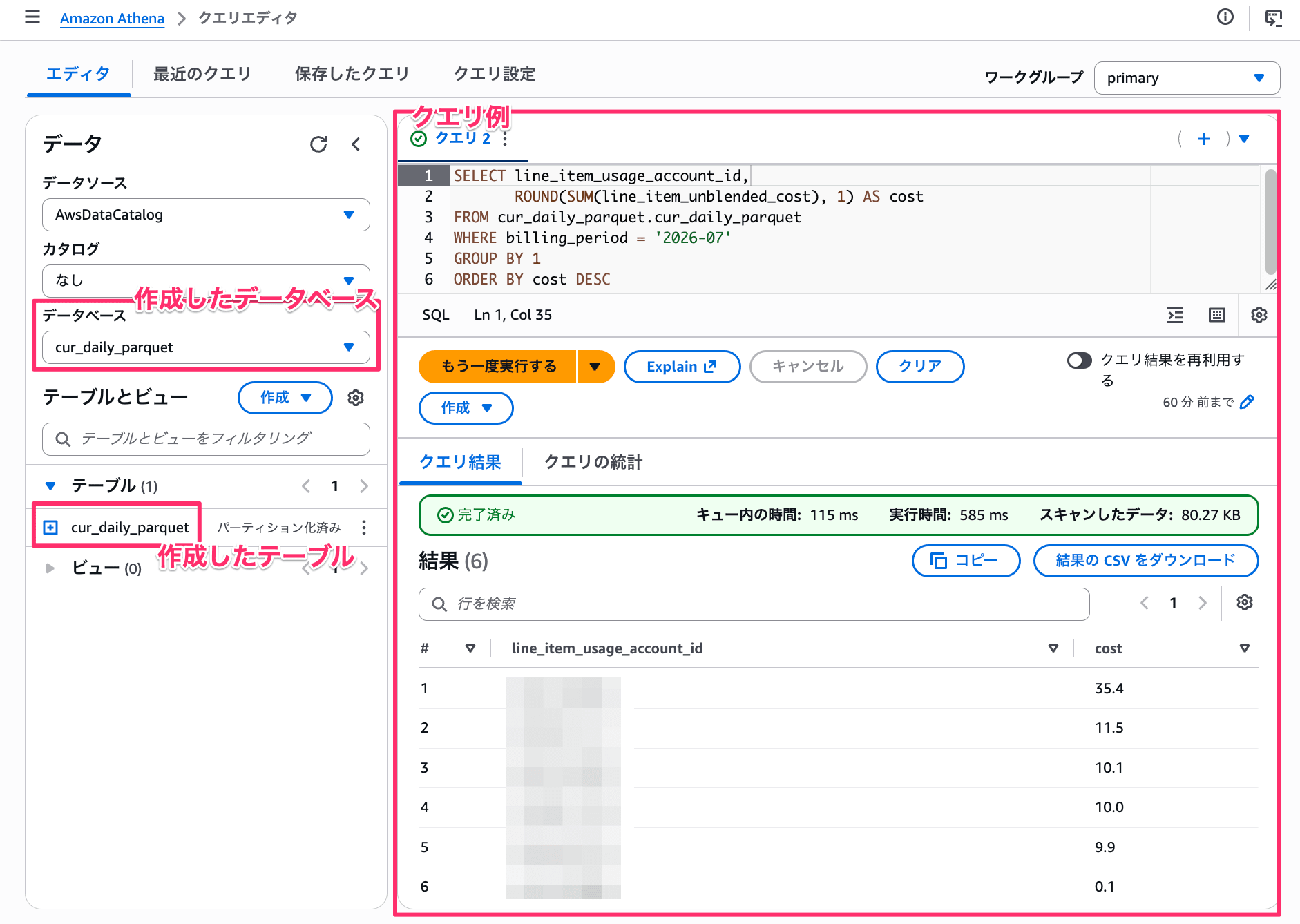
Database and table created in Athena
Generating Bedrock Charges
I prepared 4 different callers and executed the same command (aws bedrock-runtime converse) from each of them.
| Caller | Notes |
|---|---|
| IAM user | Created a user for testing and executed using an access key |
| IAM role | Obtained temporary credentials with sts assume-role and executed |
| IAM Identity Center user | Logged in with a specific permission set and executed directly |
| EC2 instance role | Executed on an EC2 instance with an instance profile attached |
The command executed was as follows.
aws bedrock-runtime converse \
  --region ap-northeast-1 \
  --model-id global.anthropic.claude-sonnet-5 \
  --messages '[{"role":"user","content":[{"text":"CURコスト配分の検証中です。「ok」とだけ返答してください。"}]}]' \
  --inference-config '{"maxTokens":16}'
Trying It Out (CUR Check)
After analyzing the CUR with Athena, the line_item_iam_principal was recorded for each executor as follows.
| Executor | Recorded line_item_iam_principal |
|---|---|
| IAM user | arn:aws:iam::123456789012:user/{username} |
| IAM role (AssumeRole) | arn:aws:sts::123456789012:assumed-role/{role name}/{session name} |
| IAM Identity Center user | arn:aws:sts::123456789012:assumed-role/AWSReservedSSO_{permission set name}_{ID}/{username} |
| EC2 instance role | arn:aws:sts::123456789012:assumed-role/{role name}/{instance ID} |
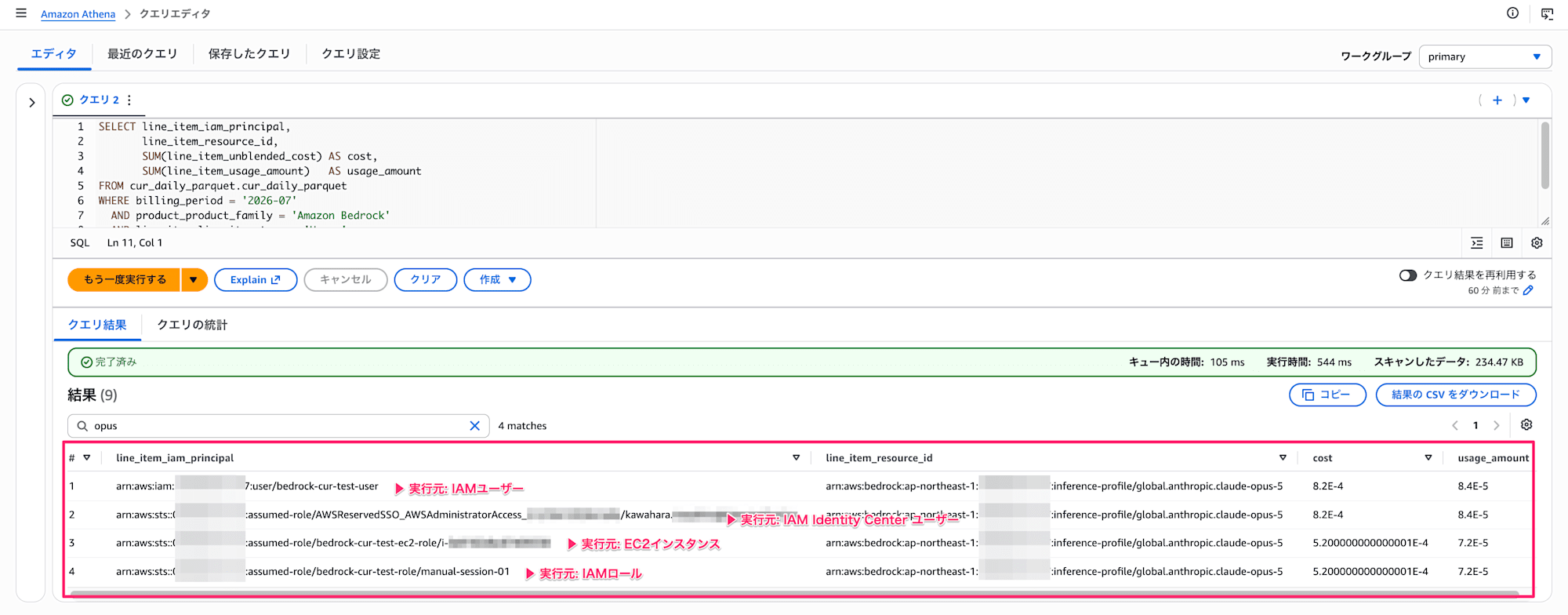
Athena query results. The ARN of each executor is recorded in the line_item_iam_principal column
The query executed is as follows.
-- Output cost and usage by IAM principal and model used
SELECT line_item_iam_principal,
       line_item_resource_id,
       SUM(line_item_unblended_cost) AS cost,
       SUM(line_item_usage_amount)   AS usage_amount
FROM cur_daily_parquet.cur_daily_parquet
WHERE billing_period = '2026-07'
  AND product_product_family = 'Amazon Bedrock'
  AND line_item_line_item_type = 'Usage'
GROUP BY 1, 2
ORDER BY cost DESC
Supplement 1: Sample of a Single Entry
For reference, a sample of a single InvokeModelInference entry is as follows.
| Item | Column Name | Value |
|---|---|---|
| IAM principal | line_item_iam_principal |
arn:aws:iam::123456789012:user/{username} |
| Product family | product_product_family |
Amazon Bedrock |
| Region | product_region_code |
ap-northeast-1 |
| Line item description | line_item_line_item_description |
AWS Marketplace software usage|ap-northeast-1|Output Tokens - Standard, Global |
| Usage start | line_item_usage_start_date |
2026-07-28 05:00:00 |
| Usage end | line_item_usage_end_date |
2026-07-28 06:00:00 |
| Usage amount | line_item_usage_amount |
1.1e-05 |
| Billing unit | pricing_unit |
1M tokens |
| Usage type | line_item_usage_type |
APN1-MP:APN1_output_tokens_global_standard-Units |
| Unblended cost | line_item_unblended_cost |
0.00011 |
| Billing account | line_item_usage_account_id |
123456789012 |
| Billing account name | line_item_usage_account_name |
{account name} |
| Operation | line_item_operation |
InvokeModelInference |
| Resource ID | line_item_resource_id |
arn:aws:bedrock:ap-northeast-1:123456789012:inference-profile/global.anthropic.claude-sonnet-5 |
Supplement 2: Cost Allocation by IAM Principal Tags
From the cost allocation tags page, by [enabling IAM principal tag keys], you can aggregate Bedrock costs by tags assigned to IAM users and roles.
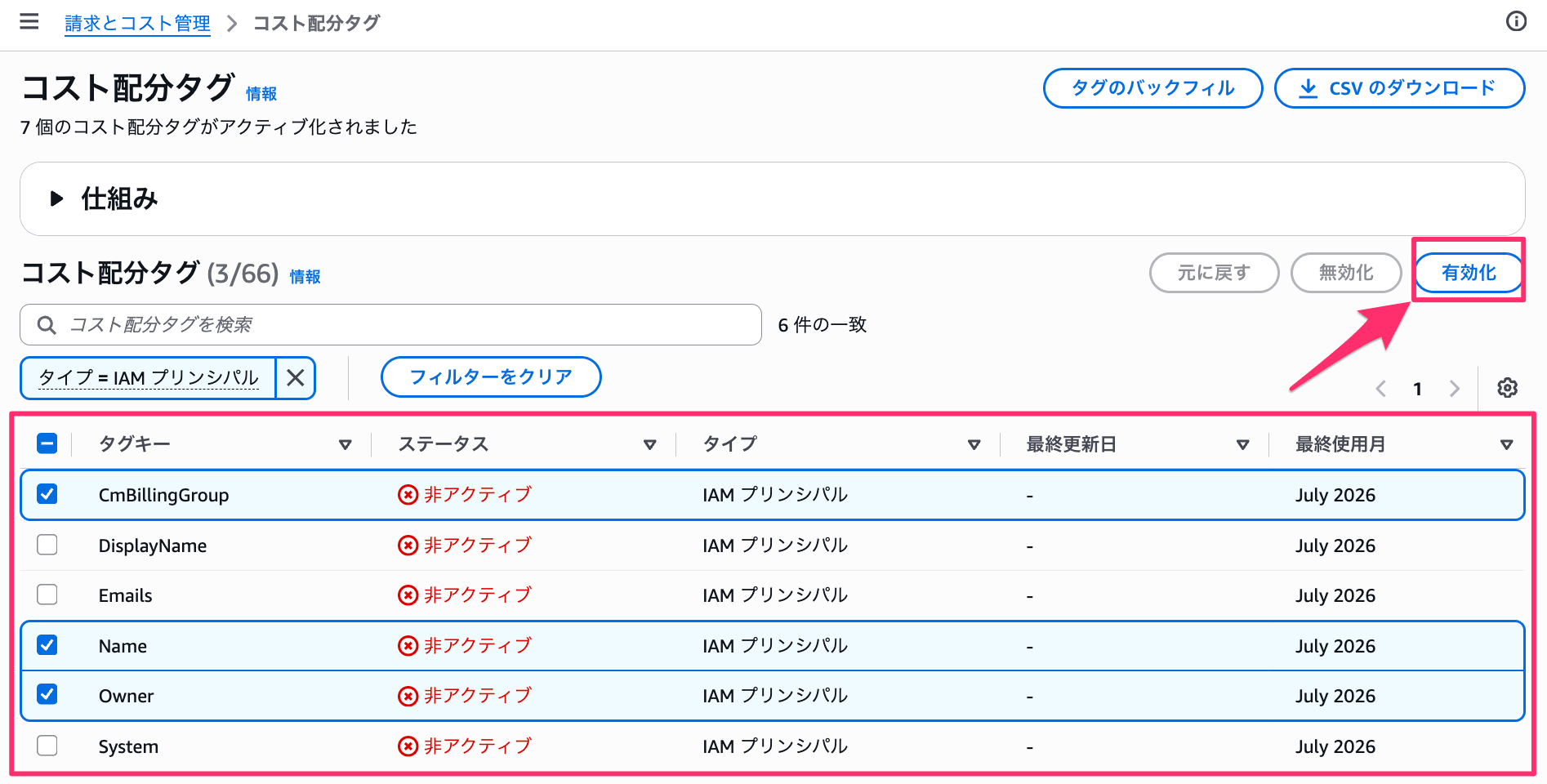
Select IAM principal in the management account and enable
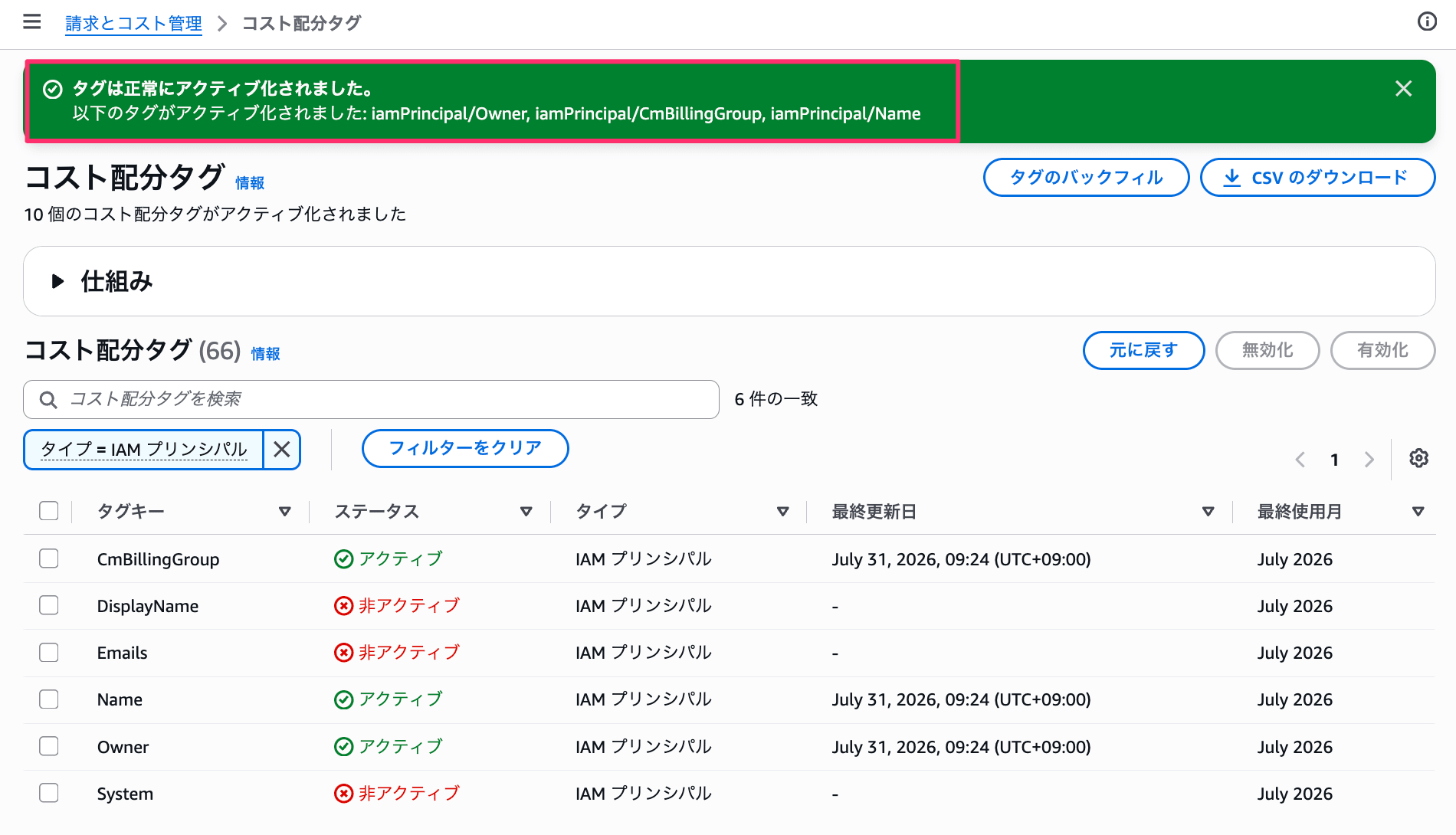
After enabling
After enabling, the tags column in CUR 2.0 and Cost Explorer will have additional items available for filtering and grouping.
▼ Example query from CUR 2.0
-- Output cost and usage by IAM principal, tag, and model
SELECT
  split_part(line_item_iam_principal, ':', 6) AS iam_principal,
  tags,
  split_part(line_item_resource_id, '/', 2) AS model_id,
  SUM(line_item_usage_amount)   AS usage_amount,
  SUM(line_item_unblended_cost) AS cost
FROM cur_daily_parquet.cur_daily_parquet
WHERE billing_period = '2026-07'
  AND product_product_family = 'Amazon Bedrock'
  AND line_item_line_item_type = 'Usage'
GROUP BY 1, 2, 3
ORDER BY cost DESC
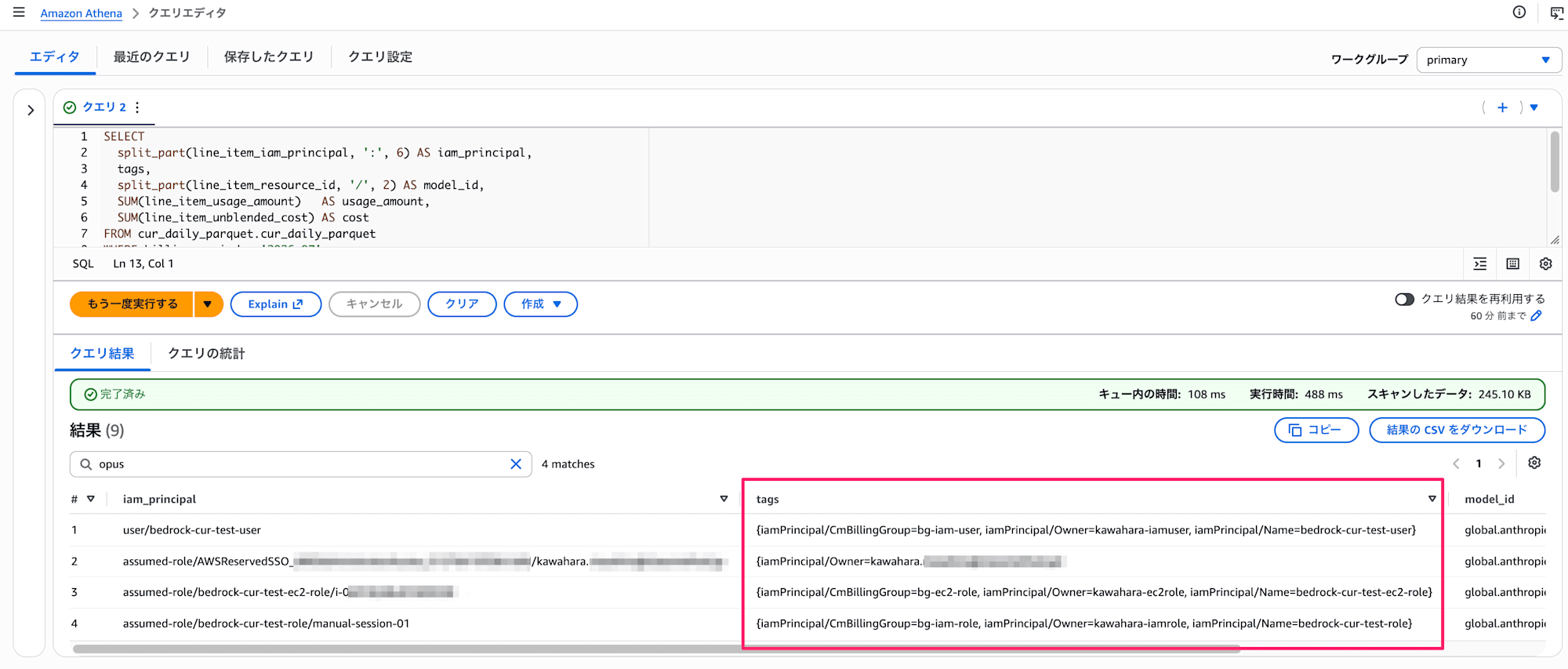
Athena query results. Tags such as iamPrincipal/Owner are recorded in the tags column
▼ Example of tag usage in Cost Explorer
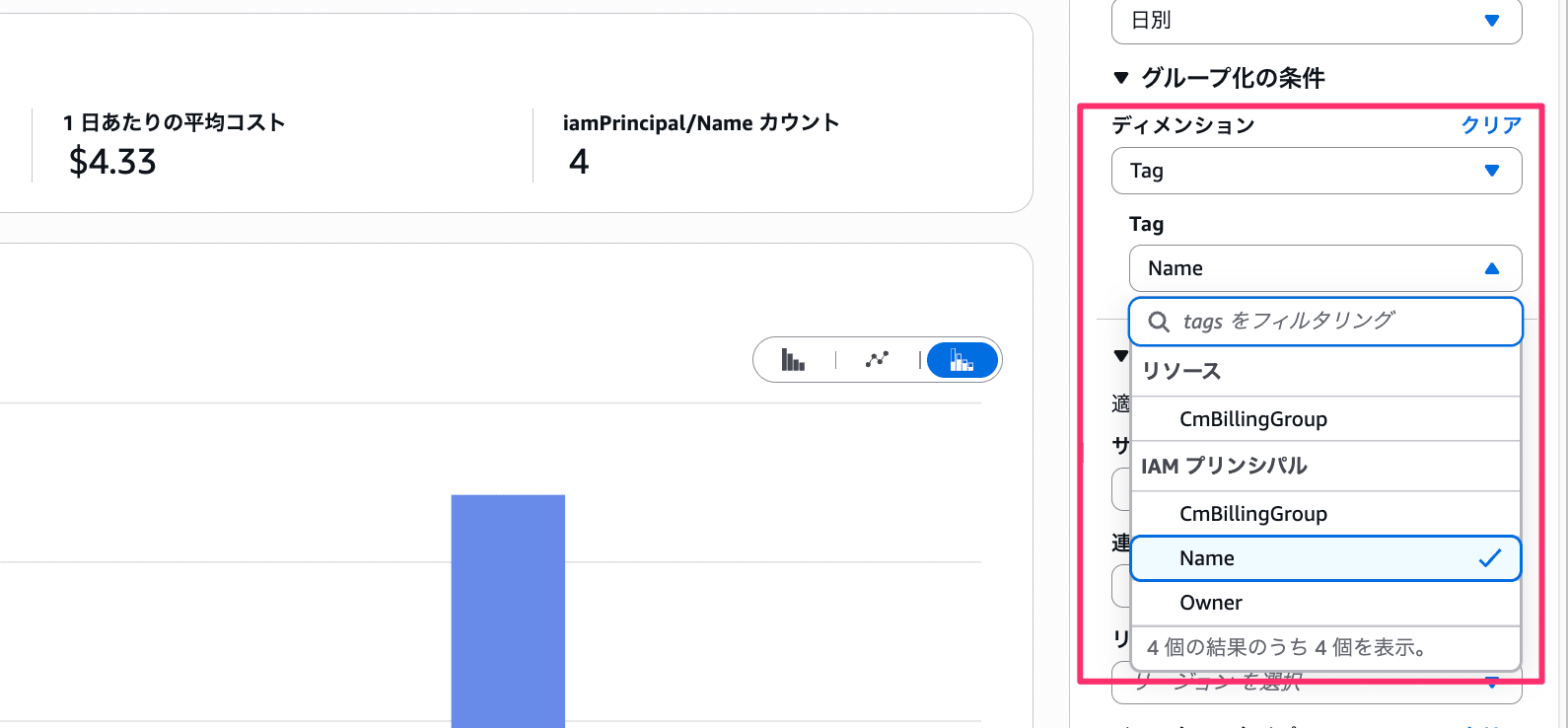
Cost Explorer grouping conditions. IAM principal tag keys are displayed under Tag in the dimensions
Conclusion
I tried out IAM principal-based cost allocation.
Until this feature appeared, I had been considering an approach where inference profiles were created per user (group) or project and the costs of each were checked individually. Now, just by looking at the line_item_iam_principal column in CUR 2.0, I can understand who called which model and how much.
At the moment, only Amazon Bedrock is supported, but I think this is a feature that will become increasingly important as organizational use of generative AI grows.
That's all — I hope this was helpful.
