
Structuring LLM Output with Tool Use in Bedrock Claude — The Story of How We No Longer Need JSON.parse() or Regular Expressions

This page has been translated by machine translation. View original
Introduction
Have you ever written code like this when you want an LLM to respond in JSON?
raw_text = llm_response["output"]["message"]["content"][0]["text"]

# Extract with regex because the LLM sometimes wraps output in a markdown code block
json_match = re.search(r"```(?:json)?\s*([\s\S]*?)```", raw_text)
json_str = json_match.group(1).strip() if json_match else raw_text.strip()
parsed = json.loads(json_str)
"Have the LLM return JSON and parse it with json.loads()" — it seems simple at first glance, but it will definitely break in production.
In this article, I'll introduce an approach using Amazon Bedrock's Tool Use (toolChoice enforcement) that eliminates the need for both regex and json.loads(). I'll concretely show the issues I actually encountered while developing an in-house service desk AI (RAG + Claude), and the code that could be deleted after migrating to Tool Use.
Why "Having the LLM Return JSON" Breaks
The approach of instructing via system prompt to "always return JSON" and parsing the response with json.loads() has three structural problems.
1. Output Gets Wrapped in Markdown Code Blocks
Out of helpfulness, the LLM may wrap JSON in ```json ... ```. Since json.loads() doesn't understand code block syntax, it fails. You end up writing regex to strip it out, but that itself becomes a fragile parser.
2. Extra Commentary Gets Mixed In
Prefatory text like "Here are the results:" can appear before the JSON. Even if you emphasize "return only JSON" in the prompt, this can recur with model updates or changes in input.
3. Truncation at max_tokens
This is the most troublesome problem. When the response reaches the token limit, the JSON gets cut off midway.
{
  "results": [...],
  "general_advice": "The remediation steps are as follows.\n\n## Pattern 1\n\n1. Admin panel
json.loads() will naturally fail. Because we had a fallback of general_advice = raw_text, a bug occurred where the truncated raw JSON was displayed directly to the user. Japanese text consumes approximately 1.5–2× more tokens than English, making max_tokens estimation particularly difficult.
Solution: Structured Output via Tool Use
Claude (and Claude on Bedrock) has a Tool Use feature. It was originally designed for "having the LLM call external tools," but by forcing a specific tool with tool_choice, you can make the LLM's output always conform to a specified JSON Schema.
The key point is that you don't actually need to execute the tool. You're simply borrowing the Tool Use mechanism to tell the LLM "output according to this schema."
How It Works
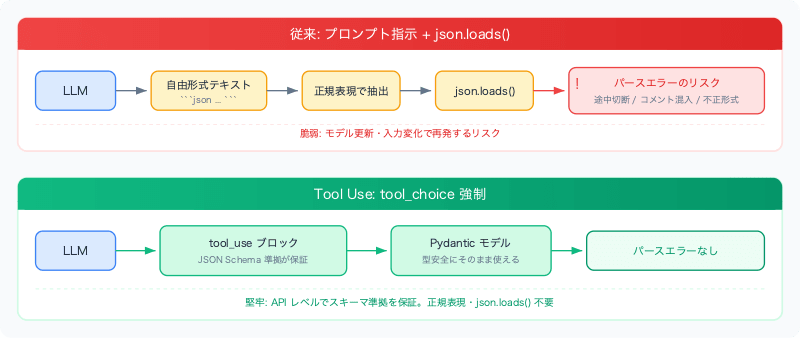
When you pass tools (schema definition) and tool_choice (forced use) to the API, the LLM returns a response as a tool_use block. The input field of this block is guaranteed at the API level to be JSON that conforms to the schema.
Implementation
Step 1: Define the Schema with a Pydantic Model
First, define the structure you want the LLM to return using a Pydantic model.
from pydantic import BaseModel, Field
from typing import Literal

class TicketResult(BaseModel):
    issue_id: int
    subject: str
    relevance: Literal["high", "medium", "low"]
    summary: str

class ChatToolInput(BaseModel):
    """Fields generated by the LLM via tool use."""

    response_type: Literal["clarification", "results"]
    general_advice: str = Field(
        default="", description="Response for the agent (markdown format)"
    )
    question: str = ""
    results: list[TicketResult] = []
Field(description=...) is reflected in the JSON Schema's description, giving the LLM a clue to understand the meaning of each field.
Step 2: Force the Output with tool_choice
Here is an example using the Anthropic SDK (anthropic[bedrock]).
from anthropic.lib.bedrock import AsyncAnthropicBedrock

client = AsyncAnthropicBedrock(aws_region="ap-northeast-1")

tool_schema = ChatToolInput.model_json_schema()

response = await client.messages.create(
    model="ap-northeast-1.anthropic.claude-sonnet-4-5-20250514-v1:0",
    messages=[{"role": "user", "content": user_message}],
    system=system_prompt,
    max_tokens=8192,
    temperature=0.3,
    tools=[{
        "name": "submit_response",
        "description": "Submit the structured helpdesk response",
        "input_schema": tool_schema,
    }],
    # This is the key. Force the LLM to use this tool.
    tool_choice={"type": "tool", "name": "submit_response"},
)
tool_choice={"type": "tool", "name": "submit_response"} is the key. This forces the LLM to always respond in the form of calling the submit_response tool, generating JSON that conforms to the schema defined in input_schema.
Step 3: Retrieve the Response
for block in response.content:
    if block.type == "tool_use" and block.name == "submit_response":
        result = ChatToolInput(**block.input)
        # result.response_type, result.general_advice, result.results
        # can be retrieved in a type-safe manner
No regex or json.loads() needed. block.input is already a parsed dict, and simply passing it to Pydantic gives you an object with type validation.
When Using boto3
If you use boto3's Converse API instead of the Anthropic SDK, the parameter names differ.
client = boto3.client("bedrock-runtime", region_name="ap-northeast-1")

response = client.converse(
    modelId="ap-northeast-1.anthropic.claude-sonnet-4-5-20250514-v1:0",
    messages=messages,
    system=[{"text": system_prompt}],
    inferenceConfig={"maxTokens": 8192, "temperature": 0.3},
    toolConfig={
        "tools": [{
            "toolSpec": {
                "name": "submit_response",
                "description": "Submit the structured helpdesk response",
                "inputSchema": {"json": tool_schema},
            }
        }],
        "toolChoice": {"tool": {"name": "submit_response"}},
    },
)
Note: boto3's Converse API does not support JSON Schema $defs / $ref. Since Pydantic v2's model_json_schema() generates nested models using $defs, inline expansion is required.
def _resolve_schema_refs(schema: dict) -> dict:
    """Inline-expand $ref to make it Bedrock-compatible (resolved recursively)."""
    defs = schema.pop("$defs", {})

    def _resolve(obj):
        if isinstance(obj, dict):
            if "$ref" in obj:
                ref_name = obj["$ref"].split("/")[-1]
                return _resolve(dict(defs[ref_name]))
            return {k: _resolve(v) for k, v in obj.items()}
        if isinstance(obj, list):
            return [_resolve(item) for item in obj]
        return obj

    return _resolve(schema)

# Expansion is required for boto3
tool_schema = _resolve_schema_refs(ChatToolInput.model_json_schema())
When using the Anthropic SDK (anthropic[bedrock]), the Messages API is used internally and $defs / $ref are natively supported, so this expansion process is not needed.
Applying the Same Pattern to Multiple Use Cases
Structured output via Tool Use can be reused for multiple purposes within a single project. Simply changing the schema (Pydantic model) applies the same pattern.
Combining with Streaming
Tool Use can also be used in combination with streaming. When streaming with tool_choice enforced, the JSON arrives in partial chunks (token by token).
async with client.messages.stream(
    model=model_id,
    messages=messages,
    system=system_prompt,
    max_tokens=8192,
    tools=[{
        "name": "submit_response",
        "description": "Submit the structured helpdesk response",
        "input_schema": tool_schema,
    }],
    tool_choice={"type": "tool", "name": "submit_response"},
) as stream:
    async for event in stream:
        if event.type == "input_json":
            chunk = event.partial_json  # A fragment of JSON arrives
However, what arrives during streaming is fragments of a JSON string. If you want to display text like "general_advice": "The remediation steps are..." in real time, you need to implement a state machine that parses the JSON structure. This will be covered in detail in this article.
Fallback When max_tokens Is Reached
Even with Tool Use, there is a possibility that JSON will be cut off midway if max_tokens is reached. However, you can use data already retrieved during streaming as a fallback.
try:
    tool_input = ChatToolInput.model_validate_json(full_tool_input)
    result = ChatResponse(
        response_type=tool_input.response_type,
        general_advice=tool_input.general_advice,
        results=tool_input.results[:3],
    )
except Exception:
    # When JSON is incomplete due to reaching max_tokens
    # Use the general_advice already retrieved during streaming as a fallback
    result = ChatResponse(
        response_type="results",
        general_advice=streamed_advice or "An error occurred while generating the response.",
    )
With the traditional approach, when json.loads() failed, raw JSON was displayed directly to the user. With the combination of Tool Use + streaming, the general_advice text received up to that point can be used, greatly improving the user experience.
Before / After
Before: Regex + json.loads() Parser
# Instruct JSON format in the system prompt
RESPONSE_FORMAT = """{
  "results": [...],
  "general_advice": "...",
}"""

# Parse the response
raw_text = "".join(block.get("text", "") for block in output)

try:
    json_match = re.search(r"```(?:json)?\s*([\s\S]*?)```", raw_text)
    json_str = json_match.group(1).strip() if json_match else raw_text.strip()
    parsed = json.loads(json_str)
except (json.JSONDecodeError, AttributeError):
    return [], raw_text  # Return raw text as-is (the cause of raw JSON being displayed)

results = [TicketResult(**r) for r in parsed.get("results", [])]
general_advice = parsed.get("general_advice", "")
After: Tool Use
tool_schema = ChatToolInput.model_json_schema()

response = await client.messages.create(
    ...,
    tools=[{
        "name": "submit_response",
        "description": "Submit the structured helpdesk response",
        "input_schema": tool_schema,
    }],
    tool_choice={"type": "tool", "name": "submit_response"},
)

for block in response.content:
    if block.type == "tool_use":
        result = ChatToolInput(**block.input)  # Type-safe. No parse errors.
import re and import json are no longer needed, and the JSON format instruction section (approximately 30 lines) could also be removed from the system prompt.
Summary
| Traditional (regex + json.loads) | Tool Use (tool_choice enforcement) | |
|---|---|---|
| Schema compliance | Relies on prompt (not guaranteed) | Guaranteed at the API level |
| Markdown fences | Must be removed with regex | Does not occur |
| Extra commentary | Risk of inclusion | Does not occur |
max_tokens truncation |
json.loads() fails → raw JSON displayed |
Easier to build a fallback strategy |
| Schema changes | Dual management of prompt and parser | Only the Pydantic model needs to change |
Structured output via Tool Use is not just a feature for "executing tools" — it can be used as a means to "enforce the LLM's output format at the API level." Since the same pattern applies whether you're using Bedrock or the Anthropic API directly, it's worth considering for any case where you want to structure LLM output.
