Implemented an SSE progress bubble in RAG chat that shows "what it's currently doing"

This page has been translated by machine translation. View original
Introduction
When operating a RAG (Retrieval-Augmented Generation)-based chat UI, there is a wait time of several seconds to tens of seconds from when a user submits a query to when the answer is displayed. During this time, a simple loading spinner alone doesn't tell users "Is it actually working?" or "How much longer will it take?"
To address this, I implemented progress status bubbles that visualize each step of the backend processing pipeline in real time.
This article introduces the process of incrementally building SSE (Server-Sent Events)-based progress display in a RAG chat application using a FastAPI + Next.js configuration.
Final Result
The progress bubbles display the following 4 steps in real time:
- Analyzing query — Analyzing the user's inquiry
- Searching knowledge base — Generating and executing KB search queries
- Fetching chunks — Retrieving and processing search result chunks
- Generating answer — Answer generation via LLM (token streaming)
Each step transitions from pending → active (with shimmer animation) → done (with checkmark). Bubbles can be expanded by clicking, allowing you to check details about the actual search queries used and retrieved chunks (title, score, preview).
Prerequisites & Environment
| Item | Version |
|---|---|
| Next.js | 16 |
| React | 19 |
| FastAPI | 0.115+ |
| Amazon Bedrock (Claude) | Sonnet 4.5 |
| Python | 3.13 |
| Node.js | 24 LTS |
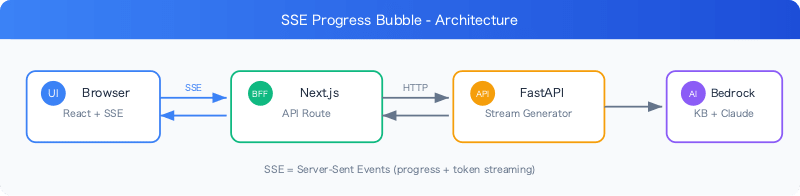
The architecture is as follows:
Step 1: Backend SSE Event Design
Defining SSE Event Types
First, I designed the types of SSE events to send to the frontend. I created a unified event system that includes not only progress display but also token streaming and error notifications.
# SSE event registry — consolidates all event definitions in one place
SSE_EVENTS: dict[str, tuple[type, str]] = {
    "progress":  (SseProgressData,  "Progress of processing steps"),
    "kb_query":  (SseKbQueryData,   "Query string used for KB search"),
    "kb_chunks": (SseKbChunksData,  "List of chunk previews retrieved from KB"),
    "token":     (SseTokenData,     "Text chunk generated by AI"),
    "result":    (ChatResponse,     "Final result"),
    "error":     (SseErrorData,     "Details when an error occurs"),
}
This registry functions as a Single Source of Truth, and the x-sse-events section of the OpenAPI specification is also auto-generated. When adding a new event, you only need to add one line here.
Type-defining Event Data with Pydantic Models
I define the payload for each SSE event using Pydantic models:
from pydantic import BaseModel, Field
from typing import Literal

class SseProgressData(BaseModel):
    step: Literal["analyzing", "retrieving", "fetching", "generating"]

class SseKbQueryData(BaseModel):
    query: str

class SseKbChunkPreview(BaseModel):
    title: str = Field(..., description="Title of the source document")
    score: float = Field(..., description="Relevance score (0-1)")
    preview: str = Field(..., description="First 120 characters of chunk content")

class SseKbChunksData(BaseModel):
    chunks: list[SseKbChunkPreview]

class SseErrorData(BaseModel):
    detail: str
By constraining step names with the Literal type, we prevent invalid step names from flowing between the backend and frontend.
Emitting Events from a Stream Generator
Using FastAPI's StreamingResponse, I emit SSE events at each point in the processing pipeline:
def _sse(event: str, data: object) -> str:
    return f"event: {event}\ndata: {json.dumps(data, ensure_ascii=False)}\n\n"

async def _chat_stream(request: ChatRequest) -> AsyncGenerator[str]:
    try:
        # Step 1: Start analysis
        yield _sse("progress", {"step": "analyzing"})

        # Step 2: Run KB query generation and problem classification concurrently
        yield _sse("progress", {"step": "fetching"})
        kb_query, problem_ctx = await asyncio.gather(
            generate_kb_query(request.messages),
            classify_problem(request.messages[0].content),
        )

        # Step 3: Execute KB search
        yield _sse("progress", {"step": "retrieving"})
        chunks = await retrieve_from_kb(kb_query, top_k=request.top_k)

        # Emit search metadata (for expanded display)
        yield _sse("kb_query", {"query": kb_query})
        yield _sse("kb_chunks", {"chunks": _make_chunk_previews(chunks)})

        # Step 4: LLM answer generation (token streaming)
        yield _sse("progress", {"step": "generating"})
        async for token_or_result in generate_chat_answer(request.messages, chunks):
            if isinstance(token_or_result, str):
                yield _sse("token", {"content": token_or_result})
            else:
                yield _sse("result", token_or_result)

    except Exception as e:
        yield _sse("error", {"detail": str(e)})
A key point is the concurrent execution of KB query generation and problem classification using asyncio.gather. This avoids stacking the latency of two LLM calls.
Step 2: Frontend Type Definitions
I define TypeScript types corresponding to the backend SSE events:
export type KbChunk = {
  title: string;
  score: number;
  preview: string;
};

export type ProgressStep = {
  id: "analyzing" | "retrieving" | "fetching" | "generating";
  label: string;
  status: "pending" | "active" | "done";
  kbQuery?: string;
  kbChunks?: KbChunk[];
  reasoning?: string;
};

export type ChatBubble =
  | { type: "user"; text: string }
  | { type: "streaming"; general_advice: string; queryId?: number }
  | { type: "progress"; steps: ProgressStep[]; collapsed: boolean; queryId?: number }
  | { type: "progress-done"; steps: ProgressStep[]; collapsed: boolean; queryId?: number }
  | { type: "results"; results: SearchResult[]; general_advice: string; /* ... */ }
  | { type: "error"; text: string };
ChatBubble is a union type representing all bubble types within the chat thread. The reason progress and progress-done are separated is for multi-turn isolation, which I'll describe later.
Step 3: SSE Stream Parsing
Receiving SSE via ReadableStream
Using the fetch API's ReadableStream, I parse SSE events one by one and update React state:
async function handleSend(text: string) {
  const queryId = ++queryIdRef.current;

  const STEP_LABELS: Record<ProgressStep["id"], string> = {
    analyzing: "Analyzing query",
    fetching: "Fetching chunks",
    retrieving: "Searching knowledge base",
    generating: "Generating answer",
  };

  function makeStep(id: ProgressStep["id"]): ProgressStep {
    return { id, label: STEP_LABELS[id], status: "active" };
  }

  // Place the initial progress bubble
  setBubbles((prev) => [
    ...prev,
    { type: "user", text },
    { type: "progress", steps: [], collapsed: false, queryId },
  ]);

  const res = await fetch("/api/chat", { method: "POST", body: JSON.stringify({ messages }) });
  const reader = res.body!.getReader();
  const decoder = new TextDecoder();
  // ... SSE parse loop
}
queryIdRef captures each turn's ID in a closure. This prevents SSE events from a second query from overwriting the progress bubble of the first query.
Implementing Event Handlers
I implement handlers corresponding to each SSE event type:
if (eventType === "progress") {
  const newStepId = data.step as ProgressStep["id"];
  setBubbles((prev) =>
    prev.map((b) => {
      if (b.type !== "progress" || b.queryId !== queryId) return b;
      // Mark the currently active step as done, make the new step active
      const updated = b.steps.map((s) =>
        s.status === "active" ? { ...s, status: "done" as const } : s,
      );
      return { ...b, steps: [...updated, makeStep(newStepId)] };
    }),
  );
} else if (eventType === "kb_query") {
  setBubbles((prev) =>
    prev.map((b) => {
      if (b.type !== "progress" || b.queryId !== queryId) return b;
      return {
        ...b,
        steps: b.steps.map((s) =>
          s.id === "retrieving" ? { ...s, kbQuery: data.query } : s
        ),
      };
    }),
  );
} else if (eventType === "kb_chunks") {
  setBubbles((prev) =>
    prev.map((b) => {
      if (b.type !== "progress" || b.queryId !== queryId) return b;
      return {
        ...b,
        steps: b.steps.map((s) =>
          s.id === "retrieving" ? { ...s, kbChunks: data.chunks } : s
        ),
      };
    }),
  );
}
The kb_query and kb_chunks events inject metadata into the retrieving step object. This allows you to check "what search queries were used and what chunks were retrieved" when expanding a step.
Bubble State Transitions
When a result event arrives at the end of the SSE stream, I finalize the progress bubble:
// On receiving a result event
setBubbles((prev) => {
  // Transition progress → progress-done (mark all steps as done)
  const withProgress = prev.map((b) => {
    if (b.type !== "progress" || b.queryId !== queryId) return b;
    return {
      ...b,
      type: "progress-done" as const,
      collapsed: true,
      steps: b.steps
        .map((s) => s.status === "active" ? { ...s, status: "done" as const } : s)
        .map((s) => s.id === "generating" ? { ...s, reasoning } : s),
    };
  });
  // Remove streaming bubble and consolidate into results bubble
  return withProgress.filter(
    (b) => !(b.type === "streaming" && b.queryId === queryId),
  );
});
The key here is the type transition from progress → progress-done. By changing to progress-done, subsequent SSE event handlers automatically skip it via the b.type !== "progress" guard.
Step 4: UI Component Implementation
ProgressTimeline — Collapsible Timeline
This is the component that manages the entire progress bubble:
function ProgressTimeline({ bubble }: {
  bubble: Extract<ChatBubble, { type: "progress" | "progress-done" }>;
}) {
  const [expanded, setExpanded] = useState(false);

  const activeStep = [...bubble.steps].reverse().find((s) => s.status === "active");
  const doneCount = bubble.steps.filter((s) => s.status === "done").length;
  const allDone = bubble.collapsed;

  return (
    <div className="rounded-lg border border-gray-100 bg-gray-50">
      {/* Single-line summary always displayed */}
      <button onClick={() => setExpanded((v) => !v)} className="flex w-full items-center gap-2 px-4 py-2.5">
        {/* Status icon */}
        {allDone ? (
          <CheckIcon className="text-emerald-500" />
        ) : (
          <span className="animate-spin rounded-full border-2 border-blue-400 border-t-transparent" />
        )}

        {/* Current step name or completion message */}
        <span className={allDone ? "text-gray-500" : "shimmer-text font-medium"}>
          {allDone ? `${doneCount} steps completed` : (activeStep?.label ?? "...")}
        </span>
      </button>

      {/* Step list when expanded */}
      {expanded && (
        <ol className="space-y-3">
          {bubble.steps.map((step) => (
            <ProgressStepRow key={step.id} step={step} expanded={expanded} />
          ))}
        </ol>
      )}
    </div>
  );
}
When collapsed, only a single-line summary is shown (active step name or completion count). When expanded, the details of all steps become visible.
ProgressStepRow — Individual Step Display
function ProgressStepRow({ step, expanded }: {
  step: ProgressStep;
  expanded: boolean;
}) {
  return (
    <li className="animate-fade-in-up">
      <div className="flex items-center gap-2">
        {/* done=checkmark, active=spinner, pending=empty circle */}
        {step.status === "done" ? (
          <CheckIcon className="text-emerald-500" />
        ) : step.status === "active" ? (
          <span className="animate-spin rounded-full border-2 border-blue-400 border-t-transparent" />
        ) : (
          <span className="rounded-full border border-gray-300" />
        )}
        <span className={step.status === "active" ? "shimmer-text font-medium" : "text-gray-600"}>
          {step.label}
        </span>
      </div>

      {/* When expanded: details of search queries, retrieved chunks, and reasoning */}
      {expanded && (
        <div className="mt-2 ml-5 space-y-2 text-xs">
          {step.kbQuery && (
            <div>
              <span className="text-gray-400">Search query:</span>
              <span className="rounded bg-gray-100 px-1.5 py-0.5 font-mono">{step.kbQuery}</span>
            </div>
          )}
          {step.kbChunks?.map((chunk, idx) => (
            <div key={idx} className="flex gap-2 rounded border bg-gray-50 px-2 py-1.5">
              <span className="font-medium text-blue-600">#{chunk.title}</span>
              <span className="text-gray-400">({chunk.score.toFixed(3)})</span>
              <span className="truncate text-gray-500">{chunk.preview}</span>
            </div>
          ))}
        </div>
      )}
    </li>
  );
}
Step 5: CSS Animations
To polish the look of the progress bubbles, I defined two animations.
Fade In + Slide Up
An entrance animation when a new step is added:
@keyframes fadeInUp {
  from {
    opacity: 0;
    transform: translateY(8px);
  }
  to {
    opacity: 1;
    transform: translateY(0);
  }
}

.animate-fade-in-up {
  animation: fadeInUp 300ms ease-out;
}
Shimmer Text
A flowing gloss animation is applied to the label of the active step:
@keyframes shimmer-sweep {
  0%   { background-position: -200% center; }
  100% { background-position: 200% center; }
}

.shimmer-text {
  background: linear-gradient(90deg, #374151 35%, #93c5fd 50%, #374151 65%);
  background-size: 300% auto;
  -webkit-background-clip: text;
  -webkit-text-fill-color: transparent;
  background-clip: text;
  animation: shimmer-sweep 1.8s linear infinite;
}
This shimmer effect clearly distinguishes the active step from static text, intuitively conveying that processing is "in progress."
A Challenge: State Isolation in Multi-turn Conversations
The Problem
In the early stages of implementation, there was only one type for the progress bubble. When a user sent a second query, the second query's SSE event handlers matched the first query's bubble via b.type === "progress", causing a bug where the completed steps of the first bubble were overwritten.
Solution: queryId + progress-done Type
I solved this with two mechanisms:
1. Scoping with queryId
Assign an incremental ID to each query and add a b.queryId !== queryId guard inside SSE handlers:
const queryId = ++queryIdRef.current;

// Inside all setBubbles calls:
if (b.type !== "progress" || b.queryId !== queryId) return b;
2. progress → progress-done Type Transition
When a result event is received, rewrite progress to progress-done. Subsequent SSE handlers are automatically skipped by the b.type !== "progress" guard, guaranteeing at the type level that completed bubbles are immutable.
// Excerpt from the ChatBubble union type
| { type: "progress"; steps: ProgressStep[]; collapsed: boolean; queryId?: number }
| { type: "progress-done"; steps: ProgressStep[]; collapsed: boolean; queryId?: number }
With this double guard, no matter how many queries are stacked, each turn's progress bubble operates independently.
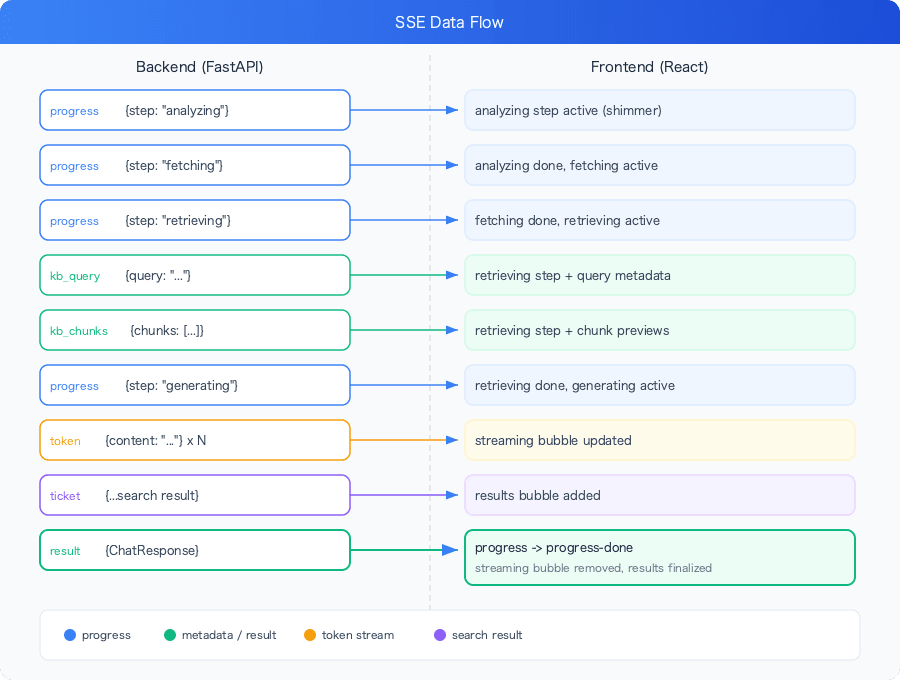
Overall Data Flow Diagram
Here is a summary of the final data flow:
Summary
Here are the insights gained through implementing the SSE progress bubbles.
Drive with real events, not timers: Rather than creating pseudo-progress with setTimeout, emit events at the actual completion timing of backend processing. This results in natural behavior where all steps complete in an instant when processing is fast, and the active step waits when processing is slow.
Centrally manage with an SSE event registry: By consolidating event definitions in the SSE_EVENTS dict, the backend code, Pydantic models, and OpenAPI specification always stay in sync.
Make bubble transitions type-safe with union types: Expressing state transitions like progress → progress-done → results using TypeScript union types ensures at compile time that each SSE handler only operates on bubbles of the correct type.
Isolate multiple turns with queryId: The double guard of a closure-captured ID and bubble type ensures each turn's progress bubble operates independently even in multi-turn conversations.
The more complex the backend processing pipeline becomes, the greater the difference this kind of progress visualization makes to the user experience. I hope this serves as a reference not just for RAG applications, but for any case where multiple-step asynchronous processing needs to be reflected in a UI.
