
When I built an MCP server myself, I realized I understood far less than I thought I did

This page has been translated by machine translation. View original
Introduction
So far, I have written several articles from the perspective of someone who uses MCP servers.
Back then, I saw an MCP server as little more than a wrapper that exposes existing functionality to AI. After building one myself, I found that this view was not sufficient. In services designed for humans, the GUI and documentation implicitly present the context. With MCP, that context had to be written out in words. I realized that even for a concept I thought I understood, my understanding changes once I build it myself.
What is MCP
Model Context Protocol (MCP) is a specification for connecting AI applications to external tools and data. An AI agent reads the tool descriptions provided by an MCP server and chooses which tool to use.
Target audience
- People who have used MCP servers but have never built one
References
Background
Recently, I had the opportunity to build an MCP server in TypeScript. Users use this server from their own AI agents. A user's AI agent connects without any context about how to use this server.
When I started building it, I still saw "MCP" from the perspective of a user, and I intended to simply wrap existing functionality. In the tool descriptions, I wrote only the functionality and the arguments, just like API documentation.
Afterwards, to verify that a user's AI agent could complete tasks without getting lost, I repeatedly ran an agent with no context. Here, an agent with no context means an AI agent in a fresh session that has neither the development history nor any conversation history. In the same position as a user's AI agent, it carries out the task relying only on the tool descriptions.
Every time I ran it, the agent with no context either stopped the task somewhere or proceeded in an order different from what I intended. As I investigated and fixed the cause each time, I noticed that in MCP, the context that nobody had needed to write down in human-facing services was missing.
For example, in a GUI, the appearance and conventions present the context. If something is a button, you know it can be pressed, and if it is an arrow, you know it moves you forward. Page transitions narrow down the functions available at any given moment and guide the user to the next action. Before an operation that is hard to undo, a confirmation screen asks for the user's approval.
API documentation also presents context to humans. API documentation is usually written per function, not per use case. Even so, a human reader reads with some purpose in mind, so they can choose the functions they need and work out the order of calls on their own.
In MCP, on the other hand, the tools are simply lined up in front of the AI agent, with no appearance and no page transitions. In MCP, the context that the screen and the reader of the documentation used to carry had to be written into the tool descriptions and a Skill.
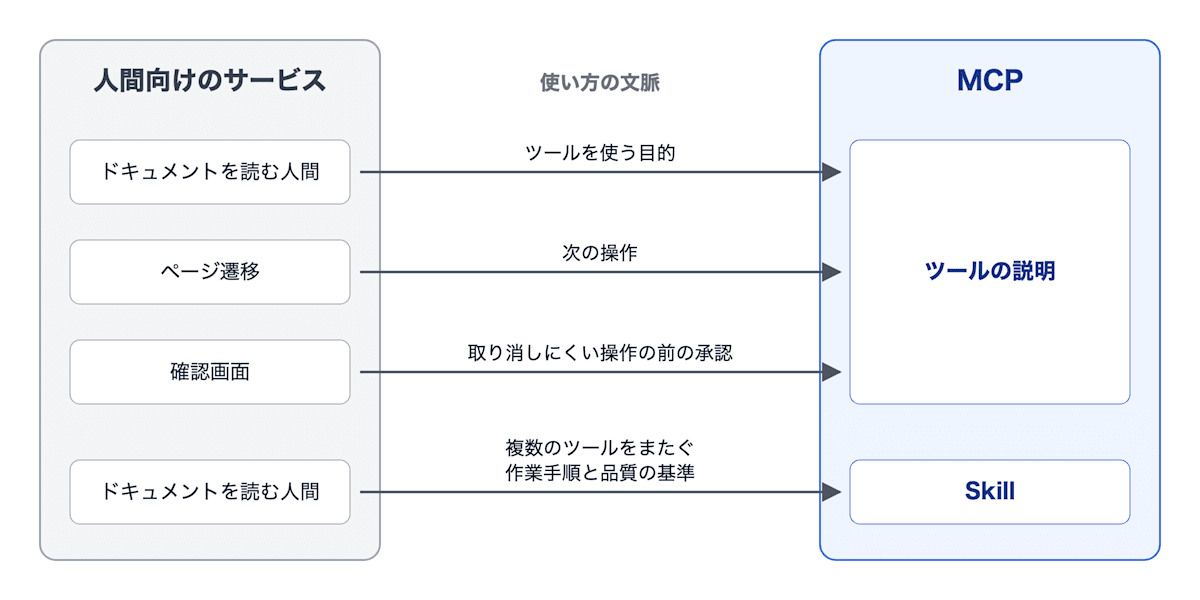
I added the context for each tool to its description. In addition to the functionality and arguments, I wrote about the purpose of using the tool, which tool to call next, and the request for user approval before use.
Work procedures that span multiple tools do not fit into the description of each tool. The description of the server as a whole (instructions) is sent to the AI agent on every connection, so writing a long work procedure there would make it be read every time. So I wrote the work procedure in a Skill in the Agent Skills format and set completion criteria for each stage of the work. The MCP server can be used without the Skill, but with it, it became easier to align the minimum standard for the work procedure and the quality of deliverables across users' AI agents.
Verification
I decided to verify the effect of the context added to the tool descriptions using a fictional meeting room reservation MCP server.
There are four tools: list_rooms, check_availability, create_reservation, and register_guest (registration of external visitors). There are three meeting rooms, with capacities of 4, 8, and 10 people, and let's say Room B, with a capacity of 8, already has a reservation in the requested time slot.
In Condition A, the tool descriptions contain only the functionality and arguments. In Condition B, we append to them the purpose of using the tool, the tool to call next, and the requirement to obtain the user's approval before use.
// 説明文は実験で比べる対象。条件 B は条件 A の文の後ろに追記する。
const descriptions = {
  list_rooms: {
    A: "会議室の一覧を返す。各会議室の id、名前、定員、階を含む。",
    B: "予約の前に最初に呼び、人数に合う部屋を選ぶために使う。次に check_availability で空きを確かめる。",
  },
  check_availability: {
    A: "指定した会議室の、指定した時間帯の空き状況を返す。引数は room_id、start、end。start と end は ISO 8601 形式。",
    B: "予約が重ならないよう、create_reservation の前に必ず呼ぶ。",
  },
  create_reservation: {
    A: "会議室の予約を作成する。引数は room_id、start、end、title、attendees。attendees は人数。作成した予約の id を返す。",
    B: "予約は社内に公開され、取り消しには手続きが要る。呼ぶ前に、部屋の名前、日時、人数を利用者に示し、承認を得ること。社外の来訪者がいる場合は、作成後に register_guest を呼ぶ。",
  },
  register_guest: {
    A: "予約に、社外の来訪者の人数を登録する。引数は reservation_id、guest_count。",
    B: "社外の来訪者がいる予約では、create_reservation の後に必ず呼ぶ。登録が無いと、受付で来訪者が入館できない。",
  },
} as const;

function describe(tool: keyof typeof descriptions): string {
  const d = descriptions[tool];
  return variant === "B" ? `${d.A}${d.B}` : d.A;
}
Full text of server.ts
// 架空の会議室予約の MCP サーバー。対照実験用。
// DESC_VARIANT=A はツールの説明を機能と引数だけにし、B は使い方の文脈を書き足す。
// 呼ばれたツールは CALL_LOG に JSONL で追記する。予約の状態は STATE_FILE に保存し、
// セッションを再開してプロセスが変わっても引き継ぐ。
import { McpServer } from "@modelcontextprotocol/sdk/server/mcp.js";
import { StdioServerTransport } from "@modelcontextprotocol/sdk/server/stdio.js";
import { appendFileSync, existsSync, readFileSync, writeFileSync } from "node:fs";
import { z } from "zod";

const variant = process.env.DESC_VARIANT === "B" ? "B" : "A";
const callLog = process.env.CALL_LOG;
const stateFile = process.env.STATE_FILE;

type Room = { id: string; name: string; capacity: number; floor: number };
type Reservation = { id: string; room_id: string; start: string; end: string; title: string; attendees: number; guest_count?: number };

const rooms: Room[] = [
  { id: "room-a", name: "会議室 A", capacity: 4, floor: 3 },
  { id: "room-b", name: "会議室 B", capacity: 8, floor: 3 },
  { id: "room-c", name: "会議室 C", capacity: 10, floor: 5 },
];

const initialReservations: Reservation[] = [
  { id: "rsv-0001", room_id: "room-b", start: "2026-12-01T14:00:00+09:00", end: "2026-12-01T15:00:00+09:00", title: "定例", attendees: 5 },
];

function loadReservations(): Reservation[] {
  if (stateFile && existsSync(stateFile)) return JSON.parse(readFileSync(stateFile, "utf8"));
  return structuredClone(initialReservations);
}

function saveReservations(list: Reservation[]): void {
  if (stateFile) writeFileSync(stateFile, JSON.stringify(list, null, 2));
}

function log(tool: string, args: unknown, result: unknown): void {
  if (!callLog) return;
  appendFileSync(callLog, JSON.stringify({ time: new Date().toISOString(), pid: process.pid, tool, args, result }) + "\n");
}

function overlaps(r: Reservation, roomId: string, start: string, end: string): boolean {
  return r.room_id === roomId && Date.parse(r.start) < Date.parse(end) && Date.parse(start) < Date.parse(r.end);
}

function reply(tool: string, args: unknown, result: unknown, isError = false) {
  log(tool, args, result);
  return { content: [{ type: "text" as const, text: JSON.stringify(result) }], isError };
}

// 説明文は実験で比べる対象。条件 B は条件 A の文の後ろに追記する。
const descriptions = {
  list_rooms: {
    A: "会議室の一覧を返す。各会議室の id、名前、定員、階を含む。",
    B: "予約の前に最初に呼び、人数に合う部屋を選ぶために使う。次に check_availability で空きを確かめる。",
  },
  check_availability: {
    A: "指定した会議室の、指定した時間帯の空き状況を返す。引数は room_id、start、end。start と end は ISO 8601 形式。",
    B: "予約が重ならないよう、create_reservation の前に必ず呼ぶ。",
  },
  create_reservation: {
    A: "会議室の予約を作成する。引数は room_id、start、end、title、attendees。attendees は人数。作成した予約の id を返す。",
    B: "予約は社内に公開され、取り消しには手続きが要る。呼ぶ前に、部屋の名前、日時、人数を利用者に示し、承認を得ること。社外の来訪者がいる場合は、作成後に register_guest を呼ぶ。",
  },
  register_guest: {
    A: "予約に、社外の来訪者の人数を登録する。引数は reservation_id、guest_count。",
    B: "社外の来訪者がいる予約では、create_reservation の後に必ず呼ぶ。登録が無いと、受付で来訪者が入館できない。",
  },
} as const;

function describe(tool: keyof typeof descriptions): string {
  const d = descriptions[tool];
  return variant === "B" ? `${d.A}${d.B}` : d.A;
}

const server = new McpServer({ name: "meeting-rooms", version: "1.0.0" });

server.registerTool("list_rooms", { description: describe("list_rooms"), inputSchema: {} }, async (args) =>
  reply("list_rooms", args, rooms),
);

server.registerTool(
  "check_availability",
  { description: describe("check_availability"), inputSchema: { room_id: z.string(), start: z.string(), end: z.string() } },
  async (args) => {
    const room = rooms.find((r) => r.id === args.room_id);
    if (!room) return reply("check_availability", args, { error: "room not found" }, true);
    const available = !loadReservations().some((r) => overlaps(r, args.room_id, args.start, args.end));
    return reply("check_availability", args, { room_id: args.room_id, start: args.start, end: args.end, available });
  },
);

server.registerTool(
  "create_reservation",
  {
    description: describe("create_reservation"),
    inputSchema: { room_id: z.string(), start: z.string(), end: z.string(), title: z.string(), attendees: z.number().int() },
  },
  async (args) => {
    const room = rooms.find((r) => r.id === args.room_id);
    if (!room) return reply("create_reservation", args, { error: "room not found" }, true);
    const list = loadReservations();
    if (list.some((r) => overlaps(r, args.room_id, args.start, args.end))) {
      return reply("create_reservation", args, { error: "time slot already reserved" }, true);
    }
    const reservation: Reservation = { id: `rsv-${String(list.length + 1).padStart(4, "0")}`, ...args };
    list.push(reservation);
    saveReservations(list);
    return reply("create_reservation", args, { reservation_id: reservation.id });
  },
);

server.registerTool(
  "register_guest",
  { description: describe("register_guest"), inputSchema: { reservation_id: z.string(), guest_count: z.number().int() } },
  async (args) => {
    const list = loadReservations();
    const reservation = list.find((r) => r.id === args.reservation_id);
    if (!reservation) return reply("register_guest", args, { error: "reservation not found" }, true);
    reservation.guest_count = args.guest_count;
    saveReservations(list);
    return reply("register_guest", args, { reservation_id: reservation.id, guest_count: args.guest_count });
  },
);

await server.connect(new StdioServerTransport());
For the agent with no context, I used Claude Code running on Claude Sonnet 5.5 via Bedrock. With --bare and an empty config directory, it does not load CLAUDE.md or hooks. With ENABLE_TOOL_SEARCH=false, I made it load all the tool descriptions at the start of the session.
export CLAUDE_CODE_USE_BEDROCK=1
export AWS_REGION=ap-northeast-1
export ENABLE_TOOL_SEARCH=false
export CLAUDE_CONFIG_DIR="$(mktemp -d)"

claude --bare -p \
  --model global.anthropic.claude-sonnet-5-5 \
  --effort medium \
  --permission-mode dontAsk \
  --tools "" \
  --allowedTools mcp__meeting-rooms__list_rooms mcp__meeting-rooms__check_availability mcp__meeting-rooms__create_reservation mcp__meeting-rooms__register_guest \
  --mcp-config mcp.json \
  --strict-mcp-config \
  --output-format stream-json --verbose \
  "2026 年 12 月 1 日 (火) の 14:00 から 15:00 まで、6 人で打ち合わせをします。うち 2 名は社外の取引先です。会議室を予約してください。"
{
  "mcpServers": {
    "meeting-rooms": {
      "command": "node",
      "args": ["server.ts"],
      "env": { "DESC_VARIANT": "A", "CALL_LOG": "calls.jsonl", "STATE_FILE": "state.json" }
    }
  }
}
* In practice, I separated the log and state files for each run and handled everything through resumption with a single script. The above is rewritten into the form of a single run.
Only when no reservation was created on the first turn, I resumed the same session and replied "Please proceed with that." I ran each condition 5 times and judged the tool calls recorded on the server and the final responses using three criteria decided before the runs. The verification environment was Claude Code 2.1.331, Node.js v24.15.0, and @modelcontextprotocol/sdk 1.32.2.
Results
| Criterion | Condition A | Condition B |
|---|---|---|
Checked availability with check_availability before reserving |
5/5 | 5/5 |
| Did not create a reservation on the first turn, and presented the details and asked for the user's approval | 0/5 | 5/5 |
Registered the visitors with register_guest after reserving |
5/5 | 5/5 |
The order of tool calls was the same in all 10 runs. The only difference was the behavior of asking for the user's approval before reserving. In Condition A, all 5 runs proceeded to the reservation without asking for approval.
予約が完了しました。

- 会議室: 会議室 C(5階、定員10名)
- 日時: 2026年12月1日(火) 14:00〜15:00
- 参加人数: 6名(うち社外の取引先2名を来訪者として登録済み)
- 予約ID: rsv-0002

会議室 B(3階)は、その時間帯に予約が入っていました。会議室 A は定員が4名なので候補から外しました。予約のタイトルは「打ち合わせ」にしています。変更したい場合はお知らせください。
In Condition B, in all 5 runs the agent stopped the task before reserving and asked for approval, then completed the reservation and visitor registration after resumption.
会議室 B は埋まっていて、会議室 C は空いています。予約を作る前に、内容の確認をお願いします。

- 部屋: 会議室 C (5階、定員 10 名)
- 日時: 2026 年 12 月 1 日 (火) 14:00〜15:00
- 人数: 6 名 (うち社外の取引先 2 名)
- 件名: 打ち合わせ

予約は社内に公開され、取り消しには手続きが要ります。この内容で予約してよければ、承認してください。承認をいただいたら予約を作成し、社外の来訪者 2 名も登録します。件名を変えたい場合は、あわせてお知らせください。
Discussion
In the experiment, some of my predictions were wrong. I had thought that even the order of calls would need to be written in the tool descriptions, but the AI agent inferred the order of calls from the tool names. (Recent models are smart...!) So the understanding I gained from the experience in the "Background" section was updated again by this verification. It reminds me that the more I feel I understand a concept, the more important it is not just to use it but to build it myself and make it work.
When I was just on the using side of MCP, I was not aware that I was working while having context naturally supplied by the GUI and documentation. Even when using other people's MCP servers, I think I was supplementing the missing context to the AI agent in the conversation. After moving to the building side and watching an agent with no context stall in its task, I became aware again of the conventions and tacit knowledge I had as a user.
Summary
If you have used MCP servers, I recommend building one, even a small one, and letting an agent with no context use it. You can recognize, from the building side, the context you had been supplementing on the using side. When writing tool descriptions, it is a good idea to start with rules that cannot be inferred from the name, such as operations that require user approval. I hope this article is helpful when you build an MCP server.