
Viewing JPEG XL in Chrome 155. Verified picture element fallback and lossless conversion from JPEG

This page has been translated by machine translation. View original
Hey there! I'm Nishimura Yuji from the Operations team!
In Chrome 155, support was added for decoding the image format JPEG XL (.jxl). Without needing to enable any flags, you can specify .jxl in an <img> tag and it will display.
However, not all visitors are using the latest version of Chrome. So, I actually verified the following three things:
- Whether
.jxldisplays as-is in Chrome 155 - Whether the
<picture>element falls back to JPEG in unsupported browsers - How much smaller an existing JPEG on hand becomes when converted to JPEG XL without changing the image quality
What Changed in Chrome 155
The key points written in the Chrome for Developers blog and Chrome Platform Status are as follows:
- Starting from Chrome 155,
image/jxlcan be decoded. Chrome Platform Status notes that support begins at version 155 for desktop, Android, WebView, and iOS - The decoder uses jxl-rs, written in Rust. The Chrome team explains they chose a memory-safe implementation because image decoders are a vulnerable target for attacks
- The advantages of JPEG XL cited include 30–50% higher compression efficiency than JPEG, lossless compression, HDR support, and lossless transcoding from JPEG
- The officially stated use cases are high-quality images and lossless compression, particularly for photos and situations where fine-grained progressive decoding is desired
This support is for the decode side — displaying JPEG XL in the browser. To create JPEG XL files, a separate encoder is needed.
Using the picture Element as a Fallback for Unsupported Browsers
In my testing, the following markup caused Chrome 155 and later to display .jxl, while unsupported browsers displayed .jpg.
<picture>
  <source type="image/jxl" srcset="photo.jxl">
  <img src="photo.jpg" alt="Photo" width="768" height="512">
</picture>
Also, starting with Chrome 155, image/jxl is included in the Accept header of image requests. By checking this header on the server or CDN, it can be used as a basis for deciding which image to serve under the same URL. I did not test the actual configuration for serving different images this way.
Test Environment and Sample Images
- Google Chrome 155.0.8059.79 (macOS, using a disposable profile in headless mode)
- Chromium 156.0.8078.4 (bundled with Playwright 1.64.0, Linux container)
- Unsupported version for comparison: Chromium 153.0.8010.12 (bundled with Playwright 1.63.0, Linux container)
- Encoder:
cjxl/djxlfrom libjxl v0.12.0 - Source image: Photo "Loquat fruit tree.jpg" from Wikimedia Commons (photographer: Sabalo22, CC0 1.0), resized to 768×512 as a PNG. The version converted to JPEG using libjpeg-turbo's
cjpeg -quality 85was treated as the "existing JPEG"
The verification page displayed three items side by side: JPEG, JPEG XL, and a <picture> element. For each image, it showed the success or failure of img.decode(), naturalWidth and naturalHeight, and the actually loaded file (currentSrc).
In Chrome 155, jxl Displayed Directly
Here are the results from opening the verification page in Chrome 155.
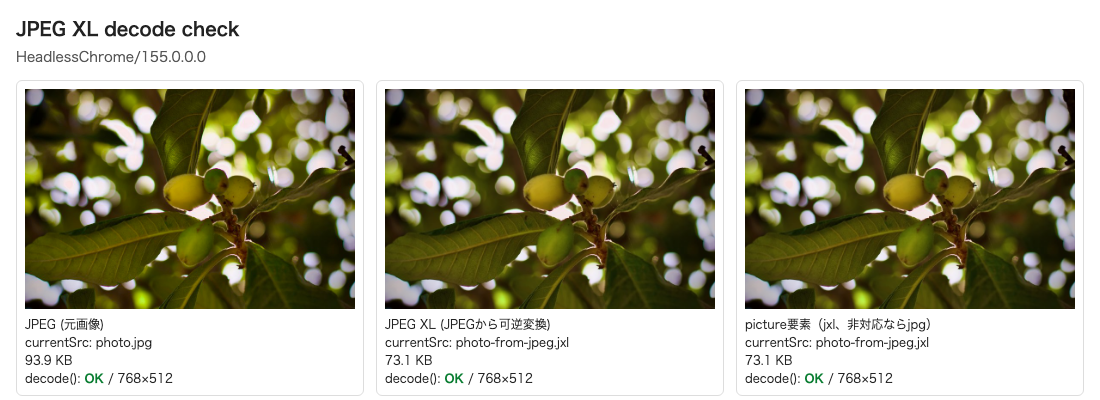
<img src="photo-from-jpeg.jxl"> succeeded in decode() and displayed at 768×512. The <picture> element also selected the .jxl source. Because headless mode was used, the UA string on screen is shortened to HeadlessChrome/155.0.0.0, but the version actually executed was 155.0.8059.79.
The same results were obtained on the same page with Chromium 156 in a container.
In Unsupported Chromium 153, the picture Element Switched to JPEG
I opened the same page in Chromium 153, which predates JPEG XL support.
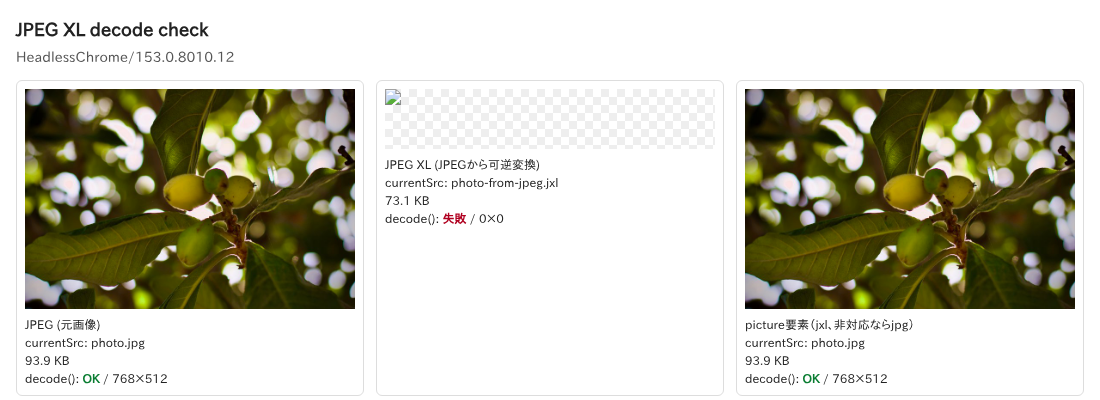
The center image, where .jxl was specified directly in <img>, did not display; decode() failed, and the size was 0×0. On the other hand, the <picture> element on the right had its currentSrc set to photo.jpg, and the JPEG was displayed.
As long as there are still visitors using unsupported browsers, it seems safer to pair the .jxl with a traditional format in a <picture> element rather than writing .jxl directly in <img>.
image/jxl Added to the Accept Header
I recorded the Accept header of image requests on the local server that served the verification page.
# Chrome 155 / Chromium 156
image/jxl,image/avif,image/webp,image/apng,image/svg+xml,image/*,*/*;q=0.8

# Chromium 153
image/avif,image/webp,image/apng,image/svg+xml,image/*,*/*;q=0.8
Chrome 155 and Chromium 156 had image/jxl at the beginning, while Chromium 153 did not include it.
Converting an Existing JPEG to JPEG XL Without Changing Quality
One of JPEG XL's features is lossless transcoding, which converts an existing JPEG without changing any pixels. When a JPEG is passed to cjxl, this conversion is performed by default.
cjxl photo.jpg demo.jxl
djxl demo.jxl back.jpg && cmp photo.jpg back.jpg && echo identical
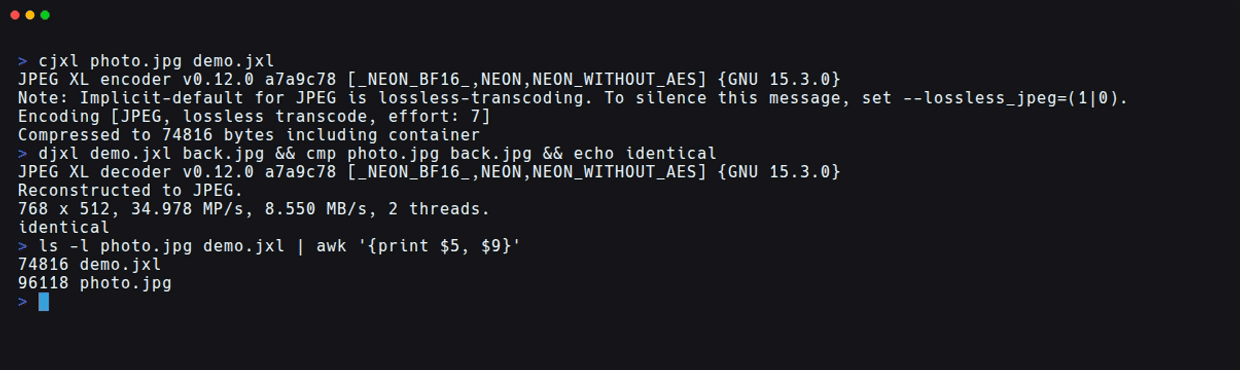
cjxl displayed Implicit-default for JPEG is lossless-transcoding and performed a lossless transcode of the JPEG. The JPEG restored with djxl matched the original file byte-for-byte, and the SHA-256 was identical.
The file sizes are as follows:
| File | Size |
|---|---|
| Original JPEG (quality 85) | 96,118 bytes |
| JPEG XL losslessly converted from JPEG | 74,816 bytes (approximately 22% reduction) |
Without changing the appearance of the image, it became approximately 22% smaller. Since it can be fully restored to the original JPEG if needed, the original file is not lost when replacing existing image assets.
Note that this differs from the official "30–50% higher compression efficiency." The approximately 22% here is the result of repackaging an image already compressed as a JPEG, without changing any pixels. It is not a figure from newly encoding with a specified quality setting. Results will also vary depending on the quality of the original JPEG and the content of the image.
For reference, I also compared using lossless compression. Converting the original PNG (806,139 bytes) to lossless JPEG XL with cjxl -d 0 resulted in 302,875 bytes, a reduction of approximately 62%. Since the photo has a lot of bokeh in the background and many smooth gradual areas, it was likely a condition well-suited to shrinking under lossless compression.
Starting with Lossless Conversion of JPEGs
If you're starting to experiment, I felt that trying lossless conversion of existing JPEGs is the easiest approach. There's no need to re-decide on quality settings, and you can revert to the original JPEG.
What I Did Not Verify This Time
The following points were not verified:
- Display on Chrome for Android, WebView, iOS, and desktop Chrome on Windows and Linux
- Animation, HDR/wide color gamut display, and the appearance of progressive decoding
- JPEG XL specified in CSS
background-imageorimage-set() - Display in Firefox and Safari
- Serving different images based on the
Acceptheader via CDN - File size comparison with AVIF and other formats at matched quality
Summary
In Chrome 155, .jxl could be displayed directly in <img> and <picture> elements. In the unsupported Chromium 153, images with .jxl specified directly did not display, but the <picture> element fell back to JPEG. Since Chrome 155 and later include image/jxl in the Accept header, it can also be used for server-side content negotiation.
Existing JPEGs can be losslessly converted with cjxl, and in this test with a photo, it became approximately 22% smaller while remaining fully reversible. For deployment, it seems best to start by losslessly converting existing JPEGs and serving them alongside the original JPEG using the <picture> element.
I hope this is helpful to someone.
Reference Links