
Let me try detecting the causes of Claude's prompt cache failures

This page has been translated by machine translation. View original
This is Suenaga from the Retail App Co-creation Division.
Claude's prompt caching is a feature that can reduce costs and latency in applications that use long system prompts or tool definitions.
However, when prompt caching isn't utilized, tracking down the cause can be a bit tedious. A feature called Cache diagnostics has been added, so I tried to see if it can detect the cause when caching isn't being used.
What Cache diagnostics reveals
Claude's Prompt caching is used when the beginning of a prompt matches the previous request. If you embed a timestamp in the system prompt or the order of tools changes, the prefix (the beginning part subject to caching) changes unintentionally.
With Cache diagnostics, by passing the id of the previous response to the next request, you can see what changed between the previous and current requests.
Cache diagnostics closes that gap. Pass the
idof your previous response, and the API compares the two requests and tells you where they diverged (the model, the system prompt, the tools, or the message history) so you can fix the root cause instead of guessing.
The cache_miss_reason.type returned includes values such as system_changed and tools_changed. You can now see from the response causes like the system prompt changed, the tool definition changed, or the message history changed.
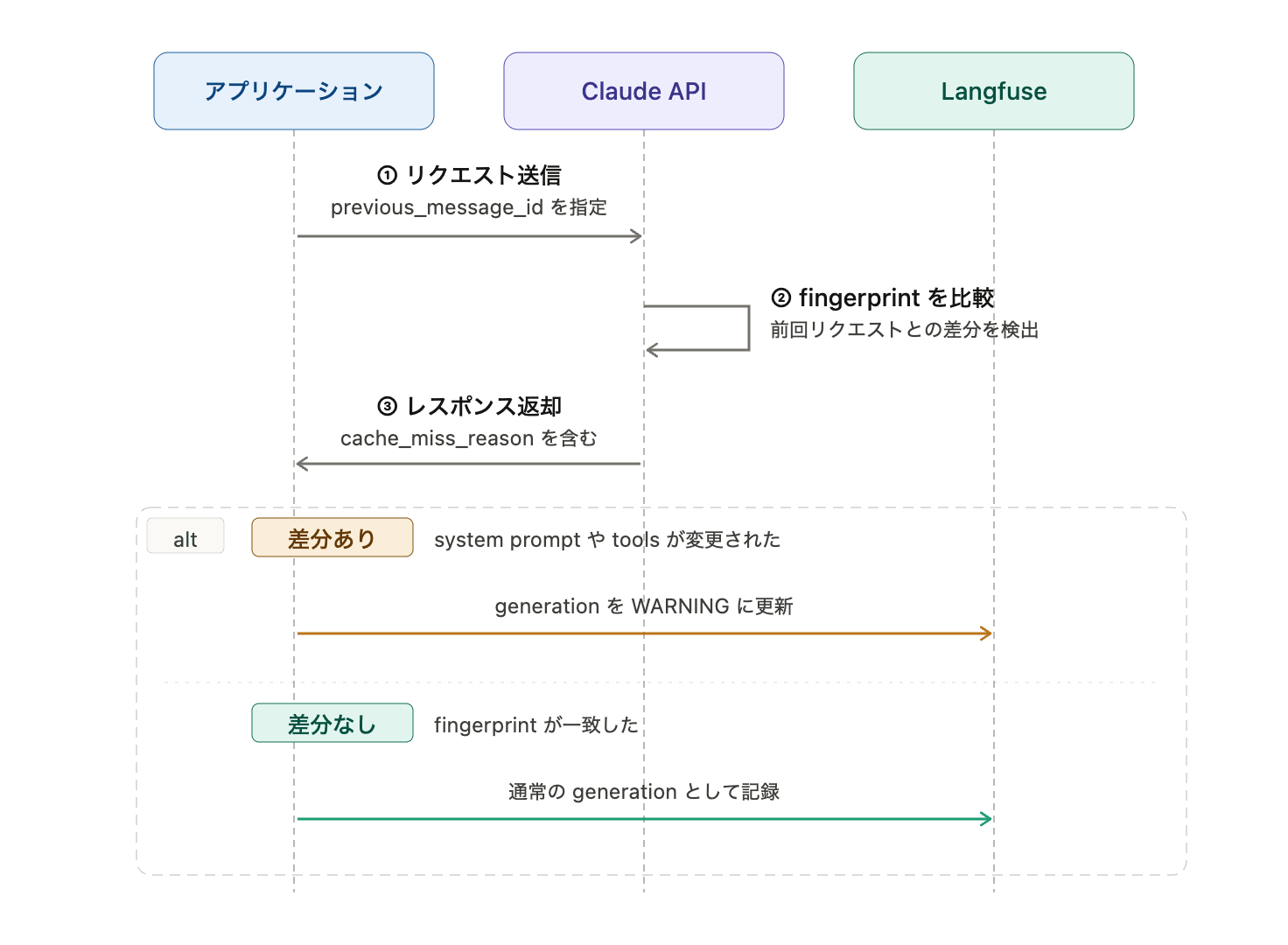
For Prompt caching, there is a method that attaches cache_control to the entire request to automatically advance the cache breakpoint, and a method that explicitly attaches cache_control to content blocks. This time, since we want to detect system_changed when the system prompt changes, we'll use the latter approach: Explicit cache breakpoints.
Note that diagnostics is information for checking "whether the request changed." To see whether the cache actually hit, you need to look at usage.cache_read_input_tokens.
Adding diagnostics to AI SDK calls
For this verification, I used the Vercel AI SDK. The AI SDK's Anthropic provider has cacheControl for Prompt caching, but since diagnostics.previous_message_id for Cache diagnostics couldn't be passed directly from the normal options, it's being added to the body via createAnthropic's fetch.
Extracting just the relevant part, it looks like this:
const anthropic = createAnthropic({
  headers: {
    "anthropic-beta": "cache-diagnosis-2026-04-07",
  },
  fetch: async (input, init) => {
    const headers = new Headers(init?.headers);
    headers.set("anthropic-beta", "cache-diagnosis-2026-04-07");

    const body = JSON.parse(String(init?.body)) as Record<string, unknown>;
    body.diagnostics = {
      previous_message_id: previousMessageId,
    };

    const response = await fetch(input, {
      ...init,
      headers,
      body: JSON.stringify(body),
    });

    lastResponse = await response.clone().json();
    return response;
  },
});
Since Cache diagnostics requires a beta header, anthropic-beta is also included. The response is read with response.clone().json(), making diagnostics available for subsequent processing.
For the system message you want to cache, attach cacheControl using AI SDK's providerOptions.
const messages: ModelMessage[] = [
  {
    role: "system",
    content: systemPrompt,
    providerOptions: {
      anthropic: {
        cacheControl: { type: "ephemeral" },
      },
    },
  },
  {
    role: "user",
    content: "~",
  },
];
Then call generateText as usual.
const result = await generateText({
  model: anthropic(MODEL),
  messages,
});
As a side note, in AI SDK, including role: "system" in the messages array will produce a warning. It is recommended to pass the system prompt to the top-level system option instead.
Making cache_miss_reason a WARNING in Langfuse
What we want to see this time is whether we can detect the cause when caching isn't being used. So, when cache_miss_reason.type is *_changed, we set the Langfuse observation to WARNING.
function warningFromDiagnostics(diagnostics: Diagnostics | undefined) {
  const reason = diagnostics?.cache_miss_reason;

  if (!reason) {
    return undefined;
  }

  if (reason.type.endsWith("_changed")) {
    return `Claude cache diagnostics warning: ${reason.type}`;
  }

  return `Claude cache diagnostics inconclusive: ${reason.type}`;
}
Using this function, we set level and statusMessage on the Langfuse generation.
const warning = warningFromDiagnostics(lastResponse?.diagnostics);

generation.update({
  output: {
    text: result.text,
    diagnostics: lastResponse?.diagnostics ?? null,
    cacheReadTokens: result.usage.inputTokenDetails.cacheReadTokens,
    cacheWriteTokens: result.usage.inputTokenDetails.cacheWriteTokens,
  },
  level: warning ? "WARNING" : "DEFAULT",
  statusMessage: warning ?? "No cache-prefix divergence reported.",
});
This time, we intentionally created a state where system_changed is returned by changing part of the system prompt being cached. With this, the relevant generation can also be viewed as a WARNING in Langfuse.
Confirming cases where caching doesn't occur
In the verification, we changed only part of the system prompt that is being cached.
When we passed the previous response's id to diagnostics.previous_message_id in this state, system_changed was returned in cache_miss_reason.
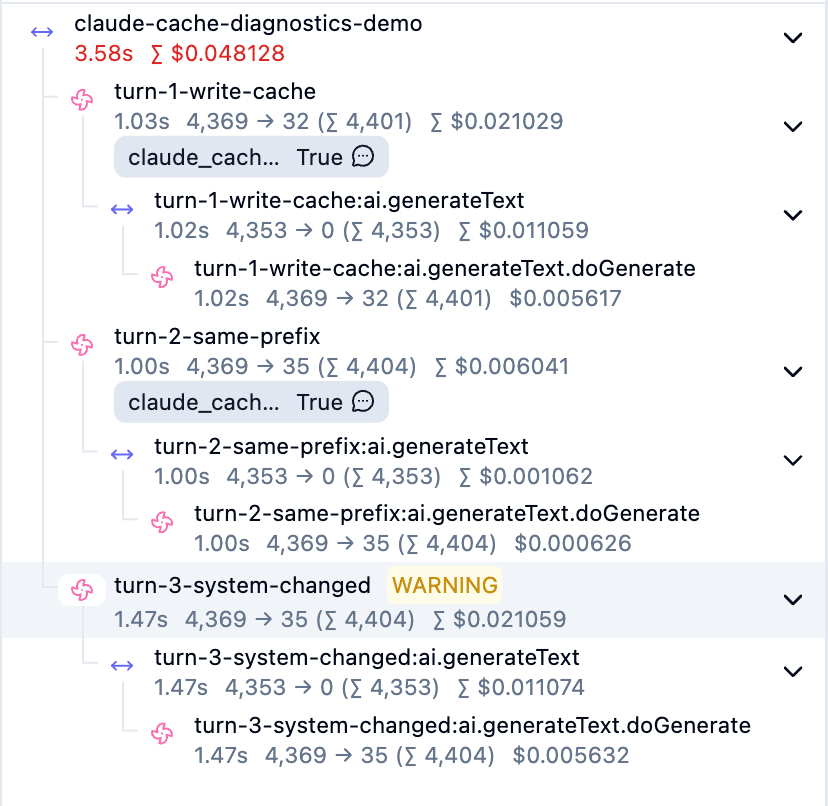
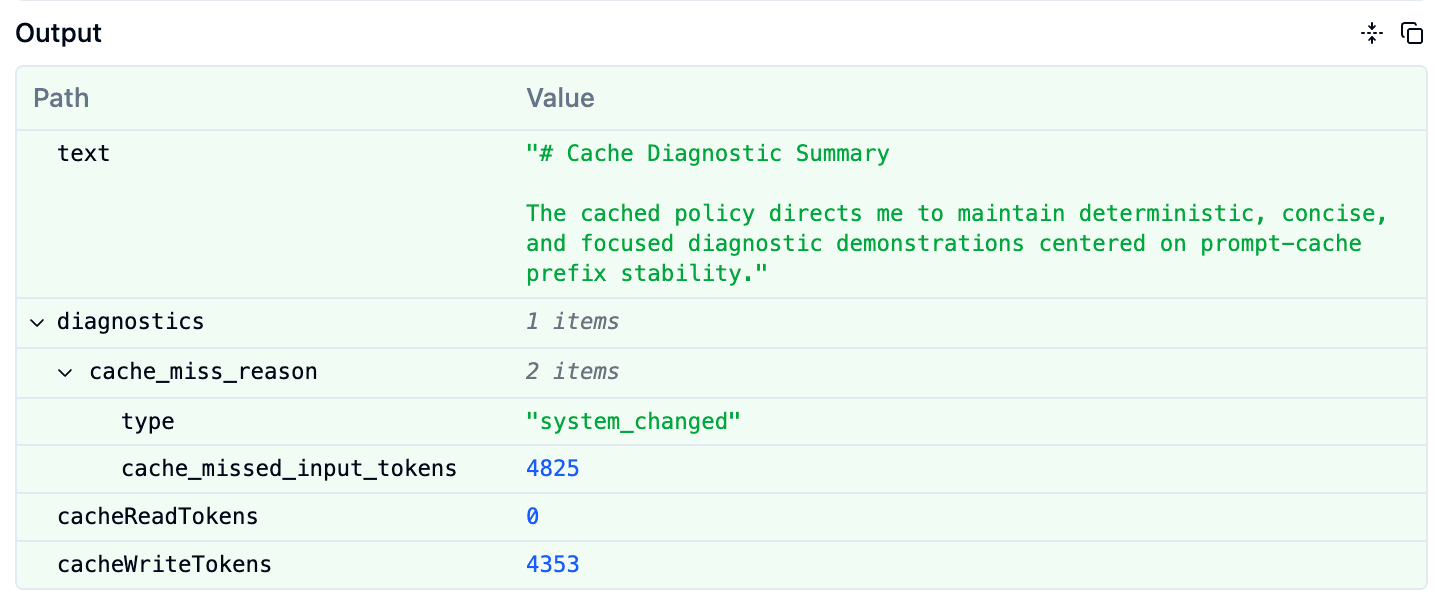
The fact that cacheReadTokens in the image is 0 also confirms that caching was not used in this request.
Closing thoughts
Using Cache diagnostics, we were able to confirm the reason why prompt caching wasn't used directly from the API response.
Rather than being essential for all applications, it seems most useful to have in place when you're caching long system prompts or tool definitions and cache misses are likely to impact costs or latency. While Langfuse is used here, it can of course be utilized with other observability tools as well.
See you 👋
